-
mmdetection--pointpillars-demo运行
1.解压数据集
http://www.cvlibs.net/datasets/kitti/eval_object.php?obj_benchmark=3d

unzip data_object_label_2.zip
unzip data_object_velodyne.zip

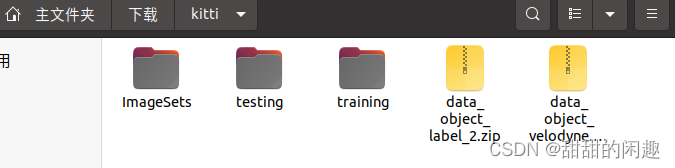
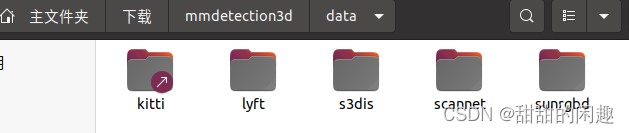
添加软链接
ln -s ~/下载/kitti data/kitti

2.下载mmdetection3d
https://github.com/open-mmlab/mmdetection3d
如果没有梯子,可以用命令行加链接下载:git clone https://github.com/open-mmlab/mmdetection3d.git,注意下载路径,默认放在“下载”文件夹。
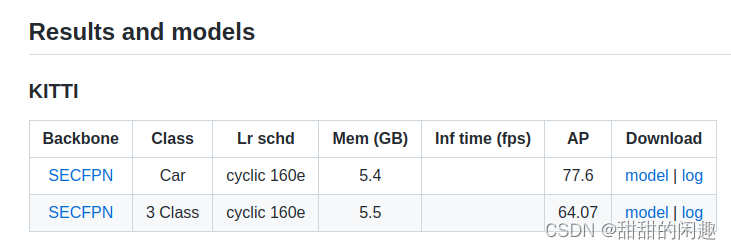
进入环境conda activate openmmlab3.下载pointpillars代码

4.下载meshlab
用来显示点云https://www.meshlab.net/#download
获取最高权限
sudo chmod a+x …

5.开整了
激活环境
conda activate openmmlab

python demo/pcd_demo.py demo/data/kitti/kitti_000008.bin configs/hv_pointpillars_secfpn_6x8_160e_kitti_3d_class.py ~/下载/hv_pointpillars_secfpn_6x8_160e_kitti-3d-3class_20220301_150306-37dc2420.pth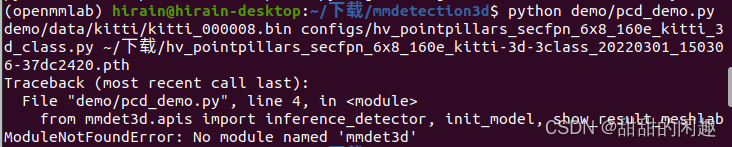
这里mmdet3d没装上,回去装一个pip install -v -e .


6.使用meshlab进行查看
打开meshlab-文件-import mesh-加载文件

可以在meshlab看到
-
相关阅读:
Leetcode 1089. 复写零
Feature and Instance Joint Selection: A Reinforcement Learning Perspective
拓扑排序算法
设计模式-迭代器模式
Linux 系统启动过程
UML类图
【每日一题】Day 39 选择题
C++ 构造函数和析构函数(Constructors & Destructors)
【STL】关联式容器的使用(12)
Java进阶(vue基础)
- 原文地址:https://blog.csdn.net/weixin_42093825/article/details/126659066