-
vue3+vite搭建项目(七)
上一节写了父子组件传值,然后里面出现什么
num.value++,这和我们vue2的写法大不一样,vue2赋值我们都是直接this.num++,this.num=123这样的写法。有人在vue3直接num++我们会发现控制台警告。这一节会讲变量赋值为了和上面的分开,这边重新注册了一个路由
import { createRouter, createWebHistory } from "vue-router" const routes = [ { path: '/', name: 'home', meta:{ title:"首页" }, component: () => import('@/view/home.vue') }, { path: '/user', name: 'user', meta:{ title:"个人中心" }, component: () => import('@/view/user.vue') }, { path: '/variable', name: 'variable', meta:{ title:"变量赋值" }, component: () => import('@/view/variable.vue') } ] const router = createRouter({ history: createWebHistory(), routes }) router.beforeEach((to, from, next) => { document.title = to.meta.title next() // 确保一定要调用 next() }) export default router- 1
- 2
- 3
- 4
- 5
- 6
- 7
- 8
- 9
- 10
- 11
- 12
- 13
- 14
- 15
- 16
- 17
- 18
- 19
- 20
- 21
- 22
- 23
- 24
- 25
- 26
- 27
- 28
- 29
- 30
- 31
- 32
- 33
- 34
- 35
- 36
- 37
- 38
- 39
简单来分两个大类
一,使用ref定义的变量
错误写法:直接计算赋值,打印一下num
//view/variable <script setup> import { ref } from "vue"; let num = ref(0); let msg = ref("我是信息"); const addNum = () => { console.log(num); num++; }; const addMsg = () => { msg = msg + "!"; }; </script> <template> <h2>{{ num }}</h2> <button @click="addNum">num+1</button> <hr /> <h2>{{ msg }}</h2> <button @click="addMsg">msg+!</button> </template> <style></style>- 1
- 2
- 3
- 4
- 5
- 6
- 7
- 8
- 9
- 10
- 11
- 12
- 13
- 14
- 15
- 16
- 17
- 18
- 19
- 20
- 21
- 22
- 23
- 24
- 25
- 26
- 27
- 28
页面效果:无反应,打印台结果
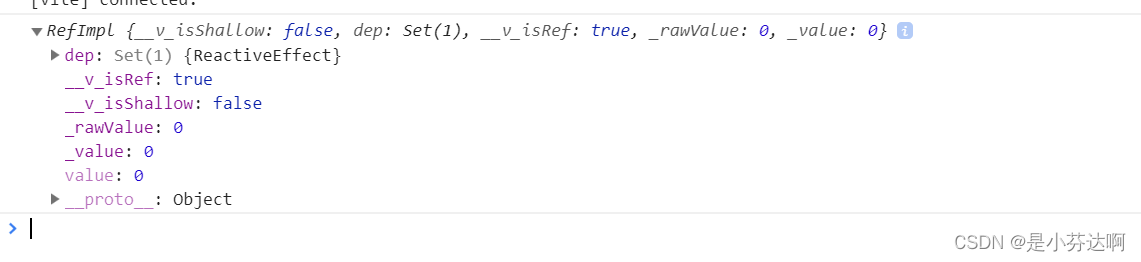
可以发现这是一个被RefImpl包裹的对象而不是一个数值正确写法:应该对num.value和msg.value操作
<script setup> import { ref } from "vue"; let num = ref(0); let msg = ref("我是信息"); const addNum = () => { num.value++; }; const addMsg = () => { msg.value = msg.value + "!"; }; </script> <template> <h2>{{ num }}</h2> <button @click="addNum">num+1</button> <hr /> <h2>{{ msg }}</h2> <button @click="addMsg">msg+!</button> </template> <style></style>- 1
- 2
- 3
- 4
- 5
- 6
- 7
- 8
- 9
- 10
- 11
- 12
- 13
- 14
- 15
- 16
- 17
- 18
- 19
- 20
- 21
- 22
- 23
- 24
- 25
- 26
页面效果

二,使用reactive定义的变量
<script setup> import { reactive, ref } from "vue"; let num = ref(0); let msg = ref("我是信息"); let person = reactive({ name: "little-fanta", age: 18, gender: "女", }); const addNum = () => { num.value++; }; const addMsg = () => { msg.value = msg.value + "!"; }; const changePerson = () => { console.log(person); person.name += "~"; person.age++; }; </script> <template> <h2>{{ num }}</h2> <button @click="addNum">num+1</button> <hr /> <h2>{{ msg }}</h2> <button @click="addMsg">msg+!</button> <hr /> <h4>{{ person }}</h4> <button @click="changePerson">改变person信息</button> </template> <style></style>- 1
- 2
- 3
- 4
- 5
- 6
- 7
- 8
- 9
- 10
- 11
- 12
- 13
- 14
- 15
- 16
- 17
- 18
- 19
- 20
- 21
- 22
- 23
- 24
- 25
- 26
- 27
- 28
- 29
- 30
- 31
- 32
- 33
- 34
- 35
- 36
- 37
- 38
- 39
- 40
- 41
页面效果:

打印台结果:

可以发现reactive定义的变量是被proxy包裹的对象,可以直接使用在正常的项目中,我们一般不会这么分开定义,那么如果想类似vue2中data的写法,如果data里面有很多数据,我们想单独拿到里面变量的话怎么办?我们要这样去使用吗?
<h6>{{ person.age }}</h6> <h6>{{ person.name }}</h6> <h6>{{ person.gender }}</h6>- 1
- 2
- 3
在vue3中是这样解决的,使用toRefs,当然如果只想用data里面某一个变量的话可以使用toRef
<script setup> import { reactive, ref, toRefs } from "vue"; let num = ref(0); let msg = ref("我是信息"); let person = reactive({ name: "little-fanta", age: 18, gender: "女", }); const data = toRefs(person); const addNum = () => { num.value++; }; const addMsg = () => { msg.value = msg.value + "!"; }; const changePerson = () => { console.log(data); person.name += "~"; person.age++; }; </script> <template> <h2>{{ num }}</h2> <button @click="addNum">num+1</button> <hr /> <h2>{{ msg }}</h2> <button @click="addMsg">msg+!</button> <hr /> <h4>{{ person }}</h4> <button @click="changePerson">改变person信息</button> </template> <style></style>- 1
- 2
- 3
- 4
- 5
- 6
- 7
- 8
- 9
- 10
- 11
- 12
- 13
- 14
- 15
- 16
- 17
- 18
- 19
- 20
- 21
- 22
- 23
- 24
- 25
- 26
- 27
- 28
- 29
- 30
- 31
- 32
- 33
- 34
- 35
- 36
- 37
- 38
- 39
- 40
- 41
- 42
打印了data结果:

toRefs把person的数据都变成了proxy对象,所以我们能够单独使用简化一点:
<script setup> import { reactive, ref, toRefs } from "vue"; let num = ref(0); let msg = ref("我是信息"); let person = reactive({ name: "little-fanta", age: 18, gender: "女", }); const { name, age, gender } = toRefs(person); const addNum = () => { num.value++; }; const addMsg = () => { msg.value = msg.value + "!"; }; const changePerson = () => { person.name += "~"; person.age++; age.value++; }; </script> <template> <h2>{{ num }}</h2> <button @click="addNum">num+1</button> <hr /> <h2>{{ msg }}</h2> <button @click="addMsg">msg+!</button> <hr /> <h4>{{ person }}</h4> <button @click="changePerson">改变person信息</button> <h5>{{ name }},{{ age }}</h5> </template> <style></style>- 1
- 2
- 3
- 4
- 5
- 6
- 7
- 8
- 9
- 10
- 11
- 12
- 13
- 14
- 15
- 16
- 17
- 18
- 19
- 20
- 21
- 22
- 23
- 24
- 25
- 26
- 27
- 28
- 29
- 30
- 31
- 32
- 33
- 34
- 35
- 36
- 37
- 38
- 39
- 40
- 41
- 42
- 43
这样就可以直接
{{age}}这样写了,然后在赋值的时侯name或者age一定要是age.value的写法 -
相关阅读:
TDengine函数大全-系统函数
用神经网络验算1+1是否等于0+2
SpringBoot读取Resource下文件的几种方式读取jar里的excel,文件损坏
SIEM解决方案之事件关联引擎组件
Ps:自由变换
学信息系统项目管理师第4版系列17_干系人管理
图像缩放和旋转算法
CPU调度
SSM 医院在线挂号系统
软件项目验收测试需提供哪些资料?找软件测试外包公司的好处?
- 原文地址:https://blog.csdn.net/weixin_52921391/article/details/126655587
