-
IOC容器(详细讲解)
文章目录
IOC容器
一、IOC底层原理
1、什么是IOC
(1)即:控制反转,把对象创建和对象之间的调用过程,交给Spring进行管理
(2)使用IOC目的:为了
降低耦合度(3)上篇文章中的Spring快速上手就是IOC实现
2、IOC底层原理
(1)xml解析、
工厂模式、反射
3、画图讲解IOC底层原理

二、IOC接口
1、IOC思想基于IOC容器完成,IOC容器底层就是对象工厂
2、Spring提供IOC容器实现的两种方式(两个接口)
(1)BeanFactory接口:IOC容器基本实现是Spring内部接口的使用接口,不提供给开发人员进行使用(加载配置文件时候不会创建对象,在获取对象时才会创建对象。)
(2)ApplicationContext接口:BeanFactory接口的子接口,提供更多更强大的功能,提供给开发人员使用(加载配置文件时候就会把在配置文件对象进行创建)推荐使用!
3、ApplicationContext接口有实现类

三、Bean管理
1、什么是Bean管理
Bean管理就是两个操作:
1、Spring创建对象
2、Spring注入属性
IOC操作Bean管理(基于xml)
1、基于XML配置文件创建对象
<bean id="hello" class="com.jin.pojo.Hello">bean>- 1
- 2
(1)在Spring配置文件中,使用bean标签,标签里面添加对应属性,就可以实现对象创建
(2)在Bean标签有很多属性,介绍常用的属性
- id属性:唯一标识
- class属性:类全路径(包类路径)
(3)创建对象时候,默认也是执行无参数构造方法完成对象创建
2、基于XML方式注入属性
(1)DI:
依赖注入,也就是注入属性3、第一种注入方式:set方式注入
//(1)传统方式: 创建类,定义属性和对应的set方法 public class Book { //创建属性 private String bname; //创建属性对应的set方法 public void setBname(String bname) { this.bname = bname; } }- 1
- 2
- 3
- 4
- 5
- 6
- 7
- 8
- 9
- 10
<bean id="book" class="com.jin.pojo.Book"> <property name="bname" value="Hello">property> bean>- 1
- 2
- 3
- 4
- 5
- 6
- 7
- 8
4、第二种注入方式:有参构造函数注入
//(1)传统方式:创建类,构建有参函数 public class Orders { //属性 private String oname; private String address; //有参数构造 public Orders(String oname,String address) { this.oname = oname; this.address = address; } }- 1
- 2
- 3
- 4
- 5
- 6
- 7
- 8
- 9
- 10
- 11
<bean id="orders" class="com.jin.pojo.Orders"> <constructor-arg name="oname" value="Hello">constructor-arg> <constructor-arg name="address" value="China!">constructor-arg> bean>- 1
- 2
- 3
- 4
- 5
5、p名称空间注入(了解即可)
<beans xmlns="http://www.springframework.org/schema/beans" xmlns:xsi="http://www.w3.org/2001/XMLSchema-instance" xmlns:p="http://www.springframework.org/schema/p" <bean id="book" class="com.jin.pojo.Hello" p:name="酷小亚" p:address="酷啊"/> beans>- 1
- 2
- 3
- 4
- 5
- 6
- 7
- 8
- 9
- 10

IOC操作Bean管理(xml注入其他类型属性)
1、字面量
(1)null值
<bean id="book" class="com.jin.pojo.Hello"> <property name="name" value="酷小亚">property> <property name="address"> <null/> property> bean>- 1
- 2
- 3
- 4
- 5
- 6
- 7
- 8
- 9
- 10
- 11
- 12
(2)属性值包含特殊符号
<bean id="book" class="com.jin.pojo.Hello"> <property name="address" > <value> >]]> value> property> bean>- 1
- 2
- 3
- 4
- 5
- 6
- 7
- 8
- 9
- 10
- 11
- 12
2、注入属性—外部Bean
(1)创建两个类:service类和dao类
(2)在service调用dao里面的方法
//dao类 public interface UserDao { void update(); } //dao接口实现类 public class UserDaoImpl implements UserDao { @Override public void update() { System.out.println("dao update..........."); } } //service类 public class UserService { //创建UserDao类型属性,生成set方法 private UserDao userDao; public void setUserDao(UserDao userDao) { this.userDao = userDao; } public void add() { System.out.println("service add..............."); userDao.update();//调用dao方法 } }- 1
- 2
- 3
- 4
- 5
- 6
- 7
- 8
- 9
- 10
- 11
- 12
- 13
- 14
- 15
- 16
- 17
- 18
- 19
- 20
- 21
- 22
- 23
- 24
- 25
- 26
- 27
(3)在spring配置文件中进行配置
<bean id="userService" class="com.jin.service.UserService"> <property name="userDao" ref="userDaoImpl">property> bean> <bean id="userDaoImpl" class="com.jin.dao.UserDaoImpl">bean>- 1
- 2
- 3
- 4
- 5
- 6
- 7
- 8
- 9
(4)测试代码
@Test public void testAdd(){ //1、加载spring配置文件 ClassPathXmlApplicationContext context = new ClassPathXmlApplicationContext("bean1.xml"); //2、获取配置创建的对象 UserService userService = context.getBean("userService", UserService.class); userService.add(); }- 1
- 2
- 3
- 4
- 5
- 6
- 7
- 8
 .
.3、注入属性—内部Bean
(1)一对多关系:部门和员工
部门和员工 一个部门有多个员工,一个员工属于一个部门(部门是一,员工是多)
(2)在实体类之间表示一对多关系
员工表示所属部门,使用对象类型属性进行表示
//部门类 public class Dept { private String dname; public void setDname(String dname) { this.dname = dname; } @Override public String toString() { return "Dept{" + "dname='" + dname + '\'' + '}'; } } //员工类 public class Emp { private String ename; private String gender; //员工属于某一个部门,使用对象形式 private Dept dept; public void setDept(Dept dept) { this.dept = dept; } public void setEname(String ename) { this.ename = ename; } public void setGender(String gender) { this.gender = gender; } public void add(){ System.out.println(ename+"::"+gender+"::"+dept); } }- 1
- 2
- 3
- 4
- 5
- 6
- 7
- 8
- 9
- 10
- 11
- 12
- 13
- 14
- 15
- 16
- 17
- 18
- 19
- 20
- 21
- 22
- 23
- 24
- 25
- 26
- 27
- 28
- 29
- 30
- 31
- 32
- 33
- 34
- 35
- 36
(3)在spring配置文件中进行配置
<bean id="emp" class="com.jin.pojo.Emp"> <property name="ename" value="酷小亚">property> <property name="gender" value="女">property> <property name="dept"> <bean id="dept" class="com.jin.pojo.Dept"> <property name="dname" value="安保部">property> bean> property> bean>- 1
- 2
- 3
- 4
- 5
- 6
- 7
- 8
- 9
- 10
- 11
- 12
- 13
(4)测试代码
@Test public void testAdd(){ //1、加载spring配置文件 ClassPathXmlApplicationContext context = new ClassPathXmlApplicationContext("bean3.xml"); //2、获取配置创建的对象 Emp emp = context.getBean("emp", Emp.class); emp.add(); }- 1
- 2
- 3
- 4
- 5
- 6
- 7
- 8
 .
.4、注入属性—级联赋值
(1)第一种写法
<bean id="emp" class="com.jin.pojo.Emp"> <property name="ename" value="Andy">property> <property name="gender" value="女">property> <property name="dept" ref="dept">property> bean> <bean id="dept" class="com.jin.pojo.Dept"> <property name="dname" value="公关部门">property> bean>- 1
- 2
- 3
- 4
- 5
- 6
- 7
- 8
- 9
- 10
- 11
(2)第二种写法
//方式二:生成dept的get方法(get方法必须有!!) public Dept getDept() { return dept; }- 1
- 2
- 3
- 4
<bean id="emp" class="com.jin.pojo.Emp"> <property name="ename" value="jams">property> <property name="gender" value="男">property> <property name="dept" ref="dept">property> <property name="dept.dname" value="技术部门">property> bean> <bean id="dept" class="com.jin.pojo.Dept"> bean>- 1
- 2
- 3
- 4
- 5
- 6
- 7
- 8
- 9
- 10
- 11
IOC操作Bean管理(xml注入集合属性)
1、创建类
定义数组、list、map、set类型属性,生成对应set方法
public class Stu { //1、数组类型属性 private String[] courses; //2、list集合类型属性 private List<String> list; //3、map集合类型属性 private Map<String,String> maps; //4、set集合类型属性 private Set<String> sets; //...(生成set方法)... public void test(){ System.out.println(Arrays.toString(courses)); System.out.println(list); System.out.println(maps); System.out.println(sets); } }- 1
- 2
- 3
- 4
- 5
- 6
- 7
- 8
- 9
- 10
- 11
- 12
- 13
- 14
- 15
- 16
- 17
- 18
- 19
- 20
- 21
- 22
2、在spring配置文件进行配置
(1)注入数组类型属性
<bean id="stu" class="com.jin.pojo.Stu"> <property name="courses"> <array> <value>javavalue> <value>govalue> array> property> bean>- 1
- 2
- 3
- 4
- 5
- 6
- 7
- 8
- 9
- 10
(2)注入List集合类型属性
<bean id="stu" class="com.jin.pojo.Stu"> <property name="list"> <list> <value>酷小value> <value>小亚value> list> property> bean>- 1
- 2
- 3
- 4
- 5
- 6
- 7
- 8
- 9
- 10
(3) 注入Map集合类型属性
<bean id="stu" class="com.jin.pojo.Stu"> <property name="sets"> <set> <value>MySQLvalue> <value>Redisvalue> set> property> bean>- 1
- 2
- 3
- 4
- 5
- 6
- 7
- 8
- 9
- 10
测试代码
@Test public void Test01(){ ClassPathXmlApplicationContext context = new ClassPathXmlApplicationContext("beans.xml"); Stu stu = context.getBean("stu", Stu.class); stu.test(); }- 1
- 2
- 3
- 4
- 5
- 6

3、在集合里面设置对象类型值
//学生所学多门课程 private List<Course> courseList;//创建集合 public void setCourseList(List<Course> courseList) { this.courseList = courseList; }- 1
- 2
- 3
- 4
- 5
public class Course { //课程类 private String cname; public void setCname(String cname) { this.cname = cname; } }- 1
- 2
- 3
- 4
- 5
- 6
- 7
- 8
- 9
<bean id="course1" class="com.atguigu.spring5.collectiontype.Course"> <property name="cname" value="Spring5框架">property> bean> <bean id="course2" class="com.atguigu.spring5.collectiontype.Course"> <property name="cname" value="MyBatis框架">property> bean>- 1
- 2
- 3
- 4
- 5
- 6
- 7
<property name="courseList"> <list> <ref bean="course1">ref> <ref bean="course2">ref> list> property>- 1
- 2
- 3
- 4
- 5
- 6
- 7
4、把集合注入部分提取出来
(1)在spring配置文件中引入名称空间util
//实体类Book public class Book { private List<String> bookList; public void setBookList(List<String> bookList) { this.bookList = bookList; } public void test(){ System.out.println(bookList); } }- 1
- 2
- 3
- 4
- 5
- 6
- 7
- 8
- 9
- 10
- 11
<beans xmlns="http://www.springframework.org/schema/beans" xmlns:xsi="http://www.w3.org/2001/XMLSchema-instance" xmlns:util="http://www.springframework.org/schema/util" xsi:schemaLocation="http://www.springframework.org/schema/beans http://www.springframework.org/schema/beans/spring-beans.xsd http://www.springframework.org/schema/util http://www.springframework.org/schema/util/spring-util.xsd"> beans>- 1
- 2
- 3
- 4
- 5
- 6
- 7
- 8
- 9
(2)使用util标签完成list集合注入提取
<bean id="book" class="com.jin.pojo.Book"> <property name="bookList" ref="bookList">property> bean> <util:list id="bookList"> <value>七龙珠value> <value>西游记value> <value>海贼王value> util:list>- 1
- 2
- 3
- 4
- 5
- 6
- 7
- 8
- 9
- 10
- 11
@Test public void Test02(){ ClassPathXmlApplicationContext context = new ClassPathXmlApplicationContext("bean2.xml"); Book book = context.getBean("book", Book.class); book.test(); }- 1
- 2
- 3
- 4
- 5
- 6
- 7
 .
.IOC操作Bean管理(FactoryBean)
1、Spring有两种类型bean
即:一种
普通bean,另一种工厂bean(FactoryBean)2、普通bean
在配置文件中定义bean类型就是返回类型
3、工厂bean
即:在配置文件中定义bean类型
可以和返回类型不一样(1)创建类,让这个类作为工厂bean,实现接口FactoryBean
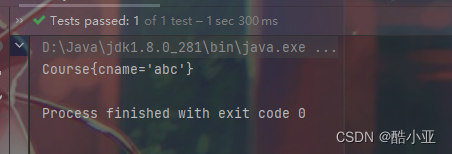
package com.jin.pojo; import org.springframework.beans.factory.FactoryBean; public class MyBean implements FactoryBean<Course> { //定义返回bean @Override public Course getObject() throws Exception { Course course = new Course(); course.setCname("abc"); return course; } @Override public Class<?> getObjectType() { return null; } @Override public boolean isSingleton() { return FactoryBean.super.isSingleton(); } }- 1
- 2
- 3
- 4
- 5
- 6
- 7
- 8
- 9
- 10
- 11
- 12
- 13
- 14
- 15
- 16
- 17
- 18
- 19
- 20
- 21
- 22
- 23
(2)实现接口里面的方法,在实现的方法中定义返回的bean类型
<bean id="myBean" class="com.jin.pojo.MyBean"> bean>- 1
- 2
(3)测试代码
@Test public void Test03(){ ClassPathXmlApplicationContext context = new ClassPathXmlApplicationContext("bean3.xml"); Course course = context.getBean("myBean", Course.class); System.out.println(course); }- 1
- 2
- 3
- 4
- 5
- 6
 .
.IOC操作Bean管理(bean 作用域)
1、在Spring里面,设置创建bean实例是单实例还是多实例
2、在Spring里面,默认情况下,
bean是单实例对象
3、如何设置单实例还是多实例
(1)在Spring配置文件bean标签里面有属性(scope)用于设置单实例还是多实例
(2)scope 属性值
singleton: (默认值)表示单实例对象prototype: 多实例对象
 .
.
(3)singleton 和 prototype区别
singleton 单实例,prototype多实例设置scope值是singleton时候,是加载spring配置文件时候就会创建单实例对象设置scope值是prototype时候,不是在加载spring配置文件时候创建对象,而是在调用getBean方法时候创建多实例对象
IOC操作Bean管理(bean生命周期)
1、生命周期
(1)从对象创建到对象销毁的过程
2、bean生命周期
(1)通过构造器
创建bean实例(无参构造)public class Orders { private String oname; //无参数构造 public Orders() { System.out.println("第一步 执行无参数构造创建bean实例"); } }- 1
- 2
- 3
- 4
- 5
- 6
- 7
- 8
(2)为bean设置
属性值和对其他bean引用(调用set方法)public void setOname(String oname) { this.oname = oname; System.out.println("第二步 调用set方法设置属性值"); }- 1
- 2
- 3
- 4
<bean id="orders" class="com.jin.pojo.Orders"> <property name="oname" value="手机">property> bean>- 1
- 2
- 3
(3)调用bean的
初始化的方法(需要进行配置)//创建执行的初始化的方法 public void initMethod(){ System.out.println("第三步 执行初始化方法"); }- 1
- 2
- 3
- 4

(4)bean
可以使用了(对象获取到了)@Test public void Test04(){ ClassPathXmlApplicationContext context = new ClassPathXmlApplicationContext("bean4.xml"); Orders orders = context.getBean("orders", Orders.class); System.out.println("第四步 获取创建bean实例对象"); System.out.println(orders); }- 1
- 2
- 3
- 4
- 5
- 6
- 7
(5)当容器关闭时候,调用bean
销毁的方法(需要进行配置销毁的方法)//创建执行的销毁的方法 public void destroyMethod(){ System.out.println("第五步 执行销毁的方法"); }- 1
- 2
- 3
- 4


3、bean的后置处理器
bean 的后置处理器,bean 生命周期有七步 (正常生命周期为五步,而配置后置处理器完成后为七步)
(1)通过构造器创建 bean 实例(无参数构造)
(2)为 bean 的属性设置值和对其他 bean 引用(调用 set 方法)
(3)把 bean 实例传递 bean 后置处理器的方法
postProcessBeforeInitialization (4)调用 bean 的初始化的方法(需要进行配置初始化的方法)
(5)把 bean 实例传递 bean 后置处理器的方法
postProcessAfterInitialization (6)bean 可以使用了(对象获取到了)
(7)当容器关闭时候,调用 bean 的销毁的方法(需要进行配置销毁的方法)
4、演示添加后置处理器效果
(1)创建类,实现接口BeanPostProcessor,创建后置处理器
public class MyBeanPost implements BeanPostProcessor { @Override public Object postProcessBeforeInitialization(Object bean, String beanName) throws BeansException { System.out.println("在初始化之前执行的方法"); return BeanPostProcessor.super.postProcessBeforeInitialization(bean, beanName); } @Override public Object postProcessAfterInitialization(Object bean, String beanName) throws BeansException { System.out.println("在初始化之后执行的方法"); return BeanPostProcessor.super.postProcessAfterInitialization(bean, beanName); } }- 1
- 2
- 3
- 4
- 5
- 6
- 7
- 8
- 9
- 10
- 11
- 12
- 13
- 14

 .
.IOC操作Bean管理(xml自动装配)
1、什么是自动装配
根据指定装配规则(属性名称或者属性类型),Spring自动将匹配的属性值进行注入
2、演示自动装配过程
创建两个类Dept、Emp
//部门类 public class Dept { @Override public String toString() { return "Dept{}"; } } //员工类 public class Emp { private Dept dept;//员工属于什么部门 public void setDept(Dept dept) { this.dept = dept; } @Override public String toString() { return "Emp{" + "dept=" + dept + '}'; } }- 1
- 2
- 3
- 4
- 5
- 6
- 7
- 8
- 9
- 10
- 11
- 12
- 13
- 14
- 15
- 16
- 17
- 18
- 19
- 20
- 21
- 22
- 23
- 24
(1)方式一:根据属性名称byName自动注入
<bean id="emp" class="com.jin.autowire.Emp" autowire="byName"> bean> <bean id="dept" class="com.jin.autowire.Dept">bean> beans>- 1
- 2
- 3
- 4
- 5
- 6
- 7
- 8
- 9
- 10
- 11
- 12
- 13
- 14
- 15
- 16
- 17
- 18
(2)方式二:根据属性类型byType自动注入
<bean id="emp" class="com.jin.autowire.Emp" autowire="byType"> bean> <bean id="dept" class="com.jin.autowire.Dept">bean> beans>- 1
- 2
- 3
- 4
- 5
- 6
- 7
- 8
IOC操作Bean管理(外部属性文件)
1、直接配置数据库信息
(1)引入德鲁伊(druid)连接池依赖jar包
德鲁伊连接池jar包下载地址: https://repo1.maven.org/maven2/com/alibaba/druid/
 .
.或者(导入依赖)
<dependency> <groupId>com.alibabagroupId> <artifactId>druidartifactId> <version>1.2.8version> dependency>- 1
- 2
- 3
- 4
- 5
(2)配置德鲁伊连接池
<bean id="dataSource" class="com.alibaba.druid.pool.DruidDataSource"> <property name="driverClassName" value="com.mysql.jdbc.Driver">property> <property name="url" value="jdbc:mysql://localhost:3306/springdb">property> <property name="username" value="root">property> <property name="password" value="123456">property> bean>- 1
- 2
- 3
- 4
- 5
- 6
- 7
2、引入外部属性文件配置数据库连接池
(1)创建外部属性文件,properties格式文件,写数据库信息
driverClassName=com.mysql.jdbc.Driver url=jdbc:mysql://localhost:3306/springdb userName=root passWord=123456- 1
- 2
- 3
- 4
(2)把外部properties 属性文件引入到spring配置文件中
首先引入context名称空间(类似p名称空间注入)

<context:property-placeholder location="classpath:jdbc.properties"/> <bean id="dataSource" class="com.alibaba.druid.pool.DruidDataSource"> <property name="driverClassName" value="${driverClassName}">property> <property name="url" value="${url}">property> <property name="username" value="${userName}">property> <property name="password" value="${passWord}">property> bean>- 1
- 2
- 3
- 4
- 5
- 6
- 7
- 8
- 9
IOC操作Bean管理(基于注解方式)
1、什么是注解
(1)注解是代码特殊标记,格式:@注解名称(属性名称=属性值,属性名称=属性值…)
(2)使用注解,注解作用在
类上面、方法上面、属性上面(3)使用注解目的:简化xml配置
2、Spring针对Bean管理中创建对象提供注解
都可以用来创建bean实例,但是四个注解功能是一样的
(1)@Component
(2)@Service
(3)@Controller
(4)@Repository
3、基于注解方式实现对象创建
(1)第一步:引入依赖
<dependency> <groupId>org.springframeworkgroupId> <artifactId>spring-aopartifactId> <version>5.3.22version> dependency>- 1
- 2
- 3
- 4
- 5
(2)第二步:开启组件扫描
首先引入context名称空间(类似p名称空间注入)
<context:component-scan base-package="com.jin">context:component-scan>- 1
- 2
- 3
- 4
- 5
- 6
- 7
(3)第三步:创建类,在类上面创建对象注解
//在注解里面value属性值可以省略不写 //默认值是类名称,首字母小写 User --> user @Component(value = "user") //类似public class User { public void add(){ System.out.println("User add ..."); } - 1
- 2
- 3
- 4
- 5
- 6
- 7
(4)第四步:测试代码
@Test public void MyTest02(){ ClassPathXmlApplicationContext context = new ClassPathXmlApplicationContext("bean2.xml"); User user = context.getBean("user", User.class); user.add(); }- 1
- 2
- 3
- 4
- 5
- 6
 .
.4、开启组件扫描细节配置
(1)自定义扫描配置,
扫描哪些需要的注解<context:component-scan base-package="com.jin" use-default-filters="false"> <context:include-filter type="annotation" expression="org.springframework.stereotype.Component"/> context:component-scan>- 1
- 2
- 3
- 4
- 5
- 6
- 7
- 8
- 9
- 10
(2)自定义扫描配置,
哪些注解不进行扫描<context:component-scan base-package="com.jin" use-default-filters="false"> <context:exclude-filter type="annotation" expression="org.springframework.stereotype.Controller"/> context:component-scan>- 1
- 2
- 3
- 4
- 5
- 6
5、基于注解方式实现属性注入
- @AutoWired :根据属性类型进行自动装配
- @Qualifier :根据属性名称进行注入,(要和上面的@AutoWired一起使用)
以防一个接口拥有多个实现类,所有要使用@Qualifier这个限定词!
代码如: @Qualifier(value = “userDaoImpl2” )
- @Resource :可以根据类型注入,
也可以根据名称注入(不推荐使用)
可以说是@AutoWired 和 @Qualifier 的集合
代码如:@Resource(name = “userDaoImpl2”)
因为@Resource 是javax(java扩展包)中的注解,不是springframework中的注解。所以不推荐使用!
- @Value :注入普通类型属性
@Value("abc") private String name; System.out.println(name);- 1
- 2
- 3
(1)第一步:把service和dao对象创建,在service和dao类添加创建对象注解
(2)第二步:在service注入dao对象,在service类添加dao类型属性,在属性上面使用
//dao接口 public interface UserDao { public void add(); } //dao接口实现类 @Repository public class UserDaoImpl implements UserDao{ @Override public void add() { System.out.println("dao add ..."); } } //service类 @Service public class UserService { //定义dao类型属性 //不需要添加set方法 //添加注入属性注解 @Autowired private UserDao userDao; public void add(){ System.out.println("service add ..."); userDao.add(); } }- 1
- 2
- 3
- 4
- 5
- 6
- 7
- 8
- 9
- 10
- 11
- 12
- 13
- 14
- 15
- 16
- 17
- 18
- 19
- 20
- 21
- 22
- 23
- 24
- 25
- 26
6、完全注解开发
(1)创建配置类,代替xml配置文件
@Configuration //作为配置类,替代xml配置文件 @ComponentScan(basePackages = {"com.jin"}) public class SpringConfig { }- 1
- 2
- 3
- 4
- 5
(2)编写测试类
@Test public void MyTest04(){ //创建AnnotationConfigApplicationContext(注解配置应用语境)对象 AnnotationConfigApplicationContext context = new AnnotationConfigApplicationContext(SpringConfig.class); UserService userService = context.getBean("userService", UserService.class); userService.add(); }- 1
- 2
- 3
- 4
- 5
- 6
- 7
-
相关阅读:
Spring Session原理解析
干货 | 利用 pytest 玩转数据驱动测试框架
C++语法基础
【计算机网络】计算机网络概述(湖科大教书匠第一章笔记)
UNIAPP实战项目笔记36 购物车的编辑商品数量完成的功能和数量价格计算
【练习赛】2022年高教杯数学建模C题(第一题的第一小问)
MyBatis Binding
5种kafka消费端性能优化方法
python文件的读取
Linux- 网络编程初探
- 原文地址:https://blog.csdn.net/weixin_45737330/article/details/126581212