-
(五)vuex
5.1.1 vuex 是什么
- 概念:专门在Vue 中实现集中式状态(数据)管理的一个Vue 插件,对vue 应用中多个组件的共享状态进行集中式的管理(读/写),也是一种组件间通信的方式,且适用于任意组件间通信。


- Github 地址: https://github.com/vuejs/vuex
5.1.2 什么时候使用 Vuex
-
多个组件依赖于同一状态
-
来自不同组件的行为需要变更同一状态
5.1.3 案例

5.1.4 Vuex 工作原理图

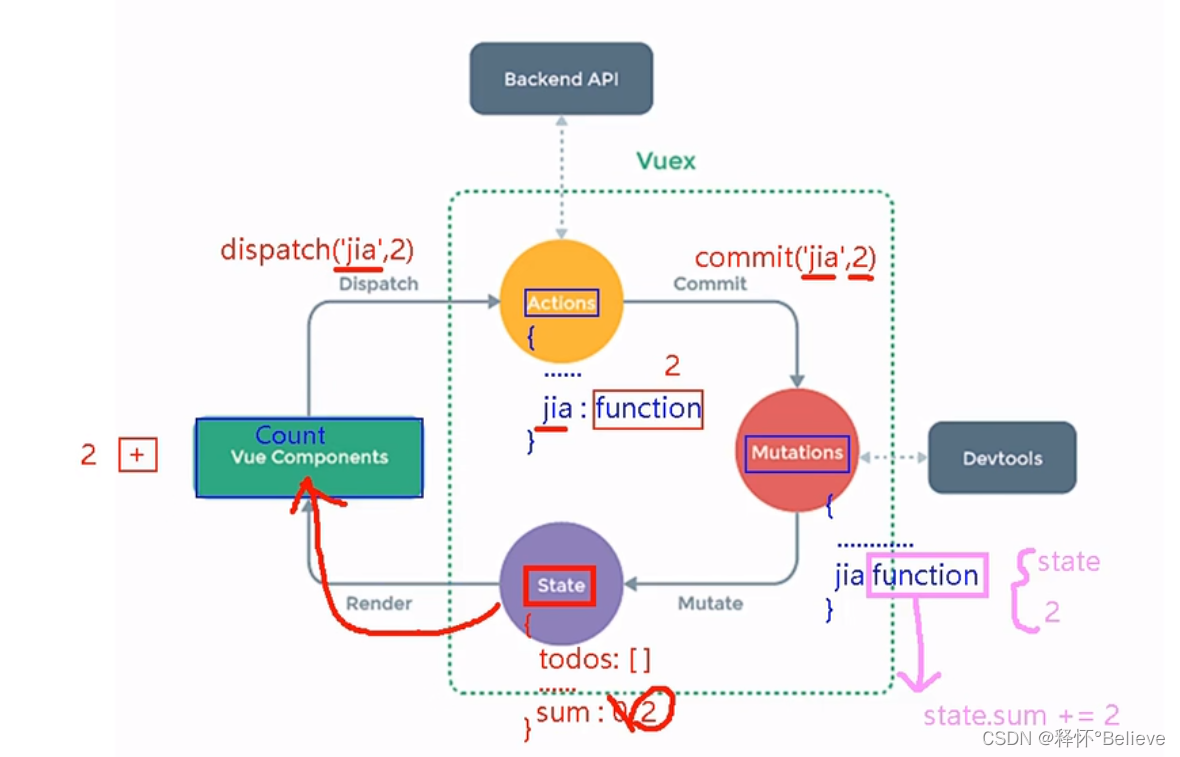
注意!!!
5.2 vuex 核心概念和 API
5.2.1 state
-
vuex 管理的状态对象
-
它应该是唯一的
-
示例代码:

5.2.2 actions
-
值为一个对象,包含多个响应用户动作的回调函数
-
通过commit( )来触发mutation 中函数的调用, 间接更新state
-
如何触发actions 中的回调?
在组件中使用:

-
可以包含异步代码(定时器, ajax 等等)
-
示例代码:
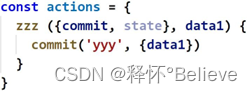
5.2.3 mutations
-
值是一个对象,包含多个直接更新state 的方法
-
谁能调用mutations 中的方法?如何调用?

-
mutations 中方法的特点:不能写异步代码、只能单纯的操作state

基本使用 -
初始化数据、配置actions、配置mutations,操作文件store.js
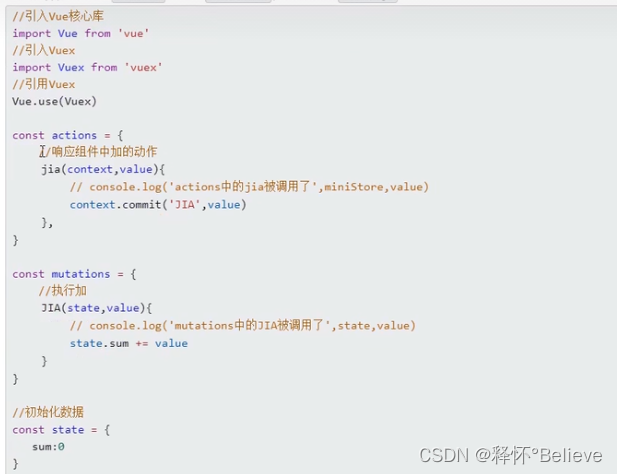

2. 组件中读取vuex中的数据: s t o r e . s t a t e . s u m 3. 组件中修改 v u e x 中的数据: store.state.sum 3. 组件中修改vuex中的数据: store.state.sum3.组件中修改vuex中的数据:store.dispatch(‘action中的方法名’,数据)或$store.commit(‘mutations中的方法名’,数据)备注:若没有网络强求或其他业务逻辑,组件中也可以越过actions,即不写dispatch,直接编写commit。
5.2.4 getters
-
值为一个对象,包含多个用于返回数据的函数
-
如何使用?——
$store.getters.xxx -
示例代码

👉getters的使用:
-
概念:当state中的数据需要经过加工后再使用时,可以使用getters加工
-
再store.js中追加getters配置

组件中读取数据:$store.getter.bigSum
👉四个map方法的使用- mapState方法用于帮助我们映射
state中的数据为计算属性
- mapGetters方法:用于帮助我们映射
getters中的数据为计算属性

- mapActions方法:用于帮助我们生成与actions对话的方法,即:包含
$store.dispatch(xxx)的函数 4.mapMutations方法:用于帮助我们生成与
mutations对话的方法,即:包$store.commit(xxx)的函数
//Count.vue <template> <div> <h1>当前求和为:{{sum}}h1> <h1>当前求和放大为:{{bigSum}}h1> <h3>我在{{school}},{{subject}}h3> <select v-model.number="n"> <option value="1">1option> <option value="2">2option> <option value="3">3option> select> <button @click="increment(n)">+button> <button @click="decrement(n)">-button> <button @click="incrementOdd(n)">当前和为奇数再加button> <button @click="incrementWait(n)">等一等再加button> div> template> <script> import {mapState,mapGetters,mapMutations,mapActions} from 'vuex' export default { name:'Count', data(){ return{ n:1,//用户选择数据 } }, computed: { //借助mapState生成计算属性,从state中读取数据。(对象写法) // ...mapState({ he: 'sum', xuexiao: 'school', xueke: 'subject' }), //借助mapState生成计算属性,从state中读取数据。(数组写法) ...mapState(['sum','school','subject']), /* ************************************************************************************ */ //...mapGetters({bigSum:'bigSum'}) ...mapGetters(['bigSum']) }, methods: { // incremnet(){ // this.$store.commit('JIA',this.n) // }, // decrement(){ // this.$store.commit('JIAN', this.n) // }, //借助mapMutations生成对应的方法,方法中会调用commit去联系mutations(对象法) ...mapMutations({ increment: 'JIA',decrement:'JIAN'}), //借助mapMutations生成对应的方法,方法中会调用commit去联系mutations(数组法) //...mapMutations(['JIA','JIAN']), /* ************************************************************************************* */ // incrementOdd(){ // this.$store.dispatch('jiaOdd', this.n) // }, // incrementWait(){ // //函数体 // this.$store.dispatch('jiaWait', this.n) // } // 借助mapActions生成对应的方法,方法中会调用dispatch去联系actions(对象法) ...mapActions({ incrementOdd: 'jiaOdd', incrementWait: 'jiaWait' }) // 借助mapActions生成对应的方法,方法中会调用dispatch去联系actions(数组法) //...mapActions(['jiaOdd','jiaWait' ]) } } script> <style scoped> button{ margin-left: 5px; } style>- 1
- 2
- 3
- 4
- 5
- 6
- 7
- 8
- 9
- 10
- 11
- 12
- 13
- 14
- 15
- 16
- 17
- 18
- 19
- 20
- 21
- 22
- 23
- 24
- 25
- 26
- 27
- 28
- 29
- 30
- 31
- 32
- 33
- 34
- 35
- 36
- 37
- 38
- 39
- 40
- 41
- 42
- 43
- 44
- 45
- 46
- 47
- 48
- 49
- 50
- 51
- 52
- 53
- 54
- 55
- 56
- 57
- 58
- 59
- 60
- 61
- 62
- 63
- 64
- 65
- 66
- 67
- 68
- 69
5.2.5 modules
-
包含多个module
-
一个module 是一个store 的配置对象
-
与一个组件(包含有共享数据)对应
👉 模块化+命名空间
- 目的:让代码更好维护,让多种数据分类更加明确。
- 修改store.js

- 开启命名空间后,组件中读取state数据:

- 开启命名空间后,组件中读取getters数据:

- 开启命名空间后,组件中调用dispatch

- 开启命名空间后,组件中调用commit

- 概念:专门在Vue 中实现集中式状态(数据)管理的一个Vue 插件,对vue 应用中多个组件的共享状态进行集中式的管理(读/写),也是一种组件间通信的方式,且适用于任意组件间通信。
-
相关阅读:
求解平面上物体的有向3d包围盒
[极致用户体验] 如何实现响应式canvas?保持canvas比例?教你让canvas自适应屏幕宽度!
Bootstrap(一)
Jmeter吞吐量控制器使用小结
指定字符串中的一部分将原来的字符串拆分成三部分partition()函数
一个宁静祥和没有bug的下午和SqlSession的故事
06 CSS03
803_div2(Rising Sand, 接受军训!
上海亚商投顾:沪指高开高走 锂电等新能源赛道大反攻
PaddleOCR以及CUDA、cuDNN安装踩坑记录
- 原文地址:https://blog.csdn.net/qq_52986400/article/details/126572809
