-
【Spring Boot 集成应用】Spring Boot与MongoDB的集成配置使用
1、Spring Boot 与 MongoDB的集成配置
-
创建工程
在spring-boot-nosql下创建spring-boot-nosql-mongodb工程

启动类:
com.mirson.spring.boot.nosql.mongodb.startup.NosqlMongodbApplication:
@SpringBootApplication @ComponentScan(basePackages = {"com.mirson"}) @EnableMongoRepositories(basePackages = "com.mirson") public class NosqlMongodbApplication { public static void main(String[] args) { SpringApplication.run(NosqlMongodbApplication.class, args); } }- 1
- 2
- 3
- 4
- 5
- 6
- 7
- 8
- 9
- 10
注意, 要使用MongoRepository功能, 需要开启EnableMongoRepositories注解, 扫描Repository接口。
-
pom.xml
<dependencies> <dependency> <groupId>org.springframework.bootgroupId> <artifactId>spring-boot-starter-data-mongodbartifactId> dependency> <dependency> <groupId>org.springframework.bootgroupId> <artifactId>spring-boot-starter-data-mongodb-reactiveartifactId> dependency> <dependency> <groupId>com.alibabagroupId> <artifactId>fastjsonartifactId> <version>1.2.58version> dependency> dependencies>- 1
- 2
- 3
- 4
- 5
- 6
- 7
- 8
- 9
- 10
- 11
- 12
- 13
- 14
- 15
- 16
- 17
- 18
- 19
- 20
- 21
- 22
这里需要用到JSON作参数数据转换, 引入fastjson组件。
-
工程配置
application.yml文件:
-
单节点模式配置
server: port: 11613 spring: application: name: nosql-mongodb # MongoDB 缓存配置 data: mongodb: # 主机 host: 127.0.0.1 # 端口 port: 27017 # 连接数据库 database: mongo-samples- 1
- 2
- 3
- 4
- 5
- 6
- 7
- 8
- 9
- 10
- 11
- 12
- 13
- 14
单节点配置, 定义主机地址、端口和数据库名称即可。
-
集群模式配置
server: port: 11613 spring: application: name: nosql-mongodb # MongoDB 缓存配置 data: mongodb: # 集群连接配置 uri: mongodb://127.0.0.1:27011,127.0.0.1:27012,127.0.0.1:27013/mongo-samples- 1
- 2
- 3
- 4
- 5
- 6
- 7
- 8
- 9
- 10
集群模式配置, 将所有节点地址和端口及数据库名称统一放在uri里面, 注意多个节点以逗号分割 ;
如果有密码认证, 把认证信息放在地址前面, 例:
uri: mongodb://username:password@127.0.0.1:27011,127.0.0.1:27012,127.0.0.1:27013/mongo-samples- 1
Spring Boot 封装的MongoDB, 没有提供连接池配置, 如果需要实现连接池, 可以自行封装替换内置的MongoDbFactory。
-
2、MongoTemplate模式运用
-
创建实体
com.mirson.spring.boot.nosql.mongodb.entity.Person:
@Document(collection="person") @Data public class Person implements Serializable { private static final long serialVersionUID = -1L; @Id private String id; /** * 姓名 */ @Indexed(unique=true) private String name; /** * 年龄 */ private Integer age; /** * 省份 */ private String province; /** * 创建时间 */ @CreatedDate Date createDate; }- 1
- 2
- 3
- 4
- 5
- 6
- 7
- 8
- 9
- 10
- 11
- 12
- 13
- 14
- 15
- 16
- 17
- 18
- 19
- 20
- 21
- 22
- 23
- 24
- 25
- 26
- 27
- 28
- 29
- 30
- 31
- 32
- 定义一个用户实体用于测试, 包含姓名、年龄、省份和创建时间。
- Document注解, 定义collection名称, 相当于数据库的表名。
- Indexed注解, 建立索引, 提升检索速度, unique=true建立唯一索引。
- CreatedDate注解, 定义时间, 结合EnableMongoAuditing注解, 新增记录的时候会自动生成当前时间。
-
定义CURD等接口
-
接口定义
com.mirson.spring.boot.nosql.mongodb.service.IMongoService
public interface IMongoService { /** * 保存用户信息 * @param person */ public String save(Person person); /** * 删除用户 * @param id */ public void delete(String id); /** * 查询所有用户 */ public List<Person> find(String id); /** * 根据名称模糊查找 * @param name * @return */ public List<Person> findByName(String name); /** * 批量保存数据 * @param personList * @return */ public String batchSave(String opt, List<Person> personList); }- 1
- 2
- 3
- 4
- 5
- 6
- 7
- 8
- 9
- 10
- 11
- 12
- 13
- 14
- 15
- 16
- 17
- 18
- 19
- 20
- 21
- 22
- 23
- 24
- 25
- 26
- 27
- 28
- 29
- 30
- 31
- 32
- 33
- 34
- 35
- 36
- 37
覆盖常用的功能接口, 包括模糊匹配, 批量数据保存。
-
接口实现
com.mirson.spring.boot.nosql.mongodb.service.MongoTemplateServiceImpl
@Service @Log4j2 public class MongoTemplateServiceImpl implements IMongoService { @Autowired private MongoTemplate mongoTemplate; /** * 保存对象 * @param person * @return */ @Override public String save(Person person) { log.info("save person: " + person); Person result = mongoTemplate.save(person); return result.getId(); } /** * 根据ID删除对象 * @param id */ @Override public void delete(String id) { log.info("delete person: " + id); Query query = new Query(Criteria.where("id").is(id)); mongoTemplate.remove(query, Person.class); } /** * 根据ID查找对象 * @param id * @return */ @Override public List<Person> find(String id) { log.info(" find person: " + id); if(StringUtils.isEmpty(id)){ // 为空, 查找所有对象 return mongoTemplate.findAll(Person.class); } // 查找指定对象 Query query = new Query(Criteria.where("id").is(id)); return mongoTemplate.find(query, Person.class); } /** * 根据名称查找对象, 支持模糊匹配 * @param name * @return */ @Override public List<Person> findByName(String name) { log.info(" findByName, name: " + name); Query query = new Query(Criteria.where("name").regex(name)); return mongoTemplate.find(query, Person.class); } /** * 批量保存数据 * @param personList * @return */ @Transactional(rollbackFor = Exception.class) public String batchSave(String opt, List<Person> personList) { log.info("batchSave, personList: " + personList); if(null != personList && !personList.isEmpty()) { // 遍历对象集合 for (int i= 0; i< personList.size(); i++) { if(i == 1 && "exception".equals(opt)) { // 手工触发异常, 验证事务有效性 throw new RuntimeException("throw manual exception!"); } // 保存对象 mongoTemplate.save(personList.get(i)); } return "batch save success."; } return "empty data."; } }- 1
- 2
- 3
- 4
- 5
- 6
- 7
- 8
- 9
- 10
- 11
- 12
- 13
- 14
- 15
- 16
- 17
- 18
- 19
- 20
- 21
- 22
- 23
- 24
- 25
- 26
- 27
- 28
- 29
- 30
- 31
- 32
- 33
- 34
- 35
- 36
- 37
- 38
- 39
- 40
- 41
- 42
- 43
- 44
- 45
- 46
- 47
- 48
- 49
- 50
- 51
- 52
- 53
- 54
- 55
- 56
- 57
- 58
- 59
- 60
- 61
- 62
- 63
- 64
- 65
- 66
- 67
- 68
- 69
- 70
- 71
- 72
- 73
- 74
- 75
- 76
- 77
- 78
- 79
- 80
- 81
- 82
- 83
- 84
- 85
- 86
-
根据ID查找对象, 如果ID为空, 则查询获取所有对象数据。
-
根据名称查找对象, 支持模糊匹配, 通过regex接口实现, 可以支持更灵活的匹配:
//完全匹配 Pattern pattern = Pattern.compile("^用户$", Pattern.CASE_INSENSITIVE); //右匹配 Pattern pattern = Pattern.compile("^.*用户$", Pattern.CASE_INSENSITIVE); //左匹配 Pattern pattern = Pattern.compile("^用户.*$", Pattern.CASE_INSENSITIVE); //模糊匹配 Pattern pattern = Pattern.compile("^.*用户.*$", Pattern.CASE_INSENSITIVE); Query query = Query.query(Criteria.where(fieldName).regex(pattern));- 1
- 2
- 3
- 4
- 5
- 6
- 7
- 8
- 9
-
batchSave 批量保存数据, 用到事务, 在MongoTransactionManager事务的使用章节再进行讲解。
-
提供Web层调用接口
因为有几种不同模式的集成使用, 都提供相同的调用接口, 我们把它们做个封装, 不重复编写。
定义抽象类com.mirson.spring.boot.nosql.mongodb.controller.AbstractController
public abstract class AbstractController { /** * MongoDB接口操作实现类 * @return */ public abstract IMongoService getMongoService(); /** * 保存用户 * @param person * @return */ @GetMapping("/save") public String save(Person person) { String id = getMongoService().save(person); return "save success. id: " + id; } /** * 删除用户 * @param id * @return */ @GetMapping("/delete") public String delete(String id) { getMongoService().delete(id); return "delete success."; } /** * 查找用户 * @param id * @return */ @GetMapping("/find") @ResponseBody public List<Person> find(String id) { List<Person> personList = getMongoService().find(id); return personList; } /** * 根据名称查找, 支持模糊匹配 * @param name * @return */ @GetMapping("/findByName") @ResponseBody public List<Person> findByName(String name) { List<Person> personList = getMongoService().findByName(name); return personList; } /** * 批量保存, 事务验证 * @param opt * @param personJson * @return */ @PostMapping("/batchSave") @ResponseBody public String batchSave(String opt, String json) { List<Person> personList = JSON.parseArray(json,Person.class); return getMongoService().batchSave(opt, personList); } }- 1
- 2
- 3
- 4
- 5
- 6
- 7
- 8
- 9
- 10
- 11
- 12
- 13
- 14
- 15
- 16
- 17
- 18
- 19
- 20
- 21
- 22
- 23
- 24
- 25
- 26
- 27
- 28
- 29
- 30
- 31
- 32
- 33
- 34
- 35
- 36
- 37
- 38
- 39
- 40
- 41
- 42
- 43
- 44
- 45
- 46
- 47
- 48
- 49
- 50
- 51
- 52
- 53
- 54
- 55
- 56
- 57
- 58
- 59
- 60
- 61
- 62
- 63
- 64
- 65
- 66
- 67
- 68
- 69
将服务层的接口,提供对外访问调用, 因为所有服务层实现IMongoService接口, 在不同模式下提供getMongoService()方法的具体实现即可。这里父类定义好各接口的访问路径, 子类中再定义@RequestMapping加以前缀识别。
com.mirson.spring.boot.nosql.mongodb.controller.MongoTemplateController:
@RestController @RequestMapping("/template") @Log4j2 public class MongoTemplateController extends AbstractController{ @Autowired private IMongoService mongoTemplateServiceImpl; @Override public IMongoService getMongoService() { return mongoTemplateServiceImpl; } }- 1
- 2
- 3
- 4
- 5
- 6
- 7
- 8
- 9
- 10
- 11
- 12
- 13
- 14
MongoTemplateController注入mongoTemplateServiceImpl, 实现getMongoService方法。
RequestMapping定义访问路径要加上/template。
-
验证
-
测试新增功能
新增一个名为user1, 年龄为21, 省份为江西省的记录
URL: /template/save?name=user1&age=21&province=江西省

保存成功, 返回ID: 5d7791f55c72e7242ce8ded8
-
测试更新功能
调用保存接口, 当传入参数包含ID时, 会自动更新对应记录。
将年龄由21改为31

更新成功, 查看compass中数据是否一致:

修改成功。
-
测试删除功能
将刚才创建的数据删除, 传入ID参数: 5d7791f55c72e7242ce8ded8

成功删除。
-
测试查询功能
通过上面测试方法, 重新创建数据, 创建新数据的时候不要指定ID参数。
指定ID查询记录:
URL: /template/find?id=5d7793c45c72e7242ce8deda

不传递ID, 查询所有记录:
URL: /template/find
-
测试模糊查询
检索所有名称为user的记录
URL: /template/findByName?name=user

检索所有名称为test的记录, 没有新增此类数据, 查询应为空

-
-
3、MongoRepository模式运用
-
定义JPA接口
com.mirson.spring.boot.nosql.mongodb.repository.IPersonMongoDao
@Repository public interface IPersonMongoDao extends MongoRepository<Person, String> { /** * 根据ID获取对象 * @param id * @return */ Optional<Person> findById(String id); /** * 根据名称模糊搜索 * @param name * @param pageable * @return */ Page<Person> findByNameLike(String name, Pageable pageable); /** * 获取所有对象 * @param pageable * @return */ Page<Person> findAll(Pageable pageable); }- 1
- 2
- 3
- 4
- 5
- 6
- 7
- 8
- 9
- 10
- 11
- 12
- 13
- 14
- 15
- 16
- 17
- 18
- 19
- 20
- 21
- 22
- 23
- 24
- 25
- 26
- 27
findByNameLike方法, 提供了模糊搜索支持和分页功能, 这些都是JPA内置帮我们实现, 更多用法:
Keyword Sample Logical result AfterfindByBirthdateAfter(Date date){"birthdate" : {"$gt" : date}}GreaterThanfindByAgeGreaterThan(int age){"age" : {"$gt" : age}}GreaterThanEqualfindByAgeGreaterThanEqual(int age){"age" : {"$gte" : age}}BeforefindByBirthdateBefore(Date date){"birthdate" : {"$lt" : date}}LessThanfindByAgeLessThan(int age){"age" : {"$lt" : age}}LessThanEqualfindByAgeLessThanEqual(int age){"age" : {"$lte" : age}}BetweenfindByAgeBetween(int from, int to){"age" : {"$gt" : from, "$lt" : to}}InfindByAgeIn(Collection ages){"age" : {"$in" : [ages…]}}NotInfindByAgeNotIn(Collection ages){"age" : {"$nin" : [ages…]}}IsNotNull,NotNullfindByFirstnameNotNull(){"firstname" : {"$ne" : null}}IsNull,NullfindByFirstnameNull(){"firstname" : null}Like,StartingWith,EndingWithfindByFirstnameLike(String name){"firstname" : name} (name as regex)NotLike,IsNotLikefindByFirstnameNotLike(String name){"firstname" : { "$not" : name }} (name as regex)Containingon StringfindByFirstnameContaining(String name){"firstname" : name} (name as regex)NotContainingon StringfindByFirstnameNotContaining(String name){"firstname" : { "$not" : name}} (name as regex)Containingon CollectionfindByAddressesContaining(Address address){"addresses" : { "$in" : address}}NotContainingon CollectionfindByAddressesNotContaining(Address address){"addresses" : { "$not" : { "$in" : address}}}RegexfindByFirstnameRegex(String firstname){"firstname" : {"$regex" : firstname }}(No keyword)findByFirstname(String name){"firstname" : name}NotfindByFirstnameNot(String name){"firstname" : {"$ne" : name}}NearfindByLocationNear(Point point){"location" : {"$near" : [x,y]}}NearfindByLocationNear(Point point, Distance max){"location" : {"$near" : [x,y], "$maxDistance" : max}}NearfindByLocationNear(Point point, Distance min, Distance max){"location" : {"$near" : [x,y], "$minDistance" : min, "$maxDistance" : max}}WithinfindByLocationWithin(Circle circle){"location" : {"$geoWithin" : {"$center" : [ [x, y], distance]}}}WithinfindByLocationWithin(Box box){"location" : {"$geoWithin" : {"$box" : [ [x1, y1], x2, y2]}}}IsTrue,TruefindByActiveIsTrue(){"active" : true}IsFalse,FalsefindByActiveIsFalse(){"active" : false}ExistsfindByLocationExists(boolean exists){"location" : {"$exists" : exists }}MongoDBRepository所提供的不同功能的操作接口:
Repository: 仅仅是一个标识,表明任何继承它的均为仓库接口类
CrudRepository: 继承 Repository,实现了一组 CRUD 相关的方法
PagingAndSortingRepository: 继承 CrudRepository,实现了一组分页排序相关的方法
MongoRepository: 继承 PagingAndSortingRepository,实现一组 mongodb规范相关的方法 -
定义Service实现类
com.mirson.spring.boot.nosql.mongodb.service.MongoRepositoryServiceImpl
@Service @Log4j2 public class MongoRepositoryServiceImpl implements IMongoService{ @Autowired private IPersonMongoDao personMongoDao; /** * 保存对象 * @param person * @return */ @Override public String save(Person person) { log.info("repository save person: " + person); Person result = personMongoDao.save(person); return result.getId(); } /** * 根据ID删除对象 * @param id */ @Override public void delete(String id) { personMongoDao.deleteById(id); log.info("repository delete person, id: " + id); } /** * 根据ID查找对象 * @param id * @return */ @Override public List<Person> find(String id) { log.info("repository find person, id: " + id); if(!StringUtils.isEmpty(id)) { // 根据ID查询 Optional<Person> personOptional = personMongoDao.findById(id); if(personOptional.isPresent()) { return Arrays.asList(personOptional.get()); } }else { // 获取所有对象, 支持分页查询 Pageable pageable = new PageRequest(0, 100); Page<Person> personPage = personMongoDao.findAll(pageable); return personPage.getContent(); } return null; } /** * 根据名称查找对象, 支持模糊匹配 * @param name * @return */ @Override public List<Person> findByName(String name) { log.info("repository findByName, name: " + name); Pageable pageable = new PageRequest(0, 100); Page<Person> personPage = personMongoDao.findByNameLike(name, pageable); return personPage.getContent(); } /** * 批量保存数据 * @param personList * @return */ @Transactional(rollbackFor = Exception.class) public String batchSave(String opt, List<Person> personList) { log.info("repository batchSave, personList: " + personList); if(null != personList && !personList.isEmpty()) { // 遍历对象集合 for (int i= 0; i< personList.size(); i++) { if(i == 1 && "exception".equals(opt)) { // 手工触发异常, 验证事务有效性 throw new RuntimeException("throw manual exception!"); } // 保存对象 personMongoDao.save(personList.get(i)); } return "batch save success."; } return "empty data."; } }- 1
- 2
- 3
- 4
- 5
- 6
- 7
- 8
- 9
- 10
- 11
- 12
- 13
- 14
- 15
- 16
- 17
- 18
- 19
- 20
- 21
- 22
- 23
- 24
- 25
- 26
- 27
- 28
- 29
- 30
- 31
- 32
- 33
- 34
- 35
- 36
- 37
- 38
- 39
- 40
- 41
- 42
- 43
- 44
- 45
- 46
- 47
- 48
- 49
- 50
- 51
- 52
- 53
- 54
- 55
- 56
- 57
- 58
- 59
- 60
- 61
- 62
- 63
- 64
- 65
- 66
- 67
- 68
- 69
- 70
- 71
- 72
- 73
- 74
- 75
- 76
- 77
- 78
- 79
- 80
- 81
- 82
- 83
- 84
- 85
- 86
- 87
- 88
- 89
- 90
根据名称模糊搜索, 调用内置的LIKE接口, 帮我们封装实现了与LIKE类似的模糊匹配功能, 这里加上Pageable参数, 是演示Pageable的用法, 实际工作中, 会对分页的计算做进一步封装, 这里不作详解。
-
定义Web层访问接口
com.mirson.spring.boot.nosql.mongodb.controller.MongoRepositoryController
@RestController @RequestMapping("/repository") public class MongoRepositoryController extends AbstractController{ @Autowired private IMongoService mongoRepositoryServiceImpl; @Override public IMongoService getMongoService() { return mongoRepositoryServiceImpl; } }- 1
- 2
- 3
- 4
- 5
- 6
- 7
- 8
- 9
- 10
- 11
- 12
- 13
- 14
注入类的名称为mongoRepositoryServiceImpl, 不能写错, 因为有多个实现类, 调用时可以观察日志检查处理类有无配置错误。
-
功能验证
-
保存功能
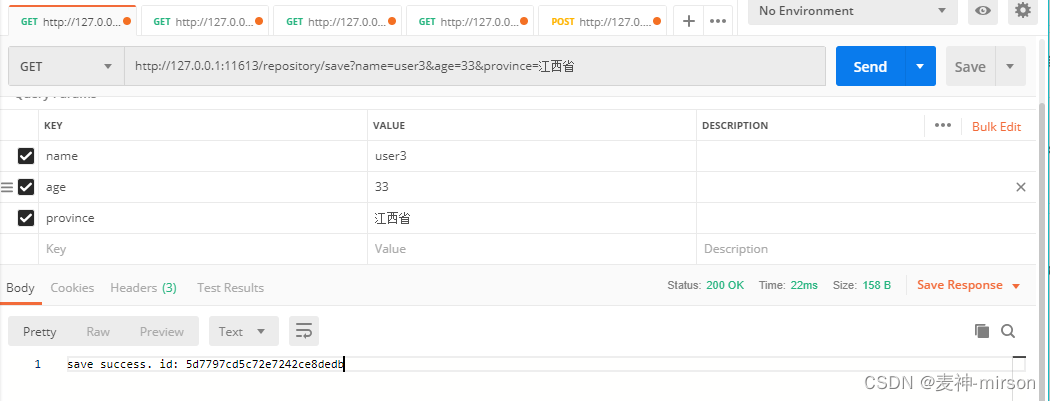
控制台日志, 正确进入Repository模式处理:

-
删除功能

-
查询功能

-
模糊查询

-
4、MongoTransactionManager事务运用
-
JAVA CONFIG配置
使用MongoDB需要开启MongoTransactionManager事务管理器, 默认Spring Boot是不会加载注入。
com.mirson.spring.boot.nosql.mongodb.config.MongodbConfiguration:
@Configuration @EnableMongoAuditing public class MongodbConfiguration { /** * Transaction MongoDB 事务配置 * @param dbFactory * @return */ @Bean MongoTransactionManager transactionManager(MongoDbFactory dbFactory) { return new MongoTransactionManager(dbFactory); } }- 1
- 2
- 3
- 4
- 5
- 6
- 7
- 8
- 9
- 10
- 11
- 12
- 13
- 14
- 15
创建MongoTransactionManager, 纳入容器管理。
-
Service层实现
前面我们定义了batchSave方法, 这里我们把Template和Repository两种模式都实现事务测试接口进行验证。
batchSave方法是批量保存用户数据, 事务验证需要模拟一个异常, 触发事务的回滚, 这里通过opt参数来控制, 如果传递值为"exception", 则手动抛出异常, 触发事务回滚机制。
-
Template模式实现类修改
MongoTemplateServiceImpl:
/** * 批量保存数据 * @param personList * @return */ @Transactional(rollbackFor = Exception.class) public String batchSave(String opt, List<Person> personList) { log.info("batchSave, personList: " + personList); if(null != personList && !personList.isEmpty()) { // 遍历对象集合 for (int i= 0; i< personList.size(); i++) { if(i == 1 && "exception".equals(opt)) { // 手工触发异常, 验证事务有效性 throw new RuntimeException("throw manual exception!"); } // 保存对象 mongoTemplate.save(personList.get(i)); } return "batch save success."; } return "empty data."; }- 1
- 2
- 3
- 4
- 5
- 6
- 7
- 8
- 9
- 10
- 11
- 12
- 13
- 14
- 15
- 16
- 17
- 18
- 19
- 20
- 21
- 22
- 23
-
Repository模式实现类修改
MongoRepositoryServiceImpl
/** * 批量保存数据 * @param personList * @return */ @Transactional(rollbackFor = Exception.class) public String batchSave(String opt, List<Person> personList) { log.info("repository batchSave, personList: " + personList); if(null != personList && !personList.isEmpty()) { // 遍历对象集合 for (int i= 0; i< personList.size(); i++) { if(i == 1 && "exception".equals(opt)) { // 手工触发异常, 验证事务有效性 throw new RuntimeException("throw manual exception!"); } // 保存对象 personMongoDao.save(personList.get(i)); } return "batch save success."; } return "empty data."; }- 1
- 2
- 3
- 4
- 5
- 6
- 7
- 8
- 9
- 10
- 11
- 12
- 13
- 14
- 15
- 16
- 17
- 18
- 19
- 20
- 21
- 22
- 23
-
-
WEB层接口
AbstractController
/** * 批量保存, 事务验证 * @param opt * @param personJson * @return */ @PostMapping("/batchSave") @ResponseBody public String batchSave(String opt, String json) { List<Person> personList = JSON.parseArray(json,Person.class); return getMongoService().batchSave(opt, personList); }- 1
- 2
- 3
- 4
- 5
- 6
- 7
- 8
- 9
- 10
- 11
- 12
提供两个参数opt, 用于控制是否抛出异常; 另一个json参数是以JSON格式传递多个Person对象, 通过fastjson组件将json字符串转换为对象。
-
事务功能验证
-
为便于演示, 先清除所有数据
如果数据过多, 可以通过Compass工具,直接将数据库删除, 程序重新启动会自动创建数据库和表。

-
Template模式,验证批量保存(不抛出异常)

查询数据:

-
Template模式,先清除所有测试数据, 验证批量保存(模拟抛出异常)

查询数据:

-
Repository模式, 验证批量保存(不抛出异常, 测试前清除所有数据)

查询数据:
-
Repository模式,验证批量保存(模拟抛出异常)。

查询数据:

-
5、ReactiveMongoTemplate响应模式运用
-
定义Service层接口
com.mirson.spring.boot.nosql.mongodb.service.MongoReactiveServiceImpl
@Service @Log4j2 public class MongoReactiveServiceImpl implements IMongoService { @Autowired private ReactiveMongoTemplate reactiveMongoTemplate; /** * 保存对象 * @param person * @return */ @Override public String save(Person person) { Mono<Person> result = reactiveMongoTemplate.save(person); result.subscribe(log::info); log.info("Reactive save person: " + person); return result.block().getId(); } /** * 根据ID删除对象 * @param id */ @Override public void delete(String id) { Query query = new Query(Criteria.where("id").is(id)); Mono<DeleteResult> result = reactiveMongoTemplate.remove(query, Person.class); result.subscribe(log::info); log.info("Reactive delete person: " + id); } /** * 根据ID查找对象 * @param id * @return */ @Override public List<Person> find(String id) { log.info("Reactive find person: " + id); if(StringUtils.isEmpty(id)){ // 为空, 查找所有对象 Flux<Person> result = reactiveMongoTemplate.findAll(Person.class); return result.collectList().block(); } // 查找指定对象 Query query = new Query(Criteria.where("id").is(id)); Flux<Person> result = reactiveMongoTemplate.find(query, Person.class); return result.collectList().block(); } /** * 根据名称查找对象, 支持模糊匹配 * @param name * @return */ @Override public List<Person> findByName(String name) { log.info("Reactive findByName, name: " + name); Query query = new Query(Criteria.where("name").regex(name)); Flux<Person> result = reactiveMongoTemplate.find(query, Person.class); return result.collectList().block(); } /** * 批量保存数据 * @param personList * @return */ @Transactional(rollbackFor = Exception.class) public String batchSave(String opt, List<Person> personList) { log.info("Reactive batchSave, personList: " + personList); if(null != personList && !personList.isEmpty()) { // 遍历对象集合 for (int i= 0; i< personList.size(); i++) { if(i == 1 && "exception".equals(opt)) { // 手工触发异常, 验证事务有效性 throw new RuntimeException("throw manual exception!"); } // 保存对象 Mono<Person> result = reactiveMongoTemplate.save(personList.get(i)); result.block(); } return "Reactive batch save success."; } return "Reactive empty data."; } }- 1
- 2
- 3
- 4
- 5
- 6
- 7
- 8
- 9
- 10
- 11
- 12
- 13
- 14
- 15
- 16
- 17
- 18
- 19
- 20
- 21
- 22
- 23
- 24
- 25
- 26
- 27
- 28
- 29
- 30
- 31
- 32
- 33
- 34
- 35
- 36
- 37
- 38
- 39
- 40
- 41
- 42
- 43
- 44
- 45
- 46
- 47
- 48
- 49
- 50
- 51
- 52
- 53
- 54
- 55
- 56
- 57
- 58
- 59
- 60
- 61
- 62
- 63
- 64
- 65
- 66
- 67
- 68
- 69
- 70
- 71
- 72
- 73
- 74
- 75
- 76
- 77
- 78
- 79
- 80
- 81
- 82
- 83
- 84
- 85
- 86
- 87
- 88
- 89
- 90
- 91
- 92
使用Reactive模式, 确保加入spring-boot-starter-data-mongodb-reactive依赖, 该组件会自动装配ReactiveMongoTemplate。Reactive支持阻塞和异步调用, 通过日志打印可以看出其异步特性。
-
定义WEB层接口
com.mirson.spring.boot.nosql.mongodb.controller.MongoReactiveController
@RestController @RequestMapping("/reactive") public class MongoReactiveController extends AbstractController { @Autowired private IMongoService mongoReactiveServiceImpl; @Override public IMongoService getMongoService() { return mongoReactiveServiceImpl; } }- 1
- 2
- 3
- 4
- 5
- 6
- 7
- 8
- 9
- 10
- 11
- 12
- 13
- 14
继承AbstractController所提供的接口, 定义RequestMapping路径为“/reactive”。
-
验证
-
保存数据

-
删除数据

-
查询数据

-
模糊查询

-
异步操作日志
通过刚才调用删除接口的日志打印, 可以看出为Reactive的异步操作特性。

-
6、总结
- Spring Boot Data MongoDB 集成使用, 主要包含模板模式,JPA Repository 模式和响应模式。 在一般情况下, 采用模板模式即可满足需要, 如果需要用到事务, 查询复杂, 操作量大的话可以采用JPA模式。 交互频繁的场景性下, 建议自定义封装连接池使用, 提升性能与稳定性。
- MongoDB 有着较高的读性能, 但写性能比较低下, 差距有15倍之多,在使用事务时,多文档事务相对于单文档数据变更性能损耗会更严重,从业务或设计上, 尽量减少多文档事务的使用。
-
-
相关阅读:
【LeetCode:1465. 切割后面积最大的蛋糕 | 贪心 + 排序】
Python_数据容器(序列)的切片
【前沿技术RPA】 一文学会用UiPath实现自动检索电子邮件(Email Automation)
【随想】每日两题Day.5 (实则一题)
el-select两个下拉框实现二级联动
计算机视觉入门-最小二乘法、随机取样法、鲁棒估计、霍夫变换
[附源码]Python计算机毕业设计Django打印助手平台
实时即未来,大数据项目车联网之创建Flink实时计算子工程【二】
华为gre带验证key案例
数组第 k 大子序列
- 原文地址:https://blog.csdn.net/hxx688/article/details/126559702