-
Shiro学习笔记_02:shiro的认证+shiro的授权
Shiro 学习笔记
本文基于B站UP主【编程不良人】视频教程【2020最新版Shiro教程,整合SpringBoot项目实战教程】进行整理记录,仅用于个人学习交流使用。
视频链接:https://www.bilibili.com/video/BV1uz4y197Zm
官方文档:http://www.baizhiedu.xin
目录标题
四、shiro中的认证
4.1 认证
身份认证,就是判断一个用户是否为合法用户的处理过程。最常用的简单身份认证方式是系统通过核对用户输入的用户名和口令,看其是否与系统中存储的该用户的用户名和口令一致,来判断用户身份是否正确。
4.2 shiro中认证的关键对象
- Subject:主体
访问系统的用户,主体可以是用户、程序等,进行认证的都称为主体;
- Principal:身份信息
是主体(subject)进行身份认证的标识,标识必须具有
唯一性,如用户名、手机号、邮箱地址等,一个主体可以有多个身份,但是必须有一个主身份(Primary Principal)。- credential:凭证信息
是只有主体自己知道的安全信息,如密码、证书等。
4.3 认证流程

4.4 认证的开发
1. 创建项目并引入依赖
org.apache.shiro shiro-core 1.5.3 - 1
- 2
- 3
- 4
- 5
2. 引入shiro配置文件
配置文件:名称随意,以 .ini 结尾,放在 resources 目录下
注意:在实际的项目开发中并不会使用这种方式,这种方法可以用来初学时练手
[users] zhangsan=123456 lisi=456789- 1
- 2
- 3

3.开发认证代码
package com.lut.test; import org.apache.shiro.SecurityUtils; import org.apache.shiro.authc.IncorrectCredentialsException; import org.apache.shiro.authc.UnknownAccountException; import org.apache.shiro.authc.UsernamePasswordToken; import org.apache.shiro.mgt.DefaultSecurityManager; import org.apache.shiro.realm.text.IniRealm; import org.apache.shiro.subject.Subject; public class test01 { public static void main(String[] args) { //1.创建安全管理器对象 DefaultSecurityManager securityManager = new DefaultSecurityManager(); //2.给安全管理器设置realm securityManager.setRealm(new IniRealm("classpath:shiro.ini")); //3.SecurityUtils给全局安全工具类设置安全管理器 SecurityUtils.setSecurityManager(securityManager); //4.关键对象subject主体 Subject subject = SecurityUtils.getSubject(); //5.创建令牌 UsernamePasswordToken token = new UsernamePasswordToken("zhangsan","123789"); try { System.out.println("认证状态"+subject.isAuthenticated());//fasle //用户认证 subject.login(token); System.out.println("认证状态"+subject.isAuthenticated()); }catch (UnknownAccountException e){ e.printStackTrace(); System.out.println("认证失败,用户名不存在"); }catch (IncorrectCredentialsException e){ e.printStackTrace(); System.out.println("认证失败,密码错误"); } } }- 1
- 2
- 3
- 4
- 5
- 6
- 7
- 8
- 9
- 10
- 11
- 12
- 13
- 14
- 15
- 16
- 17
- 18
- 19
- 20
- 21
- 22
- 23
- 24
- 25
- 26
- 27
- 28
- 29
- 30
- 31
- 32
- 33
- 34
- 35
- 36
4.常见的异常类型
- DisabledAccountException(帐号被禁用)
- LockedAccountException(帐号被锁定)
- ExcessiveAttemptsException(登录失败次数过多)
- ExpiredCredentialsException(凭证过期)等
4.5 自定义Realm
通过分析源码可得:
认证:
1.最终执行用户名比较是 在SimpleAccountRealm类 的 doGetAuthenticationInfo 方法中完成用户名校验
2.最终密码校验是在 AuthenticatingRealm类 的 assertCredentialsMatch方法 中
总结:
AuthenticatingRealm 认证realm doGetAuthenticationInf
AuthorizingRealm 授权realm doGetAuthorizationInfo
自定义Realm的作用:放弃使用.ini文件,使用数据库查询
上边的程序使用的是Shiro自带的IniRealm,IniRealm从ini配置文件中读取用户的信息,大部分情况下需要从系统的数据库中读取用户信息,所以需要自定义realm。
1.shiro提供的Realm

2.根据认证源码认证使用的是SimpleAccountRealm

SimpleAccountRealm的部分源码中有两个方法一个是 认证 一个是 授权,源码部分:
public class SimpleAccountRealm extends AuthorizingRealm { //.......省略 protected AuthenticationInfo doGetAuthenticationInfo(AuthenticationToken token) throws AuthenticationException { UsernamePasswordToken upToken = (UsernamePasswordToken) token; SimpleAccount account = getUser(upToken.getUsername()); if (account != null) { if (account.isLocked()) { throw new LockedAccountException("Account [" + account + "] is locked."); } if (account.isCredentialsExpired()) { String msg = "The credentials for account [" + account + "] are expired"; throw new ExpiredCredentialsException(msg); } } return account; } protected AuthorizationInfo doGetAuthorizationInfo(PrincipalCollection principals) { String username = getUsername(principals); USERS_LOCK.readLock().lock(); try { return this.users.get(username); } finally { USERS_LOCK.readLock().unlock(); } } }- 1
- 2
- 3
- 4
- 5
- 6
- 7
- 8
- 9
- 10
- 11
- 12
- 13
- 14
- 15
- 16
- 17
- 18
- 19
- 20
- 21
- 22
- 23
- 24
- 25
- 26
- 27
- 28
- 29
- 30
- 31
3.自定义realm
package com.lut.realm; import org.apache.shiro.authc.AuthenticationException; import org.apache.shiro.authc.AuthenticationInfo; import org.apache.shiro.authc.AuthenticationToken; import org.apache.shiro.authc.SimpleAuthenticationInfo; import org.apache.shiro.authz.AuthorizationInfo; import org.apache.shiro.realm.AuthorizingRealm; import org.apache.shiro.subject.PrincipalCollection; /** * 自定义Realm */ public class CustomerRealm extends AuthorizingRealm { //授权 @Override protected AuthorizationInfo doGetAuthorizationInfo(PrincipalCollection principals) { System.out.println("=================="); return null; } //认证 @Override protected AuthenticationInfo doGetAuthenticationInfo(AuthenticationToken token) throws AuthenticationException { //在token中获取 用户名 String principal = (String) token.getPrincipal(); System.out.println(principal); //实际开发中应当 根据身份信息使用jdbc mybatis查询相关数据库 //在这里只做简单的演示 //假设username,password是从数据库获得的信息 String username="zhangsan"; String password="123456"; if(username.equals(principal)){ //参数1:返回数据库中正确的用户名 //参数2:返回数据库中正确密码 //参数3:提供当前realm的名字 this.getName(); SimpleAuthenticationInfo simpleAuthenticationInfo = new SimpleAuthenticationInfo(principal,password,this.getName()); return simpleAuthenticationInfo; } return null; } }- 1
- 2
- 3
- 4
- 5
- 6
- 7
- 8
- 9
- 10
- 11
- 12
- 13
- 14
- 15
- 16
- 17
- 18
- 19
- 20
- 21
- 22
- 23
- 24
- 25
- 26
- 27
- 28
- 29
- 30
- 31
- 32
- 33
- 34
- 35
- 36
- 37
- 38
- 39
- 40
- 41
- 42
- 43
4.使用自定义Realm认证
package com.lut.test; import com.lut.realm.CustomerRealm; import org.apache.shiro.SecurityUtils; import org.apache.shiro.authc.IncorrectCredentialsException; import org.apache.shiro.authc.UnknownAccountException; import org.apache.shiro.authc.UsernamePasswordToken; import org.apache.shiro.mgt.DefaultSecurityManager; import org.apache.shiro.subject.Subject; /** * 测试自定义的Realm */ public class TestAuthenticatorCusttomerRealm { public static void main(String[] args) { //1.创建安全管理对象 securityManager DefaultSecurityManager defaultSecurityManager = new DefaultSecurityManager(); //2.给安全管理器设置realm(设置为自定义realm获取认证数据) defaultSecurityManager.setRealm(new CustomerRealm()); //IniRealm realm = new IniRealm("classpath:shiro.ini"); //3.给安装工具类中设置默认安全管理器 SecurityUtils.setSecurityManager(defaultSecurityManager); //4.获取主体对象subject Subject subject = SecurityUtils.getSubject(); //5.创建token令牌 UsernamePasswordToken token = new UsernamePasswordToken("zhangsan", "123"); try { subject.login(token);//用户登录 System.out.println("登录成功~~"); } catch (UnknownAccountException e) { e.printStackTrace(); System.out.println("用户名错误!!"); }catch (IncorrectCredentialsException e){ e.printStackTrace(); System.out.println("密码错误!!!"); } } }- 1
- 2
- 3
- 4
- 5
- 6
- 7
- 8
- 9
- 10
- 11
- 12
- 13
- 14
- 15
- 16
- 17
- 18
- 19
- 20
- 21
- 22
- 23
- 24
- 25
- 26
- 27
- 28
- 29
- 30
- 31
- 32
- 33
- 34
- 35
- 36
- 37
- 38
- 39
- 40
- 41
- 42
- 43
- 44
4.6 使用MD5+Salt+Hash
补充:MD5算法
作用:一般用来加密或者签名(校验和)
特点:MD5算法不可逆如何内容相同无论执行多少次md5生成结果始终是一致
网络上提供的MD5在线解密一般是用穷举的方法
生成结果:始终是一个16进制32位长度字符串
MD5的基本使用:
package com.lut.test; import org.apache.shiro.crypto.hash.Md5Hash; public class TestShiroMD5 { public static void main(String[] args) { //使用md5 Md5Hash md5Hash = new Md5Hash("123"); System.out.println(md5Hash.toHex()); //使用MD5 + salt处理 Md5Hash md5Hash1 = new Md5Hash("123", "X0*7ps"); System.out.println(md5Hash1.toHex()); //使用md5 + salt + hash散列(参数代表要散列多少次,一般是 1024或2048) Md5Hash md5Hash2 = new Md5Hash("123", "X0*7ps", 1024); System.out.println(md5Hash2.toHex()); } }- 1
- 2
- 3
- 4
- 5
- 6
- 7
- 8
- 9
- 10
- 11
- 12
- 13
- 14
- 15
- 16
- 17
- 18
- 19
- 20
- 21
- 22
输出结果:
202cb962ac59075b964b07152d234b70 bad42e603db5b50a78d600917c2b9821 7268f6d32ec8d6f4c305ae92395b00e8- 1
- 2
- 3
实际应用:将 盐和散列 后的值存在数据库中,自动realm从数据库取出盐和加密后的值由shiro完成密码校验。
1.自定义md5+salt的realm
package com.lut.realm; import org.apache.shiro.authc.AuthenticationException; import org.apache.shiro.authc.AuthenticationInfo; import org.apache.shiro.authc.AuthenticationToken; import org.apache.shiro.authc.SimpleAuthenticationInfo; import org.apache.shiro.authz.AuthorizationInfo; import org.apache.shiro.authz.SimpleAuthorizationInfo; import org.apache.shiro.realm.AuthorizingRealm; import org.apache.shiro.subject.PrincipalCollection; import org.apache.shiro.util.ByteSource; /** * 使用自定义realm 加入md5 + salt +hash */ public class CustomerMd5Realm extends AuthorizingRealm { //授权 @Override protected AuthorizationInfo doGetAuthorizationInfo(PrincipalCollection principals) { return null; } @Override protected AuthenticationInfo doGetAuthenticationInfo(AuthenticationToken token) throws AuthenticationException { //获取 token中的 用户名 String principal = (String) token.getPrincipal(); //假设这是从数据库查询到的信息 String username="zhangsan"; String password="7268f6d32ec8d6f4c305ae92395b00e8";//加密后 //根据用户名查询数据库 if (username.equals(principal)) { //参数1:数据库用户名 //参数2:数据库md5+salt之后的密码 //参数3:注册时的随机盐 //参数4:realm的名字 return new SimpleAuthenticationInfo(principal, password, ByteSource.Util.bytes("@#$*&QU7O0!"), this.getName()); } return null; } }- 1
- 2
- 3
- 4
- 5
- 6
- 7
- 8
- 9
- 10
- 11
- 12
- 13
- 14
- 15
- 16
- 17
- 18
- 19
- 20
- 21
- 22
- 23
- 24
- 25
- 26
- 27
- 28
- 29
- 30
- 31
- 32
- 33
- 34
- 35
- 36
- 37
- 38
- 39
- 40
- 41
- 42
- 43
- 44
- 45
- 46
2.使用md5+salt 认证
package com.lut.test; import com.lut.realm.CustomerMd5Realm; import org.apache.shiro.SecurityUtils; import org.apache.shiro.authc.IncorrectCredentialsException; import org.apache.shiro.authc.UnknownAccountException; import org.apache.shiro.authc.UsernamePasswordToken; import org.apache.shiro.authc.credential.HashedCredentialsMatcher; import org.apache.shiro.mgt.DefaultSecurityManager; import org.apache.shiro.subject.Subject; import java.util.Arrays; public class TestCustomerMd5RealmAuthenicator { public static void main(String[] args) { //1.创建安全管理器 DefaultSecurityManager defaultSecurityManager = new DefaultSecurityManager(); //2.注入realm CustomerMd5Realm realm = new CustomerMd5Realm(); //3.设置realm使用hash凭证匹配器 HashedCredentialsMatcher credentialsMatcher = new HashedCredentialsMatcher(); //声明:使用的算法 credentialsMatcher.setHashAlgorithmName("md5"); //声明:散列次数 credentialsMatcher.setHashIterations(1024); realm.setCredentialsMatcher(credentialsMatcher); defaultSecurityManager.setRealm(realm); //4.将安全管理器注入安全工具 SecurityUtils.setSecurityManager(defaultSecurityManager); //5.通过安全工具类获取subject Subject subject = SecurityUtils.getSubject(); //6.认证 UsernamePasswordToken token = new UsernamePasswordToken("zhangsan", "123"); try { subject.login(token); System.out.println("登录成功"); } catch (UnknownAccountException e) { e.printStackTrace(); System.out.println("用户名错误"); }catch (IncorrectCredentialsException e){ e.printStackTrace(); System.out.println("密码错误"); } } }- 1
- 2
- 3
- 4
- 5
- 6
- 7
- 8
- 9
- 10
- 11
- 12
- 13
- 14
- 15
- 16
- 17
- 18
- 19
- 20
- 21
- 22
- 23
- 24
- 25
- 26
- 27
- 28
- 29
- 30
- 31
- 32
- 33
- 34
- 35
- 36
- 37
- 38
- 39
- 40
- 41
- 42
- 43
- 44
- 45
- 46
- 47
- 48
- 49
- 50
- 51
- 52
- 53
- 54
- 55
- 56
五、shiro中的授权
5.1 授权
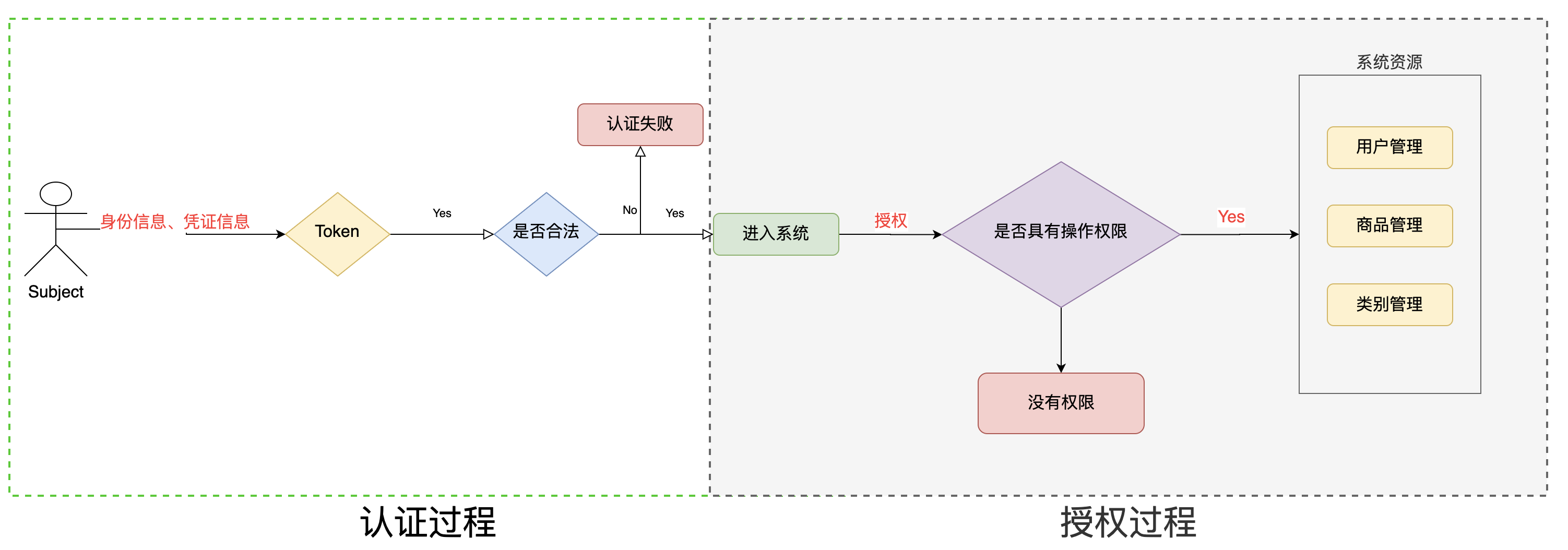
授权,即访问控制,控制谁能访问哪些资源。主体进行身份认证后需要分配权限方可访问系统的资源,对于某些资源没有权限是无法访问的。
5.2 关键对象
授权可简单理解为who对what(which)进行How操作:
Who,即主体(Subject),主体需要访问系统中的资源。What,即资源(Resource),如系统菜单、页面、按钮、类方法、系统商品信息等。资源包括资源类型和资源实例,比如商品信息为资源类型,类型为t01的商品为资源实例,编号为001的商品信息也属于资源实例。How,权限/许可(Permission),规定了主体对资源的操作许可,权限离开资源没有意义,如用户查询权限、用户添加权限、某个类方法的调用权限、编号为001用户的修改权限等,通过权限可知主体对哪些资源都有哪些操作许可。5.3 授权流程
5.4 授权方式
-
基于角色的访问控制
-
RBAC基于角色的访问控制(Role-Based Access Control)是以角色为中心进行访问控制
if(subject.hasRole("admin")){ //操作什么资源 }- 1
- 2
- 3
-
-
基于资源的访问控制
-
RBAC基于资源的访问控制(Resource-Based Access Control)是以资源为中心进行访问控制
if(subject.isPermission("user:update:01")){ //资源实例 //对资源01用户具有修改的权限 } if(subject.isPermission("user:update:*")){ //资源类型 //对 所有的资源 用户具有更新的权限 }- 1
- 2
- 3
- 4
- 5
- 6
-
5.5 权限字符串
权限字符串的规则是:资源标识符:操作:资源实例标识符,意思是对哪个资源的哪个实例具有什么操作,“:”是资源/操作/实例的分割符,权限字符串也可以使用*通配符。
例子:
- 用户创建权限:user:create,或user:create:*
- 用户修改实例001的权限:user:update:001
- 用户实例001的所有权限:user:*:001
5.6 shiro中授权编程实现方式
-
编程式
Subject subject = SecurityUtils.getSubject(); if(subject.hasRole(“admin”)) { //有权限 } else { //无权限 }- 1
- 2
- 3
- 4
- 5
- 6
-
注解式
@RequiresRoles("admin") public void hello() { //有权限 }- 1
- 2
- 3
- 4
-
标签式
JSP/GSP 标签:在JSP/GSP 页面通过相应的标签完成:- 1
- 2
- 3
- 4
- 5
5.7 开发授权
1.realm的实现
package com.lut.realm; import org.apache.shiro.authc.AuthenticationException; import org.apache.shiro.authc.AuthenticationInfo; import org.apache.shiro.authc.AuthenticationToken; import org.apache.shiro.authc.SimpleAuthenticationInfo; import org.apache.shiro.authz.AuthorizationInfo; import org.apache.shiro.authz.SimpleAuthorizationInfo; import org.apache.shiro.realm.AuthorizingRealm; import org.apache.shiro.subject.PrincipalCollection; import org.apache.shiro.util.ByteSource; /** * 使用自定义realm 加入md5 + salt +hash * 实现授权操作 */ public class CustomerMd5Realm extends AuthorizingRealm { //授权 @Override protected AuthorizationInfo doGetAuthorizationInfo(PrincipalCollection principals) { String primaryPrincipal = (String)principals.getPrimaryPrincipal(); System.out.println("身份信息: "+primaryPrincipal); //用户名 //根据身份信息 用户名 获取当前用户的角色信息,以及权限信息 SimpleAuthorizationInfo simpleAuthorizationInfo = new SimpleAuthorizationInfo(); //假设 admin,user 是从数据库查到的 角色信息 simpleAuthorizationInfo.addRole("admin"); simpleAuthorizationInfo.addRole("user"); //假设 ... 是从数据库查到的 权限信息赋值给权限对象 simpleAuthorizationInfo.addStringPermission("user:*:01"); simpleAuthorizationInfo.addStringPermission("prodect:*");//第三个参数为*省略 return simpleAuthorizationInfo; } //认证 @Override protected AuthenticationInfo doGetAuthenticationInfo(AuthenticationToken token) throws AuthenticationException { //获取 token中的 用户名 String principal = (String) token.getPrincipal(); //假设这是从数据库查询到的信息 String username="zhangsan"; String password="7268f6d32ec8d6f4c305ae92395b00e8";//加密后 //根据用户名查询数据库 if (username.equals(principal)) { //参数1:数据库用户名 //参数2:数据库md5+salt之后的密码 //参数3:注册时的随机盐 //参数4:realm的名字 return new SimpleAuthenticationInfo(principal, password, ByteSource.Util.bytes("@#$*&QU7O0!"), this.getName()); } return null; } }- 1
- 2
- 3
- 4
- 5
- 6
- 7
- 8
- 9
- 10
- 11
- 12
- 13
- 14
- 15
- 16
- 17
- 18
- 19
- 20
- 21
- 22
- 23
- 24
- 25
- 26
- 27
- 28
- 29
- 30
- 31
- 32
- 33
- 34
- 35
- 36
- 37
- 38
- 39
- 40
- 41
- 42
- 43
- 44
- 45
- 46
- 47
- 48
- 49
- 50
- 51
- 52
- 53
- 54
- 55
- 56
- 57
- 58
- 59
- 60
- 61
- 62
2.授权
package com.lut.test; import com.lut.realm.CustomerMd5Realm; import org.apache.commons.collections.ArrayStack; import org.apache.shiro.SecurityUtils; import org.apache.shiro.authc.IncorrectCredentialsException; import org.apache.shiro.authc.UnknownAccountException; import org.apache.shiro.authc.UsernamePasswordToken; import org.apache.shiro.authc.credential.HashedCredentialsMatcher; import org.apache.shiro.mgt.DefaultSecurityManager; import org.apache.shiro.subject.Subject; import java.util.Arrays; public class TestCustomerMd5RealmAuthenicator { public static void main(String[] args) { //1.创建安全管理器 DefaultSecurityManager defaultSecurityManager = new DefaultSecurityManager(); //2.注入realm CustomerMd5Realm realm = new CustomerMd5Realm(); //3.设置realm使用hash凭证匹配器 HashedCredentialsMatcher credentialsMatcher = new HashedCredentialsMatcher(); //声明:使用的算法 credentialsMatcher.setHashAlgorithmName("md5"); //声明:散列次数 credentialsMatcher.setHashIterations(1024); realm.setCredentialsMatcher(credentialsMatcher); defaultSecurityManager.setRealm(realm); //4.将安全管理器注入安全工具 SecurityUtils.setSecurityManager(defaultSecurityManager); //5.通过安全工具类获取subject Subject subject = SecurityUtils.getSubject(); //6.认证 UsernamePasswordToken token = new UsernamePasswordToken("zhangsan", "123"); try { subject.login(token); System.out.println("登录成功"); } catch (UnknownAccountException e) { e.printStackTrace(); System.out.println("用户名错误"); }catch (IncorrectCredentialsException e){ e.printStackTrace(); System.out.println("密码错误"); } //授权 if (subject.isAuthenticated()){ //基于角色权限控制 System.out.println(subject.hasRole("admin")); //基于多角色的权限控制 System.out.println(subject.hasAllRoles(Arrays.asList("admin", "user")));//true System.out.println(subject.hasAllRoles(Arrays.asList("admin", "manager")));//false //是否具有其中一个角色 boolean[] booleans = subject.hasRoles(Arrays.asList("admin", "user", "manager")); for (boolean aBoolean : booleans) { System.out.println(aBoolean); } System.out.println("====这是一个分隔符===="); //基于权限字符串的访问控制 资源标识符:操作:资源类型 //用户具有的权限 user:*:01 prodect:* System.out.println("权限:"+subject.isPermitted("user:update:01")); System.out.println("权限:"+subject.isPermitted("prodect:update:02")); //分别具有哪些权限 boolean[] permitted = subject.isPermitted("user:*:01", "user:update:02"); for (boolean b : permitted) { System.out.println(b); } //同时具有哪些权限 boolean permittedAll = subject.isPermittedAll("prodect:*:01", "prodect:update:03"); System.out.println(permittedAll); } } }- 1
- 2
- 3
- 4
- 5
- 6
- 7
- 8
- 9
- 10
- 11
- 12
- 13
- 14
- 15
- 16
- 17
- 18
- 19
- 20
- 21
- 22
- 23
- 24
- 25
- 26
- 27
- 28
- 29
- 30
- 31
- 32
- 33
- 34
- 35
- 36
- 37
- 38
- 39
- 40
- 41
- 42
- 43
- 44
- 45
- 46
- 47
- 48
- 49
- 50
- 51
- 52
- 53
- 54
- 55
- 56
- 57
- 58
- 59
- 60
- 61
- 62
- 63
- 64
- 65
- 66
- 67
- 68
- 69
- 70
- 71
- 72
- 73
- 74
- 75
- 76
- 77
- 78
- 79
- 80
- 81
- 82
- 83
- 84
- 85
- 86
- 87
- 88
- 89
- 90
- 91
-
相关阅读:
如何系统 如何进行SQL监控-执行SQL分析打印
AntD上传文件 结合Axios 服务端由Spring MVC接收
自动化运维—ansible
jbase仪器接口设计
JavaScript_Pig Game切换当前玩家
2、Mybatis框架的添加功能(Mybatis是面向接口编程,要先有接口)
Flutter开发 - iconfont妙用(手把手教程)
批量虚化边框并一键褪色的简单教程
PDF怎么转图片格式?分享三个不错的方法
springboot 集成 Swagger2(速通)
- 原文地址:https://blog.csdn.net/m0_67402125/article/details/126496318