-
基于springboot的高校学科竞赛系统
博主主页:猫头鹰源码
博主简介:Java领域优质创作者、CSDN博客专家、公司架构师、全网粉丝5万+、专注Java技术领域和毕业设计项目实战
主要内容:毕业设计(Javaweb项目|小程序等)、简历模板、学习资料、面试题库、技术咨询
文末联系获取
项目介绍:
该系统创作于2022年3月,包含详细数据库设计。基于springboot技术,数据层为MyBatis,mysql数据库,页面采用html,具有完整的业务逻辑,适合选题:学科竞赛、竞赛、校园竞赛等。
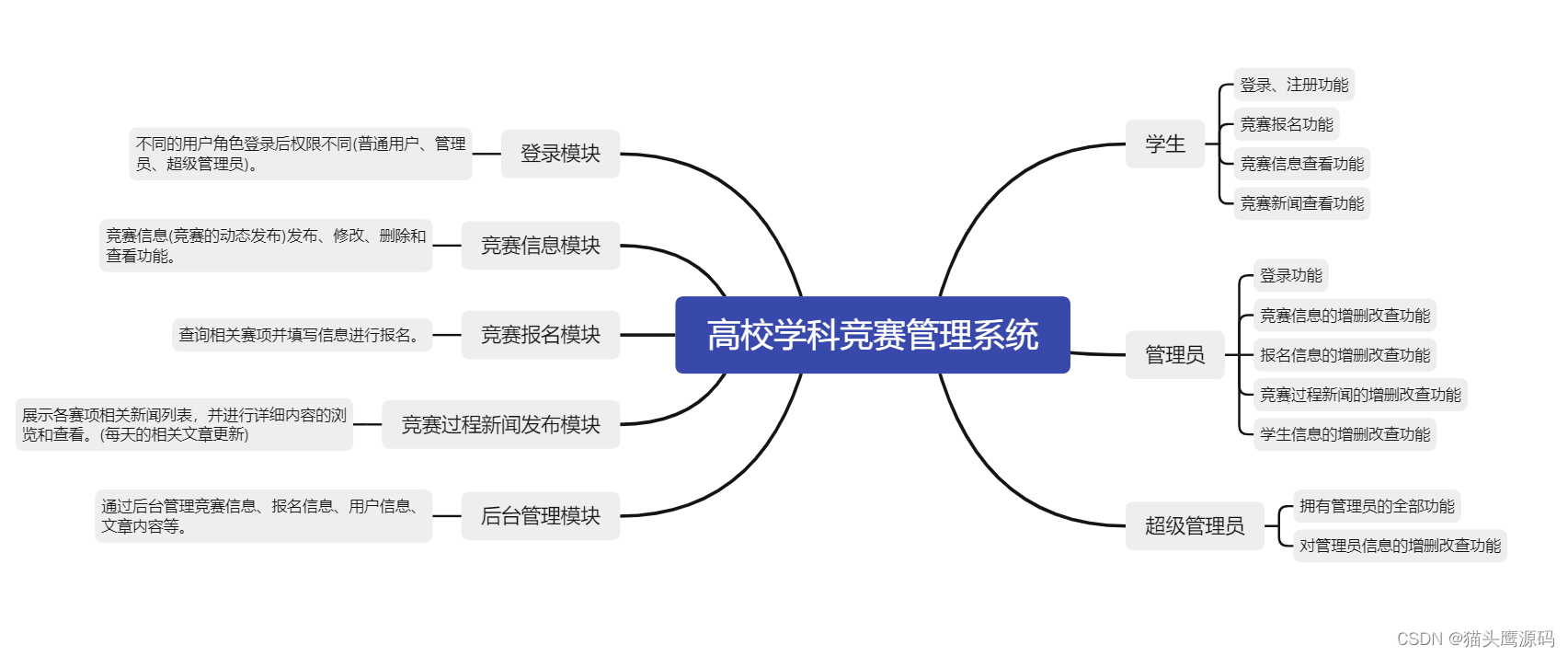
项目功能:
数据库设计:

系统包含技术:
后端:springBoot、mybatis
前端:bootstrap、js、css等,html页面
开发工具:idea
数据库:mysql 5.7
JDK版本:jdk1.8部分截图说明:
下面是用户首页

下面展示的是竞赛信息,会显示竞赛的进行状态

下面是竞赛相关新闻

可以查看新闻详情

下面是管理员登录

登录后看到首页

管理员可以维护竞赛信息

管理员维护学生信息

管理员维护新闻

项目结构也是规范的

部分代码:
- /**进入列表页面*/
- @GetMapping("/competition")
- public String userIframe(){
- return "CompetitionList";
- }
- /**列表数据*/
- @GetMapping("/list")
- @ResponseBody
- public PageResultVo findCompetition(Competition competition, Integer limit, Integer page){
- PageHelper.startPage(page,limit);
- List<Competition> competitionList = competitionService.selectByCondition(competition);
- PageInfo<Competition> pages = new PageInfo<>(competitionList);
- return JsonData.table(competitionList,pages.getTotal());
- }
- /**
- * 后台内容图片上传
- * @param dropFile
- * @param request
- * @return
- */
- @RequestMapping(value = "/ContentUpload", method = RequestMethod.POST)
- @ResponseBody
- public Map<String, Object> hotelContentUpload(MultipartFile dropFile, HttpServletRequest request) {
- Map<String, Object> result = new HashMap<>();
- //获取文件后缀
- String fileName = dropFile.getOriginalFilename();
- String fileSuffix = fileName.substring(fileName.lastIndexOf('.'));
- //文件存放路径
- String fileDirPath = new String(uploadDir);
- File fileDir = new File(fileDirPath);
- //判断文件是否存在
- if (!fileDir.exists()){
- fileDir.mkdirs();
- }
- File file = new File(fileDir.getAbsolutePath()+File.separator+ UUID.randomUUID() + fileSuffix);
- try {
- dropFile.transferTo(file);
- } catch (IOException e) {
- e.printStackTrace();
- }
- //传到前端
- result.put("errno",0);
- result.put("data",new String[] {"http://localhost:"+port+"/upload/" + file.getName()});
- return result;
- }
- /**详情*/
- @GetMapping("/query")
- public String query(String id,Model model) throws ParseException {
- Competition competition = competitionService.selectById(id);
- model.addAttribute("id",id);
- model.addAttribute("competition",competition);
- if(competition.getStartTime()==null
- || competition.getStartTime().equals("")
- || competition.getEndTime()==null
- || competition.getEndTime().equals("")
- ){
- competition.setStatus("00");
- }
- SimpleDateFormat sdf = new SimpleDateFormat("yyyy-MM-dd");
- Date start = sdf.parse(competition.getStartTime());
- Date end = sdf.parse(competition.getEndTime());
- Date current = new Date();
- if(current.before(start)){
- competition.setStatus("01");
- }else if(end.before(current)){
- competition.setStatus("03");
- }else{
- competition.setStatus("02");
- }
- return "CompetitonDetail";
- }
- /**编辑详情*/
- @GetMapping("/edit")
- @ResponseBody
- public Competition edit(Model model, String id){
- return competitionService.selectById(id);
- }
- /**编辑*/
- @PostMapping("/edit")
- @ResponseBody
- public JsonData edit(Competition competition){
- int a = competitionService.updateById(competition);
- if (a > 0) {
- return JsonData.success(null,"编辑成功!");
- } else {
- return JsonData.fail("编辑失败");
- }
- }
以上就是部分功能展示,从整体上来看,本系统功能是十分完整的,界面设计简洁大方,交互友好,数据库设计也很合理,规模适中,代码工整,清晰,适合学习使用。
好了,今天就到这儿吧,小伙伴们点赞、收藏、评论,一键三连走起呀,下期见~~ -
相关阅读:
视频生成模型Sora的全面解析:从AI绘画、ViT到ViViT、DiT、VDT、NaViT、VideoPoet
计算机网络实验:路由器交换机与其基本配置操作、常见命令
springboot相关-JDBC
服务器管理
流媒体分析之srt 协议srs 服务器实现
【已解决】Python打包文件执行报错:ModuleNotFoundError: No module named ‘pymssql‘
十、JVM常用启动参数
Postgresql在jdbc处理bit字段的解决方案
交叉验证和网格验证的方法
基于HTML仿oppo手机商城电商项目的设计与实现6个页面
- 原文地址:https://blog.csdn.net/mtyedu/article/details/126491690
