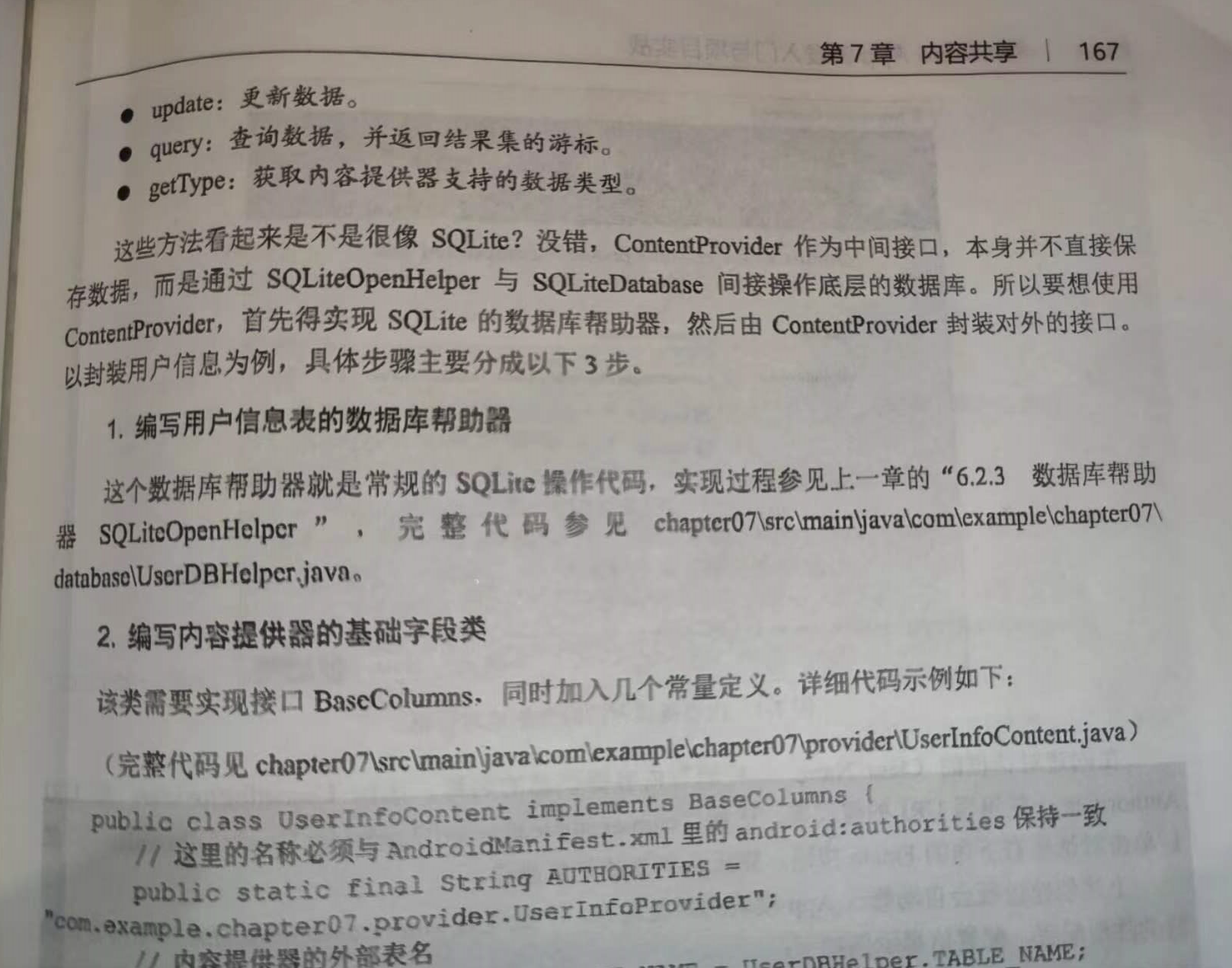
利用ContentProvider只实现服务端App的数据封装,如果客户端App想访问对方的内部数据,就要通过内容解析器ContentResolver访问。
内容解析器是客户端App操作服务端数据的工具,相对应的内容提供器是服务端的数据接口。
ContentResolver提供的方法与ContentProvider是一一对应的,比如query、insert、update、delete、getType等方法

==================================================================================================
0、前提,用户信息表信息: UserInfo
- package com.example.myapplication.bean;
-
- public class UserInfo {
- public long rowid; // 行号
- public int xuhao; // 序号
- public String name; // 姓名
- public int age; // 年龄
- public long height; // 身高
- public float weight; // 体重
- public boolean married; // 婚否
- public String update_time; // 更新时间
- public String phone; // 手机号
- public String password; // 密码
-
- public UserInfo() {
- rowid = 0L;
- xuhao = 0;
- name = "";
- age = 0;
- height = 0L;
- weight = 0.0f;
- married = false;
- update_time = "";
- phone = "";
- password = "";
- }
- }


1、编写用户信息表的数据库帮助器: UserDBHelper
- package com.example.myapplication.database;
-
- import android.annotation.SuppressLint;
- import android.content.ContentValues;
- import android.content.Context;
- import android.database.Cursor;
- import android.database.sqlite.SQLiteDatabase;
- import android.database.sqlite.SQLiteOpenHelper;
- import android.util.Log;
- import com.example.myapplication.bean.UserInfo;
- import java.util.ArrayList;
- import java.util.List;
-
- @SuppressLint("DefaultLocale")
- public class UserDBHelper extends SQLiteOpenHelper
- {
- private static final String TAG = "UserDBHelper";
- private static final String DB_NAME = "user.db"; // 数据库的名称
- private static final int DB_VERSION = 1; // 数据库的版本号
- private static UserDBHelper mHelper = null; // 数据库帮助器的实例
- private SQLiteDatabase mDB = null; // 数据库的实例
- public static final String TABLE_NAME = "user_info"; // 表的名称
-
-
- private UserDBHelper(Context context)
- {
- super(context, DB_NAME, null, DB_VERSION);
- }
-
- private UserDBHelper(Context context, int version)
- {
- super(context, DB_NAME, null, version);
- }
-
- // 利用单例模式获取数据库帮助器的唯一实例
- public static UserDBHelper getInstance(Context context, int version)
- {
- if (version > 0 && mHelper == null)
- {
- mHelper = new UserDBHelper(context, version);
- }
- else if (mHelper == null)
- {
- mHelper = new UserDBHelper(context);
- }
- return mHelper;
- }
-
- // 打开数据库的读连接
- public SQLiteDatabase openReadLink()
- {
- if (mDB == null || !mDB.isOpen())
- {
- mDB = mHelper.getReadableDatabase();
- }
-
- return mDB;
- }
-
- // 打开数据库的写连接
- public SQLiteDatabase openWriteLink()
- {
- if (mDB == null || !mDB.isOpen())
- {
- mDB = mHelper.getWritableDatabase();
- }
-
- return mDB;
- }
-
- // 关闭数据库连接
- public void closeLink()
- {
- if (mDB != null && mDB.isOpen())
- {
- mDB.close();
- mDB = null;
- }
- }
-
- // 创建数据库,执行建表语句
- public void onCreate(SQLiteDatabase db)
- {
- Log.d(TAG, "onCreate");
- String drop_sql = "DROP TABLE IF EXISTS " + TABLE_NAME + ";";
- Log.d(TAG, "drop_sql:" + drop_sql);
- db.execSQL(drop_sql);
- String create_sql = "CREATE TABLE IF NOT EXISTS " + TABLE_NAME + " ("
- + "_id INTEGER PRIMARY KEY AUTOINCREMENT NOT NULL,"
- + "name VARCHAR NOT NULL," + "age INTEGER NOT NULL,"
- + "height LONG NOT NULL," + "weight FLOAT NOT NULL,"
- + "married INTEGER NOT NULL," + "update_time VARCHAR NOT NULL"
- //演示数据库升级时要先把下面这行注释
- + ",phone VARCHAR" + ",password VARCHAR"
- + ");";
-
- Log.d(TAG, "create_sql:" + create_sql);
-
- db.execSQL(create_sql); // 执行完整的SQL语句
- }
-
- // 修改数据库,执行表结构变更语句
- public void onUpgrade(SQLiteDatabase db, int oldVersion, int newVersion)
- {
- Log.d(TAG, "onUpgrade oldVersion=" + oldVersion + ", newVersion=" + newVersion);
-
- if (newVersion > 1)
- {
- //Android的ALTER命令不支持一次添加多列,只能分多次添加
- String alter_sql = "ALTER TABLE " + TABLE_NAME + " ADD COLUMN " + "phone VARCHAR;";
- Log.d(TAG, "alter_sql:" + alter_sql);
- db.execSQL(alter_sql);
- alter_sql = "ALTER TABLE " + TABLE_NAME + " ADD COLUMN " + "password VARCHAR;";
- Log.d(TAG, "alter_sql:" + alter_sql);
- db.execSQL(alter_sql);
- }
- }
-
- // 根据指定条件删除表记录
- public int delete(String condition)
- {
- // 执行删除记录动作,该语句返回删除记录的数目
- return mDB.delete(TABLE_NAME, condition, null);
- }
-
-
- // 删除该表的所有记录
- public int deleteAll()
- {
- // 执行删除记录动作,该语句返回删除记录的数目
- return mDB.delete(TABLE_NAME, "1=1", null);
- }
-
-
- // 往该表添加一条记录
- public long insert(UserInfo info)
- {
- List<UserInfo> infoList = new ArrayList<UserInfo>();
- infoList.add(info);
- return insert(infoList);
- }
-
- // 往该表添加多条记录
- public long insert(List<UserInfo> infoList)
- {
- long result = -1;
-
- for (int i = 0; i < infoList.size(); i++)
- {
- UserInfo info = infoList.get(i);
- List<UserInfo> tempList = new ArrayList<UserInfo>();
-
- // 如果存在同名记录,则更新记录
- // 注意条件语句的等号后面要用单引号括起来
- if (info.name != null && info.name.length() > 0)
- {
- String condition = String.format("name='%s'", info.name);
- tempList = query(condition);
-
- if (tempList.size() > 0)
- {
- update(info, condition);
- result = tempList.get(0).rowid;
- continue;
- }
-
- }
-
- // 如果存在同样的手机号码,则更新记录
- if (info.phone != null && info.phone.length() > 0)
- {
- String condition = String.format("phone='%s'", info.phone);
- tempList = query(condition);
-
- if (tempList.size() > 0)
- {
- update(info, condition);
- result = tempList.get(0).rowid;
- continue;
- }
- }
-
- // 不存在唯一性重复的记录,则插入新记录
- ContentValues cv = new ContentValues();
-
- cv.put("name", info.name);
- cv.put("age", info.age);
- cv.put("height", info.height);
- cv.put("weight", info.weight);
- cv.put("married", info.married);
- cv.put("update_time", info.update_time);
- cv.put("phone", info.phone);
- cv.put("password", info.password);
-
- // 执行插入记录动作,该语句返回插入记录的行号
- result = mDB.insert(TABLE_NAME, "", cv);
-
- if (result == -1) // 添加成功则返回行号,添加失败则返回-1
- {
- return result;
- }
- }
-
- return result;
- }
-
- // 根据条件更新指定的表记录
- public int update(UserInfo info, String condition)
- {
- ContentValues cv = new ContentValues();
- cv.put("name", info.name);
- cv.put("age", info.age);
- cv.put("height", info.height);
- cv.put("weight", info.weight);
- cv.put("married", info.married);
- cv.put("update_time", info.update_time);
- cv.put("phone", info.phone);
- cv.put("password", info.password);
- // 执行更新记录动作,该语句返回更新的记录数量
- return mDB.update(TABLE_NAME, cv, condition, null);
- }
-
- public int update(UserInfo info)
- {
- // 执行更新记录动作,该语句返回更新的记录数量
- return update(info, "rowid=" + info.rowid);
- }
-
- // 根据指定条件查询记录,并返回结果数据列表
- public List<UserInfo> query(String condition)
- {
- String sql = String.format("select rowid,_id,name,age,height,weight,married,update_time," +
- "phone,password from %s where %s;", TABLE_NAME, condition);
-
- Log.d(TAG, "query sql: " + sql);
-
- List<UserInfo> infoList = new ArrayList<UserInfo>();
-
- // 执行记录查询动作,该语句返回结果集的游标
- Cursor cursor = mDB.rawQuery(sql, null);
-
- // 循环取出游标指向的每条记录
- while (cursor.moveToNext())
- {
- UserInfo info = new UserInfo();
- info.rowid = cursor.getLong(0); // 取出长整型数
- info.xuhao = cursor.getInt(1); // 取出整型数
- info.name = cursor.getString(2); // 取出字符串
- info.age = cursor.getInt(3);
- info.height = cursor.getLong(4);
- info.weight = cursor.getFloat(5); // 取出浮点数
- //SQLite没有布尔型,用0表示false,用1表示true
- info.married = (cursor.getInt(6) == 0) ? false : true;
- info.update_time = cursor.getString(7);
- info.phone = cursor.getString(8);
- info.password = cursor.getString(9);
- infoList.add(info);
- }
-
- cursor.close(); // 查询完毕,关闭数据库游标
-
- return infoList;
- }
-
- // 根据手机号码查询指定记录
- public UserInfo queryByPhone(String phone)
- {
- UserInfo info = null;
- List<UserInfo> infoList = query(String.format("phone='%s'", phone));
-
- if (infoList.size() > 0)
- {
- info = infoList.get(0);
- }
-
- return info;
- }
-
- }

2、编写内容提供器的基础字段类:UerInfoContent
- package com.example.myapplication.provider;
-
- import android.net.Uri;
- import android.provider.BaseColumns;
- import com.example.myapplication.database.UserDBHelper;
-
- public class UserInfoContent implements BaseColumns
- {
- // 这里的名称必须与AndroidManifest.xml里的android:authorities保持一致
- public static final String AUTHORITIES = "com.example.chapter07.provider.UserInfoProvider";
-
-
- // 内容提供器的外部表名
- public static final String TABLE_NAME = UserDBHelper.TABLE_NAME;
-
-
- // 访问内容提供器的URI
- public static final Uri CONTENT_URI = Uri.parse("content://" + AUTHORITIES + "/user");
-
-
- // 下面是该表的各个字段名称
- public static final String USER_NAME = "name";
- public static final String USER_AGE = "age";
- public static final String USER_HEIGHT = "height";
- public static final String USER_WEIGHT = "weight";
- public static final String USER_MARRIED = "married";
-
-
- // 默认的排序方法
- public static final String DEFAULT_SORT_ORDER = "_id desc";
- }

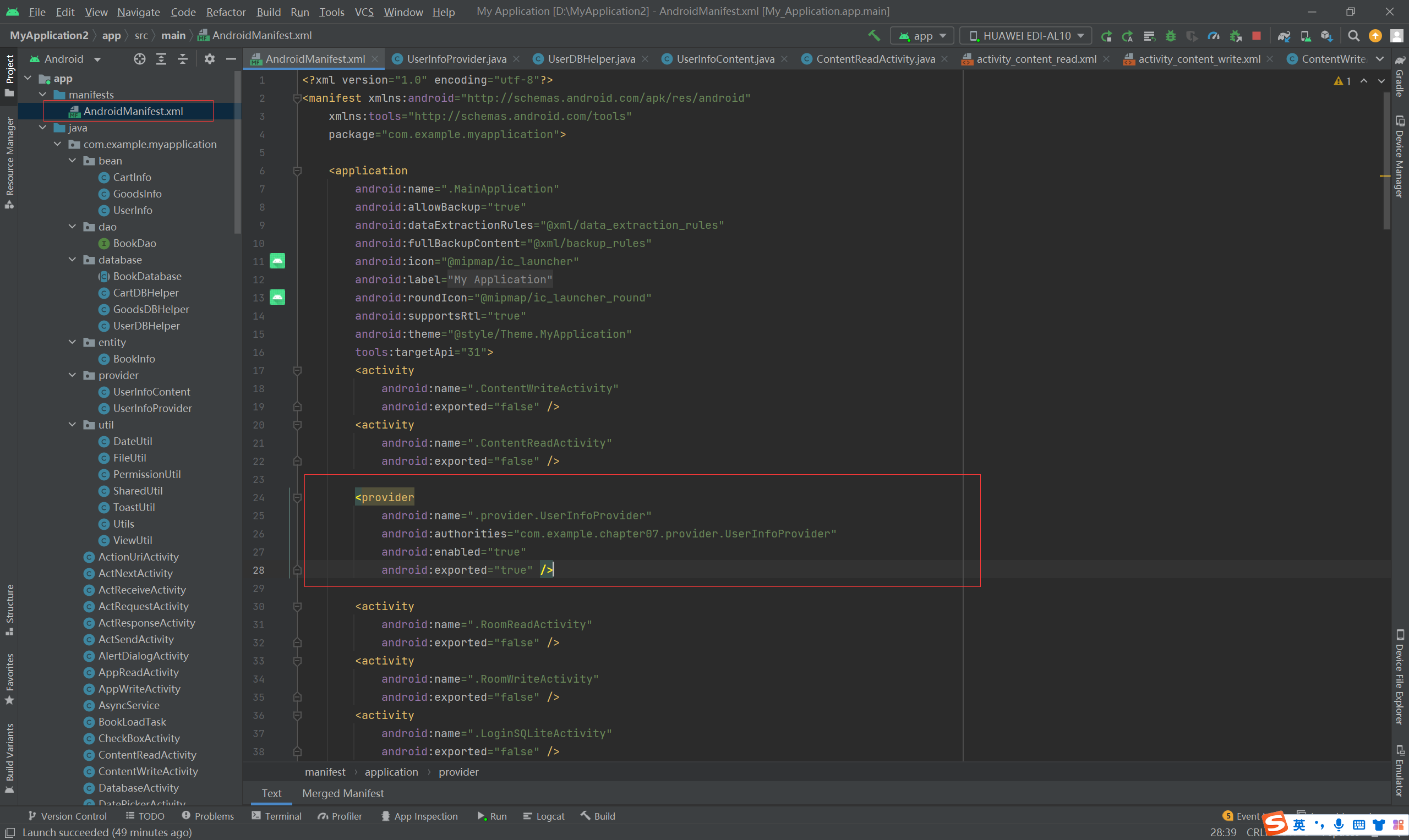
3、通过右键菜单,创建内容提供器:UserInfoProvider
- package com.example.myapplication.provider;
-
- import android.content.ContentProvider;
- import android.content.ContentUris;
- import android.content.ContentValues;
- import android.content.UriMatcher;
- import android.database.Cursor;
- import android.database.sqlite.SQLiteDatabase;
- import android.net.Uri;
- import com.example.myapplication.database.UserDBHelper;
-
- public class UserInfoProvider extends ContentProvider
- {
- private final static String TAG = "UserInfoProvider";
-
- private UserDBHelper userDB; // 声明一个用户数据库的帮助器对象
-
- public static final int USER_INFO = 1; // Uri匹配时的代号
-
- public static final UriMatcher uriMatcher = new UriMatcher(UriMatcher.NO_MATCH);
-
- static { // 往Uri匹配器中添加指定的数据路径
- uriMatcher.addURI(UserInfoContent.AUTHORITIES, "/user", USER_INFO);
- }
-
- // 创建ContentProvider时调用,可在此获取具体的数据库帮助器实例
- @Override
- public boolean onCreate()
- {
- userDB = UserDBHelper.getInstance(getContext(), 1);
- return true;
- }
-
- // 插入数据
- @Override
- public Uri insert(Uri uri, ContentValues values)
- {
- if (uriMatcher.match(uri) == USER_INFO) // 匹配到了用户信息表
- {
- // 获取SQLite数据库的写连接
- SQLiteDatabase db = userDB.getWritableDatabase();
-
- // 向指定的表插入数据,返回记录的行号
- long rowId = db.insert(UserInfoContent.TABLE_NAME, null, values);
-
- if (rowId > 0) // 判断插入是否执行成功
- {
- // 如果添加成功,就利用新记录的行号生成新的地址
- Uri newUri = ContentUris.withAppendedId(UserInfoContent.CONTENT_URI, rowId);
- // 通知监听器,数据已经改变
- getContext().getContentResolver().notifyChange(newUri, null);
- }
-
- db.close(); // 关闭SQLite数据库连接
- }
-
- return uri;
- }
-
- // 根据指定条件删除数据
- @Override
- public int delete(Uri uri, String selection, String[] selectionArgs)
- {
- int count = 0;
-
- if (uriMatcher.match(uri) == USER_INFO) // 匹配到了用户信息表
- {
- // 获取SQLite数据库的写连接
- SQLiteDatabase db = userDB.getWritableDatabase();
- // 执行SQLite的删除操作,并返回删除记录的数目
- count = db.delete(UserInfoContent.TABLE_NAME, selection, selectionArgs);
- db.close(); // 关闭SQLite数据库连接
- }
- return count;
- }
-
- // 根据指定条件查询数据库
- @Override
- public Cursor query(Uri uri, String[] projection, String selection, String[] selectionArgs, String sortOrder)
- {
- Cursor cursor = null;
-
- if (uriMatcher.match(uri) == USER_INFO) // 匹配到了用户信息表
- {
- // 获取SQLite数据库的读连接
- SQLiteDatabase db = userDB.getReadableDatabase();
- // 执行SQLite的查询操作
- cursor = db.query(UserInfoContent.TABLE_NAME,
- projection, selection, selectionArgs, null, null, sortOrder);
- // 设置内容解析器的监听
- cursor.setNotificationUri(getContext().getContentResolver(), uri);
- }
- return cursor; // 返回查询结果集的游标
- }
-
- // 获取Uri支持的数据类型,暂未实现
- @Override
- public String getType(Uri uri)
- {
- throw new UnsupportedOperationException("Not yet implemented");
- }
-
- // 更新数据,暂未实现
- @Override
- public int update(Uri uri, ContentValues values, String selection, String[] selectionArgs)
- {
- throw new UnsupportedOperationException("Not yet implemented");
- }
- }


写数据:
布局:
- <LinearLayout xmlns:android="http://schemas.android.com/apk/res/android"
- android:layout_width="match_parent"
- android:layout_height="match_parent"
- android:orientation="vertical"
- android:padding="5dp" >
-
- <RelativeLayout
- android:layout_width="match_parent"
- android:layout_height="40dp" >
-
- <TextView
- android:id="@+id/tv_name"
- android:layout_width="wrap_content"
- android:layout_height="match_parent"
- android:gravity="center"
- android:text="姓名:"
- android:textColor="@color/black"
- android:textSize="17sp" />
-
- <EditText
- android:id="@+id/et_name"
- android:layout_width="match_parent"
- android:layout_height="match_parent"
- android:layout_marginBottom="3dp"
- android:layout_marginTop="3dp"
- android:layout_toRightOf="@+id/tv_name"
- android:background="@drawable/editext_selector"
- android:gravity="left|center"
- android:hint="请输入姓名"
- android:inputType="text"
- android:maxLength="12"
- android:textColor="@color/black"
- android:textSize="17sp" />
- </RelativeLayout>
-
- <RelativeLayout
- android:layout_width="match_parent"
- android:layout_height="40dp" >
-
- <TextView
- android:id="@+id/tv_age"
- android:layout_width="wrap_content"
- android:layout_height="match_parent"
- android:gravity="center"
- android:text="年龄:"
- android:textColor="@color/black"
- android:textSize="17sp" />
-
- <EditText
- android:id="@+id/et_age"
- android:layout_width="match_parent"
- android:layout_height="match_parent"
- android:layout_marginBottom="3dp"
- android:layout_marginTop="3dp"
- android:layout_toRightOf="@+id/tv_age"
- android:background="@drawable/editext_selector"
- android:gravity="left|center"
- android:hint="请输入年龄"
- android:inputType="number"
- android:maxLength="2"
- android:textColor="@color/black"
- android:textSize="17sp" />
- </RelativeLayout>
-
- <RelativeLayout
- android:layout_width="match_parent"
- android:layout_height="40dp" >
-
- <TextView
- android:id="@+id/tv_height"
- android:layout_width="wrap_content"
- android:layout_height="match_parent"
- android:gravity="center"
- android:text="身高:"
- android:textColor="@color/black"
- android:textSize="17sp" />
-
- <EditText
- android:id="@+id/et_height"
- android:layout_width="match_parent"
- android:layout_height="match_parent"
- android:layout_marginBottom="3dp"
- android:layout_marginTop="3dp"
- android:layout_toRightOf="@+id/tv_height"
- android:background="@drawable/editext_selector"
- android:gravity="left|center"
- android:hint="请输入身高"
- android:inputType="number"
- android:maxLength="3"
- android:textColor="@color/black"
- android:textSize="17sp" />
- </RelativeLayout>
-
- <RelativeLayout
- android:layout_width="match_parent"
- android:layout_height="40dp" >
-
- <TextView
- android:id="@+id/tv_weight"
- android:layout_width="wrap_content"
- android:layout_height="match_parent"
- android:gravity="center"
- android:text="体重:"
- android:textColor="@color/black"
- android:textSize="17sp" />
-
- <EditText
- android:id="@+id/et_weight"
- android:layout_width="match_parent"
- android:layout_height="match_parent"
- android:layout_marginBottom="3dp"
- android:layout_marginTop="3dp"
- android:layout_toRightOf="@+id/tv_weight"
- android:background="@drawable/editext_selector"
- android:gravity="left|center"
- android:hint="请输入体重"
- android:inputType="numberDecimal"
- android:maxLength="5"
- android:textColor="@color/black"
- android:textSize="17sp" />
- </RelativeLayout>
-
- <Button
- android:id="@+id/btn_add_user"
- android:layout_width="match_parent"
- android:layout_height="wrap_content"
- android:gravity="center"
- android:text="添加用户信息"
- android:textColor="@color/black"
- android:textSize="17sp" />
-
- </LinearLayout>

代码:
- package com.example.myapplication;
-
- import android.annotation.SuppressLint;
- import android.content.ContentValues;
- import android.os.Bundle;
- import android.view.View;
- import android.widget.EditText;
- import androidx.appcompat.app.AppCompatActivity;
- import com.example.myapplication.bean.UserInfo;
- import com.example.myapplication.provider.UserInfoContent;
-
- @SuppressLint("DefaultLocale")
- public class ContentWriteActivity extends AppCompatActivity implements View.OnClickListener
- {
- private static final String TAG = "ContentWriteActivity";
- private EditText et_name;
- private EditText et_age;
- private EditText et_height;
- private EditText et_weight;
-
- @Override
- protected void onCreate(Bundle savedInstanceState)
- {
- super.onCreate(savedInstanceState);
- setContentView(R.layout.activity_content_write);
-
- et_name = findViewById(R.id.et_name);
- et_age = findViewById(R.id.et_age);
- et_height = findViewById(R.id.et_height);
- et_weight = findViewById(R.id.et_weight);
-
- findViewById(R.id.btn_add_user).setOnClickListener(this);
- }
-
- @Override
- public void onClick(View v)
- {
-
- if (v.getId() == R.id.btn_add_user)
- {
- UserInfo user = new UserInfo();
- user.name = et_name.getText().toString();
- user.age = Integer.parseInt(et_age.getText().toString());
- user.height = Integer.parseInt(et_height.getText().toString());
- user.weight = Float.parseFloat(et_weight.getText().toString());
- addUser(user); // 添加一条用户记录
- }
-
- }
-
- // 添加一条用户记录
- private void addUser(UserInfo user)
- {
- ContentValues name = new ContentValues();
- name.put("name", user.name);
- name.put("age", user.age);
- name.put("height", user.height);
- name.put("weight", user.weight);
- name.put("married", 0);
- name.put("update_time", DateUtil.getNowDateTime(""));
-
- // 通过内容解析器往指定Uri添加用户信息
- getContentResolver().insert(UserInfoContent.CONTENT_URI, name);
-
- ToastUtil.show(this, "成功添加用户信息");
-
- }
-
- }


读数据:
布局:
- <LinearLayout xmlns:android="http://schemas.android.com/apk/res/android"
- android:layout_width="match_parent"
- android:layout_height="match_parent"
- android:orientation="vertical" >
-
- <Button
- android:id="@+id/btn_delete"
- android:layout_width="match_parent"
- android:layout_height="wrap_content"
- android:text="删除所有记录"
- android:textColor="@color/black"
- android:textSize="17sp" />
-
- <TextView
- android:id="@+id/tv_desc"
- android:layout_width="match_parent"
- android:layout_height="wrap_content"
- android:paddingLeft="5dp"
- android:textColor="@color/black"
- android:textSize="17sp" />
-
- <ScrollView
- android:layout_width="match_parent"
- android:layout_height="wrap_content">
-
- <LinearLayout
- android:id="@+id/ll_list"
- android:layout_width="match_parent"
- android:layout_height="wrap_content"
- android:orientation="vertical" />
-
- </ScrollView>
-
- </LinearLayout>

代码:
- package com.example.myapplication;
-
- import androidx.appcompat.app.AppCompatActivity;
- import android.annotation.SuppressLint;
- import android.database.Cursor;
- import android.graphics.Color;
- import android.os.Bundle;
- import android.view.View;
- import android.widget.LinearLayout;
- import android.widget.TextView;
- import com.example.myapplication.bean.UserInfo;
- import com.example.myapplication.util.Utils;
- import com.example.myapplication.provider.UserInfoContent;
- import java.util.ArrayList;
- import java.util.List;
-
- @SuppressLint("DefaultLocale")
- public class ContentReadActivity extends AppCompatActivity implements View.OnClickListener
- {
- private static final String TAG = "ContentReadActivity";
-
- private TextView tv_desc;
- private LinearLayout ll_list; // 用户信息列表的线性布局
-
- @Override
- protected void onCreate(Bundle savedInstanceState)
- {
- super.onCreate(savedInstanceState);
- setContentView(R.layout.activity_content_read);
-
-
- findViewById(R.id.btn_delete).setOnClickListener(this);
-
- tv_desc = findViewById(R.id.tv_desc);
- ll_list = findViewById(R.id.ll_list);
-
- showAllUser(); // 显示所有的用户记录
- }
-
- // 显示所有的用户记录
- @SuppressLint("Range")
- private void showAllUser()
- {
- List<UserInfo> userList = new ArrayList<UserInfo>();
-
- // 通过内容解析器从指定Uri中获取用户记录的游标
- Cursor cursor = getContentResolver().query(UserInfoContent.CONTENT_URI, null, null, null, null);
-
- // 循环取出游标指向的每条用户记录
- while (cursor.moveToNext())
- {
- UserInfo user = new UserInfo();
- user.name = cursor.getString(cursor.getColumnIndex(UserInfoContent.USER_NAME));
- user.age = cursor.getInt(cursor.getColumnIndex(UserInfoContent.USER_AGE));
- user.height = cursor.getInt(cursor.getColumnIndex(UserInfoContent.USER_HEIGHT));
- user.weight = cursor.getFloat(cursor.getColumnIndex(UserInfoContent.USER_WEIGHT));
- userList.add(user); // 添加到用户信息列表
- }
-
- cursor.close(); // 关闭数据库游标
-
- String contactCount = String.format("当前共找到%d个用户", userList.size());
-
- tv_desc.setText(contactCount);
-
- ll_list.removeAllViews(); // 移除线性布局下面的所有下级视图
-
- for (UserInfo user : userList) // 遍历用户信息列表
- {
- String contactDesc = String.format("姓名为%s,年龄为%d,身高为%d,体重为%f\n", user.name, user.age, user.height, user.weight);
- TextView tv_contact = new TextView(this); // 创建一个文本视图
- tv_contact.setText(contactDesc);
- tv_contact.setTextColor(Color.BLACK);
- tv_contact.setTextSize(17);
-
- int pad = Utils.dip2px(this, 5);
-
- tv_contact.setPadding(pad, pad, pad, pad); // 设置文本视图的内部间距
-
- ll_list.addView(tv_contact); // 把文本视图添加至线性布局
-
- }
- }
-
- @Override
- public void onClick(View v)
- {
- if (v.getId() == R.id.btn_delete)
- {
- getContentResolver().delete(UserInfoContent.CONTENT_URI, "1=1", null);
-
- showAllUser();
-
- ToastUtil.show(this, "已删除所有记录");
- }
- }
- }


Utils
- package com.example.myapplication.util;
-
- import android.content.Context;
-
- public class Utils {
- // 根据手机的分辨率从 dp 的单位 转成为 px(像素)
- public static int dip2px(Context context, float dpValue) {
- // 获取当前手机的像素密度(1个dp对应几个px)
- float scale = context.getResources().getDisplayMetrics().density;
- return (int) (dpValue * scale + 0.5f); // 四舍五入取整
- }
-
- // 根据手机的分辨率从 px(像素) 的单位 转成为 dp
- public static int px2dip(Context context, float pxValue) {
- // 获取当前手机的像素密度(1个dp对应几个px)
- float scale = context.getResources().getDisplayMetrics().density;
- return (int) (pxValue / scale + 0.5f); // 四舍五入取整
- }
-
- }

ToastUtil
- package com.example.myapplication.util;
-
- import android.content.Context;
- import android.widget.Toast;
-
- public class ToastUtil {
-
- public static void show(Context ctx, String desc) {
- Toast.makeText(ctx, desc, Toast.LENGTH_SHORT).show();
- }
- }

DateUtil
- package com.example.myapplication.util;
-
- import android.annotation.SuppressLint;
- import android.text.TextUtils;
- import java.text.SimpleDateFormat;
- import java.util.Calendar;
- import java.util.Date;
-
- @SuppressLint("SimpleDateFormat")
- public class DateUtil
- {
- // 获取当前的日期时间
- public static String getNowDateTime(String formatStr)
- {
- String format = formatStr;
-
- if (TextUtils.isEmpty(format))
- {
- format = "yyyyMMddHHmmss";
- }
-
- SimpleDateFormat sdf = new SimpleDateFormat(format);
-
- return sdf.format(new Date());
- }
-
- // 获取当前的时间
- public static String getNowTime()
- {
- SimpleDateFormat sdf = new SimpleDateFormat("HH:mm:ss");
- return sdf.format(new Date());
- }
-
- // 获取当前的时间(精确到毫秒)
- public static String getNowTimeDetail()
- {
- SimpleDateFormat sdf = new SimpleDateFormat("HH:mm:ss.SSS");
- return sdf.format(new Date());
- }
-
- public static String formatDate(long time)
- {
- Date date = new Date(time);
- SimpleDateFormat sdf = new SimpleDateFormat("yyyy-MM-dd HH:mm:ss");
- return sdf.format(date);
- }
-
- public static String getDate(Calendar calendar) {
- Date date = calendar.getTime();
- // 创建一个日期格式化的工具
- SimpleDateFormat sdf = new SimpleDateFormat("yyyy-MM-dd");
- // 将当前日期时间按照指定格式输出格式化后的日期时间字符串
- return sdf.format(date);
- }
-
- public static String getMonth(Calendar calendar) {
- Date date = calendar.getTime();
- // 创建一个日期格式化的工具
- SimpleDateFormat sdf = new SimpleDateFormat("yyyy-MM");
- // 将当前日期时间按照指定格式输出格式化后的日期时间字符串
- return sdf.format(date);
- }
-
- public static Date formatString(String strTime) {
- Date date = new Date();
- SimpleDateFormat sdf = new SimpleDateFormat("yyyy-MM-dd");
- try {
- date = sdf.parse(strTime);
- } catch (Exception e) {
- e.printStackTrace();
- }
- return date;
- }
-
- }


========================================================================================================