-
vite+Vue3+ts之框架搭建过程与踩坑记录(持续补充)
一、序言
和 Webpack相比,Vite 具有以下特点: 快速的冷启动,不需要等待打包 即时的热模块更新 真正的按需编译,不用等待整个项目编译完成
Vite 优点 Vite 缺点 开发服务器比 Webpack 快 10-100 倍 只能针对现代浏览器(ES2015+) 将 code-splitting 作为优先事项 与 CommonJS 模块不完全兼容 处于测试阶段,仅支持 Vue 3 最小的脚手架不包括 Vuex、路由器等 不同的开发服务器与构建工具 二、创建项目
- 创建运行
# npm 6.x npm init vite@latest my-vue-app --template vue # npm 7+, 需要额外的双横线: npm init vite@latest my-vue-app -- --template vue # yarn yarn create vite my-vue-app --template vue # pnpm pnpm create vite my-vue-app -- --template vue- 1
- 2
- 3
- 4
- 5
- 6
- 7
- 8
- 9
- 10
- 11
可以使用npm创建新项目,也可以使用yarn创建新项目,如果没有yarn环境,需要npm install yarn,然后进入环境变量中将bin文件目录引入在系统文件中的path路径。
npm install/install yarn- 1
安装完成后运行项目
npm run dev/yarn dev- 1
- 进入html中修改尾缀将js改成ts
然后在script 里添加 lang=“ts”
 修改完之后,重启就可以访问项目了。虽然这样配置是可以了,但是打开main.ts会发现import App from App.vue会报错:Cannot find module ‘./App.vue’ or its corresponding type declarations.,这是因为现在ts还没有识别vue文件,需要进行下面步骤8
- 生成tsconfig.json或者手动新建
yarn add typescript -D npx tsc --init #生成tsconfig.json- 1
- 2

手动添加

tsconfig.json文件信息{ "compilerOptions": { /* 访问 https://aka.ms/tsconfig.json 以阅读有关此文件的更多信息 */ /* 基本选项 */ "incremental": true, /* 启用增量编译 */ "target": "ESNEXT", /* 指定 ECMAScript 目标版本:'ES3'、'ES5'(默认)、'ES2015'、'ES2016'、'ES2017'、'ES2018'、'ES2019'、'ES2020' 或 'ESNEXT'。 */ "module": "commonjs", /* 指定模块代码生成:“none”、“commonjs”、“amd”、“system”、“umd”、“es2015”、“es2020”或“ESNext”。 */ "lib": [], /* 指定要包含在编译中的库文件。 */ "allowJs": true, /* 允许编译 javascript 文件。 */ "checkJs": true, /* 报告 .js 文件中的错误。 */ "jsx": "preserve", /* 指定 JSX 代码生成:'preserve'、'react-native' 或 'react'。 */ "declaration": true, /* 生成相应的“.d.ts”文件。 */ "declarationMap": true, /* 为每个对应的“.d.ts”文件生成一个源映射。 */ "sourceMap": true, /* 生成相应的“.map”文件。 */ "outFile": "./", /* 连接输出到单个文件。 */ "outDir": "./", /* 将输出结构重定向到目录。 */ "rootDir": "./", /* 指定输入文件的根目录。用于通过 --outDir 控制输出目录结构。 */ "composite": true, /* 启用项目编译 */ "tsBuildInfoFile": "./", /* 指定文件存放增量编译信息 */ "removeComments": true, /* 不要向输出发出注释(删除除代码注释)。 */ "noEmit": true, /* 不发出输出(不生成编译后的文件)。 */ "noEmitOnError": true, /* 在输出js代码时,如果有错将不编译文件。 */ "importHelpers": true, /* 从 'tslib' 导入发射助手。 */ "downlevelIteration": true, /* 以“ES5”或“ES3”为目标时,为“for-of”、展开和解构中的迭代提供全面支持。 */ "isolatedModules": true, /* 将每个文件转换为一个单独的模块(类似于 'ts.transpileModule')。 */ /* 严格的类型检查选项 */ "strict": true, /* 启用所有严格的类型检查选项。 在开发中,建议将stricet这类选项都开启。 */ "strictNullChecks": true, /* 启用严格的空(undefined、null)检查,可以防止“未定义不是对象”。 建议开启*/ "strictFunctionTypes": true, /* 启用函数类型的严格检查。 */ "strictBindCallApply": true, /* 在函数上启用严格的“绑定”、“调用”、应用”方法。 */ "strictPropertyInitialization": true, /* 启用对类中属性初始化的严格检查。 */ "noImplicitThis": true, /* 使用隐含的“any”类型在“this”表达式上引发错误。 */ "noImplicitAny": true, /* 使用隐含的“any”类型在表达式和声明上引发错误(主要用于控制变量、参数是否必须知道它们的类型【类型检查】),如果是将JavaScript迁移到TypeScript时,可以关闭此项,但不建议这样做。 */ "alwaysStrict": true, /* 以严格模式解析并为每个源文件发出“使用严格”。 */ /* 额外检查 */ "noUnusedLocals": true, /* 报告未使用的本地人的错误。 */ "noUnusedParameters": true, /* 报告未使用参数的错误。 */ "noImplicitReturns": true, /* 不是函数中的所有代码路径都返回值时报告错误。 */ "noFallthroughCasesInSwitch": true, /* 在 switch 语句中报告失败情况的错误。 */ /* 模块分辨率选项 */ "moduleResolution": "node", /* 指定模块解析策略:'node' (Node.js) 或 'classic' (TypeScript pre-1.6)。 */ "baseUrl": "./", /* 解析非绝对模块名称的基目录。 */ "paths": {}, /* 一系列将导入重新映射到相对于“baseUrl”的查找位置的条目。 */ "rootDirs": [], /* 根文件夹列表,其组合内容代表运行时项目的结构。 */ "typeRoots": [], /* 包含类型定义的文件夹列表。 */ "types": [], /* 类型声明文件要包含在编译中。 */ "allowSyntheticDefaultImports": true, /* 允许从没有默认导出的模块中默认导入。 这不会影响代码发出,只是类型检查。 */ "esModuleInterop": true, /* 通过为所有导入创建命名空间对象,在 CommonJS 和 ES 模块之间启用发射互操作性。 暗示“allowSyntheticDefaultImports”。 */ "preserveSymlinks": true, /* 不解析符号链接的真实路径。 */ "allowUmdGlobalAccess": true, /* 允许从模块访问 UMD 全局变量。 */ /* 源映射选项 */ "sourceRoot": "", /* 指定调试器应该定位 TypeScript 文件而不是源位置的位置。 */ "mapRoot": "", /* 指定调试器应该定位映射文件而不是生成位置的位置。 */ "inlineSourceMap": true, /* 发出带有源映射的单个文件而不是单独的文件。 */ "inlineSources": true, /* 在单个文件中与源映射一起发出源; 需要设置“--inlineSourceMap”或“--sourceMap”。 */ /* 实验选项 */ "experimentalDecorators": true, /* 启用对 ES7 装饰器的实验性支持。 */ "emitDecoratorMetadata": true, /* 为装饰器的发射类型元数据启用实验性支持。 */ /* 高级选项 */ "skipLibCheck": true, /* 跳过声明文件的类型检查。 */ "forceConsistentCasingInFileNames": true /* 禁止对同一文件的大小写不一致的引用。 */ } }- 1
- 2
- 3
- 4
- 5
- 6
- 7
- 8
- 9
- 10
- 11
- 12
- 13
- 14
- 15
- 16
- 17
- 18
- 19
- 20
- 21
- 22
- 23
- 24
- 25
- 26
- 27
- 28
- 29
- 30
- 31
- 32
- 33
- 34
- 35
- 36
- 37
- 38
- 39
- 40
- 41
- 42
- 43
- 44
- 45
- 46
- 47
- 48
- 49
- 50
- 51
- 52
- 53
- 54
- 55
- 56
- 57
- 58
- 59
- 60
- 61
- 62
- 63
- 64
- 65
- 66
- 67
- 68
- 69
- 70
- 71
- 72
- 73
- 74
- 75
- 76
- 77
- 配置 vite.config.ts
如果是vite.config.js 就修改成ts
import { defineConfig, loadEnv, UserConfig, UserConfigExport } from "vite"; import vue from '@vitejs/plugin-vue' // https://vitejs.dev/config/ export default (config: UserConfig): UserConfigExport => { const mode = config.mode as string; const isEnvProd = ['production', 'test'].includes(mode) return defineConfig({}) }- 1
- 2
- 3
- 4
- 5
- 6
- 7
- 8
- 如果没有vite.config.ts没有配置默认处理.vue 文件
yarn add @vitejs/plugin-vue -D- 1
配置 vite.config.ts
import vue from "@vitejs/plugin-vue"; ... export default ({ commond, mode }: ConfigEnv): UserConfigExport => { return defineConfig({ plugins: [ vue() ] }) }- 1
- 2
- 3
- 4
- 5
- 6
- 7
- 8
- 9
- 设置别名
在tsconfig.json中添加下面的配置即可 vue3+ts vscode中@注解不识别
import { defineConfig, loadEnv, UserConfig, UserConfigExport } from "vite"; import vue from '@vitejs/plugin-vue' // https://vitejs.dev/config/ export default (config: UserConfig): UserConfigExport => { const mode = config.mode as string; const isEnvProd = ['production', 'test'].includes(mode) return defineConfig({ plugins: [ vue() ], resolve: { alias: [ { find: '@/', replacement: resolve(__dirname, 'src') } ] }, }) }- 1
- 2
- 3
- 4
- 5
- 6
- 7
- 8
- 9
- 10
- 11
- 12
- 13
- 14
- 15
- 16
- 17
- 18
- 19
- 20
__dirname 在 vscode 提示语法问题(如下图),是因为 ts 配置不支持 node,安装 @types/node, 并将 tsconfig.json 中的 compilerOptions.module 从 commonjs 改成 esnext。
yarn add @types/node -D- 1

//导入path包 import { resolve } from "path";- 1
- 2
导入path包出错的话是因为node安装失败,再次执行命令

原因分析:path模块是node.js内置的功能,但是node.js本身并不支持typescript,所以直接在typescript项目里使用是不行的
解决方法:安装@types/node
npm install @types/node --save-dev- 1
在tsconfig.json中配置
{ "compilerOptions": { "target": "esnext", "useDefineForClassFields": true, "module": "esnext", "moduleResolution": "node", "strict": true, "jsx": "preserve", "sourceMap": true, "resolveJsonModule": true, "isolatedModules": true, "esModuleInterop": true, "lib": ["esnext", "dom"], "skipLibCheck": true, "types": ["element-plus/global"], "baseUrl": ".", "paths": { "@/*":["./src/*"] } }, "include": ["src/**/*.ts", "src/**/*.d.ts", "src/**/*.tsx", "src/**/*.vue"], "references": [{ "path": "./tsconfig.node.json" }] }- 1
- 2
- 3
- 4
- 5
- 6
- 7
- 8
- 9
- 10
- 11
- 12
- 13
- 14
- 15
- 16
- 17
- 18
- 19
- 20
- 21
- 22
- 23
- 处理css
安装less
yarn add less less-loader --dev- 1
或者安装
yarn add sass saa-loader -D- 1
- 添加类型声明文件
src 下添加 shims-vue.d.ts 文件
declare module '*.vue' { // Vue 3 import { defineComponent } from 'vue'; const Component: ReturnType<typeof defineComponent>; export default Component; }- 1
- 2
- 3
- 4
- 5
- 6
参考信息
错误原因:找不到模块“./app.vue”或其相应的类型声明。

在src目录下新建type文件夹,新建一个 vue.d.ts ,添加代码:

- 配置 eslint 和 prettier
直接卸载依赖里npm install
"eslint": "^7.28.0", "eslint-plugin-prettier": "^3.3.1", "eslint-plugin-vue": "^7.11.1", "prettier": "^2.3.1", "@vue/eslint-config-prettier": "^6.0.0", "@vue/eslint-config-typescript": "^7.0.0", "@typescript-eslint/eslint-plugin": "^4.27.0", "@typescript-eslint/parser": "^4.27.0", "vite-plugin-eslint": "^1.1.3",- 1
- 2
- 3
- 4
- 5
- 6
- 7
- 8
- 9
用 vite 创建的 vue-ts 项目,初始化后,安装 Eslint 和 Prettier 依赖,然后执行
npx eslint --init- 1


也可以手动创建,在根目录下创建.eslintrc.js
配置eslint如下
主要是根据公司或者个人开发习惯定制规则// eslint-disable-next-line no-undef module.exports = { 'env': { 'browser': true, 'es2021': true, 'vue/setup-compiler-macros': true }, 'parser': 'vue-eslint-parser', 'extends': [ 'eslint:recommended', 'plugin:vue/vue3-essential', 'plugin:@typescript-eslint/recommended' ], 'parserOptions': { 'ecmaVersion': 'latest', 'parser': '@typescript-eslint/parser', 'sourceType': 'module' }, 'plugins': [ 'vue', '@typescript-eslint' ], // rules配置文档http://eslint.cn/docs/rules/ 'rules': { // --以下是Possible Errors JS代码中的逻辑错误相关 'no-extra-parens': 'error', // 禁止不必要的括号 // "no-console": "error" // 不允许打印console.log 'no-template-curly-in-string': 'error', // 禁止在常规字符串中出现模板字符串语法${xxx} // --以下是Best Practices 最佳实践 'default-case': 'error', // 强制switch要有default分支 'dot-location': ['error', 'property'], // 要求对象的点要跟属性同一行 'eqeqeq': 'error', // 要求使用 === 和 !== 'no-else-return': 'error', // 禁止在else前有return,return和else不能同时存在 'no-empty-function': 'error', // 禁止出现空函数,有意而为之的可以在函数内部加条注释 'no-multi-spaces': 'error', // 禁止出现多个空格,如===前后可以有一个空格,但是不能有多个空格 'no-multi-str': 'error', // 禁止出现多行字符串,可以使用模板字符串换行 'no-self-compare': 'error', // 禁止自身比较 'no-unmodified-loop-condition': 'error', // 禁止一成不变的循环条件,如while条件,防止死循环 'no-useless-concat': 'error', // 禁止没有必要的字符串拼接,如'a'+'b'应该写成'ab' 'require-await': 'error', // 禁止使用不带await的async表达式 // --以下是Stylistic Issues 主观的代码风格 'array-element-newline': ['error', 'consistent'], // 数组元素要一致的换行或者不换行 'block-spacing': 'error', // 强制函数/循环等块级作用域中的花括号内前后有一个空格(对象除外) 'brace-style': ['error', '1tbs', { 'allowSingleLine': true }], // if/elseif/else左花括号要跟if..同行,右花括号要换行;或者全部同一行 'comma-dangle': ['error', 'only-multiline'], // 允许在对象或数组的最后一项(不与结束括号同行)加个逗号 'comma-spacing': 'error', // 要求在逗号后面加个空格,禁止在逗号前面加一个空格 'comma-style': 'error', // 要求逗号放在数组元素、对象属性或变量声明之后,且在同一行 'computed-property-spacing': 'error', // 禁止在计算属性中出现空格,如obj[ 'a' ]是错的,obj['a']是对的 'eol-last': 'error', // 强制文件的末尾有一个空行 'func-call-spacing': 'error', // 禁止函数名和括号之间有个空格 'function-paren-newline': 'error', // 强制函数括号内的参数一致换行或一致不换行 'implicit-arrow-linebreak': 'error', // 禁止箭头函数的隐式返回 在箭头函数体之前出现换行 'indent': ['error', 2], // 使用一致的缩进,2个空格 'jsx-quotes': 'error', // 强制在jsx中使用双引号 'key-spacing': 'error', // 强制对象键值冒号后面有一个空格 'lines-around-comment': 'error', // 要求在块级注释/**/之前有一个空行 'multiline-comment-style': 'error', // 多行注释同一个风格,每一行前面都要有* 'new-cap': 'error', // 要求构造函数首字母大写 'newline-per-chained-call': ['error', { 'ignoreChainWithDepth': 2 }], // 链式调用长度超过2时,强制要求换行 'no-lonely-if': 'error', // 禁止else中出现单独的if 'no-multiple-empty-lines': 'error', // 限制最多出现两个空行 'no-trailing-spaces': 'error', // 禁止在空行使用空白字符 'no-unneeded-ternary': 'error', // 禁止多余的三元表达式,如a === 1 ? true : false应缩写为a === 1 'no-whitespace-before-property': 'error', // 禁止属性前有空白,如console. log(obj['a']),log前面的空白有问题 'nonblock-statement-body-position': 'error', // 强制单行语句不换行 'object-curly-newline': ['error', { 'multiline': true }], // 对象数属性要有一致的换行,都换行或都不换行 'object-curly-spacing': ['error', 'always'], // 强制对象/解构赋值/import等花括号前后有空格 'object-property-newline': ['error', { 'allowAllPropertiesOnSameLine': true }], // 强制对象的属性在同一行或全换行 'one-var-declaration-per-line': 'error', // 强制变量初始化语句换行 'operator-assignment': 'error', // 尽可能的简化赋值操作,如x=x+1 应简化为x+=1 'quotes': ['error', 'single'], // 要求字符串尽可能的使用单引号 'semi': ['error', 'never'], // 不要分号 'semi-spacing': 'error', // 强制分号后面有空格,如for (let i=0; i<20; i++) 'semi-style': 'error', // 强制分号出现在句末 'space-before-blocks': 'error', // 强制块(for循环/if/函数等)前面有一个空格,如for(...){}是错的,花括号前面要空格:for(...) {} 'space-infix-ops': 'error', // 强制操作符(+-/*)前后有一个空格 'spaced-comment': 'error', // 强制注释(//或/*)后面要有一个空格 // --以下是ECMAScript 6 ES6相关的 'arrow-body-style': 'error', // 当前头函数体的花括号可以省略时,不允许出现花括号 'arrow-parens': ['error', 'as-needed'], // 箭头函数参数只有一个时,不允许写圆括号 'arrow-spacing': 'error', // 要求箭头函数的=>前后有空格 'no-confusing-arrow': 'error', // 禁止在可能与比较操作符混淆的地方使用箭头函数 'no-duplicate-imports': 'error', // 禁止重复导入 'no-useless-computed-key': 'error', // 禁止不必要的计算属性,如obj3={['a']: 1},其中['a']是不必要的,直接写'a' 'no-var': 'error', // 要求使用let或const,而不是var 'object-shorthand': 'error', // 要求对象字面量使用简写 'prefer-const': 'error', // 要求使用const声明不会被修改的变量 'prefer-destructuring': ['error', { 'array': false, 'object': true }, { 'enforceForRenamedProperties': true }], // 要求优先使用结构赋值,enforceForRenamedProperties为true将规则应用于重命名的变量 'prefer-template': 'error', // 使用模板字符串,而不是字符串拼接 'rest-spread-spacing': 'error', // 扩展运算符...和表达式之间不允许有空格,如... re1错误,应该是...re1 'template-curly-spacing': 'error', // 禁止模板字符串${}内前后有空格 } }- 1
- 2
- 3
- 4
- 5
- 6
- 7
- 8
- 9
- 10
- 11
- 12
- 13
- 14
- 15
- 16
- 17
- 18
- 19
- 20
- 21
- 22
- 23
- 24
- 25
- 26
- 27
- 28
- 29
- 30
- 31
- 32
- 33
- 34
- 35
- 36
- 37
- 38
- 39
- 40
- 41
- 42
- 43
- 44
- 45
- 46
- 47
- 48
- 49
- 50
- 51
- 52
- 53
- 54
- 55
- 56
- 57
- 58
- 59
- 60
- 61
- 62
- 63
- 64
- 65
- 66
- 67
- 68
- 69
- 70
- 71
- 72
- 73
- 74
- 75
- 76
- 77
- 78
- 79
- 80
- 81
- 82
- 83
- 84
- 85
- 86
- 87
- 88
- 89
- 90
- 91
- 92
- 93
- 94
- 95
- 96
- 97
- 98
基本
module.exports = { env: { browser: true, es2021: true, node: true, }, extends: [ 'plugin:vue/essential' /*引入eslint-plugin-vue插件,并开启essential类别中的一系列规则。*/, 'plugin:@typescript-eslint/recommended', 'eslint:recommended' /* 启用一些列核心规则,eslint应用在vue中的必须配置*/, '@vue/prettier' /*使用prettier*/, ], parserOptions: { ecmaVersion: 13, parser: '@typescript-eslint/parser', sourceType: 'module', }, plugins: ['vue', '@typescript-eslint'], rules: { 'prettier/prettier': 'error', 'no-console': process.env.NODE_ENV === 'production' ? 'error' : 'off', 'no-debugger': process.env.NODE_ENV === 'production' ? 'error' : 'off', }, }- 1
- 2
- 3
- 4
- 5
- 6
- 7
- 8
- 9
- 10
- 11
- 12
- 13
- 14
- 15
- 16
- 17
- 18
- 19
- 20
- 21
- 22
- 23
- 24
- 25
之后开发时有eslint报错时,使用shift+alt+f格式化,可以解决大部分报错,个别无法格式化的就手动解决吧~
配置lint指令在package.json的scripts添加指令
"lint":"eslint src/**/*.{js,jsx,vue,ts,tsx} --fix",之后执行npm run lint也可以自动修复eslint报错。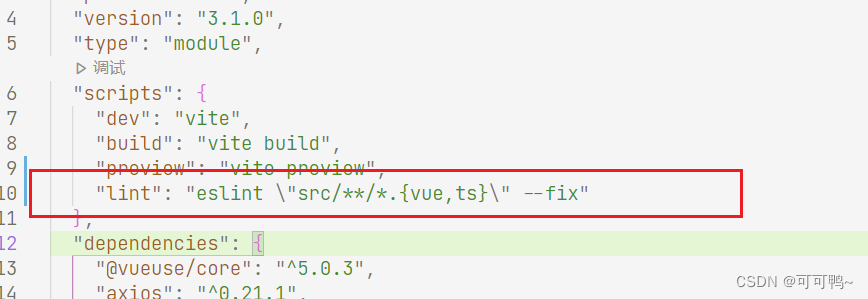
配置 prettier
在根目录下创建.prettierrc- 1
{ "singleQuote": false, "semi": true,// 结尾加分号 "trailingComma": "none",// 将多行JSX元素放在最后一行的末尾 "printWidth": 100, "arrowParens": "always", "tabWidth": 2,// 指定每个缩进级别的空格数字 "endOfLine": "auto", "overrides": [ { "files": ".prettierrc", "options": { "parser": "json" } }, { "files": "*.vue", "options": { "parser": "vue", "printWidth": 300 } } ] }- 1
- 2
- 3
- 4
- 5
- 6
- 7
- 8
- 9
- 10
- 11
- 12
- 13
- 14
- 15
- 16
- 17
- 18
- 19
- 20
- 21
- 22
- 23

- 安装router
yarn add vue-router@4.0.1- 1
在项目src目录下面新建router目录,然后添加index.ts文件,在文件中添加以下内容
import {createRouter, createWebHashHistory} from 'vue-router' // 在 Vue-router新版本中,需要使用createRouter来创建路由 export default createRouter({ // 指定路由的模式,此处使用的是hash模式 history: createWebHashHistory(), // 路由地址 routes: [] }) 或者使用 import { createRouter, createWebHashHistory, RouteRecordRaw } from 'vue-router' const routes: Array<RouteRecordRaw> = [] const router = createRouter({ history: createWebHashHistory(), //createWebHashHistory() hash模式 routes }) export default router- 1
- 2
- 3
- 4
- 5
- 6
- 7
- 8
- 9
- 10
- 11
- 12
- 13
- 14
- 15
- 16
- 17
- 18
- 19
- 20
- 21
- 22
RouteRecordRaw类型校验

创建views和layout文件夹创建home和layout文件

在路由中引入页面文件
import { createRouter, createWebHashHistory, RouteRecordRaw } from 'vue-router' import Layout from "../Layout/layout.vue"; const routes: Array<RouteRecordRaw> = [ { path: "/", component: Layout, redirect: "/home", meta: { title: "ui.router.pageWorkbench", icon: "icon-desktop" }, children: [ { path: "/home", component: () => import("../views/home.vue"), meta: { title: "ui.router.pageHome", icon: "icon-home" } } ] }, ] const router = createRouter({ history: createWebHashHistory(), //createWebHashHistory() hash模式 routes }) export default router- 1
- 2
- 3
- 4
- 5
- 6
- 7
- 8
- 9
- 10
- 11
- 12
- 13
- 14
- 15
- 16
- 17
- 18
- 19
- 20
- 21
- 22
- 23
引入到全局
import { createApp } from 'vue' import './style.css' import App from './App.vue' import router from "./router"; const app = createApp(App); app .use(router) .mount('#app');- 1
- 2
- 3
- 4
- 5
- 6
- 7
- 8

- 添加Element Plus组件库
# Yarn $ yarn add element-plus # NPM $ npm install element-plus --save- 1
- 2
- 3
- 4
- 5
- 6
或者安装固定版本
安装
"element-plus": "1.0.2-beta.71"- 1
发现有冲突
npm ERR! code ERESOLVE npm ERR! ERESOLVE unable to resolve dependency tree npm ERR! npm ERR! While resolving: my-vue-app@0.0.0 npm ERR! Found: vue@3.2.37 npm ERR! node_modules/vue npm ERR! vue@"^3.2.37" from the root project npm ERR! npm ERR! Could not resolve dependency: npm ERR! peer vue@"3.1.x" from element-plus@1.0.2-beta.71 npm ERR! node_modules/element-plus npm ERR! element-plus@"1.0.2-beta.71" from the root project npm ERR! npm ERR! Fix the upstream dependency conflict, or retry npm ERR! this command with --force, or --legacy-peer-deps npm ERR! to accept an incorrect (and potentially broken) dependency resolution.- 1
- 2
- 3
- 4
- 5
- 6
- 7
- 8
- 9
- 10
- 11
- 12
- 13
- 14
- 15
- 16
版本冲突解决
npm i --legacy-peer-deps- 1
重新执行npm install
挂在main中
import { createApp } from 'vue' import './style.css' import App from './App.vue' import router from "./router"; import ElementPlus from "element-plus"; const app = createApp(App); app .use(router) .use(ElementPlus, { size: "mini" }) .mount('#app');- 1
- 2
- 3
- 4
- 5
- 6
- 7
- 8
- 9
- 10
测试一下是否起作用,从网页上随便复制代码
element3<el-row class="mb-4"> <el-button>Default</el-button> <el-button type="primary">Primary</el-button> <el-button type="success">Success</el-button> <el-button type="info">Info</el-button> <el-button type="warning">Warning</el-button> <el-button type="danger">Danger</el-button> </el-row>- 1
- 2
- 3
- 4
- 5
- 6
- 7
- 8

- 安装vuex
npm install vuex@next --save // yarn yarn add vuex@next --save- 1
- 2
- 3
- 4
- 5
在src目录下面创建store文件夹,创建文件index.ts
import { createStore } from "vuex"; export default createStore({ state: { }, mutations: { }, actions: {}, getters: {}, modules: { } })- 1
- 2
- 3
- 4
- 5
- 6
- 7
- 8
- 9
- 10
- 11
- 12
如果要引入模块,新建模块引入到主文件中即可
import { createStore } from "vuex"; import app from "./app"; export default createStore({ state: { }, mutations: { }, actions: {}, getters: {}, modules: { app: app } })- 1
- 2
- 3
- 4
- 5
- 6
- 7
- 8
- 9
- 10
- 11
- 12
- 13
- 14
import { createStore } from "vuex"; export default createStore({});- 1
- 2
- 3
- 4

挂在全局
import { createApp } from 'vue' import './style.css' import App from './App.vue' import router from "./router"; import ElementPlus from "element-plus"; import store from "./store"; const app = createApp(App); app .use(store) .use(router) .use(ElementPlus, { size: "mini" }) .mount('#app');- 1
- 2
- 3
- 4
- 5
- 6
- 7
- 8
- 9
- 10
- 11
- 12
- 13
总的来说引入了这几个依赖
"dependencies": { "element-plus": "1.0.2-beta.71", "vue": "3.2.0", "vue-router": "4.0.1", "vuex": "^4.0.2" },- 1
- 2
- 3
- 4
- 5
- 6
- 安装axios
npm install axios --save // yarn yarn add axios- 1
- 2
- 3
- 4
指定安装
"axios": "^0.21.1",- 1
- 配置端口
vite.config.ts加入
server: { open: true, // 自动启动浏览器 host: "0.0.0.0", // localhost port: 8001, // 端口号 https: false }- 1
- 2
- 3
- 4
- 5
- 6
三、vue3知识点
export default 和 export 使用
//export default只能暴露一次 // var info = { // name: 'zs', // age: 20 // } // export default info //export 可以暴露多次 使用时用{title as title123} // import { title as title123 } from '../src/i18n/zh-TW' // console.log(title123 ) // export var title = '呵呵呵' // export var content = '哈哈哈'- 1
- 2
- 3
- 4
- 5
- 6
- 7
- 8
- 9
- 10
- 11
- 12
- 13
- 14
globalProperties
// 之前 (Vue 2.x) Vue.prototype.$http = () => {} // 之后 (Vue 3.x) const app = createApp({}) app.config.globalProperties.$http = () => {}- 1
- 2
- 3
- 4
- 5
setup两种声明形式
单引

直接抛出

demo1<script setup lang="ts"> import { computed, reactive } from "vue"; type DState = { count: number, double:number, }; const state:DState = reactive({ count: 0, double: computed(() => state.count * 2), }); function increment(){ state.count++; } </script> <template> <h1>{{ msg }}</h1> <div>{{state.count }}</div> <button @click="increment">++</button> </template> <style scoped > .logo { height: 6em; padding: 1.5em; will-change: filter; } .logo:hover { filter: drop-shadow(0 0 2em #646cffaa); } .logo.vue:hover { filter: drop-shadow(0 0 2em #42b883aa); } </style>- 1
- 2
- 3
- 4
- 5
- 6
- 7
- 8
- 9
- 10
- 11
- 12
- 13
- 14
- 15
- 16
- 17
- 18
- 19
- 20
- 21
- 22
- 23
- 24
- 25
- 26
- 27
- 28
- 29
- 30
- 31
- 32
- 33
- 34
- 35
- 36
- 37
- 38
区别

ref等使用方式

增加watchEffect

关于 config 文件和 env 文件的区别
env 可以理解为系统环境变量,是不跟随代码一起存在代码仓库的,便于线上环境配置的管理和权限分配。 config
是配置在项目代码中的,跟随代码一起存在代码仓库的,任何开发者都有权限看到。 线上数据库用户名密码等关键配置信息完全暴露还是不太好的使用时机:
config配置文件中用 env() 方法,其他地方一律用 config() 方法!声明文件
type Filter = { format: <T extends any>(str: T) => T } // 声明要扩充@vue/runtime-core包的声明. // 这里扩充"ComponentCustomProperties"接口, 因为他是vue3中实例的属性的类型. declare module '@vue/runtime-core' { export interface ComponentCustomProperties { $filters: Filter } }- 1
- 2
- 3
- 4
- 5
- 6
- 7
- 8
- 9
- 10
与使用JavaScript不同的是,用Typescript写vue程序要需要了解vue的相关类型。Vue核心的类型,大部分写在@vue/runtime-core包中。
ComponentVue页面是由一个个组件组成的,组件在Vue中的类是Component,继承了ComponentOptions、FunctionalComponent和ComponentPublicInstanceconstructor。
其中,ComponentOptions继承了ComponentOptionsBase,就是是我们经常写的声明式的包含data、methods等属性的选项组件:
FunctionalComponent是函数式组件,ComponentPublicInstanceconstructor是实例构造器(构造函数)。
ComponentOptions继承了ComponentCustomOptions,这个接口在Vue源码中是空的,我们可以借助它了自定义Vue组件选项中的属性,比如源码中的例子:
import { Router } from 'vue-router' declare module '@vue/runtime-core' { interface ComponentCustomProperties { $router: Router }}- 1
- 2
概念:可以用来约束一个函数,对象,以及类的结构和类型
//定义接口 interface ListItem{ id:number; name:string } interface List { data:ListItem[] } function getListId(list:List) { list.data.forEach(item=>{ console.log(item.id,item.name) }) } //允许传入的list有除了接口定义的其他值,但接口中规定的值必须要有 let list = { data:[ {id:1,name:'hemff',age:13} ] } /*若直接传人对象内容(对象字面量),ts会对其余的值进行类型检查,解决方法1:将内容赋值给一个变量 2.添加类型断言 as+对象类型 3.给接口添加[x:string]:any */ getListId({ data:[ {id:1,name:'hemff',age:13} ] } as List)- 1
- 2
- 3
- 4
- 5
- 6
- 7
- 8
- 9
- 10
- 11
- 12
- 13
- 14
- 15
- 16
- 17
- 18
- 19
- 20
- 21
- 22
- 23
- 24
- 25
- 26
- 27
css中的:root
:root是一个伪类,表示文档根元素,所有主流浏览器均支持 :root 选择器,除了 IE8 及更早的版本。在:root中声明相当于全局属性,只要当前页面引用了:root segment所在文件,都可以使用var()来引用。
var()函数可以代替元素中任何属性中的值的任何部分。var()函数不能作为属性名、选择器或者其他除了属性值之外的值。(这样做通常会产生无效的语法或者一个没有关联到变量的值。)
body {
background-color: var(–blue); /* 设置背景颜色为蓝色 */
}子组件可以通过 expose 暴露自身的方法和数据。
父组件通过 ref 获取到子组件并调用其方法或访问数据。
expose{ "scripts": { "dev": "vite", // 启动开发服务器,别名:`vite dev`,`vite serve` "build": "vite build", // 为生产环境构建产物 "preview": "vite preview" // 本地预览生产构建产物 } }- 1
- 2
- 3
- 4
- 5
- 6
- 7
三、报错记录


在项目的根目录中找到的tsconfig.json文件,然后添加一个新行:“resolveJsonModule”:true,
需要在tsconfig.json文件,然后添加:“esModuleInterop”: true,就没有问题了。
//推荐配置 "compilerOptions": { "target": "esnext", "module": "esnext", //是否开启严格模式 "strict": false, //不能随便使用this "noImplicitThis": true, //默认 "jsx": "preserve", "importHelpers": true, //默认 "moduleResolution": "node", "resolveJsonModule": true, "allowSyntheticDefaultImports": true, },- 1
- 2
- 3
- 4
- 5
- 6
- 7
- 8
- 9
- 10
- 11
- 12
- 13
- 14
- 15
- 16

 在 tsconfig.json 文件中添加如下配置即可
“types”: [ “vite/client” ]- 1

使用到了异步加载的组建@vueuse/core实现懒加载功能
import { useMediaQuery } from "@vueuse/core";- 1
//yarn 安装 yarn add @vueuse/core //或者npm npm install @vueuse/core- 1
- 2
- 3
- 4
- 5
vite 项目index.html中使用env环境变量
vite-plugin-html 插件
在 index.html 中增加 EJS 标签,例如<!DOCTYPE html> <html lang="en"> <head> <title><%- title %></title> </head> <body> <div id="app"></div> <script type="module" src="/src/main.js"></script> <%- injectAMapScript %> </body> </html>- 1
- 2
- 3
- 4
- 5
- 6
- 7
- 8
- 9
- 10
- 11
html({ inject: { injectData: { // apiURL: loadEnv(mode, process.cwd()).VITE_APP_API, // socketURL: loadEnv(mode, process.cwd()).VITE_APP_SOCKET, title: "可可" } }, minify: true }),- 1
- 2
- 3
- 4
- 5
- 6
- 7
- 8
- 9
- 10
建议按照如下步骤尝试解决问题:
不要使用C盘目录,使用D盘或者其他盘
尝试使用npm install 进行安装,如果使用npm可以安装,那么yarn也应该是可以安装的。
确定一下C:\Users\Administrator\Desktop\demo2这个目录下有没有package.json文件,确定一下有没有lincense属性。
使用管理员终端命令尝试安装
npm ERR! code ERESOLVE npm ERR! ERESOLVE unable to resolve dependency tree npm ERR! npm ERR! While resolving: my-vite-app@0.0.0 npm ERR! Found: vite@3.0.9 npm ERR! node_modules/vite npm ERR! dev vite@"^3.0.7" from the root project npm ERR! npm ERR! Could not resolve dependency: npm ERR! peer vite@"^2.5.10" from @vitejs/plugin-vue@1.10.2 npm ERR! node_modules/@vitejs/plugin-vue npm ERR! dev @vitejs/plugin-vue@"^1.9.4" from the root project npm ERR! npm ERR! Fix the upstream dependency conflict, or retry npm ERR! this command with --force, or --legacy-peer-deps npm ERR! to accept an incorrect (and potentially broken) dependency resolution. npm ERR! npm ERR! See C:\wangxue\node\node_cache\eresolve-report.txt for a full report.- 1
- 2
- 3
- 4
- 5
- 6
- 7
- 8
- 9
- 10
- 11
- 12
- 13
- 14
- 15
- 16
- 17
- 18
解决方法:终端输入:
npx -p npm@6 npm i --legacy-peer-deps- 1
目的:使用npx指定npm的版本
然后npm install即可 ,
如果不起作用,可以先删除node_modules和package-lock.json,再重新尝试。
“type”: “module”,
html使用type = ‘module’ 默认会产生跨域请求,本地打开的文件,file协议不支持四、配置参考
Vite 通过在一开始将应用中的模块区分为 依赖 和 源码 两类,改进了开发服务器启动时间 依赖:大多为在开发时不会变动的纯 JavaScript。一些较大的依赖(例如有上百个模块的组件库)处理的代价也很高。依赖也通常会存在多种模块化格式(例如 ESM 或者 CommonJS)。Vite 将会使用 esbuild 预构建依赖。Esbuild 使用 Go 编写,并且比以 JavaScript 编写的打包器预构建依赖快 10-100 倍。 源码:通常包含一些并非直接是 JavaScript 的文件,需要转换(例如 JSX,CSS 或者 Vue/Svelte 组件),时常会被编辑。同时,并不是所有的源码都需要同时被加载(例如基于路由拆分的代码模块) 开发环境:ESM+HMR 生产环境:Rollup 0、配置文件 默认为根目录下的vite.config.js 显示指定文件:vite --config my-config.js 1、命令相关: 打包构建: npm run build npm run preview 当上一步构建完成后,运行该命令测试应用 命令会在本地启动一个静态 Web 服务器,将 dist 文件夹运行在 http://localhost:4173 "preview": "vite preview --port 8080" 指定端口号 自动打开浏览器: "dev": "vite --open", "build": "vue-tsc --noEmit && vite build", "preview": "vite preview --open" 2、暴露的环境变量 import.meta.env.MODE: 应用运行的模式。 import.meta.env.BASE_URL:部署应用时的基本URL。他由base配置项决定。 import.meta.env.PROD: 应用是否运行在生产环境。 import.meta.env.DEV: 应用是否运行在开发环境 自定义环境变量: (1)创建文件:已存在的环境变量不会被以下文件中的覆盖 .env # 所有情况下都会加载 .env.local # 所有情况下都会加载,但会被 git 忽略 .env.[mode] # 只在指定模式下加载,如.env.production的优先级比.env高 .env.[mode].local # 只在指定模式下加载,但会被 git 忽略 VITE_SOME_KEY=123 import.meta.env.VITE_SOME_KEY访问 只有以VITE_为前缀的变量才会暴露给经过vite处理的代码 (2)添加类型声明 ///interface ImportMetaEnv { readonly VITE_APP_TITLE: string // 更多环境变量... } interface ImportMeta { readonly env: ImportMetaEnv } 3、自定义开发模式 除了默认的developmen和production还可以自定义模式,如可能希望有一个 “staging” (预发布|预上线) 模式,它应该具有类似于生产的行为,但环境变量与生产环境略有不同 vite build --mode staging .env.staging文件存放相关模式下的环境变量 4、兼容老浏览器 默认情况下 Vite 只处理语法转译,且默认不包含任何 polyfill。 通过引入polyfill 可以前往 Polyfill.io 查看,这是一个基于用户浏览器 User-Agent 字符串自动生成 polyfill 包的服务 通过插件支持: 通过插件@vitejs/plugin-legacy来支持,它将自动生成传统版本的 chunk 及与其相对应 ES 语言特性方面的 polyfill 兼容版的chunk只会在不支持原生 ESM 的浏览器中进行按需加载 5、typescript相关 (1)esbuild下不支持功能编辑时报错 配置类型导入导出、enum、没有import、export导入导出的非模块文件报错 tsconfig.json { "compilerOptions": { "isolatedModules":true 上述特性会在编辑时报错,否则会在运行时报错 } } (2)导入vite内置的一些类型定义 .资源导入 (例如:导入一个 .svg 文件) .import.meta.env 上 Vite 注入的环境变量的类型定义 .import.meta.hot 上的 HMR API 类型定义 方式一:在.d.ts文件中 /// 方式二:在tsconfig.json中 { "compilerOptions": { "types": ["vite/client"] } } 多页面配置 ├── package.json ├── vite.config.js ├── index.html ├── main.js └── nested ├── index.html └── nested.js build: { rollupOptions: { input: { main: resolve(__dirname, 'index.html'), nested: resolve(__dirname, 'nested/index.html') } } } 基本配置 (1)区分不同环境配置 command:根据运行的命令区分配置,serve为开发环境,否则为build生产环境 mode:根据环境区分配置 export default defineConfig(async ({ command, mode }) => { const config=await fn(); 支持使用Promise if (command === 'serve') { return { } } else if(command='build'){ return { } } }) (2)选项配置 export default defineConfig({ root:默认process.cwd(), index.html所在的位置,绝对位置或相对位置 base:开发或生产环境服务的公共基础路径 绝对 URL 路径名,例如 /foo/ 完整的 URL,例如 https://foo.com/ 空字符串或 ./(用于开发环境) 通过命令指定:vite build --base=/my/public/path/ 代码中获取base:import.meta.env.BASE_URL全局变量在代码中使用,原样出现(例如import.meta.env['BASE_URL']是无效的) mode:将会把serve和build时的模式都覆盖掉。也可以通过命令行 --mode 选项来重写 'development'(serve) 'production'(build) define:定义全局常量替换方式。其中每项在开发环境下会被定义在全局,而在构建时被静态替换 { __DEV__: 'dev', } plugins:[] 插件数组 publicDir:作为静态资源服务的文件夹。该目录中的文件在开发期间在 / 处提供,并在构建期间复制到 outDir 的根目录,并且始终按原样提供或复制而无需进行转换。该值可以是文件系统的绝对路径,也可以是相对于项目的根目录的相对路径。 默认'public' cacheDir:存储缓存文件的目录。此目录下会存储预打包的依赖项或 vite 生成的某些缓存文件,使用缓存可以提高性能。如需重新生成缓存文件,你可以使用 --force 命令行选项或手动删除目录。此选项的值可以是文件的绝对路径,也可以是以项目根目录为基准的相对路径。当没有检测到 package.json 时,则默认为 .vite。 默认"node_modules/.vite" assetsInclude:解析额外的定义内置type以外的静态导入资源 ['**/*.gltf'] logLevel:调整控制台输出的级别,默认为 'info' 'info' | 'warn' | 'error' | 'silent' clearScreen:设为 false 可以避免 Vite 清屏而错过在终端中打印某些关键信息。命令行模式下可以通过 --clearScreen false 设置。 默认:true envDir:用于加载 .env 文件的目录。可以是一个绝对路径,也可以是相对于项目根的路径 默认:根路径 envPrefix:自定义环境变量前缀,以 envPrefix 开头的环境变量会通过 import.meta.env 暴露在你的客户端源码中 默认:VITE_ 解析相关 resolve:{ alias:路径别名 { "@": path.resolve(__dirname, "src"), } 或 [{ find: '@', 字符串|正则 replacement: path.resolve(__dirname, 'src') }] dedupe:使用此选项强制 Vite 始终将列出的依赖项解析为同一副本 比如当安装了两个不同版本的依赖,如vue2和vue3,通过这个声明最终引入的版本 [] condition:情景导出 [{ "exports": { ".": { "import": "./index.esm.js", "require": "./index.cjs.js" } } }] mainFields:根据package.json中的字段,在不同环境中导入库的入口文件位置 import引入的文件对应module中的路径 require引入的文件对应main中的路径 默认:['module', 'jsnext:main', 'jsnext','main'] extensions导入时想要省略的扩展名列表。不建议忽略自定义导入类型的扩展名(例如:.vue),因为它会影响 IDE 和类型支持 默认:['.mjs', '.js', '.ts', '.jsx', '.tsx', '.json'] preserveSymlinks:启用此选项会使 Vite 通过原始文件路径(即不跟随符号链接的路径)而不是真正的文件路径(即跟随符号链接后的路径)确定文件身份 默认:false } css相关 css:{ modules:配置 CSS modules 的行为。选项将被传递给 postcss-modules。 postcss:内联的 PostCSS 配置(格式同 postcss.config.js),或者一个(默认基于项目根目录的)自定义的 PostCSS 配置路径 preprocessorOptions:指定传递给 CSS 预处理器的选项。 { scss: { additionalData: `$injectedColor: orange;` } } } JSON相关 json:{ namedExports:是否支持从 .json 文件中进行按名导入。 默认:true stringify:若设置为 true,导入的 JSON 会被转换为 export default JSON.parse("...") 默认:false } esbuild相关 esbuild:{ jsxFactory: 'h', jsxFragment: 'Fragment' 以上为自定义JSX ESbuild会被应用在 ts、jsx、tsx 文件,以下选项对要处理的文件类型进行配置 include:string | RegExp | (string | RegExp)[] exclude:string | RegExp | (string | RegExp)[] jsxInject:自动为每一个被 ESbuild 转换的文件注入内容 `import React from 'react'` } server相关 server:{ host:指定服务器应该监听哪个 IP 地址, 如果将此设置为 0.0.0.0 或者 true 将监听所有地址,包括局域网和公网地址 默认:'127.0.0.1' 命令设置:--host 0.0.0.0 或 --host port:指定开发服务器端口。注意:如果端口已经被使用,Vite 会自动尝试下一个可用的端口,所以这可能不是开发服务器最终监听的实际端口 默认:3000 strictPort:设为true时若端口已被占用则会直接退出,而不是尝试下一个可用端口 默认:false https:启用 TLS + HTTP/2。注意:当 server.proxy 选项 也被使用时,将会仅使用 TLS。 当为true:启用 TLS + HTTP/2。注意:当 server.proxy 选项 也被使用时,将会仅使用 TLS。 这个值也可以是一个传递给 https.createServer() 的 选项对象 https://nodejs.org/api/https.html#httpscreateserveroptions-requestlistener open:在开发服务器启动时自动在浏览器中打开应用程序。 '/docs/index.html' 设置打开的浏览器:设置环境变量 process.env.BROWSER='firefox' open其他配置:https://github.com/sindresorhus/open#app proxy:服务器代理 { '/foo': 'http://localhost:4567', 字符串简写写法 '/api': { 以 ^ 开头,将会被解释为正则,如:'^/fallback/.*' target: 'http://jsonplaceholder.typicode.com', changeOrigin: true, rewrite: (path) => path.replace(/^\/api/, ''), configure: (proxy, options) => { // proxy 是 'http-proxy' 的实例 } }, '/socket.io': { 代理 websockets or socket.io target: 'ws://localhost:3000', ws: true } } cors:为开发服务器配置 CORS。默认启用并允许任何源 传递一个 选项对象 来调整行为,https://github.com/expressjs/cors#configuration-options 设置false表示禁用 force:依赖预构建 设置为 true 强制使依赖预构建。 hmr:热更新相关 false禁用 { protocol?: string, 协议 host?: string, port?: number, path?: string, timeout?: number, overlay?: boolean, 为 false 可以禁用开发服务器错误的屏蔽 clientPort?: number, 只在客户端的情况下覆盖端口,这允许你为 websocket 提供不同的端口,而并非在客户端代码中查找。如果需要在 dev-server 情况下使用 SSL 代理,这非常有用。 server?: Server, 当使用 server.middlewareMode 或 server.https 时,你需将 server.hmr.server 指定为你 HTTP(S) 的服务器,这将通过你的服务器来处理 HMR 的安全连接请求。这在使用自签证书或想通过网络在某端口暴露 Vite 的情况下,非常有用。 } middlewareMode:以中间件模式创建 Vite 服务器 'ssr' | 'html' 在SSR中使用 fs.strict:限制为工作区 root 路径以外的文件的访问 默认:true fs.allow:限制哪些文件可以通过 /@fs/ 路径提供服务,Vite 将会搜索此根目录下潜在工作空间并作默认使用 fs.deny:用于限制 Vite 开发服务器提供敏感文件的黑名单。 默认为 ['.env', '.env.*', '*.{pem,crt}'] watch:监听文件改变 通过命令:vite build --watch { ignored: ['!**/node_modules/your-package-name/**'] 默认会忽略对 .git/ 和 node_modules/ 目录的监听,如果需要对 node_modules/ 内的包进行监听,可以为 server.watch.ignored 赋值一个取反的 glob 模式 其他选项:使用的是rollup的选项配置:https://rollupjs.org/guide/en/#watch-options } } optimizeDeps依赖优化相关 optimizeDeps:{ entries:依赖入口点 默认情况下,Vite 会抓取你的 index.html 来检测需要预构建的依赖项 如果指定了 build.rollupOptions.input,Vite 将转而去抓取这些入口点 string | string[]:指定自定义条目,该值需要遵循 fast-glob 模式 exclude:['your-package-name'] 被watch中手动设置监听的包必须被排除在优化之外,以便它能出现在依赖关系图中并触发热更新 include:默认情况下,不在 node_modules 中的,链接的包不会被预构建。使用此选项可强制预构建链接的包。 [] 应用场景:一些第三方插件中的依赖不是node_modules中的并且也不是es module的格式 esbuildOptions:在部署扫描和优化过程中传递给 esbuild 的选项。 } build构建相关 build:{ target:设置最终构建的浏览器兼容目标 默认:'modules' 指支持原生 ES 模块的浏览器。 "esnext" :即假设有原生动态导入支持,并且将会转译得尽可能小: 如果 build.minify 选项为 'terser', 'esnext' 将会强制降级为 'es2019'。 其他情况下将完全不会执行转译。 'es2015':自定义目标也可以是一个 ES 版本 ["chrome58",...]:一个浏览器版本或是多个目标组成的一个数组 polyfillModulePreload:用于决定是否自动注入 module preload 的 polyfill. true:此 polyfill 会被自动注入到每个 index.html 入口的 proxy 模块中 outDir:指定输出路径(相对于 项目根目录). 默认:dist assetsDir:指定生成静态资源的存放路径(相对于 build.outDir) 默认:assets assetsInlineLimit:小于此阈值的导入或引用资源将内联为 base64 编码,以避免额外的 http 请求。 默认:4096 (4kb) 设置为 0 可以完全禁用此项。 cssCodeSplit:css代码分割 默认:true,在异步 chunk 中导入的 CSS 将内联到异步 chunk 本身,并在其被加载时插入。 false:整个项目中的所有 CSS 将被提取到一个 CSS 文件中 cssTarget:允许用户为 CSS 的压缩设置一个不同的浏览器 target 默认值和配置与target一致 sourcemap:构建后是否生成 source map 文件 默认:false true:创建一个独立的 source map 文件 'inline':source map 将作为一个 data URI 附加在输出文件中 'hidden':与 'true' 相似,只是 bundle 文件中相应的注释将不被保留 rollupOptions:自定义的 Rollup 打包配置,并将与 Vite 的内部 Rollup 选项合并 https://rollupjs.org/guide/en/#big-list-of-options commonjsOptions:传递给 @rollup/plugin-commonjs 插件的选项。 dynamicImportVarsOptions:传递给 @rollup/plugin-dynamic-import-vars 的选项。 lib:打包库 { entry: string, name?: string, 暴露的全局变量 formats?: ('es' | 'cjs' | 'umd' | 'iife')[], 包含 'umd' 或 'iife' 时是必须的。默认 formats 是 ['es', 'umd'] fileName?: string | ((format: ModuleFormat) => string) 输出的包文件名 默认 fileName 是 package.json 的 name 选项 } manifest:包含了没有被 hash 过的资源文件名和 hash 后版本的映射。 true:包含了没有被 hash 过的资源文件名和 hash 后版本的映射。 字符串:作为 manifest 文件的名字 ssrManifest:生成 SSR 的 manifest 文件,以确定生产中的样式链接与资产预加载指令 配置和manifest一致 ssr:生成面向 SSR 的构建 默认:undefined 字符串:用于直接定义 SSR 的入口 true:需要通过设置 rollupOptions.input 来指定 SSR 的入口 minify:压缩相关 默认:'esbuild' false:禁用 'terser' 在lib模式下使用 'es' 时,build.minify 选项将失效 terserOptions:传递给 Terser 的更多 minify 选项。 write:磁盘写入相关 默认:true false:禁用将构建后的文件写入磁盘 emptyOutDir:关闭警告 默认:若 outDir 在 root 目录下,则为 true,Vite 会在构建时清空该目录 outDir在根目录之外:会抛出一个警告避免意外删除掉重要的文件。可以设置该选项来关闭这个警告 通过命令: --emptyOutDir 来使用 reportCompressedSize:启用/禁用 gzip 压缩大小报告。压缩大型输出文件可能会很慢,因此禁用该功能可能会提高大型项目的构建性能。 默认:true chunkSizeWarningLimit:chunk 大小警告的限制(以 kbs 为单位) 默认:500 watch:构建监听器 默认:null {}:启用 rollup 的监听器。在涉及只用在构建时的插件时和集成开发流程中很常用。 } 构建预览preview相关 preview:{ host:为开发服务器指定 ip 地址,默认取server.host 0.0.0.0 或 true:监听所有地址,包括局域网和公共地址。 通过命令:--host 0.0.0.0 或 --host port:指定开发服务器端口 默认:4173 strictPort:默认取server.strictPort https:默认取server.https open:默认取server.openy proxy:默认取server.proxy cors:默认取server.cors } SSR相关 ssr:{ external:为 SSR 强制外部化的依赖。 [] noExternal:防止被 SSR 外部化依赖项 string | RegExp | (string | RegExp)[] true:将没有依赖被外部化 target:SSR 服务器的构建目标。 默认:'node' 'webworker' } Worker相关 worker:{ format:worker bundle 的输出类型。 默认:'iife' 'es' plugins:适用于 worker bundle 的 Vite 插件。 [] rollupOptions:用于构建 worker bundle 的 Rollup 配置项 } }) - 1
- 2
- 3
- 4
- 5
- 6
- 7
- 8
- 9
- 10
- 11
- 12
- 13
- 14
- 15
- 16
- 17
- 18
- 19
- 20
- 21
- 22
- 23
- 24
- 25
- 26
- 27
- 28
- 29
- 30
- 31
- 32
- 33
- 34
- 35
- 36
- 37
- 38
- 39
- 40
- 41
- 42
- 43
- 44
- 45
- 46
- 47
- 48
- 49
- 50
- 51
- 52
- 53
- 54
- 55
- 56
- 57
- 58
- 59
- 60
- 61
- 62
- 63
- 64
- 65
- 66
- 67
- 68
- 69
- 70
- 71
- 72
- 73
- 74
- 75
- 76
- 77
- 78
- 79
- 80
- 81
- 82
- 83
- 84
- 85
- 86
- 87
- 88
- 89
- 90
- 91
- 92
- 93
- 94
- 95
- 96
- 97
- 98
- 99
- 100
- 101
- 102
- 103
- 104
- 105
- 106
- 107
- 108
- 109
- 110
- 111
- 112
- 113
- 114
- 115
- 116
- 117
- 118
- 119
- 120
- 121
- 122
- 123
- 124
- 125
- 126
- 127
- 128
- 129
- 130
- 131
- 132
- 133
- 134
- 135
- 136
- 137
- 138
- 139
- 140
- 141
- 142
- 143
- 144
- 145
- 146
- 147
- 148
- 149
- 150
- 151
- 152
- 153
- 154
- 155
- 156
- 157
- 158
- 159
- 160
- 161
- 162
- 163
- 164
- 165
- 166
- 167
- 168
- 169
- 170
- 171
- 172
- 173
- 174
- 175
- 176
- 177
- 178
- 179
- 180
- 181
- 182
- 183
- 184
- 185
- 186
- 187
- 188
- 189
- 190
- 191
- 192
- 193
- 194
- 195
- 196
- 197
- 198
- 199
- 200
- 201
- 202
- 203
- 204
- 205
- 206
- 207
- 208
- 209
- 210
- 211
- 212
- 213
- 214
- 215
- 216
- 217
- 218
- 219
- 220
- 221
- 222
- 223
- 224
- 225
- 226
- 227
- 228
- 229
- 230
- 231
- 232
- 233
- 234
- 235
- 236
- 237
- 238
- 239
- 240
- 241
- 242
- 243
- 244
- 245
- 246
- 247
- 248
- 249
- 250
- 251
- 252
- 253
- 254
- 255
- 256
- 257
- 258
- 259
- 260
- 261
- 262
- 263
- 264
- 265
- 266
- 267
- 268
- 269
- 270
- 271
- 272
- 273
- 274
- 275
- 276
- 277
- 278
- 279
- 280
- 281
- 282
- 283
- 284
- 285
- 286
- 287
- 288
- 289
- 290
- 291
- 292
- 293
- 294
- 295
- 296
- 297
- 298
- 299
- 300
- 301
- 302
- 303
- 304
- 305
- 306
- 307
- 308
- 309
- 310
- 311
- 312
- 313
- 314
- 315
- 316
- 317
- 318
- 319
- 320
- 321
- 322
- 323
- 324
- 325
- 326
- 327
- 328
- 329
- 330
- 331
- 332
- 333
- 334
- 335
- 336
- 337
- 338
- 339
- 340
- 341
- 342
- 343
- 344
- 345
- 346
- 347
- 348
- 349
- 350
- 351
- 352
- 353
- 354
- 355
- 356
- 357
- 358
- 359
- 360
- 361
- 362
- 363
- 364
- 365
- 366
- 367
- 368
- 369
- 370
- 371
- 372
- 373
- 374
- 375
- 376
- 377
- 378
- 379
- 380
- 381
- 382
- 383
- 384
- 385
- 386
- 387
- 388
- 389
- 390
- 391
- 392
- 393
- 394
- 395
- 396
- 397
- 398
- 399
- 400
- 401
- 402
- 403
- 404
- 405
- 406
- 407
- 408
- 409
- 410
- 411
- 412
- 413
- 414
- 415
- 416
- 417
- 418
- 419
- 420
- 421
- 422
-
相关阅读:
2021 华数杯全国大学生数学建模竞赛B题-进出口公司的货物装运策略(附带赛题解析&获奖论文及Python代码)
设计模式之桥接模式应用例题
SQL 存储过程优化
渗透测试与攻防演练之间有什么区别
开源LIMS系统miso LIMS(适用于NGS基因测序)
外卖配送小程序商城的效果如何
【直播】-DRM和TZC400的介绍-2022/11/26
UE4 C++:UFUNCTION宏、函数说明符、元数据说明符
有效的括号(栈的高频面试题)
K8S集群部署问题及处理记录
- 原文地址:https://blog.csdn.net/qq_43547255/article/details/126343215
