-
利用webSocket实现扫码登录PC端
业务需求
在app中登录后,扫web端的二维码,实现web端的自动登录
需求分析
1.websocket的传输协议这里就不多说了,要想实现扫码登录其实很简单,无非就是app端通过ws将登录信息传给web端,web端拿到登录信息后进行登录操作而已
效果演示
👇1.web端演示

👇2.APP端演示:

需求实现
业务流程图

业务流转图

代码实现
ps:
代码有所修改,但核心代码存在,不影响业务的实现。
数据存在mongodb中,这个可自行选择处理,仅用于记录扫码授权记录1.数据库设计
此处用于存储扫码登录记录信息,不保存也可以
auth_login字段 说明 id 主键 loginName 登录名 wsSessionId wsSessionId createTime 创建时间 2.代码实现
1.web端代码
1.引入依赖
<dependency> <groupId>org.apache.tomcat.embedgroupId> <artifactId>tomcat-embed-websocketartifactId> <version>9.0.39version> dependency> <dependency> <groupId>com.google.zxinggroupId> <artifactId>coreartifactId> <version>3.0.0version> dependency> <dependency> <groupId>com.google.zxinggroupId> <artifactId>javaseartifactId> <version>3.0.0version> dependency>- 1
- 2
- 3
- 4
- 5
- 6
- 7
- 8
- 9
- 10
- 11
- 12
- 13
- 14
- 15
- 16
- 17
WebSocketConfig
@Configuration public class WebSocketConfig { @Bean public ServerEndpointExporter serverEndpointExporter () { return new ServerEndpointExporter(); } }- 1
- 2
- 3
- 4
- 5
- 6
- 7
- 8
ws服务WebSocketServer
import com.alibaba.fastjson.JSONObject; import com.jinmdz.fmis.api.global.CacheManager; import org.slf4j.Logger; import org.slf4j.LoggerFactory; import org.springframework.stereotype.Component; import javax.annotation.PostConstruct; import javax.websocket.*; import javax.websocket.server.ServerEndpoint; import java.io.IOException; import java.util.concurrent.CopyOnWriteArraySet; import java.util.concurrent.atomic.AtomicInteger; /** * @author lvyq * @version 1.0 * @description: TODO * @date 2021/8/17 16:30 */ @ServerEndpoint(value = "/ws/asset") @Component public class WebSocketServer { @PostConstruct public void init() { System.out.println("websocket 加载"); } private static Logger log = LoggerFactory.getLogger(WebSocketServer.class); private static final AtomicInteger OnlineCount = new AtomicInteger(0); private static CopyOnWriteArraySet<Session> SessionSet = new CopyOnWriteArraySet<Session>(); //缓存 private static CacheManager cacheManager = new CacheManager(); /** * 连接建立成功调用的方法 */ @OnOpen public void onOpen(Session session) { SessionSet.add(session); int cnt = OnlineCount.incrementAndGet(); // 在线数加1 log.info("有连接加入,当前连接数为:{}", cnt); JSONObject mav = new JSONObject(); mav.put("sessionId",session.getId().toString()); SendMessage(session, mav.toJSONString()); } /** * 连接关闭调用的方法 */ @OnClose public void onClose(Session session) { SessionSet.remove(session); int cnt = OnlineCount.decrementAndGet(); log.info("有连接关闭,当前连接数为:{}", cnt); } /** * 收到客户端消息后调用的方法 * @param message 客户端发送过来的消息 */ @OnMessage public void onMessage(String message, Session session) { log.info("来自客户端的消息:{}",message); try{ JSONObject jsonObject = JSONObject.parseObject(message); String linkType = jsonObject.getString("linkType"); //TODO 缓存session if (linkType.equals("auth")){ //授权 CacheManager.set("auth_"+session.getId(),session); } }catch (Exception e){ e.printStackTrace(); } } /** * 出现错误 * @param session * @param error */ @OnError public void onError(Session session, Throwable error) { log.error("发生错误:{},Session ID: {}",error.getMessage(),session.getId()); error.printStackTrace(); } /** * 发送消息 * @param session * @param message */ public static void SendMessage(Session session, String message) { try { log.info("sessionID="+session.getId()); session.getBasicRemote().sendText(message); } catch (IOException e) { log.error("发送消息出错:{}", e.getMessage()); e.printStackTrace(); } } /** * @description: 授权登录,sessionId * @author: lvyq * @date: 2021/9/28 14:11 * @version 1.0 */ public static void SendMessageBySessionId(String message,String seId) throws IOException { Session session= CacheManager.get("auth_"+seId); String sessionId = ""; if (session!=null){ sessionId=session.getId(); } for (Session s : SessionSet) { if(s.getId().equals(sessionId)){ session = s; break; } } if(session!=null){ SendMessage(session, message); } else{ log.warn("没有找到你指定ID的会话:{}",sessionId); } } }- 1
- 2
- 3
- 4
- 5
- 6
- 7
- 8
- 9
- 10
- 11
- 12
- 13
- 14
- 15
- 16
- 17
- 18
- 19
- 20
- 21
- 22
- 23
- 24
- 25
- 26
- 27
- 28
- 29
- 30
- 31
- 32
- 33
- 34
- 35
- 36
- 37
- 38
- 39
- 40
- 41
- 42
- 43
- 44
- 45
- 46
- 47
- 48
- 49
- 50
- 51
- 52
- 53
- 54
- 55
- 56
- 57
- 58
- 59
- 60
- 61
- 62
- 63
- 64
- 65
- 66
- 67
- 68
- 69
- 70
- 71
- 72
- 73
- 74
- 75
- 76
- 77
- 78
- 79
- 80
- 81
- 82
- 83
- 84
- 85
- 86
- 87
- 88
- 89
- 90
- 91
- 92
- 93
- 94
- 95
- 96
- 97
- 98
- 99
- 100
- 101
- 102
- 103
- 104
- 105
- 106
- 107
- 108
- 109
- 110
- 111
- 112
- 113
- 114
- 115
- 116
- 117
- 118
- 119
- 120
- 121
- 122
- 123
- 124
- 125
- 126
- 127
CacheManager
是个缓存类,这里就不贴代码了,可自行自行百度或选择其它缓存服务WebSocketController
import com.google.zxing.client.j2se.MatrixToImageWriter; import com.google.zxing.common.BitMatrix; import com.jinmdz.fmis.api.api.service.AuthLoginService; import com.jinmdz.fmis.api.base.BaseController; import com.jinmdz.fmis.api.util.QRCodeUtils; import org.springframework.web.bind.annotation.*; import javax.annotation.Resource; import javax.servlet.http.HttpServletResponse; import java.io.IOException; import java.io.OutputStream; /** * @author lvyq * @version 1.0 * @description: * @date 2021/8/17 16:28 */ @RestController @RequestMapping("/ws") public class WebSocketController extends BaseController { /** * @description: 生成二维码 * @author: lvyq * @date: 2021/9/29 10:25 * @version 1.0 */ @GetMapping(value = "/create/{content}") public void getCode(@PathVariable("content")String content , HttpServletResponse response) throws IOException { // 设置响应流信息 response.setContentType("image/jpg"); response.setHeader("Pragma", "no-cache"); response.setHeader("Cache-Control", "no-cache"); response.setDateHeader("Expires", 0); OutputStream stream = response.getOutputStream(); BitMatrix bitMatrix = QRCodeUtils.createCode(content); MatrixToImageWriter.writeToStream(bitMatrix , "jpg" , stream); } /** * @description: 扫码成功-app端调用 * @author: lvyq * @date: 2021/9/29 14:36 * @version 1.0 */ @GetMapping("/scanCodeSuccess/{wsSessionId}") public void scanCodeSuccess(@PathVariable("wsSessionId") String wsSessionId) throws IOException { authLoginService.scanCodeSuccess(wsSessionId); } /** * @description: 扫码登录-APP端调用 * @author: lvyq * @date: 2021/9/28 13:56 * @version 1.0 */ @GetMapping("/authLogin/{userName}/{wsSessionId}") private void authLogin(@PathVariable("userName") String userName,@PathVariable("wsSessionId") String wsSessionId) throws IOException { authLoginService.authLogin(userName,wsSessionId); } }- 1
- 2
- 3
- 4
- 5
- 6
- 7
- 8
- 9
- 10
- 11
- 12
- 13
- 14
- 15
- 16
- 17
- 18
- 19
- 20
- 21
- 22
- 23
- 24
- 25
- 26
- 27
- 28
- 29
- 30
- 31
- 32
- 33
- 34
- 35
- 36
- 37
- 38
- 39
- 40
- 41
- 42
- 43
- 44
- 45
- 46
- 47
- 48
- 49
- 50
- 51
- 52
- 53
- 54
- 55
- 56
- 57
- 58
- 59
- 60
- 61
- 62
- 63
QRCodeUtils
import com.google.zxing.BarcodeFormat; import com.google.zxing.EncodeHintType; import com.google.zxing.MultiFormatWriter; import com.google.zxing.WriterException; import com.google.zxing.common.BitMatrix; import com.google.zxing.qrcode.decoder.ErrorCorrectionLevel; import java.io.IOException; import java.util.HashMap; import java.util.Map; public class QRCodeUtils { /** * 生成二维码 * @param content 二维码的内容 * @return BitMatrix对象 * */ public static BitMatrix createCode(String content) throws IOException { //二维码的宽高 int width = 200; int height = 200; //其他参数,如字符集编码 Map<EncodeHintType, Object> hints = new HashMap<>(); hints.put(EncodeHintType.CHARACTER_SET, "UTF-8"); //容错级别为H hints.put(EncodeHintType.ERROR_CORRECTION , ErrorCorrectionLevel.H); //白边的宽度,可取0~4 hints.put(EncodeHintType.MARGIN , 0); BitMatrix bitMatrix = null; try { //生成矩阵,因为我的业务场景传来的是编码之后的URL,所以先解码 bitMatrix = new MultiFormatWriter().encode(content, BarcodeFormat.QR_CODE, width, height, hints); //bitMatrix = deleteWhite(bitMatrix); } catch (WriterException e) { e.printStackTrace(); } return bitMatrix; } /** * 删除生成的二维码周围的白边,根据审美决定是否删除 * @param matrix BitMatrix对象 * @return BitMatrix对象 * */ private static BitMatrix deleteWhite(BitMatrix matrix) { int[] rec = matrix.getEnclosingRectangle(); int resWidth = rec[2] + 1; int resHeight = rec[3] + 1; BitMatrix resMatrix = new BitMatrix(resWidth, resHeight); resMatrix.clear(); for (int i = 0; i < resWidth; i++) { for (int j = 0; j < resHeight; j++) { if (matrix.get(i + rec[0], j + rec[1])) resMatrix.set(i, j); } } return resMatrix; } }- 1
- 2
- 3
- 4
- 5
- 6
- 7
- 8
- 9
- 10
- 11
- 12
- 13
- 14
- 15
- 16
- 17
- 18
- 19
- 20
- 21
- 22
- 23
- 24
- 25
- 26
- 27
- 28
- 29
- 30
- 31
- 32
- 33
- 34
- 35
- 36
- 37
- 38
- 39
- 40
- 41
- 42
- 43
- 44
- 45
- 46
- 47
- 48
- 49
- 50
- 51
- 52
- 53
- 54
- 55
- 56
- 57
- 58
- 59
- 60
- 61
- 62
- 63
- 64
AuthLoginService
import com.alibaba.fastjson.JSONObject; import com.jinmdz.fmis.api.api.model.user.LoginData; import com.jinmdz.fmis.api.base.BaseService; import com.jinmdz.fmis.api.wrapper.SecurityWrapper; import com.jinmdz.fmis.core.model.TokenInfo; import org.springframework.stereotype.Service; import javax.annotation.Resource; import java.io.IOException; /** * @author lvyq * @version 1.0 * @description: 扫码授权登录 * @date 2021/9/28 11:18 */ @Service public class AuthLoginService extends BaseService { @Resource private SecurityWrapper securityWrapper; /** * @description: 获取账号密码 * @author: lvyq * @date: 2021/9/28 13:49 * @version 1.0 */ public void authLogin(String userName,String wsSessionId) throws IOException { LoginData loginData = new LoginData(); loginData.setUsername(userName); //根据账号获取用户信息。这里根据自身业务实现即可。重要!!!! TokenInfo tokenInfo = “获取用户信息”; if (tokenInfo!=null){ JSONObject mav = new JSONObject(); mav.put("state",true); mav.put("code",2); mav.put("msg","授权成功"); mav.put("tokenInfo",tokenInfo); WebSocketServer.SendMessageBySessionId(mav.toJSONString(),wsSessionId); } } /** * @description: 扫码成功 * @author: lvyq * @date: 2021/9/29 14:42 * @version 1.0 * @param wsSessionId */ public void scanCodeSuccess(String wsSessionId) throws IOException { JSONObject mav = new JSONObject(); mav.put("state",true); mav.put("code",1); mav.put("msg","扫码成功"); WebSocketServer.SendMessageBySessionId(mav.toJSONString(),wsSessionId); } }- 1
- 2
- 3
- 4
- 5
- 6
- 7
- 8
- 9
- 10
- 11
- 12
- 13
- 14
- 15
- 16
- 17
- 18
- 19
- 20
- 21
- 22
- 23
- 24
- 25
- 26
- 27
- 28
- 29
- 30
- 31
- 32
- 33
- 34
- 35
- 36
- 37
- 38
- 39
- 40
- 41
- 42
- 43
- 44
- 45
- 46
- 47
- 48
- 49
- 50
- 51
- 52
- 53
- 54
- 55
- 56
- 57
- 58
2. APP端代码
这里逻辑比较简单,调用扫码,授权的接口即可代码有做删减更改,请根据自身开发环境处理相应业务信息/** * @description: 扫码授权 * @author: lvyq * @date: 2021/9/28 14:04 * @version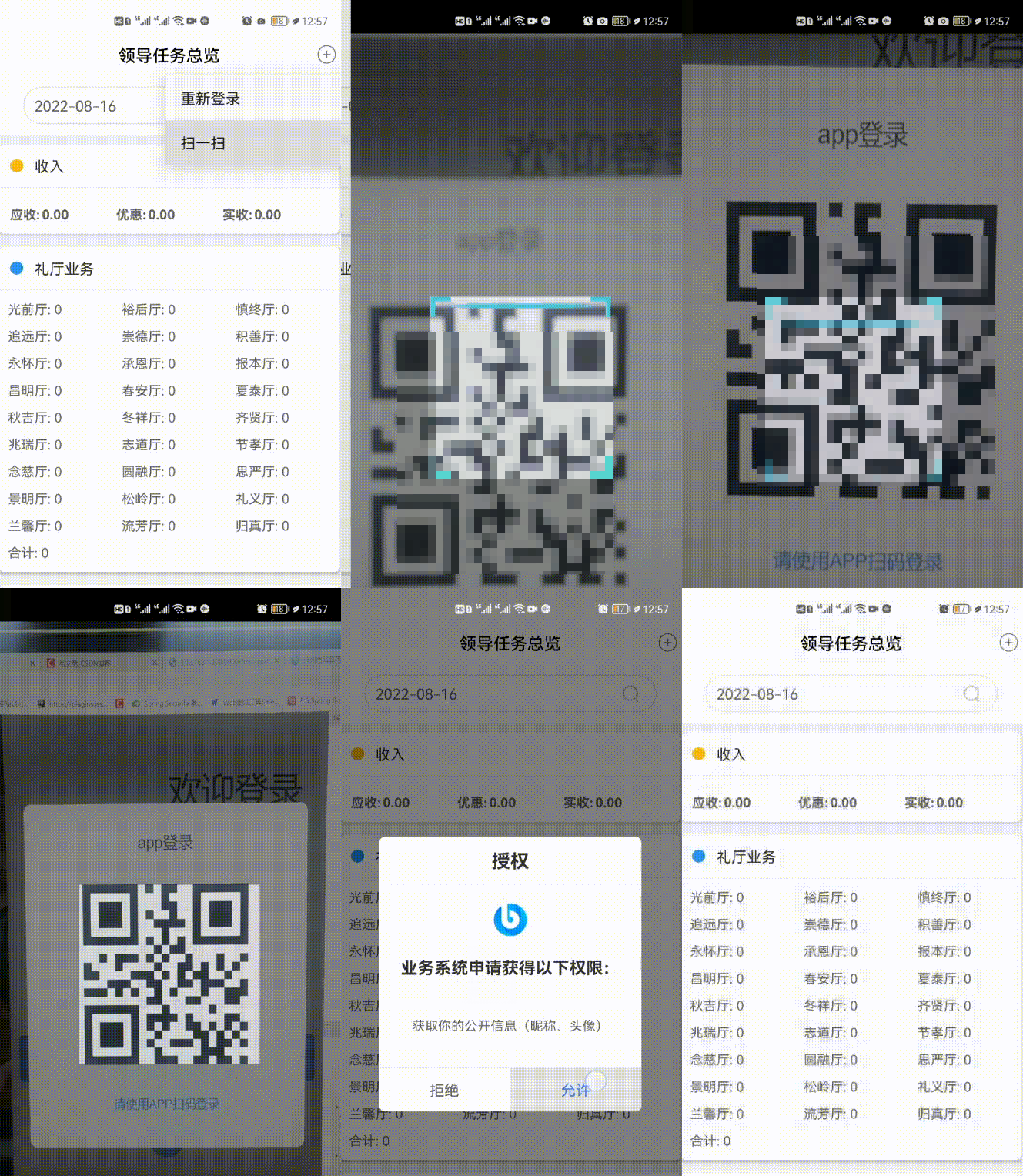 1.0 */ @PostMapping("/loginAuth") public BaseResult loginAuth(@RequestBody AuthLogin data){ mongoTemplate.insert(data);//这里是mongodb保存用户信息,请自行处理 //在此处调用授权接口 http:192.168.1.1/ws/authLogin/{userName}/{wsSessionId} BaseResult baseResult = new BaseResult(); baseResult.setCode(1); baseResult.setMessage("操作成功"); return baseResult; } /** * @description: 扫码成功 * @author: lvyq * @date: 2021/9/29 14:36 * @version 1.0 */ @PostMapping("scanCodeSuccess") public BaseResult scanCodeSuccess(@RequestBody AuthLogin data){ //在此处调用授权接口 http:192.168.1.1/ws/scanCodeSuccess/{wsSessionId} 请自行处理 BaseResult baseResult = new BaseResult(); baseResult.setCode(1); baseResult.setMessage("操作成功"); return baseResult; }- 1
- 2
- 3
- 4
- 5
- 6
- 7
- 8
- 9
- 10
- 11
- 12
- 13
- 14
- 15
- 16
- 17
- 18
- 19
- 20
- 21
- 22
- 23
- 24
- 25
- 26
- 27
- 28
- 29
- 30
- 31
- 32
- 33
- 34
- 35
- 36
-
相关阅读:
Gradle学习笔记之第一个Gradle项目
Pytorch 中使用 Tensorborad 的技巧
C语言基础篇 —— 3.4 二重指针
Java ClassLoader definePackage()方法具有什么功能呢?
云端援手:智能枢纽应对数字资产挑战 ——华为云11.11应用集成管理与创新专区优惠限时购
TCP链接为什么要必须要四次挥手,为什么链接三次握手即可?
广州华锐互动:VR动物解剖实验室带来哪些便利?
Pytorch_basics_main
关于vant 的tabbar功能
盘点 | 2022年上半年国内的电邮安全事件
- 原文地址:https://blog.csdn.net/qq_27185879/article/details/126360378