-
二十四、商城 - 商家后台修改-商品列表修改(12)
一、商家后台-商品管理【商品列表】
1.1 需求分析
在商家后台,显示该商家的商品列表信息,如下图:

1.2 查询商家商品列表
1.2.1 后端代码
修改youlexuan_shop_web工程的GoodsController.java的search方法
//获取商家ID String sellerId = SecurityContextHolder.getContext().getAuthentication().getName(); //添加查询条件 goods.setSellerId(sellerId);- 1
- 2
- 3
- 4

修改youlexuan_sellergoods_service 工程GoodsServiceImpl 的 findPage方法,修改条件构建部分代码,将原来的模糊匹配修改为精确匹配
criteria.andSellerIdEqualTo(goods.getSellerId());- 1

1.2.2 前端代码
修改goods.html. 引入js,添加控件,并且初始化
<!--引入--> <script type="text/javascript" src="../plugins/angularjs/angular.min.js"></script> <!-- 分页组件开始 --> <script src="../plugins/angularjs/pagination.js"></script> <link rel="stylesheet" href="../plugins/angularjs/pagination.css"> <!-- 分页组件结束 --> <script type="text/javascript" src="../js/base_pagination.js"></script> <script type="text/javascript" src="../js/service/goodsService.js"></script> <script type="text/javascript" src="../js/service/itemCatService.js"></script> <script type="text/javascript" src="../js/service/uploadService.js"></script> <script type="text/javascript" src="../js/service/typeTemplateService.js"></script> <script type="text/javascript" src="../js/controller/baseController.js"></script> <script type="text/javascript" src="../js/controller/goodsController.js"></script> <body class="hold-transition skin-red sidebar-mini" ng-app="youlexuan" ng-controller="goodsController" ng-init="searchEntity={}">- 1
- 2
- 3
- 4
- 5
- 6
- 7
- 8
- 9
- 10
- 11
- 12
- 13
- 14
- 15

在页面上放置分页控件<tm-pagination conf="paginationConf">tm-pagination>- 1

循环列表
<!--数据列表--> <table id="dataList" class="table table-bordered table-striped table-hover dataTable"> <thead> <tr> <th class="" style="padding-right:0px"> <input id="selall" type="checkbox" class="icheckbox_square-blue"> </th> <th class="sorting_asc">商品ID</th> <th class="sorting">商品名称</th> <th class="sorting">商品价格</th> <th class="sorting">一级分类</th> <th class="sorting">二级分类</th> <th class="sorting">三级分类</th> <th class="sorting">状态</th> <th class="text-center">操作</th> </tr> </thead> <tbody> <tr ng-repeat="entity in list"> <td><input type="checkbox"></td> <td>{{entity.id}}</td> <td>{{entity.goodsName}}</td> <td>{{entity.price}}</td> <td>{{entity.category1Id}}</td> <td>{{entity.category2Id}}</td> <td>{{entity.category3Id}}</td> <td> <span> {{status[entity.auditStatus]}} </span> </td> <td class="text-center"> <button type="button" class="btn bg-olive btn-xs">修改</button> </td> </tr> </tbody> </table>- 1
- 2
- 3
- 4
- 5
- 6
- 7
- 8
- 9
- 10
- 11
- 12
- 13
- 14
- 15
- 16
- 17
- 18
- 19
- 20
- 21
- 22
- 23
- 24
- 25
- 26
- 27
- 28
- 29
- 30
- 31
- 32
- 33
- 34
- 35
- 36
- 37
1.3 显示状态
修改goodsController.js,添加state数组
$scope.status=['未审核','已审核','审核未通过','关闭'];//商品状态- 1

修改列表显示(上面已修改)<span> {{status[entity.auditStatus]}} span>- 1
- 2
- 3

1.4 显示分类
我们现在的列表中的分类仍然显示ID
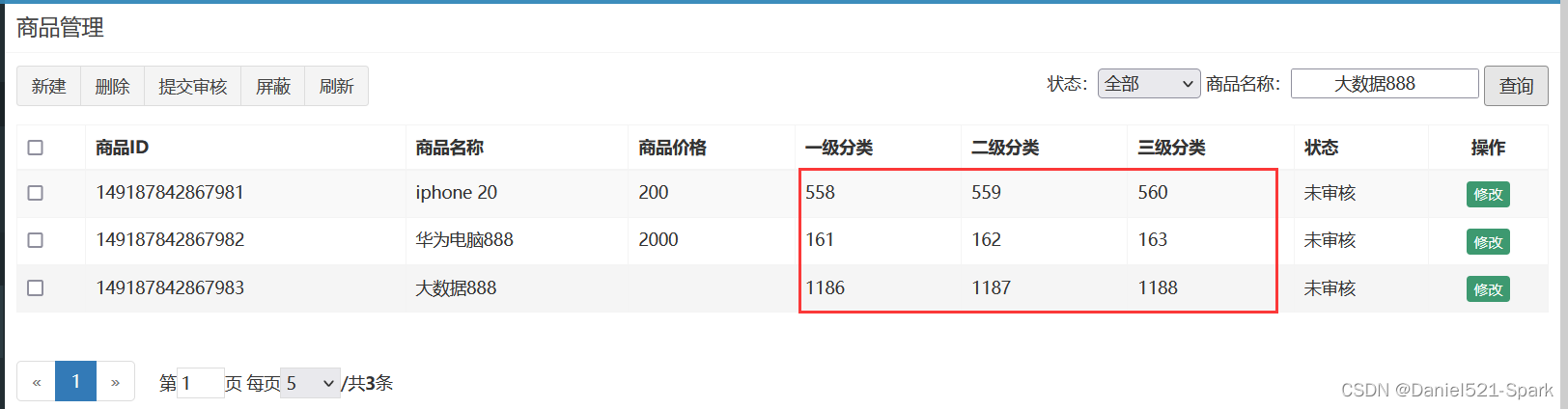
如何才能显示分类的名称呢?
- 方案一:在后端代码写关联查询语句,返回的数据中直接有分类名称。
- 方案二:在前端代码用ID去查询后端,异步返回商品分类名称。
我们目前采用方案二:
(1)修改goodsController.js
$scope.itemCatList=[];//商品分类列表 //加载商品分类列表 $scope.findItemCatList=function(){ itemCatService.findAll().success( function(response){ for(var i=0;i<response.length;i++){ $scope.itemCatList[response[i].id]=response[i].name; } } ); }- 1
- 2
- 3
- 4
- 5
- 6
- 7
- 8
- 9
- 10
- 11

代码解释:因为我们需要根据分类ID得到分类名称,所以我们将返回的结果以数组形式再次封装。
(2)修改goods.html ,增加初始化调用
<td>{{itemCatList[entity.category1Id]}}td> <td>{{itemCatList[entity.category2Id]}}td> <td>{{itemCatList[entity.category3Id]}}td>- 1
- 2
- 3

<body class="hold-transition skin-red sidebar-mini" ng-app="youlexuan" ng-controller="goodsController" ng-init="searchEntity={};findItemCatList()">- 1
- 2

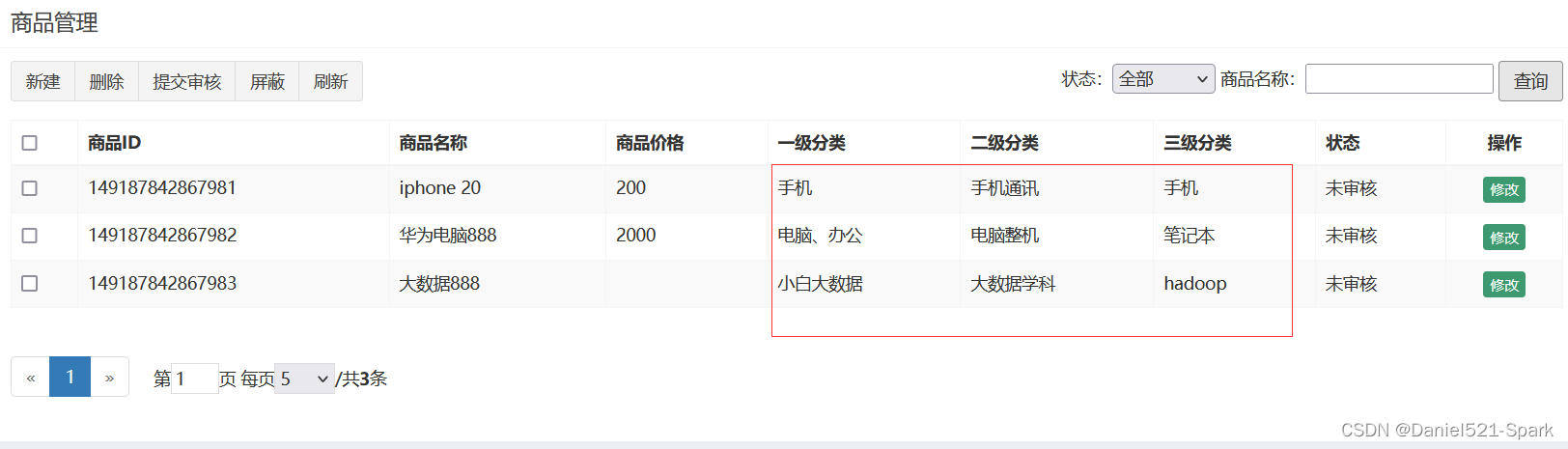
1.5 条件查询
根据状态和商品名称进行查询
修改goods.html
<div class="box-tools pull-right"> <div class="has-feedback"> 状态: <select ng-model="searchEntity.auditStatus"> <option value="">全部option> <option value="0">未审核option> <option value="1">已审核option> <option value="2">审核未通过option> <option value="3">关闭option> select> 商品名称: <input ng-model="searchEntity.goodsName"> <button class="btn btn-default" ng-click="reloadList()">查询button> div> div>- 1
- 2
- 3
- 4
- 5
- 6
- 7
- 8
- 9
- 10
- 11
- 12
- 13
- 14
- 15

测试效果显示

1.6 新建
(1) 删除不需要的按钮

(2)“新建” 只需跳转过去就行

二、商家后台-商品管理【商品修改】
2.1 需求分析
在商品列表页面点击修改,进入商品编辑页面,并传递参数商品ID,商品编辑页面接受该参数后从数据库中读取商品信息,用户修改后保存信息。
2.2 基本信息读取
我们首选读取商品分类、商品名称、品牌,副标题,价格等信息

2.2.1 后端代码
(1)修改youlexuan_sellergoods_interface的GoodsService.java

(2)修改youlexuan_sellergoods_service 的 GoodsServiceImpl.java/** * 根据ID获取实体 * @param id * @return */ @Override public Goods findOne(Long id){ //基本信息 Goods goods = new Goods(); TbGoods tbGoods = goodsMapper.selectByPrimaryKey(id); goods.setGoods(tbGoods); //扩展信息 TbGoodsDesc tbGoodsDesc = goodsDescMapper.selectByPrimaryKey(id); goods.setGoodsDesc(tbGoodsDesc); //SKU TbItemExample tbItemExample = new TbItemExample(); TbItemExample.Criteria criteria = tbItemExample.createCriteria(); criteria.andGoodsIdEqualTo(id); List<TbItem> tbItems = itemMapper.selectByExample(tbItemExample); goods.setItemList(tbItems); return goods; }- 1
- 2
- 3
- 4
- 5
- 6
- 7
- 8
- 9
- 10
- 11
- 12
- 13
- 14
- 15
- 16
- 17
- 18
- 19
- 20
- 21
- 22
- 23
- 24
- 25
- 26
- 27
- 28
- 29
- 30
- 31
- 32
- 33
- 34
(3)修改youlexuan_shop_web(和youlexuan-manager-web)的GoodsController.java

2.2.2 前端代码
(1) 将修改按钮做变动
注意: ?前要加# ,则是angularJS的地址路由的书写形式
<td class="text-center"> <a href="goods_edit.html#?id={{entity.id}}" type="button" class="btn bg-olive btn-xs" >修改a> td>- 1
- 2
- 3

(2)在goodsController中引入
$location服务
(3)修改 goodsController 添加代码
var id = $location.search()['id'];//获取参数值- 1

在goods_edit.html页面上添加指令

2.3 回显基本信息、商品图片、扩展属性
//查询实体 $scope.findOne=function(){ var id = $location.search()['id'];//获取参数值 if(id==null){ return ; } goodsService.findOne(id).success( function(response){ $scope.entity= response; //向富文本编辑器添加商品介绍 editor.html($scope.entity.goodsDesc.introduction); //显示图片列表 $scope.entity.goodsDesc.itemImages= JSON.parse($scope.entity.goodsDesc.itemImages); //显示扩展属性 $scope.entity.goodsDesc.customAttributeItems= JSON.parse($scope.entity.goodsDesc.customAttributeItems); //规格 $scope.entity.goodsDesc.specificationItems=JSON.parse($scope.entity.goodsDesc.specificationItems); //SKU列表规格列转换 for( var i=0;i<$scope.entity.itemList.length;i++ ){ $scope.entity.itemList[i].spec = JSON.parse( $scope.entity.itemList[i].spec); } } ); };- 1
- 2
- 3
- 4
- 5
- 6
- 7
- 8
- 9
- 10
- 11
- 12
- 13
- 14
- 15
- 16
- 17
- 18
- 19
- 20
- 21
- 22
- 23
- 24
- 25
- 26
- 27
- 28
- 29
- 30
- 31
- 32
- 33
- 34
问题 1: 经过测试,我们发现扩展属性值并没有读取出来,这是因为与下列代码发生冲突
解决1:我们读取出来的值被覆盖了,我们需要改写代码, 添加判断,当用户没有传递id参数时再执行此逻辑
//如果没有ID,则加载模板中的扩展数据 if($location.search()['id']==null) { //扩展属性 $scope.entity.goodsDesc.customAttributeItems = JSON.parse($scope.typeTemplate.customAttributeItems) }- 1
- 2
- 3
- 4
- 5

2.4 规格
- 在 goodsController.js下面加
//根据规格名称和选项名称返回是否被勾选 $scope.checkAttributeValue=function(specName,optionName){ var items= $scope.entity.goodsDesc.specificationItems; var object= $scope.searchObjectByKey(items,'attributeName',specName); if(object==null){ return false; }else{ if(object.attributeValue.indexOf(optionName)>=0){ return true; }else{ return false; } } }- 1
- 2
- 3
- 4
- 5
- 6
- 7
- 8
- 9
- 10
- 11
- 12
- 13
- 14

- 修改页面 goods_edit.html 上规格面板的复选框,运用 ng-checked指令控制复选框的勾选状态
ng-checked="checkAttributeValue(pojo.text,option.optionName)"- 1

2.5 保存数据
2.5.1 后端代码
修改 youlexuan_sellergoods_interface 的 GoodsService.java

修改 youlexuan_sellergoods_service 的GoodsServiceImpl ,将SKU列表插入的代码提取出来,封装到私有方法中
/** * 插入SKU列表数据 * @param goods */ private void saveItemList(Goods goods){ //还缺少了sku保存 if("1".equals(goods.getGoods().getIsEnableSpec())){ for(TbItem item :goods.getItemList()){ //标题 String title= goods.getGoods().getGoodsName(); Map<String,Object> specMap = JSON.parseObject(item.getSpec()); for(String key:specMap.keySet()){ title+=" "+ specMap.get(key); } item.setTitle(title); setItemValus(goods,item); itemMapper.insert(item); } }else{ TbItem item=new TbItem(); item.setTitle(goods.getGoods().getGoodsName());//商品KPU作为SKU名称 item.setPrice( goods.getGoods().getPrice() );//价格 item.setStatus("1");//状态 item.setIsDefault("1");//是否默认 item.setNum(99999);//库存数量 item.setSpec("{}"); setItemValus(goods,item); itemMapper.insert(item); } }- 1
- 2
- 3
- 4
- 5
- 6
- 7
- 8
- 9
- 10
- 11
- 12
- 13
- 14
- 15
- 16
- 17
- 18
- 19
- 20
- 21
- 22
- 23
- 24
- 25
- 26
- 27
- 28
- 29
- 30
在 youlexuan_sellergoods_service 的GoodsServiceImpl中 add方法中调用 此方法,修改如下:

怎么样,是不是比原来更加清爽了呢?
接下来,我们修改update方法,实现修改/** * 修改 */ @Override public void update(Goods goods){ goods.getGoods().setAuditStatus("0");//设置未申请状态:如果是经过修改的商品,需要重新设置状态 goodsMapper.updateByPrimaryKey(goods.getGoods());//保存商品表 goodsDescMapper.updateByPrimaryKey(goods.getGoodsDesc());//保存商品扩展表 //删除原有的sku列表数据 TbItemExample example=new TbItemExample(); com.zql.pojo.TbItemExample.Criteria criteria = example.createCriteria(); criteria.andGoodsIdEqualTo(goods.getGoods().getId()); itemMapper.deleteByExample(example); //添加新的sku列表数据 saveItemList(goods);//插入商品SKU列表数据 }- 1
- 2
- 3
- 4
- 5
- 6
- 7
- 8
- 9
- 10
- 11
- 12
- 13
- 14
- 15
- 16
修改youlexuan_manager_web工程的 GoodsController.java

修改youlexuan_shop_web工程的 GoodsController.java,增加验证是否是当前商家操作
//校验是否是当前商家的id Goods goods2 = goodsService.findOne(goods.getGoods().getId()); //获取当前登录的商家ID String sellerId = SecurityContextHolder.getContext().getAuthentication().getName(); //如果传递过来的商家ID并不是当前登录的用户的ID,则属于非法操作 if(!goods2.getGoods().getSellerId().equals(sellerId) || !goods.getGoods().getSellerId().equals(sellerId) ){ return new Result(false, "操作非法"); }- 1
- 2
- 3
- 4
- 5
- 6
- 7
- 8

2.5.2前端代码
(1)修改goodsController.js ,修改保存的方法
//提取文本编辑器的值 $scope.entity.goodsDesc.introduction=editor.html();- 1
- 2

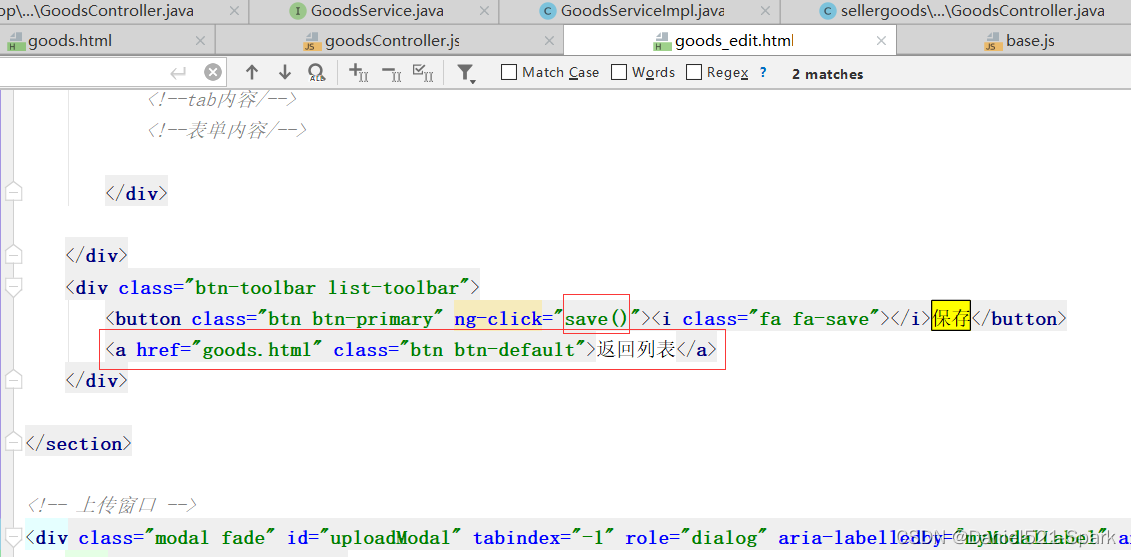
(2)修改goods_edit.html 调用
<div class="btn-toolbar list-toolbar"> <button class="btn btn-primary" ng-click="save()"><i class="fa fa-save">i>保存button> <a href="goods.html" class="btn btn-default">返回列表a> div>- 1
- 2
- 3
- 4
2.6 页面跳转
(3)保存成功后返回列表页面
location.href="goods.html";//跳转到商品列表页- 1

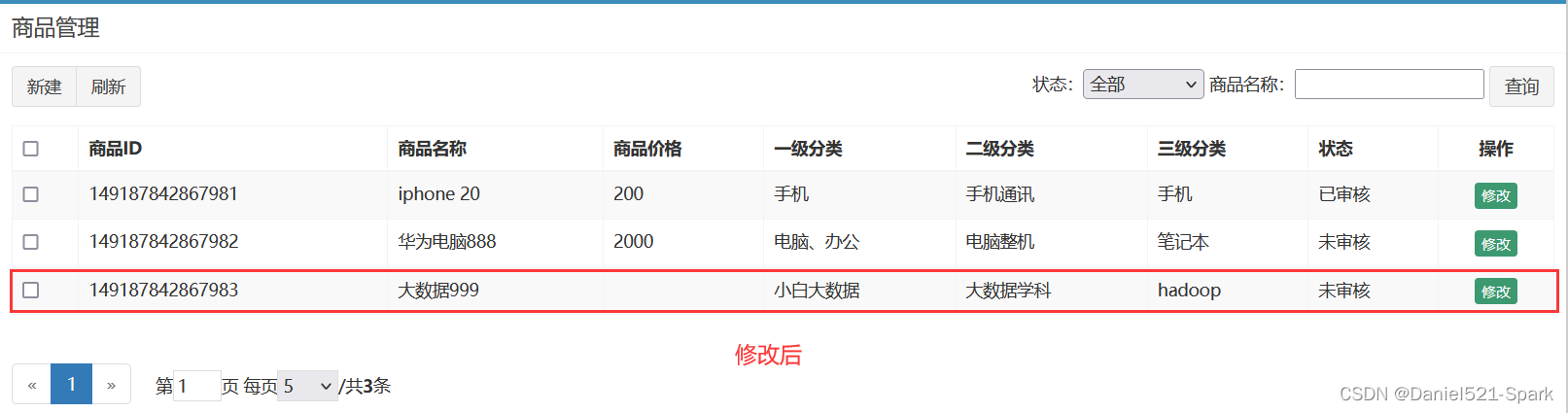
安装启动测试 :👇🏾👇🏾

当前 youlexuan 所有完整代码
-
相关阅读:
计算机基本知识1
关于学什么和如何学的思考
vue项目切换页面白屏不显示解决方案
JS实现带并发的异步任务调度器-promise
Tomcat HTTP协议与AJP协议
增量学习 Demo
centos(7.9) minikube(v1.28.0) kaniko 构建镜像
Web学习笔记-React(路由)
Redis五种基本数据类型-Hash
【深度学习】实验 — 动手实现 GPT【三】:LLM架构、LayerNorm、GELU激活函数
- 原文地址:https://blog.csdn.net/weixin_42171159/article/details/126376879
