-
Go Web---Web服务器
一个简单的 web 服务器
http是比tcp更高层的协议,它描述了网页服务器如何与客户端浏览器进行通信。Go提供了net/http包,我们马上就来看下。我们引入了
http包并启动了网页服务器,和之前的net.Listen("tcp", "localhost:50000")函数的tcp服务器是类似的,使用http.ListenAndServe("localhost:8080", nil)函数,如果成功会返回空,否则会返回一个错误(地址localhost部分可以省略,8080是指定的端口号)。//第二个参数是关于请求和对应处理函数的映射器的 err := http.ListenAndServe("localhost:8080", nil) if err != nil { log.Fatal("ListenAndServe: ", err.Error()) }- 1
- 2
- 3
- 4
- 5
http.URL用于表示网页地址,其中字符串属性Path用于保存url的路径;http.Request描述了客户端请求,内含一个URL字段。如果
req是来自html表单的POST类型请求,“var1”是该表单中一个输入域的名称,那么用户输入的值就可以通过Go代码req.FormValue("var1")获取到。还有一种方法是先执行
request.ParseForm(),然后再获取request.Form["var1"]的第一个返回参数,就像这样:var1, found := request.Form["var1"]- 1
第二个参数
found为true。如果var1并未出现在表单中,found就是false。表单属性实际上是
map[string][]string类型。网页服务器发送一个http.Response响应,它是通过http.ResponseWriter对象输出的,后者组装了HTTP服务器响应,通过对其写入内容,我们就将数据发送给了HTTP客户端。现在我们仍然要编写程序,以实现服务器必须做的事,即如何处理请求。这是通过
http.HandleFunc函数完成的。在这个例子中,当根路径“/”(url地址是 http://localhost:8080)被请求的时候(或者这个服务器上的其他任意地址),HelloServer函数就被执行了。这个函数是http.HandlerFunc类型的,它们通常被命名为Prefhandler,和某个路径前缀Pref匹配。http.HandleFunc注册了一个处理函数(这里是HelloServer)来处理对应/的请求。/可以被替换为其他更特定的url,比如/create,/edit等等;你可以为每一个特定的url定义一个单独的处理函数。这个函数需要两个参数:第一个是
ReponseWriter类型的w;第二个是请求req。程序向w写入了Hello和r.URL.Path[1:]组成的字符串:末尾的[1:]表示“创建一个从索引为1的字符到结尾的子切片”,用来丢弃路径开头的“/”,fmt.Fprintf()函数完成了本次写入;另一种可行的写法是io.WriteString(w, "hello, world!\n")。总结:第一个参数是请求的路径,第二个参数是当路径被请求时,需要调用的处理函数的引用。
package main import ( "fmt" "log" "net/http" ) func HelloServer(w http.ResponseWriter, req *http.Request) { fmt.Println("Inside HelloServer handler") fmt.Fprintf(w, "Hello,"+req.URL.Path[1:]) } func main() { http.HandleFunc("/", HelloServer) err := http.ListenAndServe("localhost:8080", nil) if err != nil { log.Fatal("ListenAndServe: ", err.Error()) } }- 1
- 2
- 3
- 4
- 5
- 6
- 7
- 8
- 9
- 10
- 11
- 12
- 13
- 14
- 15
- 16
- 17
- 18
- 19
使用命令行启动程序,会打开一个命令窗口显示如下文字:
Starting Process E:/Go/GoBoek/code_examples/chapter_14/hello_world_webserver.exe...- 1
然后打开浏览器并输入
url地址:http://localhost:8080/world,浏览器就会出现文字:Hello, world,网页服务器会响应你在 :8080/后边输入的内容。fmt.Println在服务器端控制台打印状态;在每个处理函数被调用时,把请求记录下来也许更为有用。注: 1)前两行(没有错误处理代码)可以替换成以下写法:
http.ListenAndServe(":8080", http.HandlerFunc(HelloServer))- 1
2)
fmt.Fprint和fmt.Fprintf都是可以用来写入http.ResponseWriter的函数(他们实现了io.Writer)。 比如我们可以使用fmt.Fprintf(w, "%s
, title, body)%s"- 1
来构建一个非常简单的网页并插入
title和body的值。如果你需要更多复杂的替换,使用模板包
3)如果你需要使用安全的
https连接,使用http.ListenAndServeTLS()代替http.ListenAndServe()4)除了
http.HandleFunc("/", Hfunc),其中的HFunc是一个处理函数,签名为:func HFunc(w http.ResponseWriter, req *http.Request) { ... }- 1
- 2
- 3
也可以使用这种方式:
http.Handle("/", http.HandlerFunc(HFunc))HandlerFunc只是定义了上述HFunc签名的别名:type HandlerFunc func(ResponseWriter, *Request)- 1
它是一个可以把普通的函数当做
HTTP处理器(Handler)的适配器。如果函数f声明的合适,HandlerFunc(f)就是一个执行f函数的Handler对象。http.Handle的第二个参数也可以是T类型的对象obj:http.Handle("/", obj)。如果
T有ServeHTTP方法,那就实现了http的Handler接口:func (obj *Typ) ServeHTTP(w http.ResponseWriter, req *http.Request) { ... }- 1
- 2
- 3
这个用法也在 Counter 和 Chan 类型上使用。只要实现了 http.Handler,http 包就可以处理任何 HTTP 请求.
实例演示
package main import ( "fmt" "io" "log" "net/http" "time" ) type Stu struct { mappings map[string]func(w http.ResponseWriter, req *http.Request) } func NewStu() *Stu { return &Stu{mappings: make(map[string]func(w http.ResponseWriter, req *http.Request), 3)} } func (s *Stu) ServeHTTP(w http.ResponseWriter, req *http.Request) { extractPrefixUrl := req.URL.Path[5:] handleFunc := s.mappings[extractPrefixUrl] if handleFunc == nil { io.WriteString(w, "404 NOT FOUND TARGET HANDLE FUNC
") return } handleFunc(w, req) } func (*Stu) delete(w http.ResponseWriter, req *http.Request) { w.Write([]byte("删除学生
")) } func (*Stu) put(w http.ResponseWriter, req *http.Request) { w.Write([]byte("修改学生
")) } func (*Stu) post(w http.ResponseWriter, req *http.Request) { w.Write([]byte("新增学生
")) } func main() { registerMappings() err := http.ListenAndServe(":8080", nil) if err != nil { log.Fatal("ListenAndServe: ", err.Error()) } } //registerMappings 注册请求和处理器的映射 func registerMappings() { http.HandleFunc("/", DefaultHandle) stu := NewStu() stu.mappings["delete"] = stu.delete stu.mappings["put"] = stu.put stu.mappings["post"] = stu.post http.Handle("/stu/", stu) } func DefaultHandle(w http.ResponseWriter, req *http.Request) { fmt.Fprintf(w, "默认首页
当前请求为: %s
当前系统时间: %s
", req.URL, time.Now().Format("2006-01-02 15:04:05")) }- 1
- 2
- 3
- 4
- 5
- 6
- 7
- 8
- 9
- 10
- 11
- 12
- 13
- 14
- 15
- 16
- 17
- 18
- 19
- 20
- 21
- 22
- 23
- 24
- 25
- 26
- 27
- 28
- 29
- 30
- 31
- 32
- 33
- 34
- 35
- 36
- 37
- 38
- 39
- 40
- 41
- 42
- 43
- 44
- 45
- 46
- 47
- 48
- 49
- 50
- 51
- 52
- 53
- 54
- 55
- 56
- 57
- 58
- 59
- 60
- 61
- 62
访问并读取页面
我们使用 http.Get() 获取并显示网页内容; Get 返回值中的 Body 属性包含了网页内容,然后我们用 ioutil.ReadAll 把它读出来:
package main import ( "fmt" "io" "log" "net/http" ) func main() { response, err := http.Get("https://www.baidu.com/") if err != nil { checkError(err) return } bytes, err := io.ReadAll(response.Body) if err != nil { checkError(err) return } fmt.Println(string(bytes)) } func checkError(err error) { if err != nil { log.Fatalf("Get : %v", err) } }- 1
- 2
- 3
- 4
- 5
- 6
- 7
- 8
- 9
- 10
- 11
- 12
- 13
- 14
- 15
- 16
- 17
- 18
- 19
- 20
- 21
- 22
- 23
- 24
- 25
- 26
- 27
- 28
- 29

http 包中的其他重要的函数:
-
http.Redirect(w ResponseWriter, r *Request, url string, code int):这个函数会让浏览器重定向到 url(可以是基于请求 url 的相对路径),同时指定状态码。 -
http.NotFound(w ResponseWriter, r *Request):这个函数将返回网页没有找到,HTTP 404错误。 -
http.Error(w ResponseWriter, error string, code int):这个函数返回特定的错误信息和 HTTP 代码。 - 另一个
http.Request对象req的重要属性:req.Method,这是一个包含GET或POST字符串,用来描述网页是以何种方式被请求的。
go为所有的HTTP状态码定义了常量,比如:
http.StatusContinue = 100 http.StatusOK = 200 http.StatusFound = 302 http.StatusBadRequest = 400 http.StatusUnauthorized = 401 http.StatusForbidden = 403 http.StatusNotFound = 404 http.StatusInternalServerError = 500- 1
- 2
- 3
- 4
- 5
- 6
- 7
- 8
你可以使用
w.header().Set("Content-Type", "../..")设置头信息。比如在网页应用发送
html字符串的时候,在输出之前执行w.Header().Set("Content-Type", "text/html")(通常不是必要的)。content-type会让浏览器认为它可以使用函数http.DetectContentType([]byte(form)) 来处理收到的数据。
确保网页应用健壮
当网页应用的处理函数发生 panic,服务器会简单地终止运行。这可不妙:网页服务器必须是足够健壮的程序,能够承受任何可能的突发问题。
首先能想到的是在每个处理函数中使用 defer/recover,不过这样会产生太多的重复代码。
使用闭包的错误处理模式是更优雅的方案。我们把这种机制应用到前一章的简单网页服务器上。实际上,它可以被简单地应用到任何网页服务器程序中。
为增强代码可读性,我们为页面处理函数创建一个类型:
type HandleFnc func(http.ResponseWriter, *http.Request)- 1
我们的错误处理函数应用了闭包处理错误的模式,成为 logPanics 函数:
func logPanics(function HandleFnc) HandleFnc { return func(writer http.ResponseWriter, request *http.Request) { defer func() { if x := recover(); x != nil { log.Printf("[%v] caught panic: %v", request.RemoteAddr, x) } }() function(writer, request) } }- 1
- 2
- 3
- 4
- 5
- 6
- 7
- 8
- 9
- 10
然后我们用 logPanics 来包装对处理函数的调用:
http.HandleFunc("/test1", logPanics(SimpleServer)) http.HandleFunc("/test2", logPanics(FormServer))- 1
- 2
处理函数现在可以恢复 panic 调用
实例演示:
package main import ( "io" "log" "net/http" ) const form = `` type HandleFnc func(http.ResponseWriter, *http.Request) func SimpleServer(w http.ResponseWriter, request *http.Request) { io.WriteString(w, "hello, world
") } func FormServer(w http.ResponseWriter, request *http.Request) { w.Header().Set("Content-Type", "text/html") switch request.Method { case "GET": io.WriteString(w, form) case "POST": //request.ParseForm(); //io.WriteString(w, request.Form["in"][0]) io.WriteString(w, request.FormValue("in")) } } func main() { http.HandleFunc("/test1", logPanics(SimpleServer)) http.HandleFunc("/test2", logPanics(FormServer)) if err := http.ListenAndServe(":8088", nil); err != nil { panic(err) } } func logPanics(function HandleFnc) HandleFnc { return func(writer http.ResponseWriter, request *http.Request) { defer func() { if x := recover(); x != nil { log.Printf("[%v] caught panic: %v", request.RemoteAddr, x) } }() function(writer, request) } }- 1
- 2
- 3
- 4
- 5
- 6
- 7
- 8
- 9
- 10
- 11
- 12
- 13
- 14
- 15
- 16
- 17
- 18
- 19
- 20
- 21
- 22
- 23
- 24
- 25
- 26
- 27
- 28
- 29
- 30
- 31
- 32
- 33
- 34
- 35
- 36
- 37
- 38
- 39
- 40
- 41
- 42
- 43
- 44
- 45
- 46
- 47
- 48
- 49
- 50
精巧的多功能网页服务器
错误请求头
考虑到例子的复杂性,这里先将例子进行拆分,一点点看:
- Logger 处理函数用 w.WriteHeader(404) 来输出 “404 Not Found”头部。
func main() { //注册相关映射器 http.Handle("/", http.HandlerFunc(Logger)) err := http.ListenAndServe(":12345", nil) if err != nil { log.Panicln("ListenAndServe:", err) } } func Logger(w http.ResponseWriter, req *http.Request) { //打印请求访问的URL log.Print(req.URL.String()) //输出 “404 Not Found”头部。 w.WriteHeader(404) //响应体填充oops w.Write([]byte("oops")) }- 1
- 2
- 3
- 4
- 5
- 6
- 7
- 8
- 9
- 10
- 11
- 12
- 13
- 14
- 15
- 16
- 17
此项技术通常很有用,无论何时服务器执行代码产生错误,都可以应用类似这样的代码:
if err != nil { w.WriteHeader(400) return }- 1
- 2
- 3
- 4
另外利用 logger 包的函数,针对每个请求在服务器端命令行打印日期、时间和 URL。
监控
- 包 expvar 可以创建(Int,Float 和 String 类型)变量,并将它们发布为公共变量。
它会在 HTTP URL /debug/vars 上以 JSON 格式公布。通常它被用于服务器操作计数。

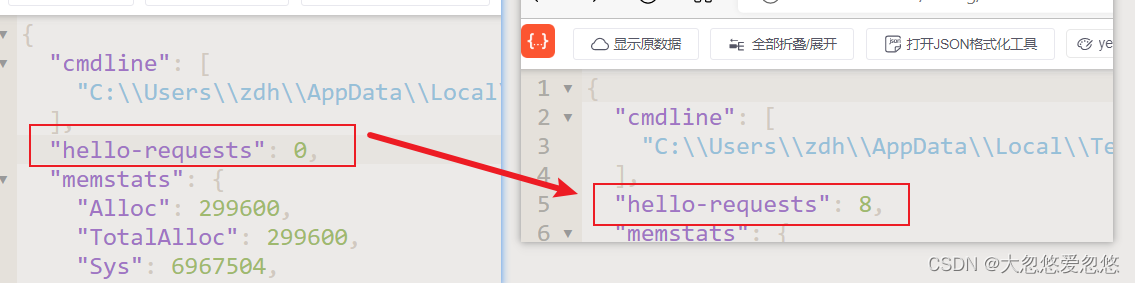
这其实SpringBoot Actuator功能类似,提供相关系统运行时参数,默认提供了很多默认监控端点,我们也可以通过expvar 包来加入我们自定义的监控端点.实例演示:
package main import ( "expvar" "io" "log" "net/http" ) //暴露出我们自定义的监控端点 var helloRequests = expvar.NewInt("hello-requests") func main() { http.Handle("/go/hello", http.HandlerFunc(HelloServer)) err := http.ListenAndServe(":12345", nil) if err != nil { log.Panicln("ListenAndServe:", err) } } func HelloServer(w http.ResponseWriter, req *http.Request) { helloRequests.Add(1) io.WriteString(w, "hello, world!\n") }- 1
- 2
- 3
- 4
- 5
- 6
- 7
- 8
- 9
- 10
- 11
- 12
- 13
- 14
- 15
- 16
- 17
- 18
- 19
- 20
- 21
- 22
- 23
- 24
- 25
每当我们访问一次/go/hello请求,helloRequests计数就会增加,我们在监控页面就可以实时查询到。
计数器对象 ctr 有一个 String() 方法,所以它实现了 expvar.Var 接口。这使其可以被发布,尽管它是一个结构体。ServeHTTP 函数使 ctr 成为处理器,因为它的签名正确实现了 http.Handler 接口。
package main import ( "bytes" "expvar" "fmt" "io" "log" "net/http" "strconv" ) type Counter struct { n int } func main() { ctr := new(Counter) expvar.Publish("counter", ctr) http.Handle("/counter", ctr) err := http.ListenAndServe(":12345", nil) if err != nil { log.Panicln("ListenAndServe:", err) } } func (ctr *Counter) String() string { return fmt.Sprintf("%d", ctr.n) } func (ctr *Counter) ServeHTTP(w http.ResponseWriter, req *http.Request) { switch req.Method { //计算GET请求的次数 case "GET": ctr.n++ case "POST": //拿到请求体中的数据 buf := new(bytes.Buffer) io.Copy(buf, req.Body) body := buf.String() //将请求体中的字符串转换为整数 if n, err := strconv.Atoi(body); err != nil { fmt.Fprintf(w, "bad POST: %v\nbody: [%v]\n", err, body) } else { //利用请求体中的数字重置Counter计数器的值 ctr.n = n fmt.Fprint(w, "counter reset\n") } } //将当前计数器中的值返回给浏览器 fmt.Fprintf(w, "counter = %d\n", ctr.n) }- 1
- 2
- 3
- 4
- 5
- 6
- 7
- 8
- 9
- 10
- 11
- 12
- 13
- 14
- 15
- 16
- 17
- 18
- 19
- 20
- 21
- 22
- 23
- 24
- 25
- 26
- 27
- 28
- 29
- 30
- 31
- 32
- 33
- 34
- 35
- 36
- 37
- 38
- 39
- 40
- 41
- 42
- 43
- 44
- 45
- 46
- 47
- 48
- 49
- 50
- 51
- 52
静态资源
FileServer(root FileSystem) Handler 返回一个处理器,它以 root 作为根,用文件系统的内容响应 HTTP 请求。要获得操作系统的文件系统,用 http.Dir,例如:
http.Handle("/go/", http.FileServer(http.Dir("/tmp")))- 1
完整案例:
package main import ( "flag" "log" "net/http" ) var webroot = flag.String("root", "./", "web root directory") func main() { //解析命令行参数 flag.Parse() http.Handle("/go/", //将请求交给具体处理器前,会帮我们剥掉请求前缀 http.StripPrefix("/go/", //拿到文件路径,去系统文件中查找,然后以附件下载的形式返回给客户端 http.FileServer(http.Dir(*webroot)))) err := http.ListenAndServe(":12345", nil) if err != nil { log.Panicln("ListenAndServe:", err) } }- 1
- 2
- 3
- 4
- 5
- 6
- 7
- 8
- 9
- 10
- 11
- 12
- 13
- 14
- 15
- 16
- 17
- 18
- 19
- 20
- 21
- 22
- 23
- 24
标签
该处理函数使用了 flag 包。VisitAll 函数迭代所有的标签(flag),打印它们的名称、值和默认值(当不同于“值”
时)package main import ( "flag" "fmt" "log" "net/http" ) var booleanflag = flag.Bool("boolean", true, "another flag for testing") func main() { http.Handle("/flags", http.HandlerFunc(FlagServer)) err := http.ListenAndServe(":12345", nil) if err != nil { log.Panicln("ListenAndServe:", err) } } func FlagServer(w http.ResponseWriter, req *http.Request) { //设置响应头 w.Header().Set("Content-Type", "text/plain; charset=utf-8") fmt.Fprint(w, "Flags:\n") //遍历所有标签 flag.VisitAll(func(f *flag.Flag) { //DefValue是当前标签的默认值 if f.Value.String() != f.DefValue { //用户通过命令行参数获得了非默认值 fmt.Fprintf(w, "%s = %s [default = %s]\n", f.Name, f.Value.String(), f.DefValue) } else { //解析后得到的值和默认值一致 fmt.Fprintf(w, "%s = %s\n", f.Name, f.Value.String()) } }) }- 1
- 2
- 3
- 4
- 5
- 6
- 7
- 8
- 9
- 10
- 11
- 12
- 13
- 14
- 15
- 16
- 17
- 18
- 19
- 20
- 21
- 22
- 23
- 24
- 25
- 26
- 27
- 28
- 29
- 30
- 31
- 32
- 33
- 34
- 35
- 36

通道
利用通道完成累加计数,程序如下:
每当有新请求到达,通道的 ServeHTTP 方法从通道获取下一个整数并显示。由此可见,网页服务器可以从通道中获取要发送的响应,它可以由另一个函数产生(甚至是客户端)。
package main import ( "fmt" "io" "log" "net/http" ) type Chan chan int func main() { http.Handle("/chan", ChanCreate()) err := http.ListenAndServe(":12345", nil) if err != nil { log.Panicln("ListenAndServe:", err) } } func ChanCreate() Chan { c := make(Chan) //利用通道完成累加计数 go func(c Chan) { for x := 0; ; x++ { c <- x } }(c) return c } func (ch Chan) ServeHTTP(w http.ResponseWriter, req *http.Request) { io.WriteString(w, fmt.Sprintf("channel send #%d\n", <-ch)) }- 1
- 2
- 3
- 4
- 5
- 6
- 7
- 8
- 9
- 10
- 11
- 12
- 13
- 14
- 15
- 16
- 17
- 18
- 19
- 20
- 21
- 22
- 23
- 24
- 25
- 26
- 27
- 28
- 29
- 30
- 31
- 32
- 33
下面的代码片段正是一个这样的处理函数,但会在 30 秒后超时:
func ChanResponse(w http.ResponseWriter, req *http.Request) { timeout := make (chan bool) go func () { time.Sleep(30e9) timeout <- true }() select { case msg := <-messages: io.WriteString(w, msg) case stop := <-timeout: return } }- 1
- 2
- 3
- 4
- 5
- 6
- 7
- 8
- 9
- 10
- 11
- 12
- 13
-
相关阅读:
好消息|又一省22年二建成绩查询时间公布
CentOS7 使用yum安装Nginx (方式一)
Windows下搭建GTK3开发环境
DeepFace【部署 03】轻量级人脸识别和面部属性分析框架deepface在Linux环境下服务部署(conda虚拟环境+docker)
Java继承
LeetCode 144 二叉树的前序遍历 - Java 实现
309 买卖股票的最佳时机含冷冻期(状态机DP)(灵神笔记)
V8垃圾回收
月薪12.8K,转行测试从0到1斩获3份过万offer,分享一些我的小秘招~
RTOS 中 Task 之间资源共享示例
- 原文地址:https://blog.csdn.net/m0_53157173/article/details/126402344
