-
Apache HttpClient 5 使用详细教程

HTTP Components Logo
超文本传输协议(HTTP)可能是当今互联网上最重要的协议之一,Web 服务、微服务以及支持网络的各种设备上的服务几乎都是 HTTP 协议,HTTP 协议已经从 Web 浏览器走向了更广泛的使用场景。
虽然
java.net包已经提供了 HTTP 访问资源的基本功能,但是它不够灵活,而且不能随心所欲的进行自定义。Apache HttpClient 5 是一个开源的 HTTP 工具包,可以支持最新 HTTP 协议标准,且有丰富的 API 和强大的扩展特性,可以用于构建任何需要进行 HTTP 协议处理的应用程序。这篇文章介绍 Apache HttpClient 5 中最为常见的一些用法,通过这篇文章可以快速的入门使用 HttpClient 5,主要内容包括 HttpClient 5 的 Get 请求、Post 请求、如何携带参数、JSON 参数、设置超时、异步请求、操作 Cookie、表单登录、基本认证、Digest 认证以及自定义 HTTP 请求拦截器等。
HttpClient 5 依赖
HttpClient 5 Maven 依赖
- <!-- https://mvnrepository.com/artifact/org.apache.httpcomponents.client5/httpclient5 -->
- <dependency>
- <groupId>org.apache.httpcomponents.client5</groupId>
- <artifactId>httpclient5</artifactId>
- <version>5.1.3</version>
- </dependency>
- <!-- https://mvnrepository.com/artifact/org.apache.httpcomponents.client5/httpclient5-fluent -->
- <dependency>
- <groupId>org.apache.httpcomponents.client5</groupId>
- <artifactId>httpclient5-fluent</artifactId>
- <version>5.1.3</version>
- </dependency>
HttpClient 5 Gradle 依赖
- implementation 'org.apache.httpcomponents.client5:httpclient5:5.1.3'
- implementation 'org.apache.httpcomponents.client5:httpclient5-fluent:5.1.3'
HttpClient 5 GET 请求
- package com.wdbyte.httpclient;
- import java.io.IOException;
- import org.apache.hc.client5.http.classic.methods.HttpGet;
- import org.apache.hc.client5.http.impl.classic.CloseableHttpClient;
- import org.apache.hc.client5.http.impl.classic.CloseableHttpResponse;
- import org.apache.hc.client5.http.impl.classic.HttpClients;
- import org.apache.hc.core5.http.HttpEntity;
- import org.apache.hc.core5.http.ParseException;
- import org.apache.hc.core5.http.io.entity.EntityUtils;
- /**
- * @author https://www.wdbyte.com
- */
- public class HttpClient5Get {
- public static void main(String[] args) {
- String result = get("http://httpbin.org/get");
- System.out.println(result);
- }
- public static String get(String url) {
- String resultContent = null;
- HttpGet httpGet = new HttpGet(url);
- try (CloseableHttpClient httpclient = HttpClients.createDefault()) {
- try (CloseableHttpResponse response = httpclient.execute(httpGet)) {
- // 获取状态码
- System.out.println(response.getVersion()); // HTTP/1.1
- System.out.println(response.getCode()); // 200
- System.out.println(response.getReasonPhrase()); // OK
- HttpEntity entity = response.getEntity();
- // 获取响应信息
- resultContent = EntityUtils.toString(entity);
- }
- } catch (IOException | ParseException e) {
- e.printStackTrace();
- }
- return resultContent;
- }
- }
响应信息:
- HTTP/1.1
- 200
- OK
- {
- "args": {},
- "headers": {
- "Accept-Encoding": "gzip, x-gzip, deflate",
- "Host": "httpbin.org",
- "User-Agent": "Apache-HttpClient/5.1.3 (Java/17)",
- "X-Amzn-Trace-Id": "Root=1-62bb1891-5ab5e5376ed960471bf32f17"
- },
- "origin": "47.251.4.198",
- "url": "http://httpbin.org/get"
- }
HttpClient 5 Fluent GET
使用 Apache HttpClient 5 提供的 Fluent API 可以更便捷的发起 GET 请求,但是可操作的地方较少。
依赖:
- <!-- https://mvnrepository.com/artifact/org.apache.httpcomponents.client5/httpclient5-fluent -->
- <dependency>
- <groupId>org.apache.httpcomponents.client5</groupId>
- <artifactId>httpclient5-fluent</artifactId>
- <version>5.1.3</version>
- </dependency>
示例:
- package com.wdbyte.httpclient;
- import java.io.IOException;
- import org.apache.hc.client5.http.fluent.Request;
- import org.apache.hc.client5.http.fluent.Response;
- /**
- * @author https://www.wdbyte.com
- */
- public class HttpClient5GetFluent {
- public static void main(String[] args) {
- System.out.println(get("http://httpbin.org/get"));
- }
- public static String get(String url) {
- String result = null;
- try {
- Response response = Request.get(url).execute();
- result = response.returnContent().asString();
- } catch (IOException e) {
- e.printStackTrace();
- }
- return result;
- }
- }
输出信息:
- {
- "args": {},
- "headers": {
- "Accept-Encoding": "gzip, x-gzip, deflate",
- "Host": "httpbin.org",
- "User-Agent": "Apache-HttpClient/5.1.3 (Java/17)",
- "X-Amzn-Trace-Id": "Root=1-62bb190e-1ba46a92645843a04c55da32"
- },
- "origin": "47.251.4.198",
- "url": "http://httpbin.org/get"
- }
HttpClient5 GET 请求参数
使用
URIBuilder的addParameters()方法来构建 GET 请求的参数。- package com.wdbyte.httpclient;
- import java.io.IOException;
- import java.net.URI;
- import java.net.URISyntaxException;
- import java.util.ArrayList;
- import java.util.List;
- import org.apache.hc.client5.http.classic.methods.HttpGet;
- import org.apache.hc.client5.http.impl.classic.CloseableHttpClient;
- import org.apache.hc.client5.http.impl.classic.CloseableHttpResponse;
- import org.apache.hc.client5.http.impl.classic.HttpClients;
- import org.apache.hc.core5.http.HttpEntity;
- import org.apache.hc.core5.http.NameValuePair;
- import org.apache.hc.core5.http.ParseException;
- import org.apache.hc.core5.http.io.entity.EntityUtils;
- import org.apache.hc.core5.http.message.BasicNameValuePair;
- import org.apache.hc.core5.net.URIBuilder;
- /**
- * @author https://www.wdbyte.com
- */
- public class HttpClient5GetParams {
- public static void main(String[] args) {
- String result = get("http://httpbin.org/get");
- System.out.println(result);
- }
- public static String get(String url) {
- String resultContent = null;
- HttpGet httpGet = new HttpGet(url);
- // 表单参数
- List<NameValuePair> nvps = new ArrayList<>();
- // GET 请求参数
- nvps.add(new BasicNameValuePair("username", "wdbyte.com"));
- nvps.add(new BasicNameValuePair("password", "secret"));
- // 增加到请求 URL 中
- try {
- URI uri = new URIBuilder(new URI(url))
- .addParameters(nvps)
- .build();
- httpGet.setUri(uri);
- } catch (URISyntaxException e) {
- throw new RuntimeException(e);
- }
- try (CloseableHttpClient httpclient = HttpClients.createDefault()) {
- try (CloseableHttpResponse response = httpclient.execute(httpGet)) {
- // 获取状态码
- System.out.println(response.getVersion()); // HTTP/1.1
- System.out.println(response.getCode()); // 200
- System.out.println(response.getReasonPhrase()); // OK
- HttpEntity entity = response.getEntity();
- // 获取响应信息
- resultContent = EntityUtils.toString(entity);
- }
- } catch (IOException | ParseException e) {
- e.printStackTrace();
- }
- return resultContent;
- }
- }
输出信息:
- {
- "args": {
- "password": "secret",
- "username": "wdbyte.com"
- },
- "headers": {
- "Accept-Encoding": "gzip, x-gzip, deflate",
- "Host": "httpbin.org",
- "User-Agent": "Apache-HttpClient/5.1.3 (Java/1.8.0_151)",
- "X-Amzn-Trace-Id": "Root=1-62ecc660-69d58a226aefb1b6226541ec"
- },
- "origin": "42.120.75.185",
- "url": "http://httpbin.org/get?username=wdbyte.com&password=secret"
- }
下面是通过抓包得到的请求响应信息格式:
- // 请求信息
- GET /get?username=wdbyte.com&password=secret HTTP/1.1
- Accept-Encoding: gzip, x-gzip, deflate
- Host: httpbin.org
- Connection: keep-alive
- User-Agent: Apache-HttpClient/5.1.3 (Java/1.8.0_151)
- // 响应信息
- HTTP/1.1 200 OK
- Date: Fri, 05 Aug 2022 07:27:30 GMT
- Content-Type: application/json
- Content-Length: 405
- Connection: keep-alive
- Server: gunicorn/19.9.0
- Access-Control-Allow-Origin: *
- Access-Control-Allow-Credentials: true
- {
- "args": {
- "password": "secret",
- "username": "wdbyte.com"
- },
- "headers": {
- "Accept-Encoding": "gzip, x-gzip, deflate",
- "Host": "httpbin.org",
- "User-Agent": "Apache-HttpClient/5.1.3 (Java/1.8.0_151)",
- "X-Amzn-Trace-Id": "Root=1-62ecc660-69d58a226aefb1b6226541ec"
- },
- "origin": "42.120.75.185",
- "url": "http://httpbin.org/get?username=wdbyte.com&password=secret"
- }
HttpClient 5 POST 请求
下面演示发起一个 POST 请求,并携带表单参数。
参数:
username=wdbyte.com&password=secret- package com.wdbyte.httpclient;
- import java.io.IOException;
- import java.util.ArrayList;
- import java.util.List;
- import org.apache.hc.client5.http.classic.methods.HttpPost;
- import org.apache.hc.client5.http.entity.UrlEncodedFormEntity;
- import org.apache.hc.client5.http.impl.classic.CloseableHttpClient;
- import org.apache.hc.client5.http.impl.classic.CloseableHttpResponse;
- import org.apache.hc.client5.http.impl.classic.HttpClients;
- import org.apache.hc.core5.http.HttpEntity;
- import org.apache.hc.core5.http.NameValuePair;
- import org.apache.hc.core5.http.ParseException;
- import org.apache.hc.core5.http.io.entity.EntityUtils;
- import org.apache.hc.core5.http.message.BasicNameValuePair;
- /**
- * @author https://www.wdbyte.com
- */
- public class HttpClient5Post {
- public static void main(String[] args) {
- String result = post("http://httpbin.org/post");
- System.out.println(result);
- }
- public static String post(String url) {
- String result = null;
- HttpPost httpPost = new HttpPost(url);
- // 表单参数
- List<NameValuePair> nvps = new ArrayList<>();
- // POST 请求参数
- nvps.add(new BasicNameValuePair("username", "wdbyte.com"));
- nvps.add(new BasicNameValuePair("password", "secret"));
- httpPost.setEntity(new UrlEncodedFormEntity(nvps));
- try (CloseableHttpClient httpclient = HttpClients.createDefault()) {
- try (CloseableHttpResponse response = httpclient.execute(httpPost)) {
- System.out.println(response.getVersion()); // HTTP/1.1
- System.out.println(response.getCode()); // 200
- System.out.println(response.getReasonPhrase()); // OK
- HttpEntity entity = response.getEntity();
- // 获取响应信息
- result = EntityUtils.toString(entity);
- // 确保流被完全消费
- EntityUtils.consume(entity);
- }
- } catch (IOException | ParseException e) {
- e.printStackTrace();
- }
- return result;
- }
- }
输出信息:
- HTTP/1.1
- 200
- OK
- {
- "args": {},
- "data": "",
- "files": {},
- "form": {
- "password": "secret",
- "username": "wdbyte.com"
- },
- "headers": {
- "Accept-Encoding": "gzip, x-gzip, deflate",
- "Content-Length": "35",
- "Content-Type": "application/x-www-form-urlencoded; charset=ISO-8859-1",
- "Host": "httpbin.org",
- "User-Agent": "Apache-HttpClient/5.1.3 (Java/17)",
- "X-Amzn-Trace-Id": "Root=1-62bb1ac8-489b2100728c81d70797a482"
- },
- "json": null,
- "origin": "183.128.136.89",
- "url": "http://httpbin.org/post"
- }
下面是通过 Wireshark 抓包得到的请求信息:
- POST /post HTTP/1.1
- Accept-Encoding: gzip, x-gzip, deflate
- Content-Length: 35
- Content-Type: application/x-www-form-urlencoded; charset=ISO-8859-1
- Host: httpbin.org
- Connection: keep-alive
- User-Agent: Apache-HttpClient/5.1.3 (Java/17)
- username=wdbyte.com&password=secret
HttpClient 5 Fluent POST
使用 Apache HttpClient 5 提供的 Fluent API 可以更便捷的发起 POST 请求,但是可操作的地方较少。
一样发送一个简单的表单参数:
username=wdbyte.com&password=secret- package com.wdbyte.httpclient;
- import java.io.IOException;
- import org.apache.hc.client5.http.fluent.Request;
- import org.apache.hc.core5.http.message.BasicNameValuePair;
- /**
- * @author https://www.wdbyte.com
- */
- public class HttpClient5PostFluent {
- public static void main(String[] args) {
- String result = post("http://httpbin.org/post");
- System.out.println(result);
- }
- public static String post(String url) {
- String result = null;
- Request request = Request.post(url);
- // POST 请求参数
- request.bodyForm(
- new BasicNameValuePair("username", "wdbyte.com"),
- new BasicNameValuePair("password", "secret"));
- try {
- result = request.execute().returnContent().asString();
- } catch (IOException e) {
- e.printStackTrace();
- }
- return result;
- }
- }
输出信息:
- {
- "args": {},
- "data": "",
- "files": {},
- "form": {
- "password": "secret",
- "username": "wdbyte.com"
- },
- "headers": {
- "Accept-Encoding": "gzip, x-gzip, deflate",
- "Content-Length": "35",
- "Content-Type": "application/x-www-form-urlencoded; charset=ISO-8859-1",
- "Host": "httpbin.org",
- "User-Agent": "Apache-HttpClient/5.1.3 (Java/17)",
- "X-Amzn-Trace-Id": "Root=1-62bb1c8a-7aee8c004f06919f31a2b533"
- },
- "json": null,
- "origin": "183.128.136.89",
- "url": "http://httpbin.org/post"
- }
HttpClient5 POST JSON 参数
使用
StringEntity类存入 JSON 参数。- package com.wdbyte.httpclient;
- import java.io.IOException;
- import org.apache.hc.client5.http.classic.methods.HttpPost;
- import org.apache.hc.client5.http.impl.classic.CloseableHttpClient;
- import org.apache.hc.client5.http.impl.classic.CloseableHttpResponse;
- import org.apache.hc.client5.http.impl.classic.HttpClients;
- import org.apache.hc.core5.http.ParseException;
- import org.apache.hc.core5.http.io.entity.EntityUtils;
- import org.apache.hc.core5.http.io.entity.StringEntity;
- /**
- * @author https://www.wdbyte.com
- */
- public class HttpClient5PostWithJson {
- public static void main(String[] args) {
- String json = "{"
- + " \"password\": \"secret\","
- + " \"username\": \"wdbyte.com\""
- + "}";
- String result = post("http://httpbin.org/post", json);
- System.out.println(result);
- }
- public static String post(String url, String jsonBody) {
- String result = null;
- HttpPost httpPost = new HttpPost(url);
- httpPost.setEntity(new StringEntity(jsonBody, ContentType.APPLICATION_JSON));
- try (CloseableHttpClient httpclient = HttpClients.createDefault()) {
- try (CloseableHttpResponse response = httpclient.execute(httpPost)) {
- // 获取响应信息
- result = EntityUtils.toString(response.getEntity());
- }
- } catch (IOException | ParseException e) {
- e.printStackTrace();
- }
- return result;
- }
- }
输出信息:
- {
- "args": {},
- "data": "{ \"password\": \"secret\", \"username\": \"wdbyte.com\"}",
- "files": {},
- "form": {},
- "headers": {
- "Accept-Encoding": "gzip, x-gzip, deflate",
- "Content-Length": "55",
- "Content-Type": "text/plain; charset=ISO-8859-1",
- "Host": "httpbin.org",
- "User-Agent": "Apache-HttpClient/5.1.3 (Java/17)",
- "X-Amzn-Trace-Id": "Root=1-62bb1dbb-5a963c1d798b06be3ee1a15e"
- },
- "json": {
- "password": "secret",
- "username": "wdbyte.com"
- },
- "origin": "183.128.136.89",
- "url": "http://httpbin.org/post"
- }
下面是通过 Wireshark 抓包得到的请求响应信息:
- // 请求信息
- POST /post HTTP/1.1
- Accept-Encoding: gzip, x-gzip, deflate
- Content-Length: 55
- Content-Type: application/json; charset=UTF-8
- Host: httpbin.org
- Connection: keep-alive
- User-Agent: Apache-HttpClient/5.1.3 (Java/17)
- { "password": "secret", "username": "wdbyte.com"}
- // 响应信息
- HTTP/1.1 200 OK
- Date: Tue, 28 Jun 2022 15:30:17 GMT
- Content-Type: application/json
- Content-Length: 573
- Connection: keep-alive
- Server: gunicorn/19.9.0
- Access-Control-Allow-Origin: *
- Access-Control-Allow-Credentials: true
- {
- "args": {},
- "data": "{ \"password\": \"secret\", \"username\": \"wdbyte.com\"}",
- "files": {},
- "form": {},
- "headers": {
- "Accept-Encoding": "gzip, x-gzip, deflate",
- "Content-Length": "55",
- "Content-Type": "application/json; charset=UTF-8",
- "Host": "httpbin.org",
- "User-Agent": "Apache-HttpClient/5.1.3 (Java/17)",
- "X-Amzn-Trace-Id": "Root=1-62bb1e89-64db55730a0361c720232ccd"
- },
- "json": {
- "password": "secret",
- "username": "wdbyte.com"
- },
- "origin": "183.128.136.89",
- "url": "http://httpbin.org/post"
- }
HttpClient 5 设置超时
使用
RequestConfig对象来配置超时时间。- package com.wdbyte.httpclient;
- import java.io.IOException;
- import org.apache.hc.client5.http.classic.methods.HttpGet;
- import org.apache.hc.client5.http.config.RequestConfig;
- import org.apache.hc.client5.http.impl.classic.CloseableHttpClient;
- import org.apache.hc.client5.http.impl.classic.CloseableHttpResponse;
- import org.apache.hc.client5.http.impl.classic.HttpClients;
- import org.apache.hc.core5.http.HttpEntity;
- import org.apache.hc.core5.http.ParseException;
- import org.apache.hc.core5.http.io.entity.EntityUtils;
- import org.apache.hc.core5.util.Timeout;
- /**
- * @author https://www.wdbyte.com
- */
- public class HttpClient5GetWithTimeout {
- public static void main(String[] args) {
- String result = get("http://httpbin.org/get");
- System.out.println(result);
- }
- public static String get(String url) {
- String resultContent = null;
- // 设置超时时间
- RequestConfig config = RequestConfig.custom()
- .setConnectTimeout(Timeout.ofMilliseconds(5000L))
- .setConnectionRequestTimeout(Timeout.ofMilliseconds(5000L))
- .setResponseTimeout(Timeout.ofMilliseconds(5000L))
- .build();
- // 请求级别的超时
- HttpGet httpGet = new HttpGet(url);
- //httpGet.setConfig(config);
- //try (CloseableHttpClient httpclient = HttpClients.createDefault()) {
- // 客户端级别的超时
- try (CloseableHttpClient httpclient = HttpClients.custom().setDefaultRequestConfig(config).build()) {
- try (CloseableHttpResponse response = httpclient.execute(httpGet)) {
- // 获取状态码
- System.out.println(response.getVersion()); // HTTP/1.1
- System.out.println(response.getCode()); // 200
- System.out.println(response.getReasonPhrase()); // OK
- HttpEntity entity = response.getEntity();
- // 获取响应信息
- resultContent = EntityUtils.toString(entity);
- }
- } catch (IOException | ParseException e) {
- e.printStackTrace();
- }
- return resultContent;
- }
- }
HttpClient 5 异步请求
下面演示三种 HttpClient 5 异步请求方式。
- package com.wdbyte.httpclient;
- import java.io.IOException;
- import java.nio.CharBuffer;
- import java.util.concurrent.CountDownLatch;
- import java.util.concurrent.ExecutionException;
- import java.util.concurrent.Future;
- import org.apache.hc.client5.http.async.methods.AbstractCharResponseConsumer;
- import org.apache.hc.client5.http.async.methods.SimpleHttpRequest;
- import org.apache.hc.client5.http.async.methods.SimpleHttpRequests;
- import org.apache.hc.client5.http.async.methods.SimpleHttpResponse;
- import org.apache.hc.client5.http.impl.async.CloseableHttpAsyncClient;
- import org.apache.hc.client5.http.impl.async.HttpAsyncClients;
- import org.apache.hc.core5.concurrent.FutureCallback;
- import org.apache.hc.core5.http.ContentType;
- import org.apache.hc.core5.http.HttpException;
- import org.apache.hc.core5.http.HttpResponse;
- import org.apache.hc.core5.http.nio.AsyncRequestProducer;
- import org.apache.hc.core5.http.nio.support.AsyncRequestBuilder;
- /**
- * HttpClient 5 异步请求
- * @author https://www.wdbyte.com
- * @date 2022/06/25
- */
- public class HttpClient5Async {
- public static void main(String[] args) {
- getAsync1("http://httpbin.org/get");
- getAsync2("http://httpbin.org/get");
- getAsync3("http://httpbin.org/get");
- }
- /**
- * 异步请求
- *
- * @param url
- * @return
- */
- public static String getAsync1(String url) {
- try (CloseableHttpAsyncClient httpclient = HttpAsyncClients.createDefault()) {
- // 开始 http clinet
- httpclient.start();
- // 执行请求
- SimpleHttpRequest request1 = SimpleHttpRequests.get(url);
- Future<SimpleHttpResponse> future = httpclient.execute(request1, null);
- // 等待直到返回完毕
- SimpleHttpResponse response1 = future.get();
- System.out.println("getAsync1:" + request1.getRequestUri() + "->" + response1.getCode());
- } catch (IOException | ExecutionException | InterruptedException e) {
- throw new RuntimeException(e);
- }
- return null;
- }
- /**
- * 异步请求,根据响应情况回调
- *
- * @param url
- * @return
- */
- public static String getAsync2(String url) {
- try (CloseableHttpAsyncClient httpclient = HttpAsyncClients.createDefault()) {
- // 开始 http clinet
- httpclient.start();
- // 根据请求响应情况进行回调操作
- CountDownLatch latch = new CountDownLatch(1);
- SimpleHttpRequest request = SimpleHttpRequests.get(url);
- httpclient.execute(request, new FutureCallback<SimpleHttpResponse>() {
- @Override
- public void completed(SimpleHttpResponse response2) {
- latch.countDown();
- System.out.println("getAsync2:" + request.getRequestUri() + "->" + response2.getCode());
- }
- @Override
- public void failed(Exception ex) {
- latch.countDown();
- System.out.println("getAsync2:" + request.getRequestUri() + "->" + ex);
- }
- @Override
- public void cancelled() {
- latch.countDown();
- System.out.println("getAsync2:" + request.getRequestUri() + " cancelled");
- }
- });
- latch.await();
- } catch (IOException | InterruptedException e) {
- throw new RuntimeException(e);
- }
- return null;
- }
- /**
- * 异步请求,对响应流做点什么
- *
- * @param url
- * @return
- */
- public static String getAsync3(String url) {
- try (CloseableHttpAsyncClient httpclient = HttpAsyncClients.createDefault()) {
- // 开始 http clinet
- httpclient.start();
- // 根据请求响应情况进行回调操作
- SimpleHttpRequest request = SimpleHttpRequests.get(url);
- CountDownLatch latch = new CountDownLatch(1);
- AsyncRequestProducer producer = AsyncRequestBuilder.get("http://httpbin.org/get").build();
- AbstractCharResponseConsumer<HttpResponse> consumer3 = new AbstractCharResponseConsumer<HttpResponse>() {
- HttpResponse response;
- @Override
- protected void start(HttpResponse response, ContentType contentType) throws HttpException, IOException {
- System.out.println("getAsync3: 开始响应....");
- this.response = response;
- }
- @Override
- protected int capacityIncrement() {
- return Integer.MAX_VALUE;
- }
- @Override
- protected void data(CharBuffer data, boolean endOfStream) throws IOException {
- System.out.println("getAsync3: 收到数据....");
- // Do something useful
- }
- @Override
- protected HttpResponse buildResult() throws IOException {
- System.out.println("getAsync3: 接收完毕...");
- return response;
- }
- @Override
- public void releaseResources() {
- }
- };
- httpclient.execute(producer, consumer3, new FutureCallback<HttpResponse>() {
- @Override
- public void completed(HttpResponse response) {
- latch.countDown();
- System.out.println("getAsync3: "+request.getRequestUri() + "->" + response.getCode());
- }
- @Override
- public void failed(Exception ex) {
- latch.countDown();
- System.out.println("getAsync3: "+request.getRequestUri() + "->" + ex);
- }
- @Override
- public void cancelled() {
- latch.countDown();
- System.out.println("getAsync3: "+request.getRequestUri() + " cancelled");
- }
- });
- latch.await();
- } catch (IOException | InterruptedException e) {
- throw new RuntimeException(e);
- }
- return null;
- }
- }
输出结果:
- getAsync1:/get->200
- getAsync2:/get->200
- getAsync3: 开始响应....
- getAsync3: 收到数据....
- getAsync3: 收到数据....
- getAsync3: 收到数据....
- getAsync3: 接收完毕...
- getAsync3: /get->200
HttpClient 5 获取 Cookie
请求
http://httpbin.org/cookies/set/cookieName/www.wdbyte.com的响应中会带有一个Cookie 信息,其中 name 为cookieName,value 为www.wdbyte.com,我们以此用作测试。Postman 请求测试,可以看到响应了 Cookie 信息。
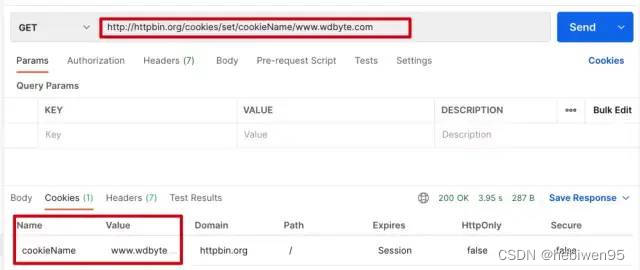
下面编写 Java 代码进行请求测试
- package com.wdbyte.httpclient;
- import java.util.List;
- import org.apache.hc.client5.http.classic.methods.HttpGet;
- import org.apache.hc.client5.http.cookie.BasicCookieStore;
- import org.apache.hc.client5.http.cookie.Cookie;
- import org.apache.hc.client5.http.cookie.CookieStore;
- import org.apache.hc.client5.http.impl.classic.CloseableHttpClient;
- import org.apache.hc.client5.http.impl.classic.CloseableHttpResponse;
- import org.apache.hc.client5.http.impl.classic.HttpClients;
- import org.apache.hc.client5.http.impl.cookie.BasicClientCookie;
- import org.apache.hc.client5.http.protocol.HttpClientContext;
- import org.apache.hc.core5.http.io.entity.EntityUtils;
- /**
- * 这个例子演示了使用本地HTTP上下文填充, 自定义属性
- */
- public class HttpClient5WithCookie {
- public static void main(final String[] args) throws Exception {
- try (final CloseableHttpClient httpclient = HttpClients.createDefault()) {
- // 创建一个本地的 Cookie 存储
- final CookieStore cookieStore = new BasicCookieStore();
- // BasicClientCookie clientCookie = new BasicClientCookie("name", "www.wdbyte.com");
- // clientCookie.setDomain("http://httpbin.org/cookies");
- // 过期时间
- // clientCookie.setExpiryDate(new Date());
- // 添加到本地 Cookie
- // cookieStore.addCookie(clientCookie);
- // 创建本地 HTTP 请求上下文 HttpClientContext
- final HttpClientContext localContext = HttpClientContext.create();
- // 绑定 cookieStore 到 localContext
- localContext.setCookieStore(cookieStore);
- final HttpGet httpget = new HttpGet("http://httpbin.org/cookies/set/cookieName/www.wdbyte.com");
- System.out.println("执行请求 " + httpget.getMethod() + " " + httpget.getUri());
- // 获取 Coolie 信息
- try (final CloseableHttpResponse response = httpclient.execute(httpget, localContext)) {
- System.out.println("----------------------------------------");
- System.out.println(response.getCode() + " " + response.getReasonPhrase());
- final List<Cookie> cookies = cookieStore.getCookies();
- for (int i = 0; i < cookies.size(); i++) {
- System.out.println("Local cookie: " + cookies.get(i));
- }
- EntityUtils.consume(response.getEntity());
- }
- }
- }
- }
输出结果:
- 执行请求 GET http://httpbin.org/cookies/set/cookieName/www.wdbyte.com
- ----------------------------------------
- 200 OK
- Local cookie: [name: cookieName; value: www.wdbyte.com; domain: httpbin.org; path: /; expiry: null]
HttpClient 5 读取文件内容请求
准备一个 JSON 内容格式的文件 params.json。
{"name":"www.wdbyte.com"}读取这个文件作为请求参数发起请求。
- package com.wdbyte.httpclient;
- import java.io.File;
- import java.io.FileInputStream;
- import org.apache.hc.client5.http.classic.methods.HttpPost;
- import org.apache.hc.client5.http.impl.classic.CloseableHttpClient;
- import org.apache.hc.client5.http.impl.classic.CloseableHttpResponse;
- import org.apache.hc.client5.http.impl.classic.HttpClients;
- import org.apache.hc.core5.http.ContentType;
- import org.apache.hc.core5.http.io.entity.EntityUtils;
- import org.apache.hc.core5.http.io.entity.FileEntity;
- import org.apache.hc.core5.http.io.entity.InputStreamEntity;
- /**
- * 加载数据流作为 POST 请求参数
- */
- public class HttpClient5ChunkEncodedPost {
- public static void main(final String[] args) throws Exception {
- String params = "/Users/darcy/params.json";
- try (final CloseableHttpClient httpclient = HttpClients.createDefault()) {
- final HttpPost httppost = new HttpPost("http://httpbin.org/post");
- final InputStreamEntity reqEntity = new InputStreamEntity(new FileInputStream(params), -1,
- ContentType.APPLICATION_JSON);
- // 也可以使用 FileEntity 的形式
- // FileEntity reqEntity = new FileEntity(new File(params), ContentType.APPLICATION_JSON);
- httppost.setEntity(reqEntity);
- System.out.println("执行请求 " + httppost.getMethod() + " " + httppost.getUri());
- try (final CloseableHttpResponse response = httpclient.execute(httppost)) {
- System.out.println("----------------------------------------");
- System.out.println(response.getCode() + " " + response.getReasonPhrase());
- System.out.println(EntityUtils.toString(response.getEntity()));
- }
- }
- }
- }
输出结果:
- 执行请求 POST http://httpbin.org/post
- ----------------------------------------
- 200 OK
- {
- "args": {},
- "data": "{\"name\":\"www.wdbyte.com\"}\n",
- "files": {},
- "form": {},
- "headers": {
- "Accept-Encoding": "gzip, x-gzip, deflate",
- "Content-Length": "26",
- "Content-Type": "application/json; charset=UTF-8",
- "Host": "httpbin.org",
- "User-Agent": "Apache-HttpClient/5.1.3 (Java/1.8.0_151)",
- "X-Amzn-Trace-Id": "Root=1-62ee4d95-1f956d4303cea09c52694c86"
- },
- "json": {
- "name": "www.wdbyte.com"
- },
- "origin": "42.120.74.238",
- "url": "http://httpbin.org/post"
- }
HttpClient 5 表单登录
表单登录可以理解为发起一个携带了认证信息的请求,然后得到响应的 Cookie 的过程。当然这里不仅仅适用于表单登录,也可以是简单的发起一个携带了表单信息的请求。
本应该使用 POST 请求发送表单参数测试,但是在 httpbin.org 中没有对应的接口用于测试,所以这里换成了 GET 请求
示例代码:
- package com.wdbyte.httpclient;
- import java.util.ArrayList;
- import java.util.List;
- import org.apache.hc.client5.http.classic.methods.HttpGet;
- import org.apache.hc.client5.http.cookie.BasicCookieStore;
- import org.apache.hc.client5.http.cookie.Cookie;
- import org.apache.hc.client5.http.entity.UrlEncodedFormEntity;
- import org.apache.hc.client5.http.impl.classic.CloseableHttpClient;
- import org.apache.hc.client5.http.impl.classic.CloseableHttpResponse;
- import org.apache.hc.client5.http.impl.classic.HttpClients;
- import org.apache.hc.core5.http.HttpEntity;
- import org.apache.hc.core5.http.NameValuePair;
- import org.apache.hc.core5.http.io.entity.EntityUtils;
- import org.apache.hc.core5.http.message.BasicNameValuePair;
- /**
- * 演示基于表单的登录
- *
- * @author https://www.wdbyte.com
- */
- public class HttpClient5FormLogin {
- public static void main(final String[] args) throws Exception {
- final BasicCookieStore cookieStore = new BasicCookieStore();
- try (final CloseableHttpClient httpclient = HttpClients.custom()
- .setDefaultCookieStore(cookieStore)
- .build()) {
- // 本应该使用 POST 请求发送表单参数,但是在 httpbin.org 中没有对应的接口用于测试,所以这里换成了 GET 请求
- // HttpPost httpPost = new HttpPost("http://httpbin.org/cookies/set/username/wdbyte.com");
- HttpGet httpPost = new HttpGet("http://httpbin.org/cookies/set/username/wdbyte.com");
- // POST 表单请求参数
- List<NameValuePair> nvps = new ArrayList<>();
- nvps.add(new BasicNameValuePair("username", "wdbyte.com"));
- nvps.add(new BasicNameValuePair("password", "secret"));
- httpPost.setEntity(new UrlEncodedFormEntity(nvps));
- try (final CloseableHttpResponse response2 = httpclient.execute(httpPost)) {
- final HttpEntity entity = response2.getEntity();
- System.out.println("Login form get: " + response2.getCode() + " " + response2.getReasonPhrase());
- System.out.println("当前响应信息 "+EntityUtils.toString(entity));;
- System.out.println("Post 登录 Cookie:");
- final List<Cookie> cookies = cookieStore.getCookies();
- if (cookies.isEmpty()) {
- System.out.println("None");
- } else {
- for (int i = 0; i < cookies.size(); i++) {
- System.out.println("- " + cookies.get(i));
- }
- }
- }
- }
- }
- }
输出结果:
- Login form get: 200 OK
- 当前响应信息 {
- "cookies": {
- "username": "wdbyte.com"
- }
- }
- Post 登录 Cookie:
- - [name: username; value: wdbyte.com; domain: httpbin.org; path: /; expiry: null]
HttpClient 5 Basic Authorization
HTTP 基本认证(Basic Authorization)是一种比较简单的认证实现,主要流程如下
-
1. 请求一个需要进行基本认证的 HTTP 接口,但是没有携带认证信息。
-
2. 此时会响应 401 状态码,并在响应 header 中的 WWW-Authenticate 提示需要进行基本认证。
-
3. 用户把需要提交认证信息进行冒号拼接,然后进行 base64 编码,再在得到的字符串开头拼接上 Basic 放入请求头 Authorization 中。
-
4. 认证成功,响应成功。
你可以通过浏览器打开下面这个 URL 进行基本认证测试。
http://httpbin.org/basic-auth/admin/123456
在 Apache HttpClient 5 中的实现方式。
- package com.wdbyte.httpclient;
- import org.apache.hc.client5.http.auth.AuthScope;
- import org.apache.hc.client5.http.auth.UsernamePasswordCredentials;
- import org.apache.hc.client5.http.classic.methods.HttpGet;
- import org.apache.hc.client5.http.impl.auth.BasicCredentialsProvider;
- import org.apache.hc.client5.http.impl.classic.CloseableHttpClient;
- import org.apache.hc.client5.http.impl.classic.CloseableHttpResponse;
- import org.apache.hc.client5.http.impl.classic.HttpClients;
- import org.apache.hc.core5.http.io.entity.EntityUtils;
- /**
- * 一个简单的示例,它使用HttpClient执行HTTP请求;
- * 一个需要进行用户身份验证的目标站点。
- */
- public class HttpClient5BasicAuthentication {
- public static void main(final String[] args) throws Exception {
- final BasicCredentialsProvider credsProvider = new BasicCredentialsProvider();
- credsProvider.setCredentials(
- new AuthScope("httpbin.org", 80),
- new UsernamePasswordCredentials("admin", "123456".toCharArray()));
- try (final CloseableHttpClient httpclient = HttpClients.custom()
- .setDefaultCredentialsProvider(credsProvider)
- .build()) {
- final HttpGet httpget = new HttpGet("http://httpbin.org/basic-auth/admin/123456");
- System.out.println("执行请求" + httpget.getMethod() + " " + httpget.getUri());
- try (final CloseableHttpResponse response = httpclient.execute(httpget)) {
- System.out.println("----------------------------------------");
- System.out.println(response.getCode() + " " + response.getReasonPhrase());
- System.out.println(EntityUtils.toString(response.getEntity()));
- }
- }
- }
- }
输出结果:
- 执行请求GET http://httpbin.org/basic-auth/user/passwd
- ----------------------------------------
- 200 OK
- {
- "authenticated": true,
- "user": "user"
- }
通过抓包可以看到完整的 HTTP 请求响应过程。
- // 请求
- GET /basic-auth/user/passwd HTTP/1.1
- Accept-Encoding: gzip, x-gzip, deflate
- Host: httpbin.org
- Connection: keep-alive
- User-Agent: Apache-HttpClient/5.1.3 (Java/1.8.0_151)
- // 响应
- HTTP/1.1 401 UNAUTHORIZED
- Date: Sat, 06 Aug 2022 08:25:33 GMT
- Content-Length: 0
- Connection: keep-alive
- Server: gunicorn/19.9.0
- WWW-Authenticate: Basic realm="Fake Realm"
- Access-Control-Allow-Origin: *
- Access-Control-Allow-Credentials: true
- // 请求
- GET /basic-auth/user/passwd HTTP/1.1
- Host: httpbin.org
- Connection: keep-alive
- User-Agent: Apache-HttpClient/5.1.3 (Java/1.8.0_151)
- Authorization: Basic dXNlcjpwYXNzd2Q=
- // 响应
- HTTP/1.1 200 OK
- Date: Sat, 06 Aug 2022 08:25:33 GMT
- Content-Type: application/json
- Content-Length: 47
- Connection: keep-alive
- Server: gunicorn/19.9.0
- Access-Control-Allow-Origin: *
- Access-Control-Allow-Credentials: true
- {
- "authenticated": true,
- "user": "user"
- }
HttpClient 5 Digest Authorization
HTTP Basic Authorization 的缺点显而易见,密码通过明文传输存在一定的安全风险,Digest Authorization 认证方式解决了明文传输的问题,这里不过多介绍 Digest 的相关内容,通过一个图简单的示意 Digest 认证方式的流程。
Digest 认证流程
下面是代码演示。
- package com.wdbyte.httpclient;
- import org.apache.hc.client5.http.auth.AuthExchange;
- import org.apache.hc.client5.http.auth.AuthScheme;
- import org.apache.hc.client5.http.auth.AuthScope;
- import org.apache.hc.client5.http.auth.UsernamePasswordCredentials;
- import org.apache.hc.client5.http.classic.methods.HttpGet;
- import org.apache.hc.client5.http.impl.auth.BasicCredentialsProvider;
- import org.apache.hc.client5.http.impl.auth.DigestScheme;
- import org.apache.hc.client5.http.impl.classic.CloseableHttpClient;
- import org.apache.hc.client5.http.impl.classic.CloseableHttpResponse;
- import org.apache.hc.client5.http.impl.classic.HttpClients;
- import org.apache.hc.client5.http.protocol.HttpClientContext;
- import org.apache.hc.core5.http.HttpHost;
- import org.apache.hc.core5.http.io.entity.EntityUtils;
- /**
- *
- * HttpClient如何验证多个请求的示例
- * 使用相同的摘要方案。在初始请求/响应交换之后
- * 共享相同执行上下文的所有后续请求都可以重用
- * 要向服务器进行身份验证的最后一个摘要nonce值。
- */
- public class HttpClient5PreemptiveDigestAuthentication {
- public static void main(final String[] args) throws Exception {
- try (final CloseableHttpClient httpclient = HttpClients.createDefault()) {
- final HttpHost target = new HttpHost("http", "httpbin.org", 80);
- final HttpClientContext localContext = HttpClientContext.create();
- final BasicCredentialsProvider credentialsProvider = new BasicCredentialsProvider();
- credentialsProvider.setCredentials(
- new AuthScope(target),
- new UsernamePasswordCredentials("admin", "123456".toCharArray()));
- localContext.setCredentialsProvider(credentialsProvider);
- final HttpGet httpget = new HttpGet("http://httpbin.org/digest-auth/auth/admin/123456");
- System.out.println("执行请求 " + httpget.getMethod() + " " + httpget.getUri());
- for (int i = 0; i < 2; i++) {
- try (final CloseableHttpResponse response = httpclient.execute(target, httpget, localContext)) {
- System.out.println("----------------------------------------");
- System.out.println(response.getCode() + " " + response.getReasonPhrase());
- EntityUtils.consume(response.getEntity());
- final AuthExchange authExchange = localContext.getAuthExchange(target);
- if (authExchange != null) {
- final AuthScheme authScheme = authExchange.getAuthScheme();
- if (authScheme instanceof DigestScheme) {
- final DigestScheme digestScheme = (DigestScheme) authScheme;
- System.out.println("Nonce: " + digestScheme.getNonce() +
- "; count: " + digestScheme.getNounceCount());
- }
- }
- }
- }
- }
- }
- }
通过抓包工具可以清晰的看到 2 次请求的流程,在最后一次请求中,直接共享了认证信息,没有再次的重新认证的流程。
- // 1. 请求
- GET /digest-auth/auth/admin/123456 HTTP/1.1
- Accept-Encoding: gzip, x-gzip, deflate
- Host: httpbin.org
- Connection: keep-alive
- User-Agent: Apache-HttpClient/5.1.3 (Java/1.8.0_151)
- // 2. 详情,提示认证,给出参数
- HTTP/1.1 401 UNAUTHORIZED
- Date: Fri, 12 Aug 2022 07:11:06 GMT
- Content-Type: text/html; charset=utf-8
- Content-Length: 0
- Connection: keep-alive
- Server: gunicorn/19.9.0
- WWW-Authenticate: Digest realm="me@kennethreitz.com", nonce="8dc5e7974a86a6fcc3cf73230b0c4a93", qop="auth", opaque="64b7f68b386c3acc38131f7472aa2079", algorithm=MD5, stale=FALSE
- Set-Cookie: stale_after=never; Path=/
- Set-Cookie: fake=fake_value; Path=/
- Access-Control-Allow-Origin: *
- Access-Control-Allow-Credentials: true
- // 3. 参数+密码 加密后再次请求
- GET /digest-auth/auth/admin/123456 HTTP/1.1
- Host: httpbin.org
- Connection: keep-alive
- User-Agent: Apache-HttpClient/5.1.3 (Java/1.8.0_151)
- Cookie: fake=fake_value; stale_after=never
- Authorization: Digest username="admin", realm="me@kennethreitz.com", nonce="8dc5e7974a86a6fcc3cf73230b0c4a93", uri="/digest-auth/auth/admin/123456", response="7c6726f8ac54c1ba28e19c71b2fc7338", qop=auth, nc=00000001, cnonce="2fa61501d47a9d39", algorithm=MD5, opaque="64b7f68b386c3acc38131f7472aa2079"
- // 4. 认证成功,响应
- HTTP/1.1 200 OK
- Date: Fri, 12 Aug 2022 07:11:08 GMT
- Content-Type: application/json
- Content-Length: 48
- Connection: keep-alive
- Server: gunicorn/19.9.0
- Set-Cookie: fake=fake_value; Path=/
- Set-Cookie: stale_after=never; Path=/
- Access-Control-Allow-Origin: *
- Access-Control-Allow-Credentials: true
- {
- "authenticated": true,
- "user": "admin"
- }
- // 5. 再次请求,共享了登录状态。
- GET /digest-auth/auth/admin/123456 HTTP/1.1
- Accept-Encoding: gzip, x-gzip, deflate
- Host: httpbin.org
- Connection: keep-alive
- User-Agent: Apache-HttpClient/5.1.3 (Java/1.8.0_151)
- Cookie: fake=fake_value; stale_after=never
- Authorization: Digest username="admin", realm="me@kennethreitz.com", nonce="8dc5e7974a86a6fcc3cf73230b0c4a93", uri="/digest-auth/auth/admin/123456", response="9955ac79f6a51a876a326449447f549d", qop=auth, nc=00000002, cnonce="2fa61501d47a9d39", algorithm=MD5, opaque="64b7f68b386c3acc38131f7472aa2079"
- // 5. 认证成功,响应
- HTTP/1.1 200 OK
- Date: Fri, 12 Aug 2022 07:11:09 GMT
- Content-Type: application/json
- Content-Length: 48
- Connection: keep-alive
- Server: gunicorn/19.9.0
- Set-Cookie: fake=fake_value; Path=/
- Set-Cookie: stale_after=never; Path=/
- Access-Control-Allow-Origin: *
- Access-Control-Allow-Credentials: true
- {
- "authenticated": true,
- "user": "admin"
- }
HttpClient 5 拦截器
HttpClient 5 中的拦截器可以对请求过程的各个阶段进行拦截处理,通过
HttpClientBuilder中的关于Interceptor的方法可以看到可以进行拦截的节点。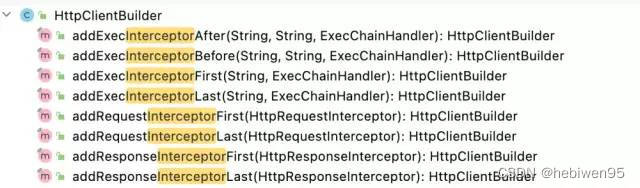
HttpClient5 拦截器
下面编写一个示例,发起三次请求,每次请求都在请求头 herader 中增加一个
request-id参数,然后对request-id值为 2 的请求直接响应 404 结束。- package com.wdbyte.httpclient;
- import java.io.IOException;
- import java.util.concurrent.atomic.AtomicLong;
- import org.apache.hc.client5.http.classic.ExecChain;
- import org.apache.hc.client5.http.classic.ExecChain.Scope;
- import org.apache.hc.client5.http.classic.ExecChainHandler;
- import org.apache.hc.client5.http.classic.methods.HttpGet;
- import org.apache.hc.client5.http.impl.ChainElement;
- import org.apache.hc.client5.http.impl.classic.CloseableHttpClient;
- import org.apache.hc.client5.http.impl.classic.CloseableHttpResponse;
- import org.apache.hc.client5.http.impl.classic.HttpClients;
- import org.apache.hc.core5.http.ClassicHttpRequest;
- import org.apache.hc.core5.http.ClassicHttpResponse;
- import org.apache.hc.core5.http.ContentType;
- import org.apache.hc.core5.http.EntityDetails;
- import org.apache.hc.core5.http.Header;
- import org.apache.hc.core5.http.HttpEntity;
- import org.apache.hc.core5.http.HttpException;
- import org.apache.hc.core5.http.HttpRequest;
- import org.apache.hc.core5.http.HttpRequestInterceptor;
- import org.apache.hc.core5.http.HttpStatus;
- import org.apache.hc.core5.http.io.entity.EntityUtils;
- import org.apache.hc.core5.http.io.entity.StringEntity;
- import org.apache.hc.core5.http.message.BasicClassicHttpResponse;
- import org.apache.hc.core5.http.protocol.HttpContext;
- /**
- * 展示如何在请求和响应时进行拦截进行自定义处理。
- */
- public class HttpClient5Interceptors {
- public static void main(final String[] args) throws Exception {
- try (final CloseableHttpClient httpclient = HttpClients.custom()
- // 添加一个请求 id 到请求 header
- .addRequestInterceptorFirst(new HttpRequestInterceptor() {
- private final AtomicLong count = new AtomicLong(0);
- @Override
- public void process(
- final HttpRequest request,
- final EntityDetails entity,
- final HttpContext context) throws HttpException, IOException {
- request.setHeader("request-id", Long.toString(count.incrementAndGet()));
- }
- })
- .addExecInterceptorAfter(ChainElement.PROTOCOL.name(), "custom", new ExecChainHandler() {
- // 请求 id 为 2 的,模拟 404 响应,并自定义响应的内容。
- @Override
- public ClassicHttpResponse execute(
- final ClassicHttpRequest request,
- final Scope scope,
- final ExecChain chain) throws IOException, HttpException {
- final Header idHeader = request.getFirstHeader("request-id");
- if (idHeader != null && "2".equalsIgnoreCase(idHeader.getValue())) {
- final ClassicHttpResponse response = new BasicClassicHttpResponse(HttpStatus.SC_NOT_FOUND,
- "Oppsie");
- response.setEntity(new StringEntity("bad luck", ContentType.TEXT_PLAIN));
- return response;
- } else {
- return chain.proceed(request, scope);
- }
- }
- })
- .build()) {
- for (int i = 0; i < 3; i++) {
- final HttpGet httpget = new HttpGet("http://httpbin.org/get");
- try (final CloseableHttpResponse response = httpclient.execute(httpget)) {
- System.out.println("----------------------------------------");
- System.out.println("执行请求 " + httpget.getMethod() + " " + httpget.getUri());
- System.out.println(response.getCode() + " " + response.getReasonPhrase());
- System.out.println(EntityUtils.toString(response.getEntity()));
- }
- }
- }
- }
- }
输出结果。
- ----------------------------------------
- 执行请求 GET http://httpbin.org/get
- 200 OK
- {
- "args": {},
- "headers": {
- "Accept-Encoding": "gzip, x-gzip, deflate",
- "Host": "httpbin.org",
- "Request-Id": "1",
- "User-Agent": "Apache-HttpClient/5.1.3 (Java/1.8.0_151)",
- "X-Amzn-Trace-Id": "Root=1-62f615ba-658ccd42182d22534dbba82c"
- },
- "origin": "42.120.75.221",
- "url": "http://httpbin.org/get"
- }
- ----------------------------------------
- 执行请求 GET http://httpbin.org/get
- 404 Oppsie
- bad luck
- ----------------------------------------
- 执行请求 GET http://httpbin.org/get
- 200 OK
- {
- "args": {},
- "headers": {
- "Accept-Encoding": "gzip, x-gzip, deflate",
- "Host": "httpbin.org",
- "Request-Id": "3",
- "User-Agent": "Apache-HttpClient/5.1.3 (Java/1.8.0_151)",
- "X-Amzn-Trace-Id": "Root=1-62f615bb-4eb6ba10736ace0e21d0cb8c"
- },
- "origin": "42.120.75.221",
- "url": "http://httpbin.org/get"
- }
-
相关阅读:
Linux信号掩码(signal mask)详解与相关例程
注解、AOP
Springboot中使用线程池的三种方式
亚马逊云科技Amazon Bedrock大模型托管服务详细分析
CANdelaStudio中的状态跳转图无法查看
JavaScript用浏览器书签制作插件(爬虫)
分布式协同AI基准测试项目Ianvs:工业场景提升5倍研发效率
阿里云短信服务——短信发送验证码
(Network)IP地址的网络号和广播地址
D. Cyclic Operations Codeforces Round 897 (Div. 2)
- 原文地址:https://blog.csdn.net/hebiwen95/article/details/126405108
