-
练习题35
一.构造函数:
作用:帮助我们初始化对象(给对象的每个属性依次的赋值)
构造函数是一个特殊的方法:
1)、构造函数没有返回值,连void也不能写
2)、构造函数的名称必须跟类名一样创建对象的时候会执行构造函数
构造函数是可以有重载的类当中会有一个默认的无参数的构造函数怒,当你写了一个新的构造函数之后,不管是有参数的还是无参数的,那个默认的无参数的构造函数都被干掉了,转而代之的是新的构造函数
二.new关键字
Person zsPerson=new Person();
new帮助我们做了3件事儿:
1)、在内存中开辟一块空间
2)、在开辟的空间中创建对象
3)、调用对象的构造函数进行初始化对象三.this关键字
1)、代表当前类的对象
2)、在类当中显示地调用本类的构造函数,调用的方式是冒号+this,即:this定义一个学生类,有六个属性,分别为姓名、性别、年龄、语文、数学、英语成绩
一个打招呼的方法:介绍自己叫XX,今年几岁了。是男同学还是女同学。
两个计算自己总分数和平均分的方法。{显示:我叫XX,这次考试总成绩为X,平均成绩为X分}
实例化两个对象并测试:
张三 男 18 三科成绩为:90 95 80
小兰 女 16 三科成绩为:95 85 100学生类:
Student.cs:using System; using System.Collections.Generic; using System.Text; namespace 练习题35 { public class Student { //当程序结束的时候,析构函数才执行 //帮助我们释放资源 //GC Garbage Collection】 //VS2019自动回收资源,可以不写析构函数 //~Student() //{ // Console.WriteLine("我是析构函数"); //} public Student(string name,char gender,int age,int chinese,int math,int english)//构造函数 { this.Name = name; this.Gender = gender; this.Age = age; this.Chinese = chinese; this.Math = math; this.English = english; } //构造函数的重载 public Student(string name,int chinese,int math,int english):this(name,'c',0,chinese,math,english)//用this调用上面较全的构造函数 { //this.Name = name; //this.Chinese = chinese; //this.Math = math; //this.English = english; } //构造函数的重载 public Student(string name,int age,char gender) { //this.Name = name; //this.Age = age; //this.Gender = gender; } private string _name; public string Name { set { _name = value; } get { return _name; } } private char _gender; public char Gender { set { if(_gender!='男' || _gender!='女') _gender = '男'; } get { return _gender; } } private int _age; public int Age { //set { // if(_age<0||_age>200) // { // _age = 0; // } // _age = value; // } //get { return _age; } set { _age = value; } get { if(_age<0||_age>200) { _age = 0; } return _age; } } private int _chinese; public int Chinese { set { _chinese = value; } get { return _chinese; } } private int _math; public int Math { set { _math = value; } get { return _math; } } private int _english; public int English { set { _english = value; } get { return _english; } } public void SayHello() { Console.WriteLine("我叫{0},我今年{1}岁了,我是{2}生",this.Name,this.Age,this.Gender); } public void ShowScore() { Console.WriteLine("我叫{0},我的总成绩是{1},我的平均成绩是{2}",this.Name,this.Chinese+this.Math+this.English,((this.Chinese + this.Math + this.English)/3)); } } }- 1
- 2
- 3
- 4
- 5
- 6
- 7
- 8
- 9
- 10
- 11
- 12
- 13
- 14
- 15
- 16
- 17
- 18
- 19
- 20
- 21
- 22
- 23
- 24
- 25
- 26
- 27
- 28
- 29
- 30
- 31
- 32
- 33
- 34
- 35
- 36
- 37
- 38
- 39
- 40
- 41
- 42
- 43
- 44
- 45
- 46
- 47
- 48
- 49
- 50
- 51
- 52
- 53
- 54
- 55
- 56
- 57
- 58
- 59
- 60
- 61
- 62
- 63
- 64
- 65
- 66
- 67
- 68
- 69
- 70
- 71
- 72
- 73
- 74
- 75
- 76
- 77
- 78
- 79
- 80
- 81
- 82
- 83
- 84
- 85
- 86
- 87
- 88
- 89
- 90
- 91
- 92
- 93
- 94
- 95
- 96
- 97
- 98
- 99
- 100
- 101
- 102
- 103
- 104
- 105
- 106
- 107
- 108
- 109
- 110
- 111
- 112
- 113
- 114
- 115
- 116
- 117
- 118
- 119
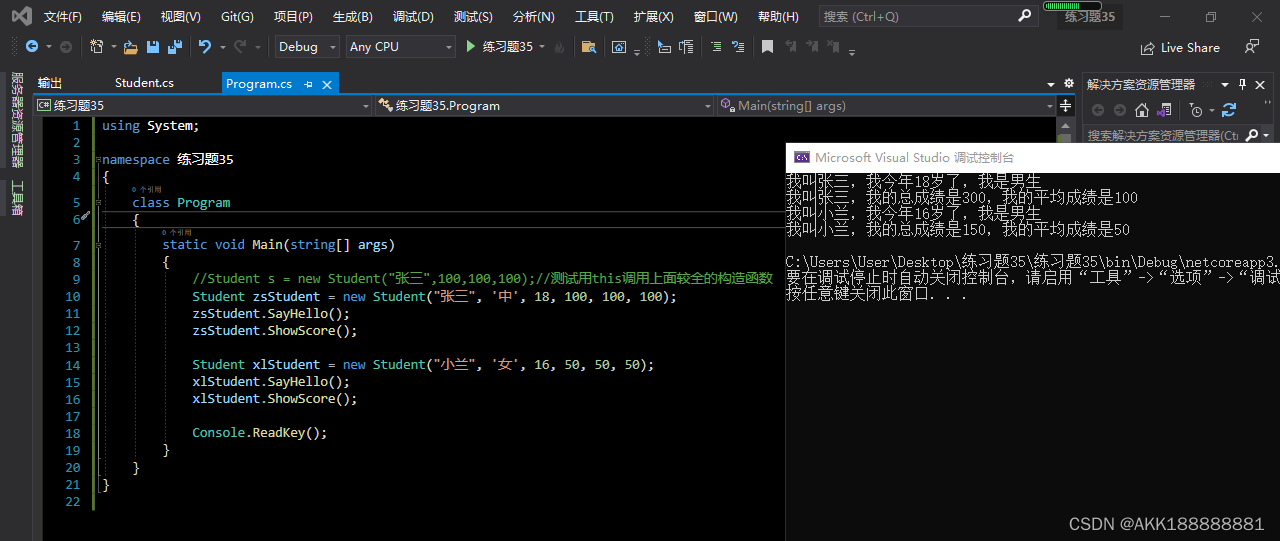
main函数:
using System; namespace 练习题35 { class Program { static void Main(string[] args) { //Student s = new Student("张三",100,100,100);//测试用this调用上面较全的构造函数 Student zsStudent = new Student("张三", '中', 18, 100, 100, 100); zsStudent.SayHello(); zsStudent.ShowScore(); Student xlStudent = new Student("小兰", '女', 16, 50, 50, 50); xlStudent.SayHello(); xlStudent.ShowScore(); Console.ReadKey(); } } }- 1
- 2
- 3
- 4
- 5
- 6
- 7
- 8
- 9
- 10
- 11
- 12
- 13
- 14
- 15
- 16
- 17
- 18
- 19
- 20
- 21
-
相关阅读:
Java8新特性--新的时间和日期API
验证NIO的非阻塞模型
em/px/rem/vh/vw 的区别?
888 案例:淘宝服饰精品案例,新浪下拉菜单案例(使用 jQuery)
ubuntu同步本地代码到github最新版
cubeIDE快速开发流程
Google Analytics Service account 认证指南
MyBatis resultMap元素的用途是什么呢?
开槌在即:陈可之油画|《赞红梅》
依赖:类之间的依赖关系【python】
- 原文地址:https://blog.csdn.net/AKK188888881/article/details/126345817
