-
Golang 代码调用可视化工具 go-callvis
说明
go-callvis 是一个可帮助使用交互式视图可视化 Go 程序调用图的开发工具。
这个工具的目的是为开发人员提供一个使用调用图数据及其与包和类型的关系的 Go 程序的可视化概览。
这在代码复杂度高的大型项目中或者试图理解其他人的代码时尤其有用。
gocallvis git地址: https://github.com/ofabry/go-callvis
安装使用
依赖
Go 1.17+
Graphviz (可选, 使用 -graphviz 标签时需要)安装
go get -u github.com/ofabry/go-callvis # 或者 git clone https://github.com/ofabry/go-callvis.git cd go-callvis && make install- 1
- 2
- 3
- 4
安装好后 $GOBIN/bin目录下会生成可执行文件go-callvis
使用方法
命令行直接使用
go-callvis [可选项] <目标包>- 1
运行后打开浏览器查看http://localhost:7878/即可
HTTP 服务器默认监听 http://localhost:7878/,使用选项 -http=“ADDR:PORT” 更改 HTTP 服务器地址。
如果想要生成单个输出文件,请使用选项 -file= < file path > 来选择输出文件目标。
输出格式默认为 svg,使用选项 -format=
使用go-callvis -h- 1
查看所有可选项
Usage of go-callvis: -algo string The algorithm used to construct the call graph. Possible values inlcude: "static", "cha", "rta", "pointer" (default "pointer") 用于构造调用图的算法。包括"static", "cha", "rta", "pointer" (默认"pointer") -cacheDir string Enable caching to avoid unnecessary re-rendering, you can force rendering by adding 'refresh=true' to the URL query or emptying the cache directory 启用缓存以避免不必要的重新渲染,可以通过在 URL 查询中添加 'refresh=true' 或清空缓存目录来强制渲染 -debug Enable verbose log. 启用详细日志 -file string output filename - omit to use server mode 输出文件名 省略则使用服务器模式 -focus string Focus specific package using name or import path. (default "main") 使用名称或导入路径关注特定包(默认为"main") -format string output file format [svg | png | jpg | ...] (default "svg") 输出文件格式 [svg | png | .jpg | ...](默认“svg”) -graphviz Use Graphviz's dot program to render images. 使用 Graphviz 的 dot 程序来渲染图像 -group string Grouping functions by packages and/or types [pkg, type] (separated by comma) (default "pkg") 按包和/或类型分组函数 [pkg, type](用逗号分隔)(默认为“pkg”) -http string HTTP service address. (default ":7878") HTTP 服务地址 (默认“:7878”) -ignore string Ignore package paths containing given prefixes (separated by comma) 忽略包含给定前缀的包路径(用逗号分隔) -include string Include package paths with given prefixes (separated by comma) 包含具有给定前缀的包路径(以逗号分隔) -limit string Limit package paths to given prefixes (separated by comma) 将包路径限制为给定前缀(用逗号分隔) -minlen uint Minimum edge length (for wider output). (default 2) 最小边长(用于更宽的输出)。 (默认 2) -nodesep float Minimum space between two adjacent nodes in the same rank (for taller output). (default 0.35) 同一等级的两个相邻节点之间的最小空间(用于更高的输出)。 (默认 0.35) -nodeshape string graph node shape (see graphvis manpage for valid values) (default "box") 图形节点形状(有关有效值,请参见 graphvis 手册页)(默认"box") -nodestyle string graph node style (see graphvis manpage for valid values) (default "filled,rounded") 图形节点样式(有关有效值,请参见 graphvis 手册页)(默认"filled,rounded") -nointer Omit calls to unexported functions. 省略对未导出函数的调用 -nostd Omit calls to/from packages in standard library. 省略对标准库中包的调用 -rankdir string Direction of graph layout [LR | RL | TB | BT] (default "LR") 图布局方向[LR | RL | TB | BT](默认“LR”) -skipbrowser Skip opening browser. 跳过打开浏览器 -tags build tags a list of build tags to consider satisfied during the build. For more information about build tags, see the description of build constraints in the documentation for the go/build package 在构建过程中考虑满足的构建标签列表。有关构建标签的更多信息,请参阅 go/build 包的文档中的构建约束描述 -tests Include test code. 包括测试代码 -version Show version and exit. 显示版本并退出- 1
- 2
- 3
- 4
- 5
- 6
- 7
- 8
- 9
- 10
- 11
- 12
- 13
- 14
- 15
- 16
- 17
- 18
- 19
- 20
- 21
- 22
- 23
- 24
- 25
- 26
- 27
- 28
- 29
- 30
- 31
- 32
- 33
- 34
- 35
- 36
- 37
- 38
- 39
- 40
- 41
- 42
- 43
- 44
- 45
- 46
- 47
- 48
- 49
- 50
- 51
- 52
- 53
- 54
- 55
- 56
- 57
- 58
- 59
- 60
- 61
- 62
- 63
- 64
- 65
- 66
- 67
- 68
- 69
- 70
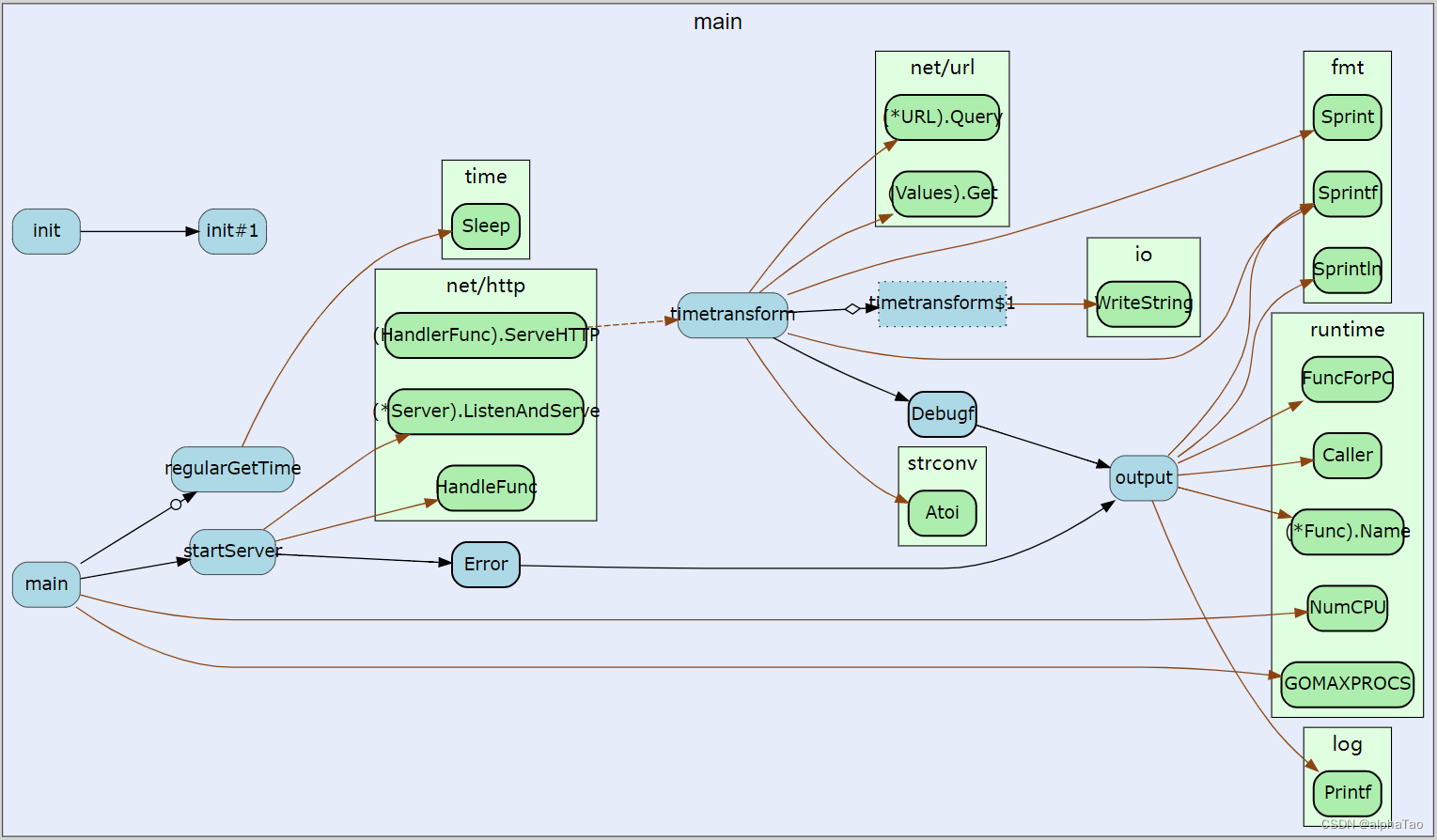
例子

图例说明
Packages / Types 包/类型 展示 (矩形) focused 焦点包 蓝色 stdlib 标准包 绿色 other 其他包 黄色 Functions / Methods 函数/方法 展示 (圆角矩形/椭圆) exported 导出 粗体边框 unexported 未导出 正常边框 anonymous 匿名 虚线边框 Calls 调用 展示 (箭线) internal 包内函数 黑色线 external 包外函数 棕色线 static 静态函数 实线 dynamic 动态函数 虚线 regular 常规 简单箭头 concurrent 并发 带圆圈箭头 deferred defer延期 带菱形箭头
本地测试使用
-
相关阅读:
lowbit()运算及原码、反码、补码
【NLP】理解 Llama2:KV 缓存、分组查询注意力、旋转嵌入等
《微信小程序开发从入门到实战》学习二十四
软件工程在20世纪80年代以来获得的主要成果有CASE Computer-Aided Software Engineering产品,软件工程的概念?
【数据库】B树、B+树、索引
git push rejected的原因
淘女郎买家秀API接口
10进制转2进制c++原码&ASCII码和字符的转换
CentOS 7 安装 Nginx
单词记忆词典 python
- 原文地址:https://blog.csdn.net/zkt286468541/article/details/126346081
