-
mmrotate自定义数据集安装部署训练测试
环境
Ubuntu18.04 cuda10.2 python3.7 2080s- 1
- 2
- 3
- 4
一、安装
conda create -n mmrotate python=3.7 conda activate mmrotate #1、 安装pytorch 和 cuda # 建议在官网根据cuda版本安装 https://pytorch.org/get-started/locally/ conda install pytorch torchvision torchaudio cudatoolkit=10.2 -c pytorch #2、安装mmcv # 安装完成后pip list看一下 torch的版本 方便安装对应版本的mmcv # 我安装的是cuda10.2和torch1.11.0 pip install mmcv-full -f https://download.openmmlab.com/mmcv/dist/cu102/torch1.11.0/index.html #3、安装mmdetection pip install mmdet #4、从github上 clone mmrotate git clone https://github.com/open-mmlab/mmrotate #5、安装mmrotate并编译 cd mmrotate pip install -r requirements.txt pip install -V -e.- 1
- 2
- 3
- 4
- 5
- 6
- 7
- 8
- 9
- 10
- 11
- 12
- 13
- 14
- 15
- 16
- 17
- 18
- 19
- 20
- 21
- 22
二、测试
# 1、下载pth文件 # 在demo目录的image_demo.py文件有该文件的使用说明 # 下载官方提供的pth文件 wget -P checkpoint https://download.openmmlab.com/mmrotate/v0.1.0/oriented_rcnn/oriented_rcnn_r50_fpn_1x_dota_le90- 1
- 2
- 3
- 4

#2、在mmrotate目录下进行测试,执行如下命令 python demo/image_demo.py demo/demo.jpg configs/oriented_rcnn/oriented_rcnn_r50_fpn_1x_dota_le90.py checkpoint/oriented_rcnn_r50_fpn_1x_dota_le90-6d2b2ce0.pth- 1
- 2
3、若弹出如下结果则说明环境安装正常- 1

三、自定义数据集制作
mmrotate中所使用的数据集是dota格式的
DOTA标签格式x1, y1, x2, y2, x3, y3, x4, y4, category: 目标名字 difficult:表示标签检测的难易程度 (1表示困难,0表示不困难)
x1,y1为左上角的坐标,然后顺时针排列4个坐标
1、使用rolabelimg工具标注数据
标注文件xml文件如下

2、生成DOTA数据集的标签格式import os import xml.etree.ElementTree as ET import math import cv2 as cv def voc_to_dota(xml_path, xml_name): txt_name = xml_name[:-4] + '.txt' txt_path = xml_path + '/txt_label' if not os.path.exists(txt_path): os.makedirs(txt_path) txt_file = os.path.join(txt_path, txt_name) file_path = os.path.join(xml_path, file_list[i]) tree = ET.parse(os.path.join(file_path)) root = tree.getroot() # print(root[6][0].text) image_path = 'data/dota/images/' out_path = 'data/dota/outputImg/' filename = image_path + xml_name[:-4] + '.jpg' img = cv.imread(filename) with open(txt_file, "w+", encoding='UTF-8') as out_file: # out_file.write('imagesource:null' + '\n' + 'gsd:null' + '\n') for obj in root.findall('object'): name = obj.find('name').text difficult = obj.find('difficult').text # print(name, difficult) robndbox = obj.find('robndbox') cx = float(robndbox.find('cx').text) cy = float(robndbox.find('cy').text) w = float(robndbox.find('w').text) h = float(robndbox.find('h').text) angle = float(robndbox.find('angle').text) # print(cx, cy, w, h, angle) p0x, p0y = rotatePoint(cx, cy, cx - w / 2, cy - h / 2, -angle) p1x, p1y = rotatePoint(cx, cy, cx + w / 2, cy - h / 2, -angle) p2x, p2y = rotatePoint(cx, cy, cx + w / 2, cy + h / 2, -angle) p3x, p3y = rotatePoint(cx, cy, cx - w / 2, cy + h / 2, -angle) # 找最左上角的点 dict = {p0y:p0x, p1y:p1x, p2y:p2x, p3y:p3x } list = find_topLeftPopint(dict) #print((list)) if list[0] == p0x: list_xy = [p0x, p0y, p1x, p1y, p2x, p2y, p3x, p3y] elif list[0] == p1x: list_xy = [p1x, p1y, p2x, p2y, p3x, p3y, p0x, p0y] elif list[0] == p2x: list_xy = [p2x, p2y, p3x, p3y, p0x, p0y, p1x, p1y] else: list_xy = [p3x, p3y, p0x, p0y, p1x, p1y, p2x, p2y] # 在原图上画矩形 看是否转换正确 cv.line(img, (int(list_xy[0]), int(list_xy[1])), (int(list_xy[2]), int(list_xy[3])), color=(255, 0, 0), thickness= 3) cv.line(img, (int(list_xy[2]), int(list_xy[3])), (int(list_xy[4]), int(list_xy[5])), color=(0, 255, 0), thickness= 3) cv.line(img, (int(list_xy[4]), int(list_xy[5])), (int(list_xy[6]), int(list_xy[7])), color=(0, 0, 255), thickness= 2) cv.line(img, (int(list_xy[6]), int(list_xy[7])), (int(list_xy[0]), int(list_xy[1])), color=(255, 255, 0), thickness= 2) data = str(list_xy[0]) + " " + str(list_xy[1]) + " " + str(list_xy[2]) + " " + str(list_xy[3]) + " " + \ str(list_xy[4]) + " " + str(list_xy[5]) + " " + str(list_xy[6]) + " " + str(list_xy[7]) + " " data = data + name + " " + difficult + "\n" out_file.write(data) # cv.imwrite(out_path + xml_name[:-4] + '.jpg', img) def find_topLeftPopint(dict): dict_keys = sorted(dict.keys()) # y值 temp = [dict[dict_keys[0]], dict[dict_keys[1]]] minx = min(temp) if minx == temp[0]: miny = dict_keys[0] else: miny = dict_keys[1] return [minx, miny] # 转换成四点坐标 def rotatePoint(xc, yc, xp, yp, theta): xoff = xp - xc yoff = yp - yc cosTheta = math.cos(theta) sinTheta = math.sin(theta) pResx = cosTheta * xoff + sinTheta * yoff pResy = - sinTheta * xoff + cosTheta * yoff # pRes = (xc + pResx, yc + pResy) # 保留一位小数点 return float(format(xc + pResx, '.1f')), float(format(yc + pResy, '.1f')) # return xc + pResx, yc + pResy if __name__ == '__main__': root_path = 'data/dota/xml' file_list = os.listdir(root_path) for i in range(0, len(file_list)): if ('.xml' in file_list[i]) or ('.XML' in file_list[i]): voc_to_dota(root_path, file_list[i]) print('----------------------------------------{}{}----------------------------------------' .format(file_list[i], ' has Done!')) else: print(file_list[i] + ' is not xml file')- 1
- 2
- 3
- 4
- 5
- 6
- 7
- 8
- 9
- 10
- 11
- 12
- 13
- 14
- 15
- 16
- 17
- 18
- 19
- 20
- 21
- 22
- 23
- 24
- 25
- 26
- 27
- 28
- 29
- 30
- 31
- 32
- 33
- 34
- 35
- 36
- 37
- 38
- 39
- 40
- 41
- 42
- 43
- 44
- 45
- 46
- 47
- 48
- 49
- 50
- 51
- 52
- 53
- 54
- 55
- 56
- 57
- 58
- 59
- 60
- 61
- 62
- 63
- 64
- 65
- 66
- 67
- 68
- 69
- 70
- 71
- 72
- 73
- 74
- 75
- 76
- 77
- 78
- 79
- 80
- 81
- 82
- 83
- 84
- 85
- 86
- 87
- 88
- 89
- 90
- 91
- 92
- 93
- 94
- 95
- 96
- 97
- 98
- 99
3、划分训练集验证集测试集
划分后的目录文件结构


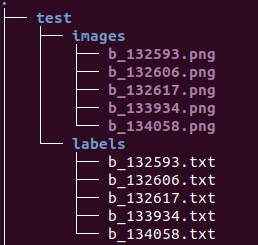
python mmrotate-main/tools/data/dota/split/img_split.py --base_json mmrotate-main/tools/data/dota/split/split_configs/ss_train.json- 1
4、切分图像
使用mmrotate中自带的tools工具,将数据进行裁减,并重新设为png格式的图像。
修改/home/cv/mmrotate/tools/data/dota/split/split_configs中的json文件,修改每个文件中的,如下几个路径即可。

分别使用脚本进行裁减1411 python img_split.py --base-json split_configs/ss_train.json 1412 python img_split.py --base-json split_configs/ss_test.json 1413 python img_split.py --base-json split_configs/ss_trainval.json 1414 python img_split.py --base-json split_configs/ss_val.json- 1
- 2
- 3
- 4
- 5
四、修改训练参数
1、修改mmrotate/mmrotate/datasets的dota.py文件中的类别

2、修改mmrotate/configs/rotated_faster_rcnn/rotated_faster_rcnn_r50_fpn_1x_dota_le90.py中的类别数量

修改rotated_faster_rcnn_r50_fpn_1x_dota_le90.py中的类别数量
修改mmrotate/configs/base/datasets中的数据集路径


修改中mmrotate/configs/base/schedules/schedule_1x.py中的参数

修改mmrotate/configs/base/default_runtime.py中的参数

3、修改train中的参数
 主要修改–config和–word-dir
python tools/train.py- 1
提示如下信息为在训练

如果遇到 Cuda out of memory错误:可将 mmrotate-main/configs/base/datasets/dotav1.py文件中的samples_per_gpu 和 workers_per_gpu 改小一点。- 1
六、测试
修改tools/tests.py

python tools/test.py --show- 1
参考资料
https://blog.csdn.net/qq_43581224/article/details/123838415?ops_request_misc=%257B%2522request%255Fid%2522%253A%2522165447944816782390592349%2522%252C%2522scm%2522%253A%252220140713.130102334…%2522%257D&request_id=165447944816782390592349&biz_id=0&utm_medium=distribute.pc_search_result.none-task-blog-2alltop_positive~default-1-123838415-null-null.142v11pc_search_result_control_group,157v13new_style1&utm_term=mmrotate&spm=1018.2226.3001.4187 -
相关阅读:
1.驱动的认知
Windows10安装Docker(基于WSL2,包含WSL2安装教程)
基于微信小程序的校园跑腿系统的研究与实现,附源码
黑马mysql教程笔记(mysql8教程)基础篇——数据库相关概念、mysql安装及卸载、数据模型、SQL通用语法及分类(DDL、DML、DQL、DCL)
深度解析:Web 3.0和元宇宙
智芯传感-工业雷管禁售在即,电子雷管的大发展已然到来!
LeetCode_23_困难_合并 K 个升序链表
大数据——Zookeeper 安装(集群)(二)
Java基础:通过Callable创建多线程
HelpLook AI 升级!一键生成SEO设置关键要素
- 原文地址:https://blog.csdn.net/threestooegs/article/details/125143773
