-
JDBC复习
什么是jdbc?
java连接数据库!
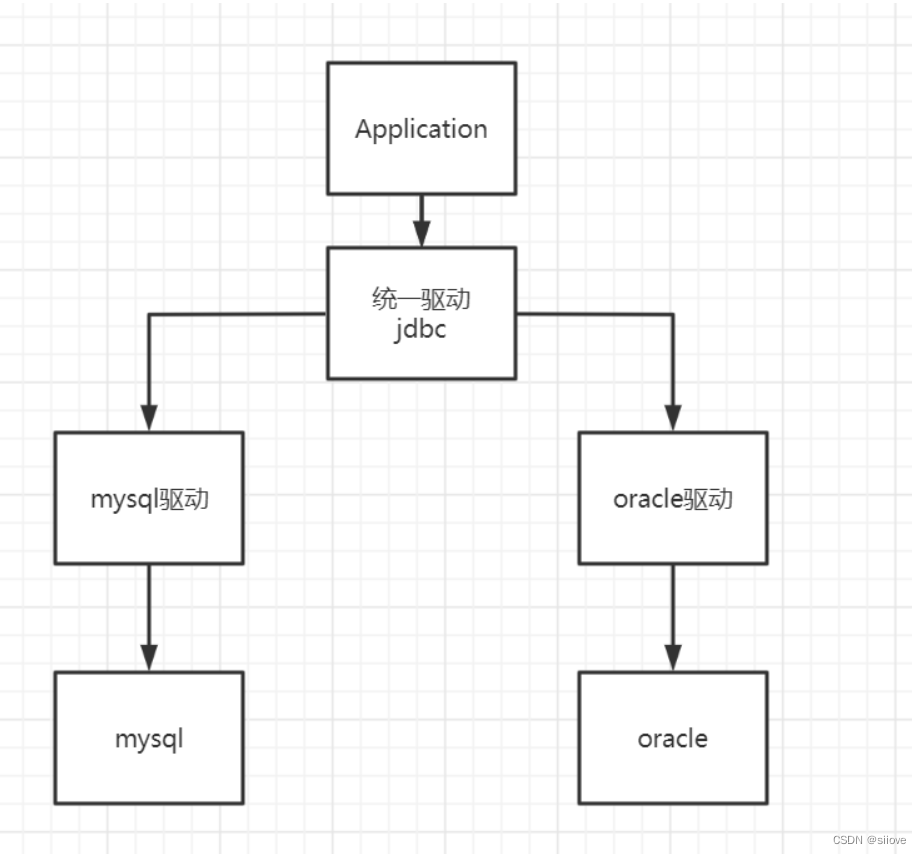
需要jar包的支持:
-
java.sql
-
javax.sql
-
mysql-connection-java...(连接驱动)
实验环境搭建(SQL)
- DROP TABLE `users`;
- CREATE TABLE `users`(
- `id` INT PRIMARY KEY,
- `name` VARCHAR(50) NOT NULL,
- `password` VARCHAR(40) NOT NULL,
- `email` VARCHAR(60) NOT NULL,
- `birthday` DATE
- ) ENGINE=INNODB DEFAULT CHARSET=utf8
- INSERT INTO `users` (`id`, `name`, `password`, `email`, `birthday`) VALUES('1','张三','123456','zs@sina.com','2021-07-14');
- INSERT INTO `users` (`id`, `name`, `password`, `email`, `birthday`) VALUES('2','李四','123456','lisi@sina.com','1981-12-04');
- INSERT INTO `users` (`id`, `name`, `password`, `email`, `birthday`) VALUES('3','王五','123456','wangwu@sina.com','1982-12-04');
- INSERT INTO `users` (`id`, `name`, `password`, `email`, `birthday`) VALUES('4','赵六','123456','zhaoliu@sina.com','1987-12-05');
- INSERT INTO `users` (`id`, `name`, `password`, `email`, `birthday`) VALUES('5','钱七','123456','qianqi@sina.com','2021-07-19');
- INSERT INTO `users` (`id`, `name`, `password`, `email`, `birthday`) VALUES('6','刘八','123456','liuba@sina.com','2021-07-19');
导入数据库依赖pom.xml
- <project xmlns="http://maven.apache.org/POM/4.0.0"
- xmlns:xsi="http://www.w3.org/2001/XMLSchema-instance"
- xsi:schemaLocation="http://maven.apache.org/POM/4.0.0 http://maven.apache.org/xsd/maven-4.0.0.xsd">
- <modelVersion>4.0.0modelVersion>
- <groupId>com.zyygroupId>
- <artifactId>javaweb-jdbcartifactId>
- <version>1.0-SNAPSHOTversion>
- <dependencies>
- <dependency>
- <groupId>mysqlgroupId>
- <artifactId>mysql-connector-javaartifactId>
- <version>5.1.49version>
- dependency>
- dependencies>
- project>
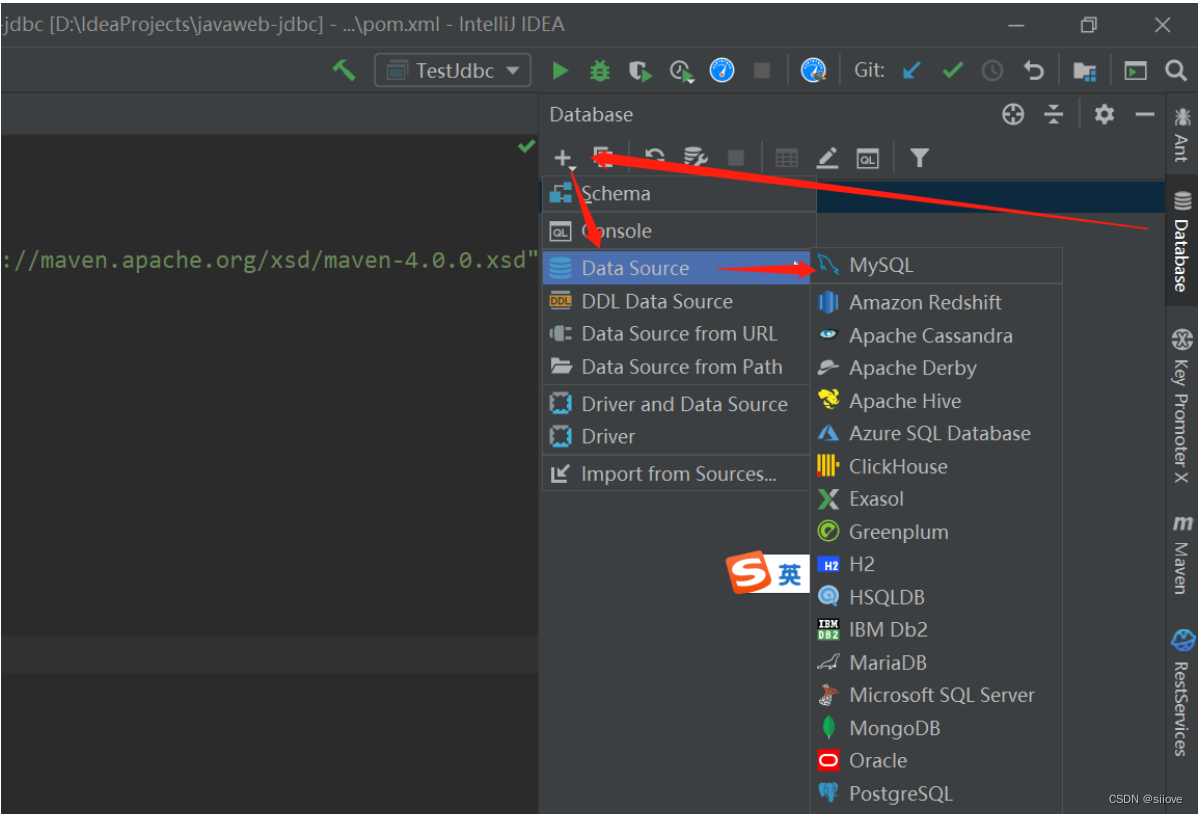
idea连接数据库
jdbc固定步骤:
-
加载驱动
-
连接数据库
-
创建Statement
-
编写sql
-
执行sql
-
关闭连接
- import java.sql.Connection;
- import java.sql.DriverManager;
- import java.sql.ResultSet;
- import java.sql.SQLException;
- import java.sql.Statement;
- /**
- * @ClassName: TestJdbc
- * @Description: TODO 类描述
- * @Author: zyy
- * @Date: 2021/12/14 17:16
- * @Version: 1.0
- */
- public class TestJdbc {
- public static void main(String[] args) {
- String url = "jdbc:mysql://localhost:3306/jdbcstudy?useUnicode=true&characterEncoding=utf-8";
- String user = "root";
- String pwd = "123456";
- try {
- //1. 加载驱动
- Class.forName("com.mysql.jdbc.Driver");
- //2. 连接数据库
- Connection con = DriverManager.getConnection(url, user, pwd);
- //3. 向数据库发送sql的对象Statement
- Statement statement = con.createStatement();
- //4.sql
- String str = "select * from users";
- //5.执行sql
- ResultSet rs = statement.executeQuery(str);
- while (rs.next()) {
- System.out.println("id=" + rs.getInt("id"));
- System.out.println("name=" + rs.getString("name"));
- System.out.println("password=" + rs.getString("password"));
- System.out.println("email=" + rs.getString("email"));
- System.out.println("birthday=" + rs.getString("birthday"));
- }
- //6.关闭
- rs.close();
- statement.close();
- con.close();
- } catch (ClassNotFoundException e) {
- e.printStackTrace();
- } catch (SQLException e) {
- e.printStackTrace();
- }
- }
- }
预编译
- public class Test2Jdbc {
- public static void main(String[] args) {
- String url = "jdbc:mysql://localhost:3306/jdbcstudy?useUnicode=true&characterEncoding=utf-8";
- String user = "root";
- String pwd = "123456";
- try {
- //1. 加载驱动
- Class.forName("com.mysql.jdbc.Driver");
- //2. 连接数据库
- Connection con = DriverManager.getConnection(url, user, pwd);
- //3.sql
- String str = "insert into users(id, name, password, email, birthday) values (?,?,?,?,?)";
- //4. 预编译
- PreparedStatement statement = con.prepareStatement(str);
- statement.setInt(1,8);
- statement.setString(2,"小红");
- statement.setString(3,"123456");
- statement.setString(4,"xiaohong@sina.com");
- statement.setDate(5,new java.sql.Date(System.currentTimeMillis()));
- //5.执行sql
- int count = statement.executeUpdate();
- if (count > 0) {
- System.out.println("插入成功!");
- }
- statement.close();
- con.close();
- } catch (ClassNotFoundException e) {
- e.printStackTrace();
- } catch (SQLException e) {
- e.printStackTrace();
- }
- }
- }
JDBC事务
要么都成功,要么都失败
ACID原则:保证数据的安全
开启事务
事务提交 commit()
事务回滚 rollback()
关闭事务转账:
A:1000
B:1000A(900) ---100--> B(1100)
Junit单元测试
依赖
- <dependency>
- <groupId>junitgroupId>
- <artifactId>junitartifactId>
- <version>4.13version>
- dependency>

简单实用
@Test注解只有在方法上有效,只要加了这个注解的方法,就可以直接运行!
- import org.junit.Test;
- /**
- * @ClassName: Test3Jdbc
- * @Description: TODO 类描述
- * @Author: zyy
- * @Date: 2021/12/16 21:11
- * @Version: 1.0
- */
- public class Test3Jdbc {
- @Test
- public void test() {
- System.out.println("hello");
- }
- }
输出结果:

失败情况:

新建表并插入数据
- CREATE TABLE `account`(
- `id` INT PRIMARY KEY,
- `name` VARCHAR(50) NOT NULL,
- `money` FLOAT NOT NULL
- ) ENGINE=INNODB DEFAULT CHARSET=utf8
- INSERT INTO `account` (`id`, `name`, `money`) VALUES(1,'A',1000);
- INSERT INTO `account` (`id`, `name`, `money`) VALUES(2,'B',1000);
- INSERT INTO `account` (`id`, `name`, `money`) VALUES(3,'C',1000);
- # 开启事务
- start transaction ;
- # 模拟转账
- update account set money=money-100 where name='A';
- update account set money=money+100 where name='B';
- # 回滚
- rollback ;
- # 提交
- commit;
- import org.junit.Test;
- import java.sql.Connection;
- import java.sql.DriverManager;
- import java.sql.SQLException;
- /**
- * @ClassName: Test3Jdbc
- * @Description: TODO 类描述
- * @Author: zyy
- * @Date: 2021/12/16 21:11
- * @Version: 1.0
- */
- public class Test3Jdbc {
- @Test
- public void test() {
- String url = "jdbc:mysql://localhost:3306/jdbcstudy?useUnicode=true&characterEncoding=utf-8";
- String user = "root";
- String pwd = "123456";
- Connection con = null;
- try {
- Class.forName("com.mysql.jdbc.Driver");
- con = DriverManager.getConnection(url, user, pwd);
- //开启事务 这里不开启事务的话异常情况就会有问题 false是开启
- con.setAutoCommit(false);
- con.prepareStatement("update account set money=money-100 where name='A'").executeUpdate();
- //制造错误
- // int i = 1 / 0;
- con.prepareStatement("update account set money=money+100 where name='B'").executeUpdate();
- con.commit();
- System.out.println("success");
- } catch (Exception e) {
- System.out.println("error rollback");
- if (con != null) {
- try {
- con.rollback();
- } catch (SQLException ex) {
- ex.printStackTrace();
- }
- }
- } finally {
- if (con != null) {
- try {
- con.close();
- } catch (SQLException e) {
- e.printStackTrace();
- }
- }
- }
- }
- }
输出结果:


-
-
相关阅读:
Java底层总结(未完善)
LeetCode_区间问题_中等_795.区间子数组个数
【UE5】 虚拟制片教程
仿游戏热血江湖游戏类22(得到物品属性方法2)
perl下mysql同步监控
互斥锁,自旋锁,读写锁
CilckHouse创建表
scipy短时傅里叶分析STFT
Python:操作SQLite数据库简单示例
【开源】基于Vue和SpringBoot的数据可视化的智慧河南大屏
- 原文地址:https://blog.csdn.net/qq_46423017/article/details/126337472
