-
十七、商城 - 品牌管理-代码生成器(5)
一、前端分层开发
1.1 需求分析
上一节 使用angularJS并完成了品牌管理的增删改查功能。但是看实现代码,JS和html都放在一起,并不利于后期的维护。现在也可以在前端代码中也运用MVC的设计模式,将代码进行分离,提高程序的可维护性。
1.2 自定义服务
在 AngularJS 中,服务是一个函数或对象,可在你的 AngularJS 应用中使用。在 上一节 开发总结中使用了内置服务$http .其实也可以自己来定义服务,而服务会封装一些操作。我们在不同的控制器中可以调用同一个服务,这样服务的代码将会被重用。现在就修改一下上一节品牌管理的代码,使用自定义服务。
优化 品牌条件查询 (将search代码段移到上面以便优化)

app.service('brandService',function ($http) { this.search = function (page,rows,searchEntity) { return $http.post('../brand/search.do?page='+page+'&rows='+rows,searchEntity); } }); app.controller('brandController',function ($scope,$http,brandService) { $scope.searchEntity={};//定义搜索对象 //批量查询 $scope.search = function (page,rows) { brandService.search(page,rows, $scope.searchEntity).success(function (response) { $scope.paginationConf.totalItems=response.total;//总记录数 $scope.list=response.rows;//给列表变量赋值 }); };- 1
- 2
- 3
- 4
- 5
- 6
- 7
- 8
- 9
- 10
- 11
- 12
- 13
- 14
- 15
- 16
- 17
- 18
- 19
- 20
优化 查询所有 (将 findBrandAll 代码段移到上面以便优化)

app.service('brandService',function ($http) { //品牌按条件查询 this.search = function (page,rows,searchEntity) { return $http.post('../brand/search.do?page='+page+'&rows='+rows,searchEntity); } //查询所有 this.findBrandAll=function () { return $http.get('../brand/findAll.do'); } }); app.controller('brandController',function ($scope,$http,brandService) { //查询所有 $scope.findBrandAll = function(){ brandService.findBrandAll.success(function (response) { $scope.list = response; }); };- 1
- 2
- 3
- 4
- 5
- 6
- 7
- 8
- 9
- 10
- 11
- 12
- 13
- 14
- 15
- 16
- 17
- 18
- 19
- 20
优化 新增、查询回显并更新 (将 add、update代码段移到上面以便优化)
app.service('brandService',function ($http) { //新增并保存 查询并更新 this.add = function (entity) { return $http.post('../brand/add.do',entity); } this.update = function (entity) { return $http.post('../brand/update.do',entity); } //查询回显——> 更新 this.findOne = function (id) { return $http.get('../brand/findOne.do?id='+id); } }); app.controller('brandController',function ($scope,$http,brandService) { //查询回显——> 更新 $scope.findOne = function (id) { brandService.findOne(id).success(function (response) { $scope.entity = response; }) }; //新增并保存 查询并更新 $scope.save = function(){ var targetObject; if ($scope.entity.id != null){ //不为空就为已经有这个数据,那就只能修改或删除 targetObject =brandService.update($scope.entity); }else{ targetObject =brandService.add($scope.entity); } targetObject.success(function (response) { if(response.success){ $scope.reloadList();//重新加载 }else{ alert(response.message); } }); };- 1
- 2
- 3
- 4
- 5
- 6
- 7
- 8
- 9
- 10
- 11
- 12
- 13
- 14
- 15
- 16
- 17
- 18
- 19
- 20
- 21
- 22
- 23
- 24
- 25
- 26
- 27
- 28
- 29
- 30
- 31
- 32
- 33
- 34
- 35
- 36
- 37
- 38
- 39
- 40
- 41
- 42
- 43
- 44
- 45
- 46
- 47
- 48
- 49
- 50
- 51
- 52
- 53
- 54
优化 批量删除 (将 delete 代码段移到上面以便优化)
app.service('brandService',function ($http) { //批量删除 this.delete = function (selectIds) { return $http.get('../brand/delete.do?ids='+selectIds); } }); app.controller('brandController',function ($scope,$http,brandService) { //批量删除 $scope.delete = function () { //获取选中的复选框 brandService.delete($scope.selectIds).success(function (response) { if(response.success){ $scope.reloadList();//重新加载 }else{ alert(response.message); } }) };- 1
- 2
- 3
- 4
- 5
- 6
- 7
- 8
- 9
- 10
- 11
- 12
- 13
- 14
- 15
- 16
- 17
- 18
- 19
- 20
- 21
1.3 代码分离
刚才的优化已经将与后端交互的部分放入自定义服务 (sevice内),目的是不同的控制层都可以重复调用服务层方法。所以现在还需要将代码分离出来,以便调用。

1.3.1 前端基础层
在youlexuan-manager-web工程js下创建base.js 没有分页引入
//构建app模块时引入pagination模块 var app = angular.module('brandApp',[]);//定义优乐选模块 ,没有分页- 1
- 2
创建base_pagination.js 有分页引入
//构建app模块时引入pagination模块 var app = angular.module('brandApp',['pagination']);//定义优乐选模块,增加分页模块 pagination:能引入分页组件- 1
- 2
一个用于不需要分页功能的页面,一个用于需要分页功能的页面.
1.3.2 前端服务层
在youlexuan-manager-web工程js下创建service文件夹。创建brandService.js
//定义Service层 app.service('brandService',function ($http) { //品牌按条件查询 this.search = function (page,rows,searchEntity) { return $http.post('../brand/search.do?page='+page+'&rows='+rows,searchEntity); } //查询所有 this.findBrandAll=function () { return $http.get('../brand/findAll.do'); } //新增并保存 查询并更新 this.add = function (entity) { return $http.post('../brand/add.do',entity); } this.update = function (entity) { return $http.post('../brand/update.do',entity); } //查询回显——> 更新 this.findOne = function (id) { return $http.get('../brand/findOne.do?id='+id); } //批量删除 this.delete = function (selectIds) { return $http.get('../brand/delete.do?ids='+selectIds); } });- 1
- 2
- 3
- 4
- 5
- 6
- 7
- 8
- 9
- 10
- 11
- 12
- 13
- 14
- 15
- 16
- 17
- 18
- 19
- 20
- 21
- 22
- 23
- 24
- 25
- 26
- 27
- 28
- 29
- 30
- 31
- 32
- 33
- 34
- 35
1.3.3 前端控制层
在youlexuan-manager-web的js文件夹下创建controller文件夹,创建brandController.js
//定义控制层,需要注入service代码 app.controller('brandController',function ($scope,$http,brandService) { //批量删除 $scope.delete = function () { //获取选中的复选框 brandService.delete($scope.selectIds).success(function (response) { if(response.success){ $scope.reloadList();//重新加载 }else{ alert(response.message); } }) }; //查询回显——> 更新 $scope.findOne = function (id) { brandService.findOne(id).success(function (response) { $scope.entity = response; }) }; //新增并保存 查询并更新 $scope.save = function(){ var targetObject; if ($scope.entity.id != null){ //不为空就为已经有这个数据,那就只能修改或删除 targetObject =brandService.update($scope.entity); }else{ targetObject =brandService.add($scope.entity); } targetObject.success(function (response) { if(response.success){ $scope.reloadList();//重新加载 }else{ alert(response.message); } }); }; //查询所有 $scope.findBrandAll = function(){ brandService.findBrandAll.success(function (response) { $scope.list = response; }); }; $scope.searchEntity={};//定义搜索对象 //批量查询 $scope.search = function (page,rows) { brandService.search(page,rows, $scope.searchEntity).success(function (response) { $scope.paginationConf.totalItems=response.total;//总记录数 $scope.list=response.rows;//给列表变量赋值 }); }; //重新加载列表 数据 $scope.reloadList=function(){ //切换页码 $scope.search( $scope.paginationConf.currentPage, $scope.paginationConf.itemsPerPage); }; //分页控件配置 $scope.paginationConf = { //变量各属性的意义: currentPage: 1, //当前页码 totalItems: 5, //总条数 itemsPerPage: 5, perPageOptions: [5, 10, 15, 20, 30], //页码选项 onChange: function(){ //更改页面时触发的事件 $scope.reloadList();//重新加载 } }; /*分页*/ $scope.findPage = function(page,rows){ $http.get('../brand/findPage.do?page='+page+'&rows='+rows).success(function(response){ $scope.list = response.rows; $scope.paginationConf.totalItems = response.total;//更新总记录数 }) }; /** * 主要思路:我们需要定义一个用于存储选中ID的数组,当我们点击复选框后判断是选择还是取消选择, * 如果是选择就加到数组中,如果是取消选择就从数组中移除。在点击删除按钮时需要用到这个存储了ID的数组。 这里我们补充一下JS的关于数组操作的知识 (1)数组的push方法:向数组中添加元素 (2)数组的splice方法:从数组的指定位置移除指定个数的元素 ,参数1为位置 ,参数2位移除的个数 (3)复选框的checked属性:用于判断是否被选中 */ //批量删除 $scope.selectIds=[];//选中的ID集合 //更新复选 $scope.updateSelection = function($event,id){ if($event.target.checked){//如果是被选中,则增加到数组 $scope.selectIds.push(id); }else{ var idx = $scope.selectIds.indexOf(id); $scope.selectIds.splice(idx, 1);//删除 } }; });- 1
- 2
- 3
- 4
- 5
- 6
- 7
- 8
- 9
- 10
- 11
- 12
- 13
- 14
- 15
- 16
- 17
- 18
- 19
- 20
- 21
- 22
- 23
- 24
- 25
- 26
- 27
- 28
- 29
- 30
- 31
- 32
- 33
- 34
- 35
- 36
- 37
- 38
- 39
- 40
- 41
- 42
- 43
- 44
- 45
- 46
- 47
- 48
- 49
- 50
- 51
- 52
- 53
- 54
- 55
- 56
- 57
- 58
- 59
- 60
- 61
- 62
- 63
- 64
- 65
- 66
- 67
- 68
- 69
- 70
- 71
- 72
- 73
- 74
- 75
- 76
- 77
- 78
- 79
- 80
- 81
- 82
- 83
- 84
- 85
- 86
- 87
- 88
- 89
- 90
- 91
- 92
- 93
- 94
- 95
- 96
- 97
- 98
- 99
- 100
- 101
- 102
- 103
- 104
- 105
- 106
- 107
- 108
- 109
- 110
- 111
- 112
- 113
- 114
- 115
- 116
1.3.4 修改页面
去掉brand.html原来的JS代码,引入刚才建立的JS

<script src="../js/base_pagination.js"></script> <script src="../js/service/brandService.js"></script> <script src="../js/controller/brandController.js"></script>- 1
- 2
- 3
二、控制器继承

2.1 需求分析
有些功能是每个页面都有可能用到的,比如分页,复选等等,如果我们再开发另一个功能,还需要重复编写。怎么能让这些通用的功能只写一次呢?我们通过继承的方式来实现。
2.2 前端代码
2.2.1 建立父控制器
在youlexuan-manager-web的js/controller目录下建立baseController.js
app.controller('baseController',function($scope){ //重新加载列表 数据 $scope.reloadList=function(){ //切换页码 $scope.search( $scope.paginationConf.currentPage, $scope.paginationConf.itemsPerPage); }; //分页控件配置 $scope.paginationConf = { //变量各属性的意义: currentPage: 1, //当前页码 totalItems: 5, //总条数 itemsPerPage: 5, perPageOptions: [5, 10, 15, 20, 30], //页码选项 onChange: function(){ //更改页面时触发的事件 $scope.reloadList();//重新加载 } }; /** * 主要思路:我们需要定义一个用于存储选中ID的数组,当我们点击复选框后判断是选择还是取消选择, * 如果是选择就加到数组中,如果是取消选择就从数组中移除。在点击删除按钮时需要用到这个存储了ID的数组。 这里我们补充一下JS的关于数组操作的知识 (1)数组的push方法:向数组中添加元素 (2)数组的splice方法:从数组的指定位置移除指定个数的元素 ,参数1为位置 ,参数2位移除的个数 (3)复选框的checked属性:用于判断是否被选中 */ //批量删除 $scope.selectIds=[];//选中的ID集合 //更新复选 $scope.updateSelection = function($event,id){ if($event.target.checked){//如果是被选中,则增加到数组 $scope.selectIds.push(id); }else{ var idx = $scope.selectIds.indexOf(id); $scope.selectIds.splice(idx, 1);//删除 } }; });- 1
- 2
- 3
- 4
- 5
- 6
- 7
- 8
- 9
- 10
- 11
- 12
- 13
- 14
- 15
- 16
- 17
- 18
- 19
- 20
- 21
- 22
- 23
- 24
- 25
- 26
- 27
- 28
- 29
- 30
- 31
- 32
- 33
- 34
- 35
- 36
- 37
- 38
- 39
- 40
- 41
- 42
2.2.2 修改品牌控制器层
修改 brandController.js

//定义控制层,需要注入service代码 app.controller('brandController',function ($scope,$controller,$http,brandService) { $controller('baseController',{$scope:$scope});//继承 //批量删除 $scope.delete = function () { //获取选中的复选框 brandService.delete($scope.selectIds).success(function (response) { if(response.success){ $scope.reloadList();//重新加载 }else{ alert(response.message); } }) }; //查询回显——> 更新 $scope.findOne = function (id) { brandService.findOne(id).success(function (response) { $scope.entity = response; }) }; //新增并保存 查询并更新 $scope.save = function(){ var targetObject; if ($scope.entity.id != null){ //不为空就为已经有这个数据,那就只能修改或删除 targetObject =brandService.update($scope.entity); }else{ targetObject =brandService.add($scope.entity); } targetObject.success(function (response) { if(response.success){ $scope.reloadList();//重新加载 }else{ alert(response.message); } }); }; //查询所有 $scope.findBrandAll = function(){ brandService.findBrandAll.success(function (response) { $scope.list = response; }); }; $scope.searchEntity={};//定义搜索对象 //批量查询 $scope.search = function (page,rows) { brandService.search(page,rows, $scope.searchEntity).success(function (response) { $scope.paginationConf.totalItems=response.total;//总记录数 $scope.list=response.rows;//给列表变量赋值 }); }; /*分页*/ $scope.findPage = function(page,rows){ $http.get('../brand/findPage.do?page='+page+'&rows='+rows).success(function(response){ $scope.list = response.rows; $scope.paginationConf.totalItems = response.total;//更新总记录数 }) }; });- 1
- 2
- 3
- 4
- 5
- 6
- 7
- 8
- 9
- 10
- 11
- 12
- 13
- 14
- 15
- 16
- 17
- 18
- 19
- 20
- 21
- 22
- 23
- 24
- 25
- 26
- 27
- 28
- 29
- 30
- 31
- 32
- 33
- 34
- 35
- 36
- 37
- 38
- 39
- 40
- 41
- 42
- 43
- 44
- 45
- 46
- 47
- 48
- 49
- 50
- 51
- 52
- 53
- 54
- 55
- 56
- 57
- 58
- 59
- 60
- 61
- 62
- 63
- 64
- 65
- 66
- 67
- 68
- 69
- 70
- 71
- 72
- 73
- 74
- 75
- 76
- 77
- 78
- 79
c o n t r o l l e r 也是 a n g u l a r 提供的一个服务,可以实现伪继承,实际上就是与 B a s e C o n t r o l l e r 共享 controller也是angular提供的一个服务,可以实现伪继承,实际上就是与BaseController共享 controller也是angular提供的一个服务,可以实现伪继承,实际上就是与BaseController共享scope
2.2.3 修改页面brand.html引入js
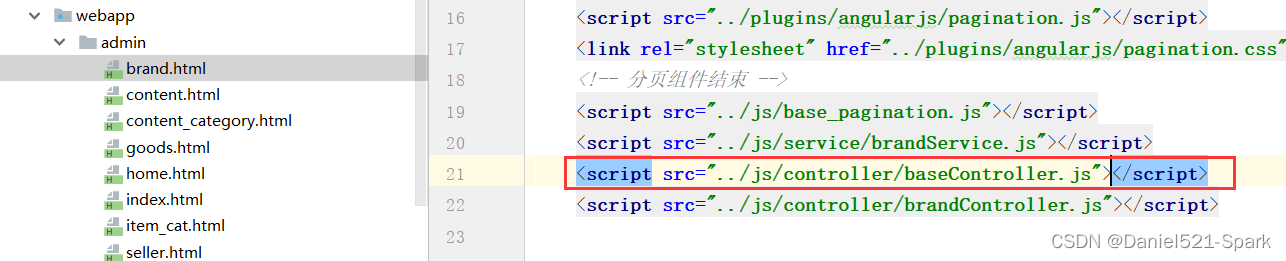
<script src="../js/base_pagination.js"></script> <script src="../js/service/brandService.js"></script> <script src="../js/controller/baseController.js"></script> <script src="../js/controller/brandController.js"></script>- 1
- 2
- 3
- 4
三、代码生成器 (单表CRUD)
(公司一般都有自己的代码生成器)
3.1 代码生成
现在来使用 1.生成器 来完成代码的编写。生成后将代码拷贝到工程中。具体步骤如下:
(1)导入(YoulexuanMakeCode)代码生成器 👇🏾👇🏾 工程到开发工具。


IDEA中 配置自己的 maven
(2)修改数据库连接配置:打开src/main/resources/properties/db.properties

jdbc.mydriver=com.mysql.jdbc.Driver jdbc.myurl=jdbc:mysql://localhost:3306/youlexuan?characterEncoding=utf-8 jdbc.myusername=root jdbc.mypassword=root- 1
- 2
- 3
- 4
(3)运行代码生成主程序:MakeCodeMain 及可生成代码 。
Service、ServiceImpl、Controller都生成到了 /src/main/java目录下
Js文件生成到了 src/main/webapp/js 目录下
Html页面文件生成到了 src/main/webapp/admin目录下


这个生成器不会生成数据访问层和实体类,因为我们之前已经用逆向工程完成了数据访问层与实体类的生成。
(4)提示成功后,到生成路径去找生成的代码,并拷贝到我们的工程中。
3.2 代码拷贝
将商家商品相关代码拷贝到工程。
(1)拷贝服务接口

(2)拷贝服务实现类
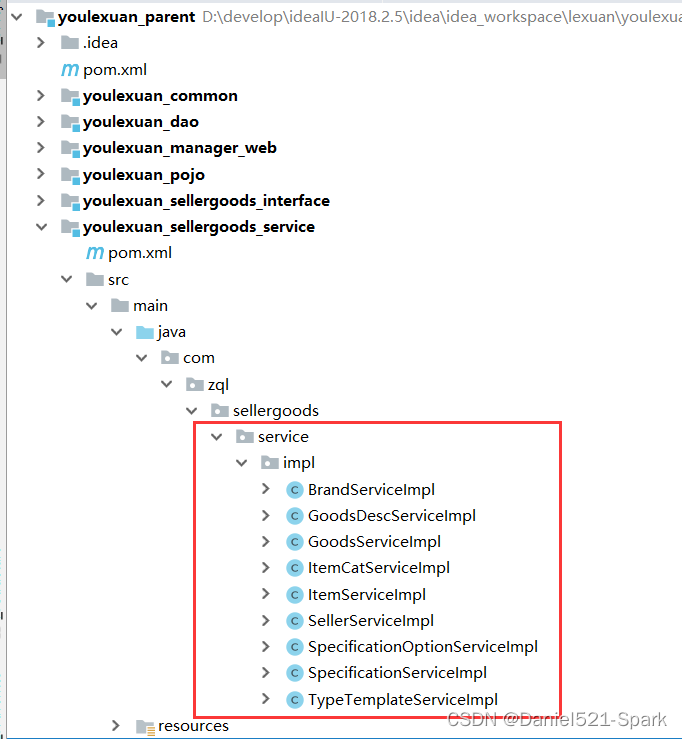
(3)拷贝控制器

(4)拷贝JS

注意:我之前定义为 :myApp,可以改成
3.3 测试
- 安装youlexuan_parent 或 执行maven命令install ,将最新的优乐选代码安装到本地仓库
- 顺序启动以下2个服务 youlexuan-sellergoods-service、youlexuan-manager-web
访问地址:
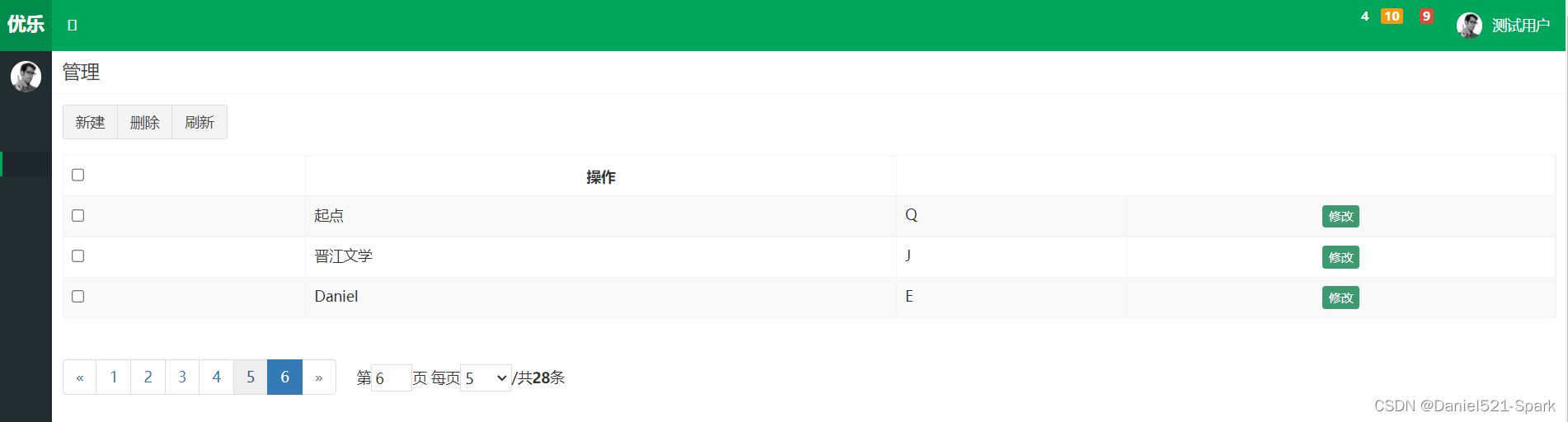
http://localhost:9101/admin/index.html点击:商品管理—》品牌管理----》进行CRUD——》测试成功!!!
-
相关阅读:
Linux学习之冯诺依曼体系结构
在Jackson中使用树模型节点(JsonNode)详解
Bio初级通讯案例
前端数据可视化之【Echarts介绍】
【LeetCode】No.55. Jump Game -- Java Version
C# InvokeRequired线程安全
低代码助力生产管理:ERP生产管理系统
Echarts tree树图按层级自定义容器宽高及显示隐藏层级后重新渲染树图宽高
【PCL】教程global_hypothesis_verification 通过验证模型假设来实现 3D 对象识别与位姿估计...
YOLO目标检测——无人机检测数据集下载分享【含对应voc、coco和yolo三种格式标签】
- 原文地址:https://blog.csdn.net/weixin_42171159/article/details/126200606
