-
Vuex环境搭建
环境搭建,无非是安装,使用,再new一个store,最后要让所有的VC的实例对象都能看见vc。
- 安装vuex
npm i vuex- 1
- 使用vuex
Vue.use(vuex)- 1
- new 一个store
- 让store被vc看见
- 注意:

1. 安装Vuex
默认npm i vuex,安装的是vuex4版本。
如果想安装vuex3版本的话,输入下面的代码:npm i vuex@3- 1
2.使用Vuex
在main.js文件中:
//引入Vuex import Vuex from 'vuex' //使用插件 Vue.use(Vuex)- 1
- 2
- 3
- 4
3.new 一个store (以方法2为例)
有2种选择:
-
第一种
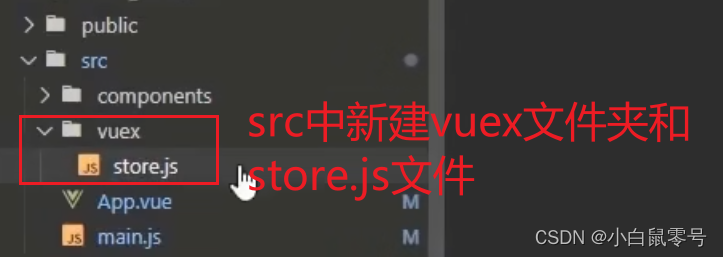
-
第二种 (官方写法)
一般,你在项目中看到store文件夹,相当于看到了vuex

index.js文件中:
//该文件用于创建Vuex中最为核心的store import Vue from 'vue' //使用插件 Vue.use(Vuex) //引入Vuex import Vuex from 'vuex' //准备Actions: 响应组件中的动作。 const actions = {} //准备Mutations: 操作数据(State) const mutations = {} //准备State: 存储数据 const state = {} //创建store,并对外暴露store export default new Vuex.Store({ actions,//触发了重名写法,这里指:actions:actions mutations, state, })- 1
- 2
- 3
- 4
- 5
- 6
- 7
- 8
- 9
- 10
- 11
- 12
- 13
- 14
- 15
- 16
- 17
- 18
- 19
- 20
- 21
- 让store被看见
- 在main.js中创建vm时传入store配置项
//引入store import store from './store/index' …… //创建vm const vm = new Vue({ el:'#app', store, //指:store:'store', render: h=>h(App), })- 1
- 2
- 3
- 4
- 5
- 6
- 7
- 8
- 9
-
相关阅读:
6 Ajax & JSON
STM32——DHT11温湿度传感器
【LeetCode】55. 跳跃游戏 - Go 语言题解
Netty入门指南之NIO Channel详解
双臂复合机器人平台叠方块例程使用与自启设置
MySQL进阶篇(五)- 锁
VS 常用的快捷键指令
SWC介绍
《强化学习》第5章 蒙特卡洛方法(未完成)
数据结构_红黑树
- 原文地址:https://blog.csdn.net/qq_41714549/article/details/126149975
