-
使用 husky+commitlint 检查提交描述是否符合规范要求,及提交代码进行格式化
要完成以上两个目标,我们需要使用两个工具:
1、commitlint: 用于检查提交信息
2、husky: 是gits hook 工具注意:npm 需要在7.x以上版本!!!!
commitlint
- 1、安装依赖:
npm install --save-dev @commitlint/config-conventional@12.1.4 @commitlint/cli@12.1.4- 1
- 2、创建 commitlint.config.js
echo "module.exports = {extends: ['@commitlint/config-conventional']}" > commitlint.config.js- 1
- 3、打开 commitlint.config.js ,增加配置项
module.exports = { // 继承的规则 extends: ['@commitlint/config-conventional'], // 定义规则类型 rules: { // type类型定义,表示 git 提交的 type 必须在以下类型范围内 'type-enum': [ 2, 'always', [ 'feat', // 新功能 feature 'fix', // 修复bug 'docs', // 文档注释 'style', // 代码格式(不影响代码运行的变动) 'refactor', // 重构(既不增加新功能,也不是修复bug) 'perf', // 性能优化 'test', // 增加测试 'chore', // 构建过程或者辅助工具的变更 'revert', // 回退 'build' // 打包 ] ], // subject 大小写不做校验 'subject-case': [0], // subject建议150字以内 'subject-max-length': [1, 'always', 150] } }- 1
- 2
- 3
- 4
- 5
- 6
- 7
- 8
- 9
- 10
- 11
- 12
- 13
- 14
- 15
- 16
- 17
- 18
- 19
- 20
- 21
- 22
- 23
- 24
- 25
- 26
- 27
- 28
- 29
husky
- 1、安装依赖:
npm install husky@7.0.1 --save-dev- 1
- 2、启动hooks, 生成 .husky文件夹
npx husky install- 1

- 3、在 pckage.json 中生成
prepare指令(需要npm >7.0 版本)
npm set-script prepare "husky install"- 1

- 4、执行 prepare 指令
npm run prepare- 1
- 5、执行成功提示

- 6、添加 commitlint 的 hook 到 husky 中,并指令在 commit-msg 的 hooks 下执行 npx --no-install commitlint --edit “$1” 指令
npx husky add .husky/commit-msg 'npx --no-install commitlint --edit "$1"'- 1
- 7、此时的 .husky 的文件结构

至此,不符合规范的 commit 将不再可提交:
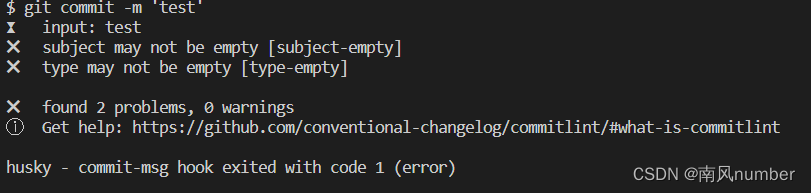
提交的时候进行检测代码格式,不符合规范就提交不了
我们期望通过husky 监测 pre-commit 钩子,在该钩子下执行 npx eslint --ext .js,.vue src 指令来进行相关检测:
- 1、执行 npx husky add .husky/pre-commit “npx eslint --ext .js,.vue src” 添加 commit 时的 hook (npx eslint --ext .js,.vue src 会在执行到该hook 时运行)
- 2、该操作会生成对应文件 pre-commit:

3、此时如果代码不规范的提交,就会抛出错误,代码无法提交

- 4、这样已经做到了,但是我们想你都发现有问题了帮我再格式化提交下,可不可以呢?答案是可以的
用到一个插件 lint-staged,无需单独安装,我们生成项目时, vue-cli 已经帮我们安装过了,所以我们直接使用就可以了
- 4-1. 修改 package.json 配置
"lint-staged":{ "src/**/*.{js,vue}":[ "eslint --fix", "git add" ] }- 1
- 2
- 3
- 4
- 5
- 6
- 4-2. 如上配置,每次它只会在你本地 commit 之前,校验你提交的内容是否符合你本地配置的 eslint 规则,检验会出现两种结果:
1.如果符合规则:则会提交成功。
2.如果不符合规则:它会自动执行 eslint --fix 尝试帮你自动修复,如果修复成功则会帮你把修复好的代码提交,如果失败,则会提示你错误,让你修好这个错误之后才能允许你提交代码 - 4-3. 修改 .husky/pre-commit 文件

- 5、再次提交发现不符合 ESLint 的内容,被自动修复
-
相关阅读:
Unity嵌入Android项目开发
装饰模式 rust和java的实现
promise、async/await的执行顺序
Vue的模板语法
现代android 动态权限,两种不同写法
Android 交叉编译openssl 、libxml2静态库
低轨互联网产业发展探究
如何利用IP定位技术进行反欺诈?
nacos应用
用html、css和jQuery实现图片翻页的特效
- 原文地址:https://blog.csdn.net/weixin_45730243/article/details/126176112


