-
maven的安装和配置
一、maven简介
Apache Maven是个项目管理和自动构建工具,基于项目对象模型(POM)的概念。
作用:完成项目的相关操作,如:编译,构建,单元测试,安装,网站生成和基于Maven部署项目。
xxx.class
百度—》 xxx.jar
在百度上进行下载
将xxx.jar导入工程中
私服
工程中的某一个xml文件中写入一个字符串,达到jar下载的作用二、安装和配置maven
1、安装maven
网址:http://maven.apache.org/download.cgi
2、配置maven环境变量
①MAVEN_HOME
值放maven的安装路径

②修改path:在其中加入%MAVEN_HOME%\bin
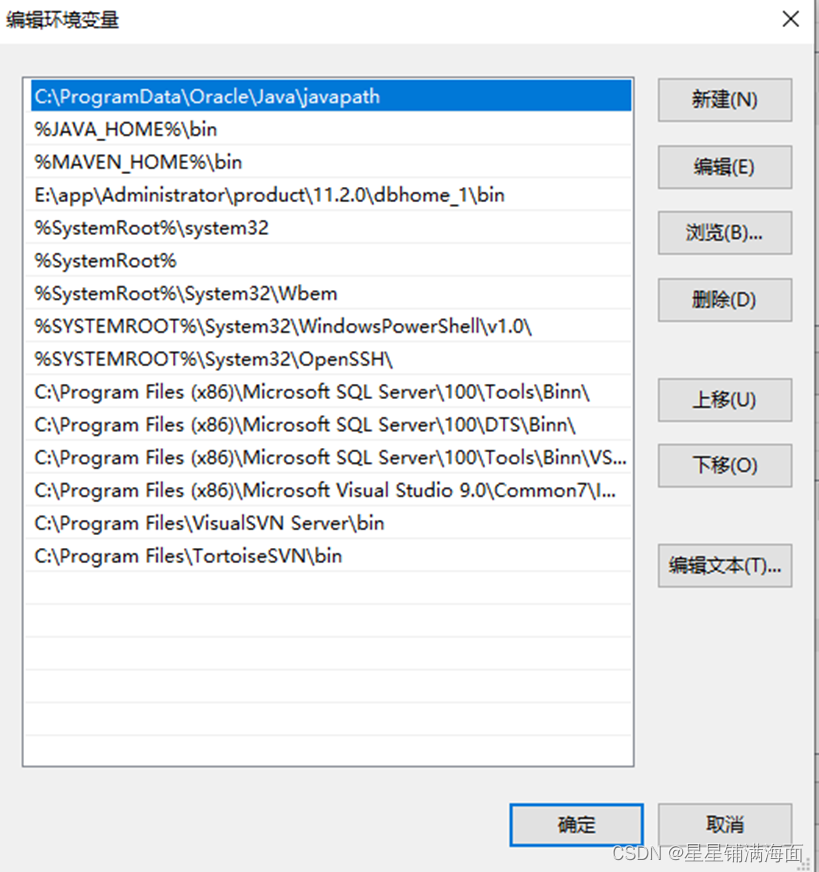
③验证doc窗口执行命令“mvn –version”

三、eclipse中配置maven
1、点击window->perferences

2、点击add

3、点击Directory

4、找到安装maven的根目录即可
四、案例
1、entity实体类
package com.zking.entity; public class User { private Long id; private String name; private String loginName; private String pwd; private Long rid; public Long getId() { return id; } public void setId(Long id) { this.id = id; } public String getName() { return name; } public void setName(String name) { this.name = name; } public String getLoginName() { return loginName; } public void setLoginName(String loginName) { this.loginName = loginName; } public String getPwd() { return pwd; } public void setPwd(String pwd) { this.pwd = pwd; } public Long getRid() { return rid; } public void setRid(Long rid) { this.rid = rid; } public User() { super(); // TODO Auto-generated constructor stub } @Override public String toString() { return "User [id=" + id + ", name=" + name + ", loginName=" + loginName + ", pwd=" + pwd + ", rid=" + rid + "]"; } }- 1
- 2
- 3
- 4
- 5
- 6
- 7
- 8
- 9
- 10
- 11
- 12
- 13
- 14
- 15
- 16
- 17
- 18
- 19
- 20
- 21
- 22
- 23
- 24
- 25
- 26
- 27
- 28
- 29
- 30
- 31
- 32
- 33
- 34
- 35
- 36
- 37
- 38
- 39
- 40
- 41
- 42
- 43
- 44
- 45
- 46
- 47
- 48
- 49
- 50
- 51
- 52
- 53
- 54
- 55
- 56
- 57
- 58
- 59
- 60
- 61
- 62
- 63
- 64
- 65
2、dao方法
package com.zking.dao; import java.sql.Connection; import java.sql.PreparedStatement; import java.sql.ResultSet; import com.zking.entity.User; import com.zking.util.DBAccess; import com.zking.util.DBHelper; public class UserDao { // 登录 public User login(User u){ Connection con=null; PreparedStatement ps=null; ResultSet rs=null; try { con=DBAccess.getConnection(); String sql="select * from t_oa_user where loginName=? and pwd=?"; ps = con.prepareStatement(sql); ps.setString(1, u.getLoginName()); ps.setString(2, u.getPwd()); rs=ps.executeQuery(); if(rs.next()) { u.setId(rs.getLong(1)); u.setName(rs.getString(2)); u.setLoginName(rs.getString(3)); u.setPwd(rs.getString(4)); u.setRid(rs.getLong(5)); } } catch (Exception e) { e.printStackTrace(); }finally { DBHelper.close(con, ps, rs); } return u; } }- 1
- 2
- 3
- 4
- 5
- 6
- 7
- 8
- 9
- 10
- 11
- 12
- 13
- 14
- 15
- 16
- 17
- 18
- 19
- 20
- 21
- 22
- 23
- 24
- 25
- 26
- 27
- 28
- 29
- 30
- 31
- 32
- 33
- 34
- 35
- 36
- 37
- 38
- 39
- 40
3、action层
package com.zking.web; import java.io.IOException; import java.io.PrintWriter; import javax.servlet.ServletException; import javax.servlet.annotation.WebServlet; import javax.servlet.http.HttpServlet; import javax.servlet.http.HttpServletRequest; import javax.servlet.http.HttpServletResponse; import com.zking.dao.UserDao; import com.zking.entity.User; @WebServlet("/login.do") public class UserAction extends HttpServlet{ @Override protected void doGet(HttpServletRequest req, HttpServletResponse resp) throws ServletException, IOException { doPost(req, resp); } @Override protected void doPost(HttpServletRequest req, HttpServletResponse resp) throws ServletException, IOException { //设置编码方式 req.setCharacterEncoding("utf-8"); resp.setCharacterEncoding("utf-8"); resp.setContentType("text/html; charset=UTF-8"); //拿out PrintWriter out = resp.getWriter(); UserDao ud=new UserDao(); //接收表单传值 String sname = req.getParameter("name"); String pwd = req.getParameter("pwd"); User u=new User(); u.setLoginName(sname); u.setPwd(pwd); User u1 = ud.login(u); if(u1!=null) { out.print(""); }else{ out.print(""); } } }- 1
- 2
- 3
- 4
- 5
- 6
- 7
- 8
- 9
- 10
- 11
- 12
- 13
- 14
- 15
- 16
- 17
- 18
- 19
- 20
- 21
- 22
- 23
- 24
- 25
- 26
- 27
- 28
- 29
- 30
- 31
- 32
- 33
- 34
- 35
- 36
- 37
- 38
- 39
- 40
- 41
- 42
- 43
- 44
- 45
- 46
- 47
4、util包
①DBHelper
package com.zking.util; import java.io.InputStream; import java.sql.Connection; import java.sql.DriverManager; import java.sql.PreparedStatement; import java.sql.ResultSet; import java.sql.SQLException; import java.sql.Statement; import java.util.Properties; /** * 提供了一组获得或关闭数据库对象的方法 * */ public class DBHelper { private static String driver; private static String url; private static String user; private static String password; static {// 静态块执行一次,加载 驱动一次 try { InputStream is = DBHelper.class .getResourceAsStream("config.properties"); Properties properties = new Properties(); properties.load(is); driver = properties.getProperty("driver"); url = properties.getProperty("url"); user = properties.getProperty("user"); password = properties.getProperty("pwd"); Class.forName(driver); } catch (Exception e) { e.printStackTrace(); throw new RuntimeException(e); } } /** * 获得数据连接对象 * * @return */ public static Connection getConnection() { try { Connection conn = DriverManager.getConnection(url, user, password); return conn; } catch (SQLException e) { e.printStackTrace(); throw new RuntimeException(e); } } public static void close(ResultSet rs) { if (null != rs) { try { rs.close(); } catch (SQLException e) { e.printStackTrace(); throw new RuntimeException(e); } } } public static void close(Statement stmt) { if (null != stmt) { try { stmt.close(); } catch (SQLException e) { e.printStackTrace(); throw new RuntimeException(e); } } } public static void close(Connection conn) { if (null != conn) { try { conn.close(); } catch (SQLException e) { e.printStackTrace(); throw new RuntimeException(e); } } } public static void myClose(Connection con,PreparedStatement ps,ResultSet rs) { try { if(rs!=null) { rs.close(); } if(ps!=null) { ps.close(); } if(con!=null&&!con.isClosed()) { con.close(); } } catch (Exception e) { e.printStackTrace(); } } public static void close(Connection conn, Statement stmt, ResultSet rs) { close(rs); close(stmt); close(conn); } public static boolean isOracle() { return "oracle.jdbc.driver.OracleDriver".equals(driver); } public static boolean isSQLServer() { return "com.microsoft.sqlserver.jdbc.SQLServerDriver".equals(driver); } public static boolean isMysql() { return "com.mysql.jdbc.Driver".equals(driver); } public static void main(String[] args) { Connection conn = DBHelper.getConnection(); DBHelper.close(conn); System.out.println("isOracle:" + isOracle()); System.out.println("isSQLServer:" + isSQLServer()); System.out.println("isMysql:" + isMysql()); System.out.println("数据库连接(关闭)成功"); } }- 1
- 2
- 3
- 4
- 5
- 6
- 7
- 8
- 9
- 10
- 11
- 12
- 13
- 14
- 15
- 16
- 17
- 18
- 19
- 20
- 21
- 22
- 23
- 24
- 25
- 26
- 27
- 28
- 29
- 30
- 31
- 32
- 33
- 34
- 35
- 36
- 37
- 38
- 39
- 40
- 41
- 42
- 43
- 44
- 45
- 46
- 47
- 48
- 49
- 50
- 51
- 52
- 53
- 54
- 55
- 56
- 57
- 58
- 59
- 60
- 61
- 62
- 63
- 64
- 65
- 66
- 67
- 68
- 69
- 70
- 71
- 72
- 73
- 74
- 75
- 76
- 77
- 78
- 79
- 80
- 81
- 82
- 83
- 84
- 85
- 86
- 87
- 88
- 89
- 90
- 91
- 92
- 93
- 94
- 95
- 96
- 97
- 98
- 99
- 100
- 101
- 102
- 103
- 104
- 105
- 106
- 107
- 108
- 109
- 110
- 111
- 112
- 113
- 114
- 115
- 116
- 117
- 118
- 119
- 120
- 121
- 122
- 123
- 124
- 125
- 126
- 127
- 128
- 129
- 130
- 131
- 132
- 133
②config.peoperties
#oracle9i #driver=oracle.jdbc.driver.OracleDriver #url=jdbc:oracle:thin:@localhost:1521:ora9 #user=test #pwd=test #sql2005 #driver=com.microsoft.sqlserver.jdbc.SQLServerDriver #url=jdbc:sqlserver://localhost:1423;DatabaseName=test #user=sa #pwd=sa #sql2000 #driver=com.microsoft.jdbc.sqlserver.SQLServerDriver #url=jdbc:microsoft:sqlserver://localhost:1433;databaseName=unit6DB #user=sa #pwd=888888 #mysql5 #driver=com.mysql.jdbc.Driver #url=jdbc:mysql://127.0.0.1:3306/mybatis_ssm?useUnicode=true&characterEncoding=utf8&serverTimezone=GMT #user=mybatis_ssm #pwd=xiaoli #mysql8 driver=com.mysql.cj.jdbc.Driver url=jdbc:mysql://127.0.0.1:3306/t280?useUnicode=true&characterEncoding=utf8&serverTimezone=GMT&useSSL=true user=root pwd=123456- 1
- 2
- 3
- 4
- 5
- 6
- 7
- 8
- 9
- 10
- 11
- 12
- 13
- 14
- 15
- 16
- 17
- 18
- 19
- 20
- 21
- 22
- 23
- 24
- 25
- 26
- 27
- 28
- 29
- 30
- 31
- 32
- 33
- 34
- 35
运行效果:

-
相关阅读:
viterbi算法
go语法速查手册
java MessageDigest 实现加密算法
AcWing 1211:蚂蚁感冒 ← 模拟题
Linux常见问题解决操作(yum被占用、lsb无此命令、Linux开机进入命令界面等)
总是留不住客户怎么办?这三点每多做一点,回头客翻一倍!
15:00进去,15:08就出来了,问的问题太变态了。
个人练习-Leetcode-1034. Coloring A Border
UE5 操作WebSocket
微软出品自动化神器【Playwright+Java】系列(四)之 浏览器操作
- 原文地址:https://blog.csdn.net/weixin_67677668/article/details/126151703
