-
Springboot整合Fastdfs上传图片、缩略图、下载文件、需求:文件转存方案(springboot整合线程池多线程实现)
SpringBoot整合FastDFS上传下载+文件转存方案
背景
公司内部有一台FastDFS文件服务器,由于有多个项目上传图片文件时都是上传到了一个服务器中,导致最近出现问题:上传文件时有时成功有时失败给用户体验很不好,公司决定重新整一台FastDFS文件服务器,只允许3个相似的项目上传图片到这里,由于项目文件数据量不是非常大(目前最大的项目中只存图片3000左右),集群就不需要了,storage服务器也只要一台,然后配置多路径存储一下即可。
思路
第一想法:由于原来那些数据库中上传文件时,存储了文件的路径信息,现在只是服务器的ip变了,直接在新的FastDFS中和原先那台把配置搞的一模一样,然后程序中把ip改一下不就OK了。
于是花时间在自己的虚拟机上搞了个FastDFS文件服务器,准备试试。
但是突然被告知,原先那个文件服务器中只有两个存储路径,好几个项目的图片文件都放入到这两个路径里了,如果全部拷贝过来,肯定是不合适的。oh~谢!
第二想法:如果不能直接拷贝,那么只能用最笨的方法了。先从数据库中找到原先那台文件服务器的存储路径,从原先的服务器上把文件下载下来,然后重新上传到新FastDFS文件服务器上(并且是包含缩略图的),然后把存储路径重新给修改一下。┐(゚~゚)┌,没法,目前只能这么搞额。
开干
想法图

搞了两个项目,项目一整合原FastDFS服务器读取文件,然后项目二整合新FastDFS服务器上传文件,并且给项目一提供一个上传的接口。
几千个文件上传下载,为了合理利用CPU资源,单线程肯定是玩不了的。
思考:本需求其实就是IO文件上传下载这样的,属于是IO密集型任务,不用多想肯定要使用多线程的。方便协调和管理,使用线程池来实现。
得是多线程且为了方便,配置多数据源(共3个项目要上传到新文件服务器)进行整合更改。
开始之前肯定要先把新的FastDFS文件服务器安装部署好,看下我这边文章linux下载安装搭建、卸载FastDfs文件服务器、配置多存储路径(轮询、最大内存选择)、nginx反向代理实现图片预览、常用命令
项目一
引入依赖
<parent> <groupId>org.springframework.bootgroupId> <artifactId>spring-boot-starter-parentartifactId> <version>2.5.12version> parent> <properties> <java.version>1.8java.version> properties> <dependencies> <dependency> <groupId>org.projectlombokgroupId> <artifactId>lombokartifactId> <version>1.18.20version> dependency> <dependency> <groupId>com.baomidougroupId> <artifactId>dynamic-datasource-spring-boot-starterartifactId> <version>3.5.0version> dependency> <dependency> <groupId>com.github.tobatogroupId> <artifactId>fastdfs-clientartifactId> <version>1.27.2version> dependency> <dependency> <groupId>org.springframework.bootgroupId> <artifactId>spring-boot-starter-webartifactId> dependency> <dependency> <groupId>mysqlgroupId> <artifactId>mysql-connector-javaartifactId> dependency> <dependency> <groupId>com.baomidougroupId> <artifactId>mybatis-plus-boot-starterartifactId> <version>3.1.0version> dependency> <dependency> <groupId>cn.hutoolgroupId> <artifactId>hutool-allartifactId> <version>5.6.6version> dependency> <dependency> <groupId>com.alibabagroupId> <artifactId>fastjsonartifactId> <version>1.2.78version> dependency> <dependency> <groupId>com.alibabagroupId> <artifactId>druid-spring-boot-starterartifactId> <version>1.1.14version> dependency> dependencies>- 1
- 2
- 3
- 4
- 5
- 6
- 7
- 8
- 9
- 10
- 11
- 12
- 13
- 14
- 15
- 16
- 17
- 18
- 19
- 20
- 21
- 22
- 23
- 24
- 25
- 26
- 27
- 28
- 29
- 30
- 31
- 32
- 33
- 34
- 35
- 36
- 37
- 38
- 39
- 40
- 41
- 42
- 43
- 44
- 45
- 46
- 47
- 48
- 49
- 50
- 51
- 52
- 53
- 54
- 55
- 56
- 57
- 58
- 59
- 60
- 61
- 62
- 63
- 64
application.yml配置文件
spring: application: name: @artifactId@ datasource: dynamic: # 设置默认的数据源或者数据源组 primary: lubei # 严格匹配数据源,默认false.true未匹配到指定数据源时抛异常,false使用默认数据源 strict: false datasource: lubei: url: jdbc:mysql://xxx:3306/beer?characterEncoding=utf8&useSSL=false driver-class-name: com.mysql.cj.jdbc.Driver username: xxx password: xxx qianan: url: jdbc:mysql://xxx:3306/db_qianan?characterEncoding=utf8&useSSL=false driver-class-name: com.mysql.cj.jdbc.Driver username: xxx password: xxx mine: url: jdbc:mysql://localhost:3306/dispatcher?characterEncoding=utf8&useSSL=false driver-class-name: com.mysql.cj.jdbc.Driver username: root password: 134520 server: port: 8080 mybatis-plus: configuration: map-underscore-to-camel-case: true # log-impl: org.apache.ibatis.logging.stdout.StdOutImpl type-aliases-package: com.wlh.fdfs.entity.mybatis mapper-locations: classpath:/mapper/*.xml fdfs: pool: max-total: 200 # 连接池最大数量 max-total-per-key: 50 # 单个tracker最大连接数 max-wait-millis: 5000 # 连接耗尽最大等待时间 毫秒 so-timeout: 15011 connect-timeout: 6011 thumb-image: # 缩略图大小 width: 150 height: 150 tracker-list: - FastDFS服务器地址:22122- 1
- 2
- 3
- 4
- 5
- 6
- 7
- 8
- 9
- 10
- 11
- 12
- 13
- 14
- 15
- 16
- 17
- 18
- 19
- 20
- 21
- 22
- 23
- 24
- 25
- 26
- 27
- 28
- 29
- 30
- 31
- 32
- 33
- 34
- 35
- 36
- 37
- 38
- 39
- 40
- 41
- 42
- 43
- 44
- 45
- 46
- 47
- 48
@RestController @RequestMapping("/dfs") public class DfsDocumentController { @Autowired @Qualifier("mine") private DfsDocumentServiceBase mine; // 文件转存 @PostMapping("/mine/dt") public R mineDT() { return mine.dt(); } }- 1
- 2
- 3
- 4
- 5
- 6
- 7
- 8
- 9
- 10
- 11
- 12
- 13
- 14
- 15
接口
public interface DfsDocumentServiceBase { // 查询所有 文件 List listAllDocs(); // 文件转存 R dt(); }- 1
- 2
- 3
- 4
- 5
- 6
- 7
实现(只展示一个数据源的)
@Service("mine") @DS("mine") // 使用mine的数据源 @Transactional @Slf4j public class MineDfsDocumentServiceImpl extends ServiceImpl<DfsDocumentMapper, DfsDocumentEntity> implements IService<DfsDocumentEntity>, DfsDocumentServiceBase { @Autowired private DfsImgHandler handler; @Override public List<DfsDocumentEntity> listAllDocs() { log.info("开始查询本地数据库"); LambdaQueryWrapper<DfsDocumentEntity> wrapper = Wrappers.<DfsDocumentEntity>lambdaQuery() .eq(DfsDocumentEntity::getStatus, 0) .eq(DfsDocumentEntity::getVolume, "flowerStorageGro"); return list(wrapper); } @Override public R dt() { List<DfsDocumentEntity> imgs = listAllDocs(); if (CollectionUtils.isEmpty(imgs)) { return R.buildSuccess("图片已经全部转存完毕"); } log.info("开始处理--下载图片--上传到目标服务器"); handler.handlerImg(imgs); return R.buildSuccess("正在转存处理所有图片...loading..."); } }- 1
- 2
- 3
- 4
- 5
- 6
- 7
- 8
- 9
- 10
- 11
- 12
- 13
- 14
- 15
- 16
- 17
- 18
- 19
- 20
- 21
- 22
- 23
- 24
- 25
- 26
- 27
- 28
- 29
- 30
DfsImgHandler.java处理类当文件数量较多时,直接分为10个segment(片段),并且开10个线程来处理。
@Service @Slf4j public class DfsImgHandler { private final int segment = 10; @Autowired private ExecutorService executorService; @Autowired DefaultFastFileStorageClient client; public void handlerImg(List<DfsDocumentEntity> imgs) { if (CollectionUtils.isEmpty(imgs)) { return; } // 如果 数量多大,那么分段多线程处理 if (imgs.size() >= 100) { log.info("图片数量过多--多线程处理"); List<List<DfsDocumentEntity>> lists = averageAssign(imgs, segment); List<DfsDocumentEntity> sub1 = lists.get(0); List<DfsDocumentEntity> sub2 = lists.get(1); List<DfsDocumentEntity> sub3 = lists.get(2); List<DfsDocumentEntity> sub4 = lists.get(3); List<DfsDocumentEntity> sub5 = lists.get(4); List<DfsDocumentEntity> sub6 = lists.get(5); List<DfsDocumentEntity> sub7 = lists.get(6); List<DfsDocumentEntity> sub8 = lists.get(7); List<DfsDocumentEntity> sub9 = lists.get(8); List<DfsDocumentEntity> sub10 = lists.get(9); // segment1 executorService.execute(() -> hl(sub1, "sub1")); // segment2 executorService.execute(() -> hl(sub2, "sub2")); // segment3 executorService.execute(() -> hl(sub3, "sub3")); // segment4 executorService.execute(() -> hl(sub4, "sub4")); // segment5 executorService.execute(() -> hl(sub5, "sub5")); // segment6 executorService.execute(() -> hl(sub6, "sub6")); // segment7 executorService.execute(() -> hl(sub7, "sub7")); // segment8 executorService.execute(() -> hl(sub8, "sub8")); // segment9 executorService.execute(() -> hl(sub9, "sub9")); // segment10 executorService.execute(() -> hl(sub10, "sub10")); // 创建10个线程处理,然后返回即可。 return; } // 数量不大,单线程处理即可 log.info("图片数量过少--单线程处理"); hl(imgs, "单线程集合"); return; } // 一个list分割成几等分list public static <T> List<List<T>> averageAssign(List<T> source, int n) { List<List<T>> result = new ArrayList<>(); log.info("imgs集合中总数量{}", source.size()); int remainder = source.size() % n; int number = source.size() / n; int offset = 0; for (int i = 0; i < n; i++) { List<T> value = null; if (remainder > 0) { value = source.subList(i * number + offset, (i + 1) * number + offset + 1); remainder--; offset++; } else { value = source.subList(i * number + offset, (i + 1) * number + offset); } log.info("第{}段的imgs集合数量有{}个", i, value.size()); result.add(value); } return result; } // dfs下载文件 public byte[] downloadFile(DfsDocumentEntity entity, Boolean thumb) { byte[] bytes = null; if (entity != null) { DownloadByteArray callback = new DownloadByteArray(); if (entity.getThumbImagePath() != null && !entity.getThumbImagePath().equals("") && thumb) { bytes = this.client.downloadFile(entity.getVolume(), entity.getThumbImagePath(), callback); } else { bytes = this.client.downloadFile(entity.getVolume(), entity.getPath(), callback); } } return bytes; } // 具体处理逻辑 public void hl(List<DfsDocumentEntity> list, String segmentName) { for (DfsDocumentEntity entity : list) { log.info("{}中图片id:{}在开始处理", segmentName, entity.getEntityId()); // 下载文件,返回文件的字节数组 byte[] bytes = downloadFile(entity, false); // 远程调用上传文件 Map<String, Object> map = new HashMap<>(); map.put("bytes", bytes); map.put("document", entity); // 处理上传文件,无返回值 HttpUtil.post("http://127.0.0.1:8081/dfs/mine/up", JSON.toJSONString(map)); } } }- 1
- 2
- 3
- 4
- 5
- 6
- 7
- 8
- 9
- 10
- 11
- 12
- 13
- 14
- 15
- 16
- 17
- 18
- 19
- 20
- 21
- 22
- 23
- 24
- 25
- 26
- 27
- 28
- 29
- 30
- 31
- 32
- 33
- 34
- 35
- 36
- 37
- 38
- 39
- 40
- 41
- 42
- 43
- 44
- 45
- 46
- 47
- 48
- 49
- 50
- 51
- 52
- 53
- 54
- 55
- 56
- 57
- 58
- 59
- 60
- 61
- 62
- 63
- 64
- 65
- 66
- 67
- 68
- 69
- 70
- 71
- 72
- 73
- 74
- 75
- 76
- 77
- 78
- 79
- 80
- 81
- 82
- 83
- 84
- 85
- 86
- 87
- 88
- 89
- 90
- 91
- 92
- 93
- 94
- 95
- 96
- 97
- 98
- 99
- 100
- 101
- 102
- 103
- 104
- 105
- 106
- 107
- 108
- 109
- 110
- 111
线程池配置,直接使用的
Executors的newFixedThreadPool线程池,注意这种线程池是有弊端的,如果阻塞队列(任务队列)数量太过于庞大了,会导致OOM的,当然我这里涉及不到这个问题,只有10个任务。以后写线程池配置最好直接使用
ThreadPoolTaskExecutor,自己根据任务数量及需求配置一款适合自己的线程池。@Configuration public class ThreadPoolConfig { @Bean public ExecutorService getThreadPool(){ return Executors.newFixedThreadPool(10); } }- 1
- 2
- 3
- 4
- 5
- 6
- 7
项目二
依赖和项目一,一致即可。
提供一个上传接口
@RestController @RequestMapping("/dfs") public class DfsDocumentController { @Autowired @Qualifier("mine") private DfsDocumentServiceBase mine; @PostMapping("/mine/up") public void mineUp(@RequestBody FileByteDTO dto) { mine.up(dto); } }- 1
- 2
- 3
- 4
- 5
- 6
- 7
- 8
- 9
- 10
- 11
- 12
- 13
DfsDocumentServiceBase.java接口public interface DfsDocumentServiceBase { // 查询所有 文件 List listAllDocs(); // 接收到文件,写入数据库 void up(FileByteDTO dto); }- 1
- 2
- 3
- 4
- 5
- 6
- 7
- 8
线程池配置,由于调用的时候使用了10个线程调用,处理的时候也设置一下配合线程池完成。5个核心线程,5个额外线程,阻塞队列数量2000,完全够用。
@Configuration // 配置类 @EnableAsync // 启用一下异步任务 public class ThreadPoolConfig { @Bean("taskExecutor") public Executor asyncExecutor() { ThreadPoolTaskExecutor executor = new ThreadPoolTaskExecutor(); // 核心线程数5:线程池创建时候初始化的线程数 executor.setCorePoolSize(5); // 最大线程数10:线程池最大的线程数,只有在缓冲队列满了之后才会申请超过核心线程数的线程 executor.setMaxPoolSize(10); // 缓冲队列2000:用来缓冲执行任务的队列 executor.setQueueCapacity(2000); // 允许线程的空闲时间60秒:当超过了核心线程出之外的线程在空闲时间到达之后会被销毁 executor.setKeepAliveSeconds(60); // 线程池名的前缀:设置好了之后可以方便我们定位处理任务所在的线程池 executor.setThreadNamePrefix("executorThread-"); // 拒绝策略 executor.setRejectedExecutionHandler(new ThreadPoolExecutor.CallerRunsPolicy()); // 初始化 executor.initialize(); return executor; } }- 1
- 2
- 3
- 4
- 5
- 6
- 7
- 8
- 9
- 10
- 11
- 12
- 13
- 14
- 15
- 16
- 17
- 18
- 19
- 20
- 21
- 22
- 23
实现,只展示一个数据源的,其他数据源的代码基本一致。
@Service("mine") @DS("mine") @Transactional @Slf4j public class MineDfsDocumentServiceImpl extends ServiceImpl<DfsDocumentMapper, DfsDocumentEntity> implements IService<DfsDocumentEntity>, DfsDocumentServiceBase { @Autowired private DefaultFastFileStorageClient client; @Override public List<DfsDocumentEntity> listAllDocs() { log.info("开始查询本地数据库"); LambdaQueryWrapper<DfsDocumentEntity> wrapper = Wrappers.<DfsDocumentEntity>lambdaQuery() .eq(DfsDocumentEntity::getStatus, 0); return list(wrapper); } @Override @Async("taskExecutor") public void up(FileByteDTO dto) { log.info("接收到数据id为{},byte数组大小是{}", i, dto.getDocument().getEntityId(), dto.getBytes().length); DfsDocumentEntity document = dto.getDocument(); // 使用ByteArrayInputStream内存流,可以快速读取字节数组 try (ByteArrayInputStream is = new ByteArrayInputStream(dto.getBytes())){ // FastImageFile专门处理图片类文件,new ThumbImage()可以不写,不写的话不会生成缩略图 FastImageFile fastImageFile = new FastImageFile(is, dto.getBytes().length, FileUtil.getFileLastName(document.getFullPath()), new HashSet<>(), new ThumbImage()); StorePath storePath = this.client.uploadImage(fastImageFile); Date date = new Date(); document.setCreateTime(date); document.setVolume(storePath.getGroup()); document.setPath(storePath.getPath()); document.setFullPath(storePath.getFullPath()); // 如果FastImageFile构造中使用了 new ThumbImage(),它会自动生成一个缩略图 document.setThumbImagePath(fastImageFile.getThumbImagePath(storePath.getPath())); // 修改图片存储路径 this.updateById(document); } catch (Exception e) { log.error("上传文件出现错误,文件id是{}", document.getEntityId()); } } }- 1
- 2
- 3
- 4
- 5
- 6
- 7
- 8
- 9
- 10
- 11
- 12
- 13
- 14
- 15
- 16
- 17
- 18
- 19
- 20
- 21
- 22
- 23
- 24
- 25
- 26
- 27
- 28
- 29
- 30
- 31
- 32
- 33
- 34
- 35
- 36
- 37
- 38
- 39
- 40
- 41
- 42
FileUtilpublic class FileUtil { public static String getFileLastName(String fileName) { int i = fileName.lastIndexOf('.'); return fileName.substring(i + 1); } }- 1
- 2
- 3
- 4
- 5
- 6
- 7
项目一从旧服务器下载文件

项目二上传图片文件到新服务器
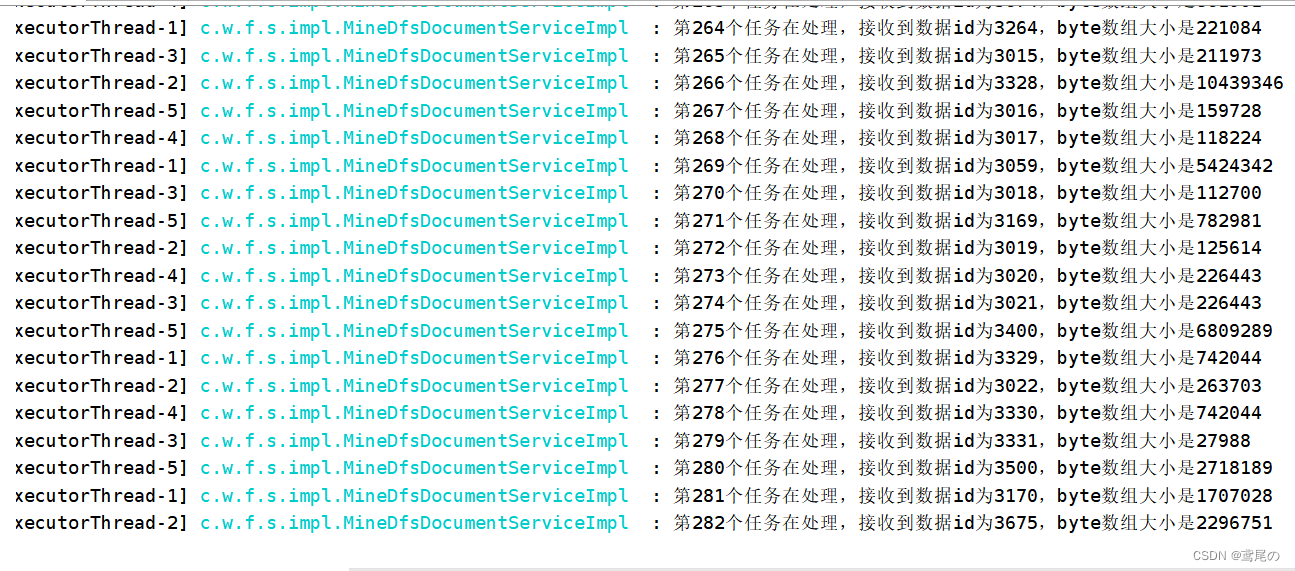
顺利将文件路径存储到数据库中

随便访问一个看看。

没问题。正常访问到。
虽然能正常完成了,但是几千个文件上传下载用了大概30多分钟,这还是在本地测试的,如果线上很可能出现别的问题(带宽,jvm内存、磁盘内存等)。而且时间太久了,感觉线程池的配置还是不太合理,如果有大佬懂线程池的,希望不吝赐教,多谢!
最后再提供个上传其他类型文件的例子
接口
@RequestMapping(value = "/inputFile", method = RequestMethod.POST) public JsonResult inputFile(HttpServletRequest request, DfsDocumentEntity entity) throws Exception { // 此种方式,前端直接表单方式提交即可,名称是 upload 的文件 Part part = request.getPart("upload"); if (part == null) { return JsonResult.failure("文件找不到!"); } this.service.inputFile(entity, part); return JsonResult.success(entity.getEntityGuid()); }- 1
- 2
- 3
- 4
- 5
- 6
- 7
- 8
- 9
- 10
实现
@Override public void inputFile(DfsDocumentEntity entity, Part part) { try { FastFile file = new FastFile(part.getInputStream(), part.getSize(), FileUtil.getFileLastName(part.getSubmittedFileName()), new HashSet<>()); // 上传文件,返回 StorePath StorePath storePath = this.client.uploadFile(file); // 设置要存入库的一些属性 entity.setEntityTitle(URLDecoder.decode(part.getSubmittedFileName(), "UTF-8")); entity.setCreateTime(new Date()); entity.setEntityGuid(StringHelper.generateGUID()); entity.setFileType(part.getContentType()); entity.setDocType(part.getContentType()); entity.setVolume(storePath.getGroup()); entity.setPath(storePath.getPath()); entity.setFullPath(storePath.getFullPath()); entity.setSize(String.valueOf(part.getSize())); this.save(entity); } catch (IOException e) { } }- 1
- 2
- 3
- 4
- 5
- 6
- 7
- 8
- 9
- 10
- 11
- 12
- 13
- 14
- 15
- 16
- 17
- 18
- 19
- 20
- 21
- 22
-
相关阅读:
TextChanged
计算机中的数据存储规则
『手撕Vue-CLI』编码规范检查
加权平均、EMD、小波等方法去噪效果对比
添加滚动彩色提醒通知公告代码
java 8 stream API
JSON和全局异常处理
SpringMVC整合Shiro与filterChainDefinitions过滤器配置
(Java)程序逻辑控制
微服务从代码到k8s部署应有尽有系列(十四、部署环境搭建)
- 原文地址:https://blog.csdn.net/weixin_45248492/article/details/126123897


