-
Java开发全终端实战租房项目-阿里云OSS
阿里云OSS存储
阿里云对象存储OSS(Object Storage Service)是一款海量、安全、低成本、高可靠的云存储服务,提供99.9999999999%(12个9)的数据持久性,99.995%的数据可用性。多种存储类型供选择,全面优化存储成本
购买服务


一般我们的使用购买最低的流量以及存储,就可以了,以目前的价格来看,是需要55元人民币
开始使用OSS
创建Bucket
使用OSS,首先需要创建Bucket,Bucket翻译成中文是水桶的意思,把存储的图片资源看做是水,想要盛水必须得有桶,就是这个意思了。
进入控制台 https://oss.console.aliyun.com/overview


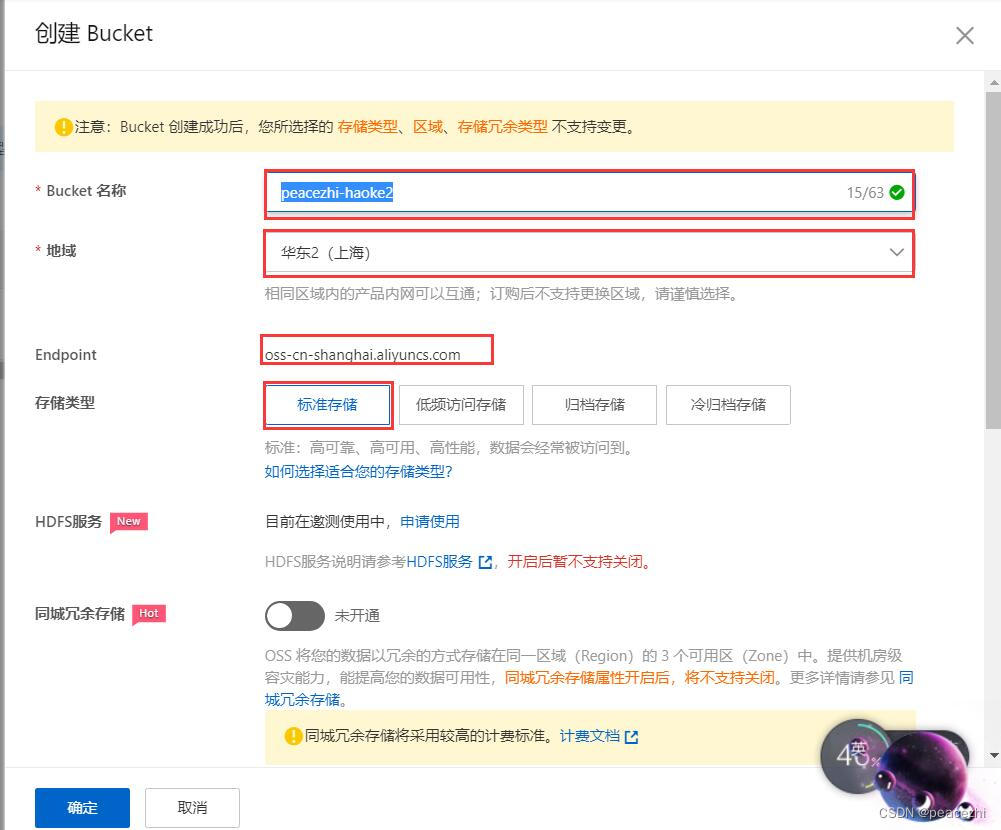
创建完成后,在左侧可以看到已经创建好的Bucket:


管理文件,可以通过在线的方式进行管理文件:

实现图片上传
在itcast-haoke-manage-api-server中实现图片上传功能,以供其他服务使用
导入依赖<dependency> <groupId>com.aliyun.ossgroupId> <artifactId>aliyun-sdk-ossartifactId> <version>2.8.3version> dependency> <dependency> <groupId>org.projectlombokgroupId> <artifactId>lombokartifactId> <version>1.18.4version> dependency> <dependency> <groupId>joda-timegroupId> <artifactId>joda-timeartifactId> <version>2.9.9version> dependency>- 1
- 2
- 3
- 4
- 5
- 6
- 7
- 8
- 9
- 10
- 11
- 12
- 13
- 14
- 15
编写aliyun.properties配置文件


aliyun.endpoint = http://oss-cn-shanghai.aliyuncs.com aliyun.accessKeyId = LTAI4G5ZGJ1UzMphvkF5gspv aliyun.accessKeySecret = k9yYvKyNT0aEdgUiLgt0t7CfvpbuCn aliyun.bucketName=peacezhi-haoke2 aliyun.urlPrefix=http://peacezhi-haoke2.oss-cn-shanghai.aliyuncs.com/- 1
- 2
- 3
- 4
- 5
编写AliyunConfig
package cn.itcast.haoke.dubbo.api.config; import com.aliyun.oss.OSSClient; import lombok.Data; import org.springframework.boot.context.properties.ConfigurationProperties; import org.springframework.context.annotation.Bean; import org.springframework.context.annotation.Configuration; import org.springframework.context.annotation.PropertySource; @Configuration @PropertySource("classpath:aliyun.properties") @ConfigurationProperties(prefix = "aliyun") @Data public class AliyunConfig { private String endpoint; private String accessKeyId; private String accessKeySecret; private String bucketName; private String urlPrefix; @Bean public OSSClient oSSClient() { return new OSSClient(endpoint, accessKeyId, accessKeySecret); } }- 1
- 2
- 3
- 4
- 5
- 6
- 7
- 8
- 9
- 10
- 11
- 12
- 13
- 14
- 15
- 16
- 17
- 18
- 19
- 20
- 21
- 22
- 23
- 24
- 25
- 26
- 27
- 28
编写PicUploadResult,该类用于返回给前端的数据结构定义。
package cn.itcast.haoke.dubbo.api.vo; import lombok.Data; @Data public class PicUploadResult { // 文件唯一标识 private String uid; // 文件名 private String name; // 状态有:uploading done error removed private String status; // 服务端响应内容,如:'{"status": "success"}' private String response; }- 1
- 2
- 3
- 4
- 5
- 6
- 7
- 8
- 9
- 10
- 11
- 12
- 13
- 14
- 15
- 16
- 17
- 18
编写PicUploadService,具体的上传逻辑实现,在该类中调用了OSS客户端的API。
package cn.itcast.haoke.dubbo.api.service; import cn.itcast.haoke.dubbo.api.config.AliyunConfig; import cn.itcast.haoke.dubbo.api.vo.PicUploadResult; import com.aliyun.oss.OSSClient; import org.apache.commons.lang3.RandomUtils; import org.apache.commons.lang3.StringUtils; import org.joda.time.DateTime; import org.springframework.beans.factory.annotation.Autowired; import org.springframework.stereotype.Service; import org.springframework.web.multipart.MultipartFile; import java.io.ByteArrayInputStream; @Service public class PicUploadService { // 允许上传的格式 private static final String[] IMAGE_TYPE = new String[]{".bmp", ".jpg", ".jpeg", ".gif", ".png"}; @Autowired private OSSClient ossClient; @Autowired private AliyunConfig aliyunConfig; public PicUploadResult upload(MultipartFile uploadFile) { PicUploadResult fileUploadResult = new PicUploadResult(); //图片做校验,对后缀名 boolean isLegal = false; for (String type : IMAGE_TYPE) { if (StringUtils.endsWithIgnoreCase(uploadFile.getOriginalFilename(), type)) { isLegal = true; break; } } if (!isLegal) { fileUploadResult.setStatus("error"); return fileUploadResult; } // 文件新路径 String fileName = uploadFile.getOriginalFilename(); String filePath = getFilePath(fileName); // 上传到阿里云 try { // 目录结构:images/2018/12/29/xxxx.jpg ossClient.putObject(aliyunConfig.getBucketName(), filePath, new ByteArrayInputStream(uploadFile.getBytes())); } catch (Exception e) { e.printStackTrace(); //上传失败 fileUploadResult.setStatus("error"); return fileUploadResult; } // 上传成功 fileUploadResult.setStatus("done"); fileUploadResult.setName(this.aliyunConfig.getUrlPrefix() + filePath); fileUploadResult.setUid(String.valueOf(System.currentTimeMillis())); return fileUploadResult; } private String getFilePath(String sourceFileName) { DateTime dateTime = new DateTime(); return "images/" + dateTime.toString("yyyy") + "/" + dateTime.toString("MM") + "/" + dateTime.toString("dd") + "/" + System.currentTimeMillis() + RandomUtils.nextInt(100, 9999) + "." + StringUtils.substringAfterLast(sourceFileName, "."); } }- 1
- 2
- 3
- 4
- 5
- 6
- 7
- 8
- 9
- 10
- 11
- 12
- 13
- 14
- 15
- 16
- 17
- 18
- 19
- 20
- 21
- 22
- 23
- 24
- 25
- 26
- 27
- 28
- 29
- 30
- 31
- 32
- 33
- 34
- 35
- 36
- 37
- 38
- 39
- 40
- 41
- 42
- 43
- 44
- 45
- 46
- 47
- 48
- 49
- 50
- 51
- 52
- 53
- 54
- 55
- 56
- 57
- 58
- 59
- 60
- 61
- 62
- 63
- 64
- 65
- 66
- 67
- 68
- 69
- 70
- 71
- 72
- 73
- 74
- 75
- 76
- 77
- 78
- 79
- 80
- 81
- 82
编写PicUploadController
package cn.itcast.haoke.dubbo.api.controller; import cn.itcast.haoke.dubbo.api.service.PicUploadFileSystemService; import cn.itcast.haoke.dubbo.api.service.PicUploadService; import cn.itcast.haoke.dubbo.api.vo.PicUploadResult; import org.springframework.beans.factory.annotation.Autowired; import org.springframework.stereotype.Controller; import org.springframework.web.bind.annotation.PostMapping; import org.springframework.web.bind.annotation.RequestMapping; import org.springframework.web.bind.annotation.RequestParam; import org.springframework.web.bind.annotation.ResponseBody; import org.springframework.web.multipart.MultipartFile; @RequestMapping("pic/upload") @Controller public class PicUploadController { @Autowired private PicUploadService picUploadService; // @Autowired // private PicUploadFileSystemService picUploadService; @PostMapping @ResponseBody public PicUploadResult upload(@RequestParam("file") MultipartFile multipartFile) { return this.picUploadService.upload(multipartFile); } }- 1
- 2
- 3
- 4
- 5
- 6
- 7
- 8
- 9
- 10
- 11
- 12
- 13
- 14
- 15
- 16
- 17
- 18
- 19
- 20
- 21
- 22
- 23
- 24
- 25
- 26
- 27
- 28
- 29
- 30

测试http://localhost:18080/pic/upload


添加水印
OSS提供了在线添加水印功能,下面我们来体验下该功能:


可以看到水印已经添加到图片中了本地文件系统存储
编写PicUploadFileSystemService
package cn.itcast.haoke.dubbo.api.service; import cn.itcast.haoke.dubbo.api.vo.PicUploadResult; import org.apache.commons.lang3.RandomUtils; import org.apache.commons.lang3.StringUtils; import org.joda.time.DateTime; import org.springframework.stereotype.Service; import org.springframework.web.multipart.MultipartFile; import java.io.File; import java.io.IOException; import java.util.Date; @Service public class PicUploadFileSystemService { // 允许上传的格式 private static final String[] IMAGE_TYPE = new String[]{".bmp", ".jpg", ".jpeg", ".gif", ".png"}; public PicUploadResult upload(MultipartFile uploadFile) { // 校验图片格式 boolean isLegal = false; for (String type : IMAGE_TYPE) { if (StringUtils.endsWithIgnoreCase(uploadFile.getOriginalFilename(), type)) { isLegal = true; break; } } PicUploadResult fileUploadResult = new PicUploadResult(); if (!isLegal) { fileUploadResult.setStatus("error"); return fileUploadResult; } String fileName = uploadFile.getOriginalFilename(); String filePath = getFilePath(fileName); // 生成图片的绝对引用地址 String picUrl = StringUtils.replace(StringUtils.substringAfter(filePath, "F:\\code\\itcast-haoke\\haoke-upload"), "\\", "/"); fileUploadResult.setName("http://image.haoke.com" + picUrl); File newFile = new File(filePath); // 写文件到磁盘 try { uploadFile.transferTo(newFile); } catch (IOException e) { e.printStackTrace(); //上传失败 fileUploadResult.setStatus("error"); return fileUploadResult; } fileUploadResult.setStatus("done"); fileUploadResult.setUid(String.valueOf(System.currentTimeMillis())); return fileUploadResult; } private String getFilePath(String sourceFileName) { String baseFolder = "F:\\code\\itcast-haoke\\haoke-upload" + File.separator + "images"; Date nowDate = new Date(); // yyyy/MM/dd String fileFolder = baseFolder + File.separator + new DateTime(nowDate).toString("yyyy") + File.separator + new DateTime(nowDate).toString("MM") + File.separator + new DateTime(nowDate).toString("dd"); File file = new File(fileFolder); if (!file.isDirectory()) { // 如果目录不存在,则创建目录 file.mkdirs(); } // 生成新的文件名 String fileName = new DateTime(nowDate).toString("yyyyMMddhhmmssSSSS") + RandomUtils.nextInt(100, 9999) + "." + StringUtils.substringAfterLast(sourceFileName, "."); return fileFolder + File.separator + fileName; } }- 1
- 2
- 3
- 4
- 5
- 6
- 7
- 8
- 9
- 10
- 11
- 12
- 13
- 14
- 15
- 16
- 17
- 18
- 19
- 20
- 21
- 22
- 23
- 24
- 25
- 26
- 27
- 28
- 29
- 30
- 31
- 32
- 33
- 34
- 35
- 36
- 37
- 38
- 39
- 40
- 41
- 42
- 43
- 44
- 45
- 46
- 47
- 48
- 49
- 50
- 51
- 52
- 53
- 54
- 55
- 56
- 57
- 58
- 59
- 60
- 61
- 62
- 63
- 64
- 65
- 66
- 67
- 68
- 69
- 70
- 71
- 72
- 73
- 74
- 75
- 76
- 77
- 78
- 79
- 80
- 81
- 82
修改Controller中的引用
package cn.itcast.haoke.dubbo.api.controller; import cn.itcast.haoke.dubbo.api.service.PicUploadFileSystemService; import cn.itcast.haoke.dubbo.api.service.PicUploadService; import cn.itcast.haoke.dubbo.api.vo.PicUploadResult; import org.springframework.beans.factory.annotation.Autowired; import org.springframework.stereotype.Controller; import org.springframework.web.bind.annotation.PostMapping; import org.springframework.web.bind.annotation.RequestMapping; import org.springframework.web.bind.annotation.RequestParam; import org.springframework.web.bind.annotation.ResponseBody; import org.springframework.web.multipart.MultipartFile; @RequestMapping("pic/upload") @Controller public class PicUploadController { // @Autowired // private PicUploadService picUploadService; @Autowired private PicUploadFileSystemService picUploadService; @PostMapping @ResponseBody public PicUploadResult upload(@RequestParam("file") MultipartFile multipartFile) { return this.picUploadService.upload(multipartFile); } }- 1
- 2
- 3
- 4
- 5
- 6
- 7
- 8
- 9
- 10
- 11
- 12
- 13
- 14
- 15
- 16
- 17
- 18
- 19
- 20
- 21
- 22
- 23
- 24
- 25
- 26
- 27
- 28
- 29
- 30

测试http://localhost:18080/pic/upload

图片位置http://image.haoke.com/images/2022/08/01/2022080112165665801002.jpg
图片主机位置F:\code\itcast-haoke\haoke-upload\images\2022\08\01

搭建nginx进行访问图片
将资料中的nginx-1.5.1.zip进行解压,修改配置文件nginx.conf,启动nginx.exe。
server { listen 8341; server_name image.haoke.com; #charset koi8-r; #access_log logs/host.access.log main; proxy_set_header X-Forwarded-Host $host; proxy_set_header X-Forwarded-Server $host; proxy_set_header X-Forwarded-For $proxy_add_x_forwarded_for; location / { root F:\code\itcast-haoke\haoke-upload; } }- 1
- 2
- 3
- 4
- 5
- 6
- 7
- 8
- 9
- 10
- 11
- 12
- 13
- 14
- 15
- 16
- 17
修改host文件

# heima 127.0.0.1 manage.haoke.com 127.0.0.1 image.haoke.com- 1
- 2
- 3
访问http://image.haoke.com:8341/images/2022/08/01/2022080112165665801002.jpg
(端口号80被IIS服务器占用,所用改为8341)

整合前端进行图片上传
修改PicturesWall.js
<Upload action="/haoke/pic/upload" listType="picture-card" fileList={fileList} onPreview={this.handlePreview} onChange={this.handleChange} >- 1
- 2
- 3
- 4
- 5
- 6
- 7
修改AddResource.js
handleFileList = (obj)=>{ let pics = new Set(); obj.forEach((v, k) => { if(v.response){ pics.add(v.response.name); } });- 1
- 2
- 3
- 4
- 5
- 6
- 7
// 处理图片 values.pic = [...this.state.pics].join(',');- 1
- 2
测试


房源列表服务
前面我们实现了新增房源服务,接下来,我们来实现房源列表服务。
定义dubbo服务
itcast-haoke-manage-dubbo-server-house-resources-dubbo-interface工程:
package cn.itcast.haoke.dubbo.server.api; import cn.itcast.haoke.dubbo.server.pojo.HouseResources; import cn.itcast.haoke.dubbo.server.vo.PageInfo; public interface ApiHouseResourcesService { /** * 新增房源 * * @param houseResources * @return -1:输入的参数不符合要求,0:数据插入数据库失败,1:成功 */ int saveHouseResources(HouseResources houseResources); /** * 分页查询房源列表 * * @param page 当前页 * @param pageSize 页面大小 * @param queryCondition 查询条件 * @return */ PageInfo<HouseResources> queryHouseResourcesList(int page, int pageSize, HouseResources queryCondition); }- 1
- 2
- 3
- 4
- 5
- 6
- 7
- 8
- 9
- 10
- 11
- 12
- 13
- 14
- 15
- 16
- 17
- 18
- 19
- 20
- 21
- 22
- 23
- 24
- 25
- 26
- 27
编写PageInfo对象
package cn.itcast.haoke.dubbo.server.vo; import lombok.AllArgsConstructor; import lombok.Data; import java.util.Collections; import java.util.List; @Data @AllArgsConstructor public class PageInfo<T> implements java.io.Serializable { private static final long serialVersionUID = -2105385689859184204L; /** * 总条数 */ private Integer total; /** * 当前页 */ private Integer pageNum; /** * 一页显示的大小 */ private Integer pageSize; /** * 数据列表 */ private List<T> records = Collections.emptyList(); }- 1
- 2
- 3
- 4
- 5
- 6
- 7
- 8
- 9
- 10
- 11
- 12
- 13
- 14
- 15
- 16
- 17
- 18
- 19
- 20
- 21
- 22
- 23
- 24
- 25
- 26
- 27
- 28
- 29
- 30
- 31
- 32
- 33
- 34
- 35
- 36
实现dubbo服务
在itcast-haoke-manage-dubbo-server-house-resources-dubbo-service中:
package cn.itcast.haoke.dubbo.server.api; import cn.itcast.haoke.dubbo.server.pojo.HouseResources; import cn.itcast.haoke.dubbo.server.service.HouseResourcesService; import cn.itcast.haoke.dubbo.server.vo.PageInfo; import com.alibaba.dubbo.config.annotation.Service; import org.springframework.beans.factory.annotation.Autowired; @Service(version = "1.0.0") public class ApiHouseResourcesServiceImpl implements ApiHouseResourcesService { @Autowired private HouseResourcesService houseResourcesService; @Override public int saveHouseResources(HouseResources houseResources) { return this.houseResourcesService.saveHouseResources(houseResources); } @Override public PageInfo<HouseResources> queryHouseResourcesList(int page, int pageSize, HouseResources queryCondition) { return this.houseResourcesService.queryHouseResourcesList(page, pageSize, queryCondition); } }- 1
- 2
- 3
- 4
- 5
- 6
- 7
- 8
- 9
- 10
- 11
- 12
- 13
- 14
- 15
- 16
- 17
- 18
- 19
- 20
- 21
- 22
- 23
- 24
- 25
- 26
编写具体实现:
package cn.itcast.haoke.dubbo.server.service.impl; import cn.itcast.haoke.dubbo.server.pojo.HouseResources; import cn.itcast.haoke.dubbo.server.service.HouseResourcesService; import cn.itcast.haoke.dubbo.server.vo.PageInfo; import com.baomidou.mybatisplus.core.conditions.query.QueryWrapper; import com.baomidou.mybatisplus.core.metadata.IPage; import org.apache.commons.lang3.StringUtils; import org.springframework.stereotype.Service; import org.springframework.transaction.annotation.Transactional; @Transactional @Service public class HouseResourcesServiceImpl extends BaseServiceImpl implements HouseResourcesService { /** * @param houseResources * @return -1:输入的参数不符合要求,0:数据插入数据库失败,1:成功 */ @Override public int saveHouseResources(HouseResources houseResources) { // 添加校验或者是其他的一些逻辑 if (StringUtils.isBlank(houseResources.getTitle())) { // 不符合要求 return -1; } return super.save(houseResources); } @Override public PageInfo<HouseResources> queryHouseResourcesList(int page, int pageSize, HouseResources queryCondition) { QueryWrapper queryWrapper = new QueryWrapper(); // 根据数据的更新时间做倒序排序 queryWrapper.orderByDesc("updated"); IPage iPage = super.queryPageList(queryWrapper, page, pageSize); return new PageInfo<HouseResources>(Long.valueOf(iPage.getTotal()).intValue(), page, pageSize, iPage.getRecords()); } }- 1
- 2
- 3
- 4
- 5
- 6
- 7
- 8
- 9
- 10
- 11
- 12
- 13
- 14
- 15
- 16
- 17
- 18
- 19
- 20
- 21
- 22
- 23
- 24
- 25
- 26
- 27
- 28
- 29
- 30
- 31
- 32
- 33
- 34
- 35
- 36
- 37
- 38
- 39
- 40
- 41
- 42
- 43
- 44
- 45
- 46
在BaseService中新增queryPageList方法:
/** * 根据条件分页查询数据列表 * * @param queryWrapper * @param page * @param rows * @return */ public IPage<T> queryPageList(QueryWrapper<T> queryWrapper, Integer page, Integer rows) { // 获取分页数据 return this.mapper.selectPage(new Page<T>(page, rows), queryWrapper); }- 1
- 2
- 3
- 4
- 5
- 6
- 7
- 8
- 9
- 10
- 11
- 12
- 13
实现RESTful接口
在itcast-haoke-manage-api-server工程中:
编写Controller/** * 查询房源列表 * * @param houseResources * @param currentPage * @param pageSize * @return */ @GetMapping @ResponseBody public ResponseEntity<TableResult> list(HouseResources houseResources, @RequestParam(name = "currentPage", defaultValue = "1") Integer currentPage, @RequestParam(name = "pageSize", defaultValue = "10") Integer pageSize) { return ResponseEntity.ok(this.houseResourcesService.queryList(houseResources, currentPage, pageSize));- 1
- 2
- 3
- 4
- 5
- 6
- 7
- 8
- 9
- 10
- 11
- 12
- 13
- 14
- 15
- 16
- 17
编写TableResult
package cn.itcast.haoke.dubbo.api.vo; import lombok.*; import java.util.List; @Data @AllArgsConstructor public class TableResult<T> { private List<T> list; private Pagination pagination; }- 1
- 2
- 3
- 4
- 5
- 6
- 7
- 8
- 9
- 10
- 11
- 12
- 13
- 14
package cn.itcast.haoke.dubbo.api.vo; import lombok.AllArgsConstructor; import lombok.Data; @Data @AllArgsConstructor public class Pagination { private Integer current; private Integer pageSize; private Integer total; }- 1
- 2
- 3
- 4
- 5
- 6
- 7
- 8
- 9
- 10
- 11
- 12
- 13
- 14
package cn.itcast.haoke.dubbo.api.vo; import lombok.AllArgsConstructor; import lombok.Data; @Data @AllArgsConstructor public class Pagination { private Integer current; private Integer pageSize; private Integer total; }- 1
- 2
- 3
- 4
- 5
- 6
- 7
- 8
- 9
- 10
- 11
- 12
- 13
- 14
Service实现
public TableResult<HouseResources> queryList(HouseResources houseResources, Integer currentPage, Integer pageSize) { PageInfo<HouseResources> pageInfo = this.apiHouseResourcesService. queryHouseResourcesList(currentPage, pageSize, houseResources); return new TableResult<>(pageInfo.getRecords(), new Pagination(currentPage, pageSize, pageInfo.getTotal())); }- 1
- 2
- 3
- 4
- 5
整合前端进行开发
修改请求数据地址
import request from '@/utils/request'; import { stringify } from 'qs'; export async function queryResource(params) { return request(`/haoke/house/resources?${stringify(params)}`); }- 1
- 2
- 3
- 4
- 5
- 6
- 7
修改字段结构
columns = [ { title: '房源编号', dataIndex: 'id', }, { title: '房源信息', dataIndex: 'title', }, { title: '图', dataIndex: 'pic', render : (text, record, index) => { return <ShowPics pics={text}/> } }, { title: '楼栋', render : (text, record, index) => { return record.buildingFloorNum + "栋"+record.buildingNum+"单元"+record.buildingUnit+"号" } }, { title: '支付方式', render : (text, record, index) => { return payType.get(record.paymentMethod) } }, { title: '户型', dataIndex: 'houseType' }, { title: '面积', dataIndex: 'useArea', render : (text, record, index) => { return text+"平方" } }, { title: '楼层', dataIndex: 'floor' }, { title: '操作', render: (text, record) => ( <Fragment> <a onClick={() => this.handleUpdateModalVisible(true, record)}>查看</a> <Divider type="vertical" /> <a href="">删除</a> </Fragment> ), }, ];- 1
- 2
- 3
- 4
- 5
- 6
- 7
- 8
- 9
- 10
- 11
- 12
- 13
- 14
- 15
- 16
- 17
- 18
- 19
- 20
- 21
- 22
- 23
- 24
- 25
- 26
- 27
- 28
- 29
- 30
- 31
- 32
- 33
- 34
- 35
- 36
- 37
- 38
- 39
- 40
- 41
- 42
- 43
- 44
- 45
- 46
- 47
- 48
- 49
- 50
- 51
- 52
- 53
- 54
- 55
- 56
- 57
图片显示效果(使用Antd的走马灯效果)

ShowPics.js的实现
import React from 'react'; import { Modal, Button, Carousel } from 'antd'; class ShowPics extends React.Component{ info = () => { Modal.info({ title: '', iconType:'false', width: '800px', okText: "ok", content: ( <div style={{width:650, height: 400, lineHeight:400, textAlign:"center"}}> <Carousel autoplay={true}> { this.props.pics.split(',').map((value,index) => { return <div><img style={{ maxWidth:600 ,maxHeight:400, margin:"0 auto" }} src={value}/></div> }) } </Carousel> </div> ), onOk() {}, }); }; constructor(props){ super(props); this.state={ btnDisabled: this.props.pics? false: true } } render() { return ( <div> <Button disabled={this.state.btnDisabled} icon="picture" shape="circle" onClick={()=>{this.info()}} /> </div> ) } } export default ShowPics;- 1
- 2
- 3
- 4
- 5
- 6
- 7
- 8
- 9
- 10
- 11
- 12
- 13
- 14
- 15
- 16
- 17
- 18
- 19
- 20
- 21
- 22
- 23
- 24
- 25
- 26
- 27
- 28
- 29
- 30
- 31
- 32
- 33
- 34
- 35
- 36
- 37
- 38
- 39
- 40
- 41
- 42
- 43
- 44
- 45
- 46
- 47

源代码
前端项目
链接:https://pan.baidu.com/s/1GyKdHr1wlcRIvbn43MVETA?pwd=dt7x
提取码:dt7x
–来自百度网盘超级会员V3的分享后端项目
链接:https://pan.baidu.com/s/1zrzYZHM8vYcMChptkU5Z1A?pwd=7lc6
提取码:7lc6
–来自百度网盘超级会员V3的分享 -
相关阅读:
消息队列系列5 - RabbitMQ安装与测试 (荣耀典藏版)
十四、使用 Vue Router 开发单页应用(1)
python爬虫之多线程threading、多进程multiprocessing、协程aiohttp 批量下载图片
大数据组件-Flink环境搭建
ELF header
IDEA 关闭SpringBoot启动Logo/图标
《机器人SLAM导航核心技术与实战》第1季:第2章_C++编程范式
人人开源搭建后台管理系统 & 逆向工程生成CRUD代码
探索原味BFF模式
【数据结构篇】堆
- 原文地址:https://blog.csdn.net/peacezhi/article/details/126096450
