• Serverless实战——2分钟,教你用Serverless每天给女朋友自动发土味情话


    原文链接:https://developer.aliyun.com/article/981268

    演示视频:https://developer.aliyun.com/live/249772

    一、Serverless简介

    Serverless,中文意思是“无服务器”,所谓的无服务器并非是说不需要依靠服务器等资源,而是说开发者再也不用过多考虑服务器的问题,可以更专注在产品代码上,同时计算资源也开始作为服务出现,而不是作为服务器的概念出现。

    1.Serverless架构

    主要包含两部分:Baas和Faas,通常位于云端,使用时不需要关注最底层的服务器。
    Baas(后端即服务:Backend as a Service)包括对象存储、云数据库、API网关、消息推送等。
    Faas(函数即服务:Functions as a Service)对计算能力进行了抽象,可以在无需管理服务器的情况下响应事件。

    2.Serverless三大应用场景

    场景一:事件触发场景,即有事件触发时才会执行。
    场景二:流量突发场景,遇到突发大流量情况时,Serverless架构下按需加载,弹性伸缩,节省资源,负载均衡。
    场景三:大数据处理场景,用户只需要上传核心代码到函数计算,就可以快速完成整个工作。

    3.Serverless的优势

    传统架构下,面对大流量场景,需要增加机器或者对机器升级,运维较为困难。面对高峰和低谷,无法做到按需使用,成本较高。
    Serverless架构下,开发者只需专注代码开发,无需在各个云资源控制台手动开通服务和配置管理,并能够根据业务请求自动进行弹性伸缩;支持用户按需付费,成本较低;开发周期快,很大程度上提升了开发、部署的效率。
    具体可以查看阿里云相关文档 https://developer.aliyun.com/group/serverless

    二、Python实现发送邮件

    import requests
    import yagmail   # 此模块用于发邮件
    import schedule  # 此模块用于计划任务
    from bs4 import BeautifulSoup
    import re
    
    ran = 0
    url = 'https://tianqi.2345.com/cixian1d/70177.htm'  # 定义天气预报的url
    loveurl = 'https://www.guaze.com/juzi/23389.html'  # 定义情话的url
    def email():
        global ran      # 将ran变量声明为全局变量
        web = requests.get(url)
        # print(web.text)
    
        page = BeautifulSoup(web.text,"html.parser")
    
        # print(ran)
    
        # print(love[ran])
    
        weather = page.find("div",class_="real-today")
        # print(weather.text)
    
        web2 = requests.get(loveurl)
        web2.encoding = 'gb2312'
        page = BeautifulSoup(web2.text, "html.parser")
    
        div = page.find('div', class_="content")
    
        div = str(div.text)
        # print(div)
        grep = re.compile(r"\d+、(.*)")
        content = grep.findall(div)
        # print(content)
    
    
    # email函数内的内容是爬取天气和情话的,具体的地址天气你可以更换url
    
        yag = yagmail.SMTP(
            host='smtp.qq.com', user='xxxxxxx@qq.com',   # 如过用的是qq邮箱就写smtp.qq.com,如果是163就写smtp.163.com
            password='xhaztrwpjffpbdhh', smtp_ssl=True       # 授权码在qq邮箱里开启smtp就会生成一个
        )
        weather = [weather.text,"每日情话:",content[ran],    # 定义发送内容
                   yagmail.inline(r"/.love.jpg")    # 附件图片,不发图片可以删掉
                   ]
        yag.send(
            to=['xxxxxxxxx@qq.com'],
            subject='早鸭',           # 邮件主题
            contents=weather          # 发送的内容为上面定义的weather,其中weather.text是天气预报,content[ran]是情话
        )
        print("发送完成")
        ran += 1
    
    schedule.every().day.at("05:21").do(email)      # 每天5点20分执行函数email0
    #schedule.every(10).seconds.do(email)  #每10秒执行一下函数email的内容,我这里用于测试
    while True:
        schedule.run_pending()
    
    • 1
    • 2
    • 3
    • 4
    • 5
    • 6
    • 7
    • 8
    • 9
    • 10
    • 11
    • 12
    • 13
    • 14
    • 15
    • 16
    • 17
    • 18
    • 19
    • 20
    • 21
    • 22
    • 23
    • 24
    • 25
    • 26
    • 27
    • 28
    • 29
    • 30
    • 31
    • 32
    • 33
    • 34
    • 35
    • 36
    • 37
    • 38
    • 39
    • 40
    • 41
    • 42
    • 43
    • 44
    • 45
    • 46
    • 47
    • 48
    • 49
    • 50
    • 51
    • 52
    • 53
    • 54
    • 55
    • 56
    • 57

    三、部署到阿里云Serverless,实现自动发送

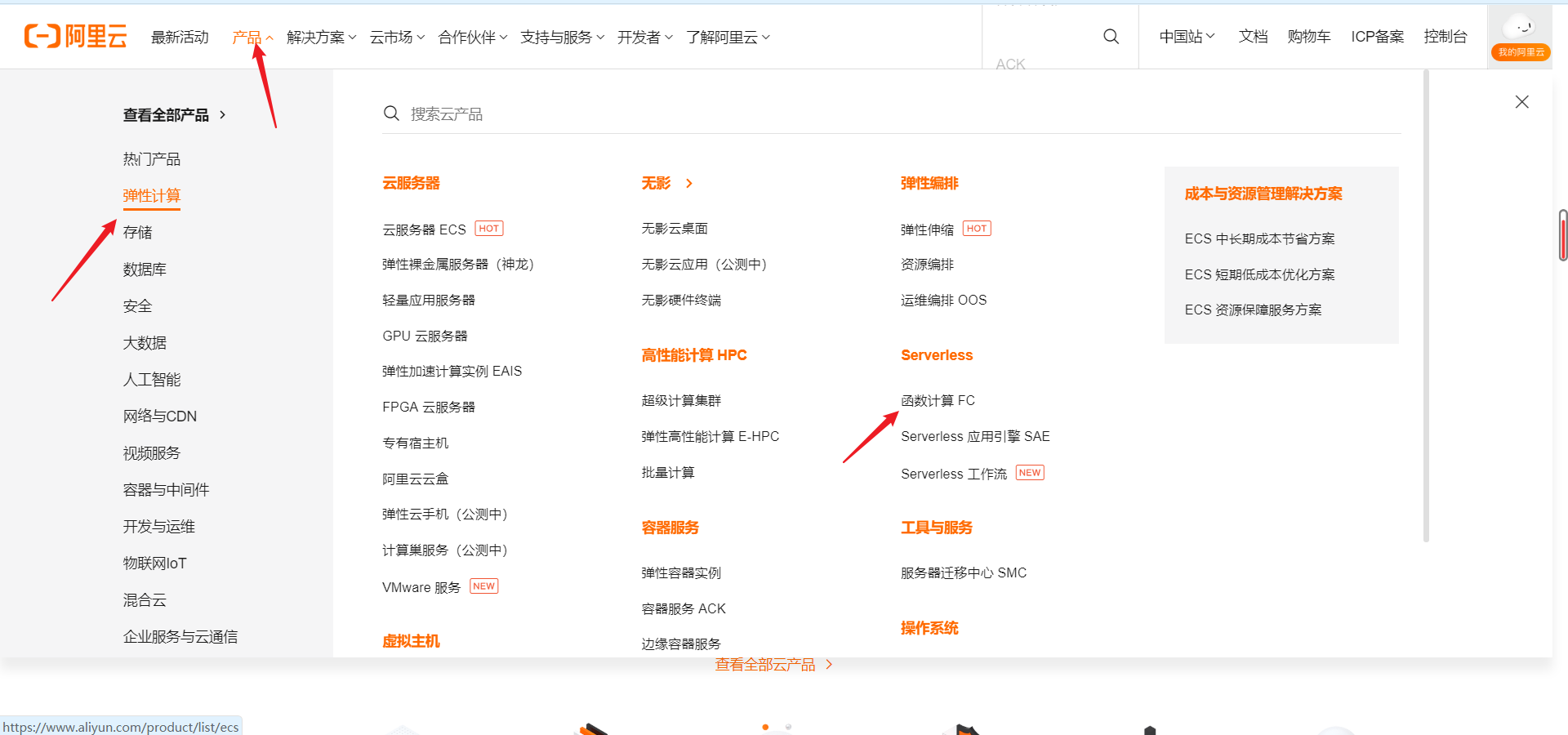
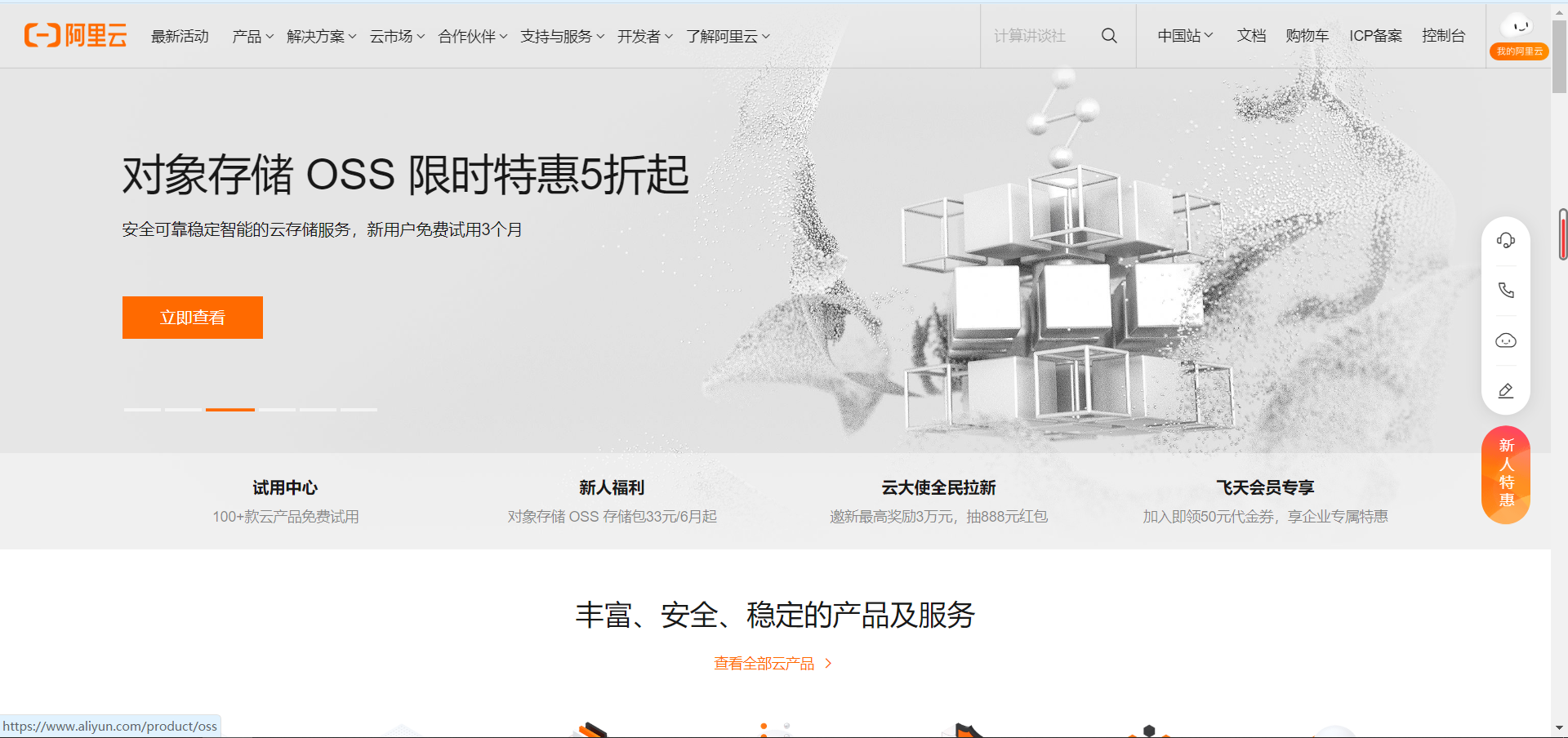
    1.登录到阿里云首页
    ![image-20220701202818857.png](https://img-blog.csdnimg.cn/img_convert/6902a7ed22b37d10db7c5c97c42af7c9.png#clientId=u706577ae-5c82-4&crop=0&crop=0&crop=1&crop=1&height=904&id=WNinE&margin=[object Object]&name=image-20220701202818857.png&originHeight=904&originWidth=1920&originalType=binary&ratio=1&rotation=0&showTitle=false&status=done&style=none&taskId=u78b49507-7db7-4cee-8266-eaf3ba2aea7&title=&width=1920)

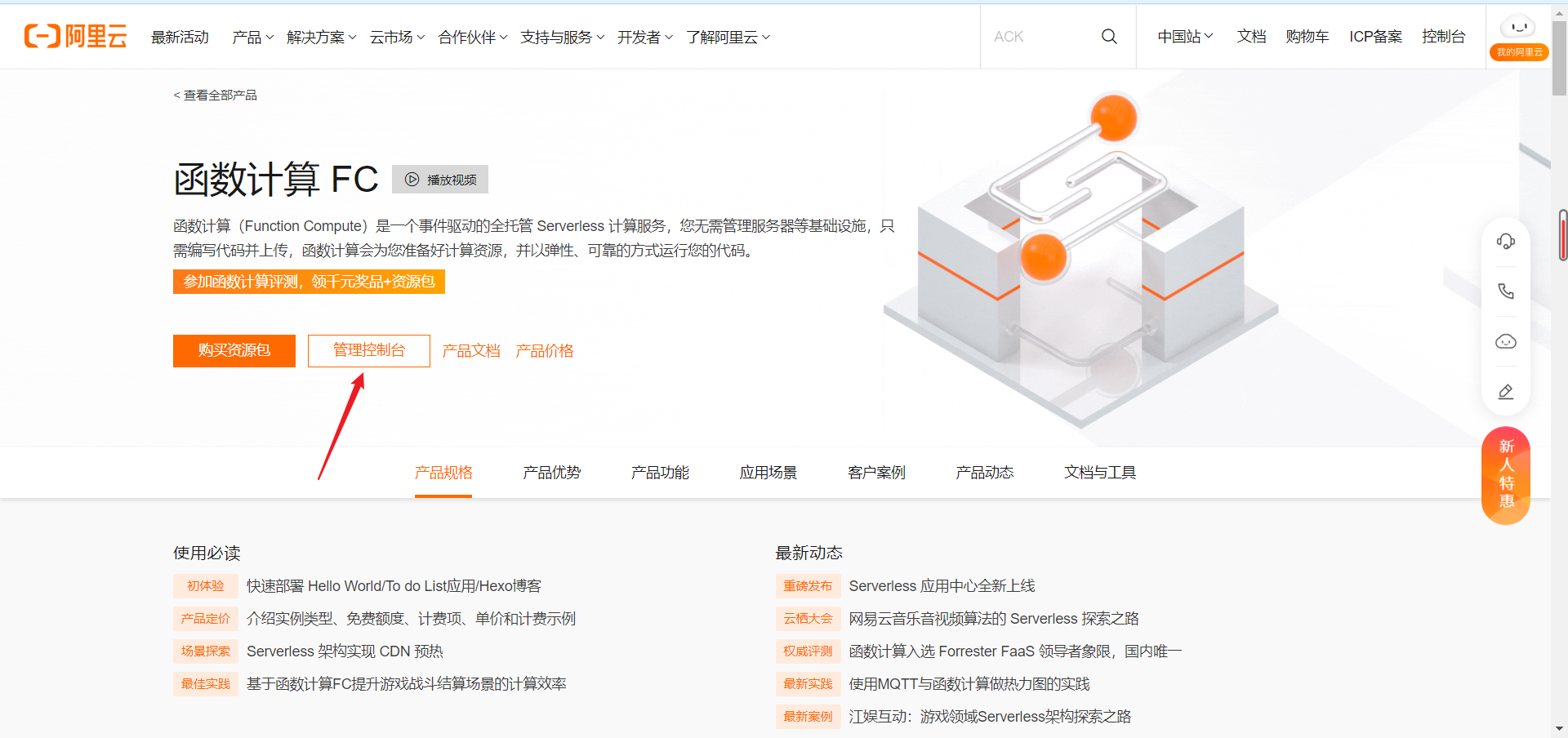
    2.选择产品->弹性计算->Serverless->函数计算FC

    ![image-20220701202913872.png](https://img-blog.csdnimg.cn/img_convert/2ce9614bd855403a47f1c7d63ae14050.png#clientId=u706577ae-5c82-4&crop=0&crop=0&crop=1&crop=1&height=900&id=z4vPH&margin=[object Object]&name=image-20220701202913872.png&originHeight=900&originWidth=1920&originalType=binary&ratio=1&rotation=0&showTitle=false&status=done&style=none&taskId=u5b4f5a5f-eca7-4534-8196-ae8f23fb84b&title=&width=1920)

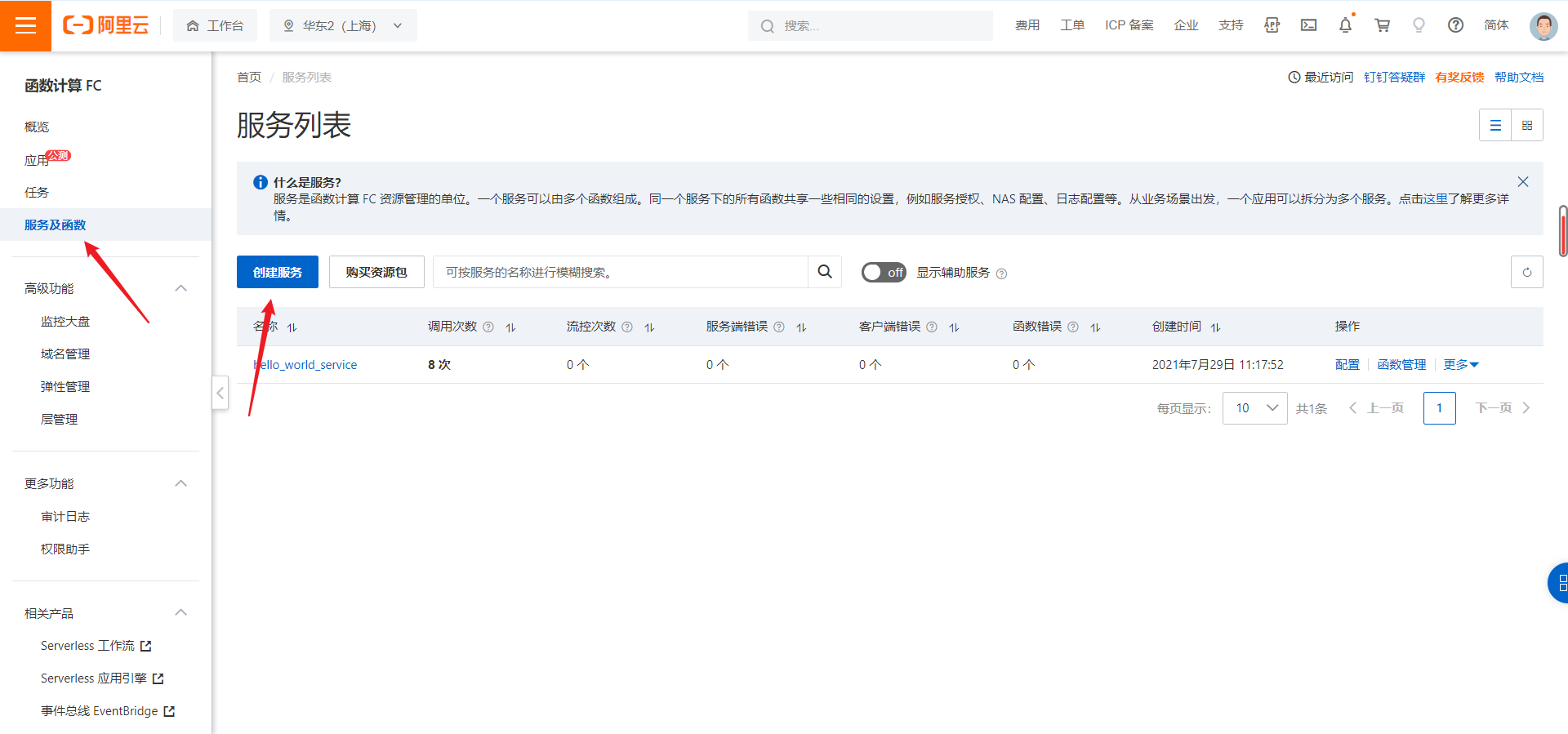
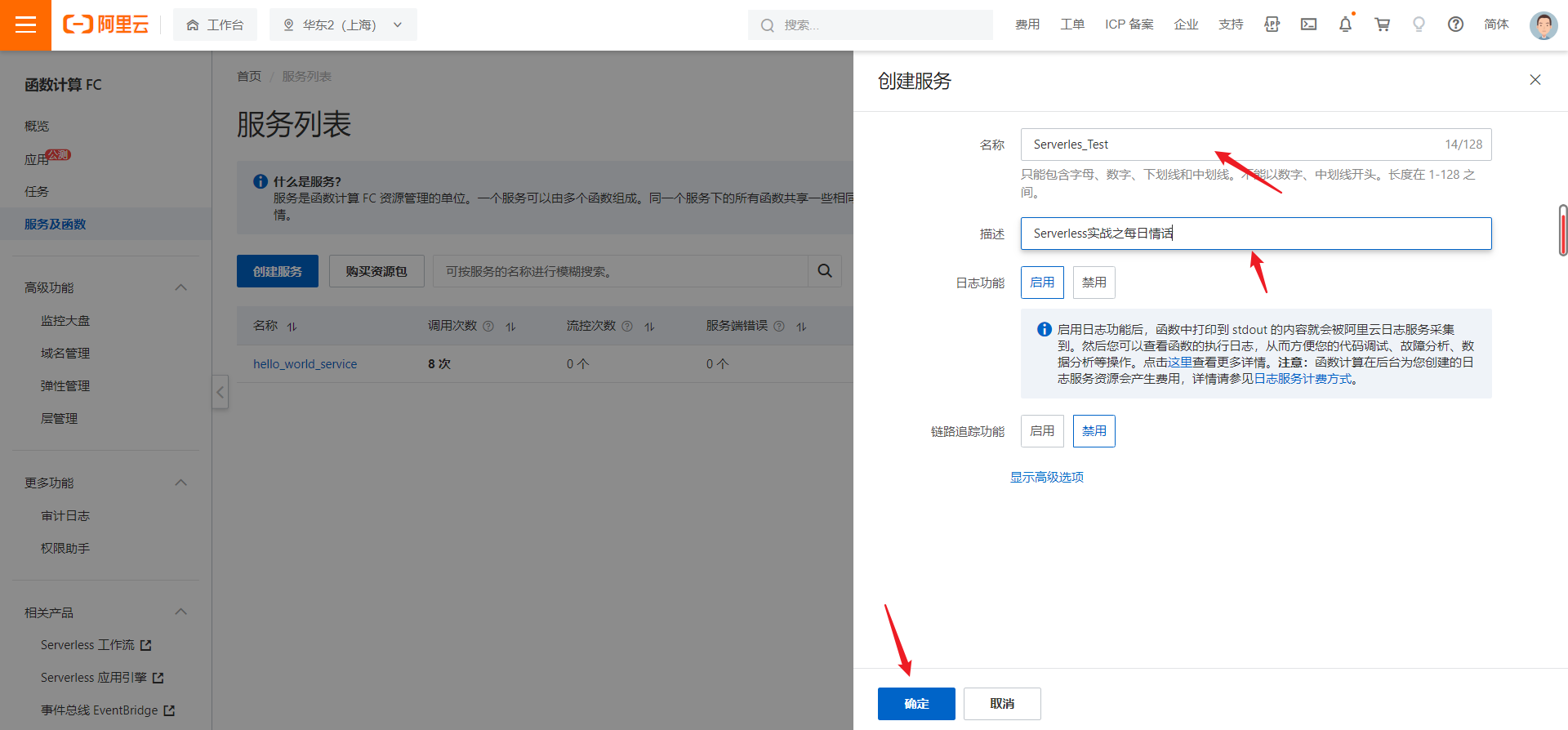
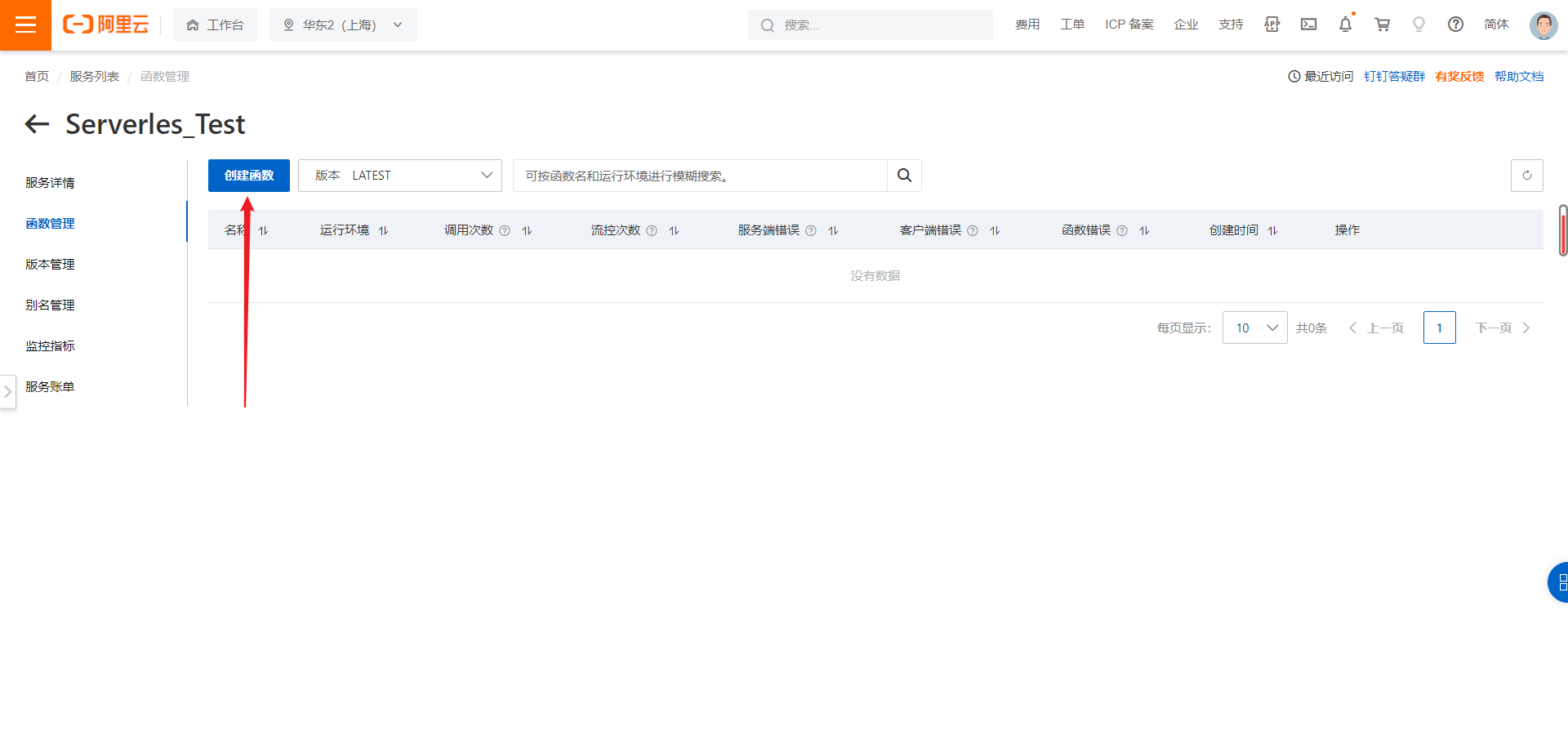
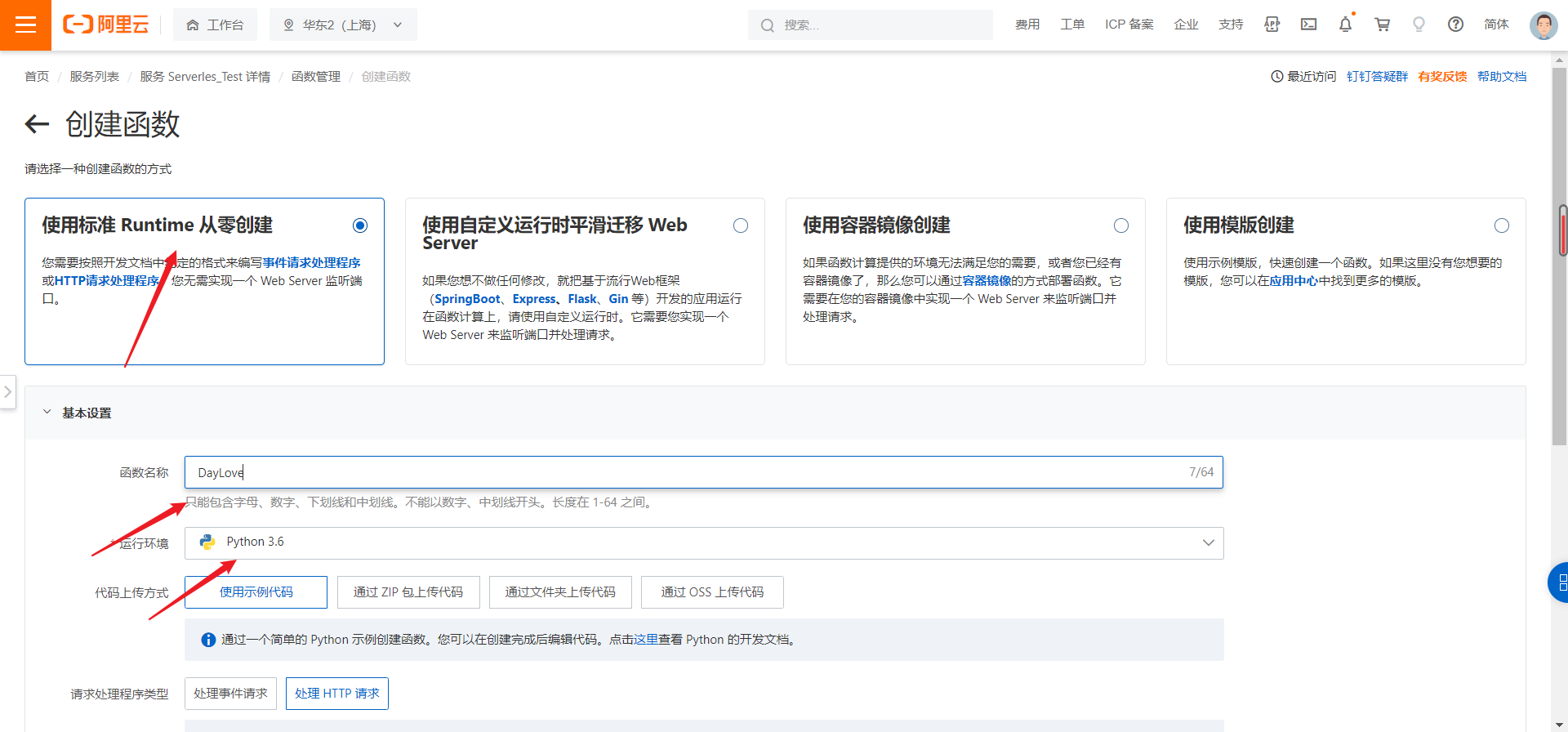
    3.进入控制台->服务及函数->创建函数

    ![image-20220701203133969.png](https://img-blog.csdnimg.cn/img_convert/9ec1b068b62fe8d0c9dc68bd51a94549.png#clientId=u706577ae-5c82-4&crop=0&crop=0&crop=1&crop=1&height=904&id=TnSDe&margin=[object Object]&name=image-20220701203133969.png&originHeight=904&originWidth=1920&originalType=binary&ratio=1&rotation=0&showTitle=false&status=done&style=none&taskId=u51189b29-5869-4aa5-beed-3b117127102&title=&width=1920)
    ![image-20220701203309597.png](https://img-blog.csdnimg.cn/img_convert/2dded52e47e25d7408a855bf43ca33af.png#clientId=u706577ae-5c82-4&crop=0&crop=0&crop=1&crop=1&height=899&id=yKmQe&margin=[object Object]&name=image-20220701203309597.png&originHeight=899&originWidth=1920&originalType=binary&ratio=1&rotation=0&showTitle=false&status=done&style=none&taskId=ue931424d-91f4-4df8-9585-1b73bb1c543&title=&width=1920)
    ![image-20220701203504468.png](https://img-blog.csdnimg.cn/img_convert/7b3c03fd0c3d88ebf6b4e4decf550c49.png#clientId=u706577ae-5c82-4&crop=0&crop=0&crop=1&crop=1&height=894&id=ANMVs&margin=[object Object]&name=image-20220701203504468.png&originHeight=894&originWidth=1920&originalType=binary&ratio=1&rotation=0&showTitle=false&status=done&style=none&taskId=ua371a1c1-342d-4da6-a92a-8ea6c6ffc12&title=&width=1920)
    ![image-20220701203546979.png](https://img-blog.csdnimg.cn/img_convert/c596135d05121788eaf906ecb74c7eed.png#clientId=u706577ae-5c82-4&crop=0&crop=0&crop=1&crop=1&height=895&id=n3lrZ&margin=[object Object]&name=image-20220701203546979.png&originHeight=895&originWidth=1920&originalType=binary&ratio=1&rotation=0&showTitle=false&status=done&style=none&taskId=u01d01b12-88b5-4465-a76b-6f23def1e56&title=&width=1920)
    ![image-20220701203657754.png](https://img-blog.csdnimg.cn/img_convert/e8975327d6bc988da399182005ecfe67.png#clientId=u706577ae-5c82-4&crop=0&crop=0&crop=1&crop=1&height=896&id=kGydG&margin=[object Object]&name=image-20220701203657754.png&originHeight=896&originWidth=1920&originalType=binary&ratio=1&rotation=0&showTitle=false&status=done&style=none&taskId=ub888bd3f-88eb-4ac0-a976-4abbf19382f&title=&width=1920)

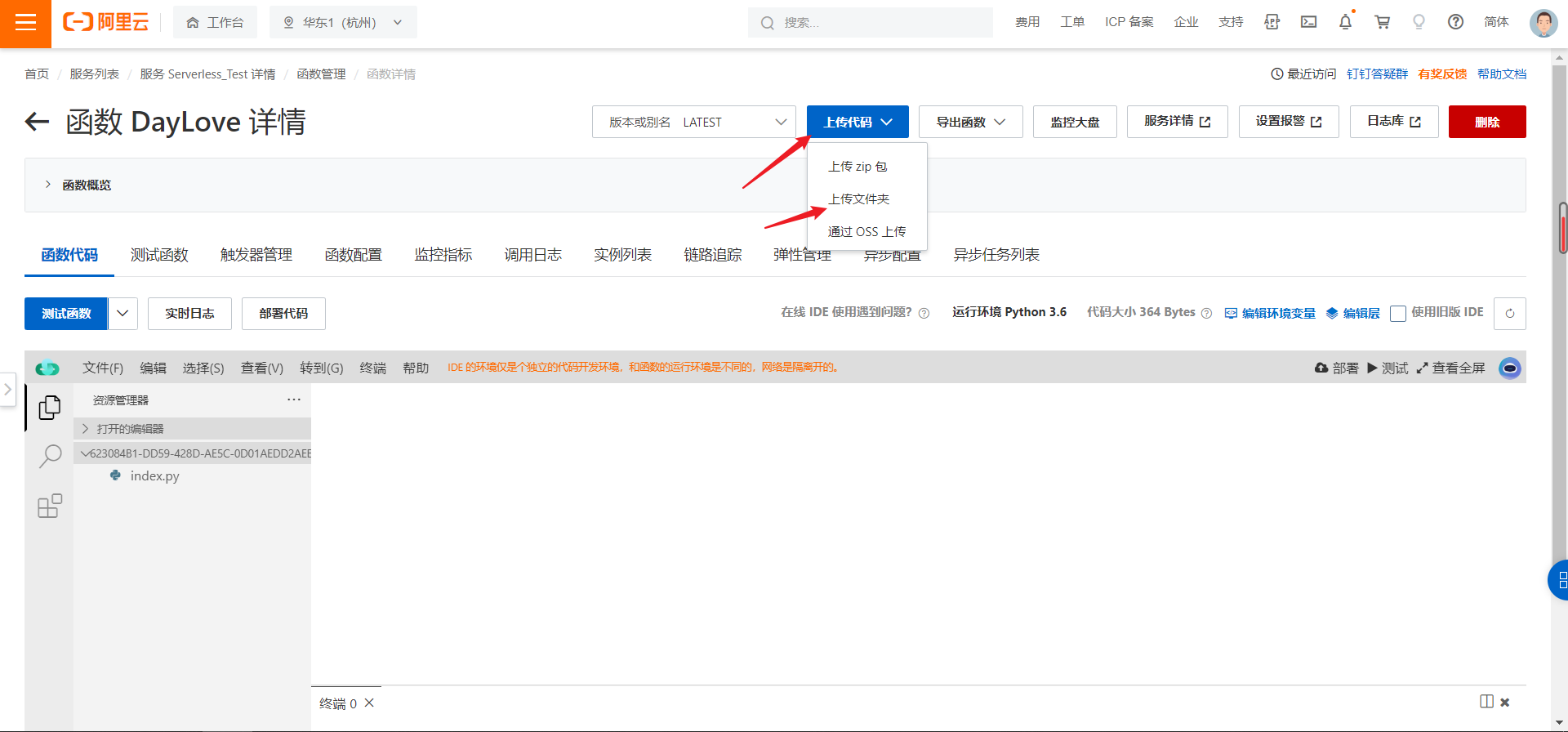
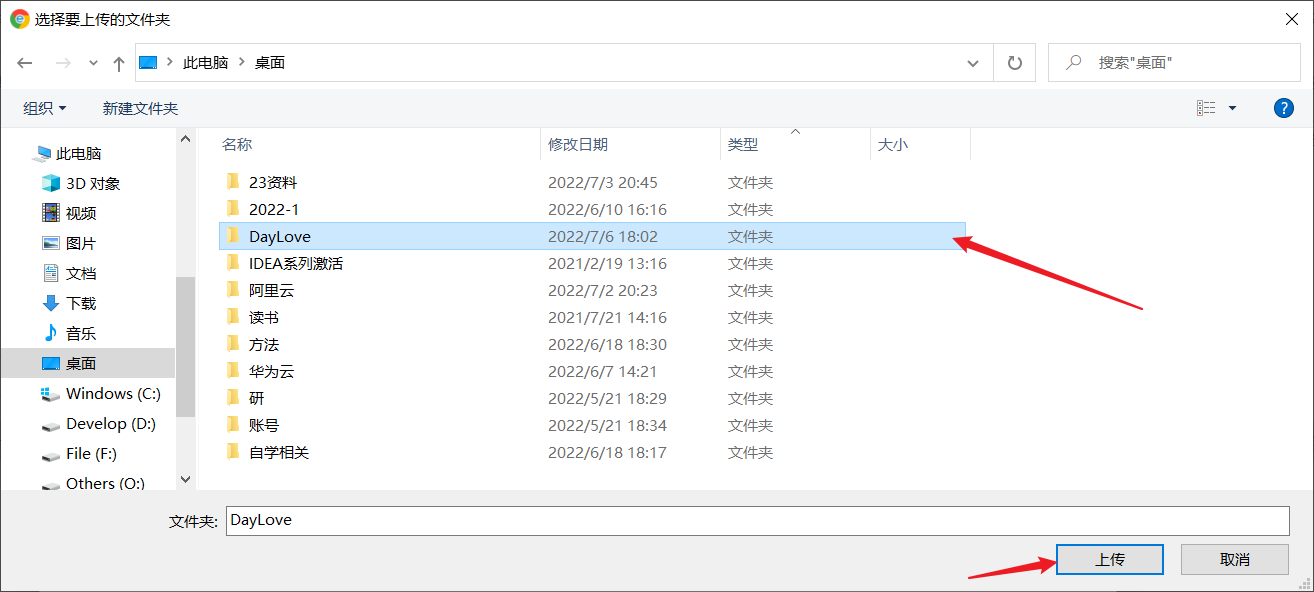
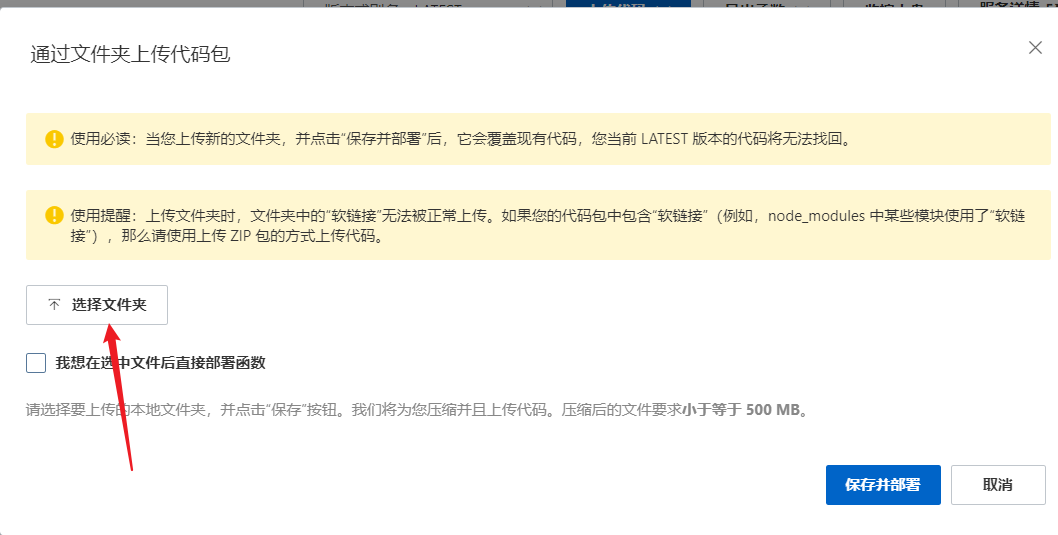
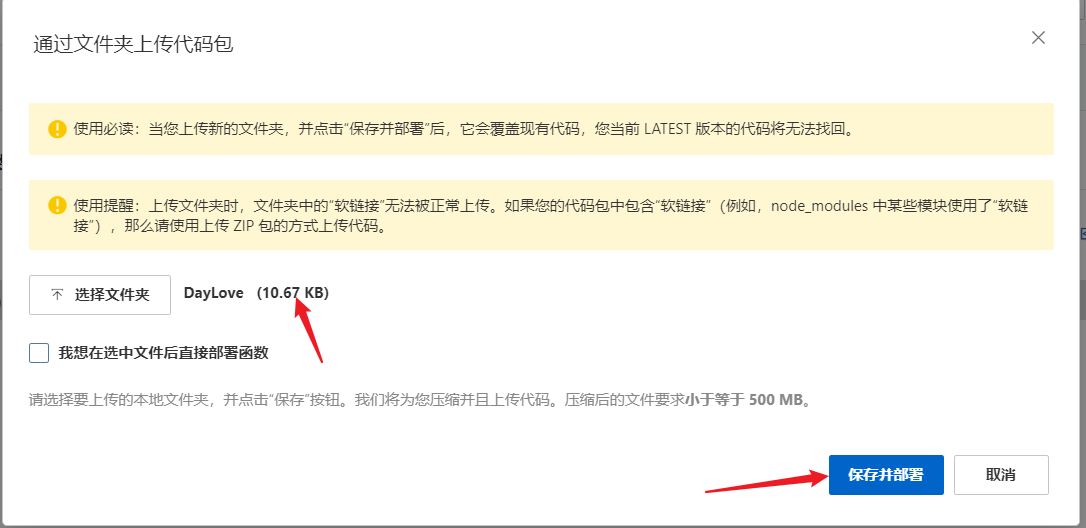
    4.上传代码->上传文件夹->选择文件夹->保存并部署

    ![image-20220706181040181.png](https://img-blog.csdnimg.cn/img_convert/94df13e5eeaa6fb13c37cef0057e84b9.png#clientId=u706577ae-5c82-4&crop=0&crop=0&crop=1&crop=1&height=896&id=u1y9c&margin=[object Object]&name=image-20220706181040181.png&originHeight=896&originWidth=1920&originalType=binary&ratio=1&rotation=0&showTitle=false&status=done&style=none&taskId=u9ec5b3f0-484d-4190-844a-7bcaa524c83&title=&width=1920)
    ![image-20220706181236172.png](https://img-blog.csdnimg.cn/img_convert/27b7977fd529d66333e5c566440f3199.png#clientId=u706577ae-5c82-4&crop=0&crop=0&crop=1&crop=1&height=535&id=oUvOJ&margin=[object Object]&name=image-20220706181236172.png&originHeight=535&originWidth=1058&originalType=binary&ratio=1&rotation=0&showTitle=false&status=done&style=none&taskId=u9465d190-59ff-4723-9cad-fe9f5f55414&title=&width=1058)![image-20220706181318098.png](https://img-blog.csdnimg.cn/img_convert/f6f778db62f48f864ad422aadd0972fd.png#clientId=u706577ae-5c82-4&crop=0&crop=0&crop=1&crop=1&height=592&id=oU5za&margin=[object Object]&name=image-20220706181318098.png&originHeight=592&originWidth=1314&originalType=binary&ratio=1&rotation=0&showTitle=false&status=done&style=none&taskId=u082170cb-1e32-4478-9268-f91bf026950&title=&width=1314)
    ![image-20220706181414524.png](https://img-blog.csdnimg.cn/img_convert/3a8f87c5c4727f8da6a102c0c8f58412.png#clientId=u706577ae-5c82-4&crop=0&crop=0&crop=1&crop=1&height=528&id=zvH19&margin=[object Object]&name=image-20220706181414524.png&originHeight=528&originWidth=1086&originalType=binary&ratio=1&rotation=0&showTitle=false&status=done&style=none&taskId=u7dba3d02-ab3b-40ea-8173-c27744d6086&title=&width=1086)

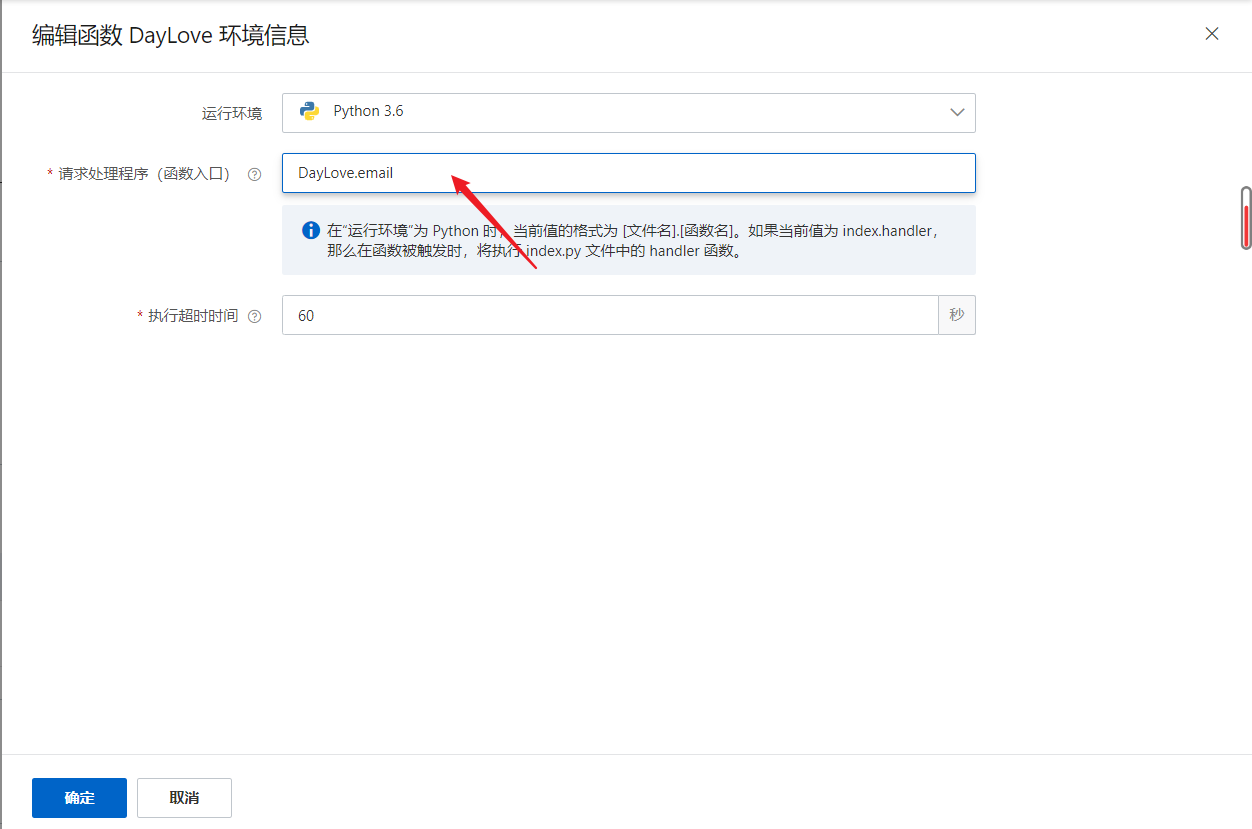
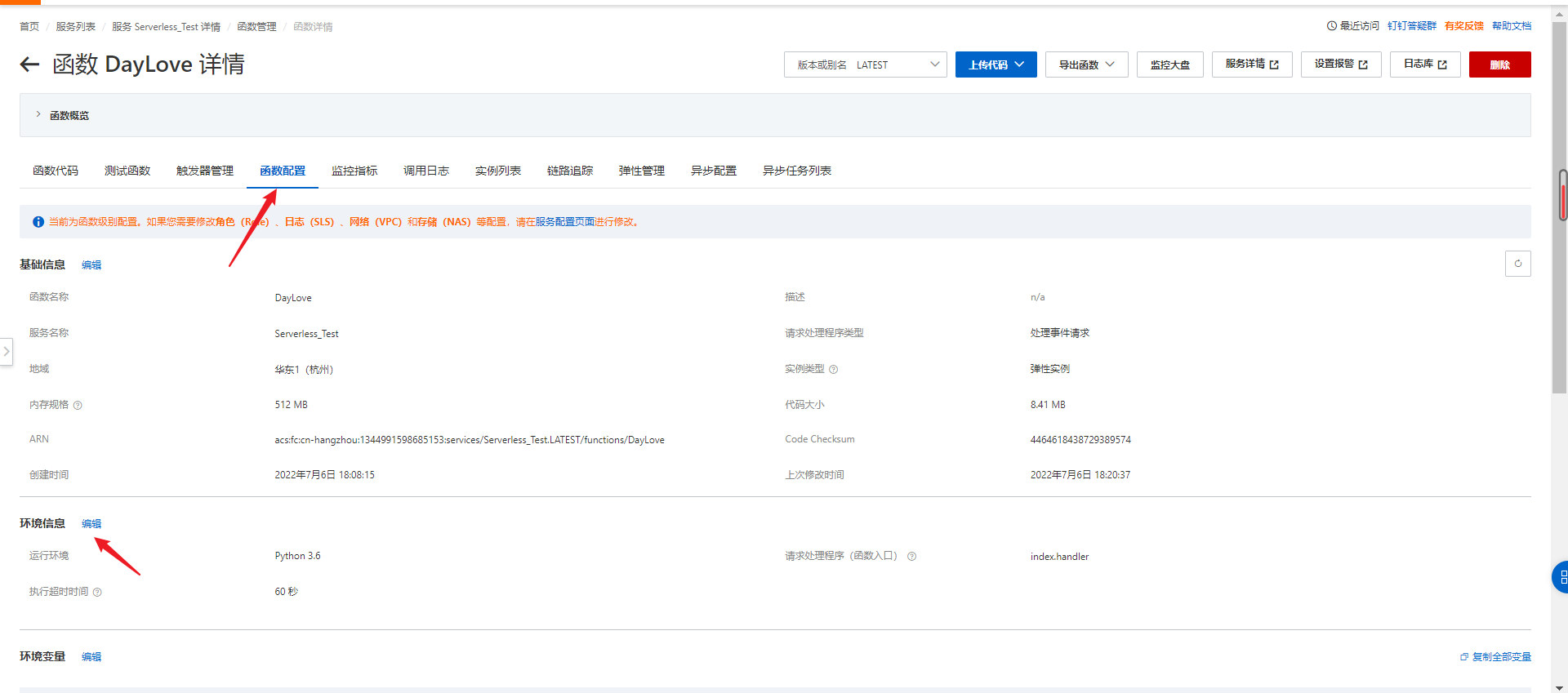
    5.函数配置->编辑环境信息->修改函数入口

    ![image-20220706182415671.png](https://img-blog.csdnimg.cn/img_convert/4b776b3f1c264f45ce3969430e072b33.png#clientId=u706577ae-5c82-4&crop=0&crop=0&crop=1&crop=1&height=849&id=JTG8o&margin=[object Object]&name=image-20220706182415671.png&originHeight=849&originWidth=1920&originalType=binary&ratio=1&rotation=0&showTitle=false&status=done&style=none&taskId=u5fc3436f-18ab-4e15-b4b6-8088ff83ec1&title=&width=1920)![image-20220706182534216.png](https://img-blog.csdnimg.cn/img_convert/e716e2f4bd054c4901cae5de191a7620.png#clientId=u706577ae-5c82-4&crop=0&crop=0&crop=1&crop=1&height=829&id=pxuIg&margin=[object Object]&name=image-20220706182534216.png&originHeight=829&originWidth=1252&originalType=binary&ratio=1&rotation=0&showTitle=false&status=done&style=none&taskId=uf05743de-e8f1-4b36-b95b-bf467a3cdd3&title=&width=1252)

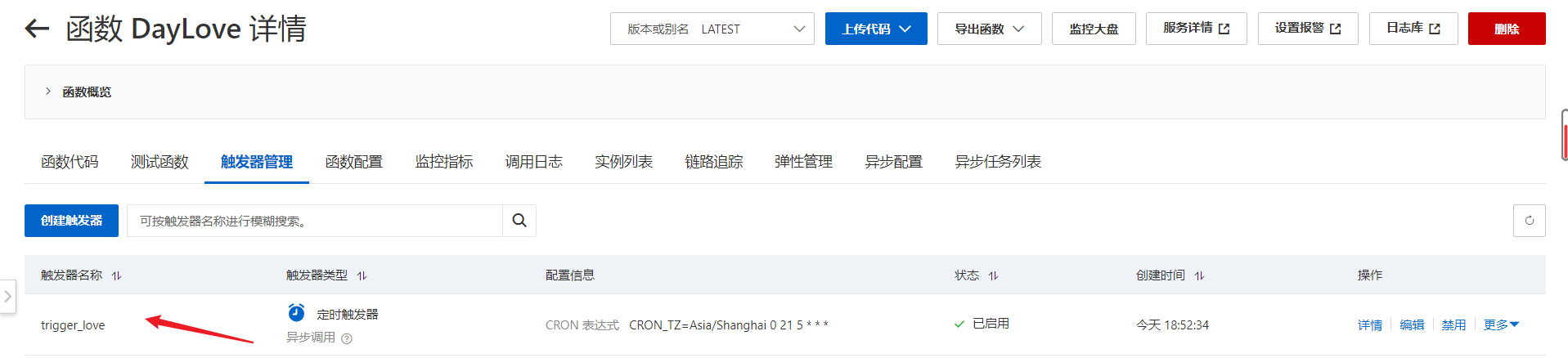
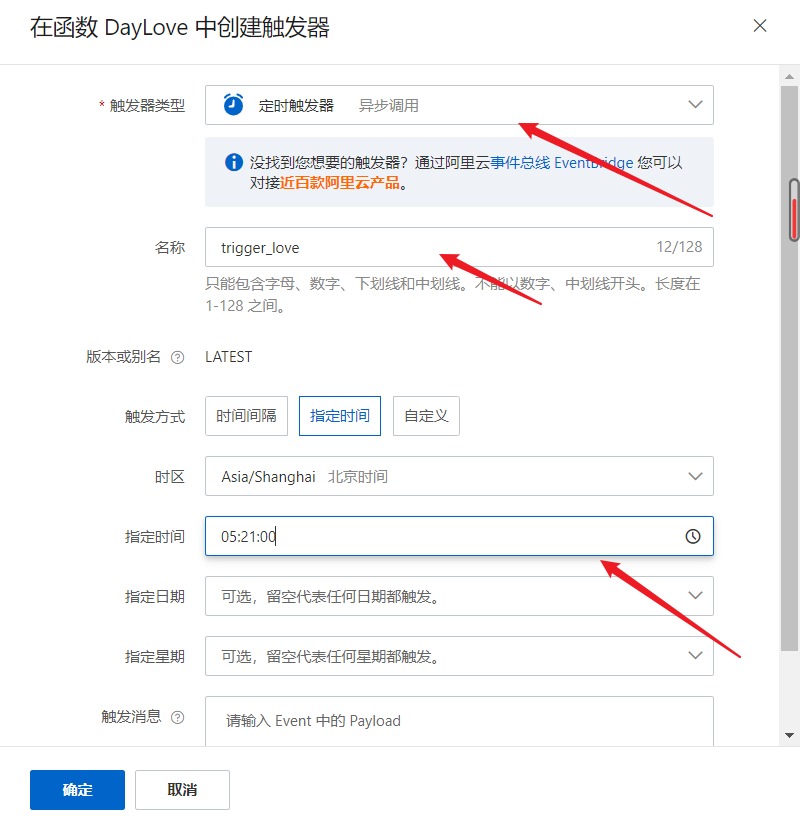
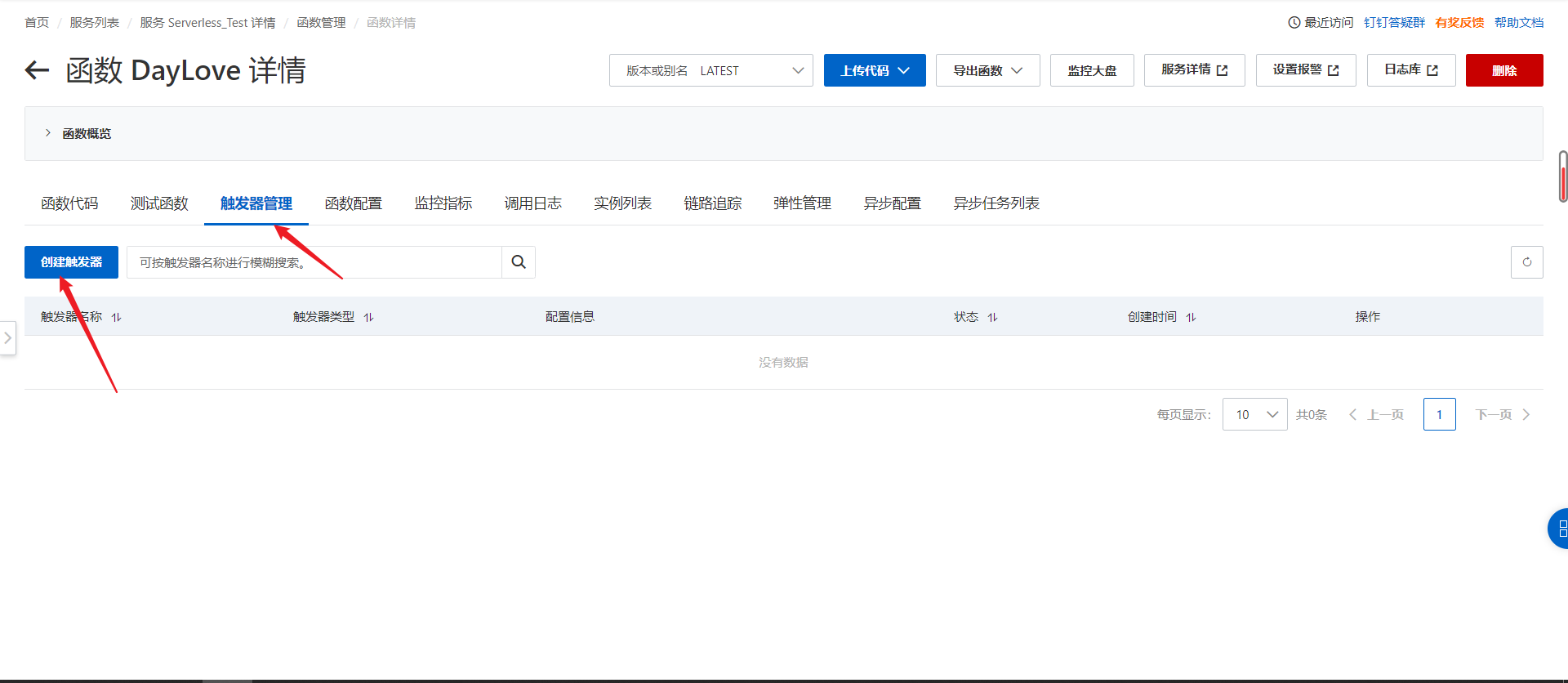
    6.添加触发器,实现每日定时发送

    触发器管理->创建触发器->定时触发器->填写名称和指定时间
    ![image-20220706184028003.png](https://img-blog.csdnimg.cn/img_convert/1aa9291f42aff13d70b904461a872c04.png#clientId=u706577ae-5c82-4&crop=0&crop=0&crop=1&crop=1&height=836&id=ltHok&margin=[object Object]&name=image-20220706184028003.png&originHeight=836&originWidth=1920&originalType=binary&ratio=1&rotation=0&showTitle=false&status=done&style=none&taskId=u00a812f3-6c61-48bf-992e-64b0989028c&title=&width=1920)![image-20220706183941738.png](https://img-blog.csdnimg.cn/img_convert/685ae1709c27ec1c33566a68dc75952b.png#clientId=u706577ae-5c82-4&crop=0&crop=0&crop=1&crop=1&height=824&id=KBT4V&margin=[object Object]&name=image-20220706183941738.png&originHeight=824&originWidth=800&originalType=binary&ratio=1&rotation=0&showTitle=false&status=done&style=none&taskId=u00093987-9bad-425c-b323-f4662417437&title=&width=800)
    ![image-20220706185307405.png](https://img-blog.csdnimg.cn/img_convert/9e518c17d5a2fa4d0f56d8f9ed901867.png#clientId=u706577ae-5c82-4&crop=0&crop=0&crop=1&crop=1&height=438&id=EvxHd&margin=[object Object]&name=image-20220706185307405.png&originHeight=438&originWidth=1917&originalType=binary&ratio=1&rotation=0&showTitle=false&status=done&style=none&taskId=u002e67ac-77ce-4107-9aa4-8ce7680093b&title=&width=1917)

    7.导入依赖并部署

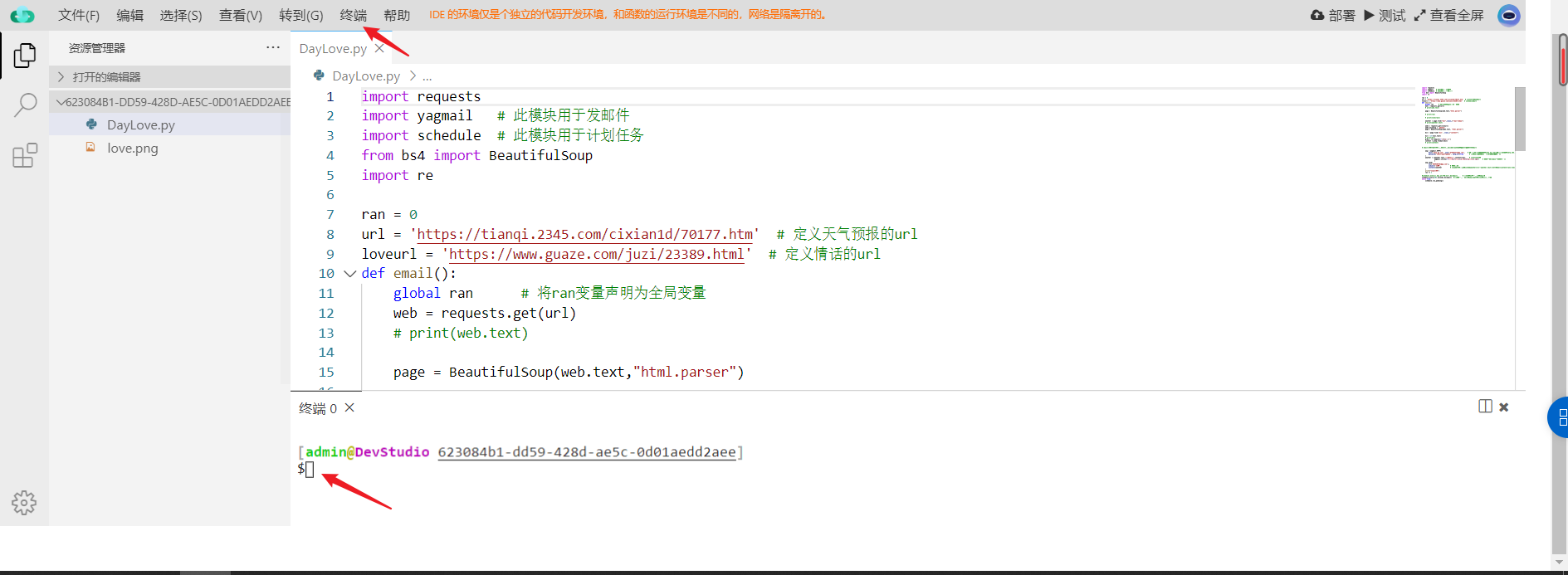
    先在终端执行以下三条命令,导入项目所需要的依赖

    pip3 install yagmail -t .
    pip3 install schedule -t .
    pip3 install bs4 -t .
    
    • 1
    • 2
    • 3

    ![image-20220706181742559.png](https://img-blog.csdnimg.cn/img_convert/59b147287edf7deb314df9444f08e0b9.png#clientId=u706577ae-5c82-4&crop=0&crop=0&crop=1&crop=1&height=693&id=myn9q&margin=[object Object]&name=image-20220706181742559.png&originHeight=693&originWidth=1889&originalType=binary&ratio=1&rotation=0&showTitle=false&status=done&style=none&taskId=u593970c6-4470-47aa-968f-296228b5f92&title=&width=1889)
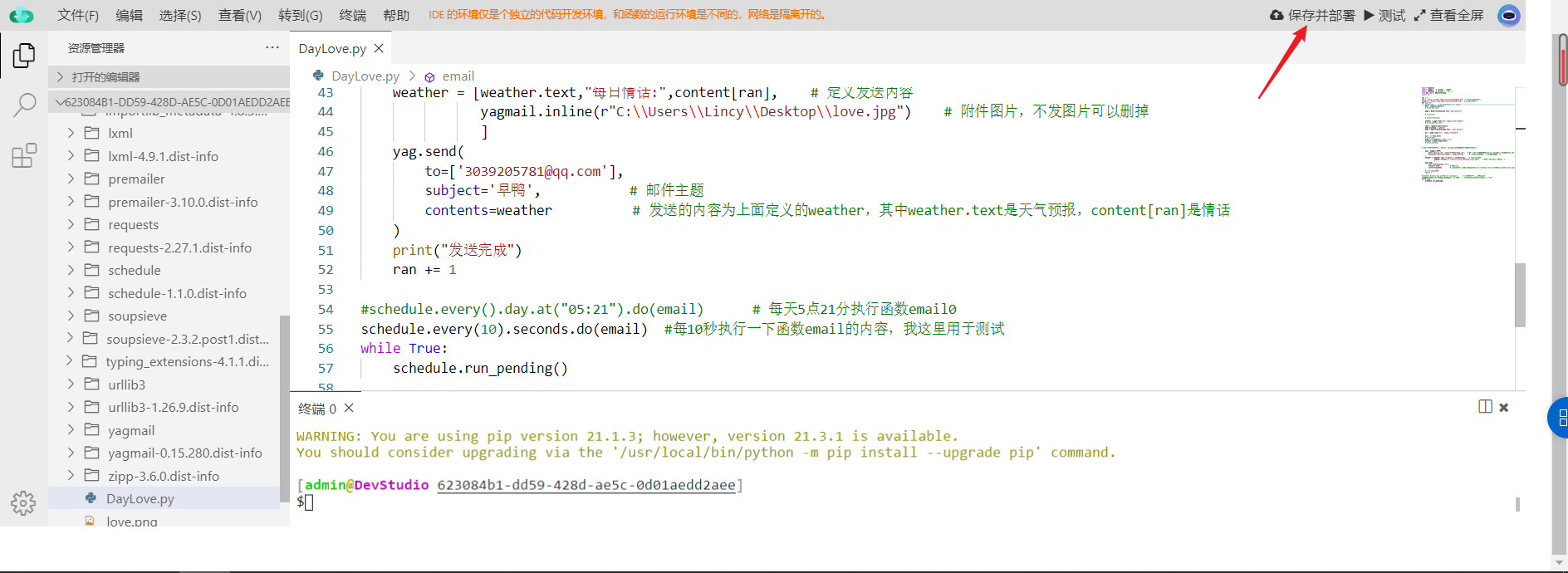
    点击右上角保存并部署
    ![image-20220706182019285.png](https://img-blog.csdnimg.cn/img_convert/9444e06ac0a2470e226e33d35a1a5813.png#clientId=u706577ae-5c82-4&crop=0&crop=0&crop=1&crop=1&height=690&id=hLBOn&margin=[object Object]&name=image-20220706182019285.png&originHeight=690&originWidth=1888&originalType=binary&ratio=1&rotation=0&showTitle=false&status=done&style=none&taskId=u763baca3-13f1-4e63-85ec-8654bef9bca&title=&width=1888)

    四、效果展示

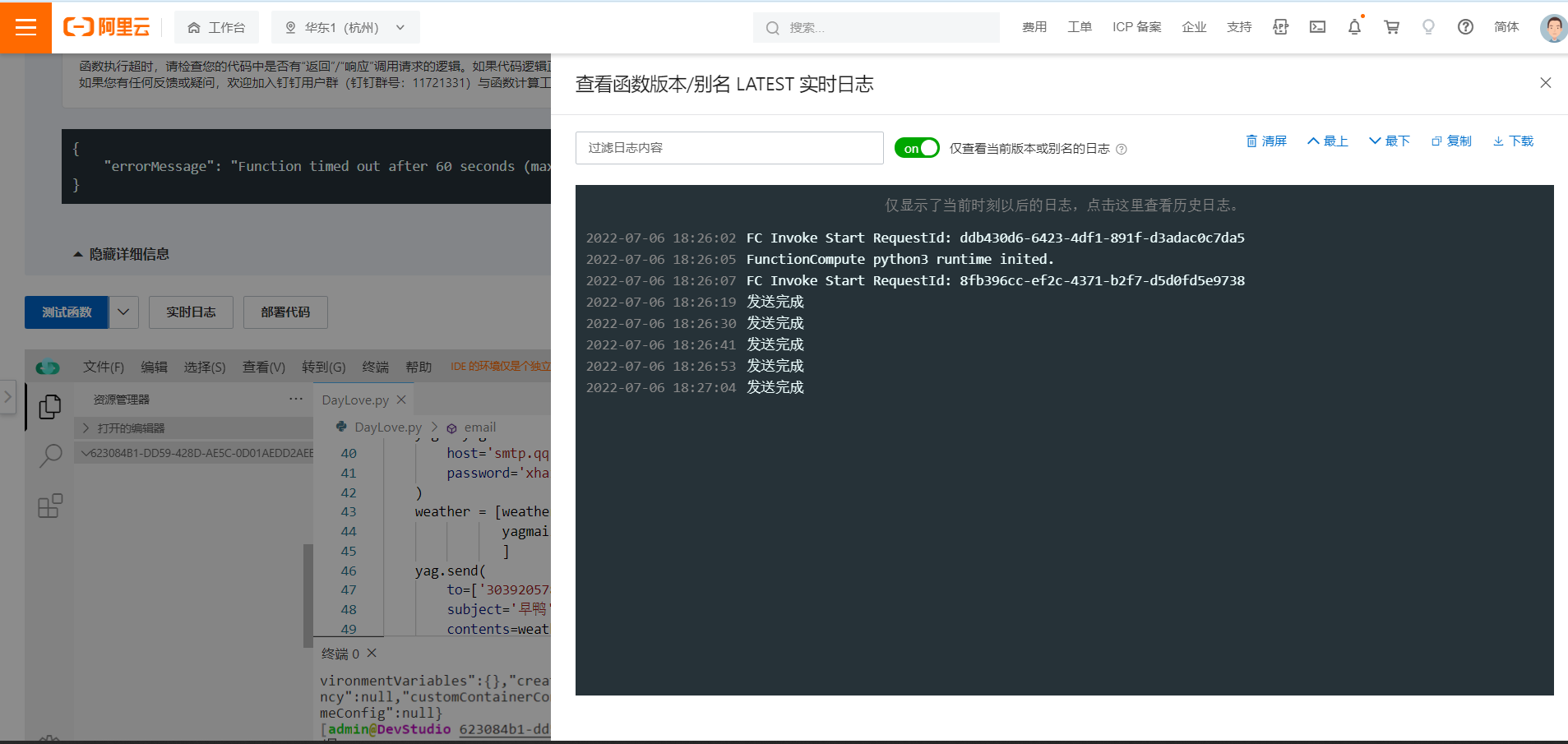
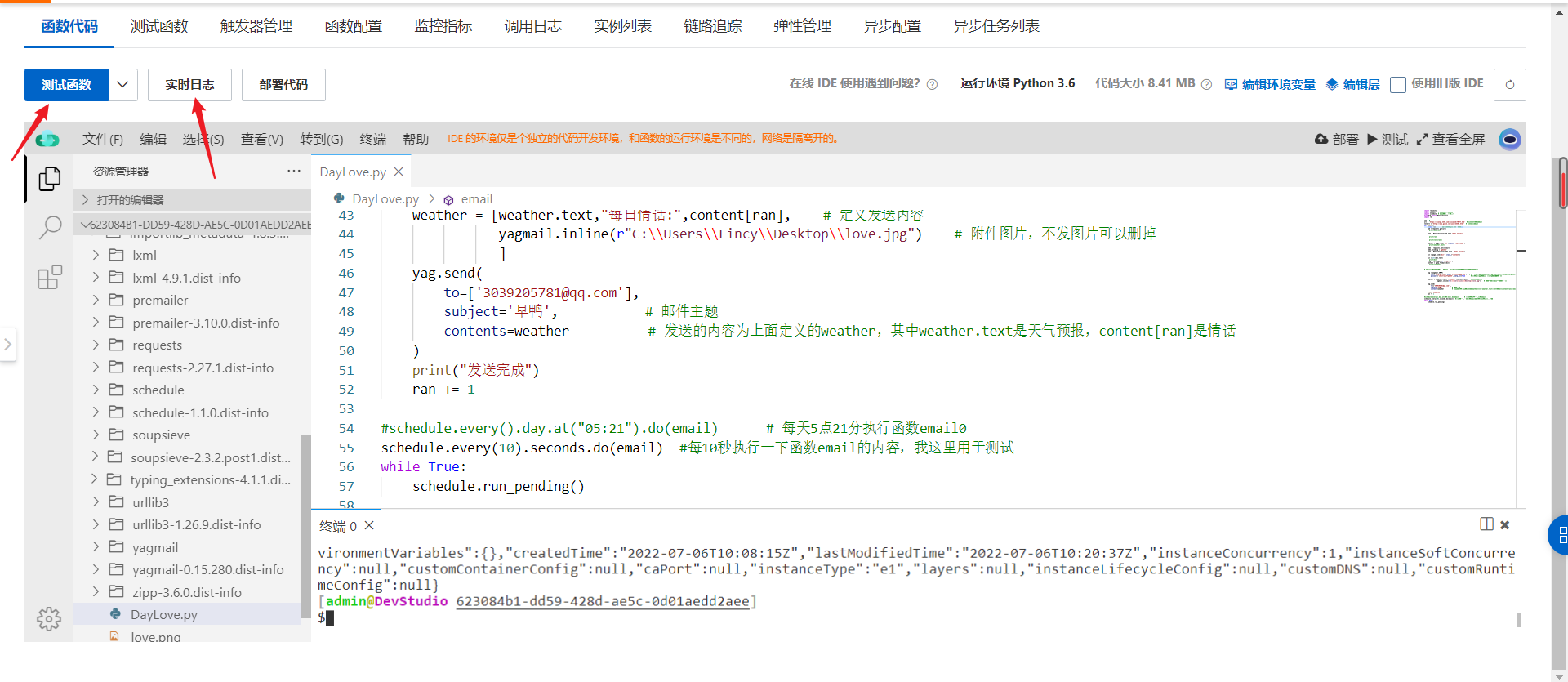
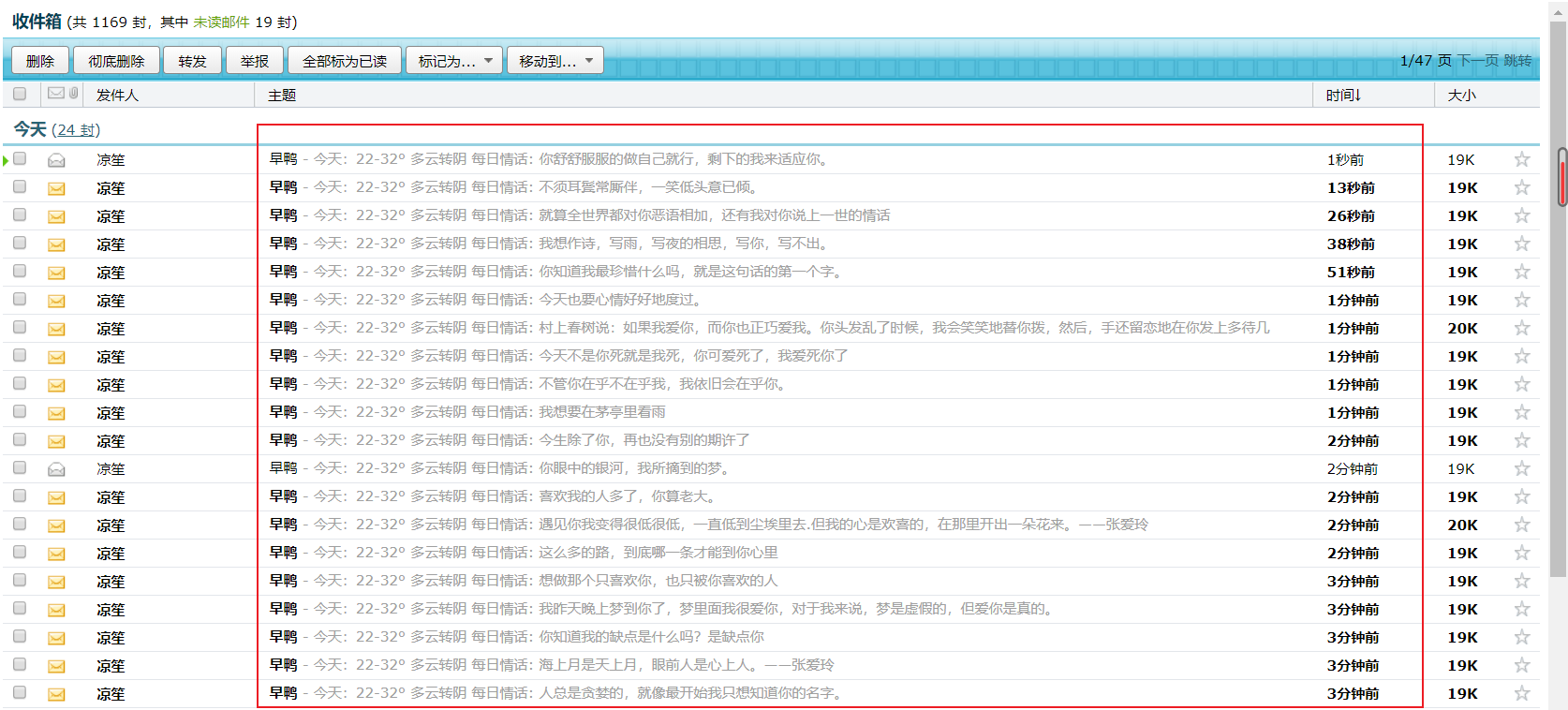
    点击左上角测试函数,然后通过实时日志查看运行结果。
    ![image-20220706182226604.png](https://img-blog.csdnimg.cn/img_convert/3ab12ee640c00d8bce8cef4ddf293aca.png#clientId=u706577ae-5c82-4&crop=0&crop=0&crop=1&crop=1&height=835&id=XiEKh&margin=[object Object]&name=image-20220706182226604.png&originHeight=835&originWidth=1920&originalType=binary&ratio=1&rotation=0&showTitle=false&status=done&style=none&taskId=uc067a5b7-fb9e-4eaa-a2e4-6afa308e257&title=&width=1920)![image-20220706182732131.png](https://img-blog.csdnimg.cn/img_convert/ad9c6030c5cfd9ccbc1b9c90c8ce8bcc.png#clientId=u706577ae-5c82-4&crop=0&crop=0&crop=1&crop=1&height=905&id=JP3Gh&margin=[object Object]&name=image-20220706182732131.png&originHeight=905&originWidth=1907&originalType=binary&ratio=1&rotation=0&showTitle=false&status=done&style=none&taskId=uce64bd16-4d45-4dd1-8e6c-004eb0702f5&title=&width=1907)
    ![image-20220701211458910.png](https://img-blog.csdnimg.cn/img_convert/149016d6bb9357bfd55952637f477378.png#clientId=u706577ae-5c82-4&crop=0&crop=0&crop=1&crop=1&height=758&id=lMvu7&margin=[object Object]&name=image-20220701211458910.png&originHeight=758&originWidth=1674&originalType=binary&ratio=1&rotation=0&showTitle=false&status=done&style=none&taskId=u82b6ab55-06a1-4d86-833b-88a5f468a8c&title=&width=1674)
    ![image-20220706183510459.png](https://img-blog.csdnimg.cn/img_convert/edde2c0c35e2da81ace1e0cce0e17658.png#clientId=u706577ae-5c82-4&crop=0&crop=0&crop=1&crop=1&height=892&id=MPdjB&margin=[object Object]&name=image-20220706183510459.png&originHeight=892&originWidth=678&originalType=binary&ratio=1&rotation=0&showTitle=false&status=done&style=none&taskId=u476415c4-9ed2-4a56-bc85-3030497222f&title=&width=678)

    五、总结

    这次实战是对Serverless的一次深刻的理解,收获技术的同时也提升了自己的学习能力。由于目前正在准备考研,就好久没有更新关于自学技术的文章,这回借着阿里云官方评测活动也去学一学火热的 Serverless 无服务架构的技术和思想,在这里分享这个当下流行的技术,然后结合着一些个人浅显的探索,希望能和大佬们共同学习成长!😄😄

  • 相关阅读:
    Hive、SparkSQL是如何决定写文件的数量的?
    我的世界Minecraft Java开服教程(Windows)开服器开服包下载开服网站服务器开服核心开服端开服软件mac版Java启动器资源包
    《最新出炉》系列初窥篇-Python+Playwright自动化测试-34-处理https 安全问题或者非信任站点-下篇
    一个 SAP 开发工程师在 SAP 德国总部出差的见闻系列 2:Walldorf 附近的小旅馆
    ucontext 上下文
    软件测试笔试题含答案
    Go中IO包简单使用
    springboot+vue实现Minio文件存储
    【原创工具】ADBGUI - GUI版ADB操作工具
    机器学习:Softmax介绍及代码实现
  • 原文地址:https://blog.csdn.net/weixin_42477427/article/details/126061801