-
JAVA8新特性
HashMap的红黑树等
JAVA8新特性:
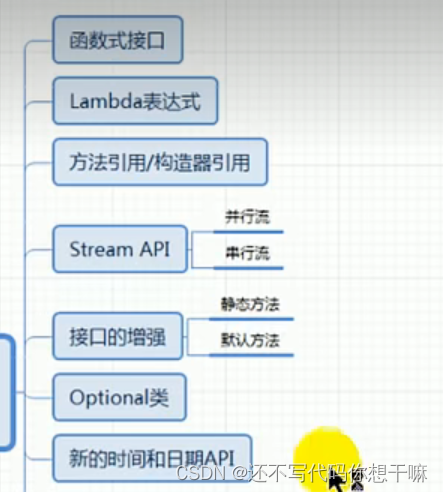

Java 8新特性简介
速度更快
代码更少(增加了新的语法:Lambda表达式)
强大的IStream API
便于并行
最大化减少空指针异常:Optional
Nashorn引擎,允许在JVM上运行JS应用并行流与串行流
并行流就是把一个内容分成多个数据块,并用不同的线程分别处理每个数据块的流。相比较串行的流,并行的流可以很大程度上提高程序的执行效率。Java8中将并行进行了优化,我们可以很容易的对数据进行并行操作。Stream API可以声明性地通过parallel() 与 sequential()在并行流与顺序流之间进行切换。
package com; import org.junit.jupiter.api.Test; import java.util.Comparator; /** * @author * @version 1.0 */ public class Lamdab { @Test public void test1(){ Runnable runnable = new Runnable() { @Override public void run() { System.out.println("你好"); } }; runnable.run(); System.out.println("*************************"); Runnable runnable2 = () -> System.out.println("buhao"); runnable2.run(); } @Test public void test2(){ Comparator<Integer> com1 = new Comparator<Integer>() { @Override public int compare(Integer o1,Integer o2) { return Integer.compare(o1,o2); } }; int compare1 = com1.compare(12,23); System.out.println(compare1); System.out.println("**************************"); // Lambda表达式的写法 Comparator<Integer> com2 = (o1,o2) -> Integer.compare(11,2); int compare2 = com2.compare(11,2); System.out.println(compare2); System.out.println("**************************"); // 方法引用 Comparator<Integer> com3 =Integer::compare; int compare3 = com3.compare(11,2); System.out.println(compare3); } }- 1
- 2
- 3
- 4
- 5
- 6
- 7
- 8
- 9
- 10
- 11
- 12
- 13
- 14
- 15
- 16
- 17
- 18
- 19
- 20
- 21
- 22
- 23
- 24
- 25
- 26
- 27
- 28
- 29
- 30
- 31
- 32
- 33
- 34
- 35
- 36
- 37
- 38
- 39
- 40
- 41
- 42
- 43
- 44
- 45
- 46
- 47
- 48
- 49
- 50
- 51
- 52
- 53
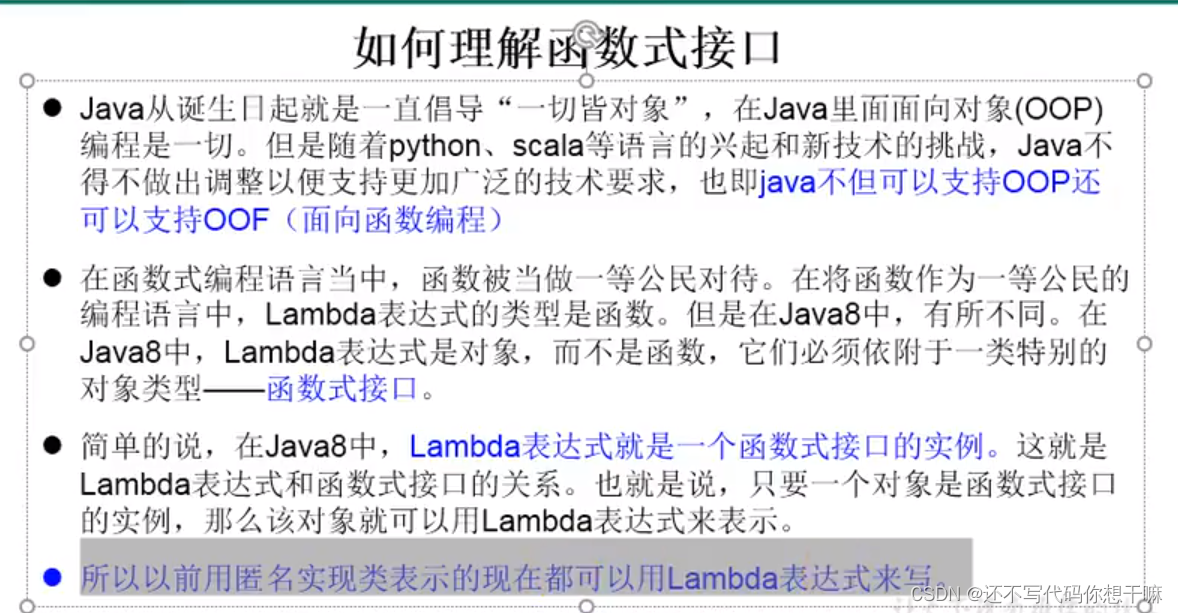
什么是函数式(Fanctional)接口
只包含一个抽象方法的接口,称为函数式接口。
你可以通过Lambda表达式来创建该接口的对象。(若Lambda表达式抛出一个受检异常(即:非运行时异常),那么该异常需要在目标接口的抽象方法上进行声明)。
我们可以在一个接口上使用@Functionallnterface注解,这样做可以检查它是否是一个函数式接口。同时javadoc也会包含一条声明,说明这个接口是一个函数式接口。
在java.util.function包下定义了Java 8的丰富的函数式接口package com; import org.junit.jupiter.api.Test; import java.util.Comparator; import java.util.function.Consumer; /** * @author * @version 1.0 * 1.举例:(o1,o2) -> Integer.compare(o1,o2); * 2.格式: * -> : Lambda操作符或箭头操作符 * ->左边: Lambda形参列表(其实就是接口中的抽象方法的形参列表 * ->右边:Lambda体(其实就是重写的抽象方法的方法体) * 3.Lambda表达式的使用:(6种情况) * * * 总结: * ->左边:Lambda形参列表的参数类型可以省略(类型推断);如果Lambda形参列表只有一个参数,其一对()也可以省略 * ->右边:Lambda体应该使用一对{}包裹;如果Lambda体只有一条执行语句(可能是return语句),可以省略这一对{}和return关键字。 * * 4.Lambda表达式的本质:作为接口的实例,接口只有一个方法,函数式接口的实例 * * 5.如果一个接口中,只声明了一个抽象方法, * * */ public class LambdaTest { // 语法格式一:无参,无返回值 @Test public void test1(){ Runnable runnable = new Runnable() { @Override public void run() { System.out.println("你好"); } }; runnable.run(); System.out.println("*************************"); Runnable runnable2 = () -> { System.out.println("buhao"); }; runnable2.run(); } @Test public void test2(){ // 语法格式二:Lambda需要一个参数,但是没有返回值 Consumer<String> con = new Consumer<String>() { @Override public void accept(String s) { System.out.println(s); } }; con.accept("你好你好@您好"); System.out.println("********************************"); Consumer<String> con1 = (String s) -> { System.out.println(s); }; con1.accept("nefariousjnj"); } // 格式三:数据类型可以省略,因为可以由编译器推断得出,称为“类型推断” @Test public void test3(){ Consumer<String> con = new Consumer<String>() { @Override public void accept(String s) { System.out.println(s); } }; con.accept("你好你好@您好"); System.out.println("********************************"); Consumer<String> con2 = ( s) -> { System.out.println(s); }; con2.accept("nefariousjnj"); } // 语法格式四:Lambda若只需要一个参数时,参数的小括号可以省略 @Test public void test4(){ Consumer<String> con = new Consumer<String>() { @Override public void accept(String s) { System.out.println(s); } }; con.accept("你好你好@您好"); System.out.println("********************************"); Consumer<String> con3 = s -> { System.out.println(s); }; con3.accept("nefariousjnj"); } // 语法格式五:Lambda需要两个或两个以上的参数,多条执行语句,并且可以有返回值 @Test public void test5(){ Comparator<Integer> com1 = new Comparator<Integer>() { @Override public int compare(Integer o1, Integer o2) { System.out.println(o1); System.out.println(o2); return o1.compareTo(o2); } }; System.out.println(com1.compare(12,56)); System.out.println("*******************************"); Comparator<Integer> com2 = (o1,o2) -> { System.out.println(o1); System.out.println(o2); return o1.compareTo(o2); }; System.out.println(com2.compare(11,2)); } // 语法格式六:当Lambda体只有一条语句时,return 与大括号若有,都可以省略 @Test public void test6(){ Comparator<Integer> com1 = new Comparator<Integer>() { @Override public int compare(Integer o1, Integer o2) { return o1.compareTo(o2); } }; System.out.println(com1.compare(12,56)); System.out.println("*******************************"); Comparator<Integer> com3 = (o1,o2) -> o1.compareTo(o2); System.out.println(com3.compare(11,2)); } @Test public void test7(){ Runnable runnable = new Runnable() { @Override public void run() { System.out.println("你好"); } }; runnable.run(); System.out.println("*************************"); Runnable runnable2 = () -> System.out.println("buhao"); runnable2.run(); } }- 1
- 2
- 3
- 4
- 5
- 6
- 7
- 8
- 9
- 10
- 11
- 12
- 13
- 14
- 15
- 16
- 17
- 18
- 19
- 20
- 21
- 22
- 23
- 24
- 25
- 26
- 27
- 28
- 29
- 30
- 31
- 32
- 33
- 34
- 35
- 36
- 37
- 38
- 39
- 40
- 41
- 42
- 43
- 44
- 45
- 46
- 47
- 48
- 49
- 50
- 51
- 52
- 53
- 54
- 55
- 56
- 57
- 58
- 59
- 60
- 61
- 62
- 63
- 64
- 65
- 66
- 67
- 68
- 69
- 70
- 71
- 72
- 73
- 74
- 75
- 76
- 77
- 78
- 79
- 80
- 81
- 82
- 83
- 84
- 85
- 86
- 87
- 88
- 89
- 90
- 91
- 92
- 93
- 94
- 95
- 96
- 97
- 98
- 99
- 100
- 101
- 102
- 103
- 104
- 105
- 106
- 107
- 108
- 109
- 110
- 111
- 112
- 113
- 114
- 115
- 116
- 117
- 118
- 119
- 120
- 121
- 122
- 123
- 124
- 125
- 126
- 127
- 128
- 129
- 130
- 131
- 132
- 133
- 134
- 135
- 136
- 137
- 138
- 139
- 140
- 141
- 142
- 143
- 144
- 145
- 146
- 147
- 148
- 149
- 150
- 151
- 152
- 153
- 154
- 155
- 156


package com; import org.junit.jupiter.api.Test; import java.util.ArrayList; import java.util.Arrays; import java.util.List; import java.util.function.Consumer; import java.util.function.Predicate; /** * @author * @version 1.0 * JAVA内置的4大核心函数式接口 * * 消费型接口 Consumervoid accept(T t) * 供给型接口Supplier public class LambdaTest2 { @Test public void test1() { happyTime(120, new Consumer<Double>() { @Override public void accept(Double aDouble) { System.out.println("不想学习!,买水价格" + aDouble); } }); System.out.println("*************************"); happyTime(520, money -> System.out.println("不想学习!,买水价格" + money)); } public void happyTime(double money, Consumer<Double> con) { con.accept(money); } @Test public void test2() { List<String> list = Arrays.asList("北京","南京","天津","东京","西京"); List<String> filterStrs = filterString(list, new Predicate<String>() { @Override public boolean test(String s) { return s.contains("京"); } }); System.out.println(filterStrs); List<String> filterStrs1 = filterString(list,s -> s.contains("京")); System.out.println(filterStrs1); } public List<String> filterString(List<String> list, Predicate<String> pre) { ArrayList<String> filterList = new ArrayList<>(); for(String s :list){ if (pre.test(s)){ filterList.add(s); } } return filterList; } }T get( ) * 函数型接口Function booLean test(T t) * */ - 1
- 2
- 3
- 4
- 5
- 6
- 7
- 8
- 9
- 10
- 11
- 12
- 13
- 14
- 15
- 16
- 17
- 18
- 19
- 20
- 21
- 22
- 23
- 24
- 25
- 26
- 27
- 28
- 29
- 30
- 31
- 32
- 33
- 34
- 35
- 36
- 37
- 38
- 39
- 40
- 41
- 42
- 43
- 44
- 45
- 46
- 47
- 48
- 49
- 50
- 51
- 52
- 53
- 54
- 55
- 56
- 57
- 58
- 59
- 60
- 61
- 62
- 63
- 64
- 65

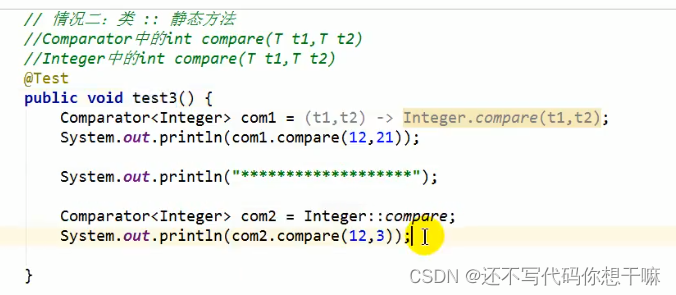
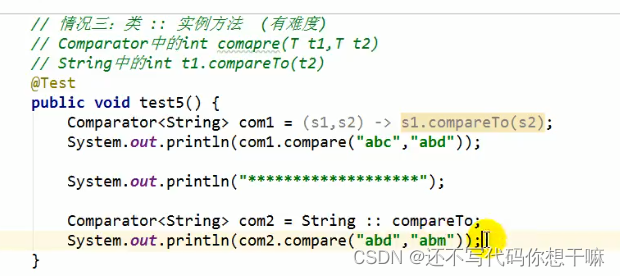
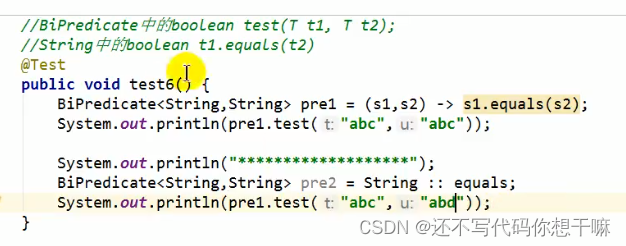
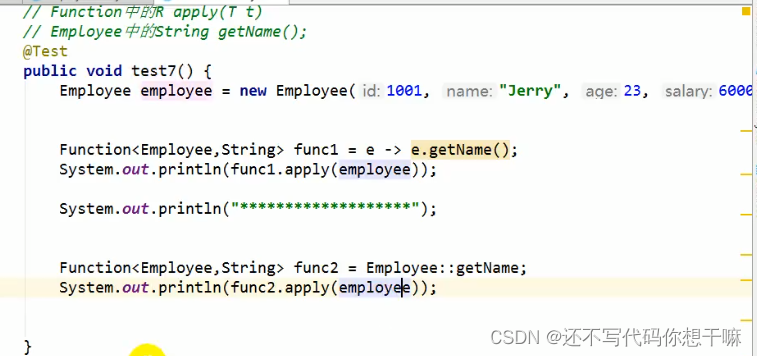
方法引用的使用
1.使用情境:当要传递给Lambda体的操作,已经有实现的方法了,可以使用方法引用!
2.方法引用,本质上就是Lambda表达式,而Lambda表达式作为函数式接口的实例。所以方法引用,也是函数式接口的实例。
3.使用格式:类(或对象)::方法名
4.具体分为如下的三种情况:
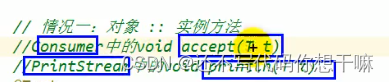
情况1:对象:∶非静态方法
情况2:类::静态方法情况3:类::非静态方法
5.方法引用使用的要求:要求接口中的抽象方法的形参列表和返回值类型与方法引用的方法的形参列表和返回值类型相同!(针对情况1和情况2)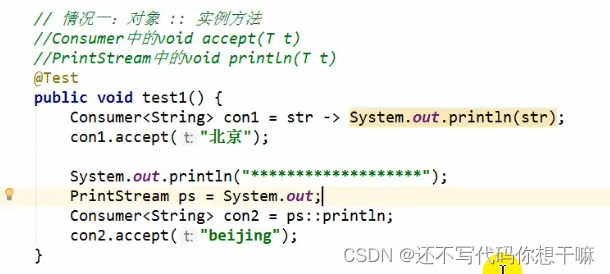


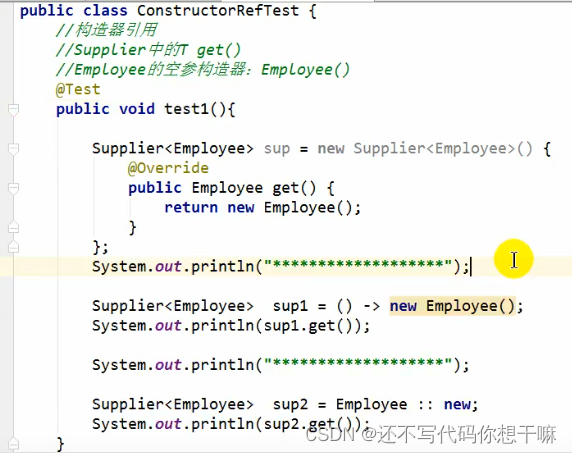
构造器引用:
和方法引用类似,函数式接口的抽象方法的形参列表和构造器的形参列表一致。抽象方法的返回值类型即为构造器所属的类的类型


数组引用:
把数组看成一个特殊的类,写法与构造器引用一致

增强Stream API
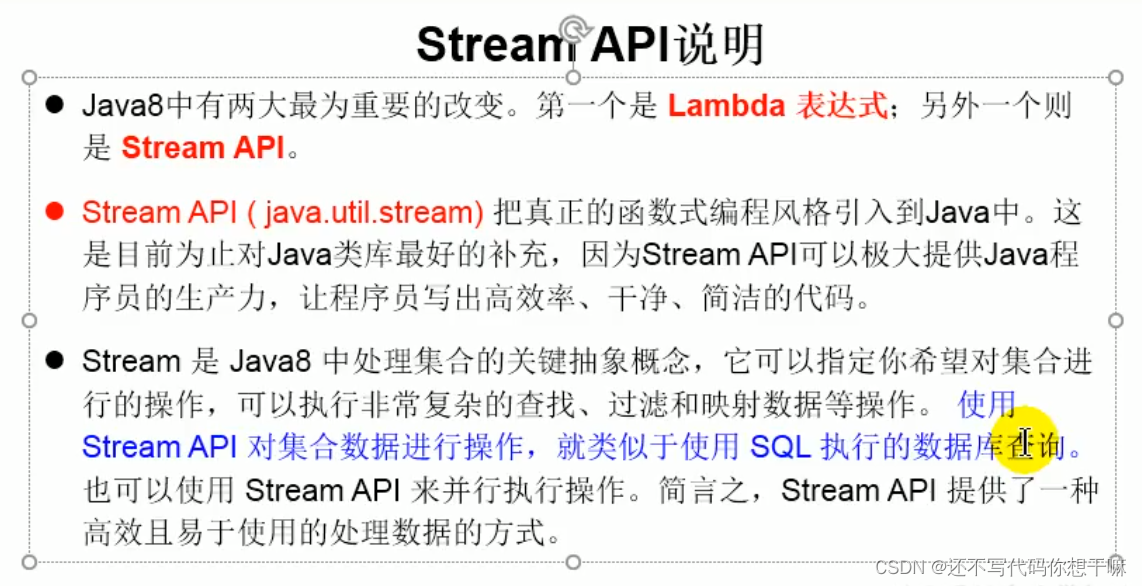
为什么要使用Stream API
实际开发中,项目中多数数据源都来自于Mysql,Oracle等。但现在数据源可以更多了,有MongDB,Radis等,而这些NoSQL的数据就需要Java层面去处理。
Stream和 Collection集合的区别:Collection是一种静态的内存数据结构,而 Stream是有关计算的。前者是主要面向内存,存储在内存中后者主要是面向CPU,通过CPU实现计算。



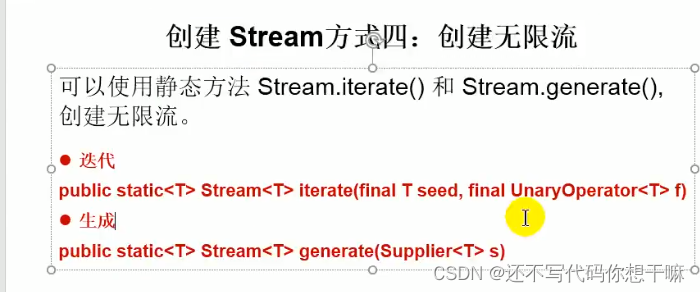
创建:package com; import org.junit.jupiter.api.Test; import java.util.Arrays; import java.util.List; import java.util.stream.IntStream; import java.util.stream.Stream; /** * @author * @version 1.0 * 1. Stream关注的是对数据的运算,与CPU打交道 * 集合关注的是数据的存储,与内存打交道 * 2. * ①Stream,自己不会存储元素。 * ②Stream不会改变源对象。相反,他们会返回一个持有结果的新Stream 。 * ③Stream操作是延迟执行的。这意味着他们会等到需要结果的时候才执行。 * * 3.Stream执行流程 * ①Stream的实例化 * ②—系列的中间操作(过滤、映射、...) * ③终止操作 * * 4.说明: * 4.1一个中间操作链,对数据源的数据进行处理 * 4.2一旦执行终止操作,就执行中间操作链,并产生结果。之后,不会再被使用 */ public class StreamAPITest { // 通过集合进行创建 @Test public void test1(){ List<Employee> employees = EmployeeData.getEmployees(); // default Streamstream():返回一个顺序流 Stream<Employee> stream = employees.stream(); // default StreamparallelStream():返回一个并行流 Stream<Employee> stream1 = employees.parallelStream(); } // 通过数组创建Stream @Test public void test2(){ int[] arr = {1, 2, 5, 4, 6}; // 调用Array类的staticStream IntStream stream = Arrays.stream(arr); Employee e1 = new Employee(1001,"tom"); Employee e2 = new Employee(1002,"jack"); Employee[] arr1 = new Employee[]{e1,e2}; Stream<Employee> stream1 = Arrays.stream(arr1); } // 通过Stream的of() @Test public void test3(){ Stream<Integer> stream = Stream.of(1, 2, 3, 4, 5); } // 创建无限流 @Test public void test4(){ // 迭代 // 遍历前10个偶数 Stream.iterate(0,t -> t + 2).limit(10).forEach(System.out::println); // 生成 Stream.generate(Math::random).limit(10).forEach(System.out::println); } }stream(T[] array):返回一个流 - 1
- 2
- 3
- 4
- 5
- 6
- 7
- 8
- 9
- 10
- 11
- 12
- 13
- 14
- 15
- 16
- 17
- 18
- 19
- 20
- 21
- 22
- 23
- 24
- 25
- 26
- 27
- 28
- 29
- 30
- 31
- 32
- 33
- 34
- 35
- 36
- 37
- 38
- 39
- 40
- 41
- 42
- 43
- 44
- 45
- 46
- 47
- 48
- 49
- 50
- 51
- 52
- 53
- 54
- 55
- 56
- 57
- 58
- 59
- 60
- 61
- 62
- 63
- 64
- 65
- 66
- 67
- 68
- 69
- 70
- 71


中间操作:package com; import org.junit.jupiter.api.Test; import java.util.ArrayList; import java.util.Arrays; import java.util.List; import java.util.stream.Stream; /** * @author * @version 1.0 */ public class StreamAPI { // 筛选与切片 @Test public void test1(){ List<Employee> employees = EmployeeData.getEmployees(); Stream<Employee> stream = employees.stream(); // filter 过滤 stream.filter(e -> e.getSalary() > 4000).forEach(System.out::println); // limit(n) 截断流 每次都要新生成一下stream流 System.out.println("************"); employees.stream().limit(3).forEach(System.out::println); // skip 跳过 System.out.println("************"); employees.stream().skip(3).forEach(System.out::println); // distinct() 筛选 注意:是根据hashCode和equals方法去重,所以要重写equals 方法 System.out.println("************"); employees.add(new Employee(100,"卡机款",85,1665)); employees.add(new Employee(100,"卡机款",85,1665)); employees.add(new Employee(100,"卡机款",85,1665)); employees.add(new Employee(100,"卡机款",85,1665)); employees.stream().distinct().forEach(System.out::println); } @Test public void test2(){ // map(Function f) List<String> strings = Arrays.asList("aa", "bb", "cc", "dd"); strings.stream().map(str -> str.toUpperCase()).forEach(System.out::println); List<Employee> employees = EmployeeData.getEmployees(); Stream<String> nameStream = employees.stream().map(Employee::getName); nameStream.filter(name -> name.length() > 2).forEach(System.out::println); Stream<Stream<Character>> streamStream = strings.stream().map(StreamAPI::fromStringToStream); streamStream.forEach(s -> { s.forEach(System.out::println); }); // flatMap(Function f) System.out.println(); Stream<Character> characterStream = strings.stream().flatMap(StreamAPI::fromStringToStream); characterStream.forEach(System.out::println); } // 将字符创中的多个字符构成的集合转换成对应的Stream的实例 public static Stream<Character> fromStringToStream(String str){ ArrayList<Character> list = new ArrayList<>(); for (Character c: str.toCharArray()){ list.add(c); } return list.stream(); } @Test public void test3(){ ArrayList arrayList = new ArrayList(); arrayList.add(1); arrayList.add(2); ArrayList arrayList1 = new ArrayList(); arrayList1.add(4); arrayList1.add(5); arrayList.add(arrayList1);//3个元素 arrayList.addAll(arrayList1);//4个元素 for (Object a: arrayList){ System.out.println(a); } } // 排序 @Test public void test4(){ // sorted 自然排序 List<Integer> list = Arrays.asList(15, 12, 78, 1, -96, 2, -1, 12); list.stream().sorted().forEach(System.out::println); // sorted(Comparator com) -- 定制排序 List<Employee> employees = EmployeeData.getEmployees(); employees.stream().sorted((e1,e2) -> Integer.compare(e1.getAge(),e2.getAge())) .forEach(System.out::println); employees.stream().sorted((e1,e2) -> { int ageValue = Integer.compare(e1.getAge(),e2.getAge()); if (ageValue != 0){ return ageValue; }else { return Double.compare(e1.getSalary(),e2.getSalary()); } }).forEach(System.out::println); } }- 1
- 2
- 3
- 4
- 5
- 6
- 7
- 8
- 9
- 10
- 11
- 12
- 13
- 14
- 15
- 16
- 17
- 18
- 19
- 20
- 21
- 22
- 23
- 24
- 25
- 26
- 27
- 28
- 29
- 30
- 31
- 32
- 33
- 34
- 35
- 36
- 37
- 38
- 39
- 40
- 41
- 42
- 43
- 44
- 45
- 46
- 47
- 48
- 49
- 50
- 51
- 52
- 53
- 54
- 55
- 56
- 57
- 58
- 59
- 60
- 61
- 62
- 63
- 64
- 65
- 66
- 67
- 68
- 69
- 70
- 71
- 72
- 73
- 74
- 75
- 76
- 77
- 78
- 79
- 80
- 81
- 82
- 83
- 84
- 85
- 86
- 87
- 88
- 89
- 90
- 91
- 92
- 93
- 94
- 95
- 96
- 97
- 98
- 99
- 100
- 101
- 102
- 103
- 104
- 105
- 106
- 107

package com; import org.junit.jupiter.api.Test; import java.util.List; import java.util.Optional; import java.util.stream.Stream; /** * @author * @version 1.0 */ public class StreamAPPITest { public static void main(String[] args) { } @Test public void test1(){ List<Employee> employees = EmployeeData.getEmployees(); // allMath(Predicate p)检查是否匹配所有元素 boolean allMatch = employees.stream().allMatch(e -> e.getAge() > 18); System.out.println(allMatch); // anyMatch(Predicate p) 检查是否至少有一个元素匹配 boolean anyMatch = employees.stream().anyMatch(e -> e.getSalary() > 200000); System.out.println(anyMatch); // noneMatch(Predicate p) 检查是否没有匹配的元素 boolean noneMatch = employees.stream().noneMatch(e -> e.getName().startsWith("马")); System.out.println(noneMatch); // findFirst 返回第一个元素 Optional<Employee> first = employees.stream().findFirst(); System.out.println(first); // findAny 返回当前流中的任意元素 Optional<Employee> any = employees.parallelStream().findAny(); System.out.println(any); // count 返回流中元素的总个数 long count = employees.stream().filter(e -> e.getSalary() > 5000).count(); System.out.println(count); // max(Comparator c) 返回流中的最大值 Stream<Double> doubleStream = employees.stream().map(e -> e.getSalary()); Optional<Double> max = doubleStream.max(Double::compare); System.out.println(max); // min(Comparator c) 返回流中的最小值 Optional<Employee> min = employees.stream().min((e1, e2) -> Double.compare(e1.getSalary(), e2.getSalary())); System.out.println(min); // forEach(Consumer c) 内部迭代 employees.stream().forEach(System.out::println); employees.forEach(System.out::println); } }- 1
- 2
- 3
- 4
- 5
- 6
- 7
- 8
- 9
- 10
- 11
- 12
- 13
- 14
- 15
- 16
- 17
- 18
- 19
- 20
- 21
- 22
- 23
- 24
- 25
- 26
- 27
- 28
- 29
- 30
- 31
- 32
- 33
- 34
- 35
- 36
- 37
- 38
- 39
- 40
- 41
- 42
- 43
- 44
- 45
- 46
- 47
- 48
- 49
- 50


package com; import org.junit.jupiter.api.Test; import java.util.Arrays; import java.util.List; import java.util.Optional; import java.util.Set; import java.util.stream.Collectors; import java.util.stream.Stream; /** * @author * @version 1.0 */ public class StreamAPPITest { public static void main(String[] args) { } @Test public void test1(){ List<Employee> employees = EmployeeData.getEmployees(); // allMath(Predicate p)检查是否匹配所有元素 boolean allMatch = employees.stream().allMatch(e -> e.getAge() > 18); System.out.println(allMatch); // anyMatch(Predicate p) 检查是否至少有一个元素匹配 boolean anyMatch = employees.stream().anyMatch(e -> e.getSalary() > 200000); System.out.println(anyMatch); // noneMatch(Predicate p) 检查是否没有匹配的元素 boolean noneMatch = employees.stream().noneMatch(e -> e.getName().startsWith("马")); System.out.println(noneMatch); // findFirst 返回第一个元素 Optional<Employee> first = employees.stream().findFirst(); System.out.println(first); // findAny 返回当前流中的任意元素 Optional<Employee> any = employees.parallelStream().findAny(); System.out.println(any); // count 返回流中元素的总个数 long count = employees.stream().filter(e -> e.getSalary() > 5000).count(); System.out.println(count); // max(Comparator c) 返回流中的最大值 Stream<Double> doubleStream = employees.stream().map(e -> e.getSalary()); Optional<Double> max = doubleStream.max(Double::compare); System.out.println(max); // min(Comparator c) 返回流中的最小值 Optional<Employee> min = employees.stream().min((e1, e2) -> Double.compare(e1.getSalary(), e2.getSalary())); System.out.println(min); // forEach(Consumer c) 内部迭代 employees.stream().forEach(System.out::println); employees.forEach(System.out::println); } //归约 @Test public void test3(){ // reduce(T identity,BinaryOperator) 可以将流中元素反复结合起来 List<Integer> list = Arrays.asList(1,5,1,2,7,8,9,3,0,5,6,4); Integer reduce = list.stream().reduce(0, Integer::sum); System.out.println(reduce); // reduce(BinaryOperator) List<Employee> employees = EmployeeData.getEmployees(); Stream<Double> doubleStream = employees.stream().map(Employee::getSalary); Optional<Double> reduce1 = doubleStream.reduce(Double::sum); System.out.println(reduce1); } // 收集 @Test public void test4(){ // collect(Collector c) 将流转换成其他形式 List<Employee> employees = EmployeeData.getEmployees(); List<Employee> collect = employees.stream().filter(e -> e.getSalary() > 600).collect(Collectors.toList()); collect.forEach(System.out::println); System.out.println("*****************************"); // 无序 Set<Employee> setStream = employees.stream().filter(e -> e.getSalary() > 600).collect(Collectors.toSet()); setStream.forEach(System.out::println); } }- 1
- 2
- 3
- 4
- 5
- 6
- 7
- 8
- 9
- 10
- 11
- 12
- 13
- 14
- 15
- 16
- 17
- 18
- 19
- 20
- 21
- 22
- 23
- 24
- 25
- 26
- 27
- 28
- 29
- 30
- 31
- 32
- 33
- 34
- 35
- 36
- 37
- 38
- 39
- 40
- 41
- 42
- 43
- 44
- 45
- 46
- 47
- 48
- 49
- 50
- 51
- 52
- 53
- 54
- 55
- 56
- 57
- 58
- 59
- 60
- 61
- 62
- 63
- 64
- 65
- 66
- 67
- 68
- 69
- 70
- 71
- 72
- 73
- 74
- 75
- 76
- 77
- 78
Optional类
到目前为止,臭名昭著的空指针异常是导致Java应用程序失败的最常见原因。以前,为了解决空指针异常,Google公司著名的Guava项目引入了Optional类,Guava通过使用检查空值的方式来防止代码污染,它鼓励程序员写更干净的代码。受到Google Guava的启发,Optional类已经成为Java 8类库的一部分。
Optional类(java.util.Optional)是一个容器类,它可以保存类型T的值,代表这个值存在。或者仅仅保存null,表示这个值不存在。原来用null表示一个值不存在,现在 Optional可以更好的表达这个概念。并且可以避免空指针异常。
Optional类的Javadoc描述如下:这是一个可以为null的容器对象。如果值存在则isPresent()方法会返回true,调用get()方法会返回该对象。

package com; import org.junit.jupiter.api.Test; import java.util.Optional; /** * @author * @version 1.0 * 避免空指针异常 * ofNullable * orElse */ public class OptionTest { @Test public void test1(){ Girls girls = new Girls(); // of(T t):保证t是非空的 Optional<Girls> girls1 = Optional.of(girls); // Optional.empty() } @Test //ofNullable(T t): t可以方nuLL //orElse(T t孙:如果单前的OptionaL内部封装的t是非空的,则返回内部的t //如果内部的t是空的,则返回orELse()方法中的参数 public void test2(){ Girls girls = new Girls(); girls = null; Optional<Girls> girls1 = Optional.ofNullable(girls); System.out.println(girls1); Girls ppgirl = girls1.orElse(new Girls("里")); System.out.println(ppgirl); } public String getGirlName(Boy boy){ return boy.getGirl().getName(); } @Test public void test3(){ Boy boy = new Boy(); boy = null; String girlname = getGirlName(boy); System.out.println(girlname); } // 优化 public String getGirlName1(Boy boy){ if(boy != null){ Girls girl = boy.getGirl(); if (girl != null){ return girl.getName(); } } return null; } @Test // 优化 public void test4(){ Boy boy = new Boy(); boy = null; String girlname = getGirlName1(boy); System.out.println(girlname); } // 使用Optional优化 public String getGirlName2(Boy boy){ Optional<Boy> boyOptional = Optional.ofNullable(boy); Boy nini = boyOptional.orElse(new Boy(new Girls("nini"))); Girls girl = nini.getGirl(); Optional<Girls> girl1 = Optional.ofNullable(girl); Girls gugu = girl1.orElse(new Girls("鼓励")); return gugu.getName(); } @Test public void test5(){ Boy boy = null; boy = new Boy(); boy = new Boy(new Girls("语言")); String girlName = getGirlName2(boy); System.out.println(girlName); } }- 1
- 2
- 3
- 4
- 5
- 6
- 7
- 8
- 9
- 10
- 11
- 12
- 13
- 14
- 15
- 16
- 17
- 18
- 19
- 20
- 21
- 22
- 23
- 24
- 25
- 26
- 27
- 28
- 29
- 30
- 31
- 32
- 33
- 34
- 35
- 36
- 37
- 38
- 39
- 40
- 41
- 42
- 43
- 44
- 45
- 46
- 47
- 48
- 49
- 50
- 51
- 52
- 53
- 54
- 55
- 56
- 57
- 58
- 59
- 60
- 61
- 62
- 63
- 64
- 65
- 66
- 67
- 68
- 69
- 70
- 71
- 72
- 73
- 74
- 75
- 76
- 77
- 78
- 79
- 80
- 81
- 82
- 83
- 84
- 85
- 86
- 87
- 88
- 89
- 90
- 91
- 92
- 93
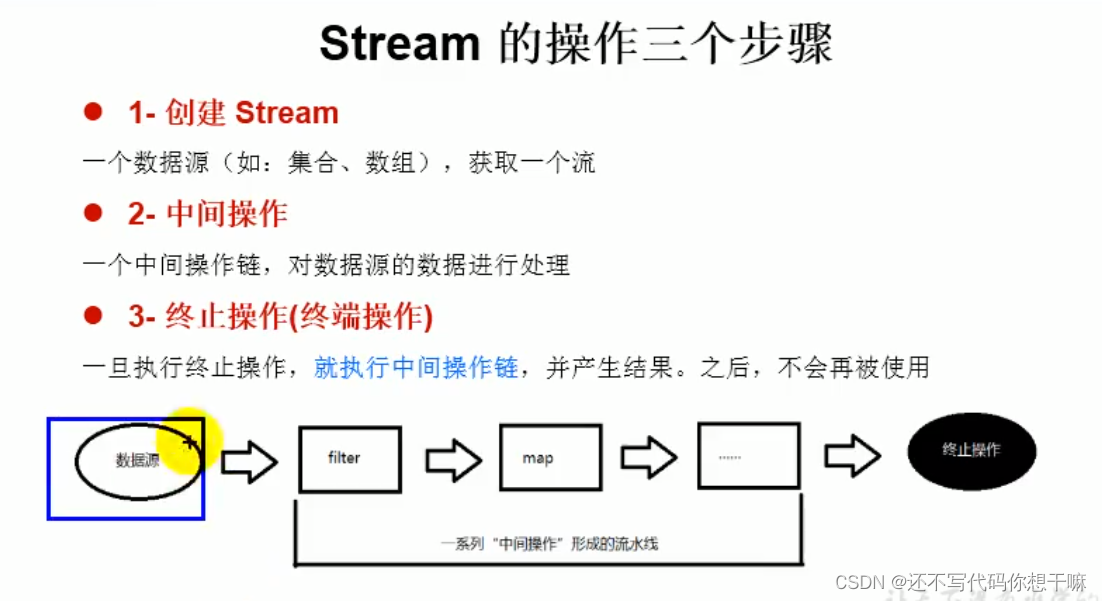
1.Stream API的理解:
1.1 Stream关注的是对数据的运算,与CPU打交道集合关注的是数据的存储,与内存打交道
1.2 java8提供了一套api,使用这套api可以对内存中的数据进行过滤、排序、映射、归约等操作。类似于sqL对数据库中表的相关操作。
2.注意点:- ①stream自己不会存储元素。
- ②Stream 不会改变源对象。相反,他们会返回一个持有结果的新Stream
- ③Stream操作是延迟执行的。这意味着他们会等到需要结果的时候才执行。
- 3.stream的使用流程:
- Stream的实例化
一系列的中间操作(过滤、映射、…)
③终止操作
4.使用流程的注意点: - 4.1一个中间操作链,对数据源的数据进行处理
- 4.2一巨执行终止操值就执行中间操作链,并产生结果。之后,不会再被使用
-
相关阅读:
深入了解Python变量:从基础到高级
基于Redis手工实现分布式锁
漏洞分析丨HEVD-0x6.UninitializedStackVariable[win7x86]
原理图合并中的技巧
图像识别-YOLO V8安装部署-window-CPU-Pycharm
List集合
Python-基于Django的新生入学管理系统
29_content 阶段的concat 模块
虹科新闻 | 虹科电子与 Mend 正式建立合作伙伴关系
渗透工具-内网权限维持-Cobalt strike
- 原文地址:https://blog.csdn.net/CSDN_xinger/article/details/126018482
