• VScode运行程序弹出小黑窗


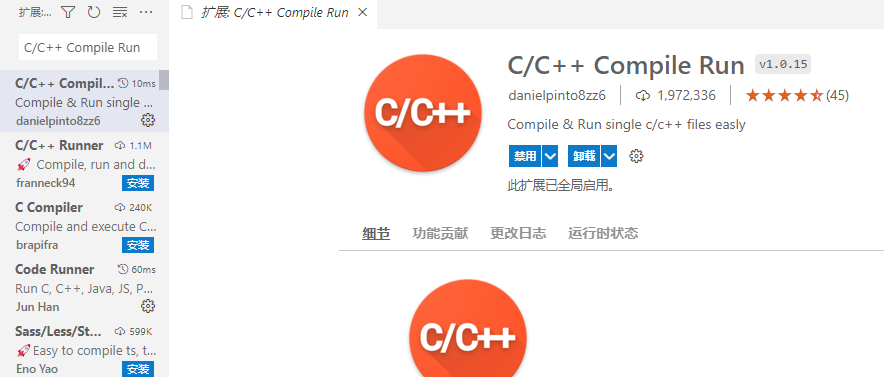
    1. 首先要下载运行C环境的相关插件,以及C/C++ Compile Run这个插件
    ![image.png](https://img-blog.csdnimg.cn/img_convert/8909a1e345edde6758787f80453fbb5c.png#clientId=u5e733858-5749-4&crop=0&crop=0&crop=1&crop=1&from=paste&height=377&id=ub86f8d2f&margin=[object Object]&name=image.png&originHeight=377&originWidth=884&originalType=binary&ratio=1&rotation=0&showTitle=false&size=69866&status=done&style=none&taskId=uce06276e-b876-472b-a71c-2b3ae042e1d&title=&width=884)

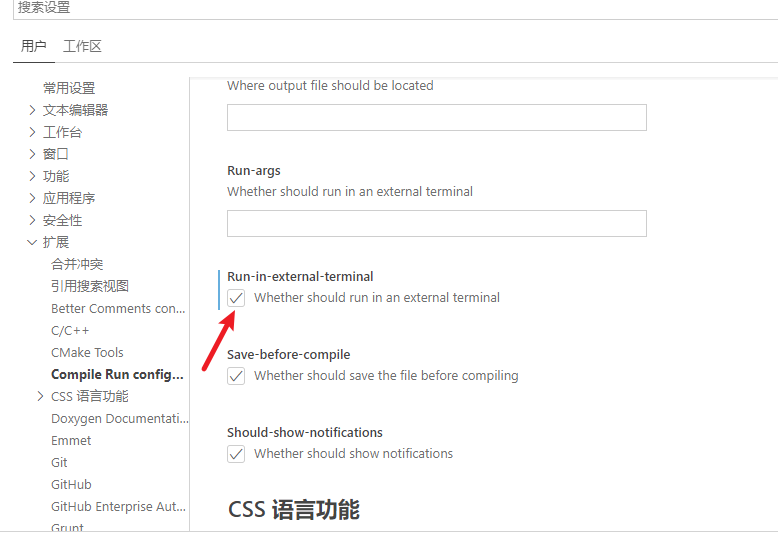
    2.进入 文件>首选项>设置>扩展>C/C++ Compile Run 中的 Run-in-external-terminal 复选框勾上

    ![image.png](https://img-blog.csdnimg.cn/img_convert/3a57461e4b49bf6a817942edab23fac7.png#clientId=u5e733858-5749-4&crop=0&crop=0&crop=1&crop=1&from=paste&height=533&id=u8ebe65a8&margin=[object Object]&name=image.png&originHeight=533&originWidth=778&originalType=binary&ratio=1&rotation=0&showTitle=false&size=44883&status=done&style=none&taskId=u6345562b-31a4-4b0b-bb5e-7d0dae3e720&title=&width=778)

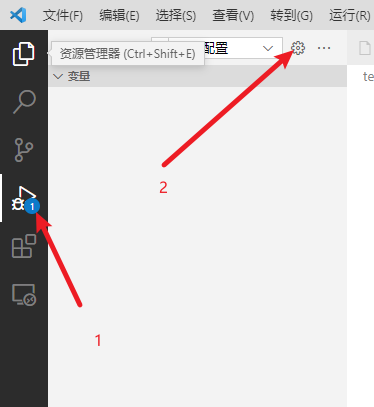
    3. 打开vscode工程目录就可以在.vscode目录下看到lauch.json文件,如果没有则需要点击调试位置,如图位置1;单击配置按钮,如图位置2,系统便会自动生成配置文件

    ![image.png](https://img-blog.csdnimg.cn/img_convert/2305c1c379fb788170f34299a720ee0e.png#clientId=u5e733858-5749-4&crop=0&crop=0&crop=1&crop=1&from=paste&height=407&id=ucaebd313&margin=[object Object]&name=image.png&originHeight=407&originWidth=374&originalType=binary&ratio=1&rotation=0&showTitle=false&size=19938&status=done&style=none&taskId=uec37760f-1581-4ff0-9150-3c1d238413f&title=&width=374)

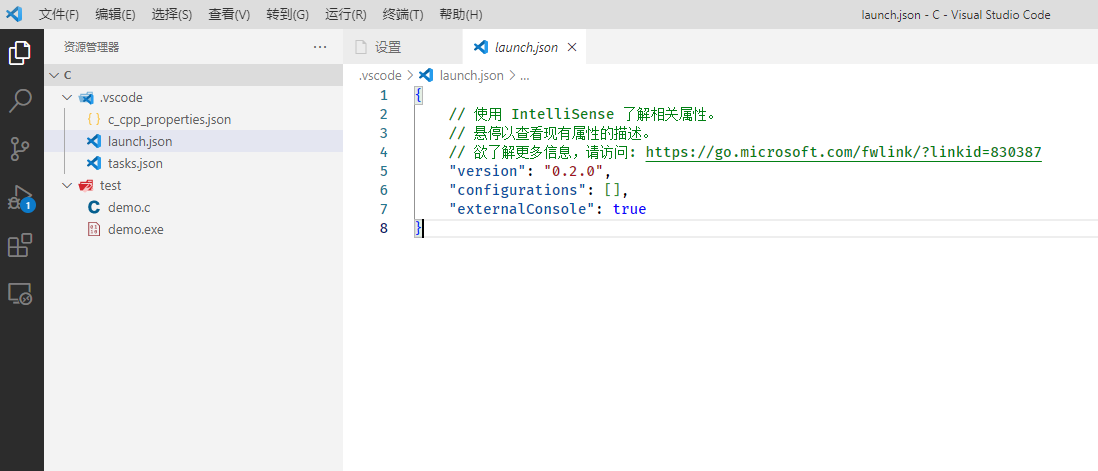
    4. 在launch.json文件中加入:"externalConsole": true,或者将launch.json文件中的console后的内容改为externalTerminal,即:**"console": "externalTerminal"**
    ![image.png](https://img-blog.csdnimg.cn/img_convert/e17896dad03cf2d9c90a503f529c7d0d.png#clientId=u5e733858-5749-4&crop=0&crop=0&crop=1&crop=1&from=paste&height=471&id=u06cba1d9&margin=[object Object]&name=image.png&originHeight=471&originWidth=1098&originalType=binary&ratio=1&rotation=0&showTitle=false&size=50152&status=done&style=none&taskId=u76b8306c-5fec-4cb5-bb72-85c508b338b&title=&width=1098)

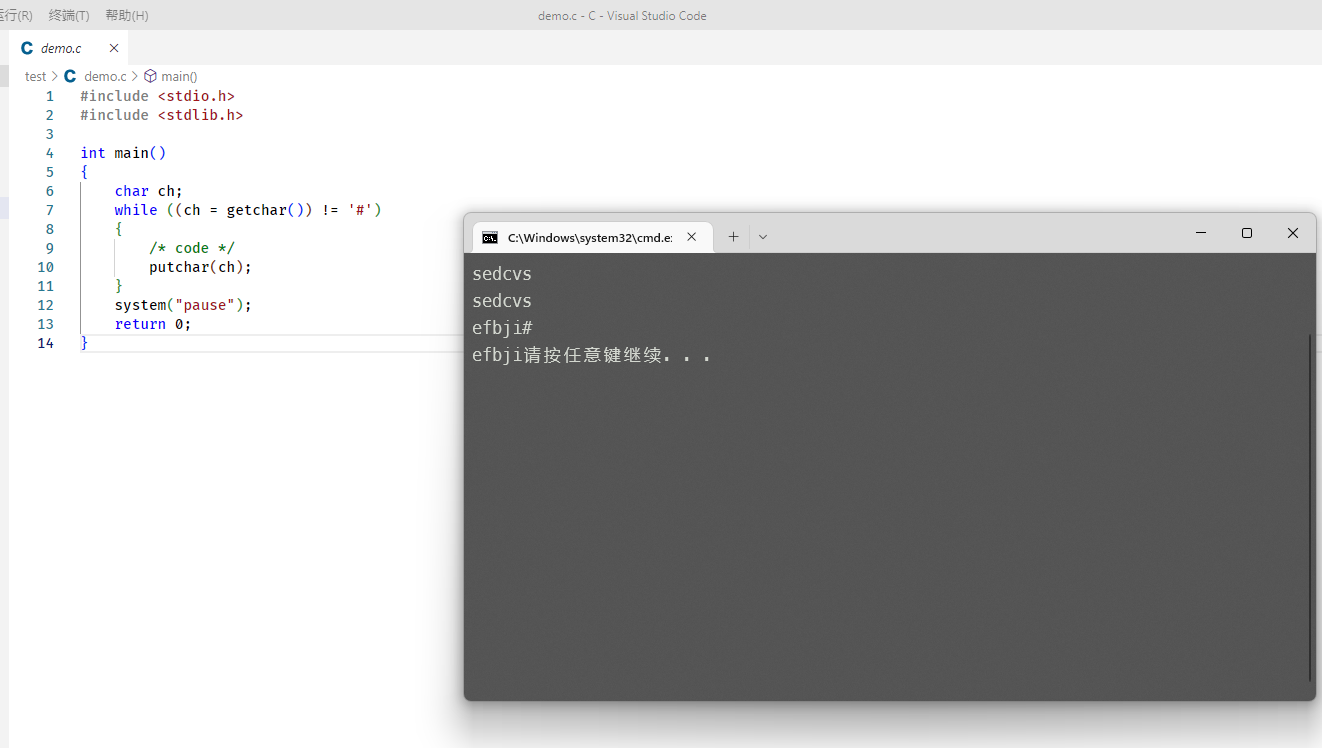
    5. VScode运行时小黑框闪退

    则需要添加代码语句将程序暂停几秒
    C/C++语句:在编码中 return 0;前添加 sysem(pause);或者getchar()
    ![image.png](https://img-blog.csdnimg.cn/img_convert/0d503f2c939b9064a95c74b02eb417f8.png#clientId=u5e733858-5749-4&crop=0&crop=0&crop=1&crop=1&from=paste&height=748&id=uae62deee&margin=[object Object]&name=image.png&originHeight=748&originWidth=1322&originalType=binary&ratio=1&rotation=0&showTitle=false&size=141825&status=done&style=none&taskId=u4eea3347-7cda-4289-9609-2f28b3cd652&title=&width=1322)

  • 相关阅读:
    Qt5开发从入门到精通——第九篇二节( Qt5 文件及磁盘处理—— 读写二进制文件)
    Restful接口设计介绍及项目准备工作
    Android MQTT连接阿里云使用Json解析数据
    【Detectron2】代码库学习-2. 环境搭建和demo
    页面测试包括哪些内容?方法和要点有哪些?
    c#中禁用当鼠标位于控件上方时ToolStripDropDownButton上的蓝色焦点
    rpn代码模块详解【faster rcnn】
    轻松实现PDF文件的在线浏览
    Vue.js+SpringBoot开发生活废品回收系统
    林业数据可视化新篇章:山海鲸软件看板设计心得
  • 原文地址:https://blog.csdn.net/luck_gid/article/details/125894651