-
经纬度PLT文件格式说明
Track File (. pit) 轨迹文件
Line 1 : File type and version information 文件类型和版本信息
Line 2 : Geodetic Datum used for the Lat/Lon positions for each trackpoint 经纬位置基准
Line 3 : "Altitude is in feet" - just a reminder that the altitude is always stored in feet 仅用于提醒
Line 4 : Reserved for future use 无用
Line 5 : multiple fields as below 有多个字段如下:
Field 1 : always zero (0) 就是0
Field 2 : width of track plot line on screen - 1 or 2 are usually the best 轨迹线宽度 1或者2合适
Field 3 : track color (RGB) 颜色
Field 4 : track description (no commas allowed) 描述(不允许出现逗号)
Field 5 : track skip value - reduces number of track points plotted, usually set to 1 (增量 用于少绘制轨迹点)
Field 6 : track type - 0 = normal , 10 = closed polygon , 20 = Alarm Zone 类型
Field 7 : track fill style - 0 =bsSolid; 1 =bsClear: 2 =bsBdiagonal: 3 =bsFdiagonal; 4
=bsCross: 5 =bsDiagCross; 6 =bsHorizontal: 7 =bsVertical: 填充风格
Field 8 : track fill color (RGB) 填充颜色
Line 6 : Number of track points in the track, not used, the number of points is determined when reading the points file 轨迹点数量 无用 具体数量在读文件时在确定
Trackpoint data 轨迹点数据
One line per trackpoint 一行一个轨迹点
each field separated by a comma 字段用逗号分隔
non essential fields need not be entered but cornua separators must still be used (example ,,) defaults will be used for empty fields 非核心字段可以不用填,但逗号必须保留
Field 1 : Latitude - decimal degrees. 纬度 十进制度
Field 2 : Longitude - decimal degrees. 经度 十进制度
Field 3 : Code - 0 if normal, 1 if break in track line 标记:0是正常点 1是线段分隔点
Field 4 : Altitude in feet (-777 if not valid) 高度(英尺单位)
Field 5 : Date - see Date Format below, if blank a preset date will be used 日期 具体格式见下
Field 6 : Date as a string 日期字符串
Field 7 : Time as a string 时间字符串
Note that OziExplorer reads the Date/Time from field 5, the date and time in fields 6 & 7 are ignored. 注意:OziExplorer 只从第5个字段读取日期和时间,6和7字段是忽略无用的。
Example
-27. 350436, 153. 055540, 1, -777, 36169. 6307194, 09-Jan-99, 3:08:14
-27. 348610, 153. 055867, 0, -777, 36169. 6307194, 09-Jan-99, 3:08:14
来一个示例文件说明一下(从奥维中导出的,奥维只识别线段,不识别区域):
- OziExplorer Track Point File Version 2.0
- WGS 84
- Altitude is in Feet
- Reserved 3
- 0,2,255,OziCE Track Log File,1
- 0
- 37.86099175,107.64961984,1,0.000000,25569.000000,0,0
- 34.90295531,106.56510208,0,0.000000,25569.000000,0,0
- 36.67082021,105.42420653,1,0.000000,25569.000000,0,0
- 36.75941577,110.00386168,0,0.000000,25569.000000,0,0
- 35.08482145,110.68451746,0,0.000000,25569.000000,0,0
- 35.80637750,105.22246910,1,0.000000,25569.000000,0,0
- 37.43673815,108.84550808,0,0.000000,25569.000000,0,0
- 35.88097093,112.32115752,0,0.000000,25569.000000,0,0
- 34.23412216,108.16469986,0,0.000000,25569.000000,0,0
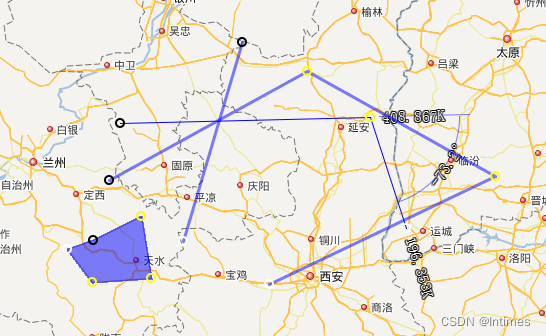
也就是说,只要更改经纬度和标记,就可以达到bln文件的效果。奥维是可以直接加载的。这个解决了matlab 2012a无法将线段输出成kml的问题。
-
相关阅读:
【Linux】Nignx的入门&使用负载均衡&动静分离(前后端项目部署)---超详细
前端面试查漏补缺
国家高新技术企业多少分通过?申请条件是什么?
VIT(Vision Transformer)学习(二)- 基础代码学习
mapstruct更新现有实体忽略null空值
vmware虚拟机启动、使用ubuntu问题
【linux命令讲解大全】092.用let命令进行算术计算的Bash内建工具
一种具有肤质保留功能的磨皮算法
SpringSecurity - 登录用户数据获取
《Java基础知识》Java ArrayList源码分析3
- 原文地址:https://blog.csdn.net/zjjsd195/article/details/125597614
