-
《MATLAB 神经网络43个案例分析》:第42章 并行运算与神经网络——基于CPU/GPU的并行神经网络运算
1. 前言
《MATLAB 神经网络43个案例分析》是MATLAB技术论坛(www.matlabsky.com)策划,由王小川老师主导,2013年北京航空航天大学出版社出版的关于MATLAB为工具的一本MATLAB实例教学书籍,是在《MATLAB神经网络30个案例分析》的基础上修改、补充而成的,秉承着“理论讲解—案例分析—应用扩展”这一特色,帮助读者更加直观、生动地学习神经网络。
《MATLAB神经网络43个案例分析》共有43章,内容涵盖常见的神经网络(BP、RBF、SOM、Hopfield、Elman、LVQ、Kohonen、GRNN、NARX等)以及相关智能算法(SVM、决策树、随机森林、极限学习机等)。同时,部分章节也涉及了常见的优化算法(遗传算法、蚁群算法等)与神经网络的结合问题。此外,《MATLAB神经网络43个案例分析》还介绍了MATLAB R2012b中神经网络工具箱的新增功能与特性,如神经网络并行计算、定制神经网络、神经网络高效编程等。
近年来随着人工智能研究的兴起,神经网络这个相关方向也迎来了又一阵研究热潮,由于其在信号处理领域中的不俗表现,神经网络方法也在不断深入应用到语音和图像方向的各种应用当中,本文结合书中案例,对其进行仿真实现,也算是进行一次重新学习,希望可以温故知新,加强并提升自己对神经网络这一方法在各领域中应用的理解与实践。自己正好在多抓鱼上入手了这本书,下面开始进行仿真示例,主要以介绍各章节中源码应用示例为主,本文主要基于MATLAB2018a(64位,MATLAB2015b未安装并行处理工具箱)平台仿真实现,这是本书第四十二章并行运算与神经网络实例,话不多说,开始!
2. MATLAB 仿真示例一
打开MATLAB,点击“主页”,点击“打开”,找到示例文件

选中chapter42_1.m,点击“打开”chapter42_1.m源码如下:
%%%%%%%%%%%%%%%%%%%%%%%%%%%%%%%%%%%%%%%%%%%%%%%%%%%% %功能:并行运算与神经网络-基于CPU/GPU的并行神经网络运算 %环境:Win7,Matlab2015b %Modi: C.S %时间:2022-06-21 %%%%%%%%%%%%%%%%%%%%%%%%%%%%%%%%%%%%%%%%%%%%%%%%%%%% %% Matlab神经网络43个案例分析 % 并行运算与神经网络-基于CPU/GPU的并行神经网络运算 % by 王小川(@王小川_matlab) % http://www.matlabsky.com % Email:sina363@163.com % http://weibo.com/hgsz2003 % 本代码为示例代码脚本,建议不要整体运行,运行时注意备注提示。 close all; clear all clc tic %% CPU并行 %% 标准单线程的神经网络训练与仿真过程 [x,t]=house_dataset; net1=feedforwardnet(10); net2=train(net1,x,t); y=sim(net2,x); %% 打开MATLAB workers % matlabpool open % 检查worker数量 delete(gcp('nocreate')) poolsize=parpool(2) %% 设置train与sim函数中的参数“Useparallel”为“yes”。 net2=train(net1,x,t,'Useparallel','yes') y=sim(net2,x,'Useparallel','yes'); %% 使用“showResources”选项证实神经网络运算确实在各个worker上运行。 net2=train(net1,x,t,'useParallel','yes','showResources','yes'); y=sim(net2,x,'useParallel','yes','showResources','yes'); %% 将一个数据集进行随机划分,同时保存到不同的文件 CoreNum=2; %设定机器CPU核心数量 if isempty(gcp('nocreate')) parpool(CoreNum); end for i=1:2 x=rand(2,1000); save(['inputs' num2str(i)],'x') t=x(1,:).*x(2,:)+2*(x(1,:)+x(2,:)) ; save(['target' num2str(i)],'t'); clear x t end %% 实现并行运算加载数据集 CoreNum=2; %设定机器CPU核心数量 if isempty(gcp('nocreate')) parpool(CoreNum); end for i=1:2 data=load(['inputs' num2str(i)],'x'); xc{i}=data.x; data=load(['target' num2str(i)],'t'); tc{i}=data.t; clear data end net2=configure(net2,xc{1},tc{1}); net2=train(net2,xc,tc); yc=sim(net2,xc); %% 得到各个worker返回的Composite结果 CoreNum=2; %设定机器CPU核心数量 if isempty(gcp('nocreate')) parpool(CoreNum); end for i=1:2 yi=yc{i}; end %% GPU并行 count=gpuDeviceCount gpu1=gpuDevice(1) gpuCores1=gpu1.MultiprocessorCount*gpu1.SIMDWidth net2=train(net1,xc,tc,'useGPU','yes') y=sim(net2,xc,'useGPU','yes') net1.trainFcn='trainscg'; net2=train(net1,xc,tc,'useGPU','yes','showResources','yes'); y=sim(net2,xc, 'useGPU','yes','showResources','yes'); toc- 1
- 2
- 3
- 4
- 5
- 6
- 7
- 8
- 9
- 10
- 11
- 12
- 13
- 14
- 15
- 16
- 17
- 18
- 19
- 20
- 21
- 22
- 23
- 24
- 25
- 26
- 27
- 28
- 29
- 30
- 31
- 32
- 33
- 34
- 35
- 36
- 37
- 38
- 39
- 40
- 41
- 42
- 43
- 44
- 45
- 46
- 47
- 48
- 49
- 50
- 51
- 52
- 53
- 54
- 55
- 56
- 57
- 58
- 59
- 60
- 61
- 62
- 63
- 64
- 65
- 66
- 67
- 68
- 69
- 70
- 71
- 72
- 73
- 74
- 75
- 76
- 77
- 78
- 79
- 80
- 81
- 82
- 83
- 84
- 85
- 86
- 87
- 88
- 89
- 90
- 91
添加完毕,点击“运行”,开始仿真,输出仿真结果如下:
Parallel pool using the 'local' profile is shutting down. Starting parallel pool (parpool) using the 'local' profile ... connected to 2 workers. poolsize = Pool - 属性: Connected: true NumWorkers: 2 Cluster: local AttachedFiles: {} AutoAddClientPath: true IdleTimeout: 30 minutes (30 minutes remaining) SpmdEnabled: true net2 = Neural Network name: 'Feed-Forward Neural Network' userdata: (your custom info) dimensions: numInputs: 1 numLayers: 2 numOutputs: 1 numInputDelays: 0 numLayerDelays: 0 numFeedbackDelays: 0 numWeightElements: 151 sampleTime: 1 connections: biasConnect: [1; 1] inputConnect: [1; 0] layerConnect: [0 0; 1 0] outputConnect: [0 1] subobjects: input: Equivalent to inputs{1} output: Equivalent to outputs{2} inputs: {1x1 cell array of 1 input} layers: {2x1 cell array of 2 layers} outputs: {1x2 cell array of 1 output} biases: {2x1 cell array of 2 biases} inputWeights: {2x1 cell array of 1 weight} layerWeights: {2x2 cell array of 1 weight} functions: adaptFcn: 'adaptwb' adaptParam: (none) derivFcn: 'defaultderiv' divideFcn: 'dividerand' divideParam: .trainRatio, .valRatio, .testRatio divideMode: 'sample' initFcn: 'initlay' performFcn: 'mse' performParam: .regularization, .normalization plotFcns: {'plotperform', plottrainstate, ploterrhist, plotregression} plotParams: {1x4 cell array of 4 params} trainFcn: 'trainlm' trainParam: .showWindow, .showCommandLine, .show, .epochs, .time, .goal, .min_grad, .max_fail, .mu, .mu_dec, .mu_inc, .mu_max weight and bias values: IW: {2x1 cell} containing 1 input weight matrix LW: {2x2 cell} containing 1 layer weight matrix b: {2x1 cell} containing 2 bias vectors methods: adapt: Learn while in continuous use configure: Configure inputs & outputs gensim: Generate Simulink model init: Initialize weights & biases perform: Calculate performance sim: Evaluate network outputs given inputs train: Train network with examples view: View diagram unconfigure: Unconfigure inputs & outputs Computing Resources: Parallel Workers: Worker 1 on 123-PC, MEX on PCWIN64 Worker 2 on 123-PC, MEX on PCWIN64 Computing Resources: Parallel Workers: Worker 1 on 123-PC, MEX on PCWIN64 Worker 2 on 123-PC, MEX on PCWIN64 count = 2 gpu1 = CUDADevice - 属性: Name: 'GeForce GTX 960' Index: 1 ComputeCapability: '5.2' SupportsDouble: 1 DriverVersion: 10.2000 ToolkitVersion: 9 MaxThreadsPerBlock: 1024 MaxShmemPerBlock: 49152 MaxThreadBlockSize: [1024 1024 64] MaxGridSize: [2.1475e+09 65535 65535] SIMDWidth: 32 TotalMemory: 4.2950e+09 AvailableMemory: 3.2666e+09 MultiprocessorCount: 8 ClockRateKHz: 1266000 ComputeMode: 'Default' GPUOverlapsTransfers: 1 KernelExecutionTimeout: 1 CanMapHostMemory: 1 DeviceSupported: 1 DeviceSelected: 1 gpuCores1 = 256 NOTICE: Jacobian training not supported on GPU. Training function set to TRAINSCG. net2 = Neural Network name: 'Feed-Forward Neural Network' userdata: (your custom info) dimensions: numInputs: 1 numLayers: 2 numOutputs: 1 numInputDelays: 0 numLayerDelays: 0 numFeedbackDelays: 0 numWeightElements: 41 sampleTime: 1 connections: biasConnect: [1; 1] inputConnect: [1; 0] layerConnect: [0 0; 1 0] outputConnect: [0 1] subobjects: input: Equivalent to inputs{1} output: Equivalent to outputs{2} inputs: {1x1 cell array of 1 input} layers: {2x1 cell array of 2 layers} outputs: {1x2 cell array of 1 output} biases: {2x1 cell array of 2 biases} inputWeights: {2x1 cell array of 1 weight} layerWeights: {2x2 cell array of 1 weight} functions: adaptFcn: 'adaptwb' adaptParam: (none) derivFcn: 'defaultderiv' divideFcn: 'dividerand' divideParam: .trainRatio, .valRatio, .testRatio divideMode: 'sample' initFcn: 'initlay' performFcn: 'mse' performParam: .regularization, .normalization plotFcns: {'plotperform', plottrainstate, ploterrhist, plotregression} plotParams: {1x4 cell array of 4 params} trainFcn: 'trainscg' trainParam: .showWindow, .showCommandLine, .show, .epochs, .time, .goal, .min_grad, .max_fail, .sigma, .lambda weight and bias values: IW: {2x1 cell} containing 1 input weight matrix LW: {2x2 cell} containing 1 layer weight matrix b: {2x1 cell} containing 2 bias vectors methods: adapt: Learn while in continuous use configure: Configure inputs & outputs gensim: Generate Simulink model init: Initialize weights & biases perform: Calculate performance sim: Evaluate network outputs given inputs train: Train network with examples view: View diagram unconfigure: Unconfigure inputs & outputs y = 1×2 cell 数组 {1×1000 double} {1×1000 double} Computing Resources: GPU device #1, GeForce GTX 960 Computing Resources: GPU device #1, GeForce GTX 960 时间已过 70.246120 秒。- 1
- 2
- 3
- 4
- 5
- 6
- 7
- 8
- 9
- 10
- 11
- 12
- 13
- 14
- 15
- 16
- 17
- 18
- 19
- 20
- 21
- 22
- 23
- 24
- 25
- 26
- 27
- 28
- 29
- 30
- 31
- 32
- 33
- 34
- 35
- 36
- 37
- 38
- 39
- 40
- 41
- 42
- 43
- 44
- 45
- 46
- 47
- 48
- 49
- 50
- 51
- 52
- 53
- 54
- 55
- 56
- 57
- 58
- 59
- 60
- 61
- 62
- 63
- 64
- 65
- 66
- 67
- 68
- 69
- 70
- 71
- 72
- 73
- 74
- 75
- 76
- 77
- 78
- 79
- 80
- 81
- 82
- 83
- 84
- 85
- 86
- 87
- 88
- 89
- 90
- 91
- 92
- 93
- 94
- 95
- 96
- 97
- 98
- 99
- 100
- 101
- 102
- 103
- 104
- 105
- 106
- 107
- 108
- 109
- 110
- 111
- 112
- 113
- 114
- 115
- 116
- 117
- 118
- 119
- 120
- 121
- 122
- 123
- 124
- 125
- 126
- 127
- 128
- 129
- 130
- 131
- 132
- 133
- 134
- 135
- 136
- 137
- 138
- 139
- 140
- 141
- 142
- 143
- 144
- 145
- 146
- 147
- 148
- 149
- 150
- 151
- 152
- 153
- 154
- 155
- 156
- 157
- 158
- 159
- 160
- 161
- 162
- 163
- 164
- 165
- 166
- 167
- 168
- 169
- 170
- 171
- 172
- 173
- 174
- 175
- 176
- 177
- 178
- 179
- 180
- 181
- 182
- 183
- 184
- 185
- 186
- 187
- 188
- 189
- 190
- 191
- 192
- 193
- 194
- 195
- 196
- 197
- 198
- 199
- 200
- 201
- 202
- 203
- 204
- 205
- 206
- 207
- 208
- 209
- 210
- 211
- 212
- 213
- 214
- 215
- 216
- 217
- 218
- 219
- 220
- 221
- 222
- 223
- 224
- 225
- 226
- 227
- 228
- 229
- 230
- 231
- 232

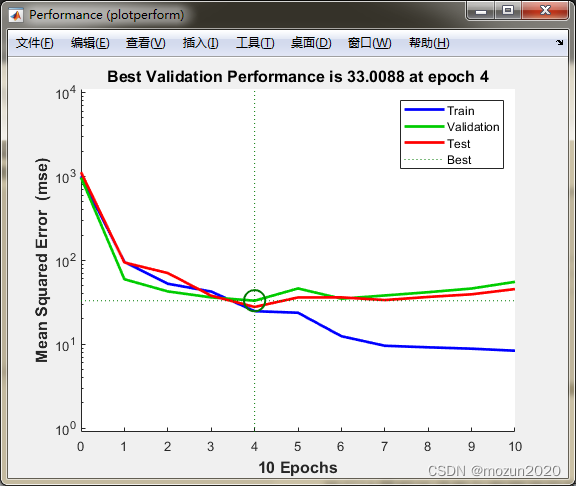
依次点击Plots中的Performance,Training State,Error Histogram,Regression可得到如下图示:


3. MATLAB 仿真示例二
选中并打开MATLAB当前文件夹视图中chapter42_2.m,

chapter42_2.m源码如下:%%%%%%%%%%%%%%%%%%%%%%%%%%%%%%%%%%%%%%%%%%%%%%%%%%%% %功能:并行运算与神经网络-基于CPU/GPU的并行神经网络运算 %环境:Win7,Matlab2015b %Modi: C.S %时间:2022-06-21 %%%%%%%%%%%%%%%%%%%%%%%%%%%%%%%%%%%%%%%%%%%%%%%%%%%% %% Matlab神经网络43个案例分析 % 并行运算与神经网络-基于CPU/GPU的并行神经网络运算 % by 王小川(@王小川_matlab) % http://www.matlabsky.com % Email:sina363@163.com % http://weibo.com/hgsz2003 %% 清空环境变量 clear all clc warning off tic %% 打开matlabpool % matlabpool open delete(gcp('nocreate')) poolsize=parpool(2) %% 加载数据 load bodyfat_dataset inputs = bodyfatInputs; targets = bodyfatTargets; %% 创建一个拟合神经网络 hiddenLayerSize = 10; % 隐藏层神经元个数为10 net = fitnet(hiddenLayerSize); % 创建网络 %% 指定输入与输出处理函数(本操作并非必须) net.inputs{1}.processFcns = {'removeconstantrows','mapminmax'}; net.outputs{2}.processFcns = {'removeconstantrows','mapminmax'}; %% 设置神经网络的训练、验证、测试数据集划分 net.divideFcn = 'dividerand'; % 随机划分数据集 net.divideMode = 'sample'; % 划分单位为每一个数据 net.divideParam.trainRatio = 70/100; %训练集比例 net.divideParam.valRatio = 15/100; %验证集比例 net.divideParam.testRatio = 15/100; %测试集比例 %% 设置网络的训练函数 net.trainFcn = 'trainlm'; % Levenberg-Marquardt %% 设置网络的误差函数 net.performFcn = 'mse'; % Mean squared error %% 设置网络可视化函数 net.plotFcns = {'plotperform','plottrainstate','ploterrhist', ... 'plotregression', 'plotfit'}; %% 单线程网络训练 tic [net1,tr1] = train(net,inputs,targets); t1=toc; disp(['单线程神经网络的训练时间为',num2str(t1),'秒']); %% 并行网络训练 tic [net2,tr2] = train(net,inputs,targets,'useParallel','yes','showResources','yes'); t2=toc; disp(['并行神经网络的训练时间为',num2str(t2),'秒']); %% 网络效果验证 outputs1 = sim(net1,inputs); outputs2 = sim(net2,inputs); errors1 = gsubtract(targets,outputs1); errors2 = gsubtract(targets,outputs2); performance1 = perform(net1,targets,outputs1); performance2 = perform(net2,targets,outputs2); %% 神经网络可视化 figure, plotperform(tr1); figure, plotperform(tr2); figure, plottrainstate(tr1); figure, plottrainstate(tr2); figure,plotregression(targets,outputs1); figure,plotregression(targets,outputs2); figure,ploterrhist(errors1); figure,ploterrhist(errors2); toc % matlabpool close- 1
- 2
- 3
- 4
- 5
- 6
- 7
- 8
- 9
- 10
- 11
- 12
- 13
- 14
- 15
- 16
- 17
- 18
- 19
- 20
- 21
- 22
- 23
- 24
- 25
- 26
- 27
- 28
- 29
- 30
- 31
- 32
- 33
- 34
- 35
- 36
- 37
- 38
- 39
- 40
- 41
- 42
- 43
- 44
- 45
- 46
- 47
- 48
- 49
- 50
- 51
- 52
- 53
- 54
- 55
- 56
- 57
- 58
- 59
- 60
- 61
- 62
- 63
- 64
- 65
- 66
- 67
- 68
- 69
- 70
- 71
- 72
- 73
- 74
- 75
- 76
- 77
- 78
- 79
- 80
- 81
- 82
- 83
- 84
- 85
- 86
- 87
- 88
点击“运行”,开始仿真,输出仿真结果如下:
Parallel pool using the 'local' profile is shutting down. Starting parallel pool (parpool) using the 'local' profile ... connected to 2 workers. poolsize = Pool - 属性: Connected: true NumWorkers: 2 Cluster: local AttachedFiles: {} AutoAddClientPath: true IdleTimeout: 30 minutes (30 minutes remaining) SpmdEnabled: true 单线程神经网络的训练时间为1.9707秒 Computing Resources: Parallel Workers: Worker 1 on 123-PC, MEX on PCWIN64 Worker 2 on 123-PC, MEX on PCWIN64 并行神经网络的训练时间为4.4909秒 performance1 = 26.4750 performance2 = 50.1747 时间已过 12.766995 秒。- 1
- 2
- 3
- 4
- 5
- 6
- 7
- 8
- 9
- 10
- 11
- 12
- 13
- 14
- 15
- 16
- 17
- 18
- 19
- 20
- 21
- 22
- 23
- 24
- 25
- 26
- 27
- 28
- 29
- 30
- 31
- 32
- 33
- 34
- 35



4. 小结
并行计算相关函数与数据调用在MATLAB2015版本之后都有升级,所以需要对源码进行调整再进行仿真,本文示例均根据机器情况与MATLAB版本进行适配。对本章内容感兴趣或者想充分学习了解的,建议去研习书中第四十二章节的内容。后期会对其中一些知识点在自己理解的基础上进行补充,欢迎大家一起学习交流。
-
相关阅读:
笔者更加愿意将产业互联网看成是一个比消费互联网要丰富得多的概念
10大白帽黑客专用的 Linux 操作系统
枚举类中有2个值,如何根据值1取值2,根据值2取值1
视频汇聚/视频云存储/视频监控管理平台EasyCVR分发rtsp流起播慢优化步骤详解
qml Combobox用法介绍与代码演示
SpringBoot3分库分表
【亲测有效】申请wx.getLocation接口多次审核不通过解决方案,申请原因范文
【保姆式通关宝典】使用Kraft快速搭建Kafka集群(含服务鉴权)
Redis+整合SpringDataRedis
为什么前端要学 JavaScript ?JS都有哪些逆天的功能?
- 原文地址:https://blog.csdn.net/sinat_34897952/article/details/125360671
