-
卷积神经网络——vgg16网络及其python实现
1、介绍
VGG-16网络包括13个卷积层和3个全连接层,网络结构较LeNet-5等网络变得十分复杂,但同时也有不错的效果。VGG16有强大的拟合能力在当时取得了非常的效果,但同时VGG也有部分不足:
1、巨大参数量导致训练时间过长,调参难度较大;
2、模型所需内存容量大,VGG的权值文件很大,用到实际应用会比较困难。2、结构原理
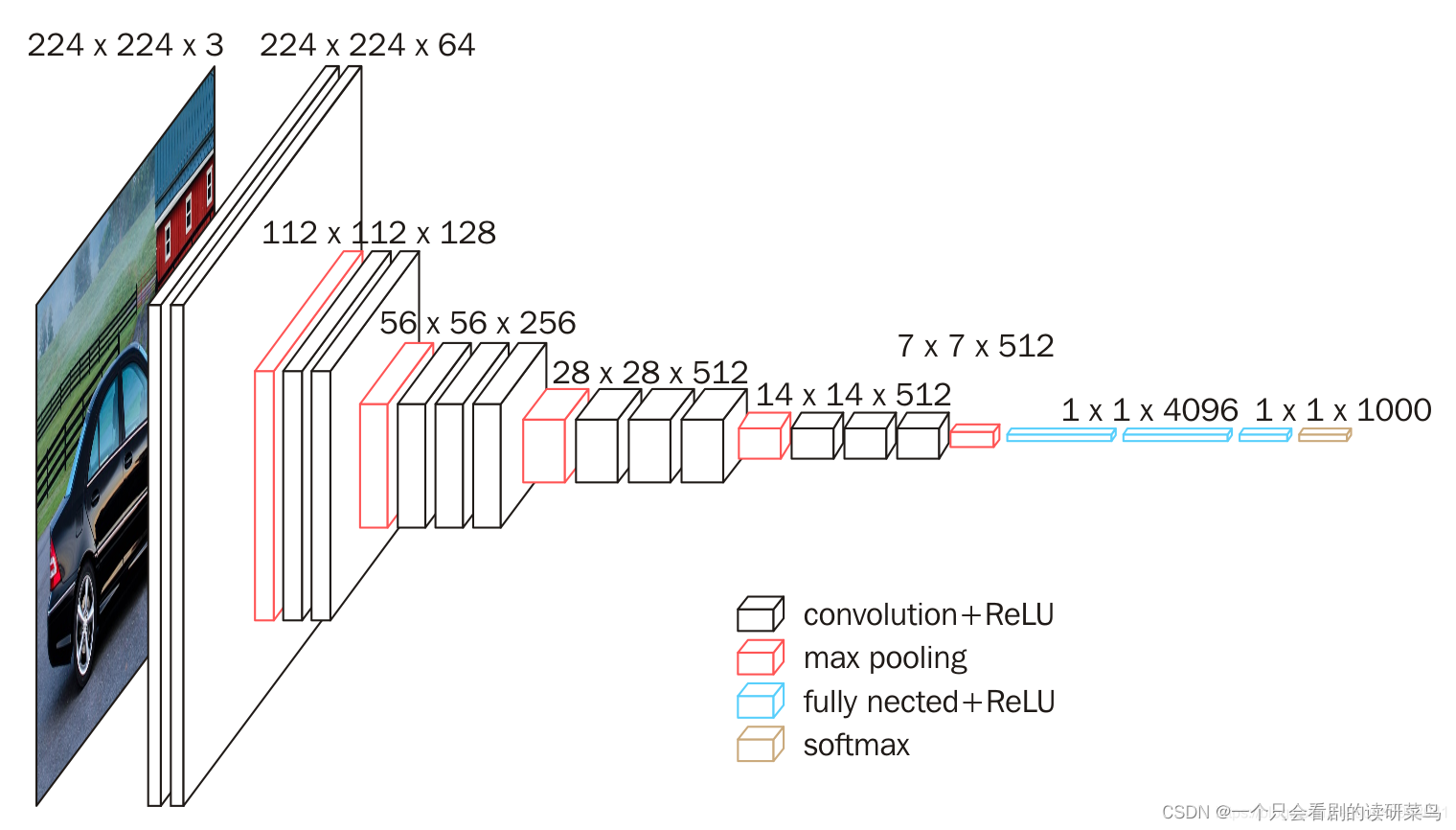
这是经典的vgg网络,输入图片大小为224*224。
下面这为官方给出的几种VGG结构图。
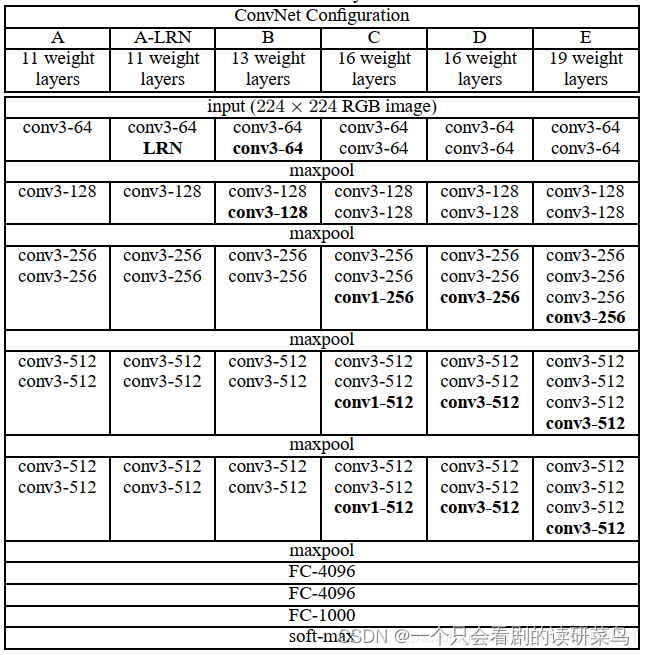
现在多用的为D模型。
简单介绍下过程,输入224*224大小的图片,然后用两次64个3*3的卷积核进行全采集,也就是补零采集,保证特征不丢失,得到64*224*224的特征;池化层得到64*112*112;再利用128个3*3的卷积核进行特征采集两次,得到特征112*112*128;池化得到56*56*128大小特征.........反复这样操作,最后卷积完得到7*7*512的特征,然后利用全连接层进行展开,最后得到1000个特征,随后进行概率分类操作。
3、python实现
选用的数据集为fashion数据集,具体请另外了解。数据可直接在库中导入,本文用class网络编写神经网络程序。
- class VGG16(Model):
- def __init__(self):
- super(VGG16, self).__init__()
- self.c1 = Conv2D(filters=64, kernel_size=(3, 3), padding='same')
- self.b1 = BatchNormalization()
- self.a1 = Activation('relu')
- self.c2 = Conv2D(filters=64, kernel_size=(3, 3), padding='same', )
- self.b2 = BatchNormalization()
- self.a2 = Activation('relu')
- self.p1 = MaxPool2D(pool_size=(2, 2), strides=2, padding='same')
- self.d1 = Dropout(0.2)
- self.c3 = Conv2D(filters=128, kernel_size=(3, 3), padding='same')
- self.b3 = BatchNormalization()
- self.a3 = Activation('relu')
- self.c4 = Conv2D(filters=128, kernel_size=(3, 3), padding='same')
- self.b4 = BatchNormalization()
- self.a4 = Activation('relu')
- self.p2 = MaxPool2D(pool_size=(2, 2), strides=2, padding='same')
- self.d2 = Dropout(0.2)
- self.c5 = Conv2D(filters=256, kernel_size=(3, 3), padding='same')
- self.b5 = BatchNormalization()
- self.a5 = Activation('relu')
- self.c6 = Conv2D(filters=256, kernel_size=(3, 3), padding='same')
- self.b6 = BatchNormalization()
- self.a6 = Activation('relu')
- self.c7 = Conv2D(filters=256, kernel_size=(3, 3), padding='same')
- self.b7 = BatchNormalization()
- self.a7 = Activation('relu')
- self.p3 = MaxPool2D(pool_size=(2, 2), strides=2, padding='same')
- self.d3 = Dropout(0.2)
- self.c8 = Conv2D(filters=512, kernel_size=(3, 3), padding='same')
- self.b8 = BatchNormalization()
- self.a8 = Activation('relu')
- self.c9 = Conv2D(filters=512, kernel_size=(3, 3), padding='same')
- self.b9 = BatchNormalization()
- self.a9 = Activation('relu')
- self.c10 = Conv2D(filters=512, kernel_size=(3, 3), padding='same')
- self.b10 = BatchNormalization()
- self.a10 = Activation('relu')
- self.p4 = MaxPool2D(pool_size=(2, 2), strides=2, padding='same')
- self.d4 = Dropout(0.2)
- self.c11 = Conv2D(filters=512, kernel_size=(3, 3), padding='same')
- self.b11 = BatchNormalization()
- self.a11 = Activation('relu')
- self.c12 = Conv2D(filters=512, kernel_size=(3, 3), padding='same')
- self.b12 = BatchNormalization()
- self.a12 = Activation('relu')
- self.c13 = Conv2D(filters=512, kernel_size=(3, 3), padding='same')
- self.b13 = BatchNormalization()
- self.a13 = Activation('relu')
- self.p5 = MaxPool2D(pool_size=(2, 2), strides=2, padding='same')
- self.d5 = Dropout(0.2)
- self.flatten = Flatten()
- self.f1 = Dense(512, activation='relu')
- self.d6 = Dropout(0.2)
- self.f2 = Dense(512, activation='relu')
- self.d7 = Dropout(0.2)
- self.f3 = Dense(10, activation='softmax')
- def call(self, x):
- x = self.c1(x)
- x = self.b1(x)
- x = self.a1(x)
- x = self.c2(x)
- x = self.b2(x)
- x = self.a2(x)
- x = self.p1(x)
- x = self.d1(x)
- x = self.c3(x)
- x = self.b3(x)
- x = self.a3(x)
- x = self.c4(x)
- x = self.b4(x)
- x = self.a4(x)
- x = self.p2(x)
- x = self.d2(x)
- x = self.c5(x)
- x = self.b5(x)
- x = self.a5(x)
- x = self.c6(x)
- x = self.b6(x)
- x = self.a6(x)
- x = self.c7(x)
- x = self.b7(x)
- x = self.a7(x)
- x = self.p3(x)
- x = self.d3(x)
- x = self.c8(x)
- x = self.b8(x)
- x = self.a8(x)
- x = self.c9(x)
- x = self.b9(x)
- x = self.a9(x)
- x = self.c10(x)
- x = self.b10(x)
- x = self.a10(x)
- x = self.p4(x)
- x = self.d4(x)
- x = self.c11(x)
- x = self.b11(x)
- x = self.a11(x)
- x = self.c12(x)
- x = self.b12(x)
- x = self.a12(x)
- x = self.c13(x)
- x = self.b13(x)
- x = self.a13(x)
- x = self.p5(x)
- x = self.d5(x)
- x = self.flatten(x)
- x = self.f1(x)
- x = self.d6(x)
- x = self.f2(x)
- x = self.d7(x)
- y = self.f3(x)
- return y
- model = VGG16()
读取数据
- import tensorflow as tf
- import os
- import numpy as np
- from matplotlib import pyplot as plt
- from tensorflow.keras.layers import Conv2D, BatchNormalization, Activation, MaxPool2D, Dropout, Flatten, Dense
- from tensorflow.keras import Model
- np.set_printoptions(threshold=np.inf)
- fashion = tf.keras.datasets.fashion_mnist
- (x_train, y_train), (x_test, y_test) = fashion.load_data()
- x_train, x_test = x_train / 255.0, x_test / 255.0
- x_train = x_train.reshape(x_train.shape[0], 28, 28, 1)
- x_test = x_test.reshape(x_test.shape[0], 28, 28, 1)
迭代训练
- model.compile(optimizer='adam',
- loss=tf.keras.losses.SparseCategoricalCrossentropy(from_logits=False),
- metrics=['sparse_categorical_accuracy'])
- cp_callback = tf.keras.callbacks.ModelCheckpoint(filepath=checkpoint_save_path,
- save_weights_only=True,
- save_best_only=True)
- history = model.fit(x_train, y_train, batch_size=64, epochs=20, validation_data=(x_test, y_test), validation_freq=1,
- callbacks=[cp_callback])
绘制结果图
- acc = history.history['sparse_categorical_accuracy']
- val_acc = history.history['val_sparse_categorical_accuracy']
- loss = history.history['loss']
- val_loss = history.history['val_loss']
- plt.subplot(1, 2, 1)
- plt.plot(acc, label='Training Accuracy')
- plt.plot(val_acc, label='Validation Accuracy')
- plt.title('Training and Validation Accuracy')
- plt.legend()
- plt.subplot(1, 2, 2)
- plt.plot(loss, label='Training Loss')
- plt.plot(val_loss, label='Validation Loss')
- plt.title('Training and Validation Loss')
- plt.legend()
- plt.show()
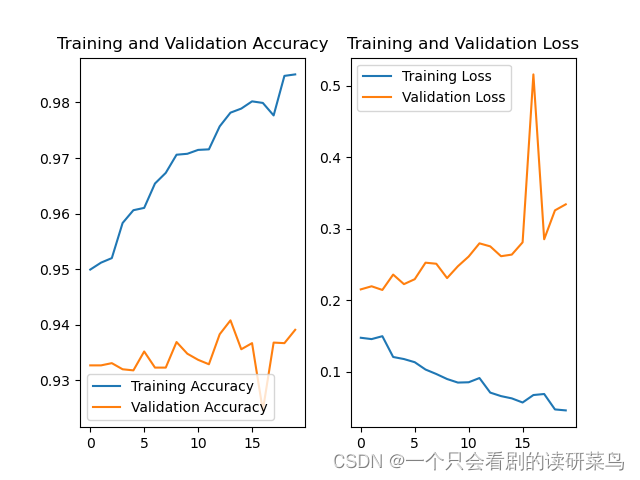
虽然不是很稳定,但总的来说准确率还可以。
-
相关阅读:
C++知识点总结(6):高精度乘法真题代码
获取1688店铺所有商品、店铺列表api
html页面直接使用elementui Plus时间线 + vue3
Java数字处理类--数字格式化
鸿蒙开发接口媒体:【@ohos.multimedia.audio (音频管理)】
Vue组件路由
基于国产芯片RK1126的智能视频分析网关
尿检设备“智能之眼”:维视智造推出MV-MC 系列医疗专用相机
桥接模式
Log4j “史诗级 ”漏洞背后:项目只有三位赞助者;RISC-V 基金会加速设计 RISC-V GPU;Linux 5.16 将延期发布 | 开源日报
- 原文地址:https://blog.csdn.net/abc1234abcdefg/article/details/125495965
