-
【yolov4】基于yolov4深度学习网络目标检测MATLAB仿真
YOLO发展至YOLOv3时,基本上这个系列都达到了一个高潮阶段,很多实际任务中,都会见到YOLOv3的身上,而对于较为简单和场景,比如没有太密集的目标和极端小的目标,多数时候仅用YOLOv2即可。除了YOLO系列,也还有其他很多优秀的工作,比如结构同样简洁的RetinaNet和SSD。后者SSD其实也会常在实际任务中见到,只不过就性能而言,要略差于YOLOv3,当然,这也是因为SSD并没有去做后续的升级,反倒很多新工作如RFB-Net、DSSD等工作都将其作为baseline。论性能,RetinaNet当然是不输于YOLOv3的,只是,相较于YOLOv3,RetinaNet的一个较为致命的问题就是:速度太慢。而这一个问题的主要原因就是RetinaNet使用较大的输出图像尺寸和较重的检测头。
yolov4的创新点
1.输入端的创新点:训练时对输入端的改进,主要包括Mosaic数据增强、cmBN、SAT自对抗训练2.BackBone主干网络:各种方法技巧结合起来,包括:CSPDarknet53、Mish激活函数、Dropblock
3.Neck:目标检测网络在BackBone和最后的输出层之间往往会插入一些层,比如Yolov4中的SPP模块、FPN+PAN结构
4.Head:输出层的锚框机制和Yolov3相同,主要改进的是训练时的回归框位置损失函数CIOU_Loss,以及预测框筛选的nms变为DIOU_nms
通俗的讲,就是说这个YOLO-v4算法是在原有YOLO目标检测架构的基础上,采用了近些年CNN领域中最优秀的优化策略,从数据处理、主干网络、网络训练、激活函数、损失函数等各个方面都有着不同程度的优化,虽没有理论上的创新,但是会受到许许多多的工程师的欢迎,各种优化算法的尝试。文章如同于目标检测的trick综述,效果达到了实现FPS与Precision平衡的目标检测 new baseline。
yolov4 网络结构的采用的算法,其中保留了yolov3的head部分,修改了主干网络为CSPDarknet53,同时采用了SPP(空间金字塔池化)的思想来扩大感受野,PANet作为neck部分。

yolov4在技术处理的思维导图:

1.MATLAB源码
- clc;
- clear;
- close all;
- warning off;
- addpath(genpath(pwd));
- %****************************************************************************
- %更多关于matlab和fpga的搜索“fpga和matlab”的CSDN博客:
- %matlab/FPGA项目开发合作
- %https://blog.csdn.net/ccsss22?type=blog
- %****************************************************************************
- %% Download Pretrained Network
- % Set the modelName from the above ones to download that pretrained model.
- modelName = 'YOLOv4-coco';
- model = helper.downloadPretrainedYOLOv4(modelName);
- net = model.net;
- %% Load Data
- % Unzip the vehicle images and load the vehicle ground truth data.
- unzip vehicleDatasetImages.zip
- data = load('vehicleDatasetGroundTruth.mat');
- vehicleDataset = data.vehicleDataset;
- % Add the full path to the local vehicle data folder.
- vehicleDataset.imageFilename = fullfile(pwd, vehicleDataset.imageFilename);
- rng('default')
- shuffledIndices = randperm(height(vehicleDataset));
- idx = floor(0.6 * length(shuffledIndices));
- trainingDataTbl = vehicleDataset(shuffledIndices(1:idx), :);
- testDataTbl = vehicleDataset(shuffledIndices(idx+1:end), :);
- % Create an image datastore for loading the images.
- imdsTrain = imageDatastore(trainingDataTbl.imageFilename);
- imdsTest = imageDatastore(testDataTbl.imageFilename);
- % Create a datastore for the ground truth bounding boxes.
- bldsTrain = boxLabelDatastore(trainingDataTbl(:, 2:end));
- bldsTest = boxLabelDatastore(testDataTbl(:, 2:end));
- % Combine the image and box label datastores.
- trainingData = combine(imdsTrain, bldsTrain);
- testData = combine(imdsTest, bldsTest);
- helper.validateInputData(trainingData);
- helper.validateInputData(testData);
- %% Data Augmentation
- augmentedTrainingData = transform(trainingData, @helper.augmentData);
- augmentedData = cell(4,1);
- for k = 1:4
- data = read(augmentedTrainingData);
- augmentedData{k} = insertShape(data{1,1}, 'Rectangle', data{1,2});
- reset(augmentedTrainingData);
- end
- figure
- montage(augmentedData, 'BorderSize', 10)
- %% Preprocess Training Data
- % Specify the network input size.
- networkInputSize = net.Layers(1).InputSize;
- preprocessedTrainingData = transform(augmentedTrainingData, @(data)helper.preprocessData(data, networkInputSize));
- % Read the preprocessed training data.
- data = read(preprocessedTrainingData);
- % Display the image with the bounding boxes.
- I = data{1,1};
- bbox = data{1,2};
- annotatedImage = insertShape(I, 'Rectangle', bbox);
- annotatedImage = imresize(annotatedImage,2);
- figure
- imshow(annotatedImage)
- % Reset the datastore.
- reset(preprocessedTrainingData);
- %% Modify Pretrained YOLO v4 Network
- rng(0)
- trainingDataForEstimation = transform(trainingData, @(data)helper.preprocessData(data, networkInputSize));
- numAnchors = 9;
- [anchorBoxes, meanIoU] = estimateAnchorBoxes(trainingDataForEstimation, numAnchors);
- % Specify the classNames to be used in the training.
- classNames = {'vehicle'};
- [lgraph, networkOutputs, anchorBoxes, anchorBoxMasks] = configureYOLOv4(net, classNames, anchorBoxes, modelName);
- %% Specify Training Options
- numEpochs = 90;
- miniBatchSize = 4;
- learningRate = 0.001;
- warmupPeriod = 1000;
- l2Regularization = 0.001;
- penaltyThreshold = 0.5;
- velocity = [];
- %% Train Model
- if canUseParallelPool
- dispatchInBackground = true;
- else
- dispatchInBackground = false;
- end
- mbqTrain = minibatchqueue(preprocessedTrainingData, 2,...
- "MiniBatchSize", miniBatchSize,...
- "MiniBatchFcn", @(images, boxes, labels) helper.createBatchData(images, boxes, labels, classNames), ...
- "MiniBatchFormat", ["SSCB", ""],...
- "DispatchInBackground", dispatchInBackground,...
- "OutputCast", ["", "double"]);
- % Convert layer graph to dlnetwork.
- net = dlnetwork(lgraph);
- % Create subplots for the learning rate and mini-batch loss.
- fig = figure;
- [lossPlotter, learningRatePlotter] = helper.configureTrainingProgressPlotter(fig);
- iteration = 0;
- % Custom training loop.
- for epoch = 1:numEpochs
- reset(mbqTrain);
- shuffle(mbqTrain);
- while(hasdata(mbqTrain))
- iteration = iteration + 1;
- [XTrain, YTrain] = next(mbqTrain);
- % Evaluate the model gradients and loss using dlfeval and the
- % modelGradients function.
- [gradients, state, lossInfo] = dlfeval(@modelGradients, net, XTrain, YTrain, anchorBoxes, anchorBoxMasks, penaltyThreshold, networkOutputs);
- % Apply L2 regularization.
- gradients = dlupdate(@(g,w) g + l2Regularization*w, gradients, net.Learnables);
- % Determine the current learning rate value.
- currentLR = helper.piecewiseLearningRateWithWarmup(iteration, epoch, learningRate, warmupPeriod, numEpochs);
- % Update the network learnable parameters using the SGDM optimizer.
- [net, velocity] = sgdmupdate(net, gradients, velocity, currentLR);
- % Update the state parameters of dlnetwork.
- net.State = state;
- % Display progress.
- if mod(iteration,10)==1
- helper.displayLossInfo(epoch, iteration, currentLR, lossInfo);
- end
- % Update training plot with new points.
- helper.updatePlots(lossPlotter, learningRatePlotter, iteration, currentLR, lossInfo.totalLoss);
- end
- end
- % Save the trained model with the anchors.
- anchors.anchorBoxes = anchorBoxes;
- anchors.anchorBoxMasks = anchorBoxMasks;
- save('yolov4_trained', 'net', 'anchors');
- %% Evaluate Model
- confidenceThreshold = 0.5;
- overlapThreshold = 0.5;
- % Create a table to hold the bounding boxes, scores, and labels returned by
- % the detector.
- numImages = size(testDataTbl, 1);
- results = table('Size', [0 3], ...
- 'VariableTypes', {'cell','cell','cell'}, ...
- 'VariableNames', {'Boxes','Scores','Labels'});
- % Run detector on images in the test set and collect results.
- reset(testData)
- while hasdata(testData)
- % Read the datastore and get the image.
- data = read(testData);
- image = data{1};
- % Run the detector.
- executionEnvironment = 'auto';
- [bboxes, scores, labels] = detectYOLOv4(net, image, anchors, classNames, executionEnvironment);
- % Collect the results.
- tbl = table({bboxes}, {scores}, {labels}, 'VariableNames', {'Boxes','Scores','Labels'});
- results = [results; tbl];
- end
- % Evaluate the object detector using Average Precision metric.
- [ap, recall, precision] = evaluateDetectionPrecision(results, testData);
- % The precision-recall (PR) curve shows how precise a detector is at varying
- % levels of recall. Ideally, the precision is 1 at all recall levels.
- % Plot precision-recall curve.
- figure
- plot(recall, precision)
- xlabel('Recall')
- ylabel('Precision')
- grid on
- title(sprintf('Average Precision = %.2f', ap))
- %% Detect Objects Using Trained YOLO v4
- reset(testData)
- data = read(testData);
- % Get the image.
- I = data{1};
- % Run the detector.
- executionEnvironment = 'auto';
- [bboxes, scores, labels] = detectYOLOv4(net, I, anchors, classNames, executionEnvironment);
- % Display the detections on image.
- if ~isempty(scores)
- I = insertObjectAnnotation(I, 'rectangle', bboxes, scores);
- end
- figure
- imshow(I)
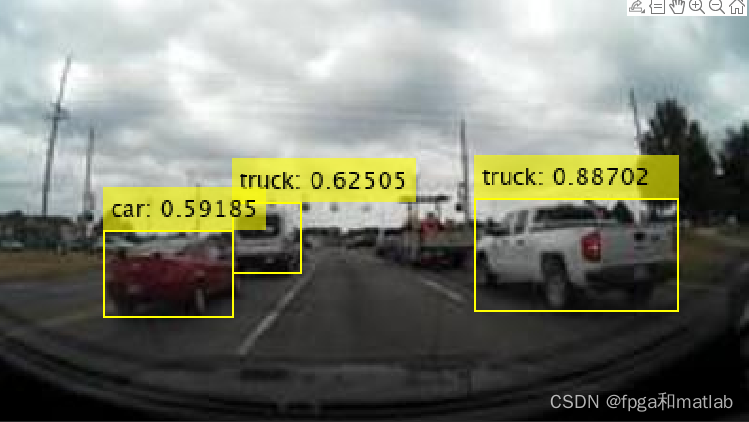
2.yolov4仿真效果


资源
-
相关阅读:
Springboot人体健康检测微信小程序毕业设计-附源码012142
青年领袖分论坛精彩回顾 | 第二届始祖数字化可持续发展峰会
小程序picker-view 初始值设置的坑
用anacnda创建虚拟环境用不用指定python版本
深度分析AMQP以及在rabbitMQ中的应用
数据库和缓存如何保持一致性
【打卡】【Linux的设备驱动管理之内核对象】21天学习挑战赛—RK3399平台开发入门到精通-Day15
微信小程序学习(二):常用样式和组件
QT中QIcon图标不显示的问题
DHTMLX JS Gantt Library 7.1.13
- 原文地址:https://blog.csdn.net/ccsss22/article/details/125464984