-
docker 开启 tcp 端口
默认安装的Docker服务是不支持远程连接的,开启TCP端口后可以进行远程连接Docker
1、操作系统环境
[root@localhost home]# uname -r
3.10.0-1160.66.1.el7.x86_642、编辑 docker 服务
注释原有 ExecStart 参数,新增 ExecStart 参数,见加红色字体。
[root@localhost home]# vi /lib/systemd/system/docker.service
[Unit]
Description=Docker Application Container Engine
Documentation=https://docs.docker.com
After=network-online.target firewalld.service
Wants=network-online.target[Service]
Type=notify
# the default is not to use systemd for cgroups because the delegate issues still
# exists and systemd currently does not support the cgroup feature set required
# for containers run by docker
# ExecStart=/usr/bin/dockerd
ExecStart=/usr/bin/dockerd -H unix:///var/run/docker.sock -H tcp://0.0.0.0:2375
ExecReload=/bin/kill -s HUP $MAINPID
# Having non-zero Limit*s causes performance problems due to accounting overhead
# in the kernel. We recommend using cgroups to do container-local accounting.
LimitNOFILE=infinity
LimitNPROC=infinity
LimitCORE=infinity
# Uncomment TasksMax if your systemd version supports it.
# Only systemd 226 and above support this version.
#TasksMax=infinity
TimeoutStartSec=0
# set delegate yes so that systemd does not reset the cgroups of docker containers
Delegate=yes
# kill only the docker process, not all processes in the cgroup
KillMode=process
# restart the docker process if it exits prematurely
Restart=on-failure
StartLimitBurst=3
StartLimitInterval=60s[Install]
WantedBy=multi-user.target-H代表指定docker的监听方式,这里是socket文件位置,也就是socket方式,2375就是tcp端口
3、保存退出
4、重新加载系统服务配置文件
systemctl daemon-reload
5、重启 docker 服务
systemctl restart docker
6、查看监听端口
ss -tnl | grep 2375
7、查看防火墙是否开放2375端口
[root@localhost home]# firewall-cmd --zone=public --query-port=2375/tcp
no
8、防火墙开启2375端口
[root@localhost home]# firewall-cmd --zone=public --add-port=2375/tcp --permanent
success
9、重启防火墙
[root@localhost home]# firewall-cmd --reload
success
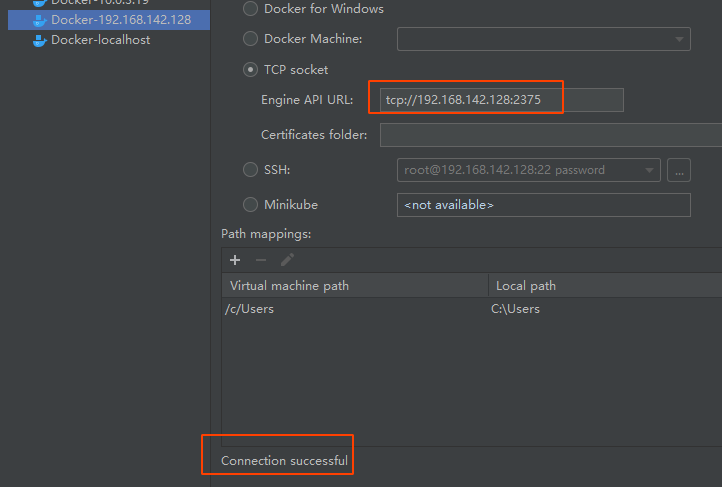
10、idea docker 端口测试
-
相关阅读:
如何获取GC(垃圾回收器)的STW(暂停)时间?
工匠的发展与兴衰趋势-机器人篇
E. Prefix Function Queries(KMP)
Ubuntu 和 Windows 文件互传
网球场地预约
KNN学习代码理解尝试
去除 Zotero + Obsidian 复制粘贴参考文献表时的多余空行(ctrl+shift+C)
【MedusaSTears】怎么禁用edge浏览器截图功能?
专利申请中的期限及期限的延长
跟运维学 Linux - 03
- 原文地址:https://blog.csdn.net/magic_kid_2010/article/details/125405536