-
【Power Automate】Power Automate中使用SharePoint caml query for GEQ datetime
前言
通过Power Automate获取SharePoint数据时候,有时候需要获取最近两天更新的数据,这时候就用到了SharePoint Rest API,下面将介绍两种方式来获取最近两天更新的数据
1、SharePoint Caml Query
- 设置前两天日期变量
substring(addDays(utcNow(),-2),0,10)
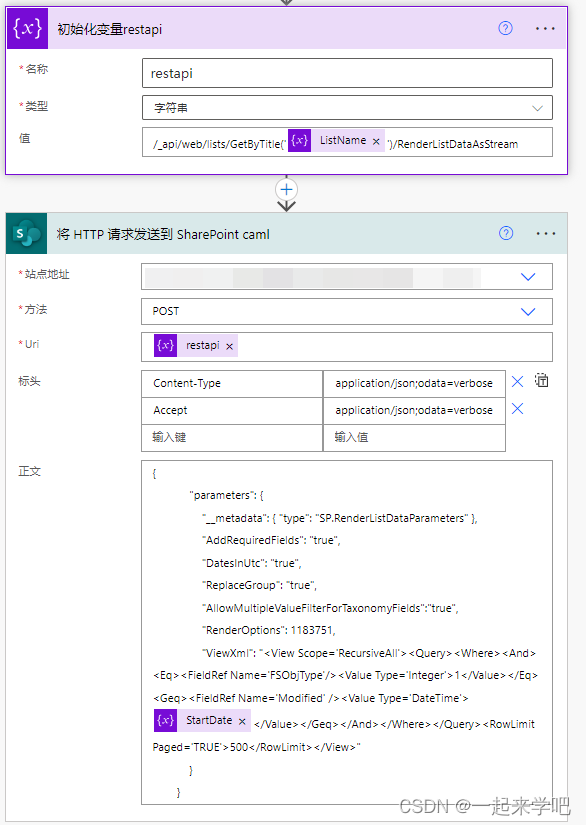
- 设置rest api及caml query语句
- 标头:
- {
- "Content-Type": "application/json;odata=verbose",
- "Accept": "application/json;odata=verbose"
- }
- Rest API:
- /_api/web/lists/GetByTitle('@{variables('ListName')}')/RenderListDataAsStream
- Caml Query:
- {
- "parameters": {
- "__metadata": { "type": "SP.RenderListDataParameters" },
- "AddRequiredFields": "true",
- "DatesInUtc": "true",
- "ReplaceGroup": "true",
- "AllowMultipleValueFilterForTaxonomyFields":"true",
- "RenderOptions": 1183751,
- "ViewXml": "<View Scope='RecursiveAll'><Query><Where><And><Eq><FieldRef Name='FSObjType'/><Value Type='Integer'>1</Value></Eq><Geq><FieldRef Name='Modified' /><Value Type='DateTime'>@{variables('StartDate')}</Value></Geq></And></Where></Query><RowLimit Paged='TRUE'>500</RowLimit></View>"
- }
- }
2、Rest API Filter
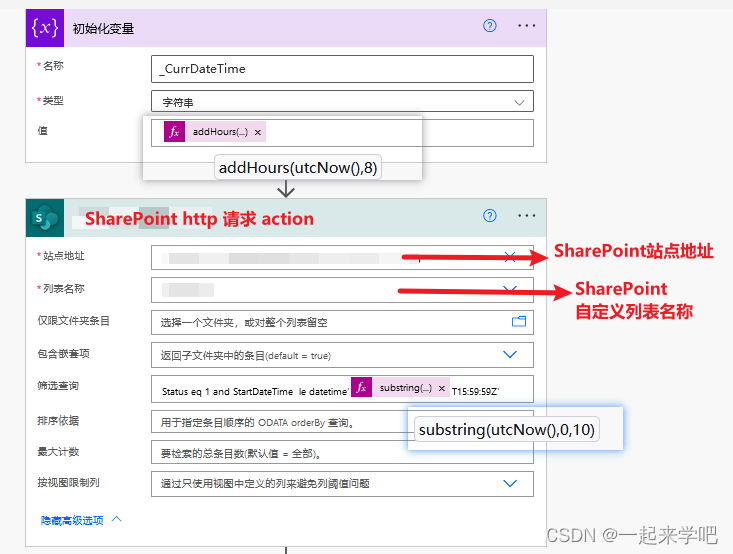
- api filter
Status eq 1 and StartDateTime le datetime'@{substring(utcNow(),0,10)}T15:59:59Z'
- 设置前两天日期变量
-
相关阅读:
【第四阶段】kotlin语言集合转换与快捷转换学习
plink2.0和plink1.9的忧伤笔记
灵性图书馆:好书推荐-《太傻天书》
华为路由器忘记密码怎么恢复
竞赛选题 深度学习的水果识别 opencv python
(附源码)计算机毕业设计SSM基于的装修设计管理系统
阿里云服务器怎么退款?云服务器退款流程图
1259:【例9.3】求最长不下降序列
RuntimeError: “addmm_impl_cpu_“ not implemented for ‘Half‘
基于Matlab计算经典CFAR阈值
- 原文地址:https://blog.csdn.net/liuzhenhe1988/article/details/125408760