-
Python实现的天气预报APP舆情热词分析程序
资源下载地址:https://download.csdn.net/download/sheziqiong/85738753
资源下载地址:https://download.csdn.net/download/sheziqiong/85738753
实验操作系统及环境:操作系统:
Linux 5.10.0-1-amd64 #1 SMP Debian 5.10.4-1 (2020-12-31) x86_64 GNU/Linux
Python环境:
Python 3.9.1+ (default, Jan 10 2021, 15:42:50)
[GCC 10.2.1 20201224] on linux实验题目第一个:
制作一个天气预报应用程序:输入城市名称,给出当天天气情况,并用图文并茂形式展示出来。
对应源代码:
weather_com_cn 为爬取www.weather.com.cn 网页的模块,通过分析使用re模块爬取输入城市的预选城市,获得js文件,再通过解析js文件得到城市的code列表,映射到GUI的列表中,通过列表选择城市,将天气的情况显示在右侧。
GUI通过PyQt5和pyqt5_tools提供,通过可视化生成界面和py文件,然后修改槽和信号将其映射到自定义函数上从而实现按下按钮的响应。
实验结果:(贴运行截图)
爬取的网页:
http://www.weather.com.cn/weather1d/101070102.shtml#input

程序运行截图:

没有互联网连接时:

当爬取的网页无响应时:

无响应原因:www.weather.com.cn 对于小型乡镇等跳转的网页与中大城市使用的网页不同。
资源文件来源:
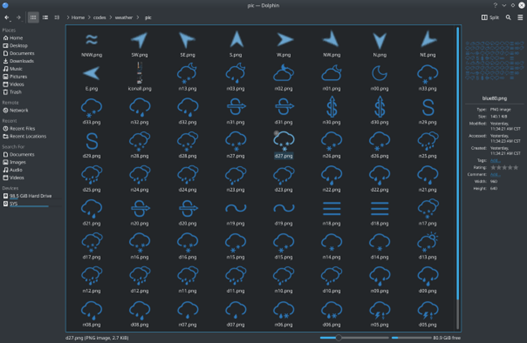
通过爬取网页得到原始图片,根据网页渲染原理进行图片分割保存备用。

分割后图片:
实验题目 第二个:
制作一个简单的舆情热词分析程序:输入监测的新闻网站列表,通过分析导出当前最热门的新闻词汇,并用图文并茂的形式展示出来。
对应源代码:
通过re库爬取输入监测的网站的所有a标签并提取其中的文字,然后通过统计程序和jieba 分词分析以及wordcloud 库生成一个词云,并显示在界面上,从而一目了然、图文并茂显示最热门的新闻词汇。
热词分析模块在filter.py 文件中实现,界面同样使用PyQt5 和 pyqt5_tools 实现。
main.py
# coding:utf-8 import sys import filter as f import analyze from PyQt5.QtWidgets import QMainWindow, QApplication from PyQt5.QtGui import QPixmap class MainWindow(QMainWindow): def __init__(self, parent = None): super(QMainWindow, self).__init__(parent) self.ui = analyze.Ui_analyze() self.ui.setupUi(self) def generate(self): try: sentences = [] summary = {} #print(self.ui.input.toPlainText()) self.ui.wordcloud.clear() self.ui.count.clear() input_url = self.ui.input.toPlainText() input_url = input_url.split('\n') for i in input_url: sentences = sentences + f.get_labels(i) summary = f.count_label(sentences) for k, v in summary.items(): self.ui.count.addItem(str(k) + ": " + str(v)) tmp = f.connect_sentences(sentences) f.generate_word_cloud(tmp, width = 400, height = 400) pix = QPixmap(r'./word_cloud.png') self.ui.wordcloud.setPixmap(pix) except: import traceback traceback.print_exc() if __name__ == '__main__': myapp = QApplication(sys.argv) mywin = MainWindow() mywin.show() sys.exit(myapp.exec_())- 1
- 2
- 3
- 4
- 5
- 6
- 7
- 8
- 9
- 10
- 11
- 12
- 13
- 14
- 15
- 16
- 17
- 18
- 19
- 20
- 21
- 22
- 23
- 24
- 25
- 26
- 27
- 28
- 29
- 30
- 31
- 32
- 33
- 34
- 35
- 36
- 37
- 38
- 39
- 40
- 41
实验结果:


通过输入网页并爬取分析关键词,生成词云图并展示在界面中。
资源下载地址:https://download.csdn.net/download/sheziqiong/85738753
资源下载地址:https://download.csdn.net/download/sheziqiong/85738753 -
相关阅读:
《SpringBoot系列十四》:@ConditionalOnBean、@ConditionalOnMissingBean注解居然失效了
Vue里面怎么使用站点地图Sitemap做SEO
GaN HEMTs在电力电子应用中的交叉耦合与基板电容分析与建模
Mybatis如何使用druid数据连接池
Java利用反射和读取xml实现迷你容器
cmake 入门笔记
2022.6.30-2022.7.3 Three.js 学习笔记
内核动态调试输出dev_info, dev_dbg
对长度为n的顺序表L,编写一个时间复杂度为O(n),空间复杂度为O(1)的算法,该算法删除线性表中的所有值为x的数据元素
“益路同行”栏目专访 第06期—小星星关爱联盟创始人魏洁荣老师
- 原文地址:https://blog.csdn.net/sheziqiong/article/details/125415640