-
json配置文件读入redis - 包含命令行解析示例
需要的取用,也是笔记,python argv经常会需要解析。类linux的命令行参数处理,这也是一个示例。
1.源码
- #!/usr/bin/python3
- #using whereis python3 to get the location of your python cmd.
- # -*- coding: utf-8 -*-
- # 获取当前脚本文件所在目录的父目录,并构建相对路径
- import os
- import sys
- import json
- import redis
- import argparse
- current_dir = os.path.dirname(os.path.abspath(__file__))
- project_path = os.path.join(current_dir, '..')
- sys.path.append(project_path)
- sys.path.append(current_dir)
- def load_json_from_file(file_path):
- # 打开文件并读取内容
- with open(file_path, 'r', encoding='utf-8') as file:
- json_str = file.read()
- # 将 JSON 字符串解析为 Python 对象
- data = json.loads(json_str)
- return data
- def json2redis(data, root_name='cfg', redis_host='localhost', redis_port=6379):
- # 连接到 Redis 服务器
- r = redis.Redis(host='localhost', port=6379, decode_responses=True)
- # 定义一个递归函数来遍历数据并存储到 Redis
- def store_in_redis(prefix, data):
- if isinstance(data, dict):
- for key, value in data.items():
- new_key = f"{prefix}:{key}"
- store_in_redis(new_key, value)
- elif isinstance(data, list):
- for index, item in enumerate(data):
- new_key = f"{prefix}:{index}"
- store_in_redis(new_key, item)
- else:
- r.set(prefix, data)
- # 调用函数,传入根键名
- store_in_redis(f"{root_name}", data)
- # 示例:从 Redis 获取存储的数据并打印
- for key in r.keys(f"{root_name}:*"):
- print(f"{key}: {r.get(key)}")
- def main():
- # 创建 ArgumentParser 对象
- parser = argparse.ArgumentParser(description='json配置文件 => Redis')
- # 添加参数
- parser.add_argument('jsonfile', type=str, help='json_file_name, the src')
- parser.add_argument('--redis_ip', type=str, default='127.0.0.1', help='redis server ip')
- parser.add_argument('--redis_port', type=int, default=6379, help='redis server port')
- parser.add_argument('--verbose', action='store_true', help='启用详细模式')
- # 解析命令行参数
- args = parser.parse_args()
- # 使用参数
- print(f'输入文件: {args.jsonfile}')
- print(f'输出文件: {args.redis_ip}')
- print(f'处理次数: {args.redis_port}')
- print(f'详细模式: {"启用" if args.verbose else "禁用"}')
- json_obj = load_json_from_file(args.jsonfile)
- filename_without_ext, _ = os.path.splitext(args.jsonfile)
- root = filename_without_ext
- root = root.replace("/", ":")
- root = root.replace("\\", ":")
- print(root)
- json2redis(json_obj, root, args.redis_ip, args.redis_port)
- if __name__ == '__main__':
- main()
- 做了脚本执行解释器的处理。
- 做了自动参数识别。
- 参数支持usage 和 --help打印。
2.命令行
1.参数不全的命令行简介自动输出 ./daemon_exec
usage: daemon_exec [-h] [--redis_ip REDIS_IP] [--redis_port REDIS_PORT] [--verbose] jsonfile
daemon_exec: error: the following arguments are required: jsonfile2.细节的参数注释打印 ./daemon_exec --help
usage: daemon_exec [-h] [--redis_ip REDIS_IP] [--redis_port REDIS_PORT] [--verbose] jsonfile
json配置文件 => Redis
positional arguments:
jsonfile json_file_name, the srcoptional arguments:
-h, --help show this help message and exit
--redis_ip REDIS_IP redis server ip
--redis_port REDIS_PORT
redis server port
--verbose 启用详细模式3.运行示例
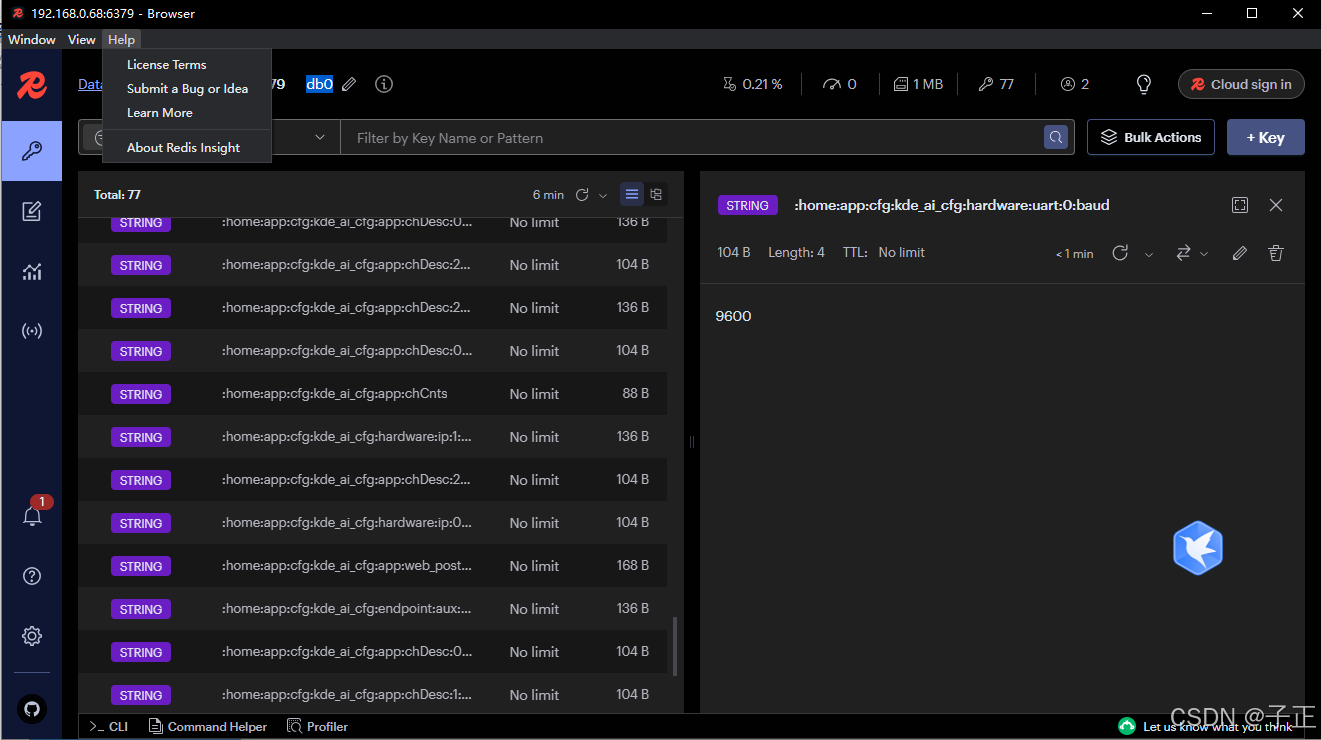
:home:app:cfg:kde_ai_cfg:app:chDesc:2:video_stream_out: rtsp://127.0.0.1:8554/ch3
:home:app:cfg:kde_ai_cfg:hardware:ip:1:mode: static
:home:app:cfg:kde_ai_cfg:app:chDesc:1:classes_prefered:0: 0
:home:app:cfg:kde_ai_cfg:endpoint:aux:mqtt:0:server: 47.114.51.90
:home:app:cfg:kde_ai_cfg:hardware:ip:0:gateway: 192.168.0.13.1 redis客户端的显示
-
相关阅读:
MySQL的内置函数
Jupyter Notebook 快捷键
Excel 一列数据转换为多行数据
免密码方式获取Hive元数据
可能是01背包问题最全面的解析
大模型部署手记(13)LLaMa2+Chinese-LLaMA-Plus-2-7B+Windows+LangChain+摘要问答
R语言检验时间序列中是否存在自相关性:使用box.test函数执行box-pierce检验验证时间序列中是否存在自相关性
C++ fstream类移动读写指针和字节数形式获取该指针位置(seekp、seekg、tellg、tellp)
四大组件---ContentResolver
ES6------04let经典案例实现
- 原文地址:https://blog.csdn.net/twicave/article/details/141030759