-
c# 二维图形绘制实践
1.等边三角形
1.1 概述
1.2 代码
- using System;
- using System.Drawing;
- using System.Windows.Forms;
- public partial class TriangleForm : Form
- {
- public TriangleForm()
- {
- //InitializeComponent();
- // 确保窗体大小足够大,以容纳三角形
- this.ClientSize = new Size(300, 300);
- this.DoubleBuffered = true; // 启用双缓冲,以减少绘图时的闪烁
- }
- protected override void OnPaint(PaintEventArgs e)
- {
- base.OnPaint(e);
- // 定义三角形的大小和位置
- int sideLength = 100; // 等边三角形外接圆的半径
- int centerX = this.ClientSize.Width / 2; // 三角形中心点的X坐标
- int centerY = this.ClientSize.Height / 2; // 三角形中心点的Y坐标
- // 将30度转换为弧度
- double degrees = 30;
- double radians = Math.PI * degrees / 180;
- double sinValue = Math.Sin(radians);
- double cosValue = Math.Cos(radians);
- float sinLen = (float)sinValue * sideLength;
- float cosLen = (float)cosValue * sideLength;
- // 计算三角形顶点的位置
- PointF topVertex = new PointF(centerX, centerY - sideLength );
- PointF leftVertex = new PointF(centerX - cosLen, centerY + sinLen);
- PointF rightVertex = new PointF(centerX + cosLen, centerY + sinLen);
- // 创建一个Brush对象来填充三角形
- using (SolidBrush brush = new SolidBrush(Color.LightBlue))
- {
- // 绘制等边三角形
- e.Graphics.FillPolygon(brush, new PointF[] { topVertex, leftVertex, rightVertex });
- // 如果你还想绘制三角形的边框,可以使用Pen对象
- using (Pen pen = new Pen(Color.Black, 2))
- {
- e.Graphics.DrawPolygon(pen, new PointF[] { topVertex, leftVertex, rightVertex });
- }
- }
- }
- [STAThread]
- static void Main()
- {
- Application.EnableVisualStyles();
- Application.SetCompatibleTextRenderingDefault(false);
- Application.Run(new TriangleForm());
- }
- }
1.3 运行结果

2 立方体
2.1 概要
立方体是用等边三角型的图转换过来的
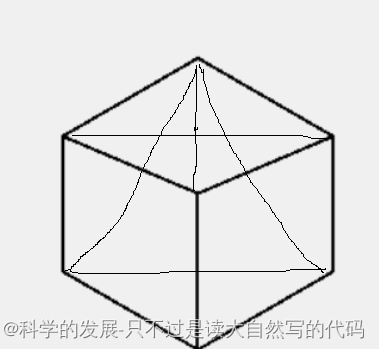
2.2 代码
- using System;
- using System.Drawing;
- using System.Windows.Forms;
- public partial class TriangleForm : Form
- {
- public TriangleForm()
- {
- //InitializeComponent();
- // 确保窗体大小足够大,以容纳三角形
- this.ClientSize = new Size(300, 300);
- this.DoubleBuffered = true; // 启用双缓冲,以减少绘图时的闪烁
- }
- protected override void OnPaint(PaintEventArgs e)
- {
- base.OnPaint(e);
- // 定义三角形的大小和位置
- int sideLength = 100; // 等边三角形的边长
- int centerX = this.ClientSize.Width / 2; // 三角形中心点的X坐标
- int centerY = this.ClientSize.Height / 2; // 三角形中心点的Y坐标
- // 将30度转换为弧度
- double degrees = 30;
- double radians = Math.PI * degrees / 180;
- double sinValue = Math.Sin(radians);
- double cosValue = Math.Cos(radians);
- float sinLen = (float)sinValue * sideLength;
- float cosLen = (float)cosValue * sideLength;
- //中心点
- PointF topVertex_center = new PointF(centerX, centerY);
- // 计算三角形顶点的位置
- PointF topVertex = new PointF(centerX, centerY - cosLen);
- PointF topVertex_left = new PointF(centerX - cosLen, centerY - cosLen + sinLen);
- PointF leftVertex = new PointF(centerX - cosLen, centerY + sinLen);
- PointF topVertex_buttom = new PointF(centerX, centerY + sinLen*2);
- PointF rightVertex = new PointF(centerX + cosLen, centerY + sinLen);
- PointF topVertex_right = new PointF(centerX + cosLen, centerY - cosLen + sinLen);
- // 创建一个Brush对象来填充三角形
- using (SolidBrush brush = new SolidBrush(Color.LightBlue))
- {
- // 绘制等边三角形
- //e.Graphics.FillPolygon(brush, new PointF[] { topVertex, leftVertex, rightVertex });
- // 如果你还想绘制三角形的边框,可以使用Pen对象
- using (Pen pen = new Pen(Color.Black, 2))
- {
- e.Graphics.DrawPolygon(pen, new PointF[] { topVertex, topVertex_left, leftVertex, topVertex_buttom, rightVertex, topVertex_right });
- e.Graphics.DrawPolygon(pen, new PointF[] { topVertex_center, topVertex_left });
- e.Graphics.DrawPolygon(pen, new PointF[] { topVertex_center, topVertex_right });
- e.Graphics.DrawPolygon(pen, new PointF[] { topVertex_center, topVertex_buttom });
- }
- }
- }
- [STAThread]
- static void Main()
- {
- Application.EnableVisualStyles();
- Application.SetCompatibleTextRenderingDefault(false);
- Application.Run(new TriangleForm());
- }
- }
2.3 运行结果

3 立方体透视图
3.1 概要
透视图是用前面的立方体,去移动顶点演化出来的

3.2 代码
- using System;
- using System.Drawing;
- using System.Net;
- using System.Windows.Forms;
- public partial class TriangleForm : Form
- {
- public TriangleForm()
- {
- //InitializeComponent();
- // 确保窗体大小足够大,以容纳三角形
- this.ClientSize = new Size(300, 300);
- this.DoubleBuffered = true; // 启用双缓冲,以减少绘图时的闪烁
- }
- protected override void OnPaint(PaintEventArgs e)
- {
- base.OnPaint(e);
- // 定义三角形的大小和位置
- int sideLength = 100; // 等边三角形的边长
- int centerX = this.ClientSize.Width / 2; // 三角形中心点的X坐标
- int centerY = this.ClientSize.Height / 2; // 三角形中心点的Y坐标
- // 将30度转换为弧度
- double degrees = 30;
- double radians = Math.PI * degrees / 180;
- double sinValue = Math.Sin(radians);
- double cosValue = Math.Cos(radians);
- float sinLen = (float)sinValue * sideLength;
- float cosLen = (float)cosValue * sideLength;
- float y_yi = 20;
- float x_yi = 10;
- //中心点
- PointF topVertex_center = new PointF(centerX+ x_yi, centerY- y_yi);
- PointF topVertex_center_hou = new PointF(centerX - x_yi, centerY + y_yi);
- // 计算三角形顶点的位置
- PointF topVertex = new PointF(centerX- x_yi, centerY - cosLen+ y_yi);
- PointF topVertex_left = new PointF(centerX - cosLen, centerY - cosLen + sinLen);
- PointF leftVertex = new PointF(centerX - cosLen, centerY + sinLen);
- PointF topVertex_buttom = new PointF(centerX+ x_yi, centerY + sinLen*2- y_yi);
- PointF rightVertex = new PointF(centerX + cosLen, centerY + sinLen);
- PointF topVertex_right = new PointF(centerX + cosLen, centerY - cosLen + sinLen);
- // 创建一个Brush对象来填充三角形
- using (SolidBrush brush = new SolidBrush(Color.LightBlue))
- {
- // 绘制等边三角形
- //e.Graphics.FillPolygon(brush, new PointF[] { topVertex, leftVertex, rightVertex });
- // 如果你还想绘制三角形的边框,可以使用Pen对象
- using (Pen pen = new Pen(Color.Black, 2))
- {
- e.Graphics.DrawPolygon(pen, new PointF[] { topVertex, topVertex_left, leftVertex, topVertex_buttom, rightVertex, topVertex_right });
- e.Graphics.DrawPolygon(pen, new PointF[] { topVertex_center, topVertex_left });
- e.Graphics.DrawPolygon(pen, new PointF[] { topVertex_center, topVertex_right });
- e.Graphics.DrawPolygon(pen, new PointF[] { topVertex_center, topVertex_buttom });
- }
- float[] dashValues = { 50, 5 }; // 虚线由5个像素的实线和5个像素的空白组成
- Pen dashedPen = new Pen(Color.Black, 1);
- e.Graphics.DrawLine(dashedPen, topVertex_center_hou, leftVertex);
- e.Graphics.DrawLine(dashedPen, topVertex_center_hou, rightVertex);
- e.Graphics.DrawLine(dashedPen, topVertex_center_hou, topVertex);
- }
- }
- [STAThread]
- static void Main()
- {
- Application.EnableVisualStyles();
- Application.SetCompatibleTextRenderingDefault(false);
- Application.Run(new TriangleForm());
- }
- }
3.3 运行结果

4.等边三角形的内切圆和外接圆
4.1 概要
4.2 代码
- using System;
- using System.Drawing;
- using System.Net;
- using System.Windows.Forms;
- public partial class TriangleForm : Form
- {
- public TriangleForm()
- {
- //InitializeComponent();
- // 确保窗体大小足够大,以容纳三角形
- this.ClientSize = new Size(300, 300);
- this.DoubleBuffered = true; // 启用双缓冲,以减少绘图时的闪烁
- }
- protected override void OnPaint(PaintEventArgs e)
- {
- base.OnPaint(e);
- // 定义三角形的大小和位置
- int sideLength = 100; // 内接圆半径
- int centerX = this.ClientSize.Width / 2; // 三角形中心点的X坐标
- int centerY = this.ClientSize.Height / 2; // 三角形中心点的Y坐标
- // 将30度转换为弧度
- double degrees = 30;
- double radians = Math.PI * degrees / 180;
- double sinValue = Math.Sin(radians);
- double cosValue = Math.Cos(radians);
- float sinLen = (float)sinValue * sideLength;
- float cosLen = (float)cosValue * sideLength;
- // 计算三角形顶点的位置
- PointF topVertex = new PointF(centerX, centerY - sideLength);
- PointF leftVertex = new PointF(centerX - cosLen, centerY + sinLen);
- PointF rightVertex = new PointF(centerX + cosLen, centerY + sinLen);
- // 设置圆形的边界矩形(位置和大小)
- Rectangle rect = new Rectangle(centerX- (int)sinLen, centerY- (int)sinLen, (int)(sinLen*2), (int)(sinLen*2)); // x=50, y=50, 宽度=100, 高度=100
- Rectangle rect2 = new Rectangle(centerX - (int)sideLength, centerY - (int)sideLength, sideLength*2, sideLength*2); // x=50, y=50, 宽度=100, 高度=100
- // 创建一个Brush对象来填充三角形
- using (SolidBrush brush = new SolidBrush(Color.LightBlue))
- {
- // 绘制等边三角形
- //e.Graphics.FillPolygon(brush, new PointF[] { topVertex, leftVertex, rightVertex });
- // 如果你还想绘制三角形的边框,可以使用Pen对象
- using (Pen pen = new Pen(Color.Black, 2))
- {
- e.Graphics.DrawPolygon(pen, new PointF[] { topVertex, leftVertex, rightVertex, });
- e.Graphics.DrawEllipse(pen, rect2);
- e.Graphics.DrawEllipse(pen, rect);
- }
- }
- }
- [STAThread]
- static void Main()
- {
- Application.EnableVisualStyles();
- Application.SetCompatibleTextRenderingDefault(false);
- Application.Run(new TriangleForm());
- }
- }
4.3 运行结果
5.直角三角形的内接圆
5.1 概要

5.2 代码
- using System;
- using System.Drawing;
- using System.Net;
- using System.Windows.Forms;
- public partial class TriangleForm : Form
- {
- public TriangleForm()
- {
- //InitializeComponent();
- // 确保窗体大小足够大,以容纳三角形
- this.ClientSize = new Size(300, 300);
- this.DoubleBuffered = true; // 启用双缓冲,以减少绘图时的闪烁
- }
- protected override void OnPaint(PaintEventArgs e)
- {
- base.OnPaint(e);
- // 定义三角形的大小和位置
- int sideLength = 50; // 内接圆半径
- int centerX = this.ClientSize.Width / 2; // 三角形中心点的X坐标
- int centerY = this.ClientSize.Height / 2; // 三角形中心点的Y坐标
- // 将30度转换为弧度
- double degrees = 22.5;
- double radians = Math.PI * degrees / 180;
- double sinValue = Math.Sin(radians);
- double cosValue = Math.Cos(radians);
- double tanValue = Math.Tan(radians);
- float sinLen = (float)sinValue * sideLength;
- float cosLen = (float)cosValue * sideLength;
- float tanLen = (float)(sideLength/ tanValue);
- // 计算三角形顶点的位置
- PointF topVertex = new PointF(centerX+ sideLength, centerY - tanLen);
- PointF leftVertex = new PointF(centerX - tanLen, centerY + sideLength);
- PointF rightVertex = new PointF(centerX + sideLength, centerY + sideLength);
- // 设置圆形的边界矩形(位置和大小)
- //Rectangle rect = new Rectangle(centerX - (int)sinLen, centerY - (int)sinLen, (int)(sinLen * 2), (int)(sinLen * 2)); // x=50, y=50, 宽度=100, 高度=100
- Rectangle rect2 = new Rectangle(centerX - (int)sideLength, centerY - (int)sideLength, sideLength * 2, sideLength * 2); // x=50, y=50, 宽度=100, 高度=100
- // 创建一个Brush对象来填充三角形
- using (SolidBrush brush = new SolidBrush(Color.LightBlue))
- {
- // 绘制等边三角形
- //e.Graphics.FillPolygon(brush, new PointF[] { topVertex, leftVertex, rightVertex });
- // 如果你还想绘制三角形的边框,可以使用Pen对象
- using (Pen pen = new Pen(Color.Black, 2))
- {
- e.Graphics.DrawPolygon(pen, new PointF[] { topVertex, leftVertex, rightVertex, });
- e.Graphics.DrawEllipse(pen, rect2);
- //e.Graphics.DrawEllipse(pen, rect);
- }
- }
- }
- [STAThread]
- static void Main()
- {
- Application.EnableVisualStyles();
- Application.SetCompatibleTextRenderingDefault(false);
- Application.Run(new TriangleForm());
- }
- }
5.3 运行结果

-
相关阅读:
JDK8中ConcurrentHashMap底层源码解析-扩容机制
React UI组件库——如何快速实现antd的按需引入和自定义主题
网工内推 | 金融业,网络管理岗,CCIE优先,最高30k
vue中缓存组件keep-alive
什么是供应商管理?为什么它很重要?
大语言模型驱动的跨域属性级情感分析——论文阅读笔记
同时安装Vue2和Vue3
Python 实例教学一
计算机毕业设计Java网上专家门诊预约系统(源码+系统+mysql数据库+Lw文档)
WebSocket实战之五JSR356
- 原文地址:https://blog.csdn.net/xie__jin__cheng/article/details/139599591