-
HALCON-从入门到入门-阈值分割定位算子综合运用
1.废话
之前我的一个师兄告诉我,针对图像上想要定位的内容,机器视觉中定位的方式有很多种,但是如果用阈值分割定位可以做的,就不要用模板匹配了。因为基于形状的模板匹配始终会存在匹配不到的风险,那如果打光效果可以,阈值分割定位的效果就会稳定很多。
其实可以分为两种情况:
第一种,使用背光打出来的图像,图像边缘非常锋利,且形状一致性比较强,周围背景色块干扰比较多,这种情况我们考虑形状给模板匹配。
第二种,产品正面打光,边缘存在过渡像素,周围背景色块干扰小,形状差异较大,这种我们考虑阈值分割进行产品定位。
后面慢慢学习过来之后就发现,在实际上很多的项目中,打光出来的成像效果在边缘都不是非常清晰,过渡非常明显的,由于产品一致性的原因,很多时候拍照出来产品的形状也会发生变换,那么我们使用阈值分割会比较稳定一些。
2.实现效果
下面是阈值分割的效果图。

这是一张芯片引脚的图片,案例的目的是将引脚的焊点定位出来。

其中用到的算子就都是二值化,形状选择,形态学操作的组合。
3.代码解析
1.首先第一步读取图片
read_image (Bond, ImageNames[I])
2.获取整个图像上的灰度最大最小值
min_max_gray (Die, Bond, 0, Min, Max, Range)
3.基于灰度最小值,二值化出黑色部分像素
threshold (DieGrey, Wires, 0, Min + 30)
4.对得到的区域进行开运算
opening_circle (WiresFilled, Balls, 9.5)
5.区域的连通域分析
筛选出更类似矩形的区域
- connection (Balls, SingleBalls)
- select_shape_std (SingleBalls, Rect, 'rectangle1', 90)

6.将类似于矩形的区域排除
difference (SingleBalls, Rect, IntermediateBalls)
7.根据图像上的像素,对区域进行展开
- gen_empty_region (Forbidden)
- expand_gray (IntermediateBalls, Bond, Forbidden, RegionExpand, 4, 'image', 6)

8.继续进行开运算
opening_circle (RegionExpand, RoundBalls, 15.5)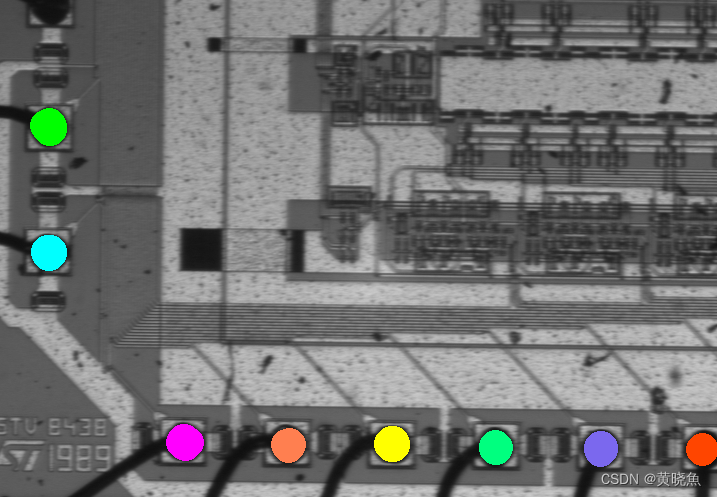
完成目标。
4.文件
- * ball_seq.hdev: Inspection of Ball Bonding
- *
- dev_update_off ()
- ImageNames := 'die/' + ['die_02','die_03','die_04','die_07']
- dev_set_colored (12)
- read_image (Bond, ImageNames[0])
- get_image_size (Bond, Width, Height)
- dev_close_window ()
- dev_open_window (0, 0, Width, Height, 'black', WindowHandle)
- set_display_font (WindowHandle, 16, 'mono', 'true', 'false')
- dev_set_draw ('margin')
- dev_set_line_width (3)
- NumImages := |ImageNames|
- for I := 0 to NumImages - 1 by 1
- read_image (Bond, ImageNames[I])
- dev_display (Bond)
- min_max_gray (Bond, Bond, 0, Min, Max, Range)
- threshold (Bond, Bright, Max - 80, 255)
- shape_trans (Bright, Die, 'rectangle2')
- dev_display (Die)
- reduce_domain (Bond, Die, DieGrey)
- min_max_gray (Die, Bond, 0, Min, Max, Range)
- threshold (DieGrey, Wires, 0, Min + 30)
- fill_up_shape (Wires, WiresFilled, 'area', 1, 100)
- opening_circle (WiresFilled, Balls, 9.5)
- connection (Balls, SingleBalls)
- select_shape_std (SingleBalls, Rect, 'rectangle1', 90)
- difference (SingleBalls, Rect, IntermediateBalls)
- gen_empty_region (Forbidden)
- expand_gray (IntermediateBalls, Bond, Forbidden, RegionExpand, 4, 'image', 6)
- opening_circle (RegionExpand, RoundBalls, 15.5)
- sort_region (RoundBalls, FinalBalls, 'first_point', 'true', 'column')
- smallest_circle (FinalBalls, Row, Column, Radius)
- NumBalls := |Radius|
- Diameter := 2 * Radius
- meanDiameter := sum(Diameter) / NumBalls
- mimDiameter := min(Diameter)
- dev_display (RoundBalls)
- if (I != NumImages)
- disp_continue_message (WindowHandle, 'black', 'true')
- endif
- stop ()
- endfor
-
相关阅读:
winlicense官方版是一款功能专业强大的编程软件
学习记录十六 ---- spring boot
ffmpeg推流+nginx转发+拉流(RTMP拉流)
优秀的程序员不是你的尽头,而是起点
【Xilinx】Zynq\MPSoc\Versal不同速度等级下的ARM主频
PLC-Recorder访问能力测试报告(4560变量测试)
自动控制原理3.5---线性系统的稳定性分析
【openGauss】一种可能是目前最快的从ORACLE同步数据到MogDB(openGauss)的方式
LeetCode_279_完全平方数
基础生态学终结版复习题
- 原文地址:https://blog.csdn.net/linux_huangyu/article/details/139530953