• 微博-指定话题当日数据爬取


    一、对微博页面的分析

    (一)对微博网页端的分析

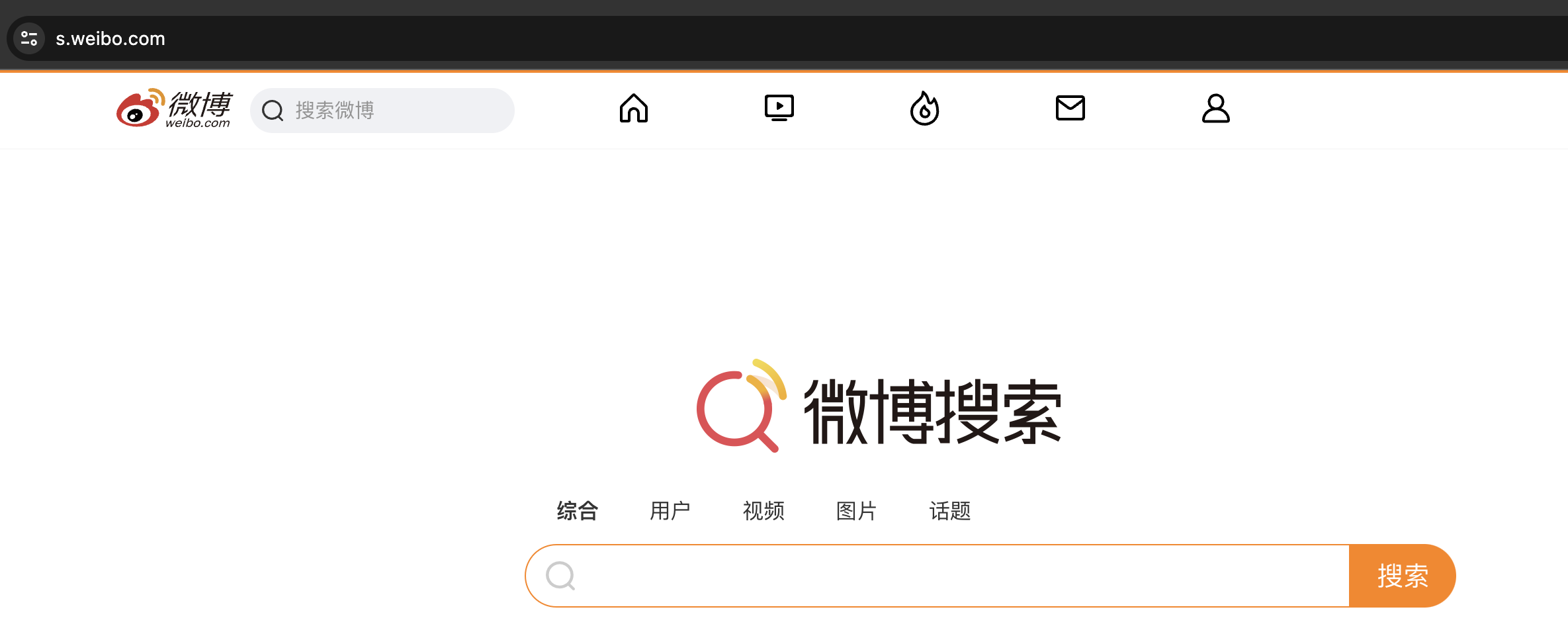
    1. 首先,我们打开微博,发现从电脑端打开微博,网址为:Sina Visitor System
    image

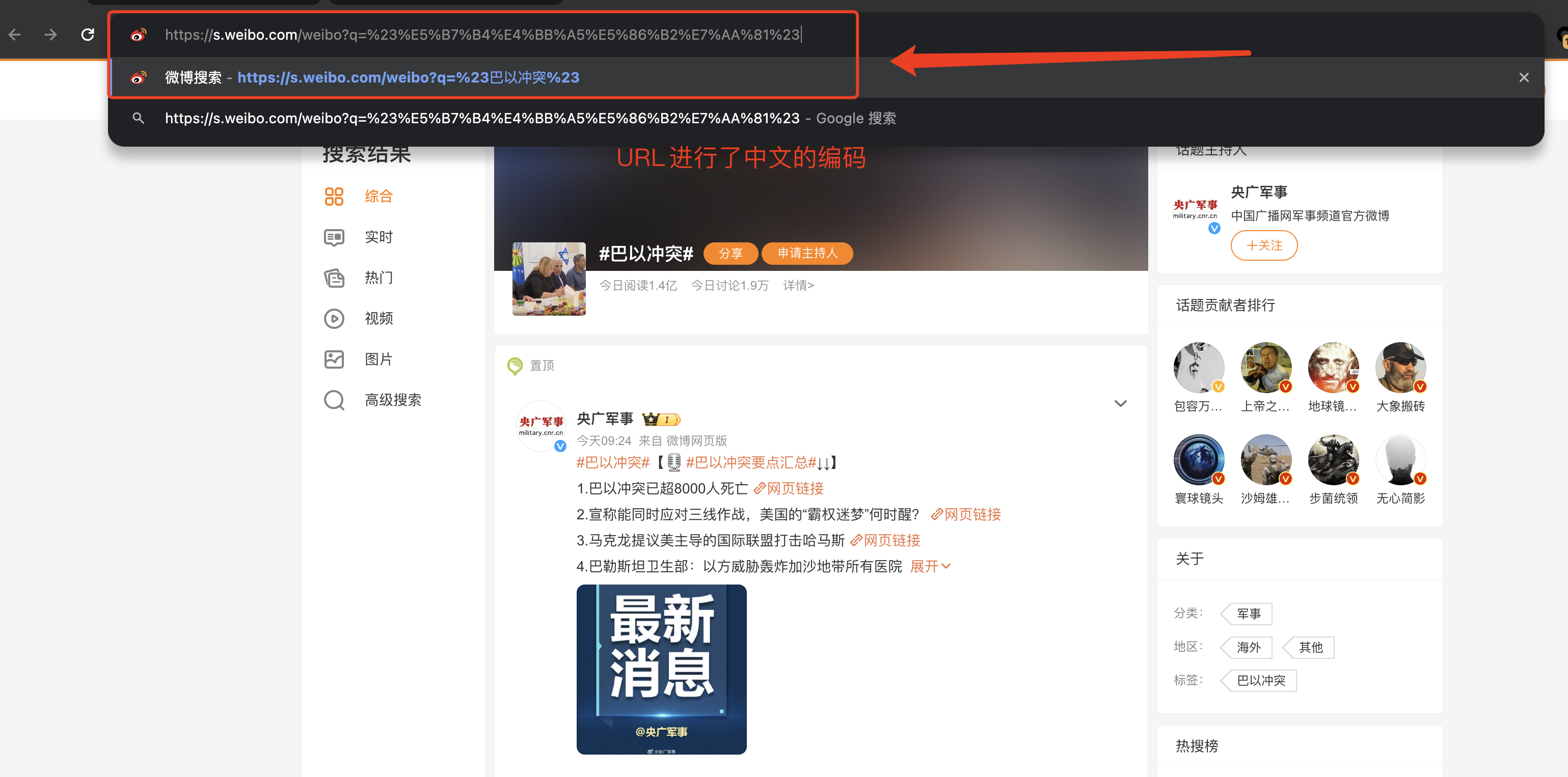
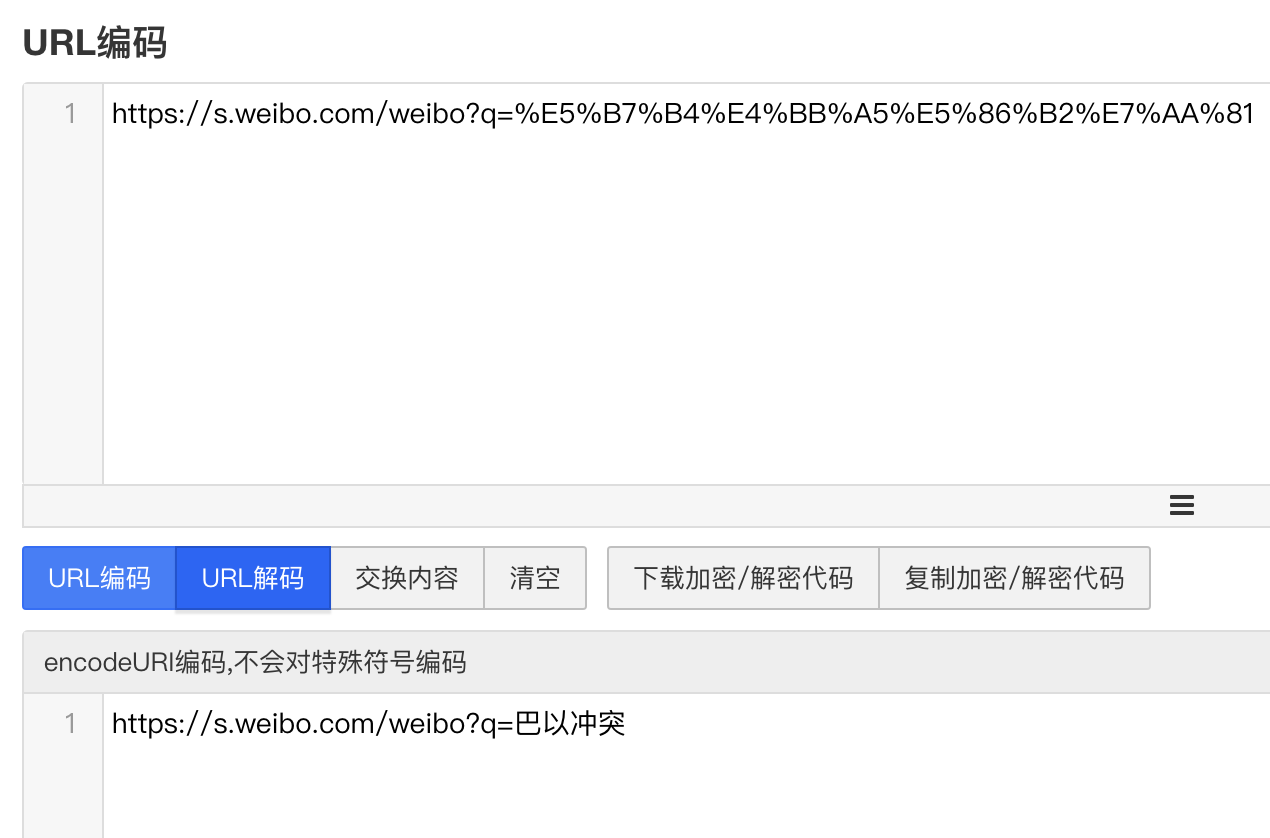
    1. 我们搜索关键字:巴以冲突,会发现其对应的 URL:巴以冲突

    image

    (1)URL 编码/解码

    通过对 URL 进行分析,不难发现我们输入的是中文“巴以冲突”,但是真实的链接却不含中文,这是因为链接中的中文被编码了。我们将复制来的 URL 进行解码操作便可以得知。
    image

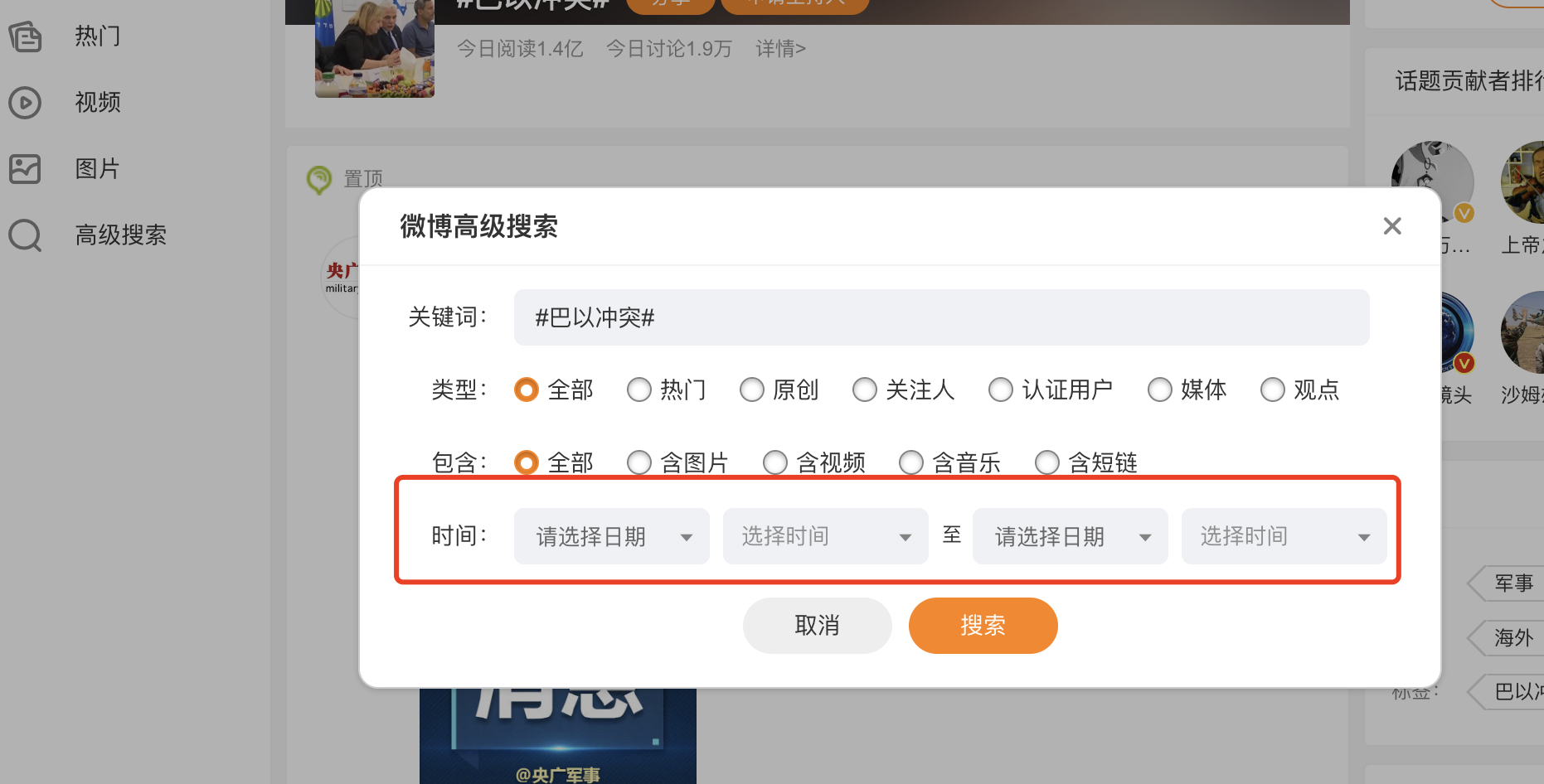
    在巴以冲突这个页面里面可以看到高级搜索,打开高级搜索后发现可以对微博的发布时间进行筛选,还可以对微博类型、微博包含的内容进行筛选。 一开始,想的便是从这下手,非常方便爬取指定时间内指定话题下的微博内容。
    image

    (2)抓包分析请求网址/请求方法/响应内容

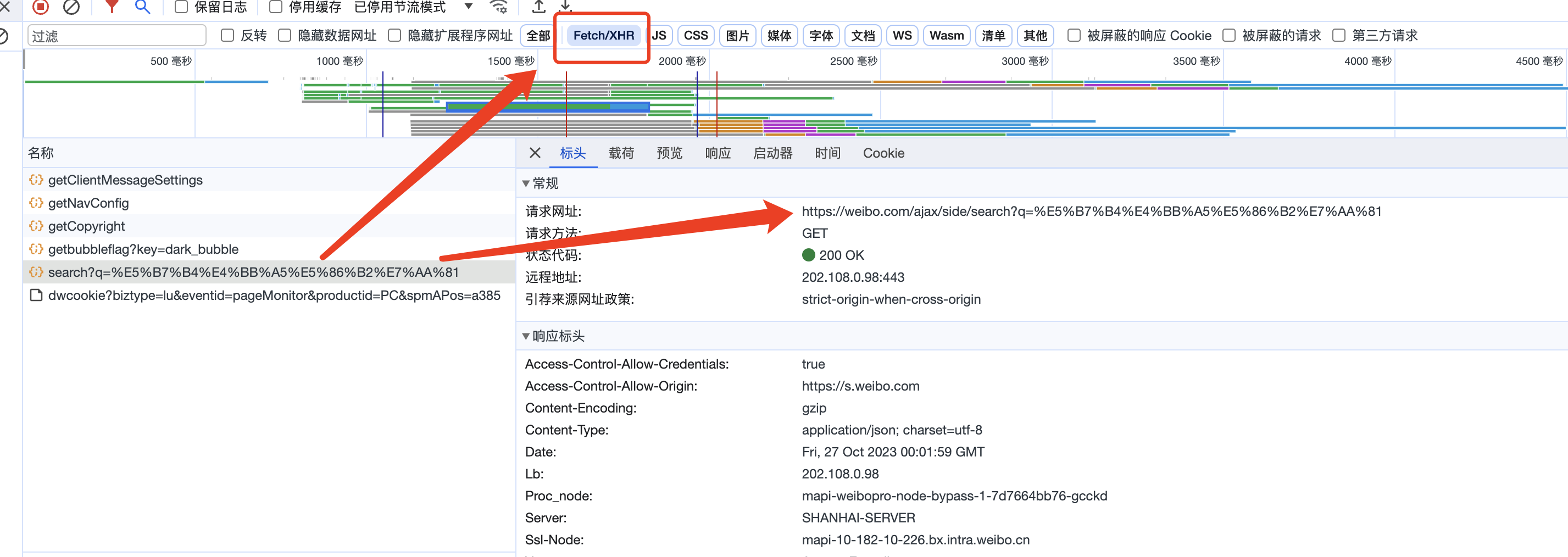
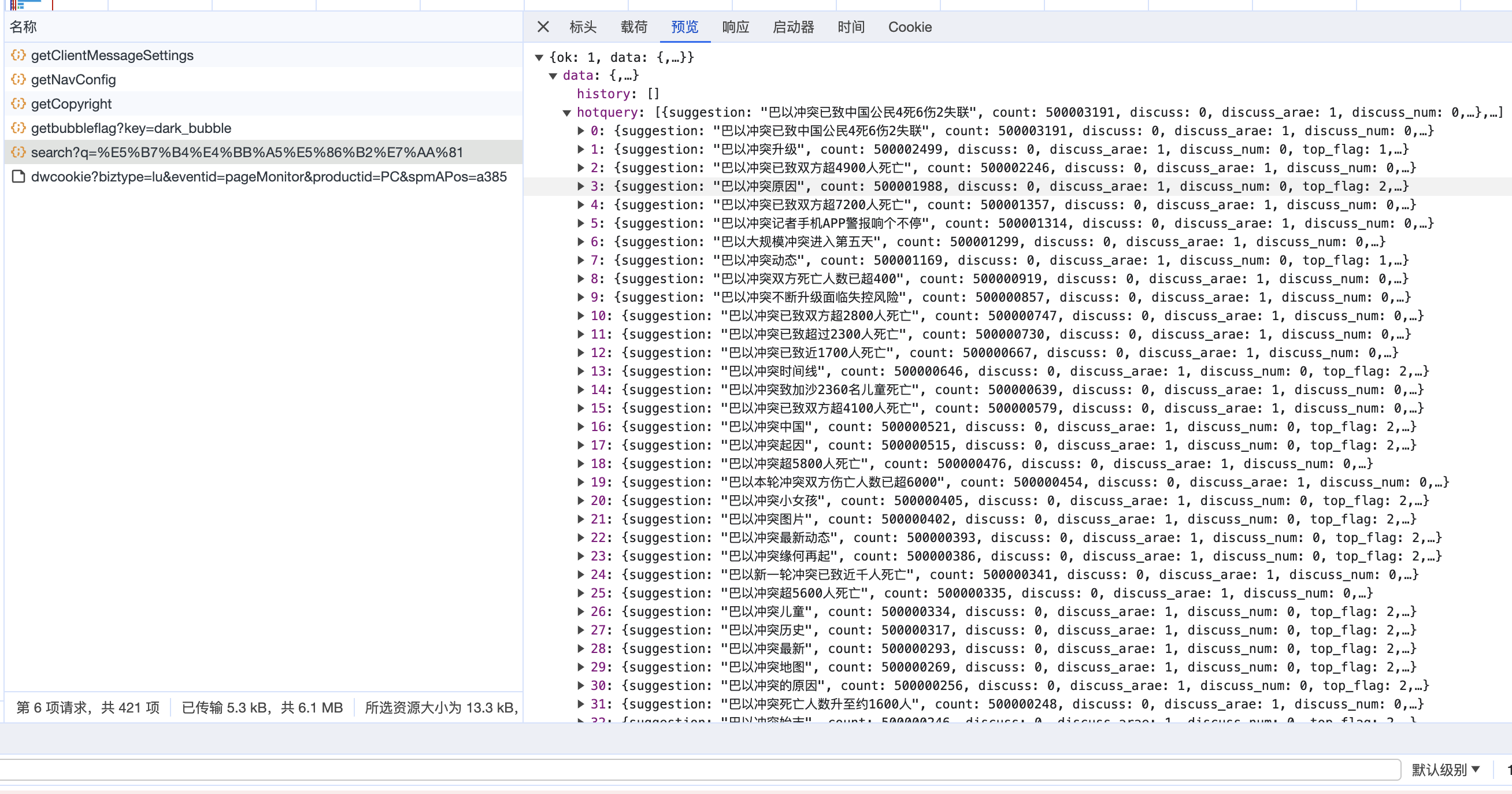
    接着,打开开发者工具,对抓包进行分析,我们可以看到请求网址发生了变化, 请求网址为: https://weibo.com/ajax/side/search?q=%E5%B7%B4%E4%BB%A5%E5%86%B2%E7%AA%81请求方法是: GET

    image

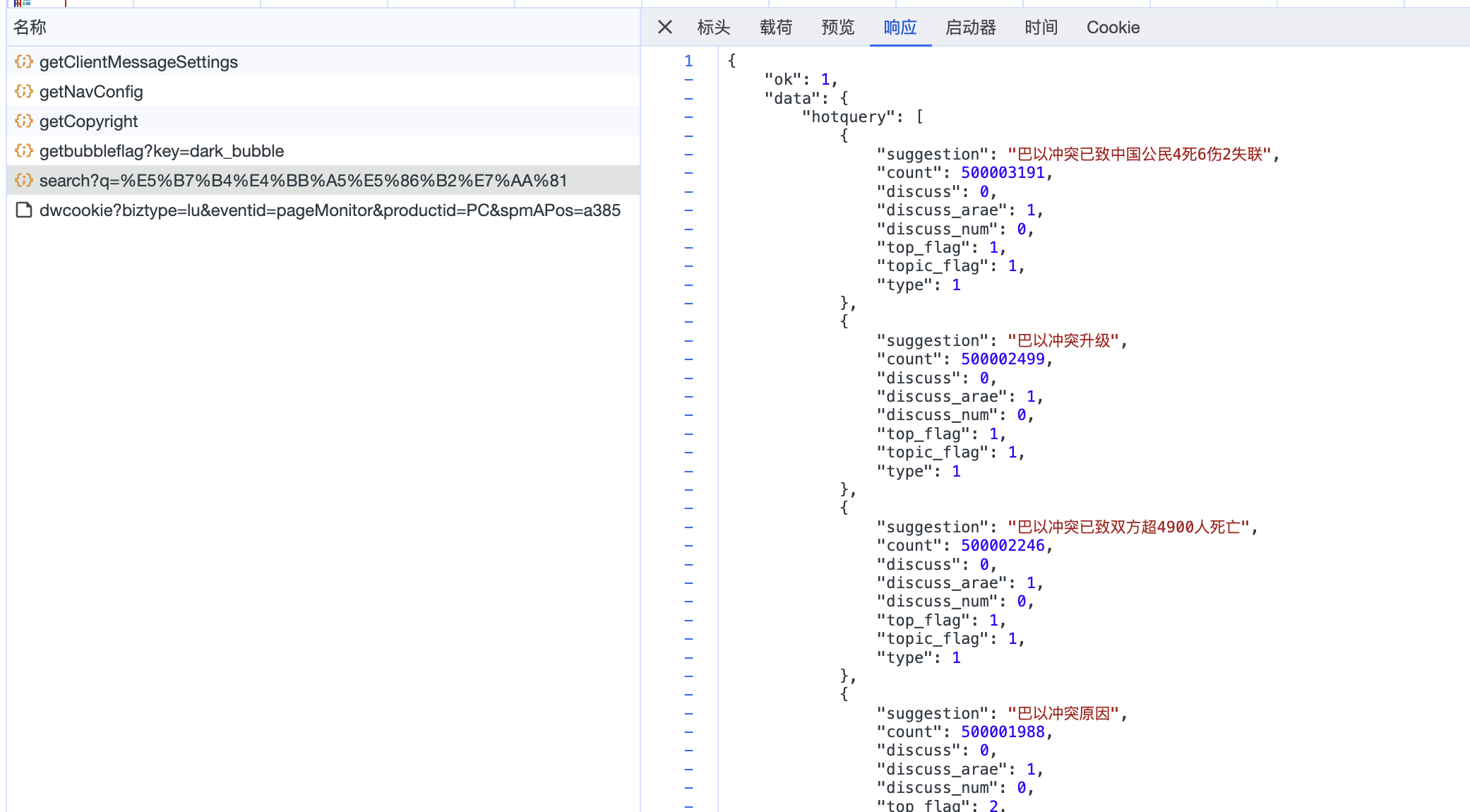
    点开预览、查看相应内容,可以发现该请求网址返回的 json 文件内容对应的就是页面中加载的微博内容。
    image

    image

    于是,便开始在 pycharm 中编写请求代码

    import requests  # 导入requests库,用于发送HTTP请求
    url = 'https://weibo.com/ajax/side/search?q=%E5%B7%B4%E4%BB%A5%E5%86%B2%E7%AA%81'
    print(url)
    response = requests.get(url=url)  # 发送HTTP GET请求
    print(f'响应状态码是:{response.status_code}')  # 如果响应状态码为200(成功)
    print(response.json())

    image


    (二)网页端的局限性(cookie 、微博数量问题)

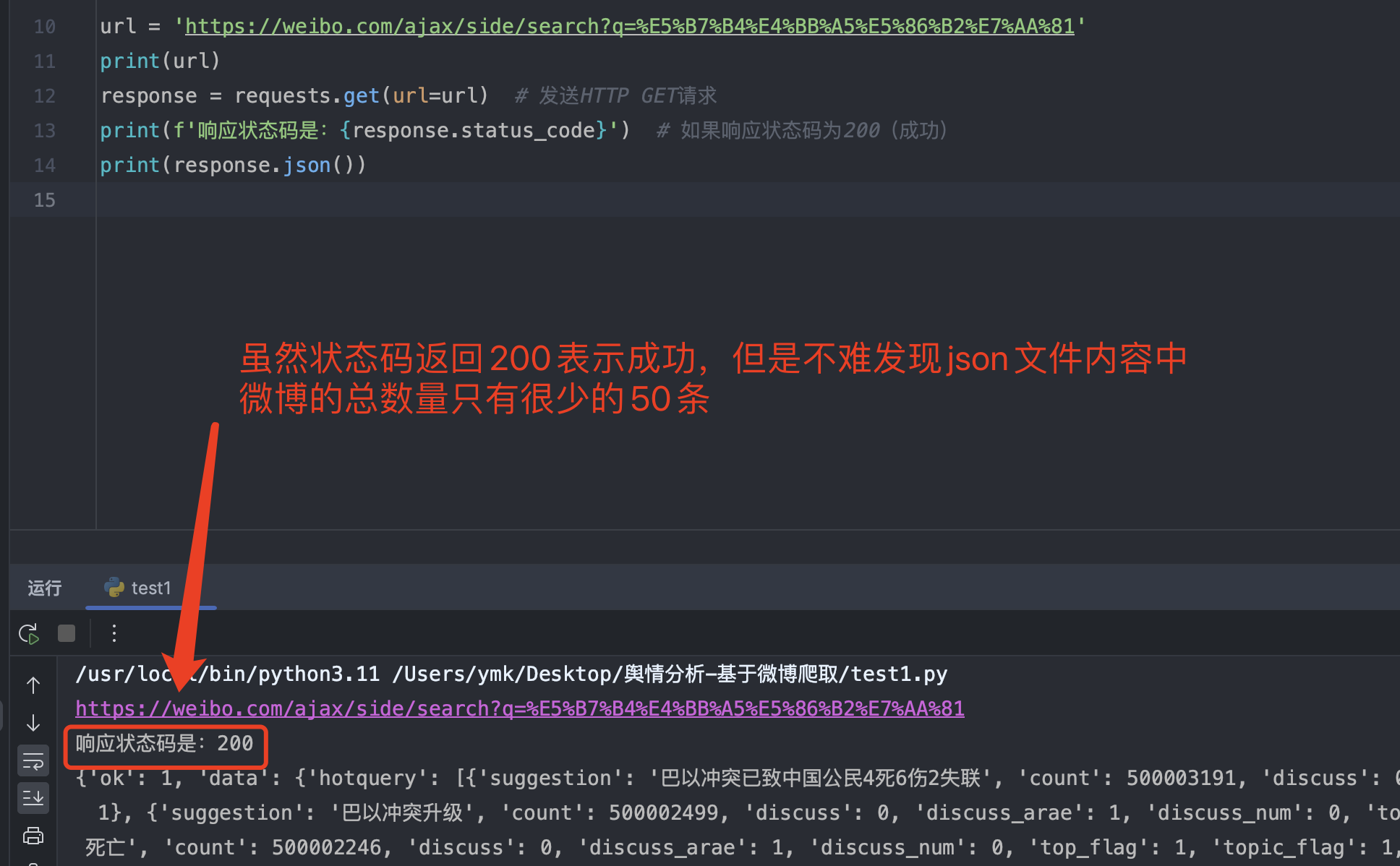
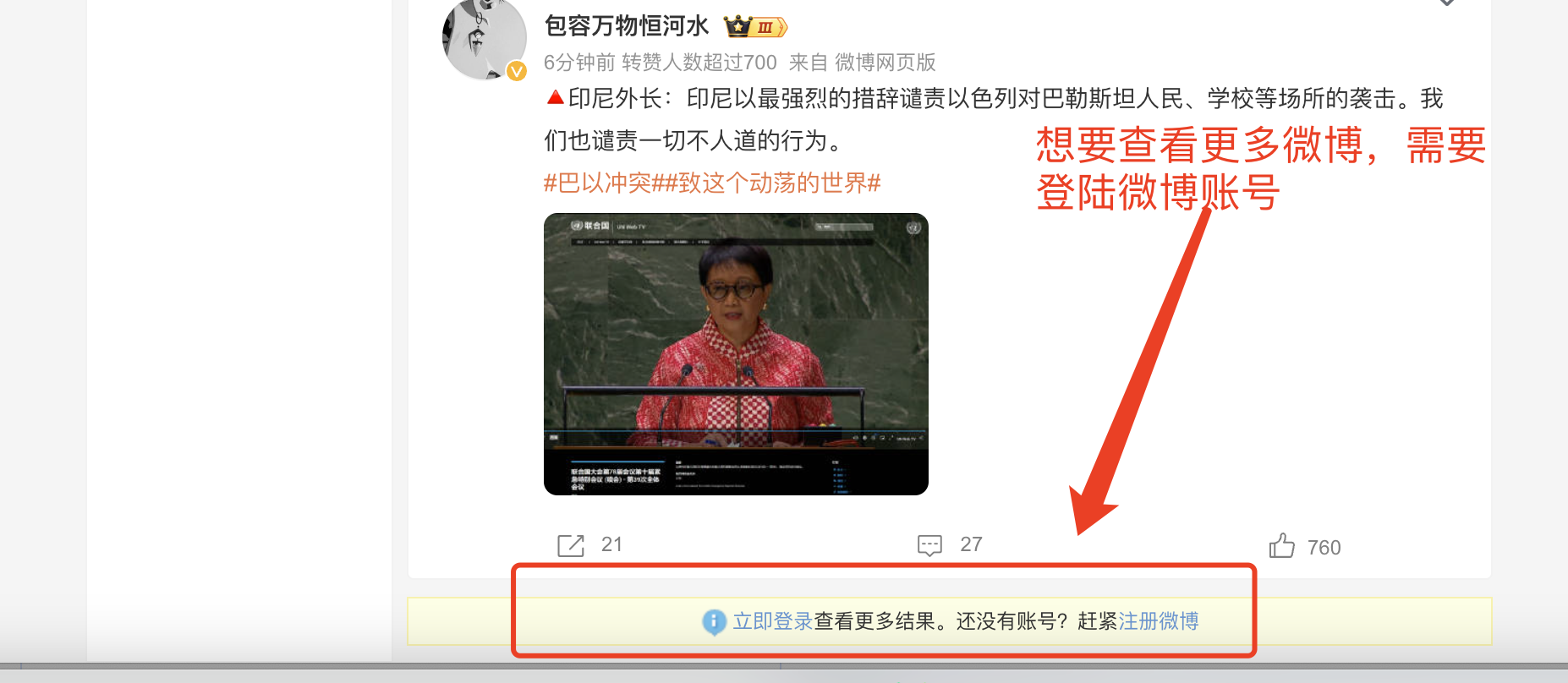
    虽然状态码返回 200 表示成功,但是 json 文件里面只有很少的 50 条微博数据,这对于爬虫而言是非常少的数据。但是,当我们向下滑动想要进一步探究、查看更多数据时,会发现这时候微博官方不给我们查看,要求我们登陆账号后才能查看。
    image

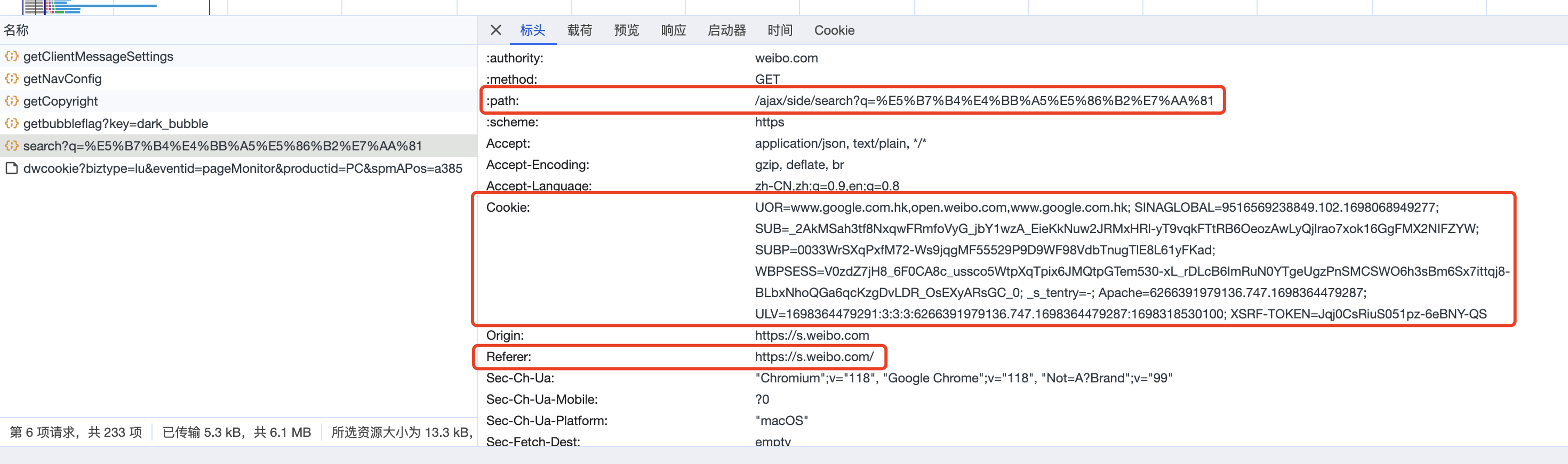
    如果需要登陆账号才能查看更多微博内容,那么意味着在爬虫里面发送 http 请求时需要使用到账号的 cookie,又考虑到网站肯定存在对爬虫的检测,如果使用 cookie 的话,肯定会被封禁的,这不仅仅会影响爬取微博数据的效率,还会造成短时间内无法打开网站。
    image

    因此,这时候便不再尝试从当前网址下手爬取数据。


    (三)微博手机端的分析

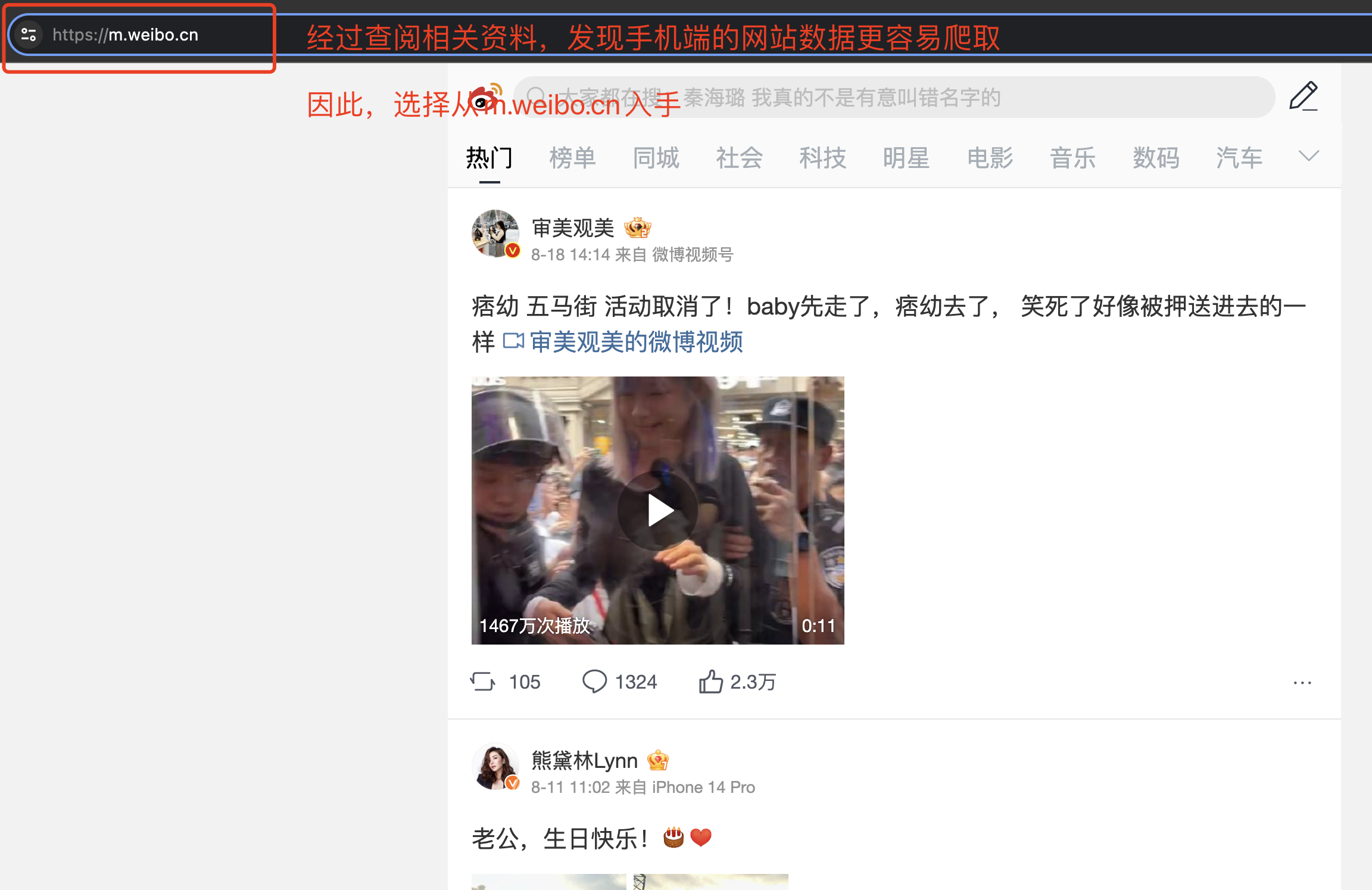
    便开始在网上查阅相关的资料,想要找到一个无需 cookie 便能爬取微博数据内容,同时又能突破只能查看 50 条数据的局限性。最终,在某网页上面有网友提了一嘴,说:“在手机端界面爬取微博数据,比在网页端爬取更加方便、局限性相对来说更小”。 于是,便开始准备从手机端网址开始下手,先尝试着验证下网友说的是否正确。 手机端的网址是:https://m.weibo.cn
    image

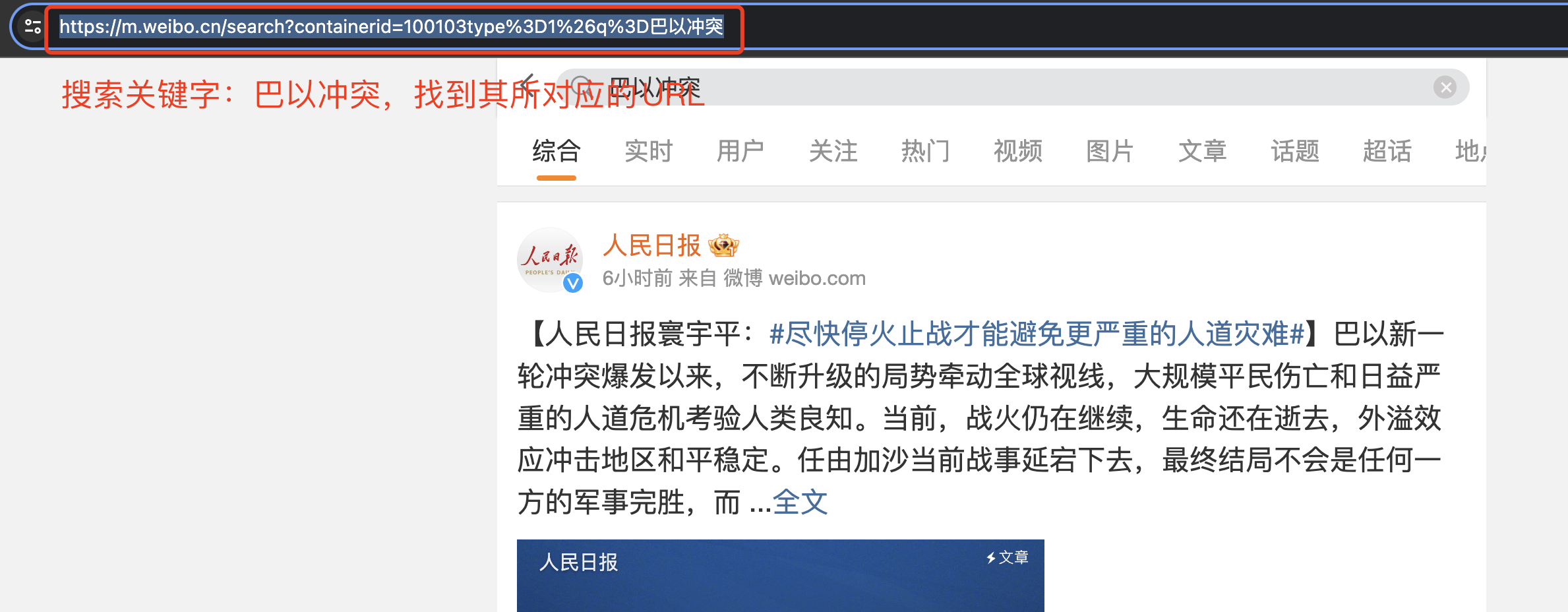
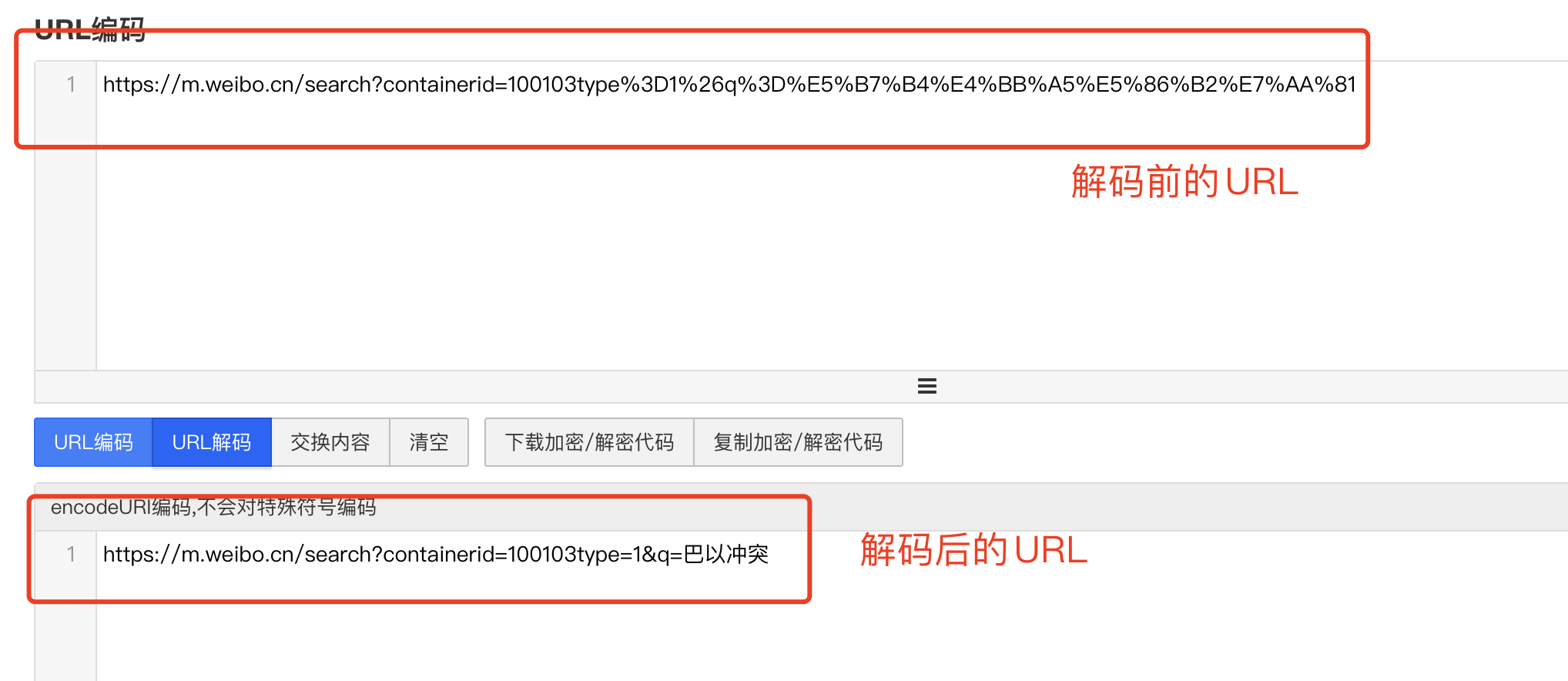
    在搜索框内搜索巴以冲突,找到其对应的 URL:https://m.weibo.cn/search?containerid=100103type%3D1%26q%3D%E5%B7%B4%E4%BB%A5%E5%86%B2%E7%AA%81
    image

    (1)URL 编码/解码

    不难发现,此处的中文仍然进行了编码操作,我们需要对链接进行解码查看是否为原来的 URL。
    image

    (2)抓包分析

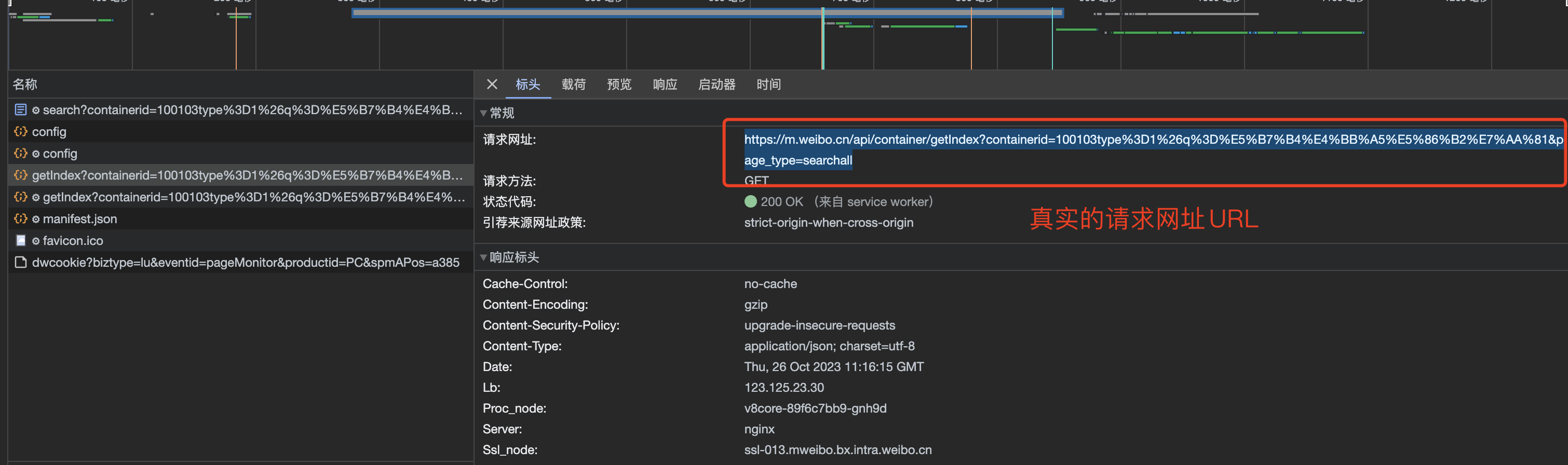
    打开开发者工具,开始对网页抓包进行分析,我们在 Fetch/XHR 里面可以找到 https 请求, 请求网址是:https://m.weibo.cn/api/container/getIndex?containerid=100103type%3D1%26q%3D%E5%B7%B4%E4%BB%A5%E5%86%B2%E7%AA%81&page_type=searchall, 请求方法是:GET, 请求参数是:containerid=100103type%3D1%26q%3D%E5%B7%B4%E4%BB%A5%E5%86%B2%E7%AA%81&page_type=searchall
    image

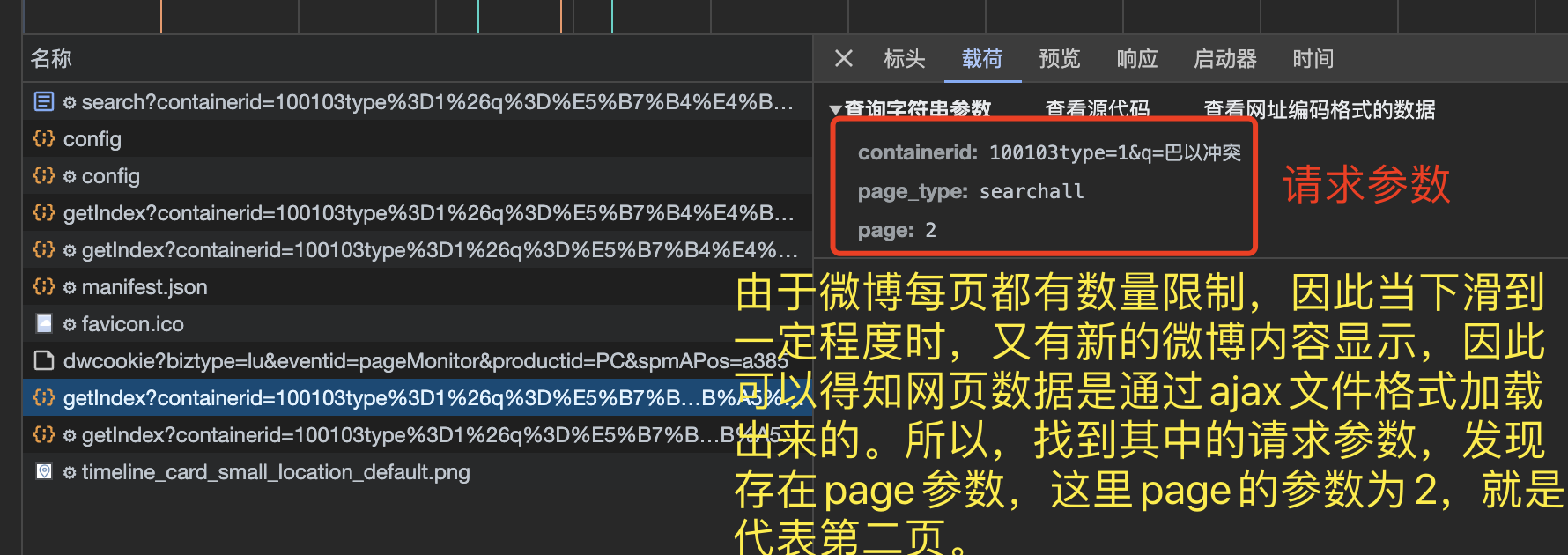
    (3)请求参数分析

    image

    由于微博每页都有数量限制,因此当下滑到一定程度时,又有新的微博内容显示,因此可以得知网页数据是通过ajax文件格式加载出来的。所以,找到其中的请求参数,发现存在page参数,这里 page的参数为 2,就是代表第二页。这个时候不难猜测出从本页面下手,并不存在微博内容数量的限制,我们只需要设置好 page 参数即可。
    image

    于是便开始写相关的代码,首先写好请求参数 params

    params = {
            'containerid': f'100103type=1&q=#{keyword}#',
            'page_type': 'searchall',
            'page': page
        }

    (4)json 内容分析

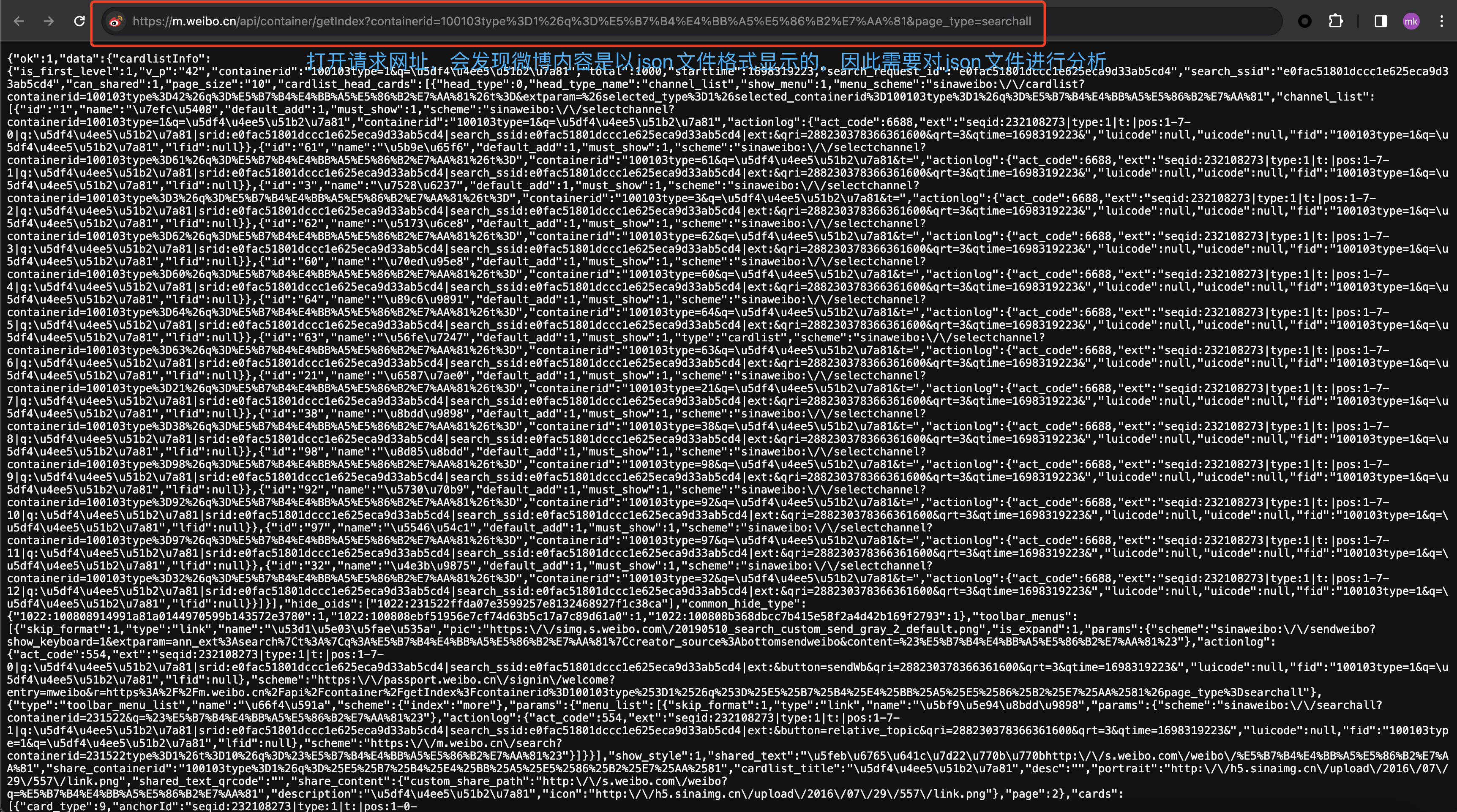
    接着我们打开请求网址https://m.weibo.cn/api/container/getIndex?containerid=100103type%3D1%26q%3D%E5%B7%B4%E4%BB%A5%E5%86%B2%E7%AA%81&page_type=searchall,发现下面微博数据仍然是以 json 格式显示的,因此我们需要对 json 文件内容进行分析。
    image

    首先,我们将 json 文件内容复制到 json 格式化检验里,发现 返回的 json 是正确的 json 文件
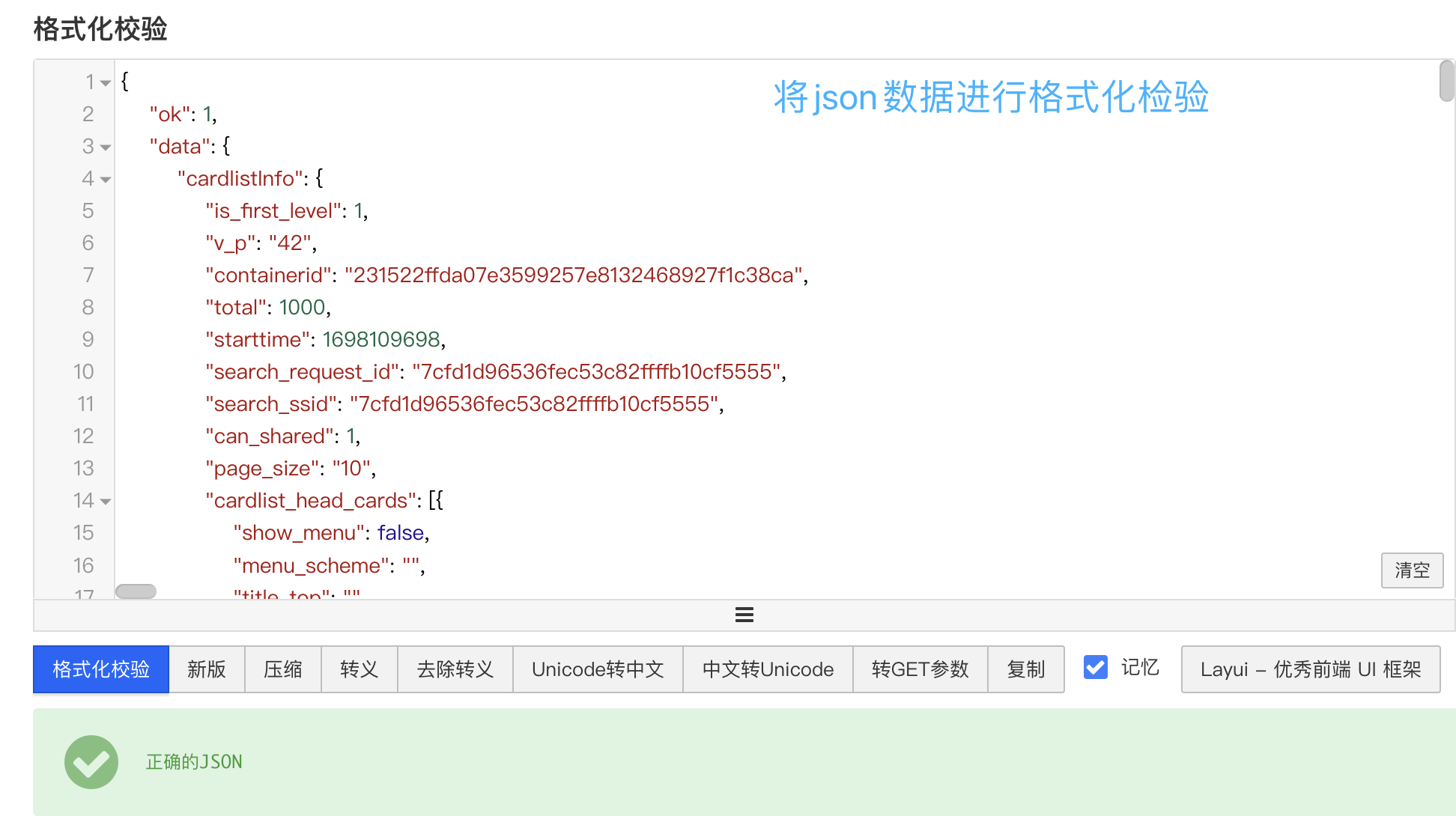
    image

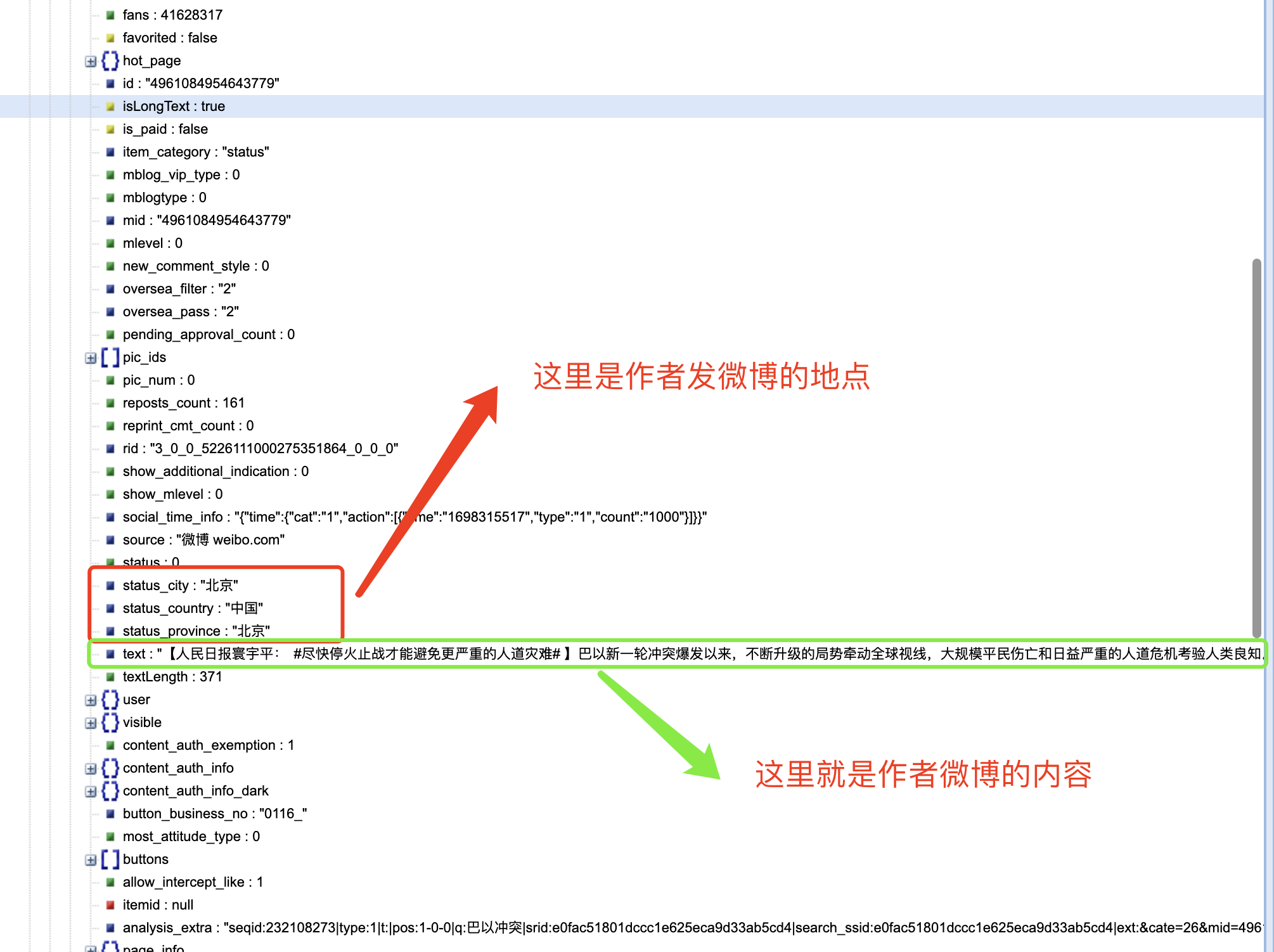
    为了方便对 json 文件内容的分析,我们选取 json 视图对 json 进行可视化分析。 不难发现,微博内容存在于 json/data/cards/里面,下图中的 0~22 均代表一条条微博内容等等数据。 image
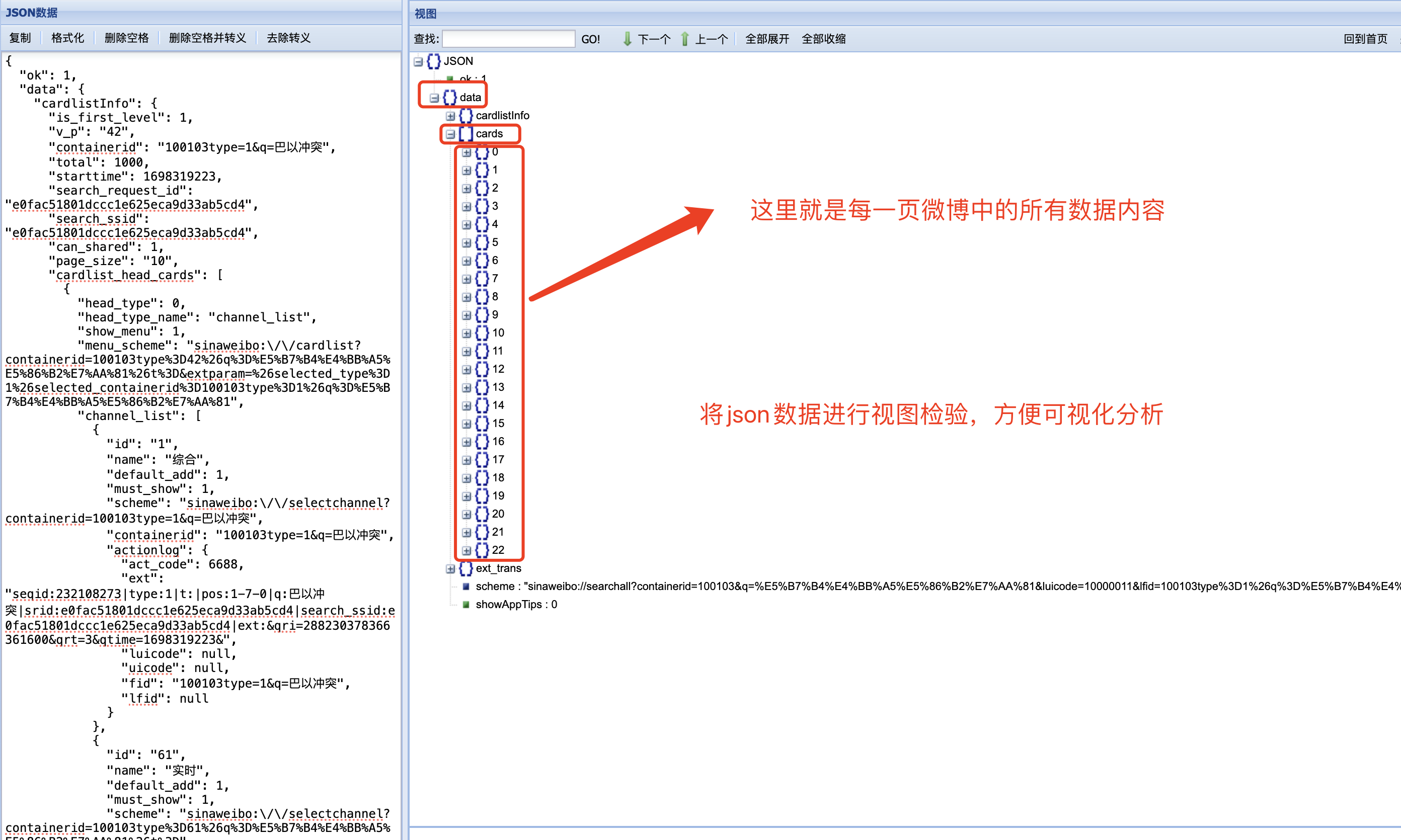
    (5)查看/提取 json 有效信息

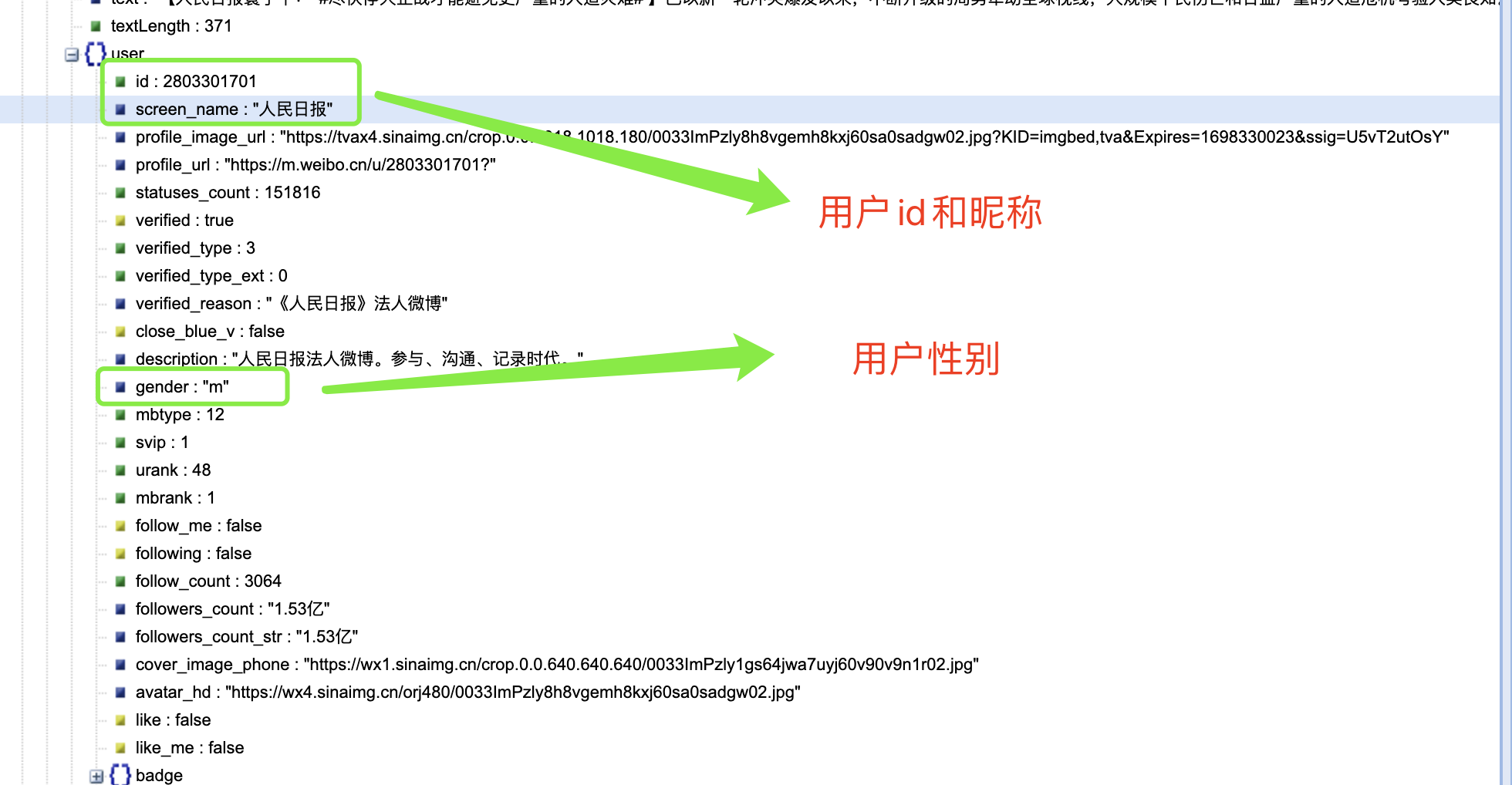
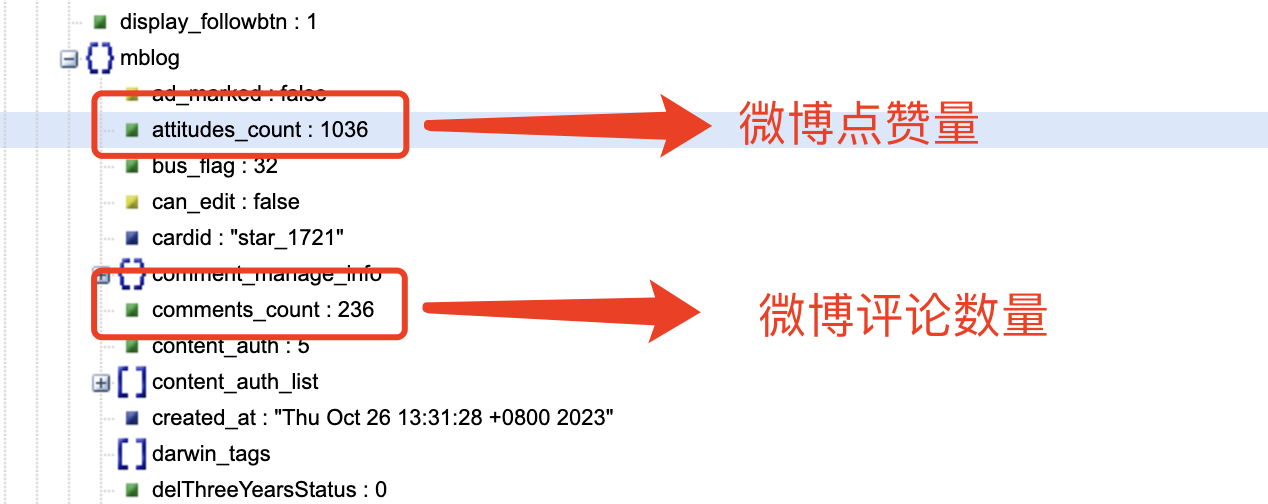
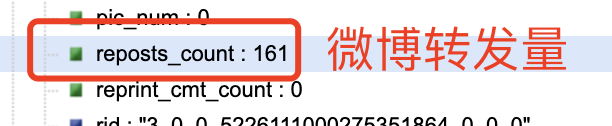
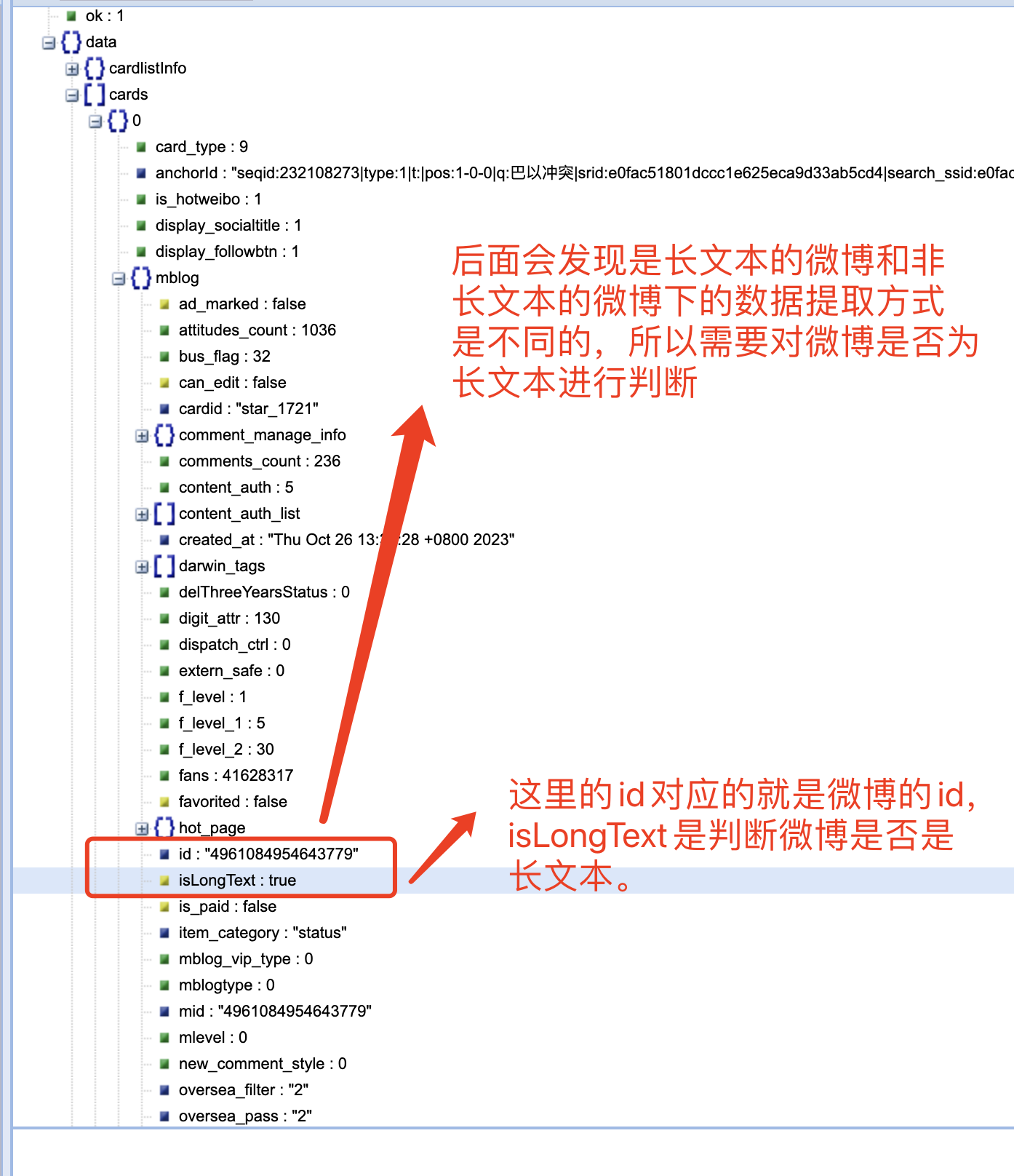
    结合网页内容对 cards 下面的内容进行分析,我们可以发现: -->在 mblog 中存在判断微博是否为长文本一项 isLongText : true 其他有用内容如下:

    Json参数分析
    python
    'wid': item.get('id'),  # 微博ID
    'user_name': item.get('user').get('screen_name'),  # 微博发布者名称
    'user_id': item.get('user').get('id'),  # 微博发布者ID
    'gender': item.get('user').get('gender'),  # 微博发布者性别
    'publish_time': time_formater(item.get('created_at')),  # 微博发布时间
    'source': item.get('source'),  # 微博发布来源
    'status_province': item.get('status_province'),  # 微博发布者所在省份
    'text': pq(item.get("text")).text(),  # 仅提取内容中的文本
    'like_count': item.get('attitudes_count'),  # 点赞数
    'comment_count': item.get('comments_count'),  # 评论数
    'forward_count': item.get('reposts_count'),  # 转发数

    image

    image

    image

    image

    image

    到了这里,我惊讶的发现爬取时并不需要用户的 cookie,可以证明网友的某些说法是正确的。


    二、代码实现过程:

    (1)导包

    python
    import requests  # 导入requests库,用于发送HTTP请求
    from urllib.parse import urlencode  # 导入urlencode函数,用于构建URL参数
    import time  # 导入time模块,用于添加时间延迟
    import random  # 导入random模块,用于生成随机数
    from pyquery import PyQuery as pq  # 导入PyQuery库,用于解析HTML和XML
    from datetime import datetime  # 导入datetime模块,用于处理日期和时间
    import os
    import csv

    (2)设置基础的 URL 以及请求参数 params

    python
    # 设置代理等(新浪微博的数据是用ajax异步下拉加载的,network->xhr)
    host = 'm.weibo.cn'  # 设置主机地址
    base_url = 'https://%s/api/container/getIndex?' % host  # 基础URL,用于构建API请求URL
    user_agent = 'Mozilla/5.0 (Macintosh; Intel Mac OS X 10_15_7) AppleWebKit/537.36 (KHTML, like Gecko) Chrome/118.0.0.0 Safari/537.36'  # 设置用户代理信息
    
    # 设置请求头
    headers = {
        'Host': host,  # 设置请求头中的Host字段
        'keep': 'close',  # 设置请求头中的keep字段
        # 话题巴以冲突下的URL对应的Referer
        # 'Referer': 'https://m.weibo.cn/search?containerid=100103type%3D1%26q%3D%E5%B7%B4%E4%BB%A5%E5%86%B2%E7%AA%81',  #
        'User-Agent': user_agent  # 设置请求头中的User-Agent字段
    }

    (3)将微博的时间格式转换为标准的日期时间格式

    python
    # 用于将微博的时间格式转换为标准的日期时间格式
    def time_formater(input_time_str):
        input_format = '%a %b %d %H:%M:%S %z %Y'  # 输入时间的格式
        output_format = '%Y-%m-%d %H:%M:%S'  # 输出时间的格式
    
        return datetime.strptime(input_time_str, input_format).strftime(output_format)

    (4)按页数 page 抓取微博内容数据

    python
    # 按页数抓取数据
    def get_single_page(page, keyword):
        # https://m.weibo.cn/api/container/getIndex?containerid=100103type=1&q=巴以冲突&page_type=searchall&page=1
        # 构建请求参数
        params = {
            'containerid': f'100103type=1&q=#{keyword}#',
            'page_type': 'searchall',
            'page': page
        }
        url = base_url + urlencode(params)  # 将输入的中文关键词编码,构建出完整的API请求URL
        print(url)  # 打印请求的URL
        error_times = 3  # 设置错误尝试次数
        while True:
            response = requests.get(url, headers=headers)  # 发送HTTP GET请求
            if response.status_code == 200:  # 如果响应状态码为200(成功)
                if len(response.json().get('data').get('cards')) > 0:  # 检查是否有数据
                    return response.json()  # 返回JSON响应数据
            time.sleep(3)  # 等待3秒
            error_times += 1  # 错误尝试次数增加
            if error_times > 3:  # 如果连续出错次数超过3次
                return None  # 返回空值

    (5)定义长文本微博内容的爬取

    python
    # 长文本爬取代码段
    def getLongText(lid):  # 根据长文本的ID获取长文本内容
        # 长文本请求头
        headers_longtext = {
        'Host': host,
        'Referer': 'https://m.weibo.cn/status/' + lid,
        'User-Agent': user_agent
        }
        params = {
        'id': lid
        }
        url = 'https://m.weibo.cn/statuses/extend?' + urlencode(params)  # 构建获取长文本内容的URL
        try:
        response = requests.get(url, headers=headers_longtext)  # 发送HTTP GET请求
        if response.status_code == 200:  # 如果响应状态码为200(成功)
        jsondata = response.json()  # 解析JSON响应数据
        tmp = jsondata.get('data')  # 获取长文本数据
        return pq(tmp.get("longTextContent")).text()  # 解析长文本内容
        except:
        pass

    (6)对 json 中的有效信息进行提取

    python
    # 修改后的页面爬取解析函数
        def parse_page(json_data):
        global count  # 使用全局变量count
        items = json_data.get('data').get('cards')  # 获取JSON数据中的卡片列表
    
        for index, item in enumerate(items):
        if item.get('card_type') == 7:
        print('导语')
        continue
    elif item.get('card_type') == 8 or (item.get('card_type') == 11 and item.get('card_group') is None):
        continue
        if item.get('mblog', None):
        item = item.get('mblog')
    else:
        item = item.get('card_group')[0].get('mblog')
        if item:
        if item.get('isLongText') is False:  # 不是长文本
        data = {
        'wid': item.get('id'),  # 微博ID
        'user_name': item.get('user').get('screen_name'),  # 微博发布者名称
        'user_id': item.get('user').get('id'),  # 微博发布者ID
        'gender': item.get('user').get('gender'),  # 微博发布者性别
        'publish_time': time_formater(item.get('created_at')),  # 微博发布时间
        'source': item.get('source'),  # 微博发布来源
        'status_province': item.get('status_province'),  # 微博发布者所在省份
        'text': pq(item.get("text")).text(),  # 仅提取内容中的文本
        'like_count': item.get('attitudes_count'),  # 点赞数
        'comment_count': item.get('comments_count'),  # 评论数
        'forward_count': item.get('reposts_count'),  # 转发数
        }
    else:  # 长文本涉及文本的展开
        tmp = getLongText(item.get('id'))  # 调用函数获取长文本内容
        data = {
        'wid': item.get('id'),  # 微博ID
        'user_name': item.get('user').get('screen_name'),  # 微博发布者名称
        'user_id': item.get('user').get('id'),  # 微博发布者ID
        'gender': item.get('user').get('gender'),  # 微博发布者性别
        'publish_time': time_formater(item.get('created_at')),  # 微博发布时间
        'source': item.get('source'),  # 微博发布来源
        'text': tmp,  # 仅提取内容中的文本
        'status_province': item.get('status_province'),  # 微博发布者所在省份
        'like_count': item.get('attitudes_count'),  # 点赞数
        'comment_count': item.get('comments_count'),  # 评论数
        'forward_count': item.get('reposts_count'),  # 转发数
        }
        count += 1
        print(f'total count: {count}')  # 打印总计数
        yield data  # 返回数据

    (7)将爬取到的内容保存到 csv 文件内

    python
    if __name__ == '__main__':
        keyword = '巴以冲突'  # 设置关键词
        result_file = f'10月26日{keyword}话题.csv'  # 设置结果文件名
        if not os.path.exists(result_file):
        with open(result_file, mode='w', encoding='utf-8-sig', newline='') as f:
        writer = csv.writer(f)
        writer.writerow(['微博ID', '微博发布者名称', '微博发布者ID', '微博发布者性别',
        '微博发布时间', '微博发布来源', '微博内容', '微博发布者所在省份', '微博点赞数量', '微博评论数量',
        '微博转发量'])  # 写入CSV文件的标题行
    
        temp_data = []  # 用于临时存储数据的列表
    
        empty_times = 0  # 空数据的连续次数
    
        for page in range(1, 50000):  # 循环抓取多页数据
        print(f'page: {page}')
        json_data = get_single_page(page, keyword)  # 获取单页数据
        if json_data == None:  # 如果数据为空
        print('json is none')
        break
    
        if len(json_data.get('data').get('cards')) <= 0:  # 检查是否有数据
        empty_times += 1
    else:
        empty_times = 0
        if empty_times > 3:  # 如果连续空数据超过3次
        print('\n\n consist empty over 3 times \n\n')
        break
    
        for result in parse_page(json_data):  # 解析并处理页面数据
        temp_data.append(result)  # 将数据添加到临时列表
        if page % save_per_n_page == 0:  # 每隔一定页数保存一次数据
        with open(result_file, mode='a+', encoding='utf-8-sig', newline='') as f:
        writer = csv.writer(f)
        for d in temp_data:
        # 将爬取到的数据写入CSV文件
        writer.writerow(
        [d['wid'],
        d['user_name'],
        d['user_id'],
        d['gender'],
        d['publish_time'],
        d['source'],
        d['text'],
        d['status_province'],
        d['like_count'],
        d['comment_count'],
        d['forward_count']])
        print(f'\n\n------cur turn write {len(temp_data)} rows to csv------\n\n')  # 打印保存数据的信息
        temp_data = []  # 清空临时数据列表
        time.sleep(random.randint(4, 8))  # 随机等待一段时间,模拟人的操作

    (8)对csv数据进行处理

    打开 csv 文件后会发现,存在重复的微博内容。 因为微博都有自己独有的 ID,故从 ID 下手对重复值进行删除处理。 在 Jupyter notebook 里面进行数据处理分析

    python
    import pandas as pd
    # 读取CSV文件
    df = pd.read_csv('10月26日巴以冲突话题.csv')
    
    # 检测并删除重复值
    df.drop_duplicates(subset='微博ID', keep='first', inplace=True)
    
    # 保存处理后的结果到新的CSV文件
    df.to_csv('处理后的内容.csv', index=False)

    三、完整的代码

    完整爬虫代码(注释由gpt自动生成)
    python
     """
    这段Python代码是一个用于爬取新浪微博数据的脚本。它使用了多个Python库来实现不同功能,包括发送HTTP请求、解析HTML和XML、处理日期和时间等。
    
    以下是代码的主要功能和结构:
    1. 导入所需的Python库:
       - `requests`: 用于发送HTTP请求。
       - `urllib.parse`: 用于构建URL参数。
       - `time`: 用于添加时间延迟。
       - `random`: 用于生成随机数。
       - `pyquery`: 用于解析HTML和XML。
       - `datetime`: 用于处理日期和时间。
       - `os`:用于文件操作。
       - `csv`:用于读写CSV文件。
    2. 设置一些常量和请求头信息,包括主机地址、基础URL、用户代理信息、请求头等。
    3. 定义了一个`time_formater`函数,用于将微博的时间格式转换为标准的日期时间格式。
    4. 定义了一个`get_single_page`函数,用于按页数抓取数据,构建API请求URL,并发送HTTP GET请求。它还包含了错误重试逻辑。
    5. 定义了一个`getLongText`函数,用于根据长文本的ID获取长文本内容。这部分代码涉及长文本的展开。
    6. 定义了一个`parse_page`函数,用于解析页面返回的JSON数据,提取所需的信息,并生成数据字典。
    7. 主程序部分包括以下功能:
       - 设置关键词(`keyword`)和结果文件名(`result_file`)。
       - 打开结果文件(CSV),如果文件不存在,则创建文件并写入标题行。
       - 定义临时数据列表`temp_data`,用于存储数据。
       - 进行循环,抓取多页数据,解析并处理页面数据,然后将数据写入CSV文件。
       - 在每隔一定页数保存一次数据到CSV文件。
       - 随机等待一段时间以模拟人的操作。
    
    总体来说,这段代码的主要目的是爬取新浪微博中与特定关键词相关的微博数据,并将其保存到CSV文件中。
    它处理了长文本的展开以及一些错误重试逻辑。需要注意的是,爬取网站数据时应遵守网站的使用政策和法律法规。
    """
    import requests  # 导入requests库,用于发送HTTP请求
    from urllib.parse import urlencode  # 导入urlencode函数,用于构建URL参数
    import time  # 导入time模块,用于添加时间延迟
    import random  # 导入random模块,用于生成随机数
    from pyquery import PyQuery as pq  # 导入PyQuery库,用于解析HTML和XML
    from datetime import datetime  # 导入datetime模块,用于处理日期和时间
    import os
    import csv
    
    # 设置代理等(新浪微博的数据是用ajax异步下拉加载的,network->xhr)
    host = 'm.weibo.cn'  # 设置主机地址
    base_url = 'https://%s/api/container/getIndex?' % host  # 基础URL,用于构建API请求URL
    user_agent = 'Mozilla/5.0 (Macintosh; Intel Mac OS X 10_15_7) AppleWebKit/537.36 (KHTML, like Gecko) Chrome/118.0.0.0 Safari/537.36'  # 设置用户代理信息
    
    # 设置请求头
    headers = {
        'Host': host,  # 设置请求头中的Host字段
        'keep': 'close',  # 设置请求头中的keep字段
        # 话题巴以冲突下的URL对应的Referer
        'Referer': 'https://m.weibo.cn/search?containerid=100103type%3D1%26q%3D%E5%B7%B4%E4%BB%A5%E5%86%B2%E7%AA%81',  #
        'User-Agent': user_agent  # 设置请求头中的User-Agent字段
    }
    
    save_per_n_page = 1  # 每隔多少页保存一次数据
    
    
    # 用于将微博的时间格式转换为标准的日期时间格式
    def time_formater(input_time_str):
        input_format = '%a %b %d %H:%M:%S %z %Y'  # 输入时间的格式
        output_format = '%Y-%m-%d %H:%M:%S'  # 输出时间的格式
    
        return datetime.strptime(input_time_str, input_format).strftime(output_format)
    
    
    # 按页数抓取数据
    def get_single_page(page, keyword):
        # https://m.weibo.cn/api/container/getIndex?containerid=100103type=1&q=巴以冲突&page_type=searchall&page=1
        # 构建请求参数
        params = {
            'containerid': f'100103type=1&q=#{keyword}#',
            'page_type': 'searchall',
            'page': page
        }
        url = base_url + urlencode(params)  # 将输入的中文关键词编码,构建出完整的API请求URL
        print(url)  # 打印请求的URL
        error_times = 3  # 设置错误尝试次数
        while True:
            response = requests.get(url, headers=headers)  # 发送HTTP GET请求
            if response.status_code == 200:  # 如果响应状态码为200(成功)
                if len(response.json().get('data').get('cards')) > 0:  # 检查是否有数据
                    return response.json()  # 返回JSON响应数据
            time.sleep(3)  # 等待3秒
            error_times += 1  # 错误尝试次数增加
            if error_times > 3:  # 如果连续出错次数超过3次
                return None  # 返回空值
    
    
    # 长文本爬取代码段
    def getLongText(lid):  # 根据长文本的ID获取长文本内容
        # 长文本请求头
        headers_longtext = {
        'Host': host,
        'Referer': 'https://m.weibo.cn/status/' + lid,
        'User-Agent': user_agent
        }
        params = {
        'id': lid
        }
        url = 'https://m.weibo.cn/statuses/extend?' + urlencode(params)  # 构建获取长文本内容的URL
        try:
        response = requests.get(url, headers=headers_longtext)  # 发送HTTP GET请求
        if response.status_code == 200:  # 如果响应状态码为200(成功)
        jsondata = response.json()  # 解析JSON响应数据
        tmp = jsondata.get('data')  # 获取长文本数据
        return pq(tmp.get("longTextContent")).text()  # 解析长文本内容
        except:
        pass
    
    
    # 解析页面返回的JSON数据
        count = 0  # 计数器,用于记录爬取的数据数量
    
    
    # 修改后的页面爬取解析函数
        def parse_page(json_data):
        global count  # 使用全局变量count
        items = json_data.get('data').get('cards')  # 获取JSON数据中的卡片列表
    
        for index, item in enumerate(items):
        if item.get('card_type') == 7:
        print('导语')
        continue
    elif item.get('card_type') == 8 or (item.get('card_type') == 11 and item.get('card_group') is None):
        continue
        if item.get('mblog', None):
        item = item.get('mblog')
    else:
        item = item.get('card_group')[0].get('mblog')
        if item:
        if item.get('isLongText') is False:  # 不是长文本
        data = {
        'wid': item.get('id'),  # 微博ID
        'user_name': item.get('user').get('screen_name'),  # 微博发布者名称
        'user_id': item.get('user').get('id'),  # 微博发布者ID
        'gender': item.get('user').get('gender'),  # 微博发布者性别
        'publish_time': time_formater(item.get('created_at')),  # 微博发布时间
        'source': item.get('source'),  # 微博发布来源
        'status_province': item.get('status_province'),  # 微博发布者所在省份
        'text': pq(item.get("text")).text(),  # 仅提取内容中的文本
        'like_count': item.get('attitudes_count'),  # 点赞数
        'comment_count': item.get('comments_count'),  # 评论数
        'forward_count': item.get('reposts_count'),  # 转发数
        }
    else:  # 长文本涉及文本的展开
        tmp = getLongText(item.get('id'))  # 调用函数获取长文本内容
        data = {
        'wid': item.get('id'),  # 微博ID
        'user_name': item.get('user').get('screen_name'),  # 微博发布者名称
        'user_id': item.get('user').get('id'),  # 微博发布者ID
        'gender': item.get('user').get('gender'),  # 微博发布者性别
        'publish_time': time_formater(item.get('created_at')),  # 微博发布时间
        'source': item.get('source'),  # 微博发布来源
        'text': tmp,  # 仅提取内容中的文本
        'status_province': item.get('status_province'),  # 微博发布者所在省份
        'like_count': item.get('attitudes_count'),  # 点赞数
        'comment_count': item.get('comments_count'),  # 评论数
        'forward_count': item.get('reposts_count'),  # 转发数
        }
        count += 1
        print(f'total count: {count}')  # 打印总计数
        yield data  # 返回数据
    
    
        if __name__ == '__main__':
        keyword = '巴以冲突'  # 设置关键词
        result_file = f'10月26日{keyword}话题.csv'  # 设置结果文件名
        if not os.path.exists(result_file):
        with open(result_file, mode='w', encoding='utf-8-sig', newline='') as f:
        writer = csv.writer(f)
        writer.writerow(['微博ID', '微博发布者名称', '微博发布者ID', '微博发布者性别',
        '微博发布时间', '微博发布来源', '微博内容', '微博发布者所在省份', '微博点赞数量', '微博评论数量',
        '微博转发量'])  # 写入CSV文件的标题行
    
        temp_data = []  # 用于临时存储数据的列表
    
        empty_times = 0  # 空数据的连续次数
    
        for page in range(1, 50000):  # 循环抓取多页数据
        print(f'page: {page}')
        json_data = get_single_page(page, keyword)  # 获取单页数据
        if json_data == None:  # 如果数据为空
        print('json is none')
        break
    
        if len(json_data.get('data').get('cards')) <= 0:  # 检查是否有数据
        empty_times += 1
    else:
        empty_times = 0
        if empty_times > 3:  # 如果连续空数据超过3次
        print('\n\n consist empty over 3 times \n\n')
        break
    
        for result in parse_page(json_data):  # 解析并处理页面数据
        temp_data.append(result)  # 将数据添加到临时列表
        if page % save_per_n_page == 0:  # 每隔一定页数保存一次数据
        with open(result_file, mode='a+', encoding='utf-8-sig', newline='') as f:
        writer = csv.writer(f)
        for d in temp_data:
        # 将爬取到的数据写入CSV文件
        writer.writerow(
        [d['wid'],
        d['user_name'],
        d['user_id'],
        d['gender'],
        d['publish_time'],
        d['source'],
        d['text'],
        d['status_province'],
        d['like_count'],
        d['comment_count'],
        d['forward_count']])
        print(f'\n\n------cur turn write {len(temp_data)} rows to csv------\n\n')  # 打印保存数据的信息
        temp_data = []  # 清空临时数据列表
        time.sleep(random.randint(4, 8))  # 随机等待一段时间,模拟人的操作

    __EOF__

  • 本文作者: mingkai2004
  • 本文链接: https://www.cnblogs.com/mingkai2004/p/18244624
  • 关于博主: 评论和私信会在第一时间回复。或者直接私信我。
  • 版权声明: 本博客所有文章除特别声明外,均采用 BY-NC-SA 许可协议。转载请注明出处!
  • 声援博主: 如果您觉得文章对您有帮助,可以点击文章右下角推荐一下。
  • 相关阅读:
    SplitMask:大规模数据集是自我监督预训练的必要条件吗?
    【微服务】CORS跨越问题&网关请求转发时进行路径重写问题
    intellij plugin(插件)的项目解析及研读
    回调函数的简单使用0717
    Linux系统目录结构
    限流神器之-Guava RateLimiter 实战
    ssm在线学习系统毕业设计-附源码211707
    TouchGFX之Mixins
    数据化运营开篇词 给你一套数据化运营的“三段式”标准路径
    【C++】红黑树插入过程详解
  • 原文地址:https://www.cnblogs.com/mingkai2004/p/18244624