-
【oceanbase】安装ocp,ocp部署oceanbase
https://www.oceanbase.com/docs/common-ocp-1000000000584989
资源
ip hostname cpu mem 组件 192.168.0.71 obnode-000-071 8 16 oceanbase-ce 192.168.0.72 obnode-000-072 8 16 oceanbase-ce 192.168.0.73 obnode-000-073 8 16 oceanbase-ce 192.168.0.74 obproxy-000-074 2 4 obproxy-ce 192.168.0.79 ocp-000-079 4 8 -> 64 ocp-server-ce 操作系统
关闭透明大页
echo never > /sys/kernel/mm/transparent_hugepage/enabled- 1
关闭防火墙
systemctl disable firewalld- 1
关闭selinux
[root@obnode-000-071 /]# cat /etc/selinux/config # This file controls the state of SELinux on the system. # SELINUX= can take one of these three values: # enforcing - SELinux security policy is enforced. # permissive - SELinux prints warnings instead of enforcing. # disabled - No SELinux policy is loaded. SELINUX=disabled- 1
- 2
- 3
- 4
- 5
- 6
- 7
- 8
用户与ssh互信
新增用户
useradd -U admin -d /home/admin -s /bin/bash mkdir -p /home/admin passwd admin- 1
- 2
- 3
给
admin增加sudovi /etc/sudoers- 1
vim /etc/sudoers 添加如下内容: Same thing without a password %wheel ALL=(ALL) NOPASSWD: ALL admin ALL=(ALL) NOPASSWD: ALL- 1
- 2
- 3
- 4
- 5
目录与属主
mkdir /data chown -R admin:admin /data chown -R admin:admin /home/admin- 1
- 2
- 3
互信
#!/usr/bin/bash SERVERS=("admin@192.168.0.71" "admin@192.168.0.72" "admin@192.168.0.73" "admin@192.168.0.74" "admin@192.168.0.75" "admin@192.168.0.79") PASSWORD="abc123456" keygen() { sudo yum -y install expect expect -c " spawn ssh-keygen -t rsa expect { *(~/.ssh/id_rsa):* { send -- \r;exp_continue} *(y/n)* { send -- y\r;exp_continue} *Enter* { send -- \r;exp_continue} *(y/n)* { send -- y\r;exp_continue} *Enter* { send -- \r;exp_continue} eof {exit 0} } expect eof " } copy(){ expect -c " set timeout -1 spawn ssh-copy-id $1 expect { *(yes/no)* { send -- yes\r; exp_continue } *password:* { send -- $PASSWORD\r; exp_continue} eof {exit 0} } expect eof " } ssh_copy_id_to_all(){ keygen ; for host in ${SERVERS[@]} do copy $host done } ssh_copy_id_to_all- 1
- 2
- 3
- 4
- 5
- 6
- 7
- 8
- 9
- 10
- 11
- 12
- 13
- 14
- 15
- 16
- 17
- 18
- 19
- 20
- 21
- 22
- 23
- 24
- 25
- 26
- 27
- 28
- 29
- 30
- 31
- 32
- 33
- 34
- 35
- 36
- 37
- 38
- 39
- 执行结果
[admin@obd-000-070 ~]$ sh ssh.sh Loaded plugins: fastestmirror, langpacks Loading mirror speeds from cached hostfile * base: mirrors.ustc.edu.cn * extras: mirrors.nju.edu.cn * updates: mirrors.ustc.edu.cn Package expect-5.45-14.el7_1.x86_64 already installed and latest version Nothing to do spawn ssh-keygen -t rsa Generating public/private rsa key pair. Enter file in which to save the key (/home/admin/.ssh/id_rsa): /home/admin/.ssh/id_rsa already exists. Overwrite (y/n)? y Enter passphrase (empty for no passphrase): Enter same passphrase again: Your identification has been saved in /home/admin/.ssh/id_rsa. Your public key has been saved in /home/admin/.ssh/id_rsa.pub. The key fingerprint is: SHA256:pm2Lcxoss4aDpt05Y2HwYBfmJ7+rIF6Gd2HrGMBG6a0 admin@obd-000-070 The key's randomart image is: +---[RSA 2048]----+ | | | . o | | o o . | |+ = + . | | * * * S | |. + =.++ | |.E.Bo++.o | |o+*oX=o+.. | |+..===+=. | +----[SHA256]-----+ spawn ssh-copy-id admin@192.168.0.71 /bin/ssh-copy-id: INFO: Source of key(s) to be installed: "/home/admin/.ssh/id_rsa.pub" /bin/ssh-copy-id: INFO: attempting to log in with the new key(s), to filter out any that are already installed /bin/ssh-copy-id: INFO: 1 key(s) remain to be installed -- if you are prompted now it is to install the new keys admin@192.168.0.71's password: Number of key(s) added: 1 Now try logging into the machine, with: "ssh 'admin@192.168.0.71'" and check to make sure that only the key(s) you wanted were added. spawn ssh-copy-id admin@192.168.0.72 /bin/ssh-copy-id: INFO: Source of key(s) to be installed: "/home/admin/.ssh/id_rsa.pub" /bin/ssh-copy-id: INFO: attempting to log in with the new key(s), to filter out any that are already installed /bin/ssh-copy-id: INFO: 1 key(s) remain to be installed -- if you are prompted now it is to install the new keys admin@192.168.0.72's password: Number of key(s) added: 1 Now try logging into the machine, with: "ssh 'admin@192.168.0.72'" and check to make sure that only the key(s) you wanted were added. spawn ssh-copy-id admin@192.168.0.73 /bin/ssh-copy-id: INFO: Source of key(s) to be installed: "/home/admin/.ssh/id_rsa.pub" /bin/ssh-copy-id: INFO: attempting to log in with the new key(s), to filter out any that are already installed /bin/ssh-copy-id: INFO: 1 key(s) remain to be installed -- if you are prompted now it is to install the new keys admin@192.168.0.73's password: Number of key(s) added: 1 Now try logging into the machine, with: "ssh 'admin@192.168.0.73'" and check to make sure that only the key(s) you wanted were added.- 1
- 2
- 3
- 4
- 5
- 6
- 7
- 8
- 9
- 10
- 11
- 12
- 13
- 14
- 15
- 16
- 17
- 18
- 19
- 20
- 21
- 22
- 23
- 24
- 25
- 26
- 27
- 28
- 29
- 30
- 31
- 32
- 33
- 34
- 35
- 36
- 37
- 38
- 39
- 40
- 41
- 42
- 43
- 44
- 45
- 46
- 47
- 48
- 49
- 50
- 51
- 52
- 53
- 54
- 55
- 56
- 57
- 58
- 59
- 60
- 61
- 62
- 63
selinux
时间服务器
"/etc/chrony.conf"- 1
替换如下内容
server ntp.cloud.aliyuncs.com minpoll 4 maxpoll 10 iburst server ntp.aliyun.com minpoll 4 maxpoll 10 iburst server ntp1.aliyun.com minpoll 4 maxpoll 10 iburst server ntp1.cloud.aliyuncs.com minpoll 4 maxpoll 10 iburst server ntp10.cloud.aliyuncs.com minpoll 4 maxpoll 10 iburst local stratum 10- 1
- 2
- 3
- 4
- 5
- 6
systemctl enable chronyd --now- 1
[root@obnode-000-071 ~]# chronyc activity 200 OK 2 sources online 0 sources offline 0 sources doing burst (return to online) 0 sources doing burst (return to offline) 3 sources with unknown address- 1
- 2
- 3
- 4
- 5
- 6
- 7
[root@obnode-000-071 ~]# chronyc sources 210 Number of sources = 2 MS Name/IP address Stratum Poll Reach LastRx Last sample =============================================================================== ^- 203.107.6.88 2 9 377 493 -4553us[-4779us] +/- 36ms ^* 120.25.115.20 2 8 43 318 -480us[ -723us] +/- 7733us- 1
- 2
- 3
- 4
- 5
- 6
[root@obnode-000-071 ~]# chronyc sources -v 210 Number of sources = 2 .-- Source mode '^' = server, '=' = peer, '#' = local clock. / .- Source state '*' = current synced, '+' = combined , '-' = not combined, | / '?' = unreachable, 'x' = time may be in error, '~' = time too variable. || .- xxxx [ yyyy ] +/- zzzz || Reachability register (octal) -. | xxxx = adjusted offset, || Log2(Polling interval) --. | | yyyy = measured offset, || \ | | zzzz = estimated error. || | | \ MS Name/IP address Stratum Poll Reach LastRx Last sample =============================================================================== ^- 203.107.6.88 2 9 377 506 -4553us[-4779us] +/- 36ms ^* 120.25.115.20 2 8 43 331 -480us[ -723us] +/- 7733us- 1
- 2
- 3
- 4
- 5
- 6
- 7
- 8
- 9
- 10
- 11
- 12
- 13
- 14
- 15
[root@obnode-000-071 ~]# chronyc tracking Reference ID : 78197314 (120.25.115.20) Stratum : 3 Ref time (UTC) : Sat Apr 13 12:56:58 2024 System time : 0.000044764 seconds slow of NTP time Last offset : -0.000242862 seconds RMS offset : 0.000326988 seconds Frequency : 7.116 ppm fast Residual freq : -0.020 ppm Skew : 0.671 ppm Root delay : 0.012850155 seconds Root dispersion : 0.002059723 seconds Update interval : 257.0 seconds Leap status : Normal- 1
- 2
- 3
- 4
- 5
- 6
- 7
- 8
- 9
- 10
- 11
- 12
- 13
- 14
[root@obnode-000-071 ~]# timedatectl Local time: Sat 2024-04-13 21:03:20 CST Universal time: Sat 2024-04-13 13:03:20 UTC RTC time: Sat 2024-04-13 13:03:21 Time zone: Asia/Shanghai (CST, +0800) NTP enabled: yes NTP synchronized: yes RTC in local TZ: no DST active: n/a- 1
- 2
- 3
- 4
- 5
- 6
- 7
- 8
- 9
limits.conf
vi /etc/security/limits.conf- 1
root soft nofile 655350 root hard nofile 655350 * soft nofile 655350 * hard nofile 655350 * soft stack unlimited * hard stack unlimited * soft nproc 655360 * hard nproc 655360 * soft core unlimited * hard core unlimited- 1
- 2
- 3
- 4
- 5
- 6
- 7
- 8
- 9
- 10
您需查看
/etc/security/limits.d/20-nproc.conf文件中是否存在 nproc 的配置,若存在需同步修改该文件中 nproc 的值sysctl.conf
vi /etc/sysctl.conf- 1
# for oceanbase ## 修改内核异步 I/O 限制 fs.aio-max-nr=1048576 ## 网络优化 net.core.somaxconn = 2048 net.core.netdev_max_backlog = 10000 net.core.rmem_default = 16777216 net.core.wmem_default = 16777216 net.core.rmem_max = 16777216 net.core.wmem_max = 16777216 net.ipv4.ip_local_port_range = 3500 65535 net.ipv4.ip_forward = 0 net.ipv4.conf.default.rp_filter = 1 net.ipv4.conf.default.accept_source_route = 0 net.ipv4.tcp_syncookies = 1 net.ipv4.tcp_rmem = 4096 87380 16777216 net.ipv4.tcp_wmem = 4096 65536 16777216 net.ipv4.tcp_max_syn_backlog = 16384 net.ipv4.tcp_fin_timeout = 15 net.ipv4.tcp_max_syn_backlog = 16384 net.ipv4.tcp_tw_reuse = 1 net.ipv4.tcp_tw_recycle = 1 net.ipv4.tcp_slow_start_after_idle=0 vm.swappiness = 0 vm.min_free_kbytes = 2097152 fs.file-max = 6573688 # 修改进程可以拥有的虚拟内存区域数量 vm.max_map_count = 655360 # 此处为 OceanBase 数据库的 data 目录 kernel.core_pattern = /data/core-%e-%p-%t- 1
- 2
- 3
- 4
- 5
- 6
- 7
- 8
- 9
- 10
- 11
- 12
- 13
- 14
- 15
- 16
- 17
- 18
- 19
- 20
- 21
- 22
- 23
- 24
- 25
- 26
- 27
- 28
- 29
- 30
- 31
- 32
- 33
- 34
- 35
软件包准备
wget https://obbusiness-private.oss-cn-shanghai.aliyuncs.com/download-center/opensource/ocp/4.2.2_CE_HF1/ocp-all-in-one-4.2.2-20240329111923.el7.x86_64.tar.gz tar -zxvf oceanbase-all-in-one-4.3.0.1-100000242024032211.el7.x86_64.tar.gz cd oceanbase-all-in-one- 1
- 2
- 3
安装部署程序
cd oceanbase-all-in-one/bin bash install.sh- 1
- 2
[admin@ocp-000-079 ~]$ cd ocp-all-in-one/ [admin@ocp-000-079 ocp-all-in-one]$ ls bin obd README.md rpms VERSION [admin@ocp-000-079 ocp-all-in-one]$ cd bin [admin@ocp-000-079 bin]$ ls env.sh install.sh uninstall.sh [admin@ocp-000-079 bin]$ bash install.sh Found previous obd installed, try upgrade... name: ob-deploy version: 2.7.0 release:5.el7 arch: x86_64 md5: a0683dc9bd3499ff0d2c5678b4558e234abfa307 size: 154066376 add /home/admin/ocp-all-in-one/rpms/ob-deploy-2.7.0-5.el7.x86_64.rpm to local mirror Trace ID: 3c11b110-fb05-11ee-a326-005056213654 If you want to view detailed obd logs, please run: obd display-trace 3c11b110-fb05-11ee-a326-005056213654 No updates detected. OBD is already up to date. See https://www.oceanbase.com/product/ob-deployer/error-codes . Trace ID: 3ce8b8e0-fb05-11ee-b2a4-005056213654 If you want to view detailed obd logs, please run: obd display-trace 3ce8b8e0-fb05-11ee-b2a4-005056213654 upgrade finished name: ob-deploy version: 2.7.0 release:5.el7 arch: x86_64 md5: a0683dc9bd3499ff0d2c5678b4558e234abfa307 size: 154066376 add /home/admin/ocp-all-in-one/rpms/ob-deploy-2.7.0-5.el7.x86_64.rpm to local mirror name: obproxy-ce version: 4.2.1.0 release:11.el7 arch: x86_64 md5: 0aed4b782120e4248b749f67be3d2cc82cdcb70d size: 677336267 add /home/admin/ocp-all-in-one/rpms/obproxy-ce-4.2.1.0-11.el7.x86_64.rpm to local mirror name: oceanbase-ce version: 4.2.1.2 release:102010022023121415.el7 arch: x86_64 md5: 1873bbe80cbbe5d00d5f276a4f7302cfca677fb6 size: 417393091 add /home/admin/ocp-all-in-one/rpms/oceanbase-ce-4.2.1.2-102010022023121415.el7.x86_64.rpm to local mirror name: oceanbase-ce-libs version: 4.2.1.2 release:102010022023121415.el7 arch: x86_64 md5: 3d3eeee6694be9b8debb0c3f8b5b6583c06e3b62 size: 468528 add /home/admin/ocp-all-in-one/rpms/oceanbase-ce-libs-4.2.1.2-102010022023121415.el7.x86_64.rpm to local mirror name: oceanbase-ce-utils version: 4.2.1.2 release:102010022023121415.el7 arch: x86_64 md5: 8d9490944c0cf35efe36fee39d5b56c622a2c82f size: 374630384 add /home/admin/ocp-all-in-one/rpms/oceanbase-ce-utils-4.2.1.2-102010022023121415.el7.x86_64.rpm to local mirror name: oceanbase-diagnostic-tool version: 1.5.2 release:22024010415.el7 arch: x86_64 md5: 4c0f0551be4ad04bc40a66763f66f76fb8bdf10c size: 34999198 add /home/admin/ocp-all-in-one/rpms/oceanbase-diagnostic-tool-1.5.2-22024010415.el7.x86_64.rpm to local mirror name: ocp-agent-ce version: 4.2.2 release:20240315150922.el7 arch: aarch64 md5: 565b5ab22ff384c246b4a707bab845048274cc04 size: 113808537 add /home/admin/ocp-all-in-one/rpms/ocp-agent-ce-4.2.2-20240315150922.el7.aarch64.rpm to local mirror name: ocp-agent-ce version: 4.2.2 release:20240315150922.el7 arch: x86_64 md5: 5d25b0d8b36f66a87ac824a4e04d4966302eaf75 size: 168136171 add /home/admin/ocp-all-in-one/rpms/ocp-agent-ce-4.2.2-20240315150922.el7.x86_64.rpm to local mirror name: ocp-server-ce version: 4.2.2 release:20240315150922.el7 arch: noarch md5: 84a65bf0ec004e73b772938696b2b896a0ef2b2f size: 644808593 add /home/admin/ocp-all-in-one/rpms/ocp-server-ce-4.2.2-20240315150922.el7.noarch.rpm to local mirror name: openjdk-jre version: 1.8.0_322 release:b09.el7 arch: x86_64 md5: 051aa69c5abb8697d15c2f0dcb1392b3f815f7ed size: 69766947 add /home/admin/ocp-all-in-one/rpms/openjdk-jre-1.8.0_322-b09.el7.x86_64.rpm to local mirror Trace ID: 3db5224a-fb05-11ee-8da9-005056213654 If you want to view detailed obd logs, please run: obd display-trace 3db5224a-fb05-11ee-8da9-005056213654 Disable remote ok Trace ID: 50a8d9c8-fb05-11ee-affa-005056213654 If you want to view detailed obd logs, please run: obd display-trace 50a8d9c8-fb05-11ee-affa-005056213654 add auto set env logic to profile: /home/admin/.bash_profile ######################################################################################### Install Finished ========================================================================================= Setup Environment: source ~/.oceanbase-all-in-one/bin/env.sh Quick Start: obd demo Use Web Service to install: obd web Use Web Service to upgrade: obd web upgrade More Details: obd -h ========================================================================================= [admin@ocp-000-079 bin]$ source env.sh- 1
- 2
- 3
- 4
- 5
- 6
- 7
- 8
- 9
- 10
- 11
- 12
- 13
- 14
- 15
- 16
- 17
- 18
- 19
- 20
- 21
- 22
- 23
- 24
- 25
- 26
- 27
- 28
- 29
- 30
- 31
- 32
- 33
- 34
- 35
- 36
- 37
- 38
- 39
- 40
- 41
- 42
- 43
- 44
- 45
- 46
- 47
- 48
- 49
- 50
- 51
- 52
- 53
- 54
- 55
- 56
- 57
- 58
- 59
- 60
- 61
- 62
- 63
- 64
- 65
- 66
- 67
- 68
- 69
- 70
- 71
- 72
- 73
- 74
- 75
- 76
- 77
- 78
- 79
- 80
- 81
- 82
- 83
- 84
- 85
- 86
- 87
- 88
- 89
- 90
- 91
- 92
- 93
- 94
- 95
- 96
- 97
- 98
- 99
- 100
- 101
- 102
- 103
- 104
- 105
- 106
- 107
- 108
- 109
- 110
安装
[admin@ocp-000-079 ~]$ obd web install start OBD WEB in 0.0.0.0:8680 please open http://192.168.0.79:8680- 1
- 2
- 3


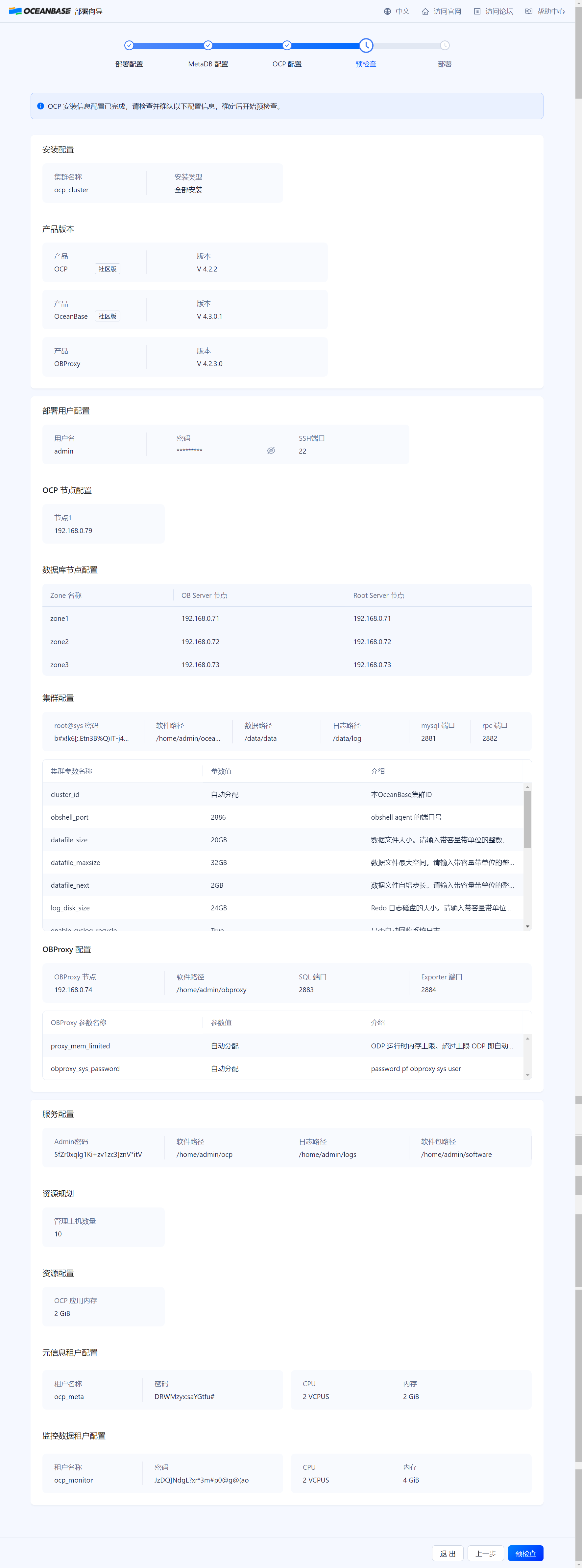


记录信息
{"url":["http://192.168.0.79:8080"],"account":"admin","password":"5fZr0xqlg1Ki+zv1zc3]znV*itV"} # 连接 oceanbase obclient -h192.168.0.71 -P2881 -uroot -p'b#x!k6[:.Etn3B%Q)IT-j4N7bzBQ' -Doceanbase -A # 连接 obproxy obclient -h192.168.0.74 -P2883 -uroot@proxysys -p'V1jXtOfxqi' -Doceanbase -A- 1
- 2
- 3
- 4
- 5
- 6
- 7
安装后处理
登陆web
http://192.168.0.79:8080/login


用 obd 查看集群信息
[admin@ocp-000-079 ~]$ obd cluster list +----------------------------------------------------------------------+ | Cluster List | +-------------+--------------------------------------+-----------------+ | Name | Configuration Path | Status (Cached) | +-------------+--------------------------------------+-----------------+ | ocp_cluster | /home/admin/.obd/cluster/ocp_cluster | running | +-------------+--------------------------------------+-----------------+ Trace ID: e910f200-fbe0-11ee-8dd4-005056213654 If you want to view detailed obd logs, please run: obd display-trace e910f200-fbe0-11ee-8dd4-005056213654 [admin@ocp-000-079 ~]$ obd cluster display ocp_cluster Get local repositories and plugins ok Open ssh connection ok Cluster status check ok Connect to observer 192.168.0.71:2881 ok Wait for observer init ok +------------------------------------------------+ | observer | +--------------+---------+------+-------+--------+ | ip | version | port | zone | status | +--------------+---------+------+-------+--------+ | 192.168.0.71 | 4.3.0.1 | 2881 | zone1 | ACTIVE | | 192.168.0.72 | 4.3.0.1 | 2881 | zone2 | ACTIVE | | 192.168.0.73 | 4.3.0.1 | 2881 | zone3 | ACTIVE | +--------------+---------+------+-------+--------+ obclient -h192.168.0.71 -P2881 -uroot -p'b#x!k6[:.Etn3B%Q)IT-j4N7bzBQ' -Doceanbase -A Connect to obproxy ok +------------------------------------------------+ | obproxy | +--------------+------+-----------------+--------+ | ip | port | prometheus_port | status | +--------------+------+-----------------+--------+ | 192.168.0.74 | 2883 | 2884 | active | +--------------+------+-----------------+--------+ obclient -h192.168.0.74 -P2883 -uroot@proxysys -p'V1jXtOfxqi' -Doceanbase -A Connect to ocp-server-ce ok +----------------------------------------------------------------------------+ | ocp-server-ce | +--------------------------+----------+-----------------------------+--------+ | url | username | password | status | +--------------------------+----------+-----------------------------+--------+ | http://192.168.0.79:8080 | admin | 5fZr0xqlg1Ki+zv1zc3]znV*itV | active | +--------------------------+----------+-----------------------------+--------+ Trace ID: fed55a90-fbe0-11ee-aad7-005056213654 If you want to view detailed obd logs, please run: obd display-trace fed55a90-fbe0-11ee-aad7-005056213654- 1
- 2
- 3
- 4
- 5
- 6
- 7
- 8
- 9
- 10
- 11
- 12
- 13
- 14
- 15
- 16
- 17
- 18
- 19
- 20
- 21
- 22
- 23
- 24
- 25
- 26
- 27
- 28
- 29
- 30
- 31
- 32
- 33
- 34
- 35
- 36
- 37
- 38
- 39
- 40
- 41
- 42
- 43
- 44
- 45
- 46
- 47
- 48
查看配置文件
cat /home/admin/.obd/cluster/ocp_cluster/config.yaml- 1
总共安装了3个组件,分别是 oceanbase-ce obproxy-ce ocp-server-ce
[admin@ocp-000-079 ocp_cluster]$ cat /home/admin/.obd/cluster/ocp_cluster/config.yaml user: username: admin password: abc123456 port: 22 oceanbase-ce: version: 4.3.0.1 release: 100000242024032211.el7 package_hash: 1f2d5c90517c0b11d8aec3ecdc4c295664bf81ef3ae536307433362e76b59e1d 192.168.0.71: zone: zone1 192.168.0.72: zone: zone2 192.168.0.73: zone: zone3 servers: - 192.168.0.71 - 192.168.0.72 - 192.168.0.73 global: appname: ocp_cluster root_password: b#x!k6[:.Etn3B%Q)IT-j4N7bzBQ mysql_port: 2881 rpc_port: 2882 home_path: /home/admin/oceanbase data_dir: /data/data redo_dir: /data/log datafile_size: 20GB datafile_maxsize: 32GB datafile_next: 2GB log_disk_size: 24GB enable_syslog_recycle: 'True' max_syslog_file_count: '50' system_memory: 1GB ocp_meta_tenant: tenant_name: ocp_meta max_cpu: 2.0 memory_size: 2G ocp_meta_username: root ocp_meta_password: DRWMzyx:saYGtfu# ocp_meta_db: meta_database ocp_monitor_tenant: tenant_name: ocp_monitor max_cpu: 2.0 memory_size: 4G ocp_monitor_username: root ocp_monitor_password: JzDQ]NdgL?xr*3m#p0@g@(ao ocp_monitor_db: monitor_database cluster_id: 1713263589 proxyro_password: uBleGrE0ws ocp_root_password: jWnNfVO8jS ocp_meta_tenant_log_disk_size: 7680M enable_syslog_wf: false memory_limit: 13251M cpu_count: 16 production_mode: false obproxy-ce: version: 4.2.3.0 package_hash: 7ca6c000887b90db111093180e6984bf4cf8f7380a948870f3eb2ac30be38f37 release: 3.el7 servers: - 192.168.0.74 global: home_path: /home/admin/obproxy prometheus_listen_port: 2884 listen_port: 2883 obproxy_sys_password: V1jXtOfxqi skip_proxy_sys_private_check: true enable_strict_kernel_release: false enable_cluster_checkout: false depends: - oceanbase-ce 192.168.0.74: proxy_id: 3464 client_session_id_version: 2 ocp-server-ce: version: 4.2.2 package_hash: 054628eb73797d67e914ff1be365445dc30b4678b26d0ddf4bdfc6d2246ee76d release: 20240315150922.el7 servers: - 192.168.0.79 global: home_path: /home/admin/ocp soft_dir: /home/admin/software log_dir: /home/admin/logs ocp_site_url: http://192.168.0.79:8080 port: 8080 admin_password: 5fZr0xqlg1Ki+zv1zc3]znV*itV memory_size: 2G manage_info: machine: 10 depends: - oceanbase-ce - obproxy-ce- 1
- 2
- 3
- 4
- 5
- 6
- 7
- 8
- 9
- 10
- 11
- 12
- 13
- 14
- 15
- 16
- 17
- 18
- 19
- 20
- 21
- 22
- 23
- 24
- 25
- 26
- 27
- 28
- 29
- 30
- 31
- 32
- 33
- 34
- 35
- 36
- 37
- 38
- 39
- 40
- 41
- 42
- 43
- 44
- 45
- 46
- 47
- 48
- 49
- 50
- 51
- 52
- 53
- 54
- 55
- 56
- 57
- 58
- 59
- 60
- 61
- 62
- 63
- 64
- 65
- 66
- 67
- 68
- 69
- 70
- 71
- 72
- 73
- 74
- 75
- 76
- 77
- 78
- 79
- 80
- 81
- 82
- 83
- 84
- 85
- 86
- 87
- 88
- 89
- 90
- 91
- 92
- 93
- 94
配置告警通道
https://www.oceanbase.com/docs/common-ocp-1000000000584847

就配置一个飞书群机器人webhook

webhook 还是一如既往的好用,测试立马就收到消息了

添加主机

接管集群
先给每个主机安装 agent
https://www.oceanbase.com/docs/common-ocp-1000000000584687
https://obbusiness-private.oss-cn-shanghai.aliyuncs.com/download-center/opensource/obagent/4.2.1/obagent-4.2.1-100000092023101717.el7.x86_64.rpm

不知道为何 上传后这里选不了agent


# 重启也看不到 [admin@ocp-000-079 ocp_cluster]$ obd cluster restart ocp_cluster -c ocp-server-ce Get local repositories and plugins ok Load cluster param plugin ok Open ssh connection ok Cluster status check ok Check before start ocp-server ok Stop ocp-server-ce ok Check before start ocp-server ok Start ocp-server-ce ok ocp-server-ce program health check ok Connect to ocp-server-ce ok +----------------------------------------------------------------------------+ | ocp-server-ce | +--------------------------+----------+-----------------------------+--------+ | url | username | password | status | +--------------------------+----------+-----------------------------+--------+ | http://192.168.0.79:8080 | admin | 5fZr0xqlg1Ki+zv1zc3]znV*itV | active | +--------------------------+----------+-----------------------------+--------+ succeed Trace ID: ba0daf66-fbf4-11ee-add1-005056213654 If you want to view detailed obd logs, please run: obd display-trace ba0daf66-fbf4-11ee-add1-005056213654- 1
- 2
- 3
- 4
- 5
- 6
- 7
- 8
- 9
- 10
- 11
- 12
- 13
- 14
- 15
- 16
- 17
- 18
- 19
- 20
- 21
- 22
- 一番折腾,原来是这个包
192.168.0.79:/home/admin/software/sys-package/ocp-agent-ce-4.2.2-20240315150922.el7.x86_64.rpm- 1

- 虽然已经配了
sudo免密,但是还是得在添加主机时使用root用户才行,不然一直处于新提交的状态

这个连接有常用的启停操作命令
https://ask.oceanbase.com/t/topic/35602977?spm=a2c6h.13066369.question.8.6ca85be54W0tmI
重启物理机(init 0关闭所有节点)
重开机后检查集群状态
集群是
running[admin@ocp-000-079 ~]$ obd cluster list +----------------------------------------------------------------------+ | Cluster List | +-------------+--------------------------------------+-----------------+ | Name | Configuration Path | Status (Cached) | +-------------+--------------------------------------+-----------------+ | ocp_cluster | /home/admin/.obd/cluster/ocp_cluster | running | +-------------+--------------------------------------+-----------------+ Trace ID: 127363e2-fcb0-11ee-ac1c-005056213654 If you want to view detailed obd logs, please run: obd display-trace 127363e2-fcb0-11ee-ac1c-005056213654- 1
- 2
- 3
- 4
- 5
- 6
- 7
- 8
- 9
- 10
但其他组件都是停止的状态
[admin@ocp-000-079 ~]$ cluster display ocp_cluster Get local repositories and plugins ok Open ssh connection ok Cluster status check ok [WARN] 192.168.0.71 oceanbase-ce is stopped [WARN] 192.168.0.72 oceanbase-ce is stopped [WARN] 192.168.0.73 oceanbase-ce is stopped [WARN] 192.168.0.74 obproxy-ce is stopped [WARN] 192.168.0.79 ocp-server-ce is stopped Trace ID: 3d7b5234-fcb0-11ee-896c-005056213654 If you want to view detailed obd logs, please run: obd display-trace 3d7b5234-fcb0-11ee-896c-005056213654- 1
- 2
- 3
- 4
- 5
- 6
- 7
- 8
- 9
- 10
- 11
启动所有组件
[admin@ocp-000-079 ~]$ obd cluster start ocp_cluster Get local repositories ok Search plugins ok Load cluster param plugin ok Cluster status check ok Check before start observer ok Check before start obproxy ok Check before start ocp-server ok Start observer ok observer program health check ok obshell program health check ok Connect to observer 192.168.0.72:2881 ok Start obproxy ok obproxy program health check ok Connect to obproxy ok Initialize obproxy-ce ok [ERROR] ocp-server-ce-py_script_start-4.2.1 RuntimeError: (2013, 'Lost connection to MySQL server during query') [ERROR] ocp-server-ce start failed Wait for observer init ok +--------------------------------------------------+ | observer | +--------------+---------+------+-------+----------+ | ip | version | port | zone | status | +--------------+---------+------+-------+----------+ | 192.168.0.71 | 4.3.0.1 | 2881 | zone1 | INACTIVE | | 192.168.0.72 | 4.3.0.1 | 2881 | zone2 | ACTIVE | | 192.168.0.73 | 4.3.0.1 | 2881 | zone3 | ACTIVE | +--------------+---------+------+-------+----------+ obclient -h192.168.0.71 -P2881 -uroot -p'b#x!k6[:.Etn3B%Q)IT-j4N7bzBQ' -Doceanbase -A +------------------------------------------------+ | obproxy | +--------------+------+-----------------+--------+ | ip | port | prometheus_port | status | +--------------+------+-----------------+--------+ | 192.168.0.74 | 2883 | 2884 | active | +--------------+------+-----------------+--------+ obclient -h192.168.0.74 -P2883 -uroot@proxysys -p'V1jXtOfxqi' -Doceanbase -A See https://www.oceanbase.com/product/ob-deployer/error-codes . Trace ID: 204d9692-fcb8-11ee-803d-005056213654 If you want to view detailed obd logs, please run: obd display-trace 204d9692-fcb8-11ee-803d-005056213654- 1
- 2
- 3
- 4
- 5
- 6
- 7
- 8
- 9
- 10
- 11
- 12
- 13
- 14
- 15
- 16
- 17
- 18
- 19
- 20
- 21
- 22
- 23
- 24
- 25
- 26
- 27
- 28
- 29
- 30
- 31
- 32
- 33
- 34
- 35
- 36
- 37
- 38
- 39
- 40
- 41
- 42
- 43
- 44
发现有组件启动失败了,分别是节点1和ocp
[admin@ocp-000-079 ~]$ obd cluster display ocp_cluster Get local repositories and plugins ok Open ssh connection ok Cluster status check ok [WARN] 192.168.0.71 oceanbase-ce is stopped Connect to observer 192.168.0.72:2881 ok Wait for observer init ok +--------------------------------------------------+ | observer | +--------------+---------+------+-------+----------+ | ip | version | port | zone | status | +--------------+---------+------+-------+----------+ | 192.168.0.71 | 4.3.0.1 | 2881 | zone1 | INACTIVE | | 192.168.0.72 | 4.3.0.1 | 2881 | zone2 | ACTIVE | | 192.168.0.73 | 4.3.0.1 | 2881 | zone3 | ACTIVE | +--------------+---------+------+-------+----------+ obclient -h192.168.0.71 -P2881 -uroot -p'b#x!k6[:.Etn3B%Q)IT-j4N7bzBQ' -Doceanbase -A Connect to obproxy ok +------------------------------------------------+ | obproxy | +--------------+------+-----------------+--------+ | ip | port | prometheus_port | status | +--------------+------+-----------------+--------+ | 192.168.0.74 | 2883 | 2884 | active | +--------------+------+-----------------+--------+ obclient -h192.168.0.74 -P2883 -uroot@proxysys -p'V1jXtOfxqi' -Doceanbase -A [WARN] 192.168.0.79 ocp-server-ce is stopped Trace ID: f165f81c-fcba-11ee-9c9a-005056213654 If you want to view detailed obd logs, please run: obd display-trace f165f81c-fcba-11ee-9c9a-005056213654- 1
- 2
- 3
- 4
- 5
- 6
- 7
- 8
- 9
- 10
- 11
- 12
- 13
- 14
- 15
- 16
- 17
- 18
- 19
- 20
- 21
- 22
- 23
- 24
- 25
- 26
- 27
- 28
- 29
- 30
- 31
单独启动主机时发现端口被占用
[admin@ocp-000-079 ~]$ obd cluster start ocp_cluster -c oceanbase-ce -s 192.168.0.71 Get local repositories ok Search plugins ok Load cluster param plugin ok Cluster status check ok Check before start observer x [ERROR] OBD-1001: 192.168.0.71:2886 port is already used, Please choose another unoccupied port or terminate the process occupying the port See https://www.oceanbase.com/product/ob-deployer/error-codes . Trace ID: 864397d2-fcbb-11ee-8f18-005056213654 If you want to view detailed obd logs, please run: obd display-trace 864397d2-fcbb-11ee-8f18-005056213654- 1
- 2
- 3
- 4
- 5
- 6
- 7
- 8
- 9
- 10
- 11
- 12
查看该节点的进程
[admin@obnode-000-071 log]$ lsof -i:2886 COMMAND PID USER FD TYPE DEVICE SIZE/OFF NODE NAME obshell 10149 admin 9u IPv4 44764 0t0 TCP obnode-000-071:responselogic (LISTEN) [admin@obnode-000-071 log]$ ps -ef|grep -i ocean admin 10102 1 0 20:46 ? 00:00:03 /home/admin/oceanbase/bin/obshell daemon --ip 192.168.0.71 --port 2886 admin 10149 10102 0 20:46 ? 00:00:05 /home/admin/oceanbase/bin/obshell server --ip 192.168.0.71 --port 2886 admin 13757 13401 0 21:15 pts/0 00:00:00 grep --color=auto -i ocean- 1
- 2
- 3
- 4
- 5
- 6
- 7
杀掉后再启动正常
[admin@ocp-000-079 ~]$ obd cluster start ocp_cluster -c oceanbase-ce -s 192.168.0.71 Get local repositories ok Search plugins ok Load cluster param plugin ok Cluster status check ok Check before start observer ok [WARN] OBD-1017: (192.168.0.71) The value of the "vm.max_map_count" must be within [327600, 1310720] (Current value: 65530, Recommended value: 655360) [WARN] OBD-1017: (192.168.0.71) The value of the "fs.file-max" must be greater than 6573688 (Current value: 1552314, Recommended value: 6573688) Start observer ok observer program health check ok obshell program health check ok Connect to observer 192.168.0.71:2881 ok succeed Trace ID: b3dbb250-fcbc-11ee-9593-005056213654 If you want to view detailed obd logs, please run: obd display-trace b3dbb250-fcbc-11ee-9593-005056213654- 1
- 2
- 3
- 4
- 5
- 6
- 7
- 8
- 9
- 10
- 11
- 12
- 13
- 14
- 15
- 16
[admin@obnode-000-071 log]$ ps -ef|grep -i ocean admin 14224 1 99 21:16 ? 00:10:40 /home/admin/oceanbase/bin/observer -r 192.168.0.71:2882:2881;192.168.0.72:2882:2881;192.168.0.73:2882:2881 -p 2881 -P 2882 -z zone1 -n ocp_cluster -c 1713263589 -d /data/data -I 192.168.0.71 -o __min_full_resource_pool_memory=2147483648,datafile_size=20G,datafile_maxsize=32G,datafile_next=2G,log_disk_size=24G,enable_syslog_recycle=True,max_syslog_file_count=50,system_memory=1G,enable_syslog_wf=False,memory_limit=13251M,cpu_count=16 admin 14303 1 1 21:16 ? 00:00:01 /home/admin/oceanbase/bin/obshell daemon --ip 192.168.0.71 --port 2886 admin 14346 14303 0 21:16 ? 00:00:00 /home/admin/oceanbase/bin/obshell server --ip 192.168.0.71 --port 2886- 1
- 2
- 3
- 4
启动 ocp
[admin@ocp-000-079 ~]$ obd cluster start ocp_cluster -c ocp-server-ce Get local repositories ok Search plugins ok Load cluster param plugin ok Cluster status check ok Check before start ocp-server ok Start ocp-server-ce ok ocp-server-ce program health check ok Start ocp-server-ce ok ocp-server-ce program health check ok Connect to ocp-server-ce ok Initialize ocp-server-ce ok +----------------------------------------------------------------------------+ | ocp-server-ce | +--------------------------+----------+-----------------------------+--------+ | url | username | password | status | +--------------------------+----------+-----------------------------+--------+ | http://192.168.0.79:8080 | admin | 5fZr0xqlg1Ki+zv1zc3]znV*itV | active | +--------------------------+----------+-----------------------------+--------+ succeed Trace ID: 46516f7a-fcbe-11ee-8cbc-005056213654 If you want to view detailed obd logs, please run: obd display-trace 46516f7a-fcbe-11ee-8cbc-005056213654- 1
- 2
- 3
- 4
- 5
- 6
- 7
- 8
- 9
- 10
- 11
- 12
- 13
- 14
- 15
- 16
- 17
- 18
- 19
- 20
- 21
- 22
ocp_agent 问题
重启主机后,发现有的节点 agent 没有起来
/usr/lib/systemd/system/ocp_agent.service [root@obnode-000-071 ocp_agent]# systemctl status ocp_agent ● ocp_agent.service - start ocp_agent Loaded: loaded (/usr/lib/systemd/system/ocp_agent.service; enabled; vendor preset: disabled) Active: failed (Result: exit-code) since Thu 2024-04-18 14:41:20 CST; 1h 2min ago Process: 1072 ExecStart=/home/admin/ocp_agent/bin/ocp_agentctl start (code=exited, status=255) Apr 18 14:40:35 obnode-000-071 systemd[1]: Starting start ocp_agent... Apr 18 14:41:15 obnode-000-071 ocp_agentctl[1072]: {"successful":false,"message":null,"error":"Module=agent, kind=DEADLINE_...t; "} Apr 18 14:41:15 obnode-000-071 systemd[1]: ocp_agent.service: control process exited, code=exited status=255 Apr 18 14:41:20 obnode-000-071 systemd[1]: Failed to start start ocp_agent. Apr 18 14:41:20 obnode-000-071 systemd[1]: Unit ocp_agent.service entered failed state. Apr 18 14:41:20 obnode-000-071 systemd[1]: ocp_agent.service failed. Hint: Some lines were ellipsized, use -l to show in full. # 查看 /var/log/messges Apr 18 14:40:59 obnode-000-071 systemd: Started Session c1 of user gdm. Apr 18 14:41:15 obnode-000-071 ocp_agentctl: {"successful":false,"message":null,"error":"Module=agent, kind=DEADLINE_EXCEEDED, code =wait_for_ready_timeout; "} Apr 18 14:41:15 obnode-000-071 systemd: ocp_agent.service: control process exited, code=exited status=255 Apr 18 14:41:20 obnode-000-071 systemd: Failed to start start ocp_agent. Apr 18 14:41:20 obnode-000-071 systemd: Unit ocp_agent.service entered failed state. Apr 18 14:41:20 obnode-000-071 systemd: ocp_agent.service failed.- 1
- 2
- 3
- 4
- 5
- 6
- 7
- 8
- 9
- 10
- 11
- 12
- 13
- 14
- 15
- 16
- 17
- 18
- 19
- 20
- 21
- 22
- 23
重新启动一次即可
● ocp_agent.service - start ocp_agent Loaded: loaded (/usr/lib/systemd/system/ocp_agent.service; enabled; vendor preset: disabled) Active: active (running) since Thu 2024-04-18 15:46:53 CST; 15s ago Process: 7481 ExecStart=/home/admin/ocp_agent/bin/ocp_agentctl start (code=exited, status=0/SUCCESS) Main PID: 7495 (ocp_agentd) Tasks: 16 CGroup: /system.slice/ocp_agent.service ├─7495 /home/admin/ocp_agent/bin/ocp_agentd -c /home/admin/ocp_agent/conf/agentd.yaml └─7507 /home/admin/ocp_agent/bin/ocp_mgragent Apr 18 15:46:46 obnode-000-071 systemd[1]: Starting start ocp_agent... Apr 18 15:46:53 obnode-000-071 ocp_agentctl[7481]: {"successful":true,"message":"ok","error":""} Apr 18 15:46:53 obnode-000-071 systemd[1]: Started start ocp_agent.- 1
- 2
- 3
- 4
- 5
- 6
- 7
- 8
- 9
- 10
- 11
- 12
- 13

接管 metaDB 集群
发现接管不上,创建主机时新增了一个IDC,IDC的region和这个
sys_region不一样群上说不支持主机所属应用和机房的修改,这就难受了,推倒重新部署一个单节点的ocp再看看

铲了
[root@ocp-000-079 ocp_agent]# su - admin Last login: Thu Apr 18 15:23:25 CST 2024 on pts/0 [admin@ocp-000-079 ~]$ obd cluster stop ocp_cluster Get local repositories ok Search plugins ok Open ssh connection ok Stop observer ok Stop obshell ok Stop obproxy ok Stop ocp-server-ce ok ocp_cluster stopped Trace ID: 35a23476-fd5d-11ee-b8c7-005056213654 If you want to view detailed obd logs, please run: obd display-trace 35a23476-fd5d-11ee-b8c7-005056213654 [admin@ocp-000-079 ~]$ obd cluster destroy ocp_cluster Are you sure to destroy the "ocp_cluster" cluster ? [y/n]: y Get local repositories ok Open ssh connection ok Check for standby tenant ok Search plugins ok Cluster status check ok observer work dir cleaning ok obproxy work dir cleaning ok ocp-server cleaning ok ocp_cluster destroyed Trace ID: 54e846b8-fd5d-11ee-924f-005056213654 If you want to view detailed obd logs, please run: obd display-trace 54e846b8-fd5d-11ee-924f-005056213654- 1
- 2
- 3
- 4
- 5
- 6
- 7
- 8
- 9
- 10
- 11
- 12
- 13
- 14
- 15
- 16
- 17
- 18
- 19
- 20
- 21
- 22
- 23
- 24
- 25
- 26
单节点OCP
单节点ocp部署后,集群已经接管在OCP

租户正常

所在主机正常

部署ocp时已经安装proxy,这里无法为ocp的oceanbase在创建一个proxy


创建3节点的oceanbase
添加主机

创建集群

提交集群配置进行创建

成功创建集群

创建obproxy


通过obproxy可以登录登录oceanbase
[admin@ocp-000-079 ocp_cluster]$ obclient -h192.168.0.74 -P2883 -uroot@sys#oceanbase01 -p Enter password: Welcome to the OceanBase. Commands end with ; or \g. Your OceanBase connection id is 2553 Server version: OceanBase_CE 4.2.1.2 (r102010022023121415-f6752332b5001069034f96c6dbb620926dc666f0) (Built Dec 14 2023 15:39:00) Copyright (c) 2000, 2018, OceanBase and/or its affiliates. All rights reserved. Type 'help;' or '\h' for help. Type '\c' to clear the current input statement. obclient [(none)]> show databases; +--------------------+ | Database | +--------------------+ | information_schema | | LBACSYS | | mysql | | oceanbase | | ocp | | ORAAUDITOR | | SYS | | test | +--------------------+ 8 rows in set (0.050 sec) obclient [(none)]> exit Bye [admin@ocp-000-079 ocp_cluster]$ obclient -h192.168.0.75 -P2883 -uroot@sys#oceanbase01 -p Enter password: Welcome to the OceanBase. Commands end with ; or \g. Your OceanBase connection id is 2701 Server version: OceanBase_CE 4.2.1.2 (r102010022023121415-f6752332b5001069034f96c6dbb620926dc666f0) (Built Dec 14 2023 15:39:00) Copyright (c) 2000, 2018, OceanBase and/or its affiliates. All rights reserved. Type 'help;' or '\h' for help. Type '\c' to clear the current input statement. obclient [(none)]> show databases; +--------------------+ | Database | +--------------------+ | information_schema | | LBACSYS | | mysql | | oceanbase | | ocp | | ORAAUDITOR | | SYS | | test | +--------------------+ 8 rows in set (0.009 sec)- 1
- 2
- 3
- 4
- 5
- 6
- 7
- 8
- 9
- 10
- 11
- 12
- 13
- 14
- 15
- 16
- 17
- 18
- 19
- 20
- 21
- 22
- 23
- 24
- 25
- 26
- 27
- 28
- 29
- 30
- 31
- 32
- 33
- 34
- 35
- 36
- 37
- 38
- 39
- 40
- 41
- 42
- 43
- 44
- 45
- 46
- 47
- 48
- 49
- 50
- 51
几个个注意点
部署OCP时,memory_limit设置太小
memory_limit 必须大于 ocp_meta_tenant 和 ocp_monitor_tenant的内存之和
Create tenant ocp_meta ok Create tenant ocp_monitor x [ERROR] resource not enough: memory (Avail: 6029M, Need: 8192M)- 1
- 2
- 3
log_disk_size 太小
https://ask.oceanbase.com/t/topic/35606467
log_disk_size 默认是 memory_limit的3倍,比如我的主机内存是16G,如果选择了自动分配内存,大概是10G左右,那么log_disk_size需要30G,按照页面的提示输入个24GB,后面安装铁定会报错

[ERROR] OBD-5000: create resource pool ocp_monitor_pool unit=‘ocp_monitor_unit’, unit_num=1, zone_list=(‘zone1’,‘zone2’,‘zone3’) execute failed [ERROR] ocp-server-ce-py_script_start-4.2.1 RuntimeError: (4733, ‘zone ‘zone1’ resource not enough to hold 1 unit. You can check resource info by views: DBA_OB_UNITS, GV$OB_UNITS, GV$OB_SERVERS.\nserver ‘“192.168.1.165:2882”’ LOG_DISK resource not enough\n’) [ERROR] ocp-server-ce start failed- 1
- 2
- 3
ocp_agent
在OCP安装agent后,systemctl查看到agent状态是不正确的
[root@obnode-000-072 ~]# systemctl status ocp_agent ● ocp_agent.service - start ocp_agent Loaded: loaded (/usr/lib/systemd/system/ocp_agent.service; bad; vendor preset: disabled) Active: failed (Result: exit-code) since Mon 2024-04-22 10:11:01 CST; 8h ago Process: 1114 ExecStart=/home/admin/ocp_agent/bin/ocp_agentctl start (code=exited, status=255) Apr 22 10:10:38 obnode-000-072 systemd[1]: Starting start ocp_agent... Apr 22 10:10:56 obnode-000-072 ocp_agentctl[1114]: {"successful":false,"message":null,"error":"Module=agent, kind...; "} Apr 22 10:10:56 obnode-000-072 systemd[1]: ocp_agent.service: control process exited, code=exited status=255 Apr 22 10:11:01 obnode-000-072 systemd[1]: Failed to start start ocp_agent. Apr 22 10:11:01 obnode-000-072 systemd[1]: Unit ocp_agent.service entered failed state. Apr 22 10:11:01 obnode-000-072 systemd[1]: ocp_agent.service failed.- 1
- 2
- 3
- 4
- 5
- 6
- 7
- 8
- 9
- 10
- 11
- 12
重启后则正常
[root@obnode-000-072 ~]# systemctl is-enabled ocp_agent enabled- 1
- 2
[root@obnode-000-072 ~]# ps -ef|grep agent root 1199 1 0 19:06 ? 00:00:00 /home/admin/ocp_agent/bin/ocp_agentd -c /home/admin/ocp_agent/conf/agentd.yaml root 1234 1199 1 19:06 ? 00:00:00 /home/admin/ocp_agent/bin/ocp_mgragent root 1235 1199 23 19:06 ? 00:00:10 /home/admin/ocp_agent/bin/ocp_monagent root 2345 2299 0 19:06 pts/0 00:00:00 grep --color=auto agent [root@obnode-000-072 ~]# systemctl status ocp_agent ● ocp_agent.service - start ocp_agent Loaded: loaded (/usr/lib/systemd/system/ocp_agent.service; enabled; vendor preset: disabled) Active: active (running) since Mon 2024-04-22 19:06:10 CST; 53s ago Process: 1072 ExecStart=/home/admin/ocp_agent/bin/ocp_agentctl start (code=exited, status=0/SUCCESS) Main PID: 1199 (ocp_agentd) Tasks: 15 CGroup: /system.slice/ocp_agent.service ├─1199 /home/admin/ocp_agent/bin/ocp_agentd -c /home/admin/ocp_agent/conf/agentd.yaml └─1234 /home/admin/ocp_agent/bin/ocp_mgragent Apr 22 19:06:05 obnode-000-072 systemd[1]: Starting start ocp_agent... Apr 22 19:06:09 obnode-000-072 sudo[1761]: root : TTY=unknown ; PWD=/home/admin/ocp_agent ; USER=admin ; COM...erver Apr 22 19:06:10 obnode-000-072 ocp_agentctl[1072]: {"successful":true,"message":"ok","error":""} Apr 22 19:06:10 obnode-000-072 systemd[1]: Started start ocp_agent. Hint: Some lines were ellipsized, use -l to show in full.- 1
- 2
- 3
- 4
- 5
- 6
- 7
- 8
- 9
- 10
- 11
- 12
- 13
- 14
- 15
- 16
- 17
- 18
- 19
- 20
- 21
服务命令行重启
https://ask.oceanbase.com/t/topic/35602977
export LD_LIBRARY_PATH=$LD_LIBRARY_PATH:/home/admin/oceanbase/lib cd /home/admin/oceanbase && bin/observer- 1
- 2
如果没有lib包报错如下:
[admin@obnode-000-072 oceanbase]$ ./bin/observer ./bin/observer: error while loading shared libraries: libmariadb.so.3: cannot open shared object file: No such file or directory- 1
- 2
-
相关阅读:
详解 React 18 更新后的特性,一文即懂
ES6 class静态属性 静态方法 私有方法 私有属性 实例属性 实例方法 静态私有属性 静态私有方法等
hue编译、启动、使用
比较运算符
vue.js毕业设计,基于vue.js前后端分离订座预约系统设计与实现(H5移动项目)
新手如何快速上手HTTP爬虫IP?
2022-07-30 mysql8执行慢SQL[Q17]分析
L1 频段卫星导航射频前端低噪声放大器芯片MS2659
Git绑定远程仓库报错error: remote origin already exists.
Websocket在Java中的实践——自动注册端点
- 原文地址:https://blog.csdn.net/a53715668/article/details/138093706
