-
【SpringCloud】OpenFeign高级特性
【SpringCloud】OpenFeign高级特性
1. 超时控制
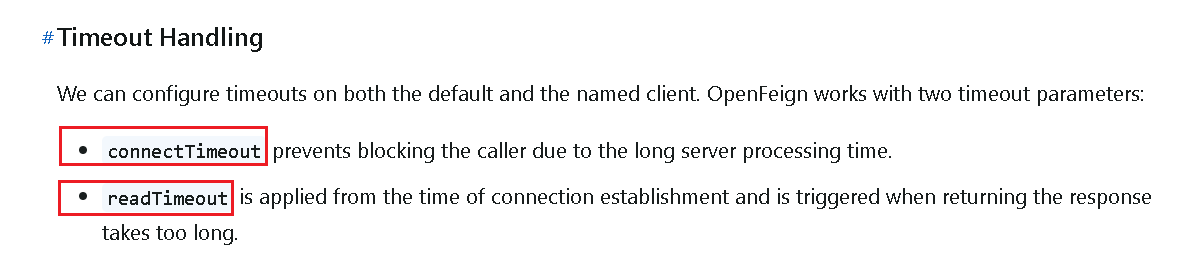
默认OpenFeign客户端等待60秒钟,但是服务端处理超过规定时间会导致Feign客户端返回报错。
为了避免这样的情况,有时候我们需要设置Feign客户端的超时控制,默认60秒太长或者业务时间太短都不好
1.1 全局配置
spring: cloud: openfeign: client: config: default: #连接超时时间 connectTimeout: 3000 #读取超时时间 readTimeout: 3000- 1
- 2
- 3
- 4
- 5
- 6
- 7
- 8
- 9
- 10
1.2 指定配置
如果A服务想让B服务的超时时间为2s,C服务想让B服务的超时时间为1s,那么全局配置就合适了,应该使用指定配置。
在服务消费方配置文件中根据调用服务名进行配置:
spring: openfeign: client: config: #default: #连接超时时间 #connectTimeout: 3000 #读取超时时间 #readTimeout: 3000 #服务名 cloud-payment-service: #连接超时时间 connectTimeout: 1000 #读取超时时间 readTimeout: 1000- 1
- 2
- 3
- 4
- 5
- 6
- 7
- 8
- 9
- 10
- 11
- 12
- 13
- 14
- 15
注意:如果全局配置和指定配置同时存在,则以指定配置为主。
2. 重试机制
OpenFeign 的重试机制默认是关闭的,需要手动开启。
新建如下配置类:
@Configuration public class FeignConfig { @Bean public Retryer myRetryer() { //return Retryer.NEVER_RETRY; //Feign默认配置是不走重试策略的 //最大请求次数为3(1+2),初始间隔时间为100ms,重试间最大间隔时间为1s return new Retryer.Default(100, 1, 3); } }- 1
- 2
- 3
- 4
- 5
- 6
- 7
- 8
- 9
- 10
由于先前配置了超时时间为1s,所以重试之后的时间为3s:

3. 替换Http客户端
OpenFeign中 http client 如果不做特殊配置,OpenFeign默认使用JDK自带的 HttpURLConnection 发送HTTP请求,由于默认HttpURLConnection没有连接池、性能和效率比较低,所以我们采用阿帕奇的Http客户端替换掉它。
3.1 引入依赖
<dependency> <groupId>org.apache.httpcomponents.client5groupId> <artifactId>httpclient5artifactId> <version>5.3version> dependency> <dependency> <groupId>io.github.openfeigngroupId> <artifactId>feign-hc5artifactId> <version>13.1version> dependency>- 1
- 2
- 3
- 4
- 5
- 6
- 7
- 8
- 9
- 10
- 11
- 12
3.2 配置
# Apache HttpClient5 配置开启 spring: cloud: openfeign: httpclient: hc5: enabled: true- 1
- 2
- 3
- 4
- 5
- 6
- 7
4. 请求/响应压缩
对请求和响应进行GZIP压缩,Spring Cloud OpenFeign支持对请求和响应进行GZIP压缩,以减少通信过程中的性能损耗。
spring: cloud: openfeign: compression: request: enabled: true min-request-size: 2048 #最小触发压缩的大小 mime-types: text/xml,application/xml,application/json #触发压缩数据类型 response: enabled: true- 1
- 2
- 3
- 4
- 5
- 6
- 7
- 8
- 9
- 10
5. 日志打印
OpenFeign 提供了日志打印功能,我们可以通过配置来调整日志级别,从而了解 Feign 中 Http 请求的细节。
OpenFeign 日志有四个级别:
- NONE:默认的,不显示任何日志。
- BASIC:仅记录请求方法、URL、响应状态码及执行时间
- HEADERS:除了 BASIC 中定义的信息之外,还有请求和响应的头信息
- FULL:除了 HEADERS 中定义的信息之外,还有请求和响应的正文及元数据。
开启日志打印步骤如下:
1)创建配置类:
@Bean Logger.Level feignLoggerLevel() { return Logger.Level.FULL; }- 1
- 2
- 3
- 4
2)yml配置:
# feign日志以什么级别监控哪个接口 logging: level: com: zhj: cloud: apis: PayFeignApi: debug- 1
- 2
- 3
- 4
- 5
- 6
- 7
- 8
注意:公式为:logging.level + 含有@FeignClient注解的完整带包名的接口名 + debug
6. 综合配置
server: port: 80 spring: application: name: cloud-consumer-openfeign-order cloud: consul: host: localhost port: 8500 discovery: prefer-ip-address: true #优先使用服务ip进行注册 service-name: ${spring.application.name} openfeign: client: config: default: #连接超时时间 connectTimeout: 3000 #读取超时时间 readTimeout: 3000 cloud-payment-service: #连接超时时间 connectTimeout: 1000 #读取超时时间 readTimeout: 1000 httpclient: hc5: enabled: true compression: request: enabled: true min-request-size: 2048 #最小触发压缩的大小 mime-types: text/xml,application/xml,application/json #触发压缩数据类型 response: enabled: true # feign日志以什么级别监控哪个接口 logging: level: com: zhj: cloud: apis: PayFeignApi: debug- 1
- 2
- 3
- 4
- 5
- 6
- 7
- 8
- 9
- 10
- 11
- 12
- 13
- 14
- 15
- 16
- 17
- 18
- 19
- 20
- 21
- 22
- 23
- 24
- 25
- 26
- 27
- 28
- 29
- 30
- 31
- 32
- 33
- 34
- 35
- 36
- 37
- 38
- 39
- 40
- 41
- 42
- 43
- 44
- 45
-
相关阅读:
浅谈大数据算法
spring cloud alibaba之nacos
动态规划解决01背包问题
Mybatis(四)
LeetCode 0231. 2 的幂
2023年09月数据库流行度最新排名
js文字逐个显示
每个人都应该去学写作
一个md5加密解密验证方式参考
golang定时器使用踩的坑:定时器每天执行一次
- 原文地址:https://blog.csdn.net/Decade_Faiz/article/details/138201894
