-
Docker发布镜像(DockerHub,阿里云)
目录
1、发布到DockerHub上
1.地址https://hub.docker.com/注册自己的账号

2.确定这个账号可以登录
3.在服务器上提交自己的镜像
- [root@wq test]# docker login --help
- Usage: docker login [OPTIONS] [SERVER]
- Log in to a registry.
- If no server is specified, the default is defined by the daemon.
- Options:
- -p, --password string Password
- --password-stdin Take the password from stdin
- -u, --username string Username
- #登录成功结果
- [root@wq test]# docker login -u skymuxue
- Password:
- WARNING! Your password will be stored unencrypted in /root/.docker/config.json.
- Configure a credential helper to remove this warning. See
- https://docs.docker.com/engine/reference/commandline/login/#credentials-store
- Login Succeeded
4.登录完毕后就可以提交镜像了,docker push
- [root@wq test]# docker images
- REPOSITORY TAG IMAGE ID CREATED SIZE
- diytomcat latest dfa3156617fc 40 hours ago 893MB
- #出现问题如下
- #直接push出现拒绝
- [root@wq test]# docker push diytomcat
- Using default tag: latest
- The push refers to repository [docker.io/library/diytomcat]
- 5f70bf18a086: Preparing
- ba6599e516c6: Preparing
- ff45e9332326: Preparing
- 5cf43dcf601f: Preparing
- d3b0d4081fd0: Preparing
- 174f56854903: Waiting
- denied: requested access to the resource is denied # 拒绝
- #出现不存在
- [root@wq test]# docker push skymuxue/diytomcat:1.0
- The push refers to repository [docker.io/skymuxue/diytomcat]
- An image does not exist locally with the tag: skymuxue/diytomcat
- #解决方法 添加一个tag标签
- [root@wq test]# docker tag dfa3156617fc skymuxue/tomcat:1.0
- [root@wq test]# docker images
- REPOSITORY TAG IMAGE ID CREATED SIZE
- diytomcat latest dfa3156617fc 40 hours ago 893MB
- skymuxue/tomcat 1.0 dfa3156617fc 40 hours ago 893MB
- #docker push上去即可!自己发布的镜像尽量带上版本号
- [root@wq test]# docker push skymuxue/tomcat:1.0
- The push refers to repository [docker.io/skymuxue/tomcat]
- 5f70bf18a086: Pushed
- ba6599e516c6: Pushing [============================> ] 171.3MB/296.9MB
- ff45e9332326: Pushed
- 5cf43dcf601f: Pushing [===============================> ] 240.2MB/376.1MB
- d3b0d4081fd0: Pushed
- 174f56854903: Pushed
2、发布到阿里云镜像服务上
1.登录阿里云,地址阿里云-计算,为了无法计算的价值 (aliyun.com)
2.找到容器镜像服务


打开容器镜像服务

创建个人实例

设置密码

3.创建命名空间


4.创建容器镜像


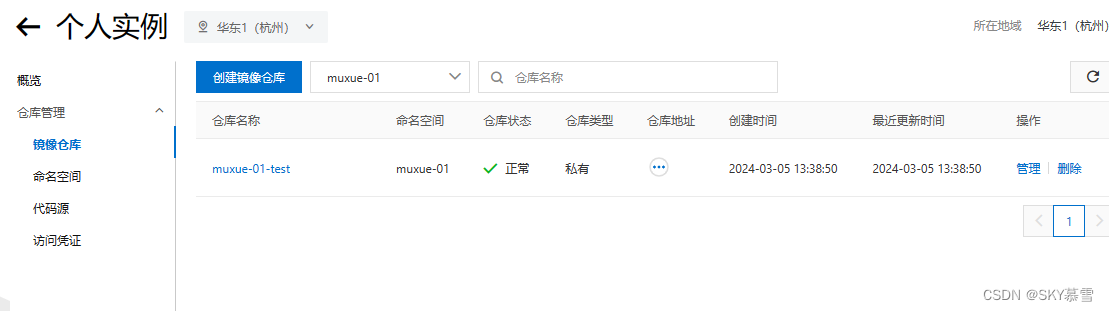
5.浏览阿里云
点击上一步创建的镜像仓库,参考官方文档

小结

save可以打成一个tar包,方便使用
- [root@wq ~]# docker save --help
- Usage: docker save [OPTIONS] IMAGE [IMAGE...]
- Save one or more images to a tar archive (streamed to STDOUT by default)
- Aliases:
- docker image save, docker save
- Options:
- -o, --output string Write to a file, instead of STDOUT
load可以将压缩的镜像文件进行解压,直接使用
- [root@wq ~]# docker load --help
- Usage: docker load [OPTIONS]
- Load an image from a tar archive or STDIN
- Aliases:
- docker image load, docker load
- Options:
- -i, --input string Read from tar archive file, instead of STDIN
- -q, --quiet Suppress the load output
-
相关阅读:
国家行政区代码
PLL的环路滤波器
h0206. 区间选点
【进程创建】
Spring Cloud框架学习-Spring Cloud Hystrix
提升服务器性能相关
[附源码]Python计算机毕业设计Django房产中介管理系统
额外的迭代器
k8s 使用小记:如何进入 k8s 部署的 pod
学完Python,不做程序员,只接兼职,哎,就是玩儿
- 原文地址:https://blog.csdn.net/qq_61785413/article/details/136475857
