-
十五、集合进阶——不可变集合 、Stream流 和 方法引用
一、创建不可变集合


public static void main(String[] args) { /*创建不可变的List集合*/ List<String> list = List.of("张三", "李四", "王五", "赵六", "钱七"); System.out.println(list.get(0)); System.out.println(list.get(1)); System.out.println(list.get(2)); System.out.println(list.get(3)); System.out.println(list.get(4)); System.out.println("====================="); for (String s : list) { System.out.println(s); } System.out.println("======================"); Iterator<String> it = list.iterator(); while (it.hasNext()) { String s = it.next(); System.out.println(s); } System.out.println("===================="); list.forEach(new Consumer<String>() { @Override public void accept(String s) { System.out.println(s); } }); list.forEach(s -> System.out.println(s)); }- 1
- 2
- 3
- 4
- 5
- 6
- 7
- 8
- 9
- 10
- 11
- 12
- 13
- 14
- 15
- 16
- 17
- 18
- 19
- 20
- 21
- 22
- 23
- 24
- 25
- 26
- 27
- 28
- 29
- 30
- 31
- 32
- 33
- 34
使用remove、add等修改方法均会报错

二、Stream流
2.1 初识Stream流

public static void main(String[] args) { ArrayList<String> list1 = new ArrayList<>(); list1.add("张无忌"); list1.add("周芷若"); list1.add("赵敏"); list1.add("张强"); list1.add("张三丰"); //0.把所有以“张”开头的元素存储到新集合中 ArrayList<String> list2 = new ArrayList<>(); for (String name : list1) { if (name.startsWith("张")){ list2.add(name); } } System.out.println(list2); //1.把“张”开头的,长度为3的元素再存储到新集合中 ArrayList<String> list3 = new ArrayList<>(); for (String name : list2) { if (name.length()==3){ list3.add(name); } } System.out.println(list3); //2.遍历打印最终结果 for (String name : list3) { System.out.println(name); } //Stream流方法 list1.stream().filter(name -> name.startsWith("张")).filter(name->name.length()==3).forEach(name -> System.out.println(name)); }- 1
- 2
- 3
- 4
- 5
- 6
- 7
- 8
- 9
- 10
- 11
- 12
- 13
- 14
- 15
- 16
- 17
- 18
- 19
- 20
- 21
- 22
- 23
- 24
- 25
- 26
- 27
- 28
- 29
- 30
- 31
- 32
- 33
- 34
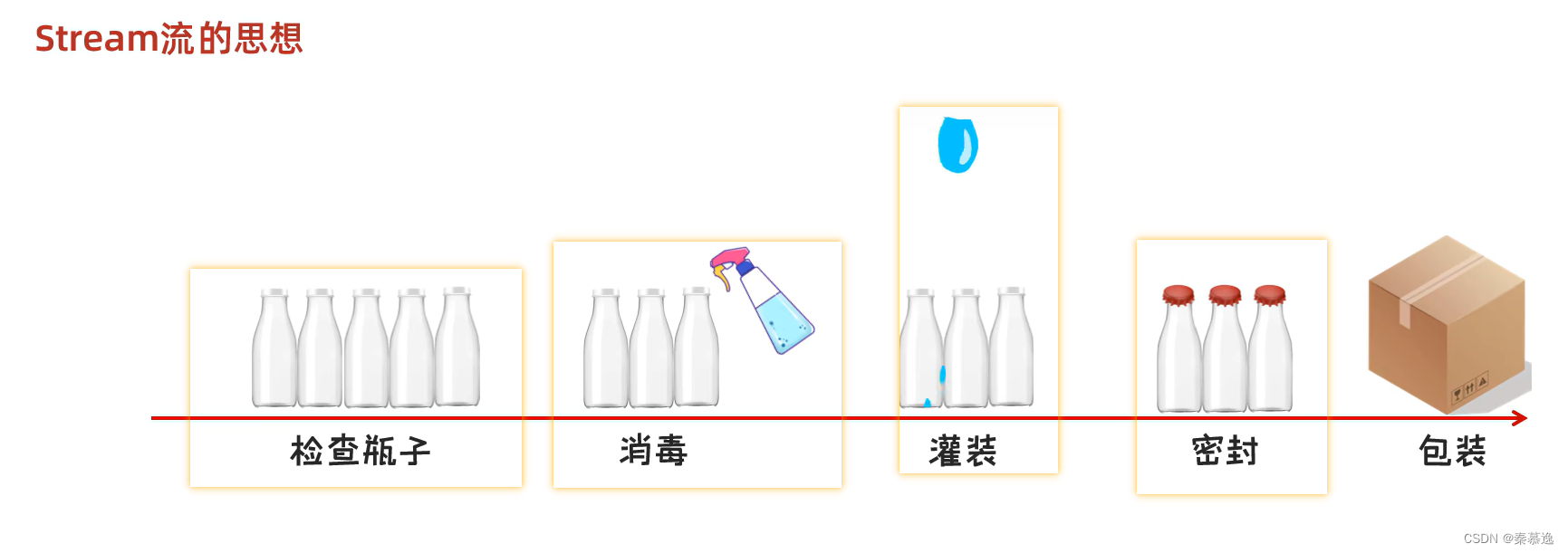

Stream流的作用:
结合了Lambda表达式,简化集合、数组的操作

Stream流的使用步骤:- 先得到一条Stream流(流水线),并把数据放上去
- 使用中间方法对流水线上的数据进行操作
- 使用终结方法对流水线上的数据进行操作

- 单列集合
public static void main(String[] args) { //0.单列集合获取Stream流 ArrayList<String> list = new ArrayList<>(); Collections.addAll(list,"a","c","b","d","e"); /*Streamstream = list.stream(); stream.forEach(new Consumer list.stream().forEach(s-> System.out.println(s)); }() { @Override public void accept(String s) { System.out.println(s); } });*/ - 1
- 2
- 3
- 4
- 5
- 6
- 7
- 8
- 9
- 10
- 11
- 12
- 13
- 14
- 15
- 双列集合
public static void main(String[] args) { //1.双列集合 HashMap<String, Integer> hm = new HashMap<>(); hm.put("aaa", 111); hm.put("bbb", 222); hm.put("ccc", 333); hm.put("ddd", 444); //第一种获取Stream流的方法 hm.entrySet().stream().forEach(s -> System.out.println(s)); System.out.println("---------------------"); //第二种获取stream流的方法 hm.keySet().stream().forEach(s -> System.out.println(s + " = " + hm.get(s))); }- 1
- 2
- 3
- 4
- 5
- 6
- 7
- 8
- 9
- 10
- 11
- 12
- 13
- 14
- 15
- 16
- 数组
public static void main(String[] args) { //数组 //0.创建数组 int[] arr = {1, 2, 3, 4, 5, 6, 7, 8, 9, 10}; //1.获取Stream流 Arrays.stream(arr).forEach(num-> System.out.println(num)); }- 1
- 2
- 3
- 4
- 5
- 6
- 7
- 8
- 一堆零散数据
public static void main(String[] args) { //一堆零散数据 Stream.of(1, 2, 3, 4, 5).forEach(num -> System.out.println(num)); System.out.println("-----------------------"); Stream.of("a", "b", "c", "d", "e").forEach(s -> System.out.println(s)); }- 1
- 2
- 3
- 4
- 5
- 6
- 7
- 8
注意:
Stream接口中静态方法of的细节:- 方法的形参是一个可变参数,可以传递一堆零散的数据,也可以传递数组
- 但是数组必须是引用数据类型的,如果传递基本数据类型,是会把整个数组当做一个元素,放到Stream当中。
2.2Stream流的中间方法

- 注意1:中间方法,返回新的Stream流,原来的Stream流只能使用一次,建议使用链式编程
- 注意2:修改Stream流中的数据,不会影响原来集合或者数组中的数据
public static void main(String[] args) { ArrayList<String> list = new ArrayList<>(); Collections.addAll(list, "张无忌", "周芷若", "赵敏", "张强", "张三丰", "张翠上", "张良", "王二麻子", "谢广坤"); //0.过滤 list.stream().filter(new Predicate<String>() { @Override public boolean test(String s) { return s.startsWith("张"); } }).forEach(name -> System.out.println(name)); System.out.println("================"); list.stream().filter(name -> name.startsWith("张")).forEach(name -> System.out.println(name)); System.out.println("================= 1."); //1.获取前几个元素 list.stream().limit(3).forEach(name -> System.out.println(name)); System.out.println("================== 2."); //2.跳过前几个元素 list.stream().skip(3).forEach(name -> System.out.println(name)); System.out.println("==========课堂练习============="); //课堂练习:"张强", "张三丰", "张翠上" list.stream() .skip(3) .limit(3) .forEach(name -> System.out.println(name)); }- 1
- 2
- 3
- 4
- 5
- 6
- 7
- 8
- 9
- 10
- 11
- 12
- 13
- 14
- 15
- 16
- 17
- 18
- 19
- 20
- 21
- 22
- 23
- 24
- 25
- 26
- 27
- 28
- 29
- 30
- 31
- 32
- 33
- 34
public static void main(String[] args) { ArrayList<String> list1 = new ArrayList<>(); Collections.addAll(list1, "张无忌", "张无忌", "张无忌", "张强", "张三丰", "张翠上", "张良", "王二麻子", "谢广坤"); ArrayList<String> list2 = new ArrayList<>(); Collections.addAll(list2, "周芷若", "赵敏"); //0.元素去重 list1.stream().distinct().forEach(name -> System.out.println(name)); System.out.println("======================="); //1.合并a和b两个流为一个流 Stream.concat(list1.stream(), list2.stream()).forEach(s -> System.out.println(s)); }- 1
- 2
- 3
- 4
- 5
- 6
- 7
- 8
- 9
- 10
- 11
- 12
- 13
- 14
- 15
- 16
- 17
public static void main(String[] args) { //类型转换 ArrayList<String> list = new ArrayList<>(); Collections.addAll(list, "张无忌-24", "周芷若-21", "赵敏-30", "张强-55", "张三丰-32", "张翠上-24", "张良-17", "王二麻子-26", "谢广坤-45"); list.stream().map(new Function<String, Integer>() { @Override public Integer apply(String s) { String[] arr = s.split("-"); String ageString = arr[1]; int age = Integer.parseInt(ageString); return age; } }).forEach(age -> System.out.println(age)); System.out.println("--------------------"); list.stream().map(s->Integer.parseInt(s.split("-")[1])).forEach(age-> System.out.println(age)); }- 1
- 2
- 3
- 4
- 5
- 6
- 7
- 8
- 9
- 10
- 11
- 12
- 13
- 14
- 15
- 16
- 17
- 18
- 19
2.3Stream流的终结方法

public static void main(String[] args) { ArrayList<String> list = new ArrayList<>(); Collections.addAll(list, "张无忌", "周芷若", "赵敏", "张强", "张三丰", "张翠上", "张良", "王二麻子", "谢广坤"); //0.遍历 list.stream().forEach(new Consumer<String>() { @Override public void accept(String s) { System.out.println(s); } }); System.out.println("================"); list.stream().forEach(s -> System.out.println(s)); System.out.println("----------------------"); //1.统计 long count = list.stream().count(); System.out.println(count); System.out.println("======================="); //2.收集流中的数据,放到数组中 Object[] arr1 = list.stream().toArray(); System.out.println(Arrays.toString(arr1)); System.out.println("----------------------"); /*toArray方法的参数的作用:负责创建一个指定类型的数组 * toArray方法的底层,会依次得到流里面的每一个数据,并把数据放到数组当中 * toArray方法的返回值:是一个装着流里面所有数据的数组*/ String[] arr2 = list.stream().toArray(new IntFunction<String[]>() { @Override public String[] apply(int value) { return new String[value]; } }); System.out.println(Arrays.toString(arr2)); System.out.println("-------------------"); String[] arr3 = list.stream().toArray(value -> new String[value]); System.out.println(Arrays.toString(arr3)); }- 1
- 2
- 3
- 4
- 5
- 6
- 7
- 8
- 9
- 10
- 11
- 12
- 13
- 14
- 15
- 16
- 17
- 18
- 19
- 20
- 21
- 22
- 23
- 24
- 25
- 26
- 27
- 28
- 29
- 30
- 31
- 32
- 33
- 34
- 35
- 36
- 37
- 38
- 39
- 40
- 41
- 42
- 43
public static void main(String[] args) { //收集流中的数据,放到集合中 ArrayList<String> list = new ArrayList<>(); Collections.addAll(list, "张无忌-男-24", "周芷若-女-21", "赵敏-女-30", "张强-男-55", "张三丰-男-32", "张翠上-女-24", "张良-男-17", "王二麻子-女-26", "谢广坤-男-45"); //0.收集到List集合当中 //需求:把所有的男性收集起来 List<String> newList = list.stream() .filter(s -> "男".equals(s.split("-")[1])) .collect(Collectors.toList()); System.out.println(newList); //1.收集到Set集合当中 //需求:把所有的男性收集起来 Set<String> newSet = list.stream() .filter(s -> "男".equals(s.split("-")[1])) .collect(Collectors.toSet()); System.out.println(newSet); 1.收集到Map集合当中 /*注意点: 如果我们要收集到Map集合当中,键不能重复,否则会报错*/ //收集Map集合当中 //谁作为键,谁作为值. //我要把所有的男性收集起来 //键:姓名。 值:年龄 Map<String, Integer> map = list.stream() .filter(s -> "男".equals(s.split("-")[1])) /* * toMap : 参数一表示键的生成规则 * 参数二表示值的生成规则 * * 参数一: * Function泛型一:表示流中每一个数据的类型 * 泛型二:表示Map集合中键的数据类型 * * 方法apply形参:依次表示流里面的每一个数据 * 方法体:生成键的代码 * 返回值:已经生成的键 * * * 参数二: * Function泛型一:表示流中每一个数据的类型 * 泛型二:表示Map集合中值的数据类型 * * 方法apply形参:依次表示流里面的每一个数据 * 方法体:生成值的代码 * 返回值:已经生成的值 * * */ .collect(Collectors.toMap(new Function<String, String>() { @Override public String apply(String s) { return s.split("-")[0]; } }, new Function<String, Integer>() { @Override public Integer apply(String s) { return Integer.parseInt(s.split("-")[2]); } })); System.out.println(map); Map<String, Integer> map2 = list.stream() .filter(s -> "男".equals(s.split("-")[1])) .collect(Collectors.toMap( s -> s.split("-")[0], s -> Integer.parseInt(s.split("-")[2]) )); System.out.println(map2); }- 1
- 2
- 3
- 4
- 5
- 6
- 7
- 8
- 9
- 10
- 11
- 12
- 13
- 14
- 15
- 16
- 17
- 18
- 19
- 20
- 21
- 22
- 23
- 24
- 25
- 26
- 27
- 28
- 29
- 30
- 31
- 32
- 33
- 34
- 35
- 36
- 37
- 38
- 39
- 40
- 41
- 42
- 43
- 44
- 45
- 46
- 47
- 48
- 49
- 50
- 51
- 52
- 53
- 54
- 55
- 56
- 57
- 58
- 59
- 60
- 61
- 62
- 63
- 64
- 65
- 66
- 67
- 68
- 69
- 70
- 71
- 72

三、练习
练习1:数据过滤
定义一个集合,并添加一些整数 1,2,3,4,5,6,7,8,9,10 过滤奇数,只留下偶数。 并将结果保存起来- 1
- 2
- 3
public static void main(String[] args) { /*定义一个集合,并添加一些整数 1,2,3,4,5,6,7,8,9,10 过滤奇数,只留下偶数。 并将结果保存起来*/ //0.创建一个集合 ArrayList<Integer> list = new ArrayList<>(); //2。添加数据 Collections.addAll(list, 1, 2, 3, 4, 5, 6, 7, 8, 9, 10); //3.过滤奇数,只留下偶数。并将结果保存起来 List<Integer> newlist = list.stream() .filter(num -> num % 2 == 0) .collect(Collectors.toList()); System.out.println(newlist); }- 1
- 2
- 3
- 4
- 5
- 6
- 7
- 8
- 9
- 10
- 11
- 12
- 13
- 14
- 15
- 16
- 17
- 18
练习2:数据操作
创建一个ArrayList集合,并添加以下字符串,字符串中前面是姓名,后面是年龄 "zhangsan,23" "lisi,24" "wangwu,25" 保留年龄大于等于24岁的人,并将结果收集到Map集合中,姓名为键,年龄为值- 1
- 2
- 3
- 4
- 5
public static void main(String[] args) { /* * 创建一个ArrayList集合,并添加以下字符串,字符串中前面是姓名,后面是年龄 "zhangsan,23" "lisi,24" "wangwu,25" 保留年龄大于等于24岁的人,并将结果收集到Map集合中,姓名为键,年龄为值*/ //0.创建一个ArrayList集合 ArrayList<String> list = new ArrayList<>(); //1.添加字符串 Collections.addAll(list, "zhangsan,23", "lisi,24", "wangwu,25"); //2.保留年龄大于等于24岁的人 Map<String, Integer> map = list.stream() .filter(s -> Integer.parseInt(s.split(",")[1]) >= 24) //将结果收集到Map集合中,姓名为键,年龄为值 .collect(Collectors.toMap(new Function<String, String>() { @Override public String apply(String s) { return s.split(",")[0]; } }, new Function<String, Integer>() { @Override public Integer apply(String s) { return Integer.parseInt(s.split(",")[1]); } })); System.out.println(map); //Lambda表达式 Map<String, Integer> map1 = list.stream() .filter(s -> Integer.parseInt(s.split(",")[1]) >= 24) .collect(Collectors.toMap( s -> s.split(",")[0], n -> Integer.parseInt(n.split(",")[1]))); System.out.println(map1); }- 1
- 2
- 3
- 4
- 5
- 6
- 7
- 8
- 9
- 10
- 11
- 12
- 13
- 14
- 15
- 16
- 17
- 18
- 19
- 20
- 21
- 22
- 23
- 24
- 25
- 26
- 27
- 28
- 29
- 30
- 31
- 32
- 33
- 34
- 35
- 36
- 37
- 38
- 39
练习3:数据操作
现在有两个ArrayList集合,分别存储6名男演员的名字和年龄以及6名女演员的名字和年龄。 姓名和年龄中间用逗号隔开。 比如:张三,23 要求完成如下的操作: 1,男演员只要名字为3个字的前两人 2,女演员只要姓杨的,并且不要第一个 3,把过滤后的男演员姓名和女演员姓名合并到一起 4,将上一步的演员信息封装成Actor对象。 5,将所有的演员对象都保存到List集合中。 备注:演员类Actor,属性有:name,age 男演员: "蔡坤坤,24" , "叶齁咸,23", "刘不甜,22", "吴签,24", "谷嘉,30", "肖梁梁,27" 女演员: "赵小颖,35" , "杨颖,36", "高元元,43", "张天天,31", "刘诗,35", "杨小幂,33"- 1
- 2
- 3
- 4
- 5
- 6
- 7
- 8
- 9
- 10
- 11
- 12
- 13
public static void main(String[] args) { /* * 现在有两个ArrayList集合,分别存储6名男演员的名字和年龄以及6名女演员的名字和年龄。 姓名和年龄中间用逗号隔开。 比如:张三,23 要求完成如下的操作: 1,男演员只要名字为3个字的前两人 2,女演员只要姓杨的,并且不要第一个 3,把过滤后的男演员姓名和女演员姓名合并到一起 4,将上一步的演员信息封装成Actor对象。 5,将所有的演员对象都保存到List集合中。 备注:演员类Actor,属性有:name,age 男演员: "蔡坤坤,24" , "叶齁咸,23", "刘不甜,22", "吴签,24", "谷嘉,30", "肖梁梁,27" 女演员: "赵小颖,35" , "杨颖,36", "高元元,43", "张天天,31", "刘诗,35", "杨小幂,33"*/ //0.有两个ArrayList集合 ArrayList<String> boyList = new ArrayList<>(); ArrayList<String> girlList = new ArrayList<>(); //1.存储6名男演员的名字和年龄以及6名女演员的名字和年龄 Collections.addAll(boyList, "蔡坤坤,24", "叶齁咸,23", "刘不甜,22", "吴签,24", "谷嘉,30", "肖梁梁,27"); Collections.addAll(girlList, "赵小颖,35", "杨颖,36", "高元元,43", "张天天,31", "刘诗,35", "杨小幂,33"); //2.男演员只要名字为3个字的前两人 Stream<String> boy = boyList.stream() .filter(s -> s.split(",")[0].length() == 3) .limit(2); //3.女演员只要姓杨的,并且不要第一个 Stream<String> girl = girlList.stream() .filter(s -> s.split(",")[0].startsWith("杨")) .skip(1); //4.把过滤后的男演员姓名和女演员姓名合并到一起 /*Listactors = Stream.concat(boy, girl) //将上一步的演员信息封装成Actor对象 .map(new Function System.out.println("===================="); List<Actor> actors2 = Stream.concat(boy, girl) //将上一步的演员信息封装成Actor对象 .map(s -> new Actor(s.split(",")[0], Integer.parseInt(s.split(",")[1]))) //将所有的演员对象都保存到List集合中 .collect(Collectors.toList()); System.out.println(actors2); }- 1
- 2
- 3
- 4
- 5
- 6
- 7
- 8
- 9
- 10
- 11
- 12
- 13
- 14
- 15
- 16
- 17
- 18
- 19
- 20
- 21
- 22
- 23
- 24
- 25
- 26
- 27
- 28
- 29
- 30
- 31
- 32
- 33
- 34
- 35
- 36
- 37
- 38
- 39
- 40
- 41
- 42
- 43
- 44
- 45
- 46
- 47
- 48
- 49
- 50
- 51
- 52
- 53
- 54
- 55
- 56
- 57
- 58
四、方法引用
4.1 初识 方法引用


把已经有的方法拿过来用,当做函数式接口中抽象方法的方法体


public static void main(String[] args) { //需求:创建一个数组,进行倒序排序 Integer[] arr = {3, 5, 4, 1, 6, 2}; System.out.println(Arrays.toString(arr)); //匿名内部类 /*Arrays.sort(arr, new Comparator<>() { @Override public int compare(Integer o1, Integer o2) { return o2 - o1; } }); */ //Lambda表达式 /*Arrays.sort(arr, (Integer o1, Integer o2) -> { return o2 - o1; });*/ //Lambda表达式简化格式 /*Arrays.sort(arr, (o1, o2) -> o2 - o1);*/ //方法引用 /*表示引用FunctionDemo1类里面的subtraction方法 * 把这个方法当做抽象方法的方法体*/ Arrays.sort(arr,FunctionDemo1::subtraction); System.out.println(Arrays.toString(arr)); } public static int subtraction(int num1, int num2) { return num2 - num1; }- 1
- 2
- 3
- 4
- 5
- 6
- 7
- 8
- 9
- 10
- 11
- 12
- 13
- 14
- 15
- 16
- 17
- 18
- 19
- 20
- 21
- 22
- 23
- 24
- 25
- 26
- 27
- 28
- 29
- 30
- 31
- 32
- 33


4.2 引用 静态方法

public static void main(String[] args) { /*练习: * 集合中有以下数字,要求把他们都变成int类型 * "1" "2" "3" "4" "5"*/ //0.创建集合并添加元素 ArrayList<String> list = new ArrayList<>(); Collections.addAll(list, "1", "2", "3", "4", "5"); //把他们都变成int类型 /*list.stream() .map(new Function- 1
- 2
- 3
- 4
- 5
- 6
- 7
- 8
- 9
- 10
- 11
- 12
- 13
- 14
- 15
- 16
- 17
- 18
- 19
- 20
- 21
- 22
- 23
4.3 引用 成员方法

- 其他类
public static void main(String[] args) { /*练习: * 集合中有一些名字,按照要求过滤数据*/ ArrayList<String> list = new ArrayList<>(); Collections.addAll(list, "张无忌", "周芷若", "赵敏", "张强", "张三丰"); //过滤姓张的且长度为3的姓名 /*list.stream() .filter(s -> s.startsWith("张")) .filter(s -> s.length() == 3) .forEach(s -> System.out.println(s));*/ /*list.stream() .filter(new Predicate() { @Override public boolean test(String s) { return s.startsWith("张") && s.length() == 3; } }).forEach(s -> System.out.println(s));*/ list.stream().filter(new StringOpreation()::stringJudge) .forEach(s-> System.out.println(s));- 1
- 2
- 3
- 4
- 5
- 6
- 7
- 8
- 9
- 10
- 11
- 12
- 13
- 14
- 15
- 16
- 17
- 18
- 19
- 20
- 21
- 22
- 23
- 24
package Function; public class StringOpreation { public boolean stringJudge(String s){ return s.startsWith("张") && s.length() == 3; } }- 1
- 2
- 3
- 4
- 5
- 6
- 7
- 8
- 本类
package Function; import java.util.ArrayList; import java.util.Collections; public class FunctionDemo3 { public static void main(String[] args) { /*练习: * 集合中有一些名字,按照要求过滤数据*/ ArrayList<String> list = new ArrayList<>(); Collections.addAll(list, "张无忌", "周芷若", "赵敏", "张强", "张三丰"); //过滤姓张的且长度为3的姓名 /*list.stream() .filter(s -> s.startsWith("张")) .filter(s -> s.length() == 3) .forEach(s -> System.out.println(s));*/ /*list.stream() .filter(new Predicate() { @Override public boolean test(String s) { return s.startsWith("张") && s.length() == 3; } }).forEach(s -> System.out.println(s));*/ //本类 //静态方法中是没有this的 /*list.stream() .filter(this::stringJudge) .forEach(s-> System.out.println(s));*/ list.stream() .filter(FunctionDemo3::stringJudge) .forEach(s-> System.out.println(s)); } public static boolean stringJudge(String s){ return s.startsWith("张") && s.length() == 3; } }- 1
- 2
- 3
- 4
- 5
- 6
- 7
- 8
- 9
- 10
- 11
- 12
- 13
- 14
- 15
- 16
- 17
- 18
- 19
- 20
- 21
- 22
- 23
- 24
- 25
- 26
- 27
- 28
- 29
- 30
- 31
- 32
- 33
- 34
- 35
- 36
- 37
- 38
- 39
- 40
- 41
- 42

package Function.game; import javax.swing.*; import java.awt.*; import java.awt.event.ActionEvent; public class LoginJFrame extends MyJFrame { JButton go = new JButton("Go!!!"); public LoginJFrame() { //设置图标 setIconImage(Toolkit.getDefaultToolkit().getImage("day26_code\\src\\Function\\game\\image\\logo.jpg")); //设置界面 initJFrame(); //添加组件 initView(); this.setVisible(true); } private void initView() { JLabel image = new JLabel(new ImageIcon("day26_code\\src\\Function\\game\\image\\kit.jpg")); image.setBounds(100, 50, 174, 174); this.getContentPane().add(image); go.setFont(new Font(null,1,20)); go.setBounds(120,274,150,50); go.setBackground(Color.WHITE); //本类 // go.addActionListener(this::method1); //父类 go.addActionListener(super::method2); this.getContentPane().add(go); } private void initJFrame() { this.setTitle("随机点名器"); this.setSize(400, 500); this.setDefaultCloseOperation(EXIT_ON_CLOSE); this.setResizable(false); this.setLocationRelativeTo(null); this.setLayout(null); this.getContentPane().setBackground(Color.WHITE); this.setAlwaysOnTop(true); } //本类中的方法 public void method1(ActionEvent e) { System.out.println("Go按钮被点击了"); } }- 1
- 2
- 3
- 4
- 5
- 6
- 7
- 8
- 9
- 10
- 11
- 12
- 13
- 14
- 15
- 16
- 17
- 18
- 19
- 20
- 21
- 22
- 23
- 24
- 25
- 26
- 27
- 28
- 29
- 30
- 31
- 32
- 33
- 34
- 35
- 36
- 37
- 38
- 39
- 40
- 41
- 42
- 43
- 44
- 45
- 46
- 47
- 48
- 49
- 50
- 51
- 52
- 53
- 54
- 55
- 56
package Function.game; import javax.swing.*; import java.awt.event.ActionEvent; public class MyJFrame extends JFrame { public void method2(ActionEvent e){ System.out.println("父类:Go按钮被点击了"); } }- 1
- 2
- 3
- 4
- 5
- 6
- 7
- 8
- 9
- 10
- 11
4.4 引用 构造方法

public static void main(String[] args) { /*练习 * 集合里面存储姓名和年龄,比如:张无忌,15 * 要求:将数据封装成Student对象并收集到List集合中*/ ArrayList<String> list = new ArrayList<>(); Collections.addAll(list, "张无忌,15", "周芷若,14", "赵敏,13", "张强,20", "张翠山,40", "张良,35", "王二麻子,37"); /*ListnewList = list.stream() .map(new Function List<Student> newList = list.stream() .map(Student::new) .collect(Collectors.toList()); System.out.println(newList); }- 1
- 2
- 3
- 4
- 5
- 6
- 7
- 8
- 9
- 10
- 11
- 12
- 13
- 14
- 15
- 16
- 17
- 18
- 19
- 20
- 21
- 22
- 23
- 24
- 25
- 26
- 27
package Function; public class Student { private String name; private int age; public Student() { } public Student(String str) { String[] arr = str.split(","); this.name = arr[0]; this.age = Integer.parseInt(arr[1]); } public Student(String name, int age) { this.name = name; this.age = age; } /** * 获取 * * @return name */ public String getName() { return name; } /** * 设置 * * @param name */ public void setName(String name) { this.name = name; } /** * 获取 * * @return age */ public int getAge() { return age; } /** * 设置 * * @param age */ public void setAge(int age) { this.age = age; } public String toString() { return "Student{name = " + name + ", age = " + age + "}"; } }- 1
- 2
- 3
- 4
- 5
- 6
- 7
- 8
- 9
- 10
- 11
- 12
- 13
- 14
- 15
- 16
- 17
- 18
- 19
- 20
- 21
- 22
- 23
- 24
- 25
- 26
- 27
- 28
- 29
- 30
- 31
- 32
- 33
- 34
- 35
- 36
- 37
- 38
- 39
- 40
- 41
- 42
- 43
- 44
- 45
- 46
- 47
- 48
- 49
- 50
- 51
- 52
- 53
- 54
- 55
- 56
- 57
- 58
- 59
- 60
- 61
4.5 使用类名引用成员方法

该方法的规则:- 需要有函数式接口
- 被引用的方法必须存在
- 被引用方法的形参,需要跟抽象方法的第二个形参到最后一个形参保持一致,返回值需要保持一致
- 被引用方法 的功能 需要满足当前的需求
抽象方法形参的详解:
- 第一个参数:
- 表示被引用方法的调用者,决定了可以引用哪些类中的方法
- 在Stream流当中,第一个参数一般都表示流里面的每一个数据
- 假设流里面的数据是字符串,那么使用这种方式进行方法引用,只能引用String这个类中的方法
- 第二个参数到最后一个参数:
- 跟被引用方法的形参保持一致,如果没有第二个参数,说明被引用的方法需要时无参的成员方法
局限性:
- 不能引用所有类中的成员方法
- 是跟抽象方法的第一个参数有关,这个参数是什么类型的,那么就只能引用这个类中的方法
public static void main(String[] args) { /*练习 * 集合里面有一些字符串,要求变成大写后进行输出*/ ArrayList<String> list = new ArrayList<>(); Collections.addAll(list, "aaa", "bbb", "ddd"); /*list.stream() .map(new Function- 1
- 2
- 3
- 4
- 5
- 6
- 7
- 8
- 9
- 10
- 11
- 12
- 13
- 14
- 15
- 16
- 17
- 18
- 19
- 20
4.6 引用数组的构造方法

public static void main(String[] args) { /*练习: * 集合中存储一些整数,收集到数组当中*/ ArrayList<Integer> list = new ArrayList<>(); Collections.addAll(list,1,2,3,4,5,6,7,8,9); /*Integer[] arr = list.stream().toArray(new IntFunction- 1
- 2
- 3
- 4
- 5
- 6
- 7
- 8
- 9
- 10
- 11
- 12
- 13
- 14
- 15
- 16
- 17
总结


五、综合练习

public static void main(String[] args) { /* 练习1: 集合中存储一些字符串的数据,比如:张三,23 收集到Student类型的数组当中(使用方法引用完成) 练习2: 创建集合添加学生对象,学生对象属性:name, age 只获取姓名并放到 数组当中(使用方法引用完成) 练习3: 创建集合添加学生,学生对象属性:name, age 把姓名和年龄拼接成:张三-23 的字符串,并放到数组当中(使用方法引用完成)*/ ArrayList<String> list = new ArrayList<>(); Collections.addAll(list, "张无忌,15", "周芷若,14", "赵敏,13", "张强,20", "张翠山,40", "张良,35", "王二麻子,37"); /*练习1: 集合中存储一些字符串的数据,比如:张三,23 收集到Student类型的数组当中(使用方法引用完成)*/ Student[] arr1 = list.stream() .map(Student::new) .toArray(Student[]::new); System.out.println(Arrays.toString(arr1)); System.out.println("========================"); /*练习2: 创建集合添加学生对象,学生对象属性:name, age 只获取姓名并放到 数组当中(使用方法引用完成)*/ ArrayList<Student> list1 = new ArrayList<>(); list1.add(new Student("张三", 23)); list1.add(new Student("lisi", 24)); list1.add(new Student("wangwu", 25)); /*String[] arr2 = list1.stream() .map(new Function- 1
- 2
- 3
- 4
- 5
- 6
- 7
- 8
- 9
- 10
- 11
- 12
- 13
- 14
- 15
- 16
- 17
- 18
- 19
- 20
- 21
- 22
- 23
- 24
- 25
- 26
- 27
- 28
- 29
- 30
- 31
- 32
- 33
- 34
- 35
- 36
- 37
- 38
- 39
- 40
- 41
- 42
- 43
- 44
- 45
- 46
- 47
- 48
- 49
- 50
- 51
- 52
- 53
- 54
- 55
- 56
- 57
- 58
- 59
- 60
- 61
- 62
- 63
- 64
- 65
- 66
- 67
- 68
- 69
- 70
- 71
- 72
- 73
- 74
- 75
- 76
- 77
- 78
- 79
- 80
- 81
- 82
- 83
- 84
-
相关阅读:
卷积神经网络(CNN):基于PyTorch的遥感影像、无人机影像的地物分类、目标检测、语义分割和点云分类
QT中的OpenGLWidget
【MySQL篇】数据库角色
45-pytest-pytest.main()使用
Verilog中的系统任务(显示/打印类)--$display, $write,$strobe,$monitor
BeanUtils.copyProperties方法详解
bootstrap.properties中配置Nacos
Mac 配置Clion Qt 调试显示变量值
HDLBits-Edgecapture
JAVA_内部类 学习笔记
- 原文地址:https://blog.csdn.net/qq_72332648/article/details/136347948
