-
基于Spring Boot+Vue的论坛网站
末尾获取源码
作者介绍:大家好,我是墨韵,本人4年开发经验,专注定制项目开发更多项目:CSDN主页YAML墨韵
学如逆水行舟,不进则退。学习如赶路,不能慢一步。
目录
一、项目简介
随着信息技术在管理上越来越深入而广泛的应用,管理信息系统的实施在技术上已逐步成熟。本文介绍了论坛网站的开发全过程。通过分析论坛网站管理的不足,创建了一个计算机管理论坛网站的方案。文章介绍了论坛网站的系统分析部分,包括可行性分析等,系统设计部分主要介绍了系统功能设计和数据库设计。
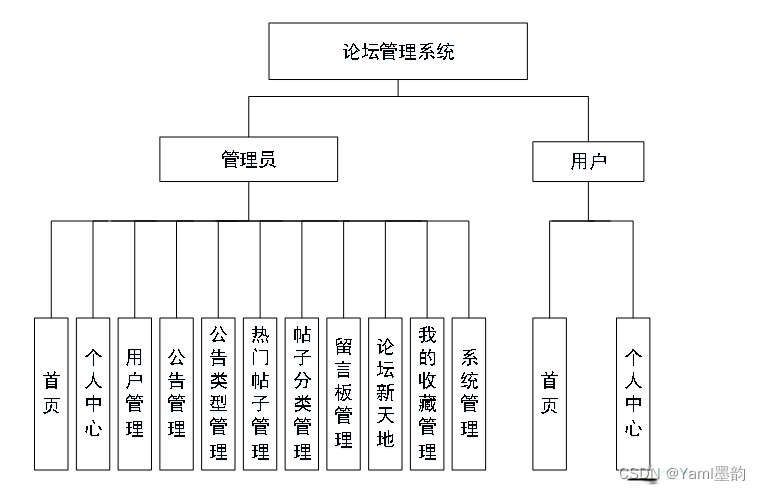
本论文系统地描绘了整个网上论坛管理系统的设计与实现,主要实现的功能有以下几点:管理员;首页、个人中心、用户管理、公告管理、公告类型管理、热门帖子管理、帖子分类管理、留言板管理、论坛新天地、我的收藏管理、系统管理,前台首页;首页、公告、热门帖子、论坛新天地、新闻资讯、留言反馈、个人中心、后台管理、客服中心,用户;首页、个人中心等功能,其具有简单的接口,方便的应用,强大的互动,完全基于互联网的特点。
二、开发技术与环境配置
以Java语言为开发工具,利用了当前先进的springboot框架,以IDEA为系统开发工具,MySQL为后台数据库,vue为后台管理页面开发的一个论坛网站系统。
2.1 SpringBoot框架
SpringBoot是一个全新开源的轻量级框架。基于Spring4.0设计,其不仅继承了Spring框架原来有的优秀特性,而且还通过简化配置文件来进一步简化了Spring应用的整个搭建以及开发过程。另外在原本的Spring中由于随着项目的扩大导入的jar包数量越来越大,随之出现了jar包版本之间的兼容性问题,而此时SpringBoot通过集成大量的框架使得依赖包的版本冲突,以及引用的不稳定性问题得到了很好的解决。
SpringBoot可以看做是Spring的加强版本,但实质上都是Spring的相关技术,有了这些优秀的开源框架,程序员在开发过程中将事半功倍。
2.2 Java语言简介
Java是由SUN公司推出,该公司于2010年被oracle公司收购。Java本是印度尼西亚的一个叫做爪洼岛的英文名称,也因此得来java是一杯正冒着热气咖啡的标识。Java语言在移动互联网的大背景下具备了显著的优势和广阔的前景,它是面向对象的,分布式的,动态的,具有平台无关性、安全性、健壮性。Java语言的基本语句语法和C++一样,但是它面向对象的技术更加彻底,因为Java要求将所有的内容都必须封装成类,把类作为程序的基本单位。由于不允许类外有变量、方法。 Java语言的分布式体现在数据分布和操作分布,它是面向网络的语言,可以处理TCP/IP协议,它也支持客户机/服务器的计算模式。Java语言的动态性是指类在运行时是动态安装的,使得Java可以动态的维护程序。Java不支持指针,对内存访问的所有操作都是通过对象实例化实现的,这样就避免了指针操作中易产生的错误,同时也预防了病毒对系统的破坏和威胁。
Java语言的编程风格与C语言非常接近,它继承了C++面向对象技术的核心,它面世之后发展迅速,非常流行,对高级C语言形成了很大的冲击。业内人士称之为“一次编译、到处执行”。当然java也有缺点,在每次执行编译后,字节码都需要消耗一定的时间,在某些程度上降低了性能。但是这并不影响java成为此次设计语言的选择。Java语言简单易学,使用它的编程时间短,功能性强,开发者学习起来更简便、更快。Java的主要特性有以下几个:
面向对象
面向对象有四个特点:封装、继承、多态、抽象。抽象是指忽略一个问题中的次要部分,关注主要部分。多态是指对同一种消息做出的不同反应。继承是指在原有的父类方法基础上增加自己独有的方法,而不改变原来父类。平台无关性、
Java编译出来的是字节码,直接由虚拟机执行。在任何平台上,只要有Java虚拟机,Java代码都能运行。可靠性和安全性
Java对内存的访问都必须通过对象的实例变量来实现,避免了指针中出现的错误。多线程
Java提供了多线程功能,利用编程实现同一时间同时工作的功能。2.3 Vue的介绍
Vue.js致力于构建数据驱动的web应用开发框架,以简洁化,轻量级,数据驱动,模块友好等优势深受企业以及前端开发者的喜爱,成为前端开发人员必备的技能。Vue3.0的出现,又带动周边生态的发展,奠定了vue在企业级开发的重要地位。
Vue是一套用于构建用户界面的渐进式框架。与其它大型框架不同的是,Vue 被设计为可以自底向上逐层应用。Vue 的核心库只关注视图层,不仅易于上手,还便于与第三方库或既有项目整合。另一方面,当与现代化的工具链以及各种支持类库结合使用时,Vue 也完全能够为复杂的单页应用提供驱动。
渐进式框架做分层设计,每层都可选,不同层可以灵活接入其他方案。而当你都想用官方的实现时,会发现也早已准备好,各层之间包括配套工具都能比接入其他方案更便捷地协同工作。 一个个放入,放多少就做多少。
2.4 mysql数据库介绍
利用MYSQL的数据独立性、安全性等特点,在软件项目中对数据进行操作,可以保证数据准确无误,并降低了程序员的应用开发时间。
MYSQL的特点是支持多线程,能方便的对系统资源充分利用,有效提高速度,还提供多种方式途径来对数据库进行连接;MYSQL的功能相对弱小、规模也小,但本系统要求不高,MYSQL完全可以满足本系统使用。
利用MYSQL建立系统数据库,不仅有利于数据处理业务的早期整合,还能利于发展后两种数据扩展的操作。2.5 B/S架构
B/S结构是目前使用最多的结构模式,它可以使得系统的开发更加的简单,好操作,而且还可以对其进行维护。使用该结构时只需要在计算机中安装数据库,和一些很常用的浏览器就可以了。浏览器就会与数据库进行信息的连接,可以实现很多的功能,B/S结构是可以直接进行使用的,而且B/S结构在使用中极大的减少了工作的维护。基于B/S的软件,所有的数据库之间都是相互独立的,因此是非常安全的。因为基于B/S结构可以清楚的看到系统正在处理的业务,并且能够及时的让管理人员做出决策,这样就可以避免企业的损失。B/S结构的基本特点是集中式的管理模式,用户使用系统生成数据后,这些数据就可以存储到系统的数据库中,方便日后能够用到,这样就可以满足人们的所有的需求。
三、系统功能实现
四、系统项目截图
用户模块的实现
交流论坛
用户登录可以发布交流论坛

交流论坛评论
用户登录后可以对其他用户发布的论坛信息进行评论操作

管理员模块的实现
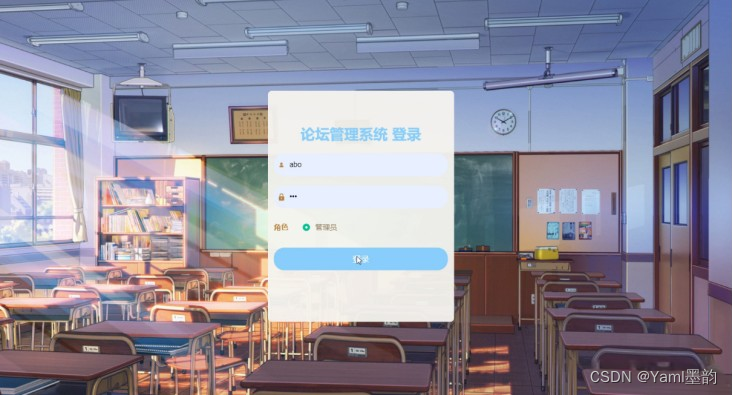
登录界面图
用户信息管理
论坛网站的系统管理员可以管理用户,可以对用户信息添加修改删除以及查询操作。具体界面的展示

普通管理员管理
系统管理员可以查看对普通管理员信息进行添加,修改,删除以及查询操作

五、核心代码
5.1、文件上传
- /**
- * 上传文件映射表
- */
- @RestController
- @RequestMapping("file")
- @SuppressWarnings({"unchecked","rawtypes"})
- public class FileController{
- @Autowired
- private ConfigService configService;
- /**
- * 上传文件
- */
- @RequestMapping("/upload")
- public R upload(@RequestParam("file") MultipartFile file,String type) throws Exception {
- if (file.isEmpty()) {
- throw new EIException("上传文件不能为空");
- }
- String fileExt = file.getOriginalFilename().substring(file.getOriginalFilename().lastIndexOf(".")+1);
- File path = new File(ResourceUtils.getURL("classpath:static").getPath());
- if(!path.exists()) {
- path = new File("");
- }
- File upload = new File(path.getAbsolutePath(),"/upload/");
- if(!upload.exists()) {
- upload.mkdirs();
- }
- String fileName = new Date().getTime()+"."+fileExt;
- File dest = new File(upload.getAbsolutePath()+"/"+fileName);
- file.transferTo(dest);
- /**
- * 如果使用idea或者eclipse重启项目,发现之前上传的图片或者文件丢失,将下面一行代码注释打开
- * 请将以下的"D:\\springbootq33sd\\src\\main\\resources\\static\\upload"替换成你本地项目的upload路径,
- * 并且项目路径不能存在中文、空格等特殊字符
- */
- // FileUtils.copyFile(dest, new File("D:\\springbootq33sd\\src\\main\\resources\\static\\upload"+"/"+fileName)); /**修改了路径以后请将该行最前面的//注释去掉**/
- if(StringUtils.isNotBlank(type) && type.equals("1")) {
- ConfigEntity configEntity = configService.selectOne(new EntityWrapper
().eq("name", "faceFile")); - if(configEntity==null) {
- configEntity = new ConfigEntity();
- configEntity.setName("faceFile");
- configEntity.setValue(fileName);
- } else {
- configEntity.setValue(fileName);
- }
- configService.insertOrUpdate(configEntity);
- }
- return R.ok().put("file", fileName);
- }
- /**
- * 下载文件
- */
- @IgnoreAuth
- @RequestMapping("/download")
- public ResponseEntity<byte[]> download(@RequestParam String fileName) {
- try {
- File path = new File(ResourceUtils.getURL("classpath:static").getPath());
- if(!path.exists()) {
- path = new File("");
- }
- File upload = new File(path.getAbsolutePath(),"/upload/");
- if(!upload.exists()) {
- upload.mkdirs();
- }
- File file = new File(upload.getAbsolutePath()+"/"+fileName);
- if(file.exists()){
- HttpHeaders headers = new HttpHeaders();
- headers.setContentType(MediaType.APPLICATION_OCTET_STREAM);
- headers.setContentDispositionFormData("attachment", fileName);
- return new ResponseEntity<byte[]>(FileUtils.readFileToByteArray(file),headers, HttpStatus.CREATED);
- }
- } catch (IOException e) {
- e.printStackTrace();
- }
- return new ResponseEntity<byte[]>(HttpStatus.INTERNAL_SERVER_ERROR);
- }
- }
5.2、数据库配置
- server:
- tomcat:
- uri-encoding: UTF-8
- port: 8080
- servlet:
- context-path: /springbootr1tjf
- spring:
- datasource:
- driverClassName: com.mysql.jdbc.Driver
- url: jdbc:mysql://127.0.0.1:3306/springbootr1tjf?useUnicode=true&characterEncoding=utf-8&useJDBCCompliantTimezoneShift=true&useLegacyDatetimeCode=false&serverTimezone=GMT%2B8
- username: root
- password: 123456
- # driverClassName: com.microsoft.sqlserver.jdbc.SQLServerDriver
- # url: jdbc:sqlserver://127.0.0.1:1433;DatabaseName=springbootr1tjf
- # username: sa
- # password: 123456
- servlet:
- multipart:
- max-file-size: 10MB
- max-request-size: 10MB
- resources:
- static-locations: classpath:static/,file:static/
- #mybatis
- mybatis-plus:
- mapper-locations: classpath*:mapper/*.xml
- #实体扫描,多个package用逗号或者分号分隔
- typeAliasesPackage: com.entity
- global-config:
- #主键类型 0:"数据库ID自增", 1:"用户输入ID",2:"全局唯一ID (数字类型唯一ID)", 3:"全局唯一ID UUID";
- id-type: 1
- #字段策略 0:"忽略判断",1:"非 NULL 判断"),2:"非空判断"
- field-strategy: 2
- #驼峰下划线转换
- db-column-underline: true
- #刷新mapper 调试神器
- refresh-mapper: true
- #逻辑删除配置
- logic-delete-value: -1
- logic-not-delete-value: 0
- #自定义SQL注入器
- sql-injector: com.baomidou.mybatisplus.mapper.LogicSqlInjector
- configuration:
- map-underscore-to-camel-case: true
- cache-enabled: false
- call-setters-on-nulls: true
- #springboot 项目mybatis plus 设置 jdbcTypeForNull (oracle数据库需配置JdbcType.NULL, 默认是Other)
- jdbc-type-for-null: 'null'
5.3、登录功能实现
- package com.controller;
- import java.util.Arrays;
- import java.util.Calendar;
- import java.util.Date;
- import java.util.Map;
- import javax.servlet.http.HttpServletRequest;
- import org.springframework.beans.factory.annotation.Autowired;
- import org.springframework.stereotype.Controller;
- import org.springframework.web.bind.annotation.GetMapping;
- import org.springframework.web.bind.annotation.PathVariable;
- import org.springframework.web.bind.annotation.PostMapping;
- import org.springframework.web.bind.annotation.RequestBody;
- import org.springframework.web.bind.annotation.RequestMapping;
- import org.springframework.web.bind.annotation.RequestParam;
- import org.springframework.web.bind.annotation.ResponseBody;
- import org.springframework.web.bind.annotation.RestController;
- import com.annotation.IgnoreAuth;
- import com.baomidou.mybatisplus.mapper.EntityWrapper;
- import com.entity.TokenEntity;
- import com.entity.UserEntity;
- import com.service.TokenService;
- import com.service.UserService;
- import com.utils.CommonUtil;
- import com.utils.MPUtil;
- import com.utils.PageUtils;
- import com.utils.R;
- import com.utils.ValidatorUtils;
- /**
- * 登录相关
- */
- @RequestMapping("users")
- @RestController
- public class UserController{
- @Autowired
- private UserService userService;
- @Autowired
- private TokenService tokenService;
- /**
- * 登录
- */
- @IgnoreAuth
- @PostMapping(value = "/login")
- public R login(String username, String password, String captcha, HttpServletRequest request) {
- UserEntity user = userService.selectOne(new EntityWrapper
().eq("username", username)); - if(user==null || !user.getPassword().equals(password)) {
- return R.error("账号或密码不正确");
- }
- String token = tokenService.generateToken(user.getId(),username, "users", user.getRole());
- return R.ok().put("token", token);
- }
- /**
- * 注册
- */
- @IgnoreAuth
- @PostMapping(value = "/register")
- public R register(@RequestBody UserEntity user){
- if(userService.selectOne(new EntityWrapper
().eq("username", - user.getUsername())) !=null) {
- return R.error("用户已存在");
- }
- userService.insert(user);
- return R.ok();
- }
- /**
- * 退出
- */
- @GetMapping(value = "logout")
- public R logout(HttpServletRequest request) {
- request.getSession().invalidate();
- return R.ok("退出成功");
- }
- /**
- * 密码重置
- */
- @IgnoreAuth
- @RequestMapping(value = "/resetPass")
- public R resetPass(String username, HttpServletRequest request){
- UserEntity user = userService.selectOne(new EntityWrapper
- ().eq("username", username));
- if(user==null) {
- return R.error("账号不存在");
- }
- user.setPassword("123456");
- userService.update(user,null);
- return R.ok("密码已重置为:123456");
- }
- /**
- * 列表
- */
- @RequestMapping("/page")
- public R page(@RequestParam Map
- EntityWrapper
ew = new EntityWrapper (); - PageUtils page = userService.queryPage(params, MPUtil.sort(MPUtil.between(MPUtil.allLike(ew, user), params), params));
- return R.ok().put("data", page);
- }
- /**
- * 列表
- */
- @RequestMapping("/list")
- public R list( UserEntity user){
- EntityWrapper
ew = new EntityWrapper (); - ew.allEq(MPUtil.allEQMapPre( user, "user"));
- return R.ok().put("data", userService.selectListView(ew));
- }
- /**
- * 信息
- */
- @RequestMapping("/info/{id}")
- public R info(@PathVariable("id") String id){
- UserEntity user = userService.selectById(id);
- return R.ok().put("data", user);
- }
- /**
- * 获取用户的session用户信息
- */
- @RequestMapping("/session")
- public R getCurrUser(HttpServletRequest request){
- Long id = (Long)request.getSession().getAttribute("userId");
- UserEntity user = userService.selectById(id);
- return R.ok().put("data", user);
- }
- /**
- * 保存
- */
- @PostMapping("/save")
- public R save(@RequestBody UserEntity user){
- if(userService.selectOne(new EntityWrapper
().eq("username", - user.getUsername())) !=null) {
- return R.error("用户已存在");
- }
- userService.insert(user);
- return R.ok();
- }
- /**
- * 修改
- */
- @RequestMapping("/update")
- public R update(@RequestBody UserEntity user){
- userService.updateById(user);//全部更新
- return R.ok();
- }
- /**
- * 删除
- */
- @RequestMapping("/delete")
- public R delete(@RequestBody Long[] ids){
- userService.deleteBatchIds(Arrays.asList(ids));
- return R.ok();
- }
- }
5.4、业务层(Service)
- package com.service;
- import java.util.List;
- import java.util.Map;
- import org.apache.ibatis.annotations.Param;
- import com.baomidou.mybatisplus.mapper.Wrapper;
- import com.baomidou.mybatisplus.service.IService;
- import com.entity.UserEntity;
- import com.utils.PageUtils;
- /**
- * 系统用户
- */
- public interface UserService extends IService
{ - PageUtils queryPage(Map
- List
selectListView(Wrapper wrapper) ; - PageUtils queryPage(Map
wrapper) - }
5.5、数据访问层(Dao)
- package com.dao;
- import java.util.List;
- import org.apache.ibatis.annotations.Param;
- import com.baomidou.mybatisplus.mapper.BaseMapper;
- import com.baomidou.mybatisplus.mapper.Wrapper;
- import com.baomidou.mybatisplus.plugins.pagination.Pagination;
- import com.entity.UserEntity;
- /**
- * 用户
- */
- public interface UserDao extends BaseMapper
{ - List
selectListView(@Param("ew") Wrapper wrapper) ; - List
selectListView(Pagination page,@Param("ew") Wrapper wrapper) ; - }
-
相关阅读:
数据结构——排序算法(冒泡排序、选择排序、插入排序、归并排序、快速排序、搜索算法)
分类、回归算法简单介绍
[s905l3]性价比神机mgv3000全网首拆,刷armbian实现更多价值!
2-1线性表-顺序表
【VBA】获取指定目录下的Excel文件,并合并所有excel中的内容。
资源共享共赢系统应用
『heqingchun-ubuntu系统下安装cuda与cudnn』
交叉编译glib
Python数据分析与机器学习38-Xgboost算法
FFplay文档解读-38-视频过滤器十三
- 原文地址:https://blog.csdn.net/Yaml4/article/details/136435816
