-
electron+vue3全家桶+vite项目搭建【27】封装窗口工具类【1】雏形
引入
demo项目地址
窗口工具类系列文章:
封装窗口工具类【1】雏形
封装窗口工具类【2】窗口组,维护窗口关系
封装窗口工具类【3】控制窗口定向移动可以看到我们之前在主进程中的逻辑全部都塞到index.ts文件中,包括窗口的一些事件处理,handle监听,协议注册等等,后期维护起来会比较麻烦,我们不妨将其中的功能细分,封装到工具类中。
思路
以新建窗口举例,流程为
- 主进程ipcMain.handle监听,根据传来的参数构建新窗口
/** * 新建一个窗口 * route=>路由地址 paramJsonStr => 序列化后的参数对象 */ ipcMain.handle("open-win", (_, route: string, paramJsonStr: string) => {...})- 1
- 2
- 3
- 4
- 5
- 渲染进程调用 ipcRenderer.invoke方法通知主进程创建窗口
/** * 新建一个窗口 * @param path 路由地址 * @param param 传递的参数 */ export function openWindow(path: string, param?: Object) { ... ipcRenderer.invoke("open-win", path, paramJsonStr); }- 1
- 2
- 3
- 4
- 5
- 6
- 7
- 8
- 9
可以预见的是,后续窗口的创建逻辑会随着业务逻辑而扩展,例如创建窗口时 指定窗口宽高,标题,背景色等属性,设置窗口透明,事件击穿等等内容,并且多个窗口间的一些交互需要我们去维护一个窗口组信息,记录窗口的id和逻辑上的关联关系等。
所以我们不妨创建一个窗口工具类,专门集成封装窗口相关的方法,属性等抽出公共声明文件
我们在渲染进程项目模块中的electronUtils和主进程中的窗口工具类中的【handle/on】方法是一一对应的【invoke/send】,传入的参数也是通用的,所以我们不妨抽出一个公共的全局声明文件,用于声明通用的一些参数对象。
1.在全局声明文件中添加通用事件对象的声明
- types\global.d.ts
/** 一些全局的对象补充声明 */ export {}; declare global { ... // 窗口创建参数规范 interface IWindowConfig { key?: string; // 窗口唯一key,不传则取窗口的id,假如已存在该key则聚焦该窗口 route?: string; // 窗口路由 width?: number; // 窗口宽度 height?: number; // 窗口高度 param?: string; // 传递参数,新窗口打开时能直接从路由中获取,拼接url传递,推荐只传小数据 } }- 1
- 2
- 3
- 4
- 5
- 6
- 7
- 8
- 9
- 10
- 11
- 12
- 13
2.主进程引入全局声明文件
- electron\electron-env.d.ts
///import "../types/global.d.ts"; - 1
- 2
- 3
抽出全局通用数据类型和方法
主进程和渲染进程都会调用相同的事件名称,所以我们不妨定义一个全局的事件枚举类,方便两个进程的代码书写和规范【事件名称应当唯一,否则会重复绑定】。
1.在根目录下创建globel目录,然后分别创建channelEvent.ts和channelEvent.d.ts两个文件 【事件管道枚举和对应的声明文件】
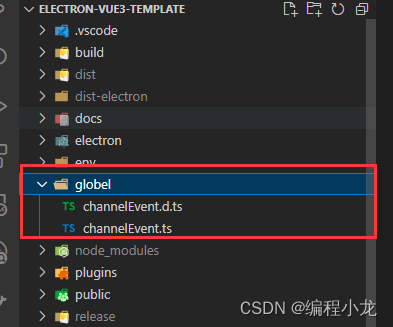
- globel\channelEvent.ts
/** * 自定义事件枚举 */ export enum CustomChannel { window_create = "custom_window_create", // 窗口新建事件 window_move_on = "custom_window_move_on", // 开启窗口移动事件 window_position_change = "custom_window_position_change", // 修改窗口的位置 }- 1
- 2
- 3
- 4
- 5
- 6
- 7
- 8
- globel\channelEvent.d.ts
// customEvents.d.ts /** * 自定义事件枚举的类型声明 */ export declare enum CustomChannel { window_create = "custom_window_create", // 窗口新建事件 window_move_on = "custom_window_move_on", // 开启窗口移动事件 window_position_change = "custom_window_position_change", // 修改窗口的位置 }- 1
- 2
- 3
- 4
- 5
- 6
- 7
- 8
- 9
- 10
2.在根目录下的tsconfig.node.json文件中添加引入
- tsconfig.node.json
"include": [...,"globel"]- 1
3.配置别名快速访问
- vite.config.ts
... resolve: { alias: { ... "@globel": path.resolve(__dirname, "./globel"), }, },- 1
- 2
- 3
- 4
- 5
- 6
- 7
- tsconfig.json
{ "compilerOptions": { ... "paths": { ... "@globel/*": ["globel/*"], }, "types": ["vite-plugin-svg-icons/client"] }, }- 1
- 2
- 3
- 4
- 5
- 6
- 7
- 8
- 9
- 10
- 11
主进程模块
1.抽离基础常量
我们将主进程中常用的常量抽离到单独的文件中:
- electron\main\common\variables.ts
import { join } from 'node:path'; /** *公共变量配置 */ process.env.DIST_ELECTRON = join(__dirname, '..'); process.env.DIST = join(process.env.DIST_ELECTRON, '../dist'); process.env.PUBLIC = process.env.VITE_DEV_SERVER_URL ? join(process.env.DIST_ELECTRON, '../public') : process.env.DIST; // 公共变量中存一份SRC的路径,方便取值 process.env.SRC_PATH = join(__dirname, '../../src').split('\\').join('/'); // 预加载文件路径 export const preloadPath = join(__dirname, '../preload/index.js'); // dev环境请求地址 export const url = process.env.VITE_DEV_SERVER_URL; // 部署环境的html文件路径 export const indexHtmlPath = join(process.env.DIST, 'index.html'); // icon图标地址 export const iconPath = join(process.env.PUBLIC, 'icons/icon.ico'); // app的title,会被index.html中配置的%VITE_APP_TITLE% 覆盖 export const appTitle = "新窗口"; // app在windows上注册表的协议 export const PROTOCOL = 'bcxlelectrondemo';- 1
- 2
- 3
- 4
- 5
- 6
- 7
- 8
- 9
- 10
- 11
- 12
- 13
- 14
- 15
- 16
- 17
- 18
- 19
- 20
- 21
- 22
- 23
- 24
- 25
- 26
2.封装窗口工具类
注意:
1.定义默认窗口参数时使用了ts中的联合类型,这样定义的defaultWindowConfig就必须拥有指定的两个类型中的所有属性
2.创建了一个窗口类,并将窗口相关的逻辑封装为窗口类中的成员方法
3.窗口类中定义个一个listen方法,里面放置所有需要与渲染进程交互的handle监听
- electron\main\windowUtils.ts
import { BrowserWindow, BrowserWindowConstructorOptions, ipcMain, } from "electron"; import { url, appTitle, preloadPath, iconPath, indexHtmlPath, } from "./common/variables"; import { CustomChannel } from "../../globel/channelEvent"; /* ======================= 定义一些窗口工具类中会使用到的常量,以及窗口顶级父类 ========================= */ // 默认窗口参数 export const defaultWindowConfig: BrowserWindowConstructorOptions & IWindowConfig = { title: appTitle, icon: iconPath, width: 800, height: 600, webPreferences: { webviewTag: true, preload: preloadPath, nodeIntegration: true, contextIsolation: false, }, }; /** * 窗口工具类 */ export class WindowUtils { // 事件监听处理 listen() { // 窗口创建监听 ipcMain.handle(CustomChannel.window_create, (_, opt: IWindowConfig) => { this.createWindows(opt); }); } /** * 创建窗口 * @param windowConfig 窗口创建参数 */ createWindows(windowConfig: IWindowConfig): BrowserWindow { // 创建窗口对象 const win = new BrowserWindow( Object.assign({}, defaultWindowConfig, windowConfig) ); // 根据当前环境加载页面,并传递参数 const param = windowConfig.param ? "?urlParamData=" + windowConfig.param : ""; if (process.env.VITE_DEV_SERVER_URL) { // 如果是开发环境,则直接访问本地跑起的服务,拼接对应的路由 win.loadURL(`${url}#${windowConfig.route}${param}`); } else { // 如果是线上环境,则加载html文件的路径,然后拼接路由 win.loadFile(indexHtmlPath, { hash: windowConfig.route + param }); } // 绑定通用窗口事件 return win; } }- 1
- 2
- 3
- 4
- 5
- 6
- 7
- 8
- 9
- 10
- 11
- 12
- 13
- 14
- 15
- 16
- 17
- 18
- 19
- 20
- 21
- 22
- 23
- 24
- 25
- 26
- 27
- 28
- 29
- 30
- 31
- 32
- 33
- 34
- 35
- 36
- 37
- 38
- 39
- 40
- 41
- 42
- 43
- 44
- 45
- 46
- 47
- 48
- 49
- 50
- 51
- 52
- 53
- 54
- 55
- 56
- 57
- 58
- 59
- 60
- 61
- 62
- 63
- 64
- 65
- 66
- 67
- 68
- 69
- 70
接着我们调整index.ts中的创建主窗口的代码:
import {WindowUtils} from './windowUtils' // 创建窗口工具类 const windowUtils = new WindowUtils(); windowUtils.listen(); ... async function createWindow() { ... win = windowUtils.createWindows({ route:"/" }); }- 1
- 2
- 3
- 4
- 5
- 6
- 7
- 8
- 9
- 10
- 11
- 12
- 13
- 14
- 15
对比之前代码,简练了不少

渲染进程模块
1.我们调整通用交互工具类,补充新的窗口创建方法
- src\utils\electronUtils.ts
import { ipcRenderer } from "electron"; import { CustomChannel } from "@globel/channelEvent"; /** * 新建一个窗口 * @param windowConfig */ export function createWindow(windowConfig: IWindowConfig) { ipcRenderer.invoke(CustomChannel.window_create, windowConfig); }- 1
- 2
- 3
- 4
- 5
- 6
- 7
- 8
- 9
2.调整demo代码
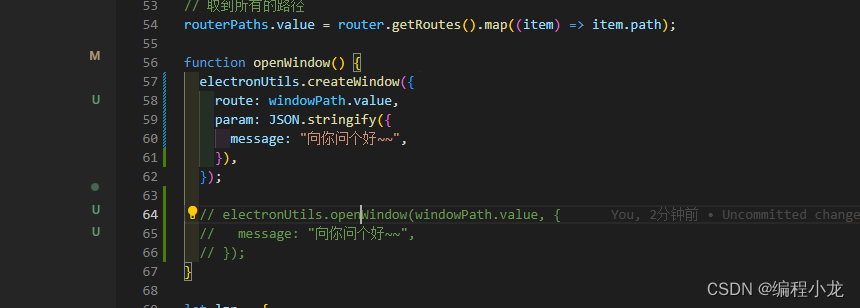
- src\components\demo\Index.vue
electronUtils.createWindow({ route: windowPath.value, param: JSON.stringify({ message: "向你问个好~~", }), });- 1
- 2
- 3
- 4
- 5
- 6
测试结果
能够正常的创建窗口

-
相关阅读:
PCB设计---铜箔类型(二)
Java开发学习(二)----IOC、DI入门案例
文心一言 VS 讯飞星火 VS chatgpt (242)-- 算法导论17.4 1题
牛客 NC25080 Catch That Cow
TS同时打包和监视所有ts文件或只指定ts文件
@Import :Spring Bean模块装配的艺术
spring aop
windows上安装wsl(windows的linux子系统)
聊起日本文化大家首先会想起什么
Python学习:len() 函数详解:获取字符串长度或字节数、join()方法:合并字符串
- 原文地址:https://blog.csdn.net/qq_42365534/article/details/136279112
