-
hadoop 日志聚集功能配置 hadoop(十一)
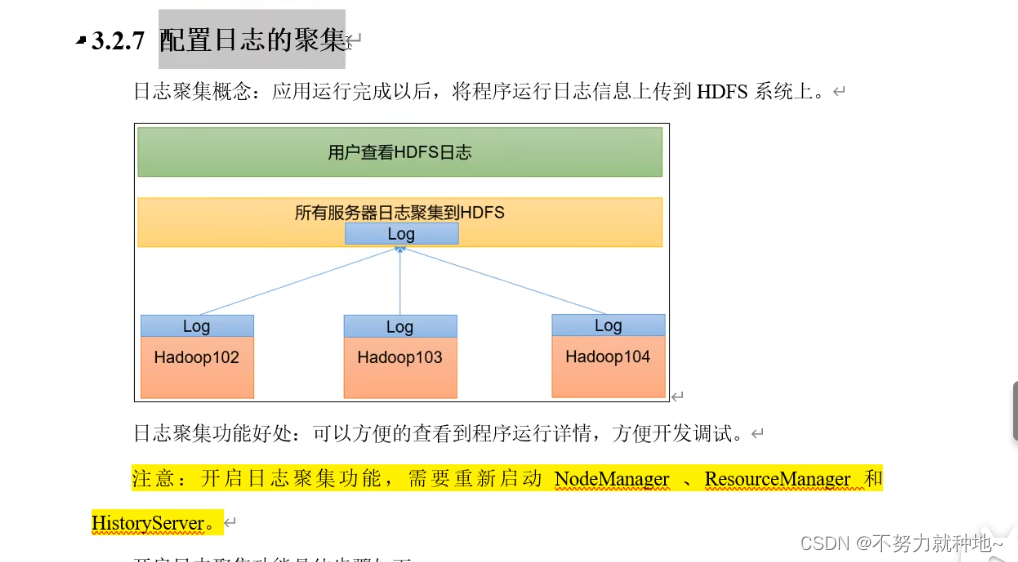
由图所示,本文主要是将三台机器log 进行日志聚集查看。图更加直观
1. 首先需要配置历史服务器配置,才可以配置日志聚集功能:
hadoop 配置历史服务器 开启历史服务器查看 hadoop (十)-CSDN博客
2. 配置了三台服务器,hadoop22, hadoop23, hadoop24
3. hadoop文件路径: /opt/module/hadoop-3.3.4
4. hadoop22机器配置配置文件:
文件路径:/opt/module/hadoop-3.3.4/etc/hadoop
文件名称:yarn-site.xml
文件中,需要修改为你自己的 服务器名
- <?xml version="1.0"?>
- <!--
- Licensed under the Apache License, Version 2.0 (the "License");
- you may not use this file except in compliance with the License.
- You may obtain a copy of the License at
- http://www.apache.org/licenses/LICENSE-2.0
- Unless required by applicable law or agreed to in writing, software
- distributed under the License is distributed on an "AS IS" BASIS,
- WITHOUT WARRANTIES OR CONDITIONS OF ANY KIND, either express or implied.
- See the License for the specific language governing permissions and
- limitations under the License. See accompanying LICENSE file.
- -->
- <configuration>
- <!-- Site specific YARN configuration properties -->
- <!-- 指定MR走shuffle -->
- <property>
- <name>yarn.nodemanager.aux-services</name>
- <value>mapreduce_shuffle</value>
- </property>
- <!-- 指定ResourceManager的地址-->
- <property>
- <name>yarn.resourcemanager.hostname</name>
- <value>hadoop23</value>
- </property>
- <!-- 环境变量的继承 -->
- <property>
- <name>yarn.nodemanager.env-whitelist</name>
- <value>JAVA_HOME,HADOOP_COMMON_HOME,HADOOP_HDFS_HOME,HADOOP_CONF_DIR,CLASSPATH_PREPEND_DISTCACHE,HADOOP_YARN_HOME,HADOOP_MAPRED_HOME</value>
- </property>
- <!-- 开启日志聚集功能 -->
- <property>
- <name>yarn.log-aggregation-enable</name>
- <value>true</value>
- </property>
- <!-- 设置日志聚集服务器地址 -->
- <property>
- <name>yarn.log.server.url</name>
- <value>http://hadoop22:19888/jobhistory/logs</value>
- </property>
- <!-- 设置日志保留时间为7天 -->
- <property>
- <name>yarn.log-aggregation.retain-seconds</name>
- <value>604800</value>
- </property>
- </configuration>
5. 分发文件到其他两台服务器:
- # 这个命令是我相关文章的一个脚本,如果没有这个脚本,是运行不了的,
- # 可以查看之前文章,添加脚本,也可以手动复制,修改, 也可以centos 的scp 命令发送过去
- # 先看注释
- # 先看注释
- # 先看注释
- xsync yarn-site.xml
6. 停止历史服务器:
- # hadoop文件夹
- cd /opt/module/hadoop-3.3.4
- # 停止
- bin/mapred --daemon stop historyserver
7. 重启hadoop23机器的yarn集群:
去hadoop23机器:
- # hadoop文件夹
- cd /opt/module/hadoop-3.3.4
- # hadoop23机器,停止yarn集群
- sbin/stop-yarn.sh
- #jps
- jps
- # jps多查看两遍是否已停止
- # 开启
- sbin/start-yarn.sh
8. 去hadoop22机器重启历史服务器:
- # hadoop文件夹
- cd /opt/module/hadoop-3.3.4
- # 开始
- bin/mapred --daemon start historyserver
9. 重新启动计算demo:
hadoop jar share/hadoop/mapreduce/hadoop-mapreduce-examples-3.3.4.jar wordcount /input /output210. 查看日志聚集记录:
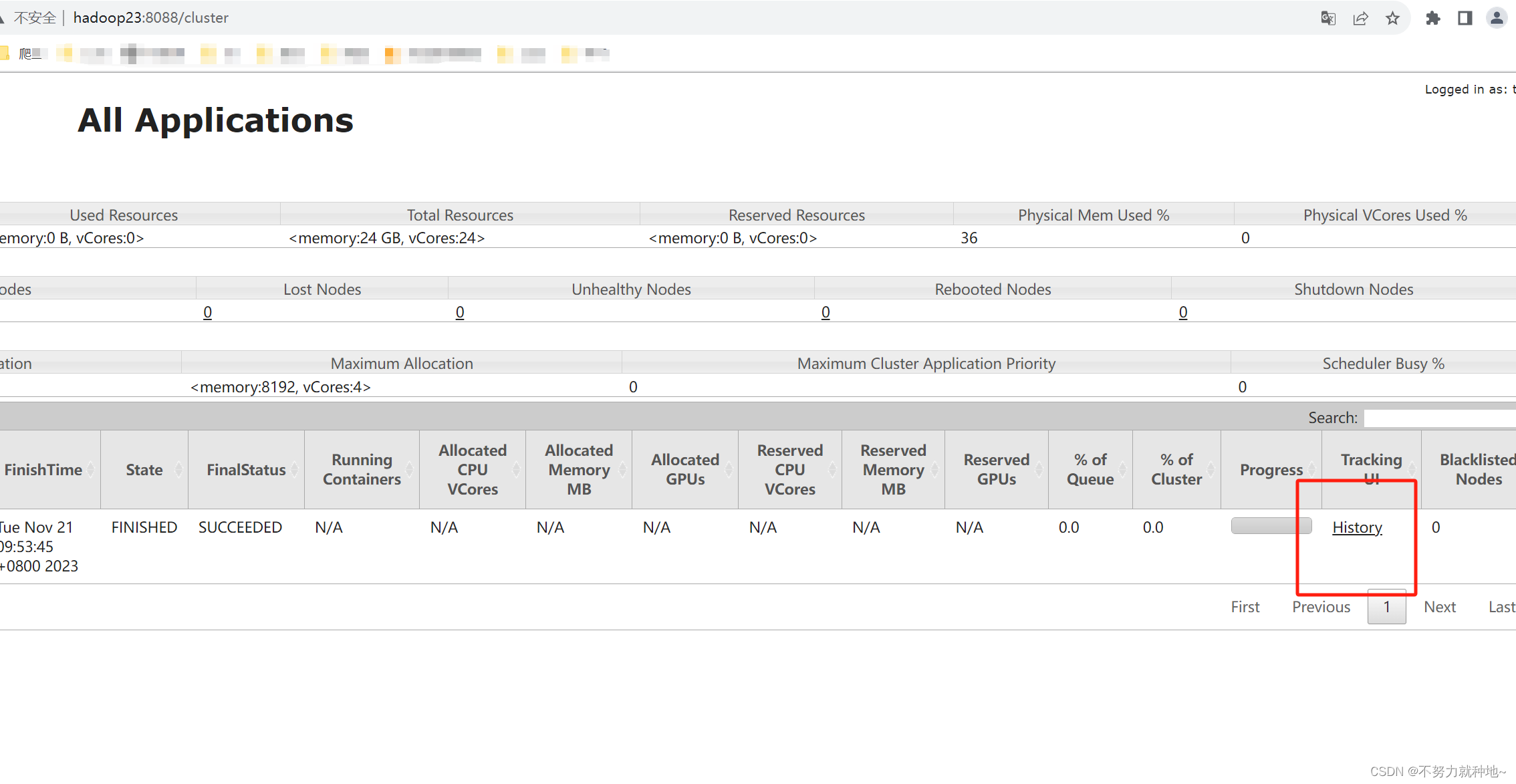
依次点击框中链接


11. 日志已启用成功,能够查看日志
-
相关阅读:
UE 插件模块引用
Rsync远程同步
在 .NET Core 中构建工作服务和调度运行
头哥实践平台之Linux 文件/目录管理
动态sql和分页
19.spring beanfactory与applicationcontext
Xiaojie雷达之路---匹配滤波器
H3C SecParh堡垒机 get_detail_view.php 任意用户登录漏洞
NEDC、WLTC、CLTC,三种汽车能源消耗测试标准有什么区别?
遥感高光谱笔记-高光谱遥感图像处理与信息提取
- 原文地址:https://blog.csdn.net/qq_33919114/article/details/134525008
