-
用Java实现贪吃蛇小游戏
一、创建新项目
首先创建一个新的项目,并命名为贪吃蛇。其次在贪吃蛇项目下创建一个名为images的文件夹用来存放游戏相关图片。
然后再在项目的src文件下创建一个com.xxx.view的包用来存放所有的图形界面类,创建一个com.xxx.controller的包用来存放启动的入口类(控制类)。

二、游戏界面
package com.snake.view;
import java.awt.Color;
import java.awt.EventQueue;
import java.awt.Font;
import java.awt.Frame;
import java.awt.Graphics;
import java.awt.Image;
import java.util.ArrayList;
import java.util.List;
import java.util.Random;
import javax.swing.ImageIcon;
import javax.swing.JFrame;
import javax.swing.JOptionPane;
import javax.swing.JPanel;
import javax.swing.Timer;
import javax.swing.border.EmptyBorder;
import java.awt.event.ActionEvent;
import java.awt.event.ActionListener;
import java.awt.event.KeyAdapter;
import java.awt.event.KeyEvent;public class SnakeJPanel extends JPanel implements ActionListener{
private boolean start;//当前游戏状态
private int speed;//速度
private boolean exist;//当前是否存在食物
private int foodType;//食物种类
private int x;//豆子的横坐标
private int y;//豆子的纵坐标private ArrayList
public String direction;//方向
private String direction2;//引导方向
public boolean flag;
Random rand = new Random();
private ImageIcon up;
private ImageIcon down;
private ImageIcon right;
private ImageIcon left;
private ImageIcon body;
private ImageIcon food;
private ImageIcon title;
Timer time;private int score;//当前得分情况
private int num;//吃到的食物个数
// private Image offScreenImage; //图形缓存
//图片绘制
@Override
public void paint(Graphics g) {
direction = direction2;
g.setColor(Color.WHITE);
g.fillRect(0, 0, 900, 700);
//绘制游戏框
//标题框
// g.drawRect(25, 30, 800, 75);
title.paintIcon(this, g, 25, 10);
//内容框
g.setColor(Color.black);
g.fillRect(25, 75, 850, 600);
//绘制食物的坐标位置
if(!exist) {//如果当前不存在豆子,随机绘制一个豆子
if(num % 5 == 0) {
foodType = 1;
}else {
foodType = 0;
}
boolean isProduce = true;
while(isProduce) {
isProduce = false;
x = rand.nextInt(33) * 25 + 25;
y = rand.nextInt(23) * 25 + 75;
for (int[] arr:localList) {
if(x == arr[0] && y == arr[1]) {
isProduce = true;
break;
}
}
}
System.out.println(x + "---" + y);
}
if(eat()) {
exist = false;
}else {
exist = true;
}
if(foodType == 0) {
//绘制食物
g.setColor(Color.blue);
// g.fillRect(x, y, 25, 25);
g.drawImage(food.getImage(),x, y, 25, 25,null);
}else {
//绘制食物
g.setColor(Color.WHITE);
g.fillRect(x, y, 25, 25);
// g.drawImage(food.getImage(),x, y, 25, 25,null);
}
//绘制头
g.setColor(Color.red);
// g.fillRect(localList.get(0)[0], localList.get(0)[1], 25, 25);
ImageIcon head = null;
//判断当前方向
if(direction.equals("R")) {
head = right;
}else if(direction.equals("L")) {
head = left;
}else if(direction.equals("U")) {
head = up;
}else if(direction.equals("D")) {
head = down;}
// g.drawImage(head.getImage(), localList.get(0)[0], localList.get(0)[1], 25, 25,null);
head.paintIcon(this, g,localList.get(0)[0], localList.get(0)[1]);
//绘制身体
g.setColor(Color.white);
for (int i = 1; i < localList.size(); i++) {
// g.fillRect(localList.get(i)[0], localList.get(i)[1], 25, 25);
// g.drawImage(body.getImage(), localList.get(i)[0], localList.get(i)[1], 25, 25,null);
body.paintIcon(this, g, localList.get(i)[0], localList.get(i)[1]);
}
// g.fillRect(localList.get(1)[0], localList.get(1)[1], 25, 25);
// g.fillRect(localList.get(2)[0], localList.get(2)[1], 25, 25);
//绘制分数和长度
//长度
g.setColor(Color.GREEN);
g.setFont(new Font("宋体", Font.BOLD, 18));
g.drawString("长度:" + (localList.size() - 1), 25, 30);
//分数
g.drawString("分数:" + score, 25, 48);
if(!start) {//如果游戏未启动,结束移动和重绘
g.setColor(Color.white);
g.setFont(new Font("宋体", Font.BOLD, 30));
g.drawString("暂停/开始(请按任意键开始,空格键暂停)", 150, 300);
time.stop();
}else {
time.start();
}
// speed();
//移动后进行下一次绘制
// move();//移动
// repaint();//重新绘制
}
// //解决闪烁问题
// //如果为JFrame 为重量级 程序不会调用update()方法
// //如果为Frame 为轻量级 重写update()方法 做双缓冲
// //如果为JPanel 不会闪烁
// @Override
// public void update(Graphics g)
// {
// System.out.println("update");
// if(offScreenImage == null)
// offScreenImage = this.createImage(900, 700); //新建一个图像缓存空间,这里图像大小为800*600
// Graphics gImage = offScreenImage.getGraphics(); //把它的画笔拿过来,给gImage保存着
// paint(gImage); //将要画的东西画到图像缓存空间去
// g.drawImage(offScreenImage, 0, 0, null); //然后一次性显示出来
// }
@Override
public void actionPerformed(ActionEvent e) {
//移动后进行下一次绘制
move();//移动
repaint();//重新绘制
}
/**
* 绘制速度
*/
// private void speed() {
// try {//按一定速度进行移动
// Thread.sleep(speed);//控制移动速度
// } catch (InterruptedException e) {
// // TODO 自动生成的 catch 块
// e.printStackTrace();
// }
// }
/**
* 初始化图片
*/
private void drawImage() {
up = new ImageIcon("images/up.png");
down = new ImageIcon("images/down.png");
right = new ImageIcon("images/right.png");
left = new ImageIcon("images/left.png");
body = new ImageIcon("images/body.png");
food = new ImageIcon("images/food.png");
title = new ImageIcon("images/title.jpg");
}
private boolean eat() {
if(localList.get(0)[0] == x && localList.get(0)[1] == y) {//如果当前蛇头吃到了豆子
System.out.println("eat");
num++;
if(foodType == 0) {
score += 10;
}else {
score += (rand.nextInt(5) * 10 + 10);
}
int last = localList.size() - 1;//蛇尾
//在蛇尾后面添加一节身体
localList.add(new int[] {localList.get(last)[0],localList.get(last)[1]});
return true;
}
return false;
}
//移动方法
public void move() {
//判断是否游戏结束if(isbody()) {
System.out.println("game over");
start = false;//结束游戏移动
JOptionPane.showMessageDialog(null,"游戏已结束!");
time.stop();
init();
}
if(flag && localList != null) {//如果长度不为空且游戏未结束
int last = localList.size() - 1;//记录蛇尾
for (int i = last; i > 0; i--) {//从蛇尾开始,每节身体移动到前一节身体的位置上
localList.set(i,new int[] {localList.get(i - 1)[0],localList.get(i - 1)[1]});
}
//记录头位置
int[] local = localList.get(0);
//判断当前方向,并进行模拟移动,判断是否与边界重合
if(direction.equals("R")) {
if(local[0] >= 850) {
local[0] = 25;
}else {
local[0] += 25;
}
}else if(direction.equals("L")) {
if(local[0] <= 25) {
local[0] = 850;
}else {
local[0] -= 25;
}
}else if(direction.equals("U")) {
if(local[1] <= 75) {
local[1] = 650;
}else {
local[1] -= 25;
}}else if(direction.equals("D")) {
if(local[1] >= 650) {
local[1] = 75;
}else {
local[1] += 25;
}
}
//更改头的位置
localList.set(0, local);
}
}
//判断下一步是否为蛇身
private boolean isbody() {
// TODO 自动生成的方法存根
//记录头位置
int x = localList.get(0)[0];
int y = localList.get(0)[1];
//判断当前方向,并进行模拟移动,判断是否与边界重合
if(direction.equals("R")) {
x += 25;
}else if(direction.equals("L")) {
x -= 25;
}else if(direction.equals("U")) {
y -= 25;}else if(direction.equals("D")) {
y += 25;
}
for (int i = 1; i < localList.size(); i++) {
if(localList.get(i)[0] == x && localList.get(i)[1] == y) {
return true;
}
}
return false;
}
// //判断下一步是否为边界
// private boolean isborder() {
// // TODO 自动生成的方法存根
// //记录头位置
// // TODO 自动生成的方法存根
// //记录头位置
// int x = localList.get(0)[0];
// int y = localList.get(0)[1];
//
// //判断当前方向,并进行模拟移动,判断是否与边界重合
// if(direction.equals("R")) {
// x += 25;
// }else if(direction.equals("L")) {
// x -= 25;
// }else if(direction.equals("U")) {
// y -= 25;
// }else if(direction.equals("D")) {
// y += 25;
// }
//
// if(x < 25 || x > (33 * 25 + 25)) {
// return true;//当x坐标超出边界,则返回true
// }
// if(y < 105 || y > (23 * 25 + 105)) {
// return true;//当y坐标超出边界,则返回true
// }
// return false;//蛇头移动后未超出边界,返回false
//
// }
/**
* Create the frame.
*/
public SnakeJPanel(int speed) {
this.speed = speed; //初始化速度
//初始化游戏面板的基本信息
this.setSize(900, 700);
this.setLocation(0, 30);
this.setFocusable(true);
init();//初始化界面
drawImage();//绘制图片
moveByKey();//给界面添加一个键盘监听
}
/*
* 键盘监听
* 通过键盘输入上下左右来控制当前蛇头移动的方向
* 先判断当前蛇头方向,再来改变引导方向
* 当进行绘制时再修改蛇的方向
* 保证不会因为在短时间内快速变换方向导致蛇头逆向转向
*/
private void moveByKey() {
addKeyListener(new KeyAdapter() {
@Override
public void keyPressed(KeyEvent e) {
int key = e.getKeyCode();//边界值判断
switch(key) {
case 65:
case 37:{//向左走
if(!direction.equals("R")) {
direction2 = "L";
}
break;
}
case 87:
case 38:{//向上走
if(!direction.equals("D")) {direction2 = "U";
}
break;
}
case 68:
case 39:{//向右走
if(!direction.equals("L")) {
direction2 = "R";
}
break;
}
case 83:
case 40:{//向下走
if(!direction.equals("U")) {
direction2 = "D";
}
break;
}
case KeyEvent.VK_SPACE:{//如果当前键盘输入为空格
start = !start;//调整游戏状态
System.out.println("暂停/开始");
repaint();//重绘
}
}
//任意键开始
if(!start && key != KeyEvent.VK_SPACE) {//如果当前状态为暂停状态,且键盘输入不是空格
start = true;
repaint();//重绘
}
}
});
}
/**
* 初始化游戏基本信息
*/
private void init() {
start = false;
exist = true;
direction2 = "U";
flag = true;
localList = new ArrayList
localList.add(0,new int[] {75,125});//蛇头
localList.add(1,new int[] {75,150});//蛇身1
localList.add(2,new int[] {75,175});//蛇身2
//创建第一个食物的位置
//通过循环保证当前生成的食物不在身体所在的坐标上
boolean isProduce = true;
while(isProduce) {//循环生成食物坐标
isProduce = false;//结束本次循环
x = rand.nextInt(33) * 25 + 25;
y = rand.nextInt(23) * 25 + 75;
for (int[] arr:localList) {//循环遍历蛇头及蛇身的坐标
if(x == arr[0] && y == arr[1]) {//如果食物坐标和蛇的某一节坐标重合
isProduce = true;//跳转循环状态,继续下一次食物生成
break;
}
}
//蛇身遍历完成,没有重合坐标,结束食物坐标生成
}
time = new Timer(speed, this);
setLayout(null);
score = 0;
num = 0;
foodType = 0;
// repaint();
}
}三、构造启动类
package com.snake.controller;
import javax.swing.JFrame;
import javax.swing.JOptionPane;
import com.snake.view.SnakeJPanel;
public class SnakeStart {
public static void main(String[] args) {
int speed = 0;
String showInputDialog = null;//初始化时间
//得到速度
while(true) {
showInputDialog = JOptionPane.showInputDialog("蛇移动速度(1 - 5)","3");
if(showInputDialog == null) {
showInputDialog = "3";//默认速度
break;
}
if(showInputDialog.length() > 1) {
continue;
}
char[] a = showInputDialog.toCharArray();
if(a[0] >= '1' && a[0] <= '5') {
break;
}
}
speed = Integer.parseInt(showInputDialog) * 50;
SnakeJPanel snakeJPanel = new SnakeJPanel(speed);
//创建一个JFrame窗口,将游戏面板添加进行窗口中
JFrame jFrame = new JFrame();
//设置窗口的某些属性
jFrame.setDefaultCloseOperation(JFrame.EXIT_ON_CLOSE);
jFrame.setSize(920, 750);
jFrame.add(snakeJPanel);
jFrame.setLocationRelativeTo(null);
jFrame.setVisible(true);
}}
四、游戏测试
以上步骤都做好就可以进行测试了,先激活Fn键,然后ctrl+F11快捷运行。
1.弹出窗口,设置贪吃蛇移动速度
2.按任意键开始游戏,空格键暂停:

3.上下左右(↑↓←→)移动:
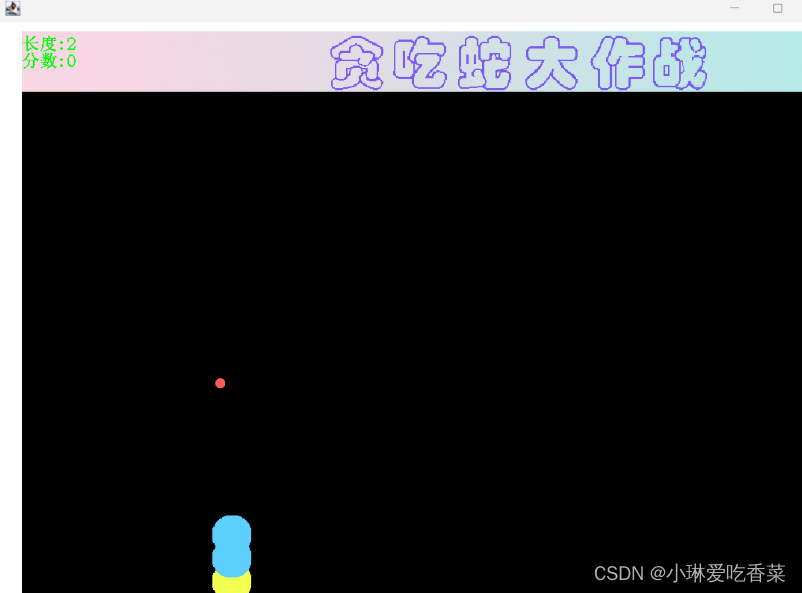
4.头部碰到身体任何部位游戏结束:

-
相关阅读:
vue3源码分析——实现slots
ARM开发流程LDS相关解惑
LM小型可编程控制器软件(基于CoDeSys)笔记十九:报错does not match the profile of the target
yolo系列的Neck模块
Java EE企业级开发学习 -- day1
django+drf+vue 简单系统搭建 (3) - 基于类的视图
RocketMQ简介与安装
docker-compose 安装 jekins
计算机毕业设计Python深度学习房价预测 房价可视化 链家爬虫 房源爬虫 房源可视化 卷积神经网络 大数据毕业设计 机器学习 人工智能 AI
入职一周感慨
- 原文地址:https://blog.csdn.net/weixin_69030282/article/details/134454890