-
mp4视频批量截取!!!
mp4视频批量截取!!!
问题:如果我们想截取一个mp4视频中的多个片段,一个一个截会很麻烦!
- 可以将想要截取的开始时间和结束时间保存到 excel表 中,进行批量截取。
1、对一个视频,记录想要截取的时间段
如下,一共3列,
start_time(开始时间)、end_time(结束时间)、name(视频名);时间单位为s(秒)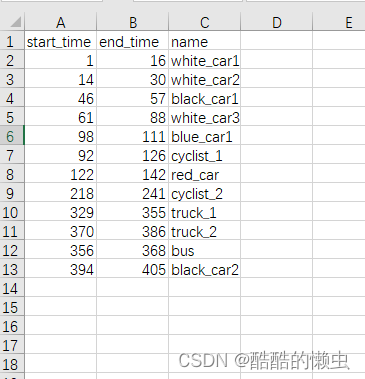
2、运行以下python代码
from moviepy.editor import VideoFileClip import pandas as pd import os def cut_mp4(input_video, input_excel, output_path): # 检查文件夹是否存在,如果不存在则创建 if not os.path.exists(output_path): os.makedirs(output_path) # 打开输入视频 video_clip = VideoFileClip(input_video) # 读取Excel文件 df = pd.read_excel(input_excel) # 提取前两列数据到int数组 start_times = df['start_time'].tolist() end_times = df['end_time'].tolist() # 提取最后一列数据到string数组 names = df['name'].tolist() i = 0 while i < len(start_times): # 剪辑的开始时间(以秒为单位) start = start_times[i] # 剪辑的结束时间(以秒为单位) end = end_times[i] name = names[i] + '.mp4' # 拼接新的文件路径 output_video = os.path.join(output_path, name) # 剪辑视频 clipped_video = video_clip.subclip(start, end) # 指定输出视频的编解码器和格式 clipped_video.write_videofile(output_video, codec="libx264", audio_codec="aac") i += 1 print("剪辑完成!!!") if __name__ == "__main__": # 输入视频文件名 input_video = "D:\\image_data\\target_tracking\\example_video_sot\\2023-10-21-14-54-14.mp4" # 输入excel文件名 input_excel = "D:\\image_data\\target_tracking\\example_video_excel\\2023-10-21-14-54-14.xlsx" # 输出视频文件夹 output_path = "D:\\image_data\\target_tracking\\example_videos\\2023-10-21-14-54-14\\" cut_mp4(input_video, input_excel, output_path)- 1
- 2
- 3
- 4
- 5
- 6
- 7
- 8
- 9
- 10
- 11
- 12
- 13
- 14
- 15
- 16
- 17
- 18
- 19
- 20
- 21
- 22
- 23
- 24
- 25
- 26
- 27
- 28
- 29
- 30
- 31
- 32
- 33
- 34
- 35
- 36
- 37
- 38
- 39
- 40
- 41
- 42
- 43
- 44
- 45
- 46
- 47
- 48
- 49
- 50
- 51
- 52
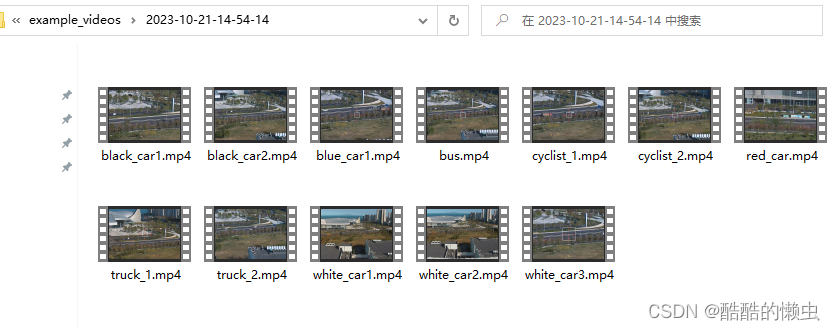
3、剪辑完成如下:
注:仅供学习参考,如有不足欢迎指正!
-
相关阅读:
CrossOver2023(Mac电脑运行Windows软件)
MFC主框架和视类PreCreateWindow()函数学习
一个 不用充钱 也能让你变强的 VSCode 插件
真人踩过的坑,告诉你避免自动化测试新手常犯的10个错误
c#设计模式-行为型模式 之 迭代器模式
面试题 01.01. 判定字符是否唯一
深度学习之基于Tensorflow人脸面部表情识别系统
Microsoft Dynamics 365 CE 扩展定制 - 7. 安全
MyBatis学习:动态SQL中<if>标签的使用
【C#】试卷批改系统
- 原文地址:https://blog.csdn.net/weixin_43412762/article/details/134407643