-
React Native 环境搭建
省流:失败!!!使用简易沙盒环境搭建项目!!!
万马奔腾!!!
Mac 版
根据官网步骤进行,V 0.72
注:在开始之前,我删除了电脑中已有 Homebrew ,重新安装最新版的 Homebrew。过程中使用有科学上网工具。
关于 Homebrew 的安装问题,可以参考这篇博客。
1,安装 node
brew install node@16下载到某个阶段,就进行不下去,停止后,耐着性子,继续执行上述指令,在执行失败了 N 次以后,直接下载了 Nodejs 官网的 pkg 进行安装。
2,安装 watchman
brew install watchman跟 1中 指令一样,安装到某一个耗时较长的框架就会断(失败),那就反复执行这个指令,直到下载成功。
我大概反复执行了 4次 该指令。
没有切换淘宝源。
3,配置 yarn
npm install -g yarn需要管理员权限,又执行
sudo npm install -g yarn4,Xcode 安装
安装完成之后,配置模拟器。
关于 Xcode 的安装这里不再赘述,有不懂的自行搜索安装配置。
5,CocoaPods 安装
CocoaPods 被誉为 iOS 的 npm。
安装指令,以下二选一:
- sudo gem install cocoapods
- brew install cocoapods
我最开始使用了 brew 的方式来安装,毕竟刚刚安装完 brew,想继续使用它。
过程中依然会遇到某一个库安装比较慢 和 卡断 的问题,我 brew 安装 cocoapods 指令执行了 三四次才安装OK。
6,我之前安装过 react-native-cli,所以先执行卸载的指令
npm uninstall -g react-native-cli @react-native-community/cli7,在想要创建 ReactNative 项目的文件夹下,执行以下指令来创建项目
npx react-native@latest init AwesomeProject可是,还是失败了!项目创建失败!

结果如上图!
✖ Installing Ruby Gems
error Ignoring ffi-1.15.1 because its extensions are not built. Try: gem pristine ffi --version 1.15.1
✖ Installing Ruby Gems
error Looks like your iOS environment is not properly set. Please go to https://reactnative.dev/docs/environment-setup?os=macos&platform=android and follow the React Native CLI QuickStart guide for macOS and iOS.
原因分析:
1,Cocoapods 问题?
瞎猜的,不过在排查时,有重大发现!!!
Mac 自带有 ruby 环境,而 Cocoapods 和 Homebrew 在安装和配置时都有关于 ruby 环境的更新和使用。并且,由于路径的问题,我们一直使用的都是 Mac 自带的 ruby,所以在这个地址,发现了修改 ruby 环境地址的方法。
我这里也记录一份,修改 ruby 环境路径的具体修改步骤如下:
步骤一:
依次输入如下终端指令
- which ruby
- ruby -v
得到如下结果,说明你的电脑 ruby 环境 Mac 默认的 ruby 环境
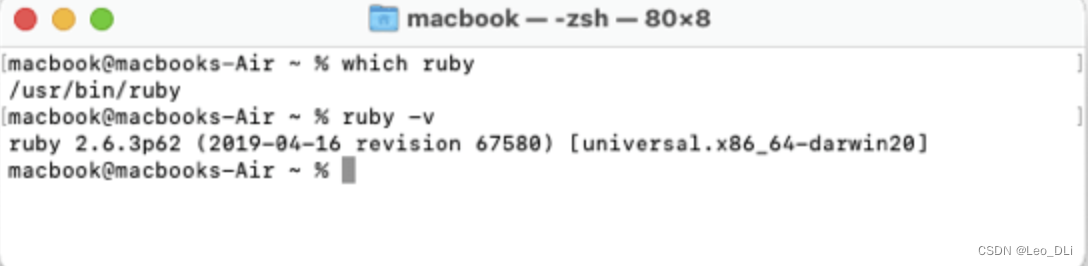
步骤二:
终端执行以下指令,或者直接找到文件进行编辑
open -e ~/.zshrc如果告诉你没有找到 .zshrc 文件,请移步这里创建并使用 .zshrc 文件。
步骤三:
在 .zshrc 文件中输入以下内容
Inter 芯片:
- if [ -d "/usr/local/opt/ruby/bin" ]; then
- export PATH=/usr/local/opt/ruby/bin:$PATH
- export PATH=`gem environment gemdir`/bin:$PATH
- fi
M系列芯片:
- if [ -d "/opt/homebrew/opt/ruby/bin" ]; then
- export PATH=/opt/homebrew/opt/ruby/bin:$PATH
- export PATH=`gem environment gemdir`/bin:$PATH
- fi
步骤四:
保存并关闭 .zshrc 文件。
关闭终端窗口,以确认修改。
步骤五:
再次输入 ruby -v 指令,获取到最新的 ruby 版本(不是步骤一中的版本,就代表路径修改完毕了,没必要再执行 which ruby 指令了)。
执行完以上步骤之后,再次在目标文件夹中执行 npx react-native@latest init AwesomeProject 指令,尝试创建 React Native 项目。

又报错了
✔ Processing template
✖ Installing Ruby Gems
error /Library/Ruby/Site/2.6.0/rubygems.rb:264:in `find_spec_for_exe': can't find gem bundler (>= 0.a) with executable bundle (Gem::GemNotFoundException)
from /Library/Ruby/Site/2.6.0/rubygems.rb:283:in `activate_bin_path'
from /usr/bin/bundle:23:in `
' ✖ Installing Ruby Gems
error Looks like your iOS environment is not properly set. Please go to https://reactnative.dev/docs/environment-setup?os=macos&platform=android and follow the React Native CLI QuickStart guide for macOS and iOS.
这不还是 Ruby 的问题吗?难道没有修改成功?
ruby -v 发现确实 ruby 路径又出问题了。
再次按照上述博客修改 ruby 默认路径。
之后再次执行 npx react-native@latest init AwesomeProject 指令创建项目。
再次失败。报错如下:

✔ Installing Ruby Gems
⠴ Updating CocoaPods repositories (this may take a few minutes) fatal: unable to access 'https://github.com/CocoaPods/Specs.git/': Recv failure: Operation timed out
✖ Updating CocoaPods repositories (this may take a few minutes)
✖ Updating CocoaPods repositories (this may take a few minutes)
error Failed to update CocoaPods repositories for iOS project.
Please try again manually: "pod repo update".
CocoaPods documentation: https://cocoapods.org/.
info Run CLI with --verbose flag for more details.
随后,执行 pod repo update 失败。

然后执行:sudo pod repo update --verbose
出错了,我想当然的加了 sudo,执行后 报错,不能使用 sudo,但是我没注意。

然后开始搜索:[!] CocoaPods was not able to update the `cocoapods` repo. If this is an unexpected issue and persists you can inspect it running `pod repo update --verbose`
找到一篇博客,说是 执行 pod repo list 然后发现有三个 repo 源,然后执行
pod repo remove XXX 来逐个卸载感觉不对的 源。过程中,可能卸载错了源,导致后面卸载重装 cocoapods。
然后就执行 pod repo update 指令。报错:
[!] CocoaPods was not able to update the `cocoapods` repo. If this is an unexpected issue and persists you can inspect it running `pod repo update --verbose`
执行 pod update 企图再次更新。报错:
[!] No `Podfile' found in the project directory.
算了,卸载吧!这是乱搞的下场,不再乱搞了,卸载 cocoapods,然后重新来过。
brew uninstall cocoapods
然后:sudo gem install cocoapods,换一种安装 cocoapods 的方式。安装成功。
看到终端告诉我:
A new release of RubyGems is available: 3.4.10 → 3.4.21!
Run `gem update --system 3.4.21` to update your installation.
那就执行指令:gem update --system 3.4.21
随后:ruby -v
得到结果:ruby 3.2.2 (2023-03-30 revision e51014f9c0) [x86_64-darwin21]
(好像跟之前的ruby版本一样,不纠结了,其实是更新失败了,但感觉这个 3.2.2 也可以了)
折腾了半天。
执行:pod setup 指令,得到结果:Setup completed。
React Native 环境配置中,安装完 cocoapods 之后,没有要求执行 pod setup 指令,之前在搜索卸载安装 cocoapods 时,发现了这个指令,好像回想起来 cocoapods 需要 setup 的吧。索性就执行下吧。
然后 输入 pod --version,得到当前版本号 1.14.2 。之前是 1.13.0 。这也算是这段折腾的收货吧。
pod repo list 输出的 repo 源只有一个了。
执行:pod repo update 指令。想着创建 React Native 项目之前,再执行下这个指令吧,省得待会儿创建项目时再报 repo 的问题。
还是报错:
Updating spec repo `cocoapods`
$ /usr/bin/git -C /Users/xuedongli/.cocoapods/repos/cocoapods fetch origin --progress
fatal: unable to access 'https://github.com/CocoaPods/Specs.git/': Failure when receiving data from the peer
[!] CocoaPods was not able to update the `cocoapods` repo. If this is an unexpected issue and persists you can inspect it running `pod repo update --verbose`
再执行下:pod repo update --verbose 吧。......
更新成功了!。。。。。。
我上面折腾了半天,是不是我想当然的加了 sudo 惹的祸。。。。。。哎!
继续执行:npx react-native@latest init AwesomeProject 指令创建项目吧!
关于 React Native 的原生安装方式的探索到此结束吧!
接下来将使用 简易沙盒 环境来创建项目了!
本章完!
-
相关阅读:
react--电商商品列表使用
剑指offer68-77二分查找、排序
React技巧之打开文件输入框
用程序计算出钢琴88个键的音高
wordpress多语言-wordpress多语言开发教程-wordpress多语言采集
Winform和WPF数据绑定区别小结
Kylin (六) --------- 查询性能优化
一、 计算机网络概论
git everything up-to-date解决方法
ORB-SLAM2 ---- ORBmatcher::SearchByBoW函数
- 原文地址:https://blog.csdn.net/Leo_DLi/article/details/134137329