-
uni-app:js实现数组中的相关处理
一、查询数组中,某一项中的某个数据为指定值的项(
find()方法)使用分析
- 使用数组的
find()方法来查询id为 0 的那一项数据。这个方法会返回满足条件的第一个元素,如果找不到符合条件的元素,则返回undefined。 - 使用
find()方法传入一个回调函数作为参数。回调函数接收一个参数item,表示数组中的每个元素。我们在回调函数中判断item.id === 0来查找id为 0 的那一项数据。
效果展示
这里查询id为1的那一项的数据信息
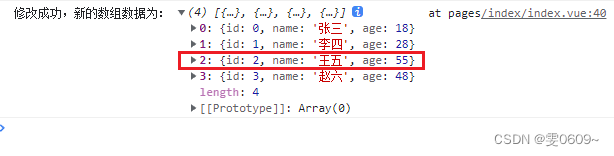
核心代码
const item = array.find(item => item.id === 1);
完整代码
- <template>
- <view>
- view>
- template>
- <script>
- export default {
- data() {
- return {
- }
- },
- methods: {
- },
- onLoad() {
- const array =[
- {
- id:0,
- name:'张三',
- age:18
- },
- {
- id:1,
- name:'李四',
- age:28
- },
- {
- id:2,
- name:'王五',
- age:38
- },
- {
- id:3,
- name:'赵六',
- age:48
- }
- ]
- console.log('初始数组');
- console.log(array);
- //查询数组中指定id值的具体项(这里指定id为1)
- console.log('查询id为1的那一项数据');
- const item = array.find(item => item.id === 1);
- console.log(item);
- }
- };
- script>
- <style>
- style>
二、查询数组中,某一项中的某个数据为指定值的项,存在多项数据的情况(
filter()方法)使用分析
- 使用数组的
filter()方法。filter()方法会返回一个新数组 - 使用
filter()方法传入一个回调函数作为参数。回调函数接收一个参数item,表示数组中的每个元素。我们在回调函数中判断item.name === '张三'来筛选出name为 "张三" 的所有项。
效果展示
这里查询name为‘张三’的全部项的数据信息

核心代码
const items = array.filter(item => item.name === '张三');
完整代码
- <template>
- <view>
- view>
- template>
- <script>
- export default {
- data() {
- return {
- }
- },
- methods: {
- },
- onLoad() {
- const array = [{
- id: 0,
- name: '张三',
- age: 18
- },
- {
- id: 1,
- name: '李四',
- age: 28
- },
- {
- id: 2,
- name: '王五',
- age: 38
- },
- {
- id: 3,
- name: '张三',
- age: 48
- }
- ];
- console.log('初始数组');
- console.log(array);
- console.log('查询name为‘张三’的全部项');
- const items = array.filter(item => item.name === '张三');
- console.log(items);
- }
- };
- script>
- <style>
- style>
注:find()和 filter(),前者只返回满足条件的第一个的元素,而不是所有,后者即返回全部满足条件的数据
三、查询数组中,某一项中的某个数据为指定值时,对应该项中其他值的信息
方法一:使用循环遍历数组进行查询
使用分析
通过for循序对数组进行遍历,array[i].id即为每一项中的id值
效果展示
这里查询id为2时,该项的name值

核心代码
let name = '';
for (let i = 0; i < array.length; i++) {
if (array[i].id === 2) {
name = array[i].name;
break;
}
}完整代码
- <template>
- <view>
- view>
- template>
- <script>
- export default {
- data() {
- return {
- }
- },
- methods: {
- },
- onLoad() {
- const array = [{
- id: 0,
- name: '张三',
- age: 18
- },
- {
- id: 1,
- name: '李四',
- age: 28
- },
- {
- id: 2,
- name: '王五',
- age: 38
- },
- {
- id: 3,
- name: '张三',
- age: 48
- }
- ];
- console.log('初始数组');
- console.log(array);
- console.log('查询id为2的项中的name值');
- let name = '';
- for (let i = 0; i < array.length; i++) {
- if (array[i].id === 2) {
- name = array[i].name;
- break;
- }
- }
- console.log(name);
- }
- };
- script>
- <style>
- style>
方法二:使用find()方法和三目运算进行配合
使用分析
find()方法返回第一个满足条件的元素,而不是所有。如果没有任何元素满足条件,则返回undefined- 如果find()方法查询到了数据,通过三目运算进行输出
效果展示
这里查询id为2时,该项的name值
核心代码
const item = array.find(item => item.id === 2);
const name = item ? item.name : '';完整代码
- <template>
- <view>
- view>
- template>
- <script>
- export default {
- data() {
- return {
- }
- },
- methods: {
- },
- onLoad() {
- const array = [{
- id: 0,
- name: '张三',
- age: 18
- },
- {
- id: 1,
- name: '李四',
- age: 28
- },
- {
- id: 2,
- name: '王五',
- age: 38
- },
- {
- id: 3,
- name: '张三',
- age: 48
- }
- ];
- console.log('初始数组');
- console.log(array);
- console.log('查询id为2的项中的name值');
- const item = array.find(item => item.id === 2);
- //三目运算,如果item的值存在说明找到了对应的数据就输出值,如果不是就输出空值
- const name = item ? item.name : '';
- console.log(name);
- }
- };
- script>
- <style>
- style>
四、判断数组中,是否存在有一项中某个数据为指定值的项
使用分析
- 数组的
some()方法来判断是否存在满足条件的元素。some()方法会遍历数组中的每一个元素,如果其中任意一个元素返回true,则some()方法的返回值为true;如果所有元素都返回false,则some()方法的返回值为false。 - 使用
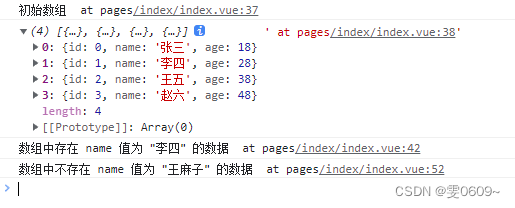
some()方法传入一个回调函数作为参数。回调函数接收一个参数item,表示数组中的每个元素。我们在回调函数中判断item.name === '李四'来查找name属性等于 "李四" 的元素。如果找到了匹配的项,则将hasItem设置为true;否则设置为false。
效果展示
这里判断name中是否含有‘李四’和‘王麻子’
核心代码
const hasItem = array.some(item => item.name === '李四');
if (hasItem) {
console.log('数组中存在 name 值为 "李四" 的数据');
} else {
console.log('数组中不存在 name 值为 "李四" 的数据');
}完整代码
- <template>
- <view>
- view>
- template>
- <script>
- export default {
- data() {
- return {
- }
- },
- methods: {
- },
- onLoad() {
- const array = [{
- id: 0,
- name: '张三',
- age: 18
- },
- {
- id: 1,
- name: '李四',
- age: 28
- },
- {
- id: 2,
- name: '王五',
- age: 38
- },
- {
- id: 3,
- name: '赵六',
- age: 48
- }
- ];
- console.log("初始数组")
- console.log(array)
- //判断是否有name为'李四'的数据
- const hasItem = array.some(item => item.name === '李四');
- if (hasItem) {
- console.log('数组中存在 name 值为 "李四" 的数据');
- } else {
- console.log('数组中不存在 name 值为 "李四" 的数据');
- }
- //判断是否有name为'王麻子'的数据
- const hasItem1 = array.some(item => item.name === '王麻子');
- if (hasItem1) {
- console.log('数组中存在 name 值为 "王麻子" 的数据');
- } else {
- console.log('数组中不存在 name 值为 "王麻子" 的数据');
- }
- }
- };
- script>
- <style>
- style>
五、修改数组中某一项中的某个值为指定值时,该项对应别的数据的值
使用分析
- 使用
find()方法传入一个回调函数作为参数。回调函数接收一个参数item,表示数组中的每个元素。我们在回调函数中判断item.id === 2来查找id属性等于 2 的元素。如果找到了匹配的项,则将对应的age值修改为 55,并输出修改后的数组;否则输出“数组中不存在 id 值为 2 的元素”。
效果展示
这里修改id为2对应的age值
原始数据
修改后数据
核心代码
const item = array.find(item => item.id === 2);
if (item) {
item.age = 55;
console.log('修改成功,新的数组数据为:', array);
} else {
console.log('数组中不存在 id 值为 2 的元素');
}完整代码
- <template>
- <view>
- view>
- template>
- <script>
- export default {
- data() {
- return {
- }
- },
- methods: {
- },
- onLoad() {
- const array = [{
- id: 0,
- name: '张三',
- age: 18
- },
- {
- id: 1,
- name: '李四',
- age: 28
- },
- {
- id: 2,
- name: '王五',
- age: 38
- },
- {
- id: 3,
- name: '赵六',
- age: 48
- }
- ];
- const item = array.find(item => item.id === 2);
- if (item) {
- item.age = 55;
- console.log('修改成功,新的数组数据为:', array);
- } else {
- console.log('数组中不存在 id 值为 2 的元素');
- }
- }
- };
- script>
- <style>
- style>
六、数组的插入(push向后插入,unshift向前插入,splice指定项插入)
1、push向后插入
使用分析
push方法可以在数组末尾添加新元素
效果展示
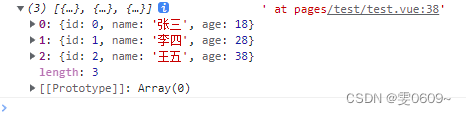
这里向数组末尾添加了一条新对象
{
id: 4,
name: '钱七',
age: 58
}原始数据
修改后数据
核心代码
array.push({
id: 4,
name: '钱七',
age: 58
});完整代码
- <template>
- <view>
- view>
- template>
- <script>
- export default {
- data() {
- return {
- }
- },
- methods: {
- },
- onLoad() {
- const array = [{
- id: 0,
- name: '张三',
- age: 18
- },
- {
- id: 1,
- name: '李四',
- age: 28
- },
- {
- id: 2,
- name: '王五',
- age: 38
- },
- {
- id: 3,
- name: '赵六',
- age: 48
- }
- ];
- array.push({
- id: 4,
- name: '钱七',
- age: 58
- });
- console.log(array); // 打印数组,可以看到新的对象被成功添加
- }
- };
- script>
- <style>
- style>
2、unshift向前插入
使用分析
- 向数组开头插入元素:可以使用
unshift方法向数组开头插入新元素。
效果展示
这里向数组最前端添加了一条新对象
{
id: -1,name: '王小二',
age: 25
}原始数据
修改后数据
核心代码
array.unshift({
id: -1,
name: 'New Person',
age: 25
});
完整代码
- <template>
- <view>
- view>
- template>
- <script>
- export default {
- data() {
- return {
- }
- },
- methods: {
- },
- onLoad() {
- const array = [{
- id: 0,
- name: '张三',
- age: 18
- },
- {
- id: 1,
- name: '李四',
- age: 28
- },
- {
- id: 2,
- name: '王五',
- age: 38
- },
- {
- id: 3,
- name: '赵六',
- age: 48
- }
- ];
- array.unshift({
- id: -1,
- name: '王小二',
- age: 25
- });
- console.log(array); // 打印数组,可以看到新的对象被成功添加
- }
- };
- script>
- <style>
- style>
3、splice指定位置插入
使用分析
- 使用
splice方法在数组中的任意位置插入新元素。该方法可以接受三个参数,第一个参数是要插入的位置(索引),第二个参数是要删除的元素个数(设置为 0 表示不删除元素),第三个参数以及后续参数是要插入到数组中的元素。
效果展示
这里向下标为3的位置添加了一条新对象(也就是该项的下标要为三)
{
id: 5,
name: 'New Person',
age: 30
}
原始数据
修改后数据
核心代码
array.splice(3, 0, {
id: 5,
name: 'New Person',
age: 30
});完整代码
- <template>
- <view>
- view>
- template>
- <script>
- export default {
- data() {
- return {
- }
- },
- methods: {
- },
- onLoad() {
- const array = [{
- id: 0,
- name: '张三',
- age: 18
- },
- {
- id: 1,
- name: '李四',
- age: 28
- },
- {
- id: 2,
- name: '王五',
- age: 38
- },
- {
- id: 3,
- name: '赵六',
- age: 48
- }
- ];
- array.splice(3, 0, {
- id: 5,
- name: 'New Person',
- age: 30
- });
- console.log(array); // 打印数组,可以看到新的对象被成功添加
- }
- };
- script>
- <style>
- style>
七、寻找数组中某一项中的某个值为指定值时,对这一项进行替换
使用分析
- 使用数组的
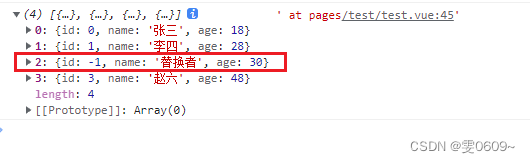
findIndex方法找到数组中特定元素的索引,然后使用这个索引进行替换操作,这里通过寻找id为2的值,对这一项进行替换
效果展示
原始数据
修改后数据
核心代码
const index = array.findIndex(item => item.id === 2);
if (index !== -1) {
array[index] = {
id: -1,
name: '替换者',
age: 30
};
}完整代码
- <template>
- <view>
- view>
- template>
- <script>
- export default {
- data() {
- return {
- }
- },
- methods: {
- },
- onLoad() {
- const array = [{
- id: 0,
- name: '张三',
- age: 18
- },
- {
- id: 1,
- name: '李四',
- age: 28
- },
- {
- id: 2,
- name: '王五',
- age: 38
- },
- {
- id: 3,
- name: '赵六',
- age: 48
- }
- ];
- const index = array.findIndex(item => item.id === 2);
- if (index !== -1) {
- array[index] = {
- id: -1,
- name: '替换者',
- age: 30
- };
- }
- console.log(array); // 打印数组,可以看到新的对象被成功添加
- }
- };
- script>
- <style>
- style>
八、数组的删除(pop末尾删除,shift开头删除,splice指定位置删除,
filter删除符合特定条件的元素)1、pop末尾删除
使用分析
pop方法删除数组末尾的元素
效果展示
原始数据
修改后数据
核心代码
array.pop();//删除数组末尾项
完整代码
- <template>
- <view>
- view>
- template>
- <script>
- export default {
- data() {
- return {
- }
- },
- methods: {
- },
- onLoad() {
- const array = [{
- id: 0,
- name: '张三',
- age: 18
- },
- {
- id: 1,
- name: '李四',
- age: 28
- },
- {
- id: 2,
- name: '王五',
- age: 38
- },
- {
- id: 3,
- name: '赵六',
- age: 48
- }
- ];
- array.pop();//删除数组末尾项
- console.log(array); // 打印数组,可以看到新的对象被成功添加
- }
- };
- script>
- <style>
- style>
2、shift开头删除
使用分析
- 使用
shift方法删除数组开头的元素
效果展示
原始数据
修改后数据

核心代码
array.shift();;//删除数组首项
完整代码
- <template>
- <view>
- view>
- template>
- <script>
- export default {
- data() {
- return {
- }
- },
- methods: {
- },
- onLoad() {
- const array = [{
- id: 0,
- name: '张三',
- age: 18
- },
- {
- id: 1,
- name: '李四',
- age: 28
- },
- {
- id: 2,
- name: '王五',
- age: 38
- },
- {
- id: 3,
- name: '赵六',
- age: 48
- }
- ];
- array.shift();;//删除数组首项
- console.log(array); // 打印数组,可以看到新的对象被成功添加
- }
- };
- script>
- <style>
- style>
3、splice指定位置删除
使用分析
splice方法删除指定位置的元素,第一个参数为索引,第二个参数为要删除的元素个数
效果展示
原始数据
修改后数据

核心代码
array.splice(2, 1);//从数组中的索引为 2 的位置开始,删除 1 个元素。你也可以根据需要指定删除多个元素。这里也就是删除下标为2的元素即name为王五的这一项
完整代码
- <template>
- <view>
- view>
- template>
- <script>
- export default {
- data() {
- return {
- }
- },
- methods: {
- },
- onLoad() {
- const array = [{
- id: 0,
- name: '张三',
- age: 18
- },
- {
- id: 1,
- name: '李四',
- age: 28
- },
- {
- id: 2,
- name: '王五',
- age: 38
- },
- {
- id: 3,
- name: '赵六',
- age: 48
- }
- ];
- array.splice(2, 1);//找到下标为2的位置,删除一个元素
- console.log(array); // 打印数组,可以看到新的对象被成功添加
- }
- };
- script>
- <style>
- style>
4、
filter删除符合特定条件的元素使用分析
- 删除符合特定条件的元素(只是筛选需要的项,组成新数组)
效果展示
原始数据
修改后数据

核心代码
var new_array = array.filter(item => item.id !== 2);//创建一个新的数组,其中不包含
id为 2 的元素。原始数组不会被修改,而是返回一个新的数组完整代码
- <template>
- <view>
- view>
- template>
- <script>
- export default {
- data() {
- return {
- }
- },
- methods: {
- },
- onLoad() {
- const array = [{
- id: 0,
- name: '张三',
- age: 18
- },
- {
- id: 1,
- name: '李四',
- age: 28
- },
- {
- id: 2,
- name: '王五',
- age: 38
- },
- {
- id: 3,
- name: '赵六',
- age: 48
- }
- ];
- var new_array = array.filter(item => item.id !== 2);
- console.log("原数组",array); // 原数组
- console.log("新数组",new_array); // 打印数组,可以看到新的对象被成功添加
- }
- };
- script>
- <style>
- style>
九、数组的拷贝(复制)
- 使用数组的
-
相关阅读:
【C++】构造函数与类的组合以及初始化
css设置 图片根据宽或高 等比例缩放
MSVC 和 Visual Studio 代码诊断的未来
什么是神经网络?
openfeign整合sentinel进行降级
【Python】数据结构与算法
面向5G通信的射频关键技术解决毫米波传播距离短难题
Day51——JavaScript事件绑定,jQuery类库
手机 IOS 软件 IPA 签名下载安装详情图文教程
关于制作一个Python小游戏(三)
- 原文地址:https://blog.csdn.net/weixin_46001736/article/details/133921010
 https://blog.csdn.net/weixin_46001736/article/details/134283969?csdn_share_tail=%7B%22type%22%3A%22blog%22%2C%22rType%22%3A%22article%22%2C%22rId%22%3A%22134283969%22%2C%22source%22%3A%22weixin_46001736%22%7D