-
flutter 创建插件
资料:
完整流程 Flutter 集成 Golang 多语言跨端开发基础案例 - 知乎
https://www.cnblogs.com/webabcd/p/flutter_lib_plugin_plugin_ios.html
步骤1、创建插件
我创建的插件名字是konnect_im_sdk 选择的语言是 java和swift创建。
直接把插件放在项目中 plugins/konnect_im_sdk 如下

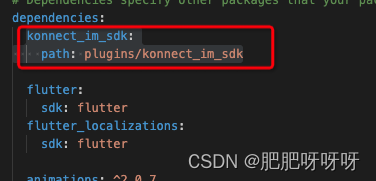
然后再项目的pubspec.yaml 引入本地项目插件
konnect_im_sdk:
path: plugins/konnect_im_sdk
然后再插件的ios项目目录下 创建 Products 将 完整流程 Flutter 集成 Golang 多语言跨端开发基础案例 - 知乎
生成的object-c的ios第三方sdk放进去
然后在 .podspec 文件配置 第三方sdk的路径
s.vendored_frameworks = 'Products/*.framework'
s.static_framework = true
Classes 下的文件中 导入 第三方库 如这样的
现在就可以调用object-c中的方法了
object-c 中声明文件
FOUNDATION_EXPORT BOOL Konnect_im_sdkInitSDK(id_Nullable listener, NSString* _Nullable operationID, NSString* _Nullable config); - @protocol Konnect_im_sdk_callbackOnConnListener;
- @class Konnect_im_sdk_callbackOnConnListener;
- @protocol Konnect_im_sdk_callbackOnBatchMsgListener <NSObject>
- - (void)onRecvNewMessages:(NSString* _Nullable)messageList;
- @end
- @protocol Konnect_im_sdk_callbackOnConnListener <NSObject>
- - (void)onConnectFailed:(int32_t)errCode errMsg:(NSString* _Nullable)errMsg;
- - (void)onConnectSuccess;
- - (void)onConnecting;
- - (void)onKickedOffline;
- - (void)onUserTokenExpired;
- @end
- @interface Konnect_im_sdk_callbackOnConnListener : NSObject <goSeqRefInterface, Konnect_im_sdk_callbackOnConnListener> {
- }
- @property(strong, readonly) _Nonnull id _ref;
- - (nonnull instancetype)initWithRef:(_Nonnull id)ref;
- - (void)onConnectFailed:(int32_t)errCode errMsg:(NSString* _Nullable)errMsg;
- - (void)onConnectSuccess;
- - (void)onConnecting;
- - (void)onKickedOffline;
- - (void)onUserTokenExpired;
- @end
调用
Konnect_im_sdkInitSDK 第一个参数是这样写的
- class MyConnectionListener: Konnect_im_sdk_callbackOnConnListener {
- override func onConnectFailed(_ errCode: Int32, errMsg: String?) {
- print("连接失败,错误码:\(errCode),错误信息:\(errMsg ?? "")")
- }
- override func onConnectSuccess() {
- print("连接成功")
- }
- override func onConnecting() {
- print("正在连接...")
- }
- override func onKickedOffline() {
- print("您已被踢下线")
- }
- override func onUserTokenExpired() {
- print("用户令牌已过期")
- }
- }
运行可以运行 但是报错了 报错同 go_seq_go_to_refnum on objective-c objects is not permitted
https://github.com/golang/go/issues/20254
记 IOS Swift 实现 gomobile interface 抛出异常 go_seq_go_to_refnum on objective-c objects is not permitted
swift 中是不存在多继承的 下面的写法 又报多继承
- class MyConnectionListener: NSObject, Konnect_im_sdk_callbackOnConnListener {
- func onConnectFailed(_ errCode: Int32, errMsg: String?) {
- print("连接失败,错误码:\(errCode),错误信息:\(errMsg ?? "")")
- }
- func onConnectSuccess() {
- print("连接成功")
- }
- func onConnecting() {
- print("正在连接...")
- }
- func onKickedOffline() {
- print("您已被踢下线")
- }
- func onUserTokenExpired() {
- print("用户令牌已过期")
- }
- }
那么 Konnect_im_sdk_callbackOnConnListener是一个类 不是协议 说明声明文件中Konnect_im_sdk_callbackOnConnListener定义有问题
找到第三方sdk定义的地方 注释掉

Konnect_im_sdk_callbackOnConnListener 不是既是协议 又同时定义为类
注释掉问题解决
总结
go_seq_go_to_refnum on objective-c objects is not permitted
是 传参类型不对导致的
安卓项目
修改 build.gradle 配置文件
dependencies {
// libs 是 第三方包的路径
implementation fileTree(dir: 'libs', include: ['*.jar'])
// imsdk
implementation(name: 'konnect_im_sdk', ext: 'aar')
}
文件中导入第三方包
package chat.konnect.konnect_im_sdk;

-
相关阅读:
【web前端】CSS第二天
第二范式
AXI4Arbiter object scala code reading
Android开发基础:SharedPreferences的使用
Java注解(Annotation)
grpc和protobuf在一起
可见光通信(毕业设计)
python创建exe文件
CV&NLP基础9之卷积神经网络CNN入门
webpack之代码分离
- 原文地址:https://blog.csdn.net/weixin_43575775/article/details/133899411
